What Is the Critical Path Method (CPM) in Project Management?

The critical path method (CPM) is a project management technique that finds the longest chain of dependent tasks in a project. That chain sets the shortest time the project can take, and a task on it cannot slip without moving the delivery date.
This guide covers what CPM is, why and when to use it, how to implement it step by step, how to apply it in practice, how it compares to PERT and Gantt charts, where it falls short, and how to get the most out of it.
Key Takeaways
- CPM identifies the longest sequence of dependent tasks to work out the shortest project completion time.
- Critical path analysis maps task dependencies and calculates early/late start dates to identify activities with zero float time.
- The method helps prioritize tasks, manage resources better, and identify potential constraints that could delay project completion.
- Implementation involves listing tasks, creating network diagrams, estimating durations, and performing forward and backward pass calculations.
What Is CPM in Project Management?
CPM in project management is a scheduling technique that shows the longest sequence of dependent tasks and determines a project’s minimum completion time. It also shows how much schedule flexibility every other task has before it would delay the project.
CPM maps the dependencies between activities, so you can see which tasks have zero float and must finish on schedule to avoid delays. Zero float means a task cannot slip at all without moving the project end date. These tasks directly impact your project’s completion timeline, and teams track them in leading project management tools.
CPM finds that path by calculating the longest continuous path from start to finish, using each task’s duration and its relationships with other activities.
James E. Kelley Jr. and Morgan R. Walker developed CPM in the late 1950s at DuPont and Remington Rand Univac, and presented it in a 1959 conference paper.
Let’s now look at why you should use the method.
Why Should You Use the Critical Path Method?
You should use the critical path method when a project has many interdependent tasks and a fixed completion date. On that kind of complex project, it helps you:
- Calculate the earliest start and finish dates for each task.
- Identify critical dependencies between activities.
- Prioritize resource distribution effectively.
- Monitor project progress systematically.
For project managers, its value comes from a systematic approach to task organization, timeline optimization, and resource distribution and management. The method’s forward and backward pass calculations give you a defensible timeline rather than a guess.
Whether you’re leading a construction project, developing software, or coordinating a marketing campaign, CPM helps you break complex objectives into manageable components while keeping a clear, visible sequence of activities.
The benefits below follow from that structure.
What Are the Benefits of the CPM Method?
The benefits of the CPM method, as we group them, are task prioritization, risk management, team communication, and cost efficiency. Early identification of critical tasks lets project managers plan and allocate resources more effectively. In practice, the method delivers:
- Task prioritization. Critical activities get attention first, while non-critical tasks are managed around them.
- Risk management. Early identification of bottlenecks and scheduling flexibility shows where a delay would hurt.
- Team communication. A shared network diagram and clear delegation give everyone one reference point.
- Cost efficiency. Knowing which tasks control the date lets you allocate resources and monitor costs against it.
That shared reference matters most when work is tracked in separate places. If each team keeps its own list, a slip on one task can reach the dependent team late. Publish the path in one place and every dependent team sees the change when it happens.
Whether those benefits justify the upkeep depends on the project, which is the next question.
When Should You Apply CPM in Project Management?
Apply CPM in project management when a chain of dependent tasks drives the delivery date; delaying any one of them would push it back. Those scenarios involve multiple interdependent tasks, tight deadlines, or complex resource management needs.
It is particularly effective on a large, complex project that requires careful monitoring and risk mitigation. If the tasks are largely parallel and independent, the method adds upkeep without adding control.
Once a project qualifies, implementation follows six steps.
How Do You Implement the Critical Path Method in Project Management?
To implement the critical path method in project management, you list all project tasks, identify task dependencies, create a network diagram, estimate task durations, run the critical path analysis, and calculate float and slack. This is our recommendation.

We’ll take a closer look at each.
Step 1: List All Project Tasks
Before you start drawing the diagram, you need to make an extensive task list that includes every project activity from start to finish. When listing tasks, you’ll need to:
- Break down critical activities into manageable components.
- Document clear descriptions and expected outcomes.
- Add a rough duration estimate for each task, to be refined in Step 4.
- Note obvious predecessor relationships, to be mapped fully in Step 2.
- Organize task sequences and prioritize them.

Productive keeps project specs, tasks, and timelines in one place for better visibility.
Step 2: Identify Task Dependencies
To identify task dependencies, determine which activities must be completed before others can begin. For this step, use historical data and gather feedback from the project team.
The idea is to create a detailed dependency list that names the predecessor of every dependent task. Since Step 3 maps these relationships in a diagram, you must have identified all sequential connections between activities first.
Step 3: Create a Network Diagram
A network diagram, sometimes called a CPM chart or critical path diagram, is a visual representation of your tasks and their dependencies. In this step, you should:
- Use a node for each task, plus a start node and a finish node for the project.
- Draw arrows between nodes to show which task depends on which.
- Include activity duration estimates (how long it takes to complete a task).
You don’t have to draw this by hand. With Productive’s Gantt Charts, blocking and waiting-on dependencies appear as arrows connecting tasks.

Easily identify and manage critical path activities with Productive’s intuitive timeline layout view.
With the “Move dependent tasks” setting on, moving one task shifts every task it blocks by the same number of days.
Make smarter project plans with Productive
Step 4: Estimate Task Durations
Once your diagram is in place, break each task into measurable units and estimate its duration. Historical data and expert opinions make each activity duration estimate more reliable.
You should also include factors like resource availability, potential risks, and dependencies between tasks. Wrap up this step by developing contingency plans for activities with high levels of uncertainty.
Step 5: Run the Critical Path Analysis
Here’s how to calculate the critical path manually: work through a forward pass and a backward pass for each task in your diagram. The forward pass calculates each activity’s earliest start and finish times. The backward pass calculates each activity’s latest start and finish times.
For the forward pass, start at the beginning and calculate the Early Start (ES) and Early Finish (EF) times. For the backward pass, work from the end to determine Late Start (LS) and Late Finish (LF) times.
Once you’ve completed both passes, you can identify the critical path: the sequence of tasks with zero float. That sequence is also the longest duration through your project network.
How the Critical Path Algorithm Works: Forward and Backward Pass
The forward and backward passes together are the critical path algorithm. This critical path calculation turns a list of tasks, durations, and dependencies into the schedule’s longest path and the float on everything else. To run it, you need to:
- Identify all tasks and their dependencies
- Calculate Early Start (ES) and Early Finish (EF) through forward pass analysis
- Determine Late Start (LS) and Late Finish (LF) using backward pass calculations
- Calculate slack values to pinpoint critical path activities
Step 6: Calculate Float and Slack
When calculating float in the project schedule, you have to account for two main types of float: total float and free float. Total float is the maximum time you can delay a task without affecting the project’s completion date. Free float is how long you can delay a task without affecting the early start of the next dependent task.
Understanding the difference helps you make informed decisions about task scheduling. Total float considers the entire project timeline, whereas free float focuses on the immediate impact on successor activities.
Total Float vs. Free Float
Here’s a shorter recap of their differences:
- Total float is the maximum delay allowable without impacting project completion.
- A free float shows available delay time without affecting successor activities.
- The total float belongs to the entire project.
- Free float is specific to individual activities.
With the path and its float calculated, the next question is what to do with them during delivery.
How Should You Apply CPM in Practice?
Day to day, you apply CPM in practice by resolving resource constraints as they appear and collecting data for future projects. When you need to shorten the schedule itself, you turn to the compression strategies in the next section. We’ll take a closer look at the two day-to-day practices first.
Resolving Resource Constraints
Managing resource constraints within CPM means identifying, analyzing, and resolving them. They show up, for example, when two critical tasks need the same person in the same week. You resolve them by analyzing float across non-critical tasks and reallocating people from those non-critical paths to keep critical tasks on schedule.
Use resource smoothing to rebalance bookings within the available float, and resource leveling only when the constraint is hard enough to justify moving the end date.
Data Collection for Future Projects
The data you record on this project is what makes your next critical path more accurate. Systematic data collection enables precise estimation and better resource management, so track it as you go. The key project data we’re talking about are:
- Historical task durations and dependencies
- Resource utilization patterns
- Cost performance metrics
Project management software already tracks the duration, utilization, and cost side of this.
Productive’s Report Intelligence lets you ask a question about that project data and get the answer in plain language.
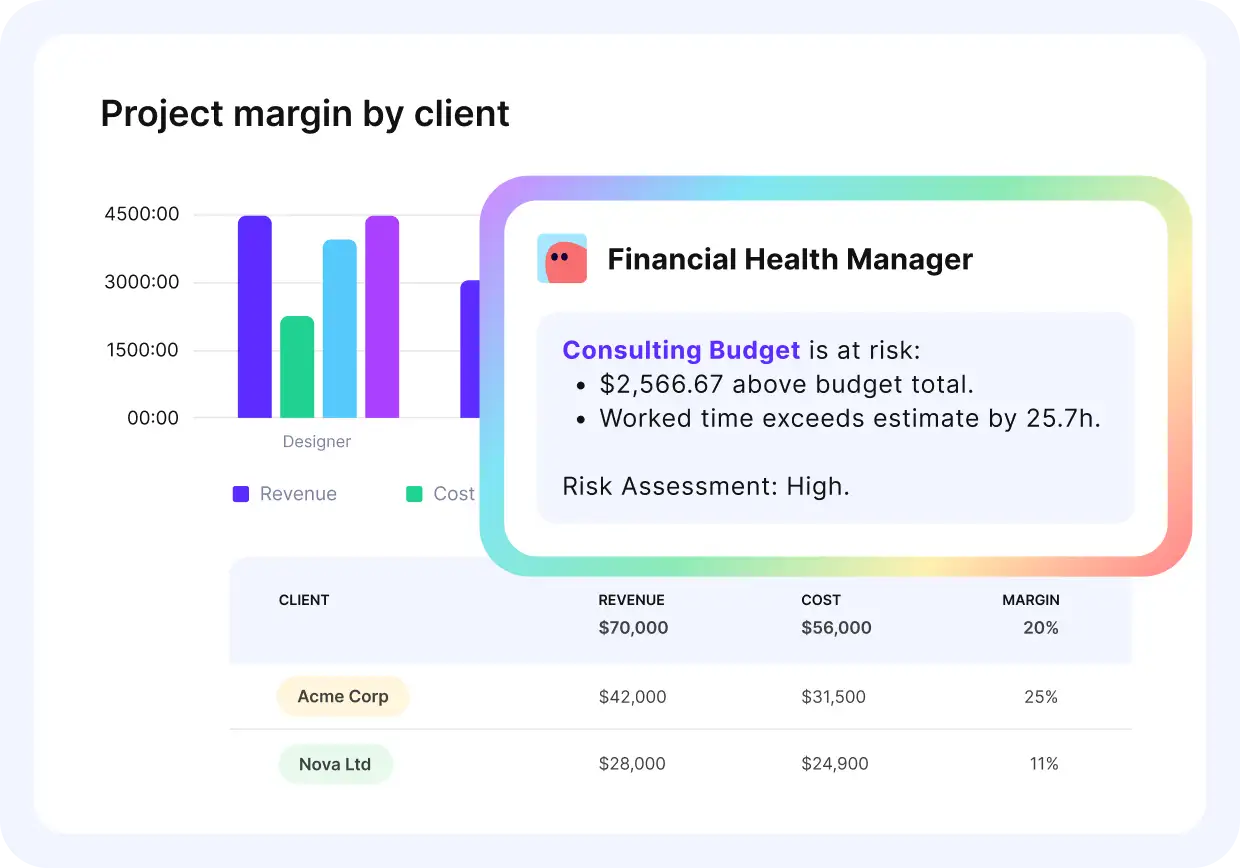
Ask AI for project insights in Productive
You can also describe the report you need and get a fully configured result. For a comparison of tools with these kinds of AI features, see our roundup of AI project management tools.
Collected data also tells you when compression is worth the risk, which brings us to the advanced strategies.
What Are the Advanced CPM Project Management Strategies?
The advanced CPM project management strategies are fast-tracking and project crashing. Both compress the schedule without cutting project scope, and they trade risk against cost in opposite ways. We’ll take a closer look at each.
Fast-Tracking
In fast-tracking, you start a dependent task before its predecessor finishes, running previously sequential activities in parallel. It accelerates project timelines without adding people or budget up front. The trade-off is risk: overlapping dependent work can force rework if the predecessor changes. Its biggest benefits are:
- Enhanced team collaboration through simultaneous task execution.
- Shorter overall duration through parallel activities.
- Improved resource utilization and reduced idle time.
Project Crashing
In project crashing, you allocate additional resources to compress the timeline, so critical tasks finish sooner at a higher cost. Crashing keeps the original task relationships intact, so the risk is to budget rather than to sequence. To implement it, identify the critical path activities with the lowest crash cost per unit of time and add resources there first.
Both strategies assume CPM is the right scheduling method for the project, so it helps to know how it compares to the alternatives.
Fast Tracking
In fast tracking, you’re overlapping tasks that would typically occur sequentially, so that you achieve quicker completion times without additional resource investment. Fast-tracking is one of the most effective strategies for accelerating project timelines while maximizing resource efficiency.
Its biggest benefits are:
- Enhanced team collaboration through simultaneous task execution.
- Reduced project duration through parallel activities.
- Improved resource utilization and reduced idle time.
- Strategic buffers against potential delays.
How Does CPM Compare to Other Scheduling Methods?
The two methods to compare CPM with are PERT and Gantt charts. PERT handles uncertain durations with probabilistic estimates, Gantt charts give a timeline view for tracking progress, and CPM’s distinct job is identifying critical tasks and their interdependencies.

We’ll take a closer look at each comparison.
Critical Path Method vs. PERT
CPM and PERT (Program Evaluation and Review Technique) differ considerably in their approaches and applications. The big differences in how these project scheduling techniques handle project planning and execution are:
- CPM uses deterministic time estimates, while PERT uses three-point estimates.
- PERT is a better fit for projects with high uncertainty and project risk.
- CPM focuses on identifying critical paths and activity sequences.
- PERT emphasizes event-oriented planning over activity-based approaches.
Critical Path Method vs. Gantt Charts
CPM and Gantt charts have different purposes in scheduling and visualization. CPM is strong at identifying critical tasks and estimating project duration. Gantt charts provide a timeline-based view that’s better suited for tracking progress and resource spend.
They work well together. A critical path Gantt chart highlights the critical tasks on the timeline bars, so you see the sequence and the dates in one view.
None of these methods removes CPM’s built-in limitations, which the next section covers.
What Are the Limitations of the Critical Path Method?
The limitations of the critical path method are limited flexibility, complex diagrams, insufficient focus on resource allocation, and difficulty estimating task durations. This is our list. We’ll take a closer look at each, with what to do about it.
Limited Flexibility Without Critical Path Method Software
CPM is based on a fixed sequence of task dependencies and durations. It assumes that once the plan is built, execution will follow the exact path with minimal deviation. In reality, unexpected delays, client requests, and shifting priorities happen.
Any change in a critical task ripples through the whole critical path timeline. If you’re not regularly updating your CPM schedule, even a small delay can derail the project, leaving teams scrambling and stakeholders frustrated.
What to do about it: Use CPM scheduling software that allows for real-time adjustments. Add risk management techniques and schedule buffers so your project can flex without breaking.
Complex Diagrams That Are Hard to Communicate
As the number of individual tasks grows, the diagram quickly becomes hard to read. If your project team or stakeholders aren’t trained in CPM, they may find it confusing or ignore it altogether. Miscommunication can lead to missed deadlines, disconnected teams, and delays in decision-making. If people don’t understand the plan, they won’t follow it.
What to do about it: Break large projects into modular sub-projects with their own mini critical paths. Use visual Gantt chart views with color-coded dependencies to improve accessibility. And always provide a simplified summary for stakeholders.
Insufficient Focus on Resource Allocation
The method focuses on the sequence of task dependencies and timing, not the people, tools, or budget required to complete those tasks. It has no view of resource constraints: tasks may appear to be scheduled correctly, but you might not have enough team members available at the right time. This can lead to resource overload, inefficiencies, and burnout.
What to do about it: Combine critical path scheduling with a view of who’s booked and who can take on more work.
Productive’s Resource Planning gives you that view and lets you compare current and future team capacity before you commit to a date.
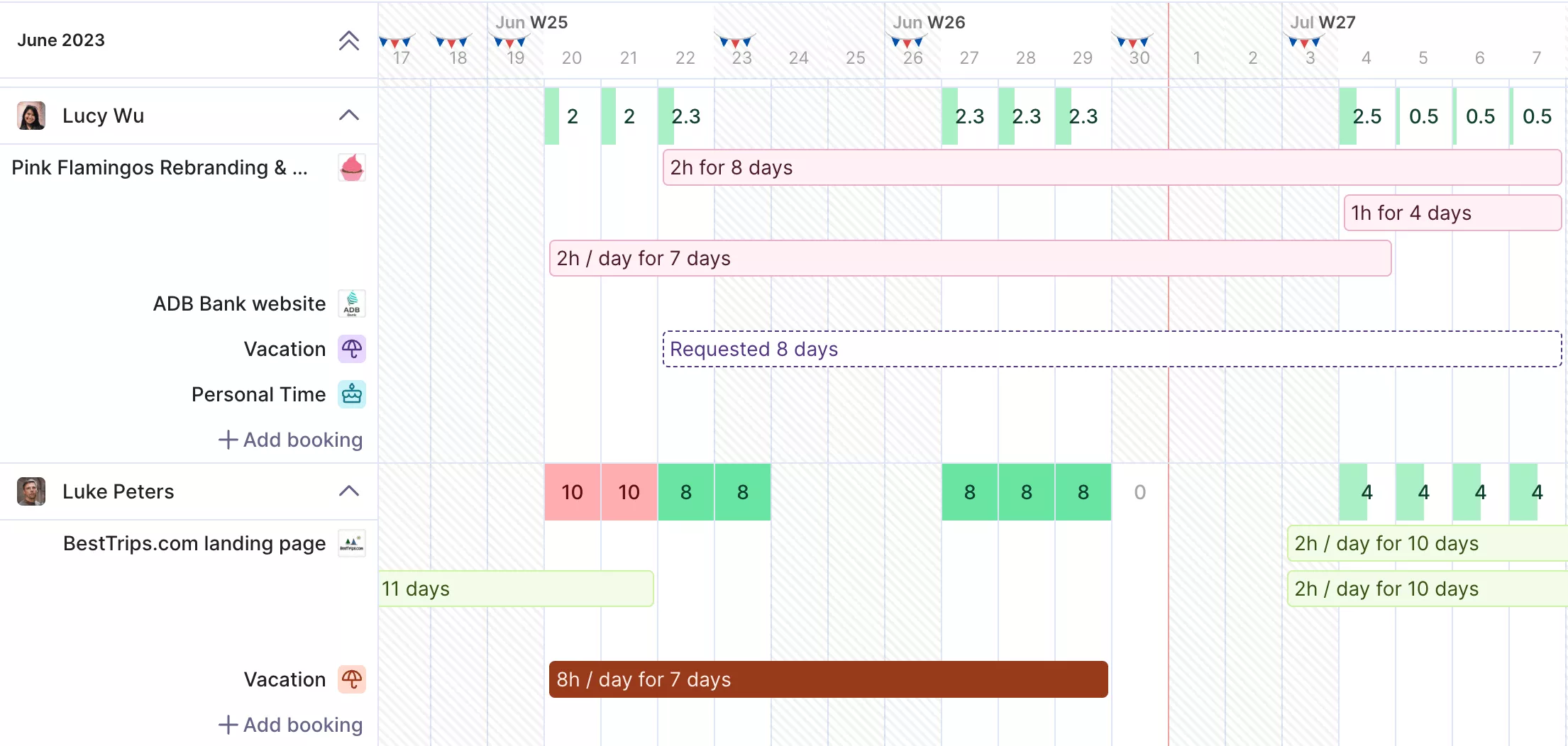
Track your team’s resource capacity in Productive.

Resource planning is central: having a clear overview of workloads helps us assign the right people to the right projects at the right time, avoiding costly bottlenecks and overloads.
Read the full customer story to see how DonQ grew with full operational control using Productive.
Difficulty Estimating Task Durations Accurately
Task durations start as best guesses or optimistic assumptions, especially in the early project stages. In reality, many factors can extend or shorten a task’s actual duration.
Inaccurate estimates distort the whole path. You might be focusing on the wrong tasks or ignoring areas that are quietly becoming your new bottleneck.
What to do about it: Use historical project data and estimation techniques like three-point estimation (optimistic, most likely, pessimistic) to build more realistic timelines. Recalculate the path regularly as actual progress is tracked.
Knowing the limitations is half the work. The other half is a set of habits that keep the method useful.
How Do You Get the Most Out of CPM?
You get the most out of CPM by breaking the project into detailed tasks, mapping clear dependencies, building a thorough diagram, and updating the schedule as work progresses. Those four habits keep a critical path useful after kickoff.
You’ll also want to regularly monitor progress against the project schedule, update it as needed, and optimize resource allocation while maintaining enough flexibility to address bottlenecks as they arise.
Schedule Every Task and Dependency in One Place
The critical path method remains a core project management technique for scheduling activities, optimizing timelines, and managing resources. It shows you which tasks control the delivery date and where you have room to move. Its limitations are real, but each has a practical answer, and pairing CPM with other techniques keeps your plan precise and adaptable.
The method works best when the whole team can see the schedule it runs on. To make the most of it, choose project management software that keeps tasks, dependencies, and team capacity in one place. Productive does exactly that.
Book a demo with Productive and see how it fits your projects.
Plan, Manage and Deliver Projects with Productive.
Visualize dependencies, spot delays early, and build project schedules that actually deliver – all with a single project management tool.
