What Is Workload Management and How Do You Manage It?

When a few people carry most of the work, deadlines slip, and people burn out. Workload management balances tasks across employees according to availability, skill sets, and business goals.
Below are the main challenges, the signs of overload, and how to manage workload for your team and yourself. It ends with strategic planning and what to look for in project management software.
Key Takeaways
- Workload management schedules tasks so everyone gets the right amount of work: too much risks burnout, and too little can leave employees underutilized.
- Balanced assignments matter because they keep people engaged, and engagement pays off in profit: fewer unrealistic deadlines, less stress, and clearer visibility into status all feed it.
- Challenges include understanding capacity, managing resource pools, adapting to scope changes, and tracking progress: billable utilization is one way to gauge productivity, and a flag on projects passing their allocated hours lets you react early.
- When choosing software, look for one that shows each person’s assigned time against their availability: scalability, user-friendliness, and customer service are essential for adoption across the entire team.
What Is Workload Management?
Workload management is scheduling tasks across one or more project teams so deadlines stay achievable and capacity stays balanced. It includes:
- Planning work
- Prioritizing essential activities
- Organizing task lists
A workload is the amount of work assigned to a person or team over a set period. You describe it in terms of hours, the number of tasks, and deadlines.
The main goal is to give everyone on the team the right amount of work. Too much raises the risk of burnout; too little, and you might be underutilizing your employees.
Wide oscillation in workload means swinging between those two states, with overloaded weeks followed by idle ones. Both ends can lead to decreased job satisfaction, disengagement, and eventually employee attrition.
Balanced workloads also shape engagement, which is where the business case starts.
Why Is Workload Management Important?
Workload management is important because realistic workloads support engagement, and engagement shows up in profit. Gallup’s research on engaged teams found that top-quartile business units for engagement outperform bottom-quartile units by 23% in profitability.
Balanced workloads help increase engagement by:
- Combatting unrealistic deadlines across numerous projects
- Ensuring that individual workloads are appropriate
- Improving communication and progress visibility
- Reducing employee stress by clarifying actual workload
- Creating a capacity building plan for professional growth
It overlaps with resource management, but the two cover different ground.
What’s the Difference Between Workload Management and Resource Management?
The difference is scope: workload management covers tasks across your people, while resource management covers all resources. It distributes tasks in a way that prevents overload and delays in project milestones.
Resource management is the broader approach. It includes human resources, finances, facilities and equipment, and other resources depending on your industry and company.
Keeping workloads balanced comes with its own set of challenges.
What Challenges Can You Face in Workload Management?
The challenges you can face in workload management include understanding team capacity, managing resource pools, adapting to project changes, and tracking progress accurately. These are our picks.
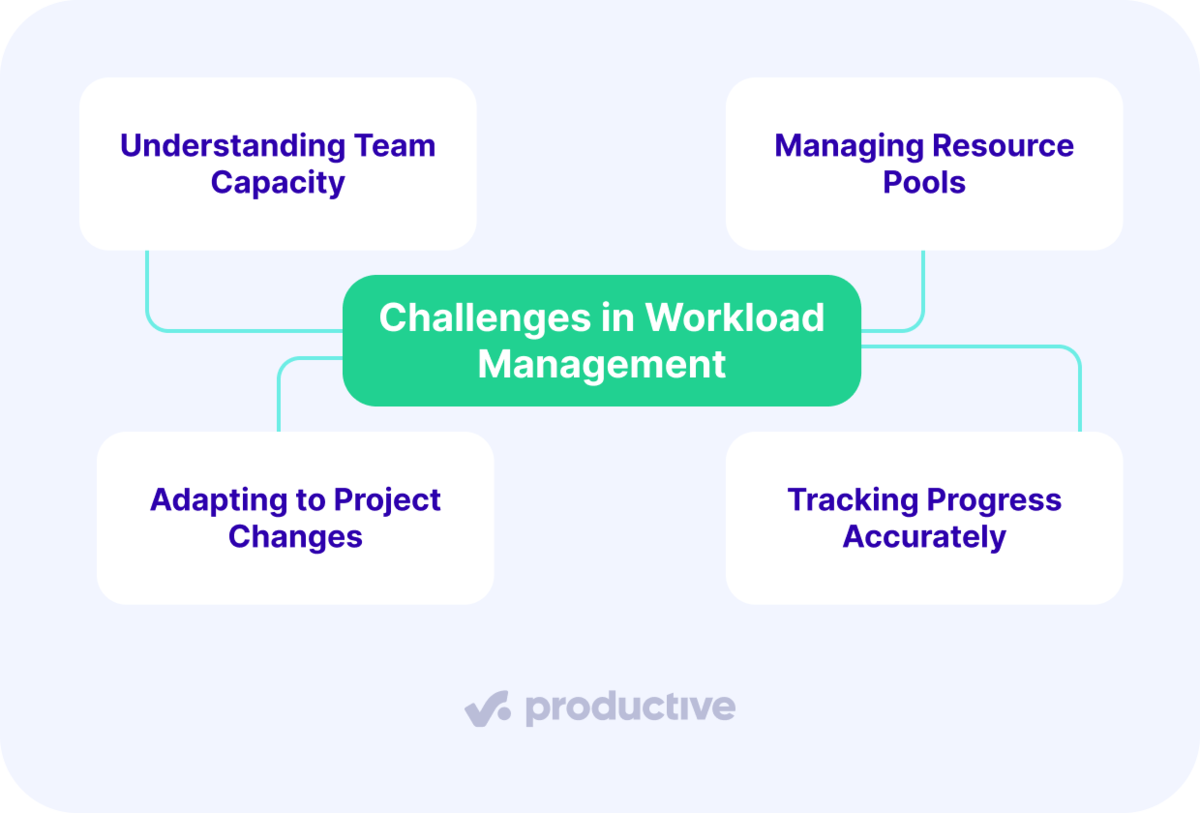
We’ll take a closer look at each.
Understanding Team Capacity
Understanding team capacity means knowing what each employee can do and when they’re available. Calculating the billable utilization rate is one way to gauge the productivity of a specific department or employee.
Billable utilization is billable hours divided by total available working hours. You can break it down by seniority, department, or project for more detail.
Keep in mind that both billable and non-billable hours are valuable for your workforce planning. Billable hours are the time a client pays for directly. Non-billable hours are the time your agency funds itself, and they cover work such as:
- Skill building
- Administrative tasks
- Project pitching
In Productive’s Resource Planner, you can track team utilization, manage billable hours, and spot revenue gaps in advance.
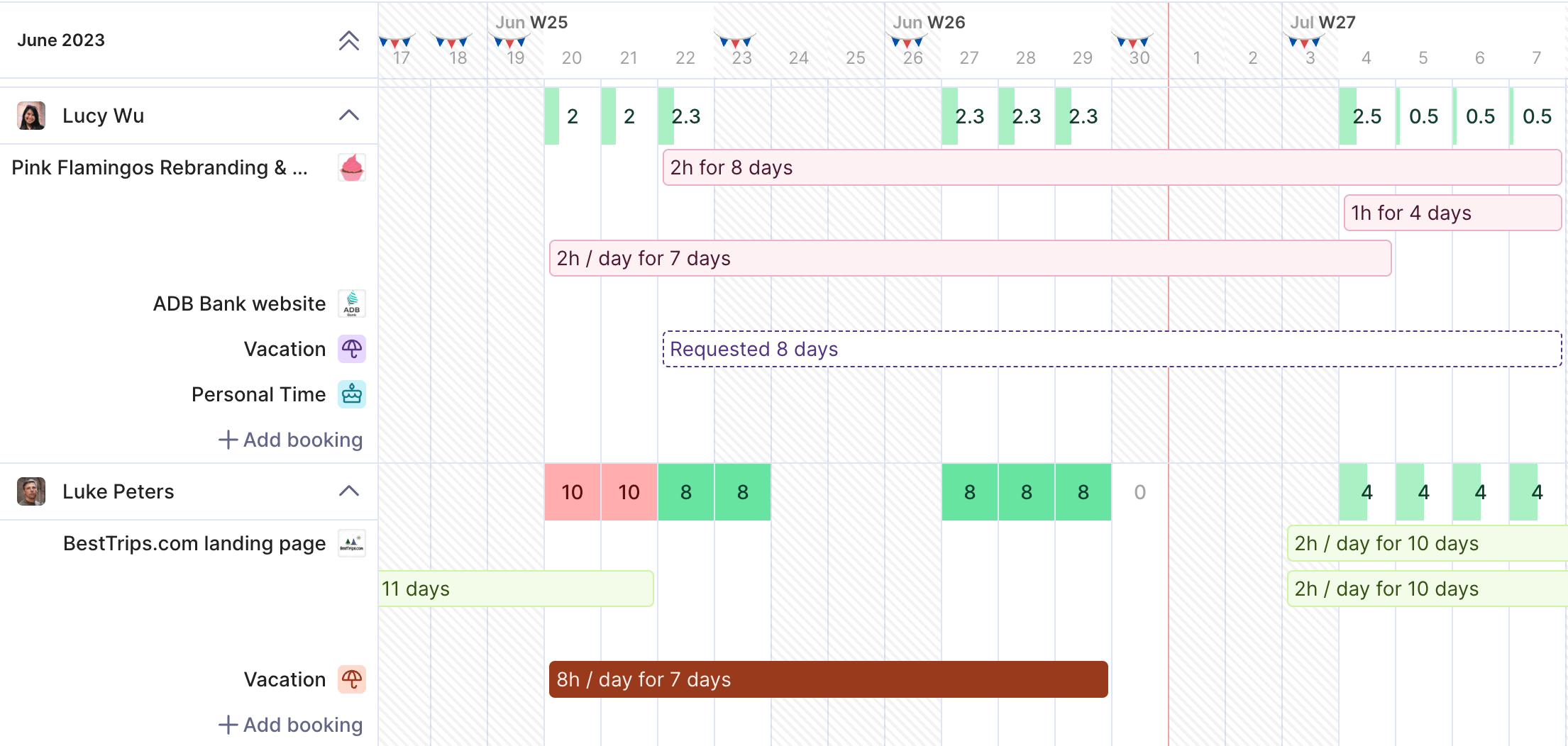
Track your billable hours and spot revenue gaps in Productive.
It also shows who’s booked, who can take on more work, and who’s on vacation or out sick.
See Who Has Capacity in Productive.
Managing Resource Pools
Efficient management of your resource pool includes:
- Operational or day-to-day management: Operational management covers scheduling your people and project schedules day to day. It also prevents uneven workload distribution (learn more about creating a resource management plan).
- Strategic or long-term management: Strategic management plans for your business’s future needs and how your people will meet them. This includes various strategic HR planning tasks such as succession planning, reskilling or upskilling, and talent retention.
Adapting to Project Changes
Adapting to project changes gets harder when scope grows after the plan is set, known as scope creep. Two causes to watch are:
- Setting and maintaining unrealistic expectations
- A lack of ability to gauge the effect of scope changes
Unrealistic expectations can come from missing historical data on past projects or misjudging project complexity. They also stem from a desire to overdeliver to keep clients happy.
The second cause comes from having no real-time view of how a change affects the plan. Resource management software that forecasts cost and profit margins from scheduled work shows that effect while the project runs.
Tracking Progress Accurately
Tracking progress accurately needs a system that flags a project passing its allocated hours while you can still react.
It also needs KPIs matched to what the initiative is trying to change. For example:
- For employee satisfaction, key performance indicators (KPIs) include engagement scores, turnover rates, and survey feedback.
- For productivity, track output per hour, efficiency ratios, and the share of projects delivered on time.
- For project performance, track milestone hit rates, budget adherence, scope change frequency, and completion times.
Set target goals for each of your capacity planning KPIs so you can see when you’re off track.
Balancing workload across all of these projects is the resource manager’s job.
What Does a Resource Manager Do?
A resource manager decides which staff do the work and when, across every live project in the business. The project manager owns the work itself: scope, deliverable quality, client communication, and the deadline.
Say a project manager sets Thursday for the first creative round. The resource manager picks the designer with the free hours and the right seniority without breaking their other bookings.
With Productive’s Agents, you can build a Resourcing Agent for this step. It suggests the person for the work and creates schedules based on capacity.
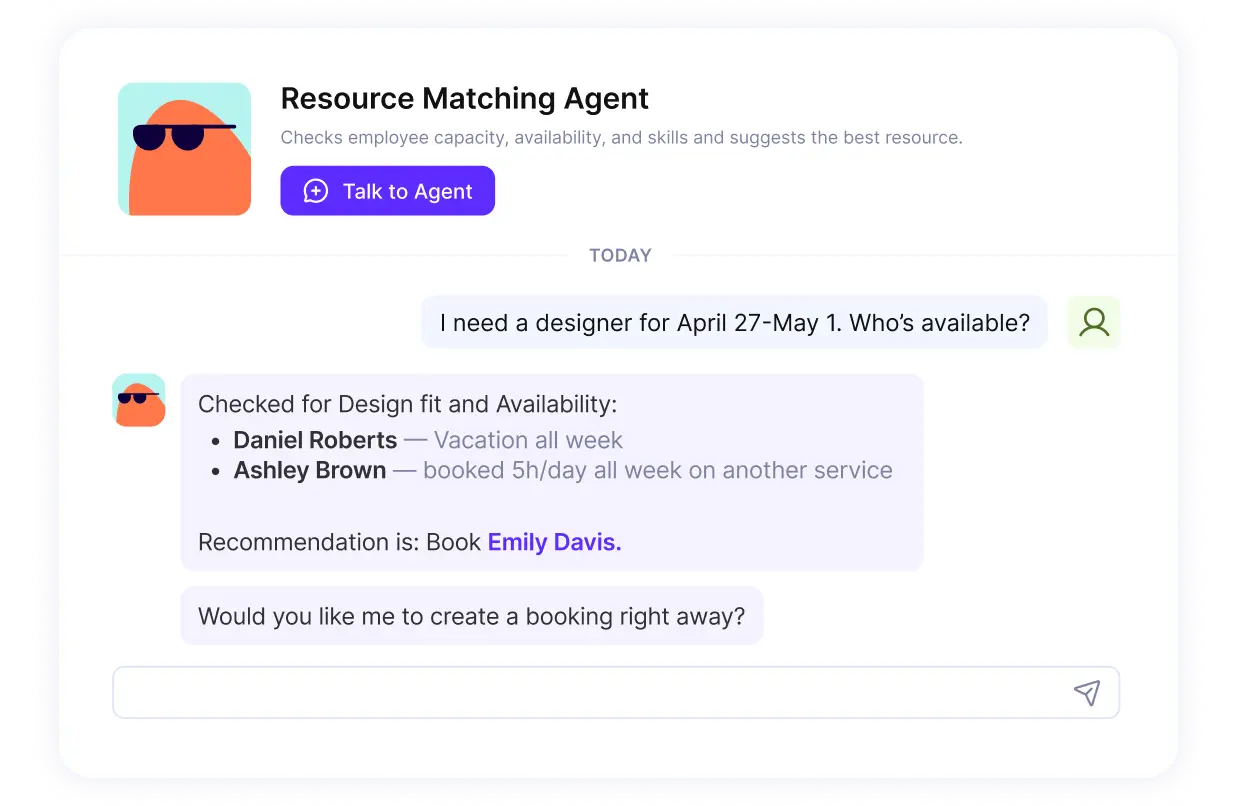
Let Agents handle the busywork in Productive.
The resource manager role also covers workforce planning: having the people and skills the business needs in the months ahead. Read more about what the resource manager role covers.
Without this role, each project manager plans only for their own project. Overload on shared people can then go unnoticed.
What Is Workload Overload and What Causes It?
Workload overload occurs when the demands placed on an employee exceed their capacity to complete their tasks effectively. Causes include too many tasks, work beyond the employee’s experience, unrealistic deadlines, and disengagement.
Overload can also happen when the workload is moderate or well-suited to capabilities. Even light workloads might become heavy if employees are disengaged or unmotivated.
Disengagement can be caused by:
- Long-term work on repetitive tasks
- Loss of perspective for the overarching business goals
- Lack of personal progression within the company
- Inadequate compensation
Catching the symptoms early gives you time to rebalance work before people disengage.
Symptoms of Workload Overload
Symptoms of workload overload include late hours, a drop in quality, missed deadlines, chronic fatigue, and quieter communication. Several show up in your time and project data:
- Working late and logging overtime. Time entries land after hours and on weekends.
- A drop in quality. Rework rises on deliverables that used to pass first review.
- Missed deadlines. The same people ask for one extension after another.
- Chronic fatigue. Familiar work takes longer, and people stop volunteering for anything new.
- Decreased communication. Status updates stop, and questions go unanswered for days.
Left unchecked, these symptoms can turn into burnout.
How Do You Prevent Burnout From Heavy Workloads?
You prevent burnout from heavy workloads by building development into the job and watching how managers behave. Unlike a stressful week, burnout builds from long-term issues with overwhelming or unbalanced workloads.
In Eagle Hill Consulting’s 2025 burnout survey, 55% of U.S. workers reported burnout. Burnt-out employees were nearly three times more likely to say they plan to leave.
Strategies for preventing burnout include:
- A strength-based approach to the employee lifecycle to foster a culture of development
- Monitoring management behavior to keep the work environment healthy
- Upskilling bosses to provide meaningful feedback for nurturing employee growth
- Aligning professional growth with personal wellbeing
Watch for the same signs in managers. They carry their own workload plus responsibility for their team’s.
Prevention depends on how you manage team workload day to day.
Which Strategies Can You Use to Manage Team Workload?
Strategies for managing team workload include delegating tasks, prioritizing crucial work, managing client expectations, and keeping team communication transparent. These are our recommendations. We’ll take a closer look at each.
Delegating Tasks
Delegating tasks starts with identifying what needs to be done and when. Then organize it into a capacity planning template.
Some of the strategies used include:
- Identifying strengths and weaknesses: Understand your team’s abilities and assign tasks to employees who’ll perform them best.
- Define your expectations: Clearly communicate the task’s objectives, deadlines, and expected results to avoid confusion.
- Provide support and feedback: Offer help and constructive feedback to keep tasks on plan, without micromanaging.
Prioritizing Crucial Work
Prioritizing crucial work matters when your project managers run several projects at once. It’s essential to determine urgent tasks or strategic workloads, but also to identify which projects are your top priority. Learn more about the specifics of handling resourcing for multiple projects.
Committing equally to every project is tempting, but it can cause burnout instead of quality delivery. Overservicing (doing more work than the client pays for) stretches your people thin and cuts into profitability.
Capacity indicators turn red when someone is overbooked, so you see who has room before adding work.
Managing Client Expectations
Managing client expectations means agreeing up front on the project scope, so changes have a reference point. For example, the maintenance phase of a website project can be a weak point. Clients and service providers might have different notions of what it includes: bug fixes vs. implementing new features.
Reopening a project you thought was finished cuts into your capacity for new, profitable work. Another critical aspect is promoting mutual transparency. When clients understand your tasks and progress, conversations about changes start from the same facts.
Tools with client access let clients check task progress without waiting for a status update.
Keeping Team Communication Transparent
Keeping team communication transparent means your project teams, like your clients, can see who owns what. Give your team a clear overview of:
- Employee workload across a project
- Who is responsible for what
- How each task affects the overall project milestones
With that overview, people can manage their own work and stay engaged. It can also reduce stress, because everyone knows what they owe and how to deliver it. Team workload management tools give your team that overview through task status updates, notifications, comment history, and project boards.
The same habits apply when the workload you’re managing is your own.
How Can You Manage Your Own Workload?
You can manage your own workload with team basics: realistic deadlines, protected focus time, and tracked hours. Some tips for more efficient personal workloads include:
- Healthy work-life balance: Prioritize your health and personal time as you would work tasks, to prevent burnout.
- Blocking out time: Dedicate specific periods for focused work, allowing for more efficient task completion and reducing distractions.
- Set realistic deadlines: Estimate the time needed for tasks accurately, considering potential obstacles to ensure deadlines are achievable.
- Two-minute rule: Do anything that takes two minutes or less right away to shorten your to-do list.
- Task batching: Group similar activities together to minimize context switching, enhancing focus and productivity.
- Pomodoro Technique: Work in short, intense bursts followed by brief breaks to maintain high concentration levels and avoid fatigue.
- Utilize time tracking: Monitor how you spend your time to identify areas for improvement and better allocate your hours.
Beyond the day to day, workload also needs a longer-range plan.
What Does Strategic Workload Planning Include?
Strategic workload planning includes forecasting, capacity building, and aligning workload plans with business goals. This is our list.
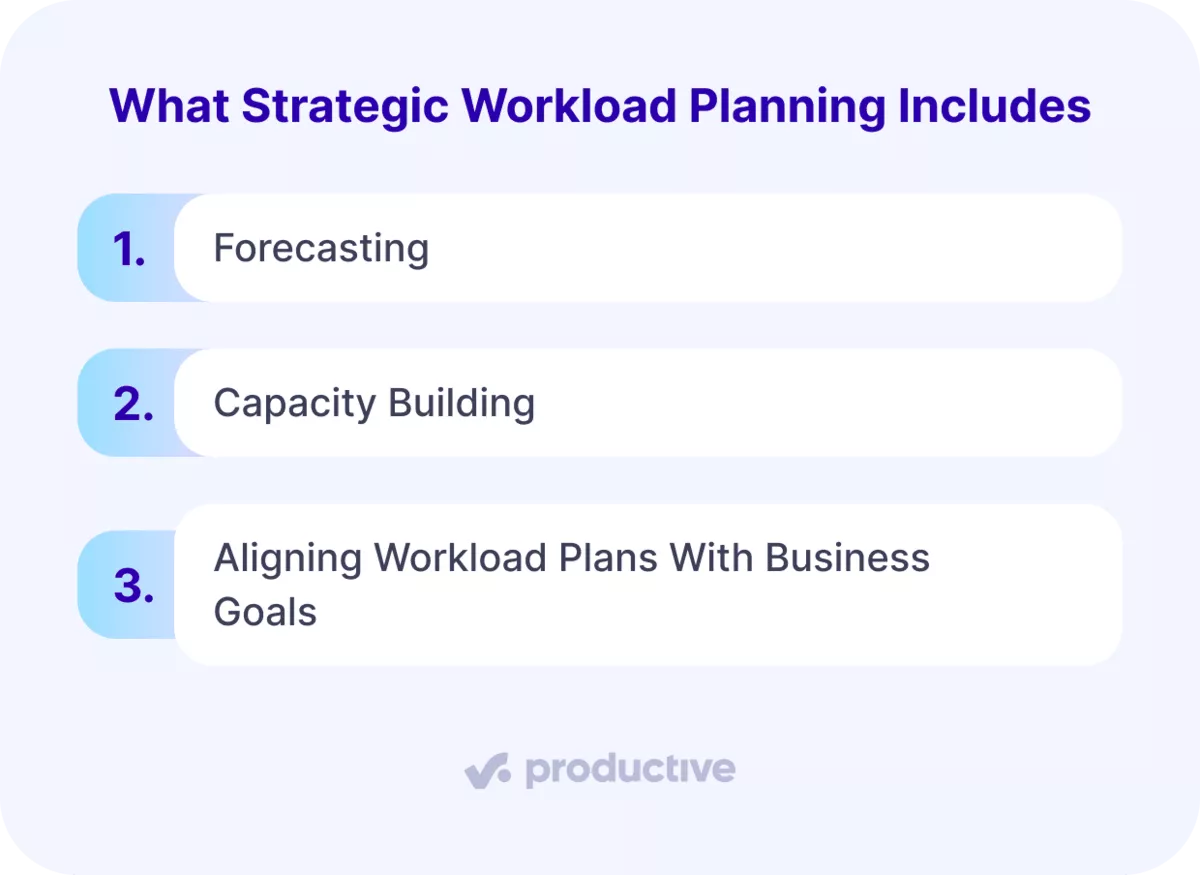
We’ll take a closer look at each.
Forecasting
Needs forecasting involves examining data on market trends, customer feedback, and historical patterns to predict future demand. For example, a retailer might study several years of holiday sales to plan inventory for the coming season.
This proactive approach allows businesses to adjust their strategies. Strategies for matching capacity with demand include lead strategy and lag strategy. Lead strategy adds capacity before it’s needed. Lag strategy adds it once demand has already passed capacity.
Capacity Building
Capacity building develops your team’s skills and operational capabilities so you can handle changes in demand. The two main types of capacity building include:
- Upskilling, where employees learn new skills complementary to their current job requirements.
- Reskilling, which includes training employees in entirely new skills or roles that differ from their current job functions.
A practical example is a digital marketing company investing in advanced training for emerging technologies, such as artificial intelligence. The training can improve current delivery and prepare the company for future projects that need those skills.
Aligning Workload Plans With Business Goals
Aligning workload plans with business goals means every project and task supports what the business is trying to achieve. For example, a business entering a new market might hire for the skills it lacks or upskill current talent.
This alignment requires regular reviews of business goals and workload management strategies to adjust priorities as circumstances change.
The last piece is choosing software that keeps these numbers up to date.
What Should You Look for in Workload Management Software?
Look for workload management software that shows each person’s assigned hours against their available hours across every project.
Project management tools can also support task prioritization, team collaboration, utilization tracking, and workflow automation. This is all our own recommendation. When looking for your top software choice, you should also consider:
- Scalability
- User-friendliness
- Customer service
These three criteria are essential for promoting adoption across the entire team. Additionally, scalability is important for ensuring your software can grow alongside your professional services business.
In Productive’s Project Management, the Workload layout shows the tasks assigned to each person across all projects.
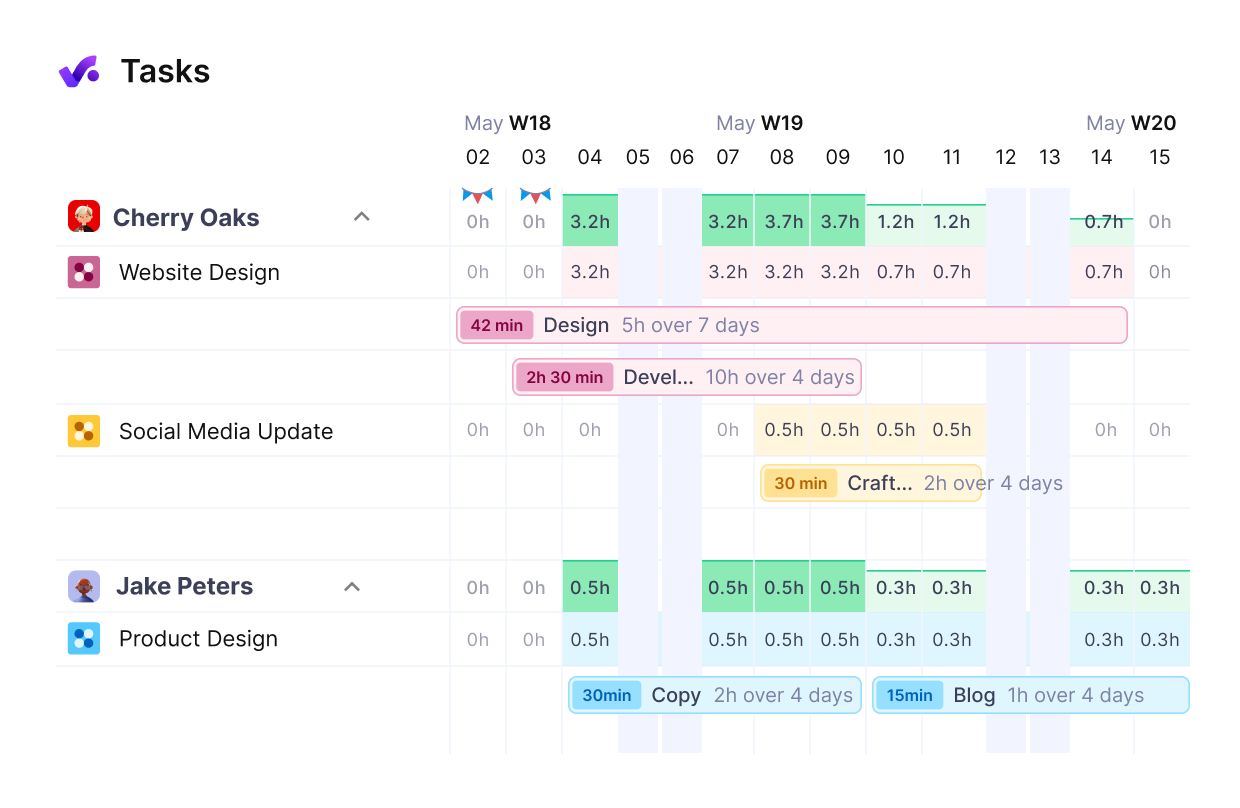
View your team’s workload in Productive.
If you’re comparing tools to balance your work, see our roundup of the best workload management tools.
Match Your Team’s Workload to Its Real Capacity
Managing workload works when you know each person’s real capacity, prioritize paying work, and replan when scope changes. Without it, overload can show up as overtime and missed deadlines, and eventually as turnover.
Productive is agentic PSA software that connects resource planning, time tracking, budgets, and project management. You run projects, budgets, and resources in one place, so capacity and task workload are in the same tool.
Book a demo to see how to plan workload across your team in Productive.
Manage Workload Across Every Project
Compare current and future team capacity to know whether you can take on more work.
