How to Choose Project Management Software in 2026

The short answer to how to choose project management software is to test it on work you already delivered. Every tool on your shortlist demos well, so the question is which one breaks on your own numbers.
This project management software buyer’s guide gives you five steps and the features that decide the choice. You also get a scorecard, the questions that disqualify a seller, and a first-month checklist.
Key Takeaways:
- Elimination narrows the field faster than scoring does. Start choosing project management software by writing three to five conditions, then drop anything that fails one.
- The dividing line is whether you bill for time. Task tools and project management platforms split on rate cards, budget burn, and resource planning. That is why services firms buy project management software.
- A trial is a reproduction test. Rebuild last month’s invoice, last week’s schedule, and one report your leadership reads, then compare all three.
- Open the export file before you sign anything. Whatever it does not carry is work you redo by hand, and that is the real price of moving.
How to Choose Project Management Software (in Five Steps)
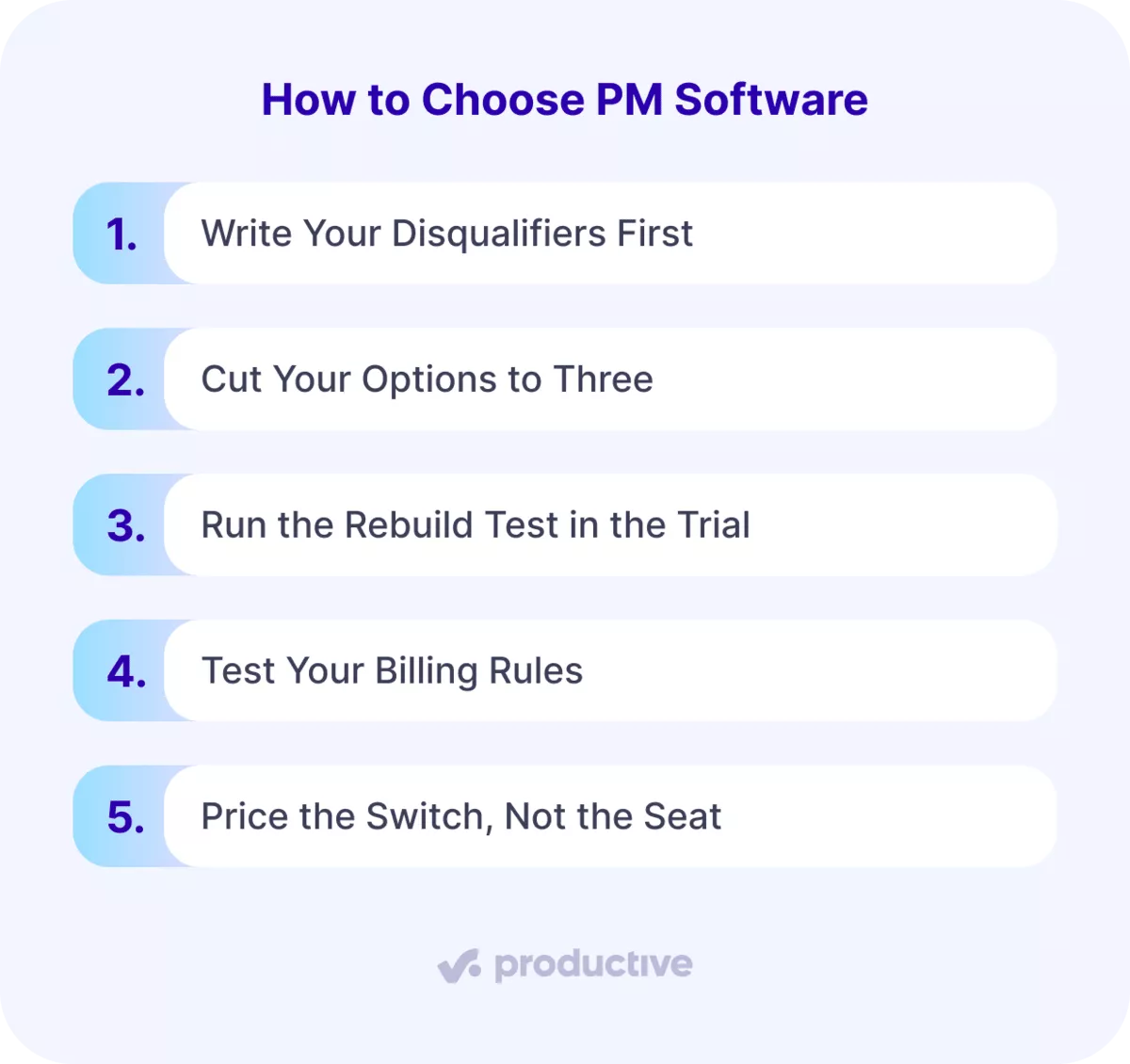
You choose project management software by writing your disqualifiers first, cutting your options to three, rebuilding last month’s real work inside each trial, testing your billing rules, and pricing the switch rather than the seat.
The first two moves cut the field of project management software before anyone books a demo. That keeps your time on tools that could run your projects.
The middle two run on projects you already delivered, where you know the right answer. You are marking each tool against a key you already hold. The last move prices the switch: what your software exports, what you rebuild, and the hours that takes.
Software is usually priced per seat, which is easy to compare and rarely the number that hurts.
What Each Move Leaves You With
Each move ends in something written: a disqualifier list, three finalists, three rebuilt outputs, and an opened export file. That trail is what whoever signs off on a project management purchase will ask for.
Keep them in one place, because whoever questions the choice later will not remember the demo.
How Do You Know You Have Outgrown Your Current Tool?
You have outgrown your current tool when you cannot answer three questions from it: what a client has left on their contract, what a project actually cost to deliver, and who is over capacity next month.
The Spreadsheet, the Export and the Guess
The first question is what a client has left on their contract. If your project management software cannot show it, someone keeps a spreadsheet by hand or reads the last invoice. Both are out of date the moment anyone logs time.
The second is what a project actually cost to deliver. That needs a cost rate for every person on it, and task tools do not hold cost rates. Freelancers make it worse, because their rates differ on every job. So you export the hours and price them by hand after the project has closed.
The third is who is over capacity next month. You answer that by asking people whether they feel busy, which tells you about this week only. That is the gap planning capacity across projects is meant to close. Client deadlines land on the same few people, and you find out when one of them says so.
Count the Hours the Workaround Costs
If you answer any of the three by exporting into a spreadsheet, you have outgrown the project management tool. The number worth measuring is how many hours a month that export costs you. List the pain points in it, because they are what new project management software has to remove.
What Features Do You Actually Need in a Project Management Tool?
The features you actually need depend on whether you bill for time, and the dividing line is rate cards, budget burn, and resource planning, which task tools do not carry.
Everything sorts on one question: do you bill clients for the time your team spends? A yes moves the money rows into the must-have column. A no means a simpler project management tool will hold you another year.
The types of project management software split along the same line.
| Feature | Who needs it | Who can skip it | What to test in a trial |
|---|---|---|---|
| Task management, project tracking and project views | Every team working to client deadlines and project milestones | Nobody | Rebuild last week’s work as Kanban boards, then switch to Gantt charts |
| Time tracking | Anyone billing hours | Fixed-fee shops | Log three days of real hours against two projects |
| Rate cards and per-person cost rates | Firms mixing employees and freelancers | Teams on one flat rate | Enter two people at different cost rates, then invoice a day |
| Budget burn and budgeting features | Anyone quoting fixed fees | Teams billing time and materials monthly | Load a closed budget and check burn against your invoice |
| Resource management, resource allocation, resource scheduling and capacity views | Teams that cannot name this week’s workload | Teams of five | Schedule next month and find who is over resource capacity |
| Reporting dashboards, project dashboards and portfolio reporting | Anyone whose leadership asks for numbers | Teams running one project | Rebuild one report leadership reads and check the information |
| Client or guest access | Agencies sharing progress with clients | In-house teams | Invite an outside address and list what it opens |
| Role-based permissions | Anyone with freelancers or client seats | Teams where everyone sees everything | Create a contractor login and try to open a budget |
| Accounting integrations | Anyone invoicing from another system | Teams invoicing inside the tool | Push one invoice into your accounting software and check the lines |
| Workflow automation and workflow management | Teams repeating the same handoffs weekly | Teams whose process changes per client | Automate one status change and watch it fire |
| AI features and AI automation | Teams losing hours to admin | Anyone who cannot name the task it removes | Ask it for a report you run, then check the number |
| Multi-currency billing | Firms invoicing outside their reporting currency | Single-currency firms | Invoice in one currency and report in another |
| Document control and proofing features | Creative teams running client approvals | Teams approving over email | Upload a file, run one approval round, find version two |
| File sharing, collaboration tools and communication features | Teams across offices or time zones | Teams happy with their existing communication tools | Comment on one file from a second account |
| Risk management and issue and bug-tracking | Teams running long delivery projects | Teams on short retainers | Log one risk, then check who it notifies |
| Agile Project Management views | Teams running sprints for clients | Teams delivering in one phase | Run one sprint and open the burndown |
Every tool on your shortlist will have task management, Kanban boards and Gantt charts. Resource management, time tracking and rate cards are where they separate. Project views matter less than they look.
Tips for Feature Choosing
Kanban boards, Gantt charts and calendars show the same task list in different layouts. Budgeting features, portfolio reporting and resource allocation are the rows that separate a task tool from a platform.
Team size changes which rows are nice-to-have features and which are requirements.
- If you can name what everyone is working on this week, skip resource scheduling.
- Once you cannot, project planning stops working from memory.
Communication features matter more across offices, where task management carries the conversation that used to happen at a desk. Project templates start paying once you run the same engagement twice a quarter.
Firms needing every row in one place are shopping for professional services automation rather than standalone project management software.
Narrow your options this way before you compare project management software.
A shortlist built on needs you do not have is how firms pay for software nobody opens. Productive’s project management layouts run Gantt, board, calendar, timeline and workload views off the same tasks.
Step 1: Write Your Disqualifiers First
Write three to five conditions before you open a single product site. Each must be answerable yes or no, and must kill a tool when the answer is no. Most project management software passes a demo, so the list does the eliminating instead.
What Makes a Condition a Disqualifier
A condition counts only if you can settle it inside the first twenty minutes of a trial. If it takes a sales call to answer, it is not a disqualifier yet. Rewrite anything phrased as a preference, because a preference removes nothing from your list.
Keep goals out of this list. Goals belong in the business case, and a goal never eliminates a project management tool.
Integrations are the most common condition, because a tool that cannot reach your accounting software needs a workaround forever.
Example of a Disqualifier
Rasa Sosnovskytė runs Growth Bite, a fifteen-person agency in Lithuania. Her condition was that the tool hold a different cost rate for every person, freelancers included. Without it she could not work out what a project cost to deliver, so Trello was out.
Who Else Adds a Condition
Send the draft to whoever signs the contract and whoever runs the numbers before you go further. A condition your finance lead raises after the demos restarts everything. Ask what each of them needs from the tool that they cannot get today.
Your project managers will name something different from your finance lead. If you run cross-functional teams or cross-functional initiatives, ask each lead for one condition, then stop at five.
One System for Projects, Time and Money
Productive runs tasks, time tracking, budgets, resourcing and invoicing in the same place. Nothing gets exported to a spreadsheet to answer what a project actually cost

Step 2: Cut Your Options to Three
Take your list to two or three published category shortlists and to your current project management tool. Mark every candidate against every condition, using product documentation rather than the marketing page. Anything that fails one condition is out, and it does not get a demo.
Three Tools, One Brief, the Same Questions
Stop at three, because each demo costs an hour from everyone attending and a fourth rarely changes anything. Most disqualifier lists leave fewer than three options standing, which tells you the list is working. If six survive, your conditions are preferences and the list must be rewritten.
Run the same process on all three so the comparison holds. Give each one the same brief, the same sample project, and the same written questions. Collect feedback from the project managers and project teams who use the software daily, not just the signer.
A published roundup of project management software is a reasonable place to build the starting list. Check your options against your own conditions rather than against the ranking. Most project management software looks identical on a feature page, which is why the conditions do the work.
Record What You Cut and Why
Write the three names down, with the condition each one nearly failed. That note is what you check after the trials, when the demos have blurred together. Keep the ones you eliminated and the reason, because someone will ask you in six months.
Step 3: Run the Rebuild Test in the Trial
Pull three things you already produced: last month’s invoice, last week’s schedule, and one report your leadership reads. Rebuild all three inside each trial. A tool passes only when all three come out of its own data and match what you issued.
What Counts as a Pass?
Anything needing a manual adjustment, a spreadsheet, or help from the seller has not been reproduced. Write down which of the three failed and put it to the seller as a question.
A partial pass is information, not a verdict.
Reproduction beats exploration because you already know the right answer for last month. You are marking the project management software against a key you already hold. The only test data that cannot flatter a tool is work you have already delivered.
Wherever it sits in the project lifecycle, you already know the answer. Most project management software demos well, which is why the rebuild is the only honest test.
What to Load and Who Runs the Rebuild
Load one live project before you start, with real hours, real rates, and real time tracking on it. Pick something current and billable rather than a project that closed last year. Sample data ships with the software and is built to work.
- Budget half a day for the load and an hour for each rebuild.
- Run the same process on every trial so the results compare.
- Have the person who builds your invoices run the rebuild, not whoever is championing the purchase. They will spot the shortcut a champion talks past.
Your free trial period usually runs fourteen or thirty days, which is more than this takes. Start the rebuild in week one, so you still have time to ask the seller about whatever failed.
Step 4: Test Your Billing Rules
Take your rate card and two closed project budgets into each trial, one hourly and one fixed fee. Rebuild both invoices, and check the total against what you actually sent the client. Most project management software can raise an invoice. Fewer can raise yours.
Both totals have to come out without a manual override. A rule that needs a workaround now will need one every month you own the project management software.
The Rules That Break Tools
These are the rules that most often break a tool, and each takes a minute to test:
- Different cost rates per person, including freelancers whose rate changes by job.
- Rates that vary by seniority, or by client, or by both.
- Hours worked that are billed at a different number by agreement.
- Retainers where unused hours roll over, or expire at month end.
- Expenses rebuilled with a markup, or passed on at cost.
- Invoicing in one currency while you report in another.
Every tool does time tracking. Fewer price that tracking against a rate card and carry it into the budget without anyone retyping a number.
Productive’s budgeting tools hold custom budgets with different billing models and track spend against profit as time is logged.
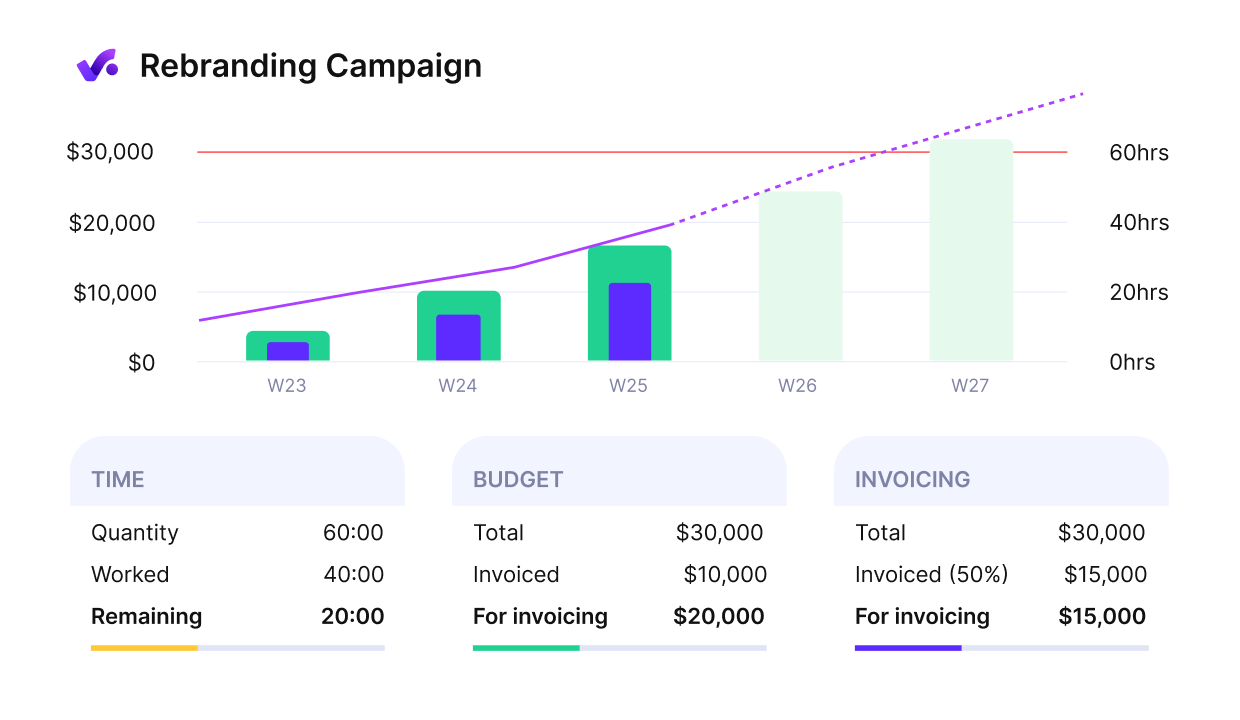
Get early warnings of budget overruns.
When a Total Does Not Match?
Find out whether the software cannot model the rule, or whether nobody set it up. Ask the seller to configure it during the trial, then rebuild the invoice. A rule the seller cannot configure inside a trial will not appear after you sign.
Write down which rule failed on which tool. That note decides more than any feature comparison you run this month.
Step 5: Price the Switch, Not the Seat
Pull an export from your current tool this week, before you sign anything. Open the file and write down what information it actually contains. Then write down the historical months you genuinely need to keep.
Most project management software will export your data. Fewer export it in a shape you can load somewhere else. Whatever the export does not carry is either work you redo by hand or history you lose. The number that decides this is the hours needed to rebuild it.
These usually do not survive the move:
- Task comments, and the decisions buried inside them.
- File attachments, especially anything over a size limit.
- Time entries older than the retention window.
- Closed budgets, and the rate card that priced them.
- The link between a time entry and the invoice it was billed on.
What Changes When Your Headcount Moves?
A per-user pricing model behaves differently from a tiered one the month you add five people. Ask what a guest or client seat counts as, because that is where the surprise usually sits. Scalability shows up in the contract as much as in the project management software.
What to Export Before You Cancel
- Your full time-entry history as CSV, with person, project, date and rate on every row.
- Every closed budget, with the rate card that priced it.
- Your client and contact list, with billing details attached.
- Every invoice raised in the tool, as PDFs plus a CSV of the totals.
- File attachments downloaded, not linked.
- Task history for any project still under retainer or warranty.
What Should Your Software Selection Criteria Be?
Your selection criteria are your billing rules, your reporting line, your integrations, your permissions model, and your export path, scored against the three tools you tested.
Score the three project management tools that survived the trial. Selecting project management software gets harder, not easier, when you score twelve options on twenty criteria.
Criteria for software built for professional services teams weigh billing and reporting above everything else.
Every row carries a condition that fails a tool outright. A criterion you cannot fail is a preference.
| Criterion | What you check | What fails it |
|---|---|---|
| Export path | Pull a full export during the trial and open it | Anything you need is missing from the file |
| Permissions model | Create a contractor account and a client permissions account | A read-only client costs a full seat |
| Single sign-on | Ask whether it is included or sits behind an upgrade | Your IT policy requires it and the plan does not carry it |
| Accounting integrations | Push one invoice across and check the lines survive | It requires a third-party connector to reach your ledger |
| API for custom integrations | Read the documentation for the endpoint you need | The endpoint is read-only and you need to write |
| Reporting processes | Have a non-user run one report end to end | Only an admin can produce it |
| Implementation effort | Ask how many hours of your time go into setup | Nobody will give you a number |
| Contract terms | Ask what happens when you add five people mid-term | Seats can be added but never removed |
| Scalability | Ask for the limits on projects, clients and custom fields | A limit sits below where you expect to be in two years |
| Financial tracking | Rebuild last quarter’s margin by client | The numbers need a spreadsheet to finish |
| Cost estimation and profitability forecasts | Forecast one open project to completion | The forecast ignores committed but unlogged time |
| Project audit trail | Open the history on one closed task | Edits are not attributed or not kept |
| Mobile app | Log time and approve one item from a phone | Time tracking works only at a desk |
| Support during the trial | Time the reply to a real question, not a sales question | The answer arrives after your trial ends |
Write the scores down, because a project management software selection nobody recorded gets re-argued in six months. Weight the rows your work depends on and ignore the rest.
A firm billing hourly needs the export path and the accounting row far more than the mobile one.
Manage projects with Productive
What Should You Ask a Vendor Before You Buy?
The questions worth asking a vendor are the ones with a disqualifying answer: how your rate structure is modeled, what the export file contains, which features sit behind an upgrade, and who can change permissions.
Send your rate card and one closed project ahead of the demo, so the hour runs on your numbers. Then ask these, and listen for the answer that ends it.
- How would you model our rate structure in this tool? A walkthrough of a different firm’s setup means yours has not been tested.
- What exactly is in the export file, and in what format? If nobody can tell you without checking, assume you will find out after you sign.
- Which of the features you just showed us sit behind an upgrade? A promise to include it this once, with no paper, is not an answer.
- Who can change permissions, and what does a client login cost? Client access on a full seat changes the maths for every project you share.
- What happens to our data if we cancel? Anything short of a named export format and a retention period is a gap.
- What does your documentation say about the integrations we depend on? A roadmap date instead of a documentation page means it does not exist yet.
Collect feedback from whoever asked each question the same day, while the information is fresh. Project management software sells on what it can do, and these questions ask what it will do for you.
What Are the Most Common Mistakes When Choosing Project Management Software?
The mistakes that cost most are buying on the demo instead of your own data, letting one team decide for five, testing features instead of billing rules, and never opening the export.
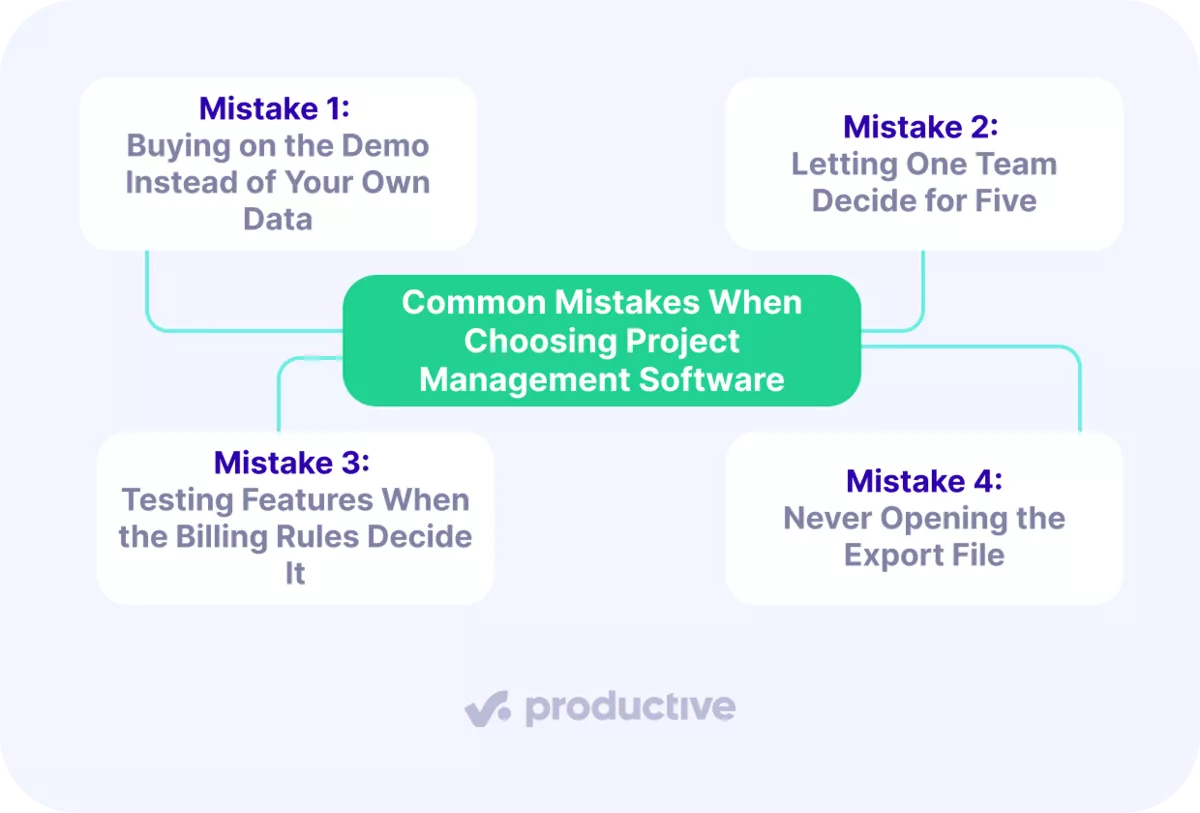
Mistake 1: Buying on the Demo Instead of Your Own Data
A demo runs on a dataset built to make the software look effortless. You watch a clean project close out perfectly and read that as evidence about your own work. The cost lands in month three, when the first real invoice needs a manual adjustment and a spreadsheet. By then the project management software is paid for and the team has learned it.
Mistake 2: Letting One Team Decide for Five
Project management software usually gets chosen by whoever complains loudest about the current tool. Finance, project managers and the people logging hours each have a condition. One of them is in the room.
You find the missing condition after go-live, which is the most expensive possible time to find it. The fix costs one email before the shortlist and nothing afterwards.
Mistake 3: Testing Features When the Billing Rules Decide It
Feature lists are easy to compare, so that is where evaluation time goes. Billing rules are specific to you, harder to test, and they are what breaks. Two tools can both do time tracking and only one can bill nine hours worked as eight.
Feature parity between two options tells you nothing about which will invoice correctly. User experience tells you nothing about either.
Mistake 4: Never Opening the Export File
Everyone plans to check the export and almost nobody does it before signing. It feels like a problem for later, and later is exactly when it stops being solvable. The learning curve on a new tool is survivable, and so is a user interface nobody loves.
Discovering your history did not come with you is not. Open the file in week one of the trial, when walking away still costs nothing.
Your First 30 Days After You Choose
Your first thirty days run on four jobs: name one owner, load one live project, rebuild last month’s invoice inside the tool, and set the date you review adoption.
Week One
Name the owner before anything else, and give them half a day a week for the first month. Project managers usually take this on. The job is answering questions, fixing setup, and deciding how your process maps onto the tool. Then load one live project: current, billable, with real hours and real rates on it.
Rebuild last month’s invoice inside the project management software and check it against what you sent.
Weeks Two to Four
Move project teams across one at a time, starting with the project teams that log the most hours. Our guide to planning team capacity covers the sequencing.
Set the user adoption review date now, and write down what gets checked. Time entries logged on time, budgets updated, reports run without help. Those are the adoption goals, and they are countable.
Expect the implementation to be uncomfortable. Rasa Sosnovskytė called her onboarding not the easiest thing her team had done. They built workarounds to fit their own project management software. That is a normal implementation, not a warning sign.
Collect feedback at the thirty-day mark from the people doing the time tracking, not only from the owner.
FAQ
How Long Does the Selection Process Take?
The selection process takes most teams four to eight weeks, and the trials take the largest share. Shortlisting moves fast once your conditions are written, while the rebuild test needs calendar time.
Who Should Be Involved in the Decision?
The decision needs whoever signs the contract, whoever raises invoices, and the project managers who schedule the team. Everyone else contributes one condition rather than a vote, which keeps the process from stalling.
What Should You Test During a Free Trial?
Test the outputs you already produce: one invoice, one schedule, one report. A feature tour shows what a project management tool can do, never what it does with your numbers.
How Do You Choose Software for a Small Team?
Small teams choose project management software the same way, with a shorter list of conditions. Under ten people you can skip resource scheduling, so the export path and billing rules carry more weight.
Can You Switch Tools Mid-Project?
You can switch tools mid-project, and the cleanest moment is a billing cycle boundary. Close and invoice everything in the old project management software, then start the new one from a clean month.
Final Thoughts on the Wrong Tool
Every month on the wrong tool adds history you will have to move later. The export you open in two years holds every project you run between now and then. That is what makes this decision expensive. Being strict costs less today than at any point after.
So spend the afternoon. Write the disqualifiers, rebuild last month’s invoice inside each trial, and open the export before you sign. No project management tool demo does any of that for you.
No project management software volunteers what it cannot do. If Productive is on your shortlist, book a demo and talk ask our team for advice.
Connect With Agency Peers
Access agency-related Slack channels, exchange business insights, and join in on members-only live sessions.
