Top 15 monday.com Alternatives (Paid & Free) Decision Guide

If you feel stuck looking for the best monday.com alternatives, or maybe just overwhelmed by endless feature comparison lists, it’s okay. Sit back and keep on reading, because the search is done.
This decision guide will show you the best Monday substitutes, their core features, pros, cons, and best use cases.
To top it all off, at the end of the article, we’ll walk you through a simple step-by-step process for choosing the right fit, and answer any questions you still might have.
What Are The Best monday.com Alternatives?
The best Monday alternatives right now are Productive, Plaky, Celoxis, Screendragon, Jira, Zoho’s work management tool, Smartsheet, ClickUp, Asana, and Trello. Each of these work management tools fits a different type of team, budget, and way of working.
Use the list below as a quick shortlist before you dive into the full reviews and compare it with other collaborative tools your team already uses. Skim the best for lines and free plan notes to narrow down the tools that match your team, then jump to those sections for details.
1. Productive – Best for All-in-One Project Management
Productive.io is a work management platform best suited for agencies and service businesses that want full visibility into budgets, resource utilization, time tracking, and profitability-all in one place.
While monday.com excels at visual boards, it requires many plugins or external systems to cover the full operational picture. Productive replaces that patchwork with a single system built to run your entire operation, from proposal to invoice.
Try Productive as your monday.com replacement
Track Utilization And Capacity In Real Time
Many monday.com users hit a wall when trying to understand how their team’s time is actually being used. It’s difficult to see whether people are booked too lightly or stretched too thin across multiple projects, especially in fast-moving agency environments.
That lack of visibility leads to burnout, missed deadlines, and expensive last-minute resourcing fixes.
See who’s overbooked, underutilized, or at risk of burnout before it becomes a problem by using Productive’s live resource planning and capacity management features that turn assumptions into clear decisions.
- Color-coded workload views show who’s overloaded, well-utilized, or available
- Utilization per person, role, or team lets you see who’s at 90% vs. 60%
- Forecasted availability up to 6 months out helps you plan hiring and freelancer needs
- Skill filtering helps match people to upcoming projects
- Tentative bookings allow you to reserve time for pipeline deals without committing fully
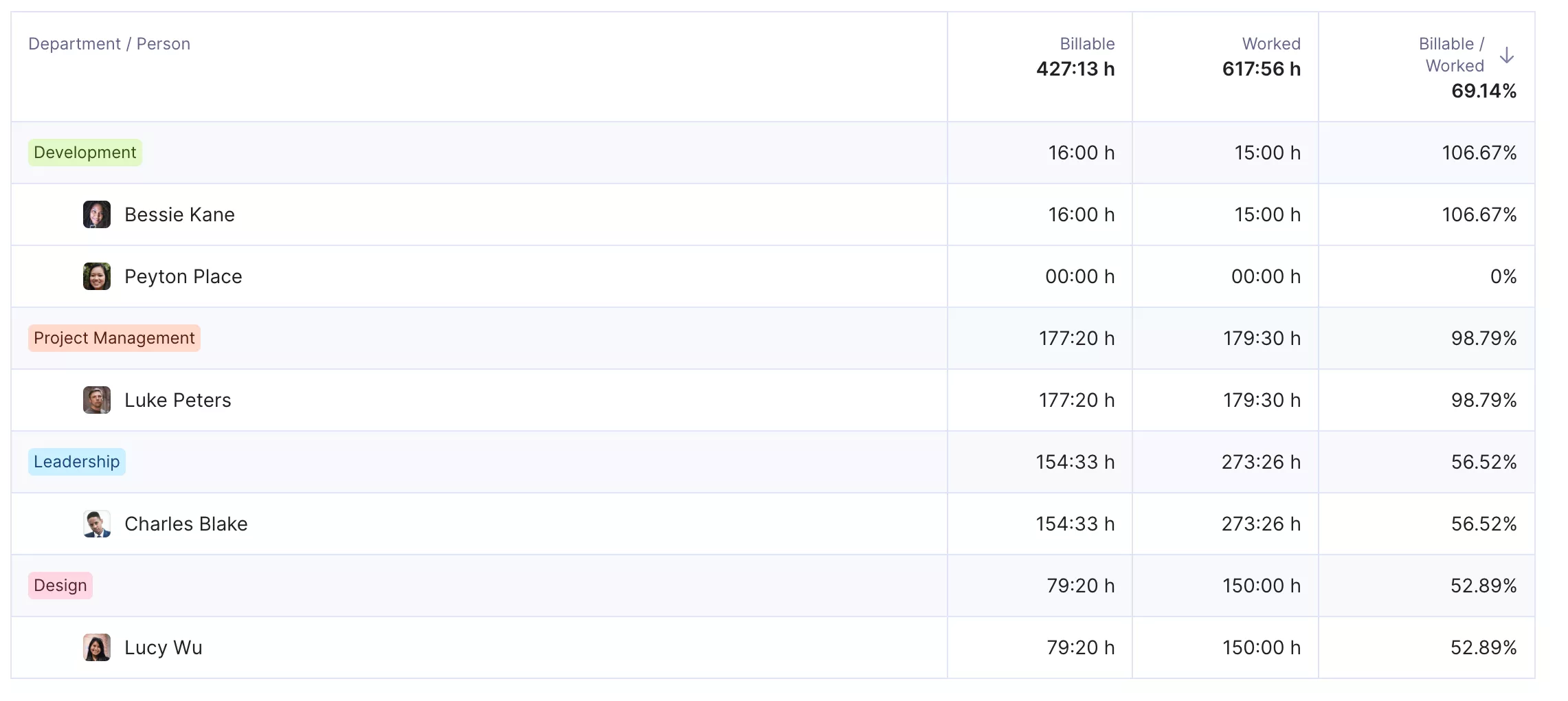
Get real-time utilization reports and early warnings of overbooking or idle hours.
Why it matters: Agencies using monday often struggle to know when to take on new work or hire. Productive gives you the data to plan capacity and optimize resource use without guesswork.
See Project Profitability Before It’s Too Late
Many teams using monday.com struggle with budget overruns that are only discovered after the fact. Budget tracking is often retroactive, disconnected from time tracking, and requires manual data pulls from spreadsheets or separate apps.
Without real-time visibility, PMs can’t see when they’re burning through budgets, and finance teams can’t forecast or intervene until it’s too late.
We talk more about profitability in our Productive vs Monday side-by-side comparison.
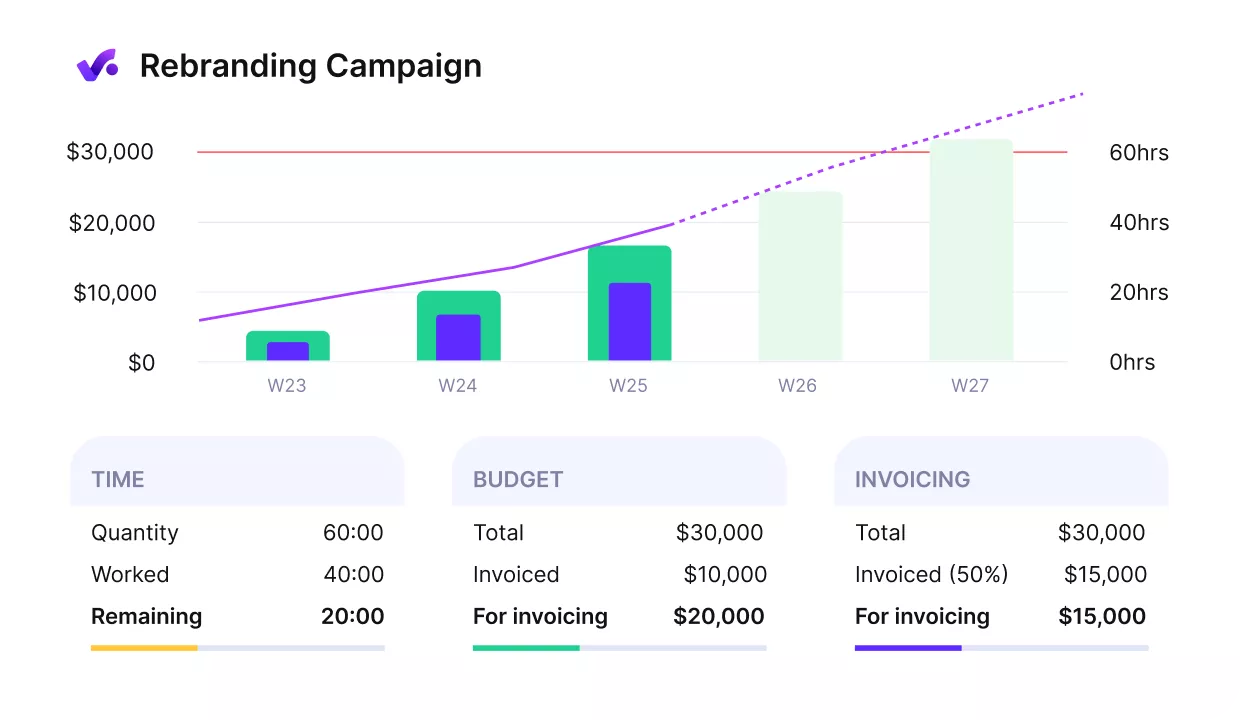
Avoid budget overruns and track budget spend in real-time.
Our users have real-time budget tracking and cost visibility, so they’re never caught off guard. In Productive, teams can monitor spending as it happens, and take action before projects drift off course.
- Live budget burn updates as time is logged
- Profitability dashboards by project, client, or service line
- Budget alerts at 75%, 90%, and 100% thresholds
- Built-in cost vs. bill rate analysis for margin visibility
- Invoicing tied directly to tracked time-no manual reconciliation
Why it matters: In monday.com, teams risk discovering budget overruns too late. Productive shows what’s happening in real time, so PMs and finance leads can act early, not after the damage is done.
For more context, head over to our budget management guide.
Log Time Without The Friction
Many teams using monday add time tracking as a plugin or external app, but quickly discover it’s disconnected from the core task flow. As a result, time entries are either missing, unlinked to real work, or managed in a separate tool altogether-making reporting and billing harder than it should be.
Productive’s time tracking is built into daily work, not bolted on.
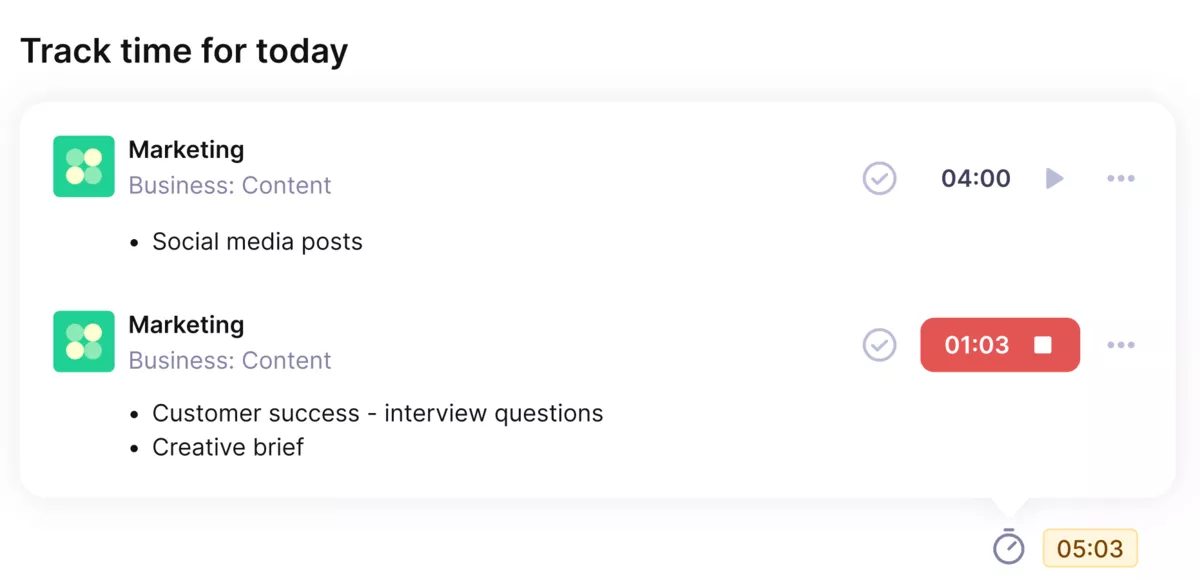
Track time directly where work happens.
Our users can:
- Start timers or log time directly on tasks
- Track manually, by calendar, or in bulk-whichever works best
- Get instant budget updates as time is entered
- Compare estimated vs. actual time to improve forecasting
- Personalize rates to ensure accurate cost and revenue tracking
- Get Smart timesheet suggestions based on recent activity
Why it matters: Many teams abandon time tracking in monday.com due to disconnected plugins. In Productive, it’s part of the workflow-so you get accurate time data without chasing the team.
Core Project Management Features
Below the essential project management toolkit built into Productive that help you manage client work end to end:
- Task management with task dependencies: Assign, track, and organize work by projects, phases, or deliverables
- Timeline and scheduling: Plan work visually, balance workloads, and shift dates as projects evolve
- Budgeting: Set labor and expense budgets, track overages, and run profitability scenarios
- Resource planning: Schedule people across teams, track availability, and spot overbooking
- Approvals: Handle time, expense, and time off approvals with built-in workflows
- Reports: Build dashboards for clients, project health, profitability, or utilization in a few clicks
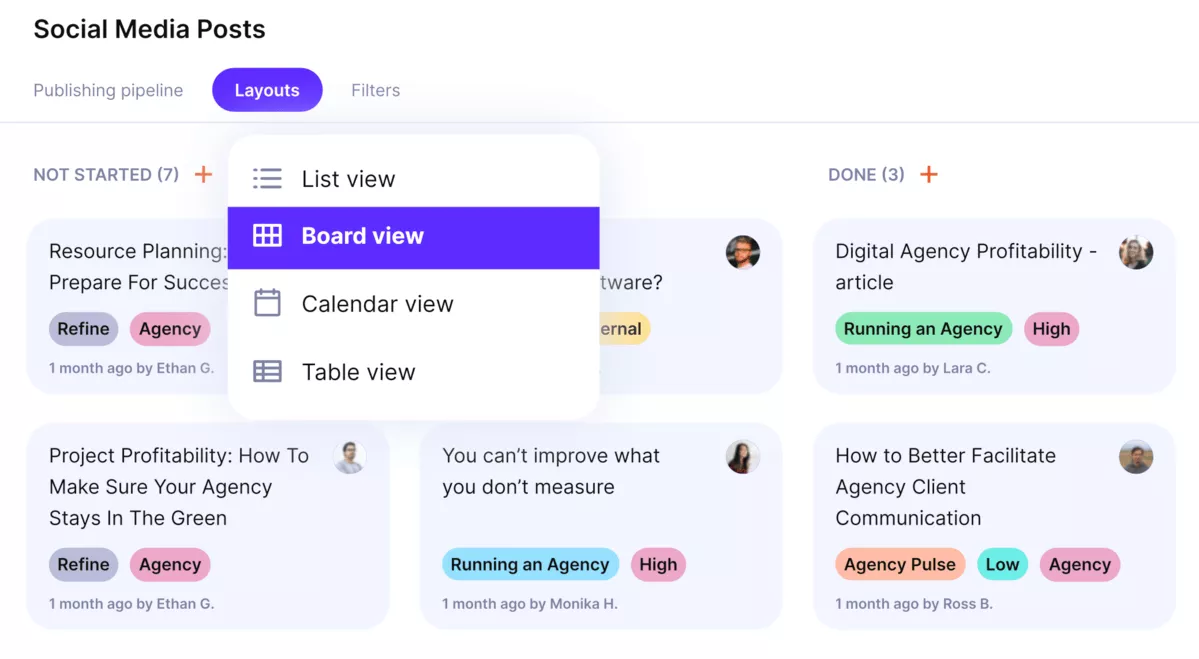
Use the timeline or Kanban view to manage projects.
Pricing
- Plans start with the Essential plan at $10 per user per month, which includes essential features such as budgeting, project & task management, docs, time tracking, expense management, reporting, and time off management.
- The Professional plan includes custom fields, recurring budgets, advanced reports, billable time approvals, and much more for $25 per user per month.
- The Ultimate plan has everything that the Essential plan and Professional plan offer, along with the HubSpot integration, advanced forecasting, advanced custom fields, overhead calculations, and more. Book a demo or reach out to our team for the monthly price per user.
Productive offers a 14-day free trial, so you can see what it can do for your project’s financial health.
Swap monday.com for Real Profitability Insight
Productive replaces your mix of project boards, timesheets, and budget spreadsheets with one platform built for agencies and service teams.

2. Plaky – Best for Simple Visual Boards
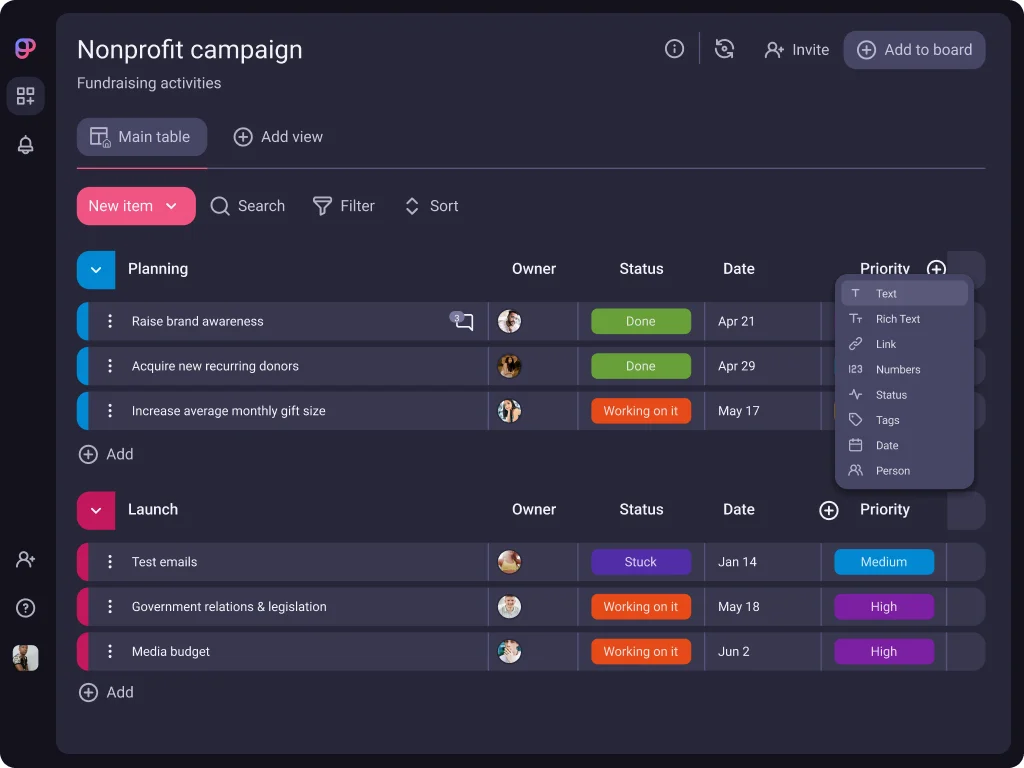
Plaky is a simple work management tool best for small teams that want visual boards and a free way to keep work in one place. It suits small businesses, solopreneurs, and internal teams that want straightforward task management without complex features.
Core Features:
- Kanban-style boards
- Simple table view
- Basic task management with assignees and due dates
- Templates and custom fields
SOurce: plaky
Pros:
- Very easy to learn and use, even for first time work management software users
- Clean, intuitive interface that keeps work and updates clear
- Free plan with unlimited users and projects for small teams
- Fast web and mobile application with a consistent experience across devices
Cons:
- Reporting is basic compared to more advanced work management tools
- Limited templates and customization options in some areas
- Missing calendar and calendar sync options that some teams expect
- Few integrations and no advanced automation for complex workflows
Final Verdict:
Plaky is a sensible monday.com alternative for very small teams that mostly need to see who is doing what and when. If you already rely on other tools for budgets and reports, it can be a friendly front end for simple work.
If you want one system to handle planning, tracking, and financials, you will outgrow it quickly.
3. Celoxis – Best for Cost And Resource Control
Celoxis is a project management and project portfolio management platform best for organizations that need firm control over schedules, costs, and resources across many parallel projects.
It suits mid sized and larger teams that already think in terms of portfolios, capacity, and utilization rather than single task lists.
Core Features:
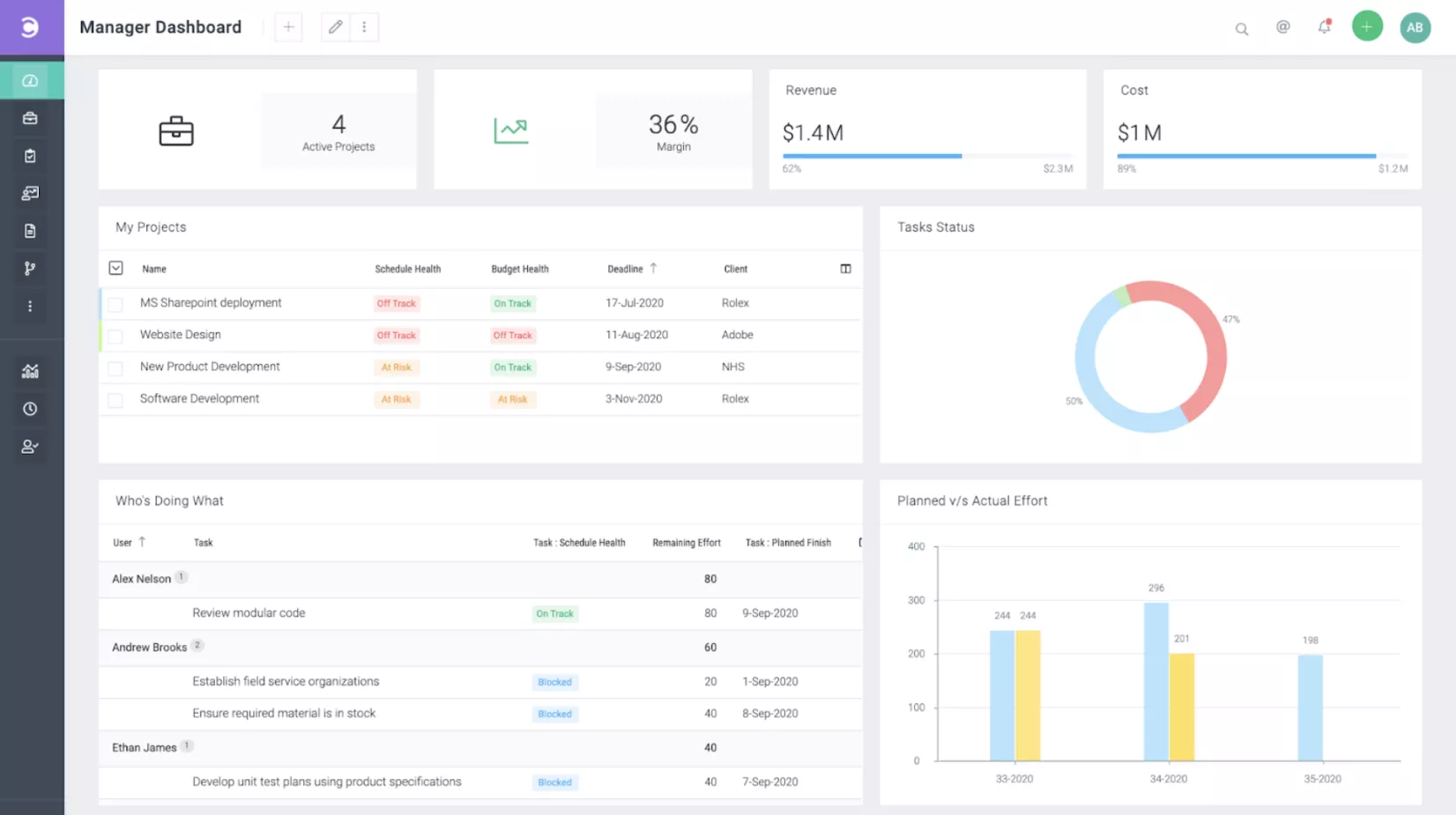
- Interactive Gantt chart scheduling
- Resource management and workload views
- Integrated time tracking and timesheets
- Customizable reports, data visualization, and dashboards
SOurce: celoxis
Pros:
- Strong task management for multiple projects and portfolios
- Solid resource management that helps balance workloads
- Detailed reporting that combines schedule, cost, and time data
- Highly configurable tool with responsive customer support when you need help
Cons:
- User interface can feel busy and overwhelming for new users
- Learning curve to configure workspaces, visual dashboards, roles, and permissions properly
- No true free plan, only a time limited trial
- Can feel heavy or expensive for smaller teams with simple projects
Final Verdict:
Celoxis is a realistic monday.com alternative if you manage a complex project portfolio and want deep control over scheduling, resource management, and reporting in one place.
If your team is small or you mainly run simple projects, the learning curve and overhead may outweigh the benefits, and a lighter work management tool will be easier to live with.
4. Screendragon – Best for Complex Creative Workflows
Screendragon is a creative operations and work management platform best for larger agencies and in house teams that need structured workflows, approvals, and resource planning.
It suits marketing and creative departments that run many campaigns at once and must keep briefs, reviews, and budgets under control.
Core Features:
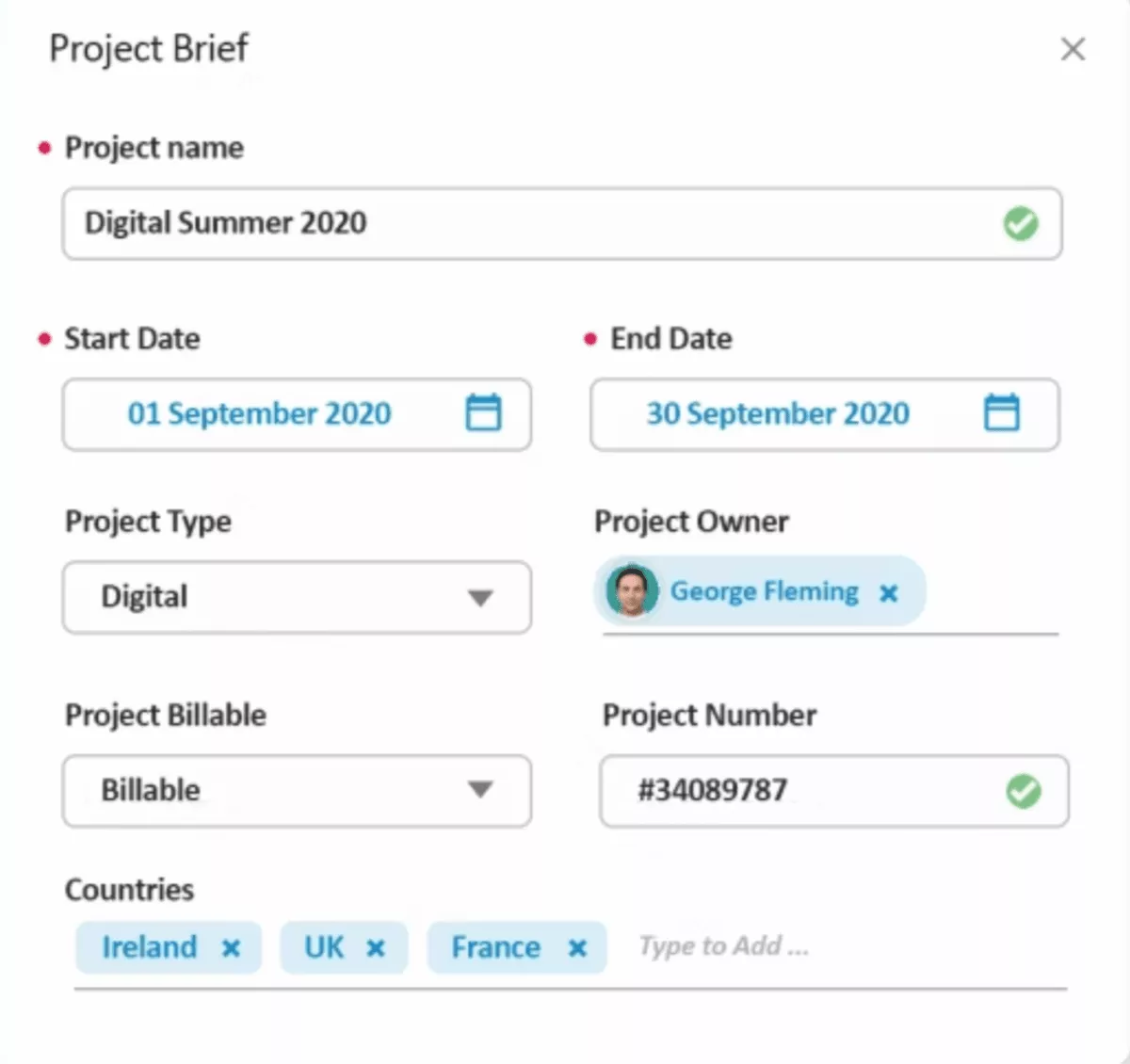
- Customizable workflow and approval automation
- Centralized briefs and asset management
- Resource management and capacity planning
- Budget tracking and reporting dashboards
SOurce: Screendragon
Pros:
- Strong workflow automation that mirrors real approval paths for campaigns and creative work
- Central hub for briefs, assets, and feedback so teams do not chase updates across tools
- Useful resource management views that help traffic and operations leads balance workloads
- Well regarded onboarding and support for teams that commit to rolling it out properly
Cons:
- Pricing and implementation effort are on the higher side compared to lighter work management tools
- Configuration can feel complex, especially for teams without a dedicated operations owner
- Interface and feature set can overwhelm smaller teams that only need basic task management
- Not many customers use every module, so some features can sit idle if the rollout is not planned carefully
Final Verdict:
Screendragon is a strong monday.com alternative if you run a large creative or marketing operation with strict approval flows and want workflows, resources, and budgets in one place.
If your team is smaller, does not have someone to own configuration, or mainly needs simple task management, the cost and complexity will feel like a stretch and a lighter work management tool will be a better fit.
5. Jira – Best for Agile Software Teams
Jira is a project management tool best for software and product teams that work in agile frameworks and need detailed issue tracking. It suits engineering squads that run sprints, plus product managers and tech leads who need a structured backlog with clear priorities.
Core Features:
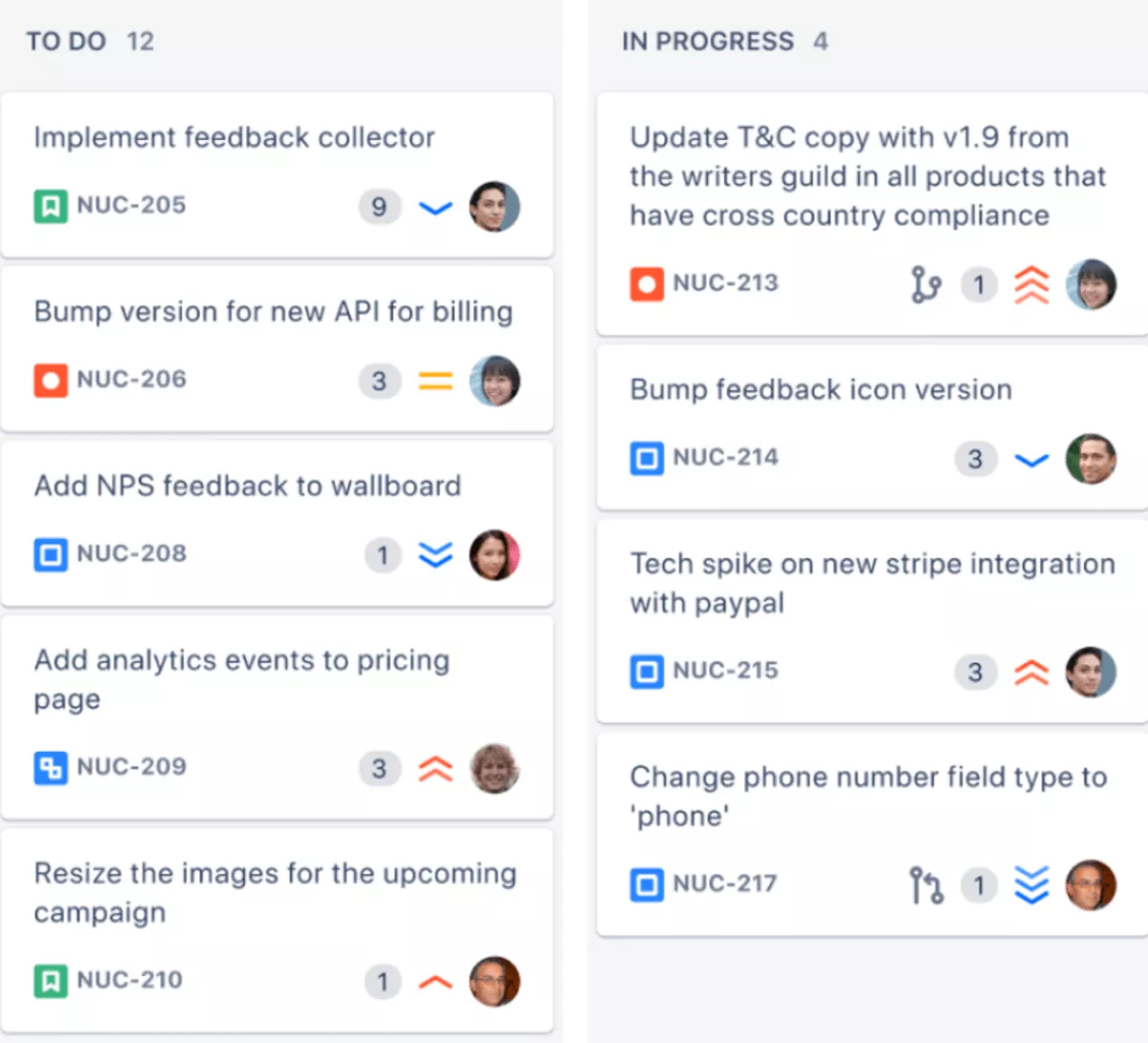
- Scrum and Kanban boards for agile workflows
- Backlog management with issues, epics, and story points
- Custom workflows and statuses for different teams
- Integrations with development tools like Bitbucket and CI systems
SOurce: jira
Pros:
- Strong support for Agile project management with flexible boards and backlogs
- Deep tracking of issues, epics, and releases for engineering teams
- Rich marketplace of apps and integrations for development workflows
- Granular permissions and workflows that can match how different squads work
Cons:
- Steep learning curve for non technical users who only need basic task management
- Configuration can become complex and hard to maintain without an owner
- Interface can feel cluttered, especially when many projects and fields are in use
- Limited native support for time tracking, budgets, and profitability compared to operations focused tools
Final Verdict:
Jira is a strong monday.com replacement if your main work is software development and you want an agile-first system that keeps every issue and release under control.
If your team includes many non technical roles or you need one place for budgets, time tracking, and financial reporting, Jira will feel heavy in daily use and you will still need extra tools to run the full operation.
6. Zoho Projects – Best for Budget Conscious Teams
This tool is a work management platform best for small and mid sized teams that want structured projects and basic time tracking without high subscription costs.
It suits budget conscious businesses, especially those already using other Zoho apps and looking for a familiar interface.
Core Features:
- Task lists, subtasks, and task dependencies for structured execution
- Gantt chart and timeline visualisation
- Built in time tracking and timesheets
- Issue tracking and basic reports
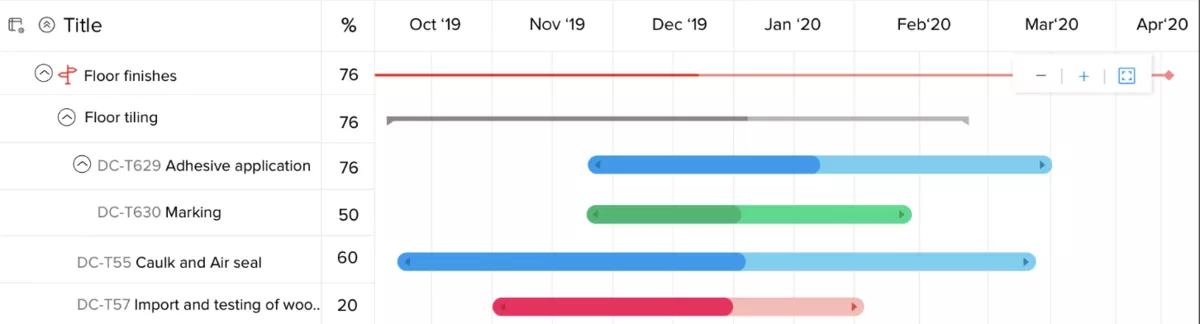
SOurce: Zoho Projects
Pros:
- Good value for money compared to many other work management tools in its class
- Built in time tracking that helps teams log work without a separate app
- Flexible task management with dependencies, milestones, and Gantt chart views
- Integrates well with the wider Zoho ecosystem for teams already using Zoho apps
Cons:
- User interface can feel dated and less polished than newer competitors
- Reporting and dashboards are basic and may not satisfy teams that want deep analytics
- Mobile apps and notifications can be inconsistent according to some users
- More advanced financial and portfolio management needs still require spreadsheets or extra tools
Final Verdict:
This platform is a reasonable monday.com substitute if you want structured projects, built in time tracking, and a lower price point, especially if you already rely on other Zoho products.
If you expect a very modern interface or need advanced reporting, forecasting, resource management and profitability views in one place, it will feel limited and you will still depend on external tools to cover the gaps.
7. Smartsheet – Best for Spreadsheet Style Planning
Smartsheet is a work management platform best for teams that prefer spreadsheet style planning with extra collaboration and automation.
It suits operations, implementation, and PMO teams that already manage work in grids and want something more structured than static files.
Core Features:
- Grid based sheets that feel similar to spreadsheets
- Gantt chart and Gantt View for schedules and dependencies
- Card and calendar views for different ways of seeing work
- Automation rules, visual dashboards, and reporting
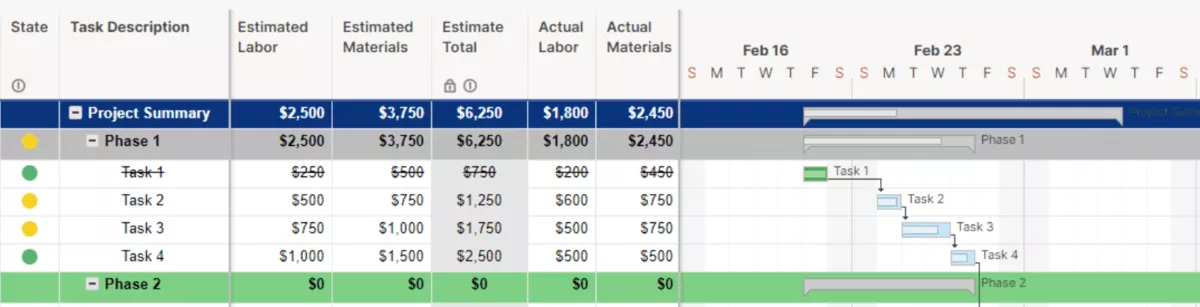
SOurce: smartsheet
Pros:
- Familiar grid layout that makes it easier for spreadsheet first users to adopt
- Flexible sheets that can store tasks, resource information, and project metadata in one place
- Strong reporting, activity logs, and dashboards that pull data from multiple sheets
- Automation features that reduce manual updates and recurring admin work
Cons:
- Can feel complex and intimidating for people who dislike spreadsheets
- Large or heavily formatted sheets may become slower or harder to maintain over time
- Visual boards and timelines feel secondary compared to the core grid experience
- Pricing can add up as more users and premium features are required
Final Verdict:
Smartsheet is a solid monday.com alternative if your team already thinks in rows and columns and wants to centralize complex project data.
If you have a lot of visual thinkers, smaller creative teams, or people who resist spreadsheet style tools, it can feel heavy in daily use and a more visual work management tool may be a better fit.
8. ClickUp – Best for Highly Custom Workspaces
ClickUp is a project management and workflow management platform best for teams that want to customize almost every part of their workspace and replace scattered collaboration tools with one system.
It suits growing teams that are ready to invest time into setup and governance so the system stays clear as work scales.
Core Features:
- Hierarchy with spaces, folders, lists, and tasks
- Multiple project views including list, board, and Gantt chart timeline
- Docs, whiteboards, and comments for team collaboration and real time communication
- Custom fields, task tagging, an automation builder for complex automation workflows, and templates
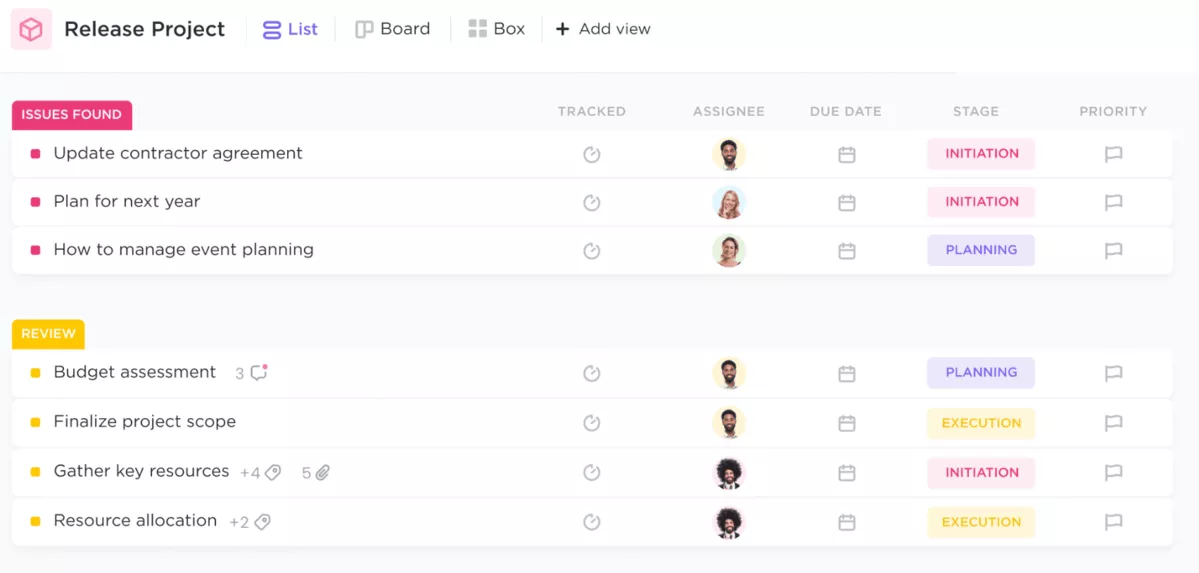
SOurce: clickup
Pros:
- Very flexible structure that lets teams model simple or complex projects in one tool
- Wide choice of views so people can switch between lists, boards, or timelines as needed
- Built in docs and comments that keep team collaboration close to the work
- Active development pace and many templates to speed up initial workspace setup
Cons:
- Configuration can take significant time and needs a clear owner to avoid clutter
- New users can feel overwhelmed by the number of options and settings
- Performance and interface can feel busy in very large workspaces with many lists and fields
- Still relies on other tools or manual work for deep financials and advanced reporting
Final Verdict:
ClickUp is a strong monday.com alternative if you like to design your own system and have someone who can own that structure over time.
If your team prefers a simpler, more opinionated work management tool or you do not have capacity to maintain a complex workspace, ClickUp can feel like more work than it is worth.
Additionally, you can play it safe an check out our Clickup vs Monday vs Asana comparison.
9. Asana – Best for Structured Team Projects
Asana is a work management tool best for cross functional teams that want clear, structured projects and tasks in a clean interface. It suits marketing, operations, and internal teams that need reliable coordination more than heavy customization.
Core Features:
- Projects built from tasks, sections, and subtasks
- List, board, and timeline views
- Basic workflow automation with rules
- Comments, attachments, file sharing, and simple reporting
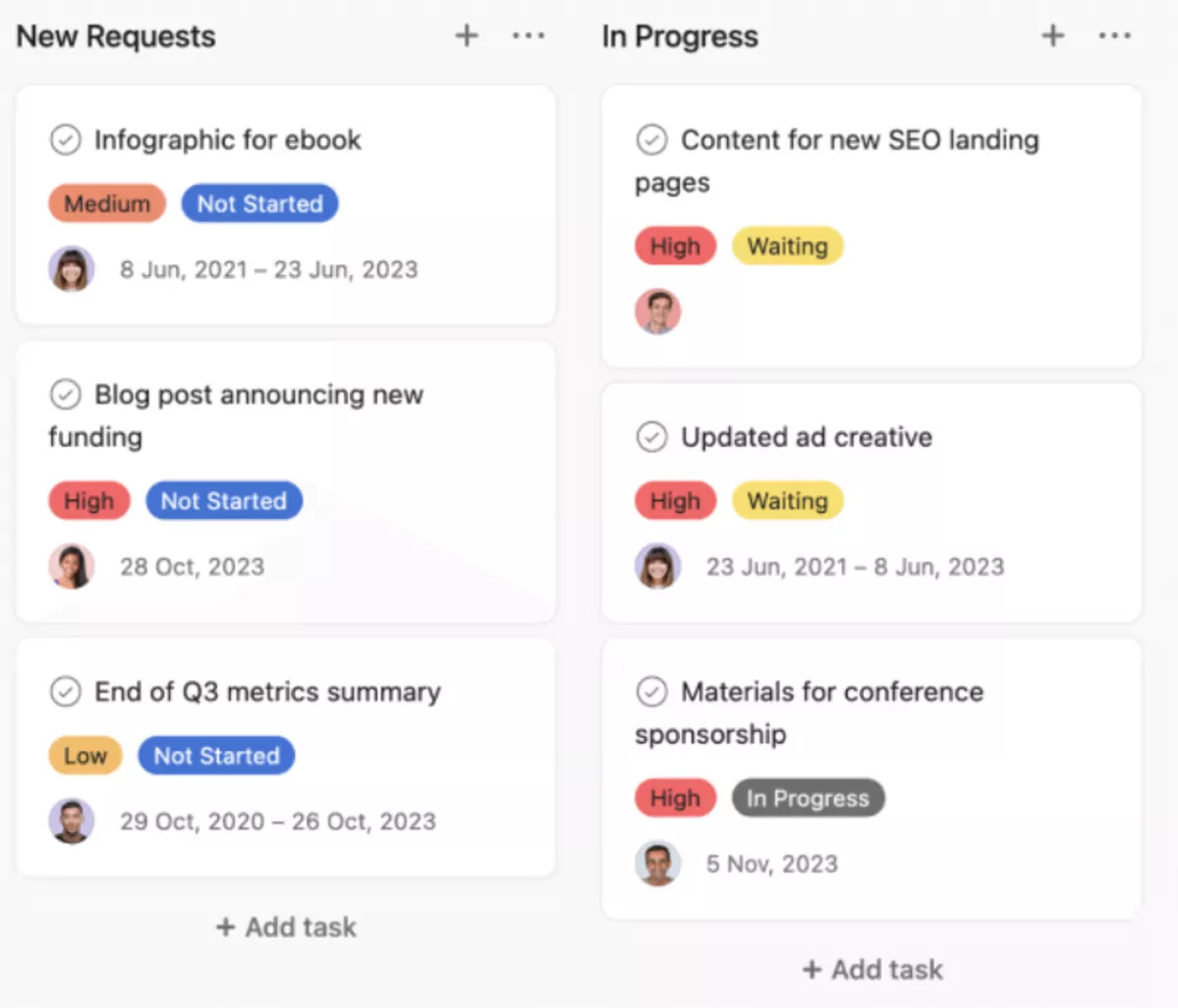
SOurce: asana
Pros:
- Easy for most remote teams to learn, even if they have never used work management software
- Clear structure that helps teams see what is due, who owns it, and how work connects
- Good support for recurring work and templates for common project types
- Solid collaboration tools that keep updates in context instead of in long email threads
Cons:
- Limited native support for budgets, billing, and profitability, so many teams need extra tools
- Advanced reporting and portfolio views often sit behind higher pricing tiers
- Can feel constrained for teams that want highly customized workflows or many custom fields
- Some users feel notifications and inbox views can become noisy without careful tuning
Final Verdict:
Asana is a reliable monday.com alternative if your main goal is to organize and track team projects in a clear way.
If you want one platform to handle project financials or demand very deep customization, you will likely pair Asana with other tools, or feel that it does not go far enough.
10. Trello – Best for Simple Kanban Boards
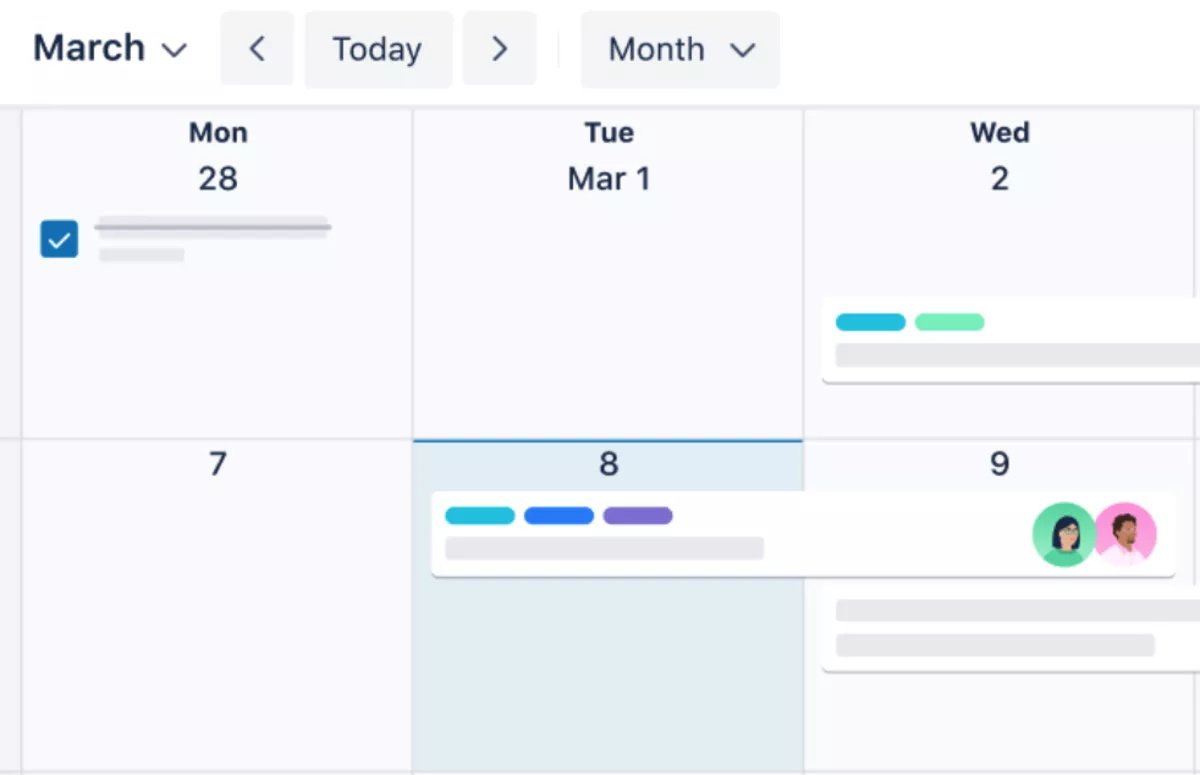
Trello is a lightweight work management tool best for small teams and simple workflows that can live on visual boards. It suits personal projects, small side teams, remote teams, and straightforward pipelines where cards moving between lists tell most of the story.
Core Features:
- Board, list, and task cards on Kanban boards
- Checklists and due dates inside cards
- Labels, attachments, and comments
- Power ups and integrations for extra functions
SOurce: trello
Pros:
- Very simple to set up and understand, even for people new to work management tools
- Visual boards and simple drag and drop make it easy to see the status of tasks at a glance
- Flexible enough to handle many simple use cases from content pipelines to basic CRM boards
- Generous free plan that works well for small teams and personal projects
Cons:
- No built in project budgets, time tracking, or profitability features
- Reporting is minimal without installing and configuring extra power ups
- Boards can multiply quickly and become hard to manage at scale
- Relies on add ons and external tools to cover more advanced work management needs
Final Verdict:
Trello is a good monday.com alternative when you only need simple Kanban boards to track tasks and ideas. If you manage multiple clients, complex projects, or need strong reporting and financials, an all-in-one tool like Productive is a better fit.
For individuals or very small teams, Trello can double as a simple daily planner, especially when you combine lists, labels, and a personal Focus Mode for the most important cards.
In case you’re a visual Kanban person, head over to our Trello alternatives review.
Why Are Teams Looking For monday.com Replacements?
Teams usually start searching for Monday alternatives when the boards look good, but key workflows still live in spreadsheets or separate apps. Reviews often mention the same themes: complexity as work grows, limited time tracking and reporting on lower plans, and pricing that feels out of step with what small teams get.
Grouped Pain Points From Real Users
These themes show up again and again in public reviews and user feedback.
- Complexity as you scale: monday.com feels simple at first, but advanced setups can be confusing and require trial and error to configure.
- Time tracking and reporting as add ons: core project management features are solid, yet time tracking and reporting often depend on paid add ons or higher tiers.
- Pricing and seat bundles: smaller teams feel forced to buy blocks of seats, and free or basic plans can feel limited for real project work.
- Fragmented workflows: teams end up splitting work across boards, spreadsheets, and other tools to cover gaps.
How These Pain Points Show Up In Day To Day Work?
These pain points turn into specific headaches once you try to run real projects at scale.
- A manager wants to see how much time the team logged this week but needs to export data from several boards into a spreadsheet.
- Finance or leadership ask for basic project reporting, such as margins by client or billable versus non billable time, but the data lives in several systems, and it’s a headache to consolidate it.
- Teams prepare month end reports by copying numbers from monday.com into separate files because budgets and time tracking are not tightly connected.
- New colleagues need long onboarding to understand how boards, automations, and permissions work, which slows down adoption.
- Admins spend time fixing automations, column types, and permissions instead of improving the overall workflow.
How Do The Best monday.com Substitutes Compare?
The top monday.com substitutes differ most in how deep their project management goes and how well they handle money, people, and reporting in one place. The table below compares each tool on those points so you can see where they shine and where you will still need extra tools.
Key Comparison Dimensions
- Best for: The type of team or use case where the tool fits best.
- Planning depth: How well it covers planning, tasks, and schedules.
- Financial workflows: How much it helps with budgets, time tracking, and profitability.
- Resource planning: How clearly it shows workloads and capacity.
- Reporting: How strong the built in views and dashboards are.
- Not ideal if: A quick hint for who should probably skip it.
Best Alternatives To monday.com Comparison Table
| Tool | Best for | Planning depth | Financial workflows | Resource planning | Reporting | Not ideal if |
|---|---|---|---|---|---|---|
| 1. Productive | Agencies and service teams that want one place for projects, time, and budgets | End to end project management with tasks, schedules, and project budgets | Built in time tracking, budgets, and profitability views | Strong capacity planning and scheduling for people and teams | Detailed reports for projects, clients, and services | You only need a simple free board and do not care about financials yet |
| 2. Plaky | Small teams that want simple visual boards | Basic tasks and boards for light projects | No budgets or time tracking built in | No real resource management views | Very simple reporting | You need serious planning, budgets, or cross project reporting |
| 3. Celoxis | Mid-sized and larger teams with many parallel projects | Advanced project and portfolio management for complex work | Strong support for costs, budgets, and billed time | Detailed workload and resource management views | Useful dashboards for campaigns and approvals | You want a lightweight, low effort tool for a small team |
| 4. Screendragon | Large creative and marketing teams with strict workflows | Strong work management for campaigns and creative work | Budget tracking for projects and campaigns, limited billing | Good resource planning for creative and traffic teams | Rich reports and dashboards | You are a small team without capacity to manage a complex system |
| 5. Jira | Software and product teams working in Agile | Deep issue and sprint management for development work | Limited native support for budgets or profitability | Basic views, often extended with marketplace apps | Strong tracking of issues and releases | Your work is not mainly software development or engineering |
| 6. Zoho Projects | Budget conscious teams that want tasks and time tracking | Solid project planning with tasks, milestones, and Gantt charts | Built in time tracking, limited budgeting out of the box | Simple workload views, more depth with other Zoho apps | Basic reports that cover tasks and logged time | You want very polished UX or advanced financial reporting in one tool |
| 7. Smartsheet | Spreadsheet first teams running structured projects | Flexible sheets for complex project plans | Financial tracking needs manual work or custom sheets | Can store resource data, but needs setup to be clear | Strong reporting and dashboards across sheets | Your team dislikes spreadsheet style tools or wants simple visual boards |
| 8. ClickUp | Teams that want to design a custom workspace | Broad project management features across many views | Can track time and budgets with some setup, invoicing still separate | Workload views exist but need careful configuration | Many views and custom dashboards, some setup required | You prefer simple, opinionated workflows and do not want to govern a complex setup |
| 9. Asana | Cross functional teams that want clear projects and tasks | Strong task and project management with timelines and boards | No native budgets, limited to basic workload and time integrations | Basic workload features on higher plans | Good built in reports for tasks and timelines | You need one platform for detailed project financials and deep customization |
| 10. Trello | Small teams and simple workflows on Kanban boards | Simple boards for tasks and ideas, no full project structure | No budgets or time tracking without add ons | No built in resource planning views | Very limited reporting without power ups | You manage many clients, complex projects, or need serious reporting and controls |
How To Read This Table?
Start by looking at the “Best for” and “Not ideal if” columns to rule tools in or out based on your type of work. Then compare planning depth, financial workflows, and resource planning for the few that remain, since those are the areas where you will otherwise fall back to spreadsheets.
How Should You Choose The Right monday Alternative?
Choosing the right monday.com alternative starts with being clear about why monday.com is not working for you, then matching the listed tools with your key features, deal-brakers and must-haves.
The best fit depends on the type of projects you run, how you bill for work, and how much configuration your team can handle.
Six Steps for Choosing a monday App Replacement
Start with a short, honest review of how you work today and what is slowing you down.
- List your main pain points: Write down where monday.com falls short for your team, such as reporting, time tracking, or planning capacity.
- Map your key workflows: Sketch how work moves from sales handoff to delivery and invoicing so you know what a new work management tool must support.
- Decide what must be built in: Mark which steps need to live in one system, like budgets, approvals, or time tracking, and which can stay in supporting tools.
- Set your budget and constraints: Be realistic about what you can spend and whether you need a free plan, a simple setup, or strong support.
- Shortlist two or three tools: Use the earlier list and comparison table to pick a few alternatives to Monday that match your workflows and budget.
- Test with real projects: Run a small pilot with real clients or internal projects before you commit, and check how reporting and planning feel after a few weeks.
Migration Checklist For Moving Off Monday.com
Once you have chosen a new tool, treat migration as a small project with a clear plan. As you migrate, test data import from monday.com into the new system so you do not rebuild every project from scratch.
- Audit existing boards and dashboards: Decide which boards, automations, and reports are still useful and which can be archived.
- Define what to recreate: Identify the minimum set of projects, workflows, and reports that must exist in the new tool from day one.
- Set up a pilot space: Build a clean structure in the new system and migrate a limited set of active projects or clients into it.
- Run both tools in parallel for a short time: Let a few teams work in the new tool while keeping monday.com as a safety net during the pilot.
- Plan a clear cutover date: Choose a date when all new work starts in the new tool and monday.com moves to read only or archive.
- Train the team and capture feedback: Offer short training sessions, gather feedback after the first weeks, and refine workflows while habits are still forming.
If you follow these steps, switching from monday.com to a new work management platform becomes a controlled change rather than a risky leap. You keep projects moving, improve your workflows, and avoid rebuilding the same reporting problems in a new tool.
Which Other monday.com Alternatives Are Worth Mentioning?
Some pop up often in conversations but are not strong enough to sit in the core list for most teams. They can still be the right choice in specific setups, especially if you already use their ecosystems.
Other monday App Alternatives Mini-Comparison Table
Use this table to understand where these tools fit and why they are not in the main group of ten.
| Tool | Best for | Why it is not in the core list |
|---|---|---|
| 11. Airtable | Teams that want a flexible database style system they can shape into simple project management | Requires more setup and ongoing maintenance, and still needs extra tools for deep reporting and financials |
| 12. Wrike | Marketing teams and agencies that want strong project management with proofing and campaign views | Overlaps with tools like Screendragon and Celoxis, and can feel heavy for smaller teams compared to the main picks |
| 13. Microsoft Planner | Internal teams already on Microsoft 365 that need basic Kanban boards | Good as a simple board inside the Microsoft stack, but too limited for serious project management and financial workflows |
| 14. Ravetree | Professional services teams that want projects, time tracking, and billing in one system | Solid fit for some agencies, but less widely adopted and not as visible in this specific monday.com alternatives search space |
| 15. Basecamp | Small teams that want simple team collaboration, communication, to do lists, and client updates in one place | Great as a simple messaging system and for lightweight task tracking, but lacks structured planning, resource management, and detailed reporting |
Final Thoughts on Replacing monday App
Choosing a monday.com alternative is about simplifying how your team works and getting out of the spreadsheet spiral. While most tools in this guide solve parts of the puzzle, very few bring planning, collaboration, time tracking, budgets, approvals, and reporting together in one place.
If you’re tired of stitching tools together or juggling manual updates, it’s worth exploring all-in-one platforms that are purpose-built for service delivery and operational clarity. When you compare tools, look beyond features and pricing and pay attention to customer service quality, since you will rely on it during rollout and change.
Let us know if you have any migration questions, and book a short demo with Productive.
FAQ
What is the best monday.com alternative for agencies?
If your team needs built-in time tracking, budgeting, and project profitability reporting, most generic tools will fall short. The best fit is a platform designed for agencies or client services work where you need one place to manage delivery and financials.
Is monday.com still a good choice for small teams?
Yes, especially for simple task boards and workflows. Small internal teams that don’t need time tracking, approvals, or project-level financials may find monday.com more than enough. Complexity tends to grow when teams scale or start charging for work.
Which monday.com alternative has the best reporting?
If you’re struggling with exporting data to spreadsheets, look for tools that offer real-time dashboards, built-in utilization views, and profitability tracking. These reduce the need for extra tools and help you see what’s working without rebuilding reports.
Are there any free alternatives to monday.com?
Yes. Several tools in this list (like ClickUp or Trello) offer free plans, though most limit features like reporting, automation, or collaboration at scale. Free plans are great for testing fit or running small internal projects but may feel limited once you manage clients or budgets, especially if there are strict user limitations on who can access advanced features.
How hard is it to switch from monday.com to something else?
Switching tools takes planning, but it’s manageable if done gradually. Audit what you use, pilot a few projects in the new tool, and move over in phases. Don’t try to rebuild everything – only migrate what you need going forward.
Connect With Agency Peers
Access agency-related Slack channels, exchange business insights, and join in on members-only live sessions.
