Human Resource Planning (HRP): Meaning and 4-Step Process

You’ve committed to client work, and too few people are free to deliver it. Human resource planning is the process of matching your people’s skills and available hours to the work ahead.
In this article, you’ll get what it means, its types, why it matters, and a worked four-step process. You’ll also see how to keep the plan on track, its challenges and trends, and where software helps.
Key Takeaways
- Planning human resources means matching your people’s skills and available hours to the work ahead: You decide who you need, when, and with which skills before the work arrives.
- The planning process runs in four steps: You analyze your current workforce, forecast demand, size the gap, and turn each gap into a dated action.
- The challenges start with inputs that go out of date: Reported availability, old skills records, dropped training time, and strategy changes can all make a correct-looking plan wrong.
- Software helps by keeping capacity, bookings, and logged hours together: You update one plan as projects and time off change.
What Is Human Resource Planning (HRP)?
HRP is the process of matching your people’s skills and available hours to the work ahead. It covers your current employees, the roles you’ll need next, and the gap between the two.
Some illustrative examples for different businesses:
- An e-commerce business forecasting seasonal demand for IT capacity planning, then scaling its support team.
- A design agency spotting higher demand for digital media and planning which designers to upskill or reskill.
- A law firm preparing for partner retirements by developing internal candidates as future leaders and recruiting external talent.
What Are the Types of HR Planning?
The types of HR planning are short-term and strategic, and they differ in how far ahead the plan looks. The split is our own framing, and each one plans for a different horizon:
- Short-term planning reacts to immediate staffing needs, such as covering a resignation or a sudden project.
- Strategic planning aligns staffing with your future business goals. Our guide to long-term strategic planning covers it in depth.
Why Is HR Planning Important?
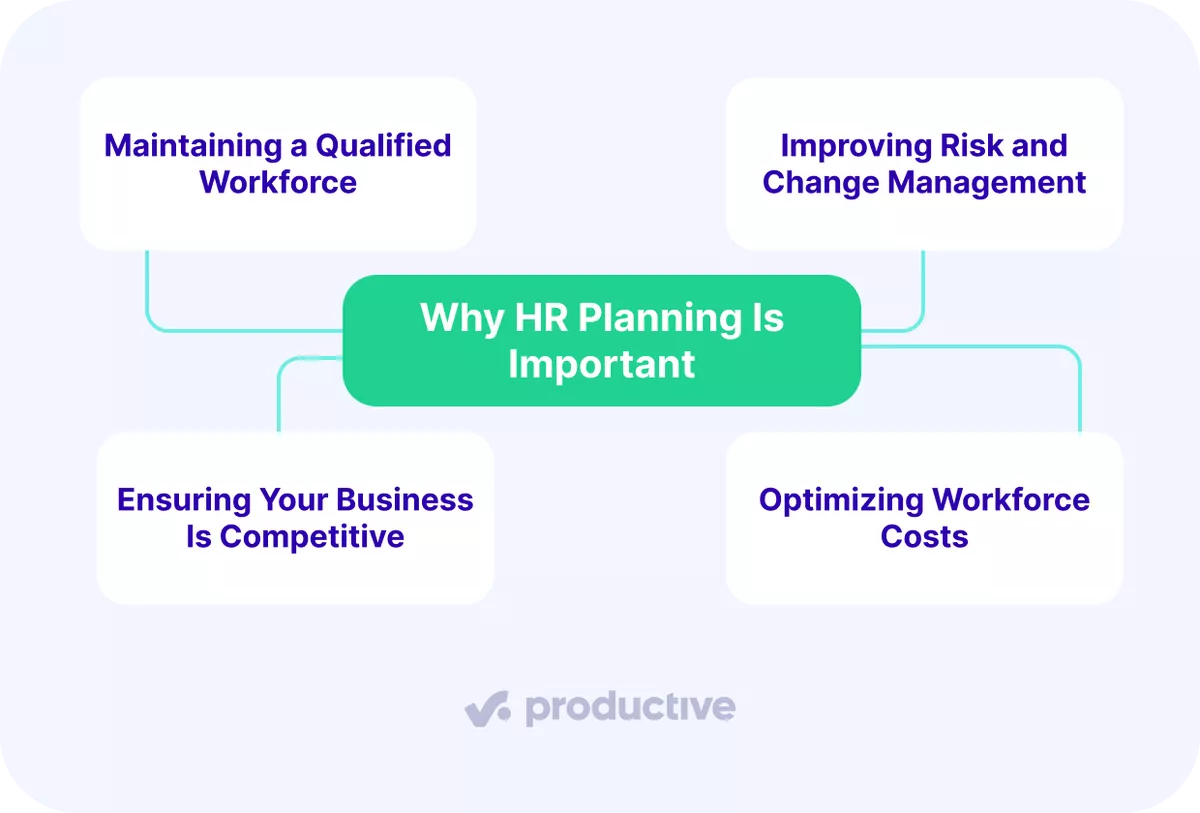
HR planning is important because you maintain a qualified workforce, manage risk and change, stay competitive, and optimize workforce costs. The four headings are our breakdown.
We’ll take a closer look at each.
1. Maintaining a Qualified Workforce
Maintaining a qualified workforce means tying hiring, training, and development to your business goals. Suppose next year’s strategy adds a service line; you know which skills to recruit or build first. That reduces the slow, error-prone work that follows when a project lands on people without the right employee skills.
2. Improving Risk and Change Management
Improving risk and change management means surfacing staffing risks before they become delivery problems. When you forecast needs against trends, you can write a contingency plan for each scenario. The plan names who covers a key role and which clients hear first.
Some risks are external factors, such as a technological advancement that devalues part of your team’s skills. Others come from inside, such as a leadership transition when a director steps down. A plan drafted months ahead gives that handover a named owner and a date.
3. Ensuring Your Business Is Competitive
Ensuring your business is competitive means having the skills a client asks for before the contract is signed. A firm that knows its staffing needs can recruit future talent before a project is won, not after. If a client asks for a capability you’ve already planned for, you can staff it without a hiring delay.
4. Optimizing Workforce Costs
Optimizing workforce costs means balancing utilization so that payroll covers productive work. Low utilization means paying for hours no client is billed for. Sustained high utilization leaves little time for training and can push people toward burnout. Spotting gaps early also cuts last-minute hiring and overtime, two costly fixes for a staffing shortfall.
Productive calculates utilization as billable hours divided by available hours, where availability already subtracts holidays and approved time off.
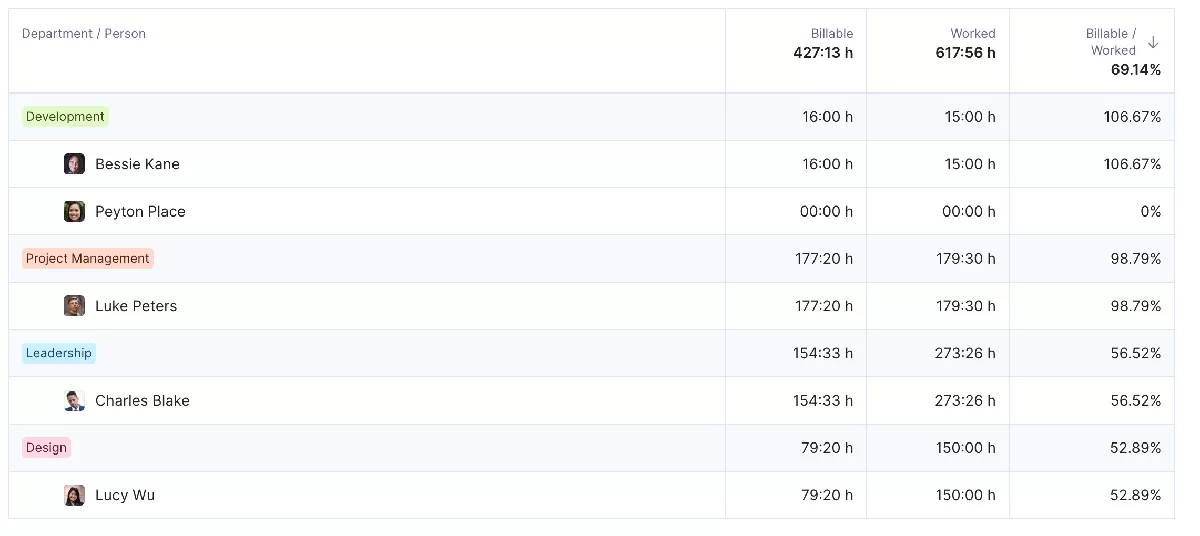
Track billable hours by person in Productive’s utilization reports
You can track team utilization by person and see who has room for more client work.

That’s a key thing that we get out of the reports that really feeds into our utilization and resourcing. If we know we’re doing 30% on the internal projects, then we know we’ve got the capacity to take on more work.
Read how DotDev uses reports to plan utilization and resourcing with Productive.
What Is the Human Resource Planning Process?
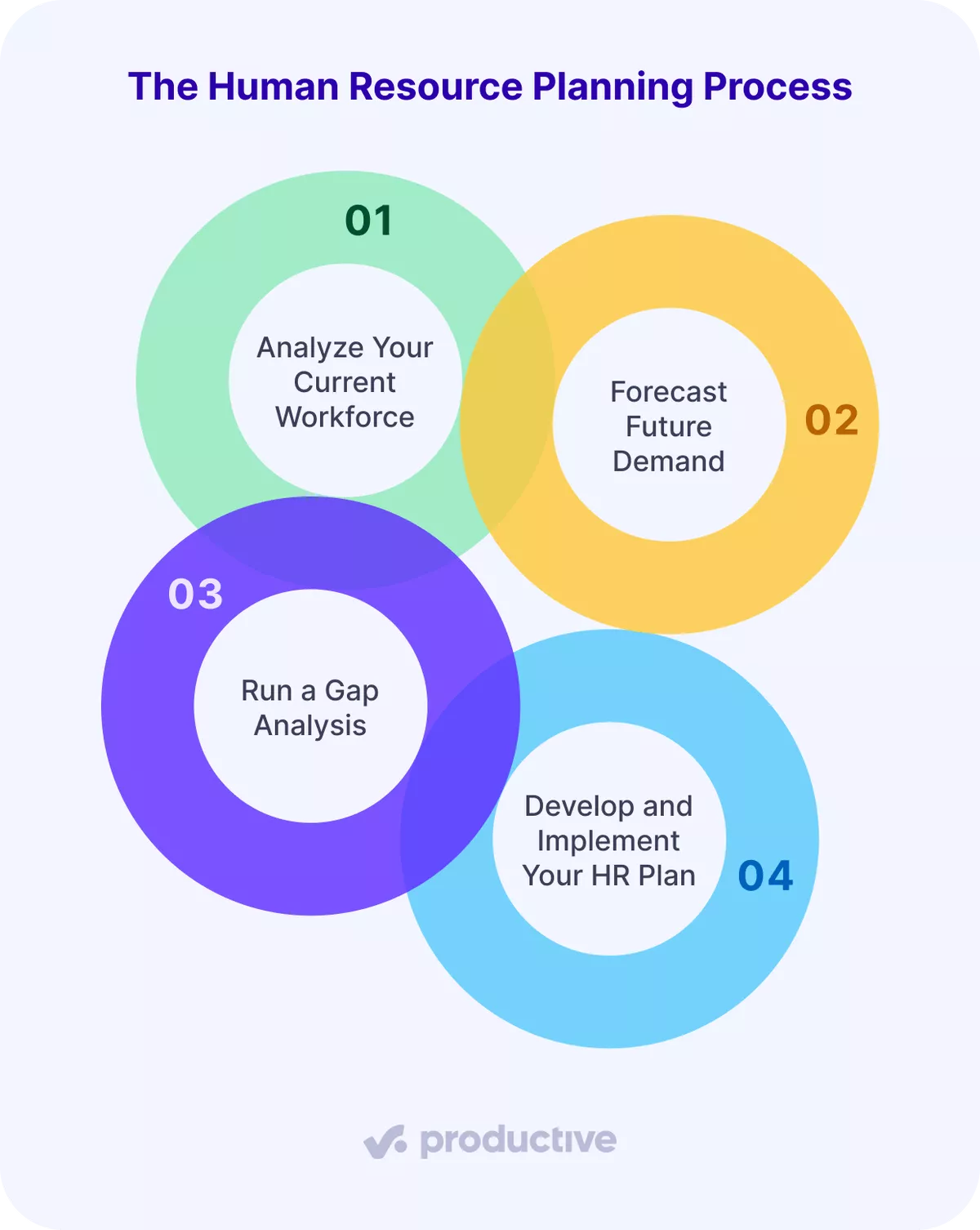
The human resource planning process is analyzing your current workforce, forecasting future demand, running a gap analysis, and implementing the plan. This four-step split is our own.
Let’s look at each.
Step 1: Analyze Your Current Workforce
Analyzing your current workforce means measuring the hours and skills you have today. The first step in the human resource planning process is this baseline, because every later step builds on it.
Open your staff list and last quarter’s timesheets. For each person, record their role, seniority, technical and soft skills, and hours available for client work. That’s contracted hours minus time off, holidays, and regular internal time.
Together, these show your workforce size and structure. The step is done when you have current capacity by role in hours per week.
Our illustrative example runs through every step. A design agency has three designers, each with 30 client hours available per week. Design capacity is 90 hours per week.
Step 2: Forecast Future Demand
Forecasting future demand means turning signed and likely work into future workforce requirements, in hours by role. Pull your signed projects and your sales pipeline.
Signed work is firm. Likely deals show where growth or a new service line adds load, so keep the two apart.
Three methods sharpen the estimate, and these three are our pick:
- Ratio analysis predicts staffing from past project volume against headcount.
- Trend analysis reads patterns in your staffing data over time.
- Comparative analysis sets one project’s resourcing against others or benchmarks you against competitors.
The step is done when every role has a demand figure in hours per week. In the example, signed projects need 70 design hours per week. Likely deals would add 40 more for four weeks.
Productive lets you book people on unsigned deals as tentative bookings. They don’t count toward scheduled hours until you confirm them.
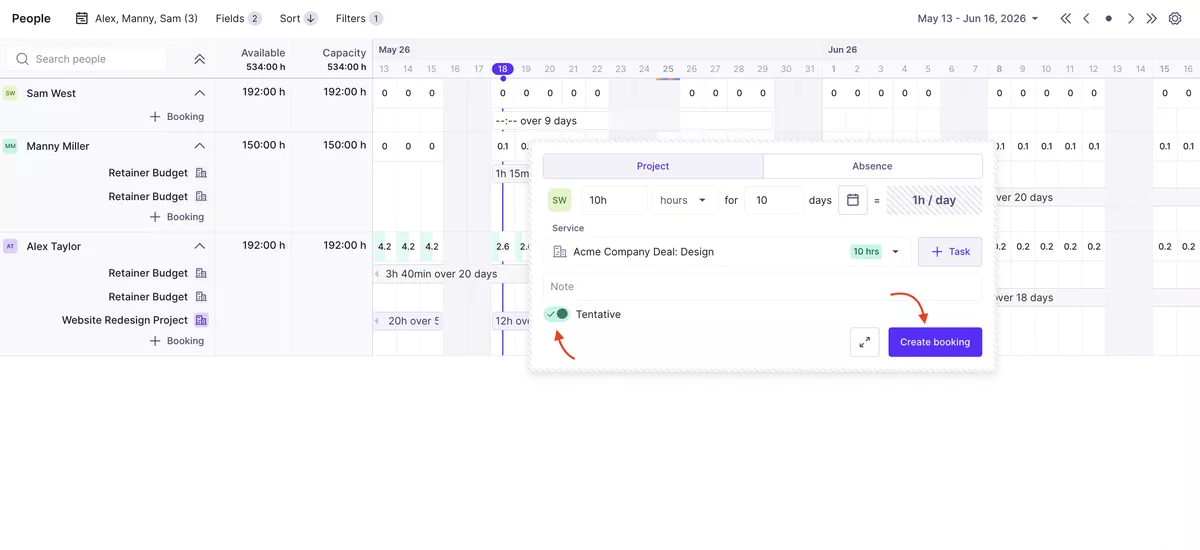
Book likely deals as tentative work next to confirmed bookings in Productive’s Resource Planner
That keeps likely work visible without counting it as scheduled time. You can plan your team’s capacity with confirmed and tentative work side by side.
Plan likely deals before they’re signed
Step 3: Run a Gap Analysis
Running a gap analysis means putting capacity and demand side by side, role by role. Any role where demand exceeds capacity has a talent gap to fix next. If the work needs a skill nobody has, it’s also a skill gap.
A role where capacity exceeds demand has spare hours, a cue to chase work or delay a hire. In the example, signed work alone leaves 20 spare design hours. If the likely deals close, demand reaches 110 hours against 90. Design is then 20 hours per week short.
Then check last quarter’s projects. Compare estimated with actual completion times to find where work slipped because of a missing skill. If upcoming projects need that skill, flag it now. The step is done when your capacity sheet shows a gap figure for every role.
Step 4: Develop and Implement Your HR Plan
Developing the plan means turning each gap into one dated action: hire, contract, reskill, or shift work. Reskilling trains a person for a different role, while upskilling deepens skills in their current one. Give each action an owner, a date range, hours, and the project it serves.
The gap figures make it an informed decision, not a guess. Collect the actions in a resource plan, a document listing each person, their availability, and their scheduled time.
In the example, the four-week, 20-hour weekly gap becomes four hours per working day of contractor time. Pair the plan with retention moves, such as career development plans and competitive pay.
The step is done when your resource plan lists a dated action with an owner for every gap. Once the plan is live, the next job is checking it against logged hours.
How Do You Keep Your HR Plan on Track?
You keep your HR plan on track by monitoring planned against logged hours, reviewing the plan every quarter, and improving it in small steps. The three practices are our recommendation. We’ll take a closer look at each.
Monitor Planned Against Logged Hours
Monitoring planned against logged hours means comparing your resource plan with the time people actually record. Check whether each role works the hours the plan assumed. Some benefits, such as better work-life balance, won’t show up in hours, so ask people as well.
In Productive, you can ask the AI Assistant to “show scheduled versus worked hours by person for last month”. It returns a link to a structured report with the filters and grouping applied. You pull a report in plain language instead of configuring it manually.
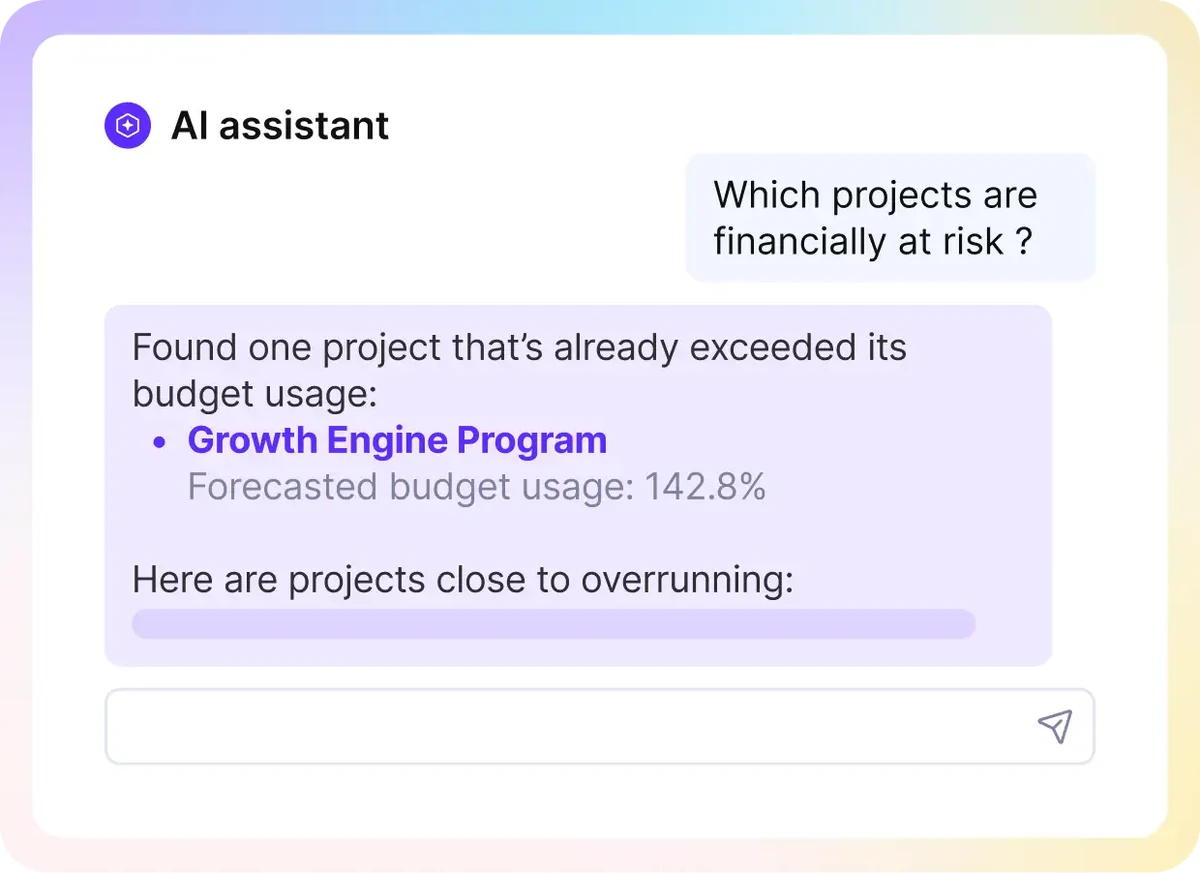
Ask the AI Assistant for insights in Productive.
If you’re comparing tools, see our list of the top resource management software.
Review the Plan Every Quarter
Reviewing the plan every quarter means rerunning the gap check with new demand figures. Strategy and client demand can change within a year. A regular review shows where a strategy has gone off track while you can still change it.
Improve the Plan in Small Steps
Improving the plan in small steps means changing one input or action at a time. Ask the people you planned for whether the plan worked, then adjust. Small changes make it easier to see which one helped. Even a well-run plan can break, so the challenges are worth knowing in advance.
What Challenges Can Break a Human Resource Plan?
The challenges that can break a human resource plan are forecasting accuracy, outdated skills records, billable balance, and goal alignment. This list is our selection. We’ll take a closer look at each.
Forecasting Accuracy
A forecast fails when available hours exist on paper but not in practice. Availability that team leads estimate can leave out internal meetings, admin time, and scope creep on live projects.
Instead, base available hours on last quarter’s timesheets by role, minus logged internal time. Demand also shifts with market conditions, so forecast a low and a high case for each role.
Outdated Skills Records
A skills record made at hire goes out of date as roles change. People pick up new skills on client projects, and client demand shifts toward skills you never tracked.
At each quarterly review, add every skill a person used on billed work. A skill gap then shows before a project needs it.
Billable and Non-Billable Balance
When every hour carries a client rate, training looks like lost revenue and can get dropped. Too much training cuts into profitability.
Book a non-billable allocation per role in your resource plan, then compare it with logged hours. Without time tracking, you can’t see the split.
Alignment With Business Goals
Strategy can change in meetings that the person planning staff doesn’t attend. Put your resourcing lead in the quarterly strategy meeting, and have them update the forecast inputs that week. Some of these pressures come from outside your firm, in the trends below.
What Trends Are Shaping Human Resources Plans?
Three trends shaping human resources plans are a lasting talent shortage, scarce AI skills, and more upskilling. All three come from ManpowerGroup’s 2026 Talent Shortage Survey release of 39,000 employers:
- Hiring stays hard. 72% of employers report hiring difficulty, and Professional, Scientific, and Technical Services sits at 73%.
- AI skills are now the hardest to find. AI Model & Application Development (20%) and AI Literacy (19%) lead the global ranking.
- Upskilling and reskilling lead the response. At 27%, it’s the top strategy employers use against the shortage.
For your plan, reskilling can cover a gap that a hire won’t fill in time. Book the training hours in your resource plan like any other action.
FAQ
Is Human Resource Planning the Same as Workforce Planning?
Human resource planning is the same as workforce planning in purpose: both align people with business needs. The CIPD defines workforce planning as “a core business process which aligns changing organization needs with people strategy”. The four steps above do that job, counted in hours and skills.
How Is HR Planning Different From Resource Planning?
HR planning is different from resource planning in horizon and output. An HR plan sets how many people and which skills you need over the coming months. A resource plan books the people you already have onto projects, week by week.
Your HR plan decides who joins or trains. Your resource plan decides who works for which client this week. For the weekly side, see how to plan resources across multiple projects.
Use Software for Human Resource Planning
Using software helps once the plan needs weekly upkeep. A workforce plan holds when you count available hours, not billed ones, and size each gap by role. Each gap then gets a dated action, and a quarterly check against logged hours shows where it drifted.
That upkeep is easier when bookings, time off, and logged hours are in one tool. Productive is an agentic PSA platform where you run projects, budgets, and resources in one place.
Book a demo with Productive to see availability, bookings, and utilization for your whole team.
Plan Your Next Hire Against Booked Work
Productive’s placeholders let you book a hire who hasn’t joined yet and see whether you need to recruit.
