Top 10 Clockify Alternatives (2026) Review + Migration Guide

If you’re also browsing Clockify alternatives due to its recent update, you’re right where you need to be.
Here we cover the top 10 true Clockify replacements with a shortlist and a comparison table. Each tool gets its key features and user-based pros and cons, plus a clear skip signal.
You also get a plain how-to-choose process and a migration checklist to copy. So if you’re now paying for what used to be free, one of these 10 will feel (and work) better.
What Are the Best Clockify Alternatives in 2026?
The best Clockify alternatives in 2026 are Productive, My Hours, Harvest, Traqq, TimeCamp, Toggl Track, Timely, Jibble, Time Doctor, and Buddy Punch.
Here is who each tool fits best, with a jump link to its full review.
Buyer Comparison Table of Popular Time Tracking Apps
Use this table to quickly shortlist time trackers. Labels are intentionally simple so you can compare tradeoffs without reading a spec sheet.
| Time Tracking Software | Best for | Who should skip | Standout features | Tracking method | Timesheet approvals | Reporting depth | Billing handoff |
|---|---|---|---|---|---|---|---|
| 1. Productive | Agencies, budgets, approvals | Teams wanting free, small-scale time tracking | Budgets and approvals tied to delivery | Automatic Timer and manual entry | Where enabled | Advanced | Review before invoicing |
| 2. MyHours | Small teams, simple tracking | Teams needing approvals and in-tool invoicing | Fast setup and simple client reporting | Timer and manual entry | Limited | Basic to medium | Exports for invoicing |
| 3. Harvest | Tracking to invoices | Teams needing automation-first tracking | Invoicing from logged hours | Timer and manual entry | Limited | Medium | Invoices inside the tool |
| 4. Traqq | Ethical time tracking | Teams needing screenshots or heavy monitoring | AI-powered insights | Timer and manual entry | Limited | Advanced | Exports for invoicing |
| 5. TimeCamp | Automation plus timer | Teams that just want a simple timer | Automatic capture options | Automatic, timer, manual | Varies by plan | Medium to advanced | Exports and billing support |
| 6. Toggl Track | Lightweight tracking habit | Teams needing approvals and governance | Quick timer with clean reports | Timer and manual entry | Varies by plan | Medium | Exports and rates |
| 7. Timely | Minimal backfill | Teams that dislike background capture | Timeline you allocate to projects | Capture plus allocation | Varies by workflow | Medium | Client summaries and exports |
| 8. Jibble | Attendance and shifts | Agencies billing by project profitability | Clock-in workflows and location options | Clock-in/out, kiosk, mobile | Varies by workflow | Basic to medium | Payroll exports |
| 9. Time Doctor | Monitoring environments | Privacy-first teams, simple-timer users | Activity insights plus optional screenshots | Automatic and manual | Varies by setup | Medium | Payroll workflows |
| 10. Buddy Punch | Hourly teams, scheduling, attendance | Freelancers and project-billing teams | GPS tracking, scheduling, and anti-time theft tools | Clock-in/out, kiosk, mobile | Yes | Medium | Payroll exports and integrations |
How We Chose These Alternatives?
We choose these Clockify alternatives by reading recurring themes in G2 and Capterra reviews, then verifying features on official docs. We rank based on a clear buyer fit, who a tool serves well and who should skip it, not feature counts.
1. Productive – Best for Time and Project Management
If Clockify is “fine,” but your team still lives in spreadsheets, the real problem is not tracking. It is everything that happens after: budgets, resourcing, approvals, and profitability checks that never quite match your time logs.
Productive treats tracked time as part of project delivery and company operations, so hours feed budgets, resourcing, and reporting.
Try the best Clockify alternative
See Who’s Working on What Without Another Spreadsheet
When timers get forgotten, your capacity plan drifts, and you book work based on wrong assumptions instead of real availability. Most teams patch this with a spreadsheet that is out of date the moment someone changes a task.
Productive’s resource planner connects real availability and ongoing work. You see who is working on what, who has room, and where a project runs long.
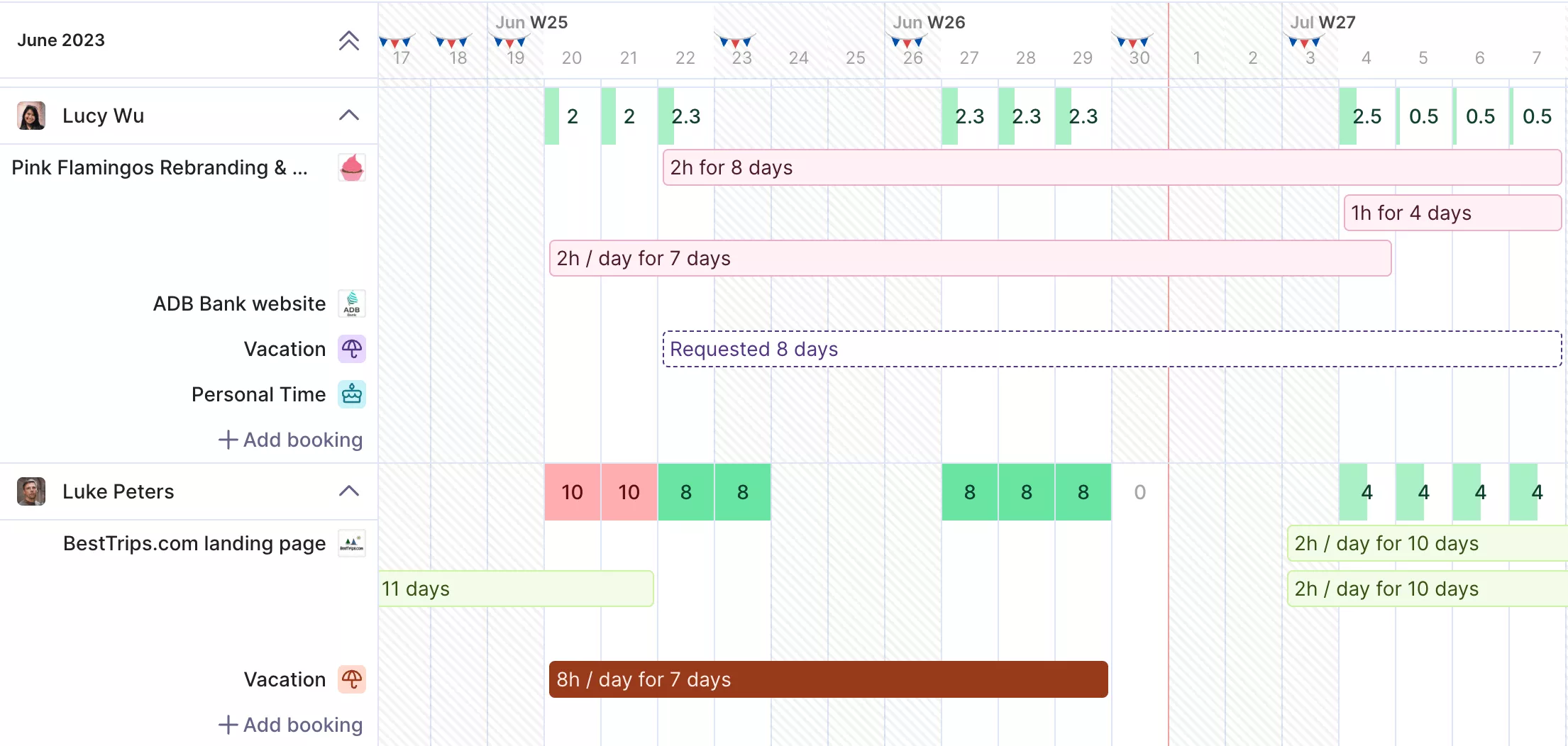
Connect actual availability with ongoing and upcoming projects.
You rebalance work before people burn out, and plan and forecast in the same place instead of building workarounds. Time off gets approved before it is confirmed, so the plan stays real. Productive also syncs with your Google Calendar.
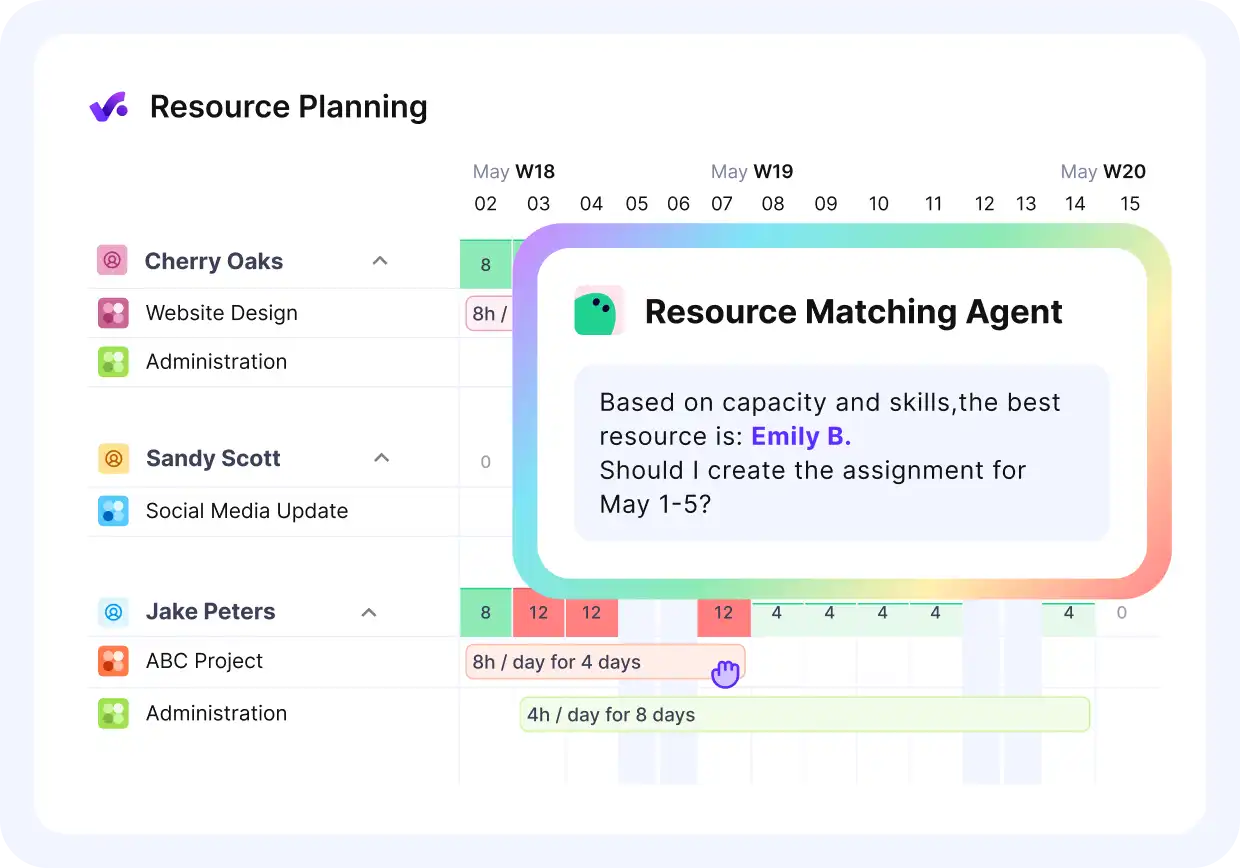
Ask agents to match the right person with the right project.
Know Your Project Profit Without Rebuilding It in Excel
If you only track hours, profit lives in a separate Excel sheet that someone updates by hand. By the time the numbers are ready, the project is often over and the margin is already gone.
In Productive, tracked time and expenses roll into each project’s budget and profitability view. You apply cost rates and billable rates once, then watch margin as the work happens, not after the write-off.
Budget owners approve time and expenses, so costs do not slip in late.
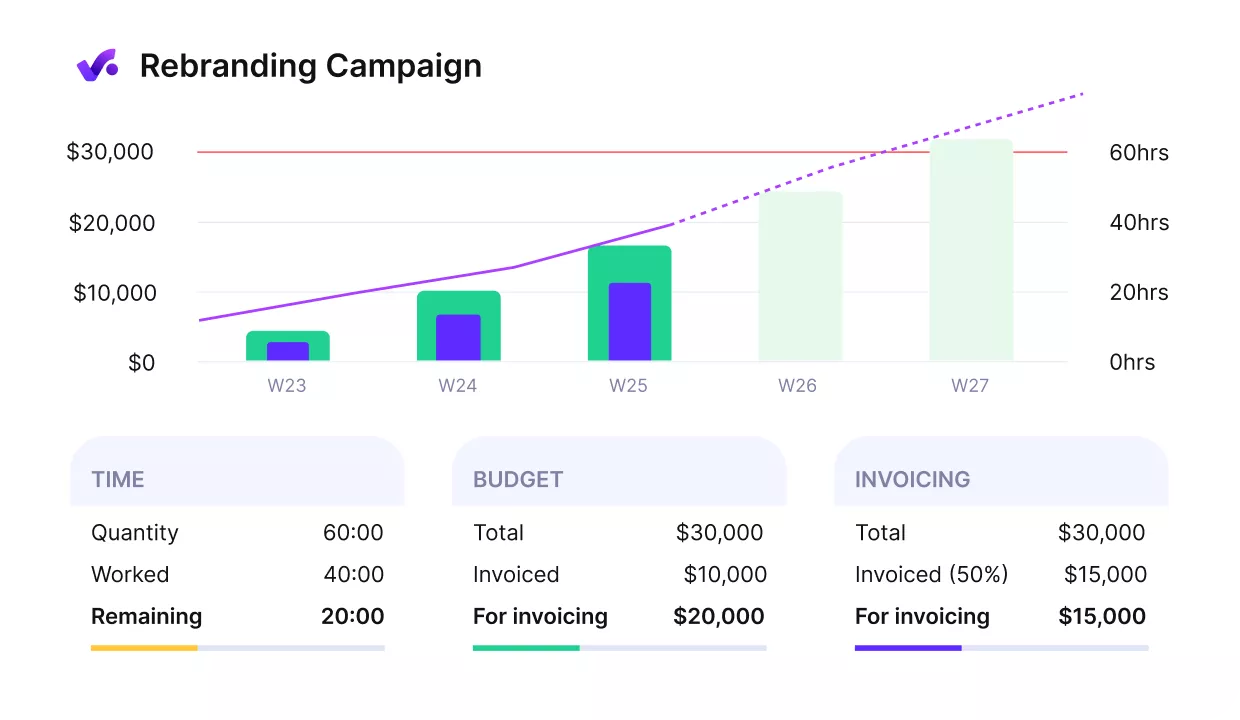
Adjust scope and capacity to prevent budget overruns.
You get early warnings on overruns while you can still adjust scope or talk to the client. For the formulas behind it, see our guide to project profitability metrics.
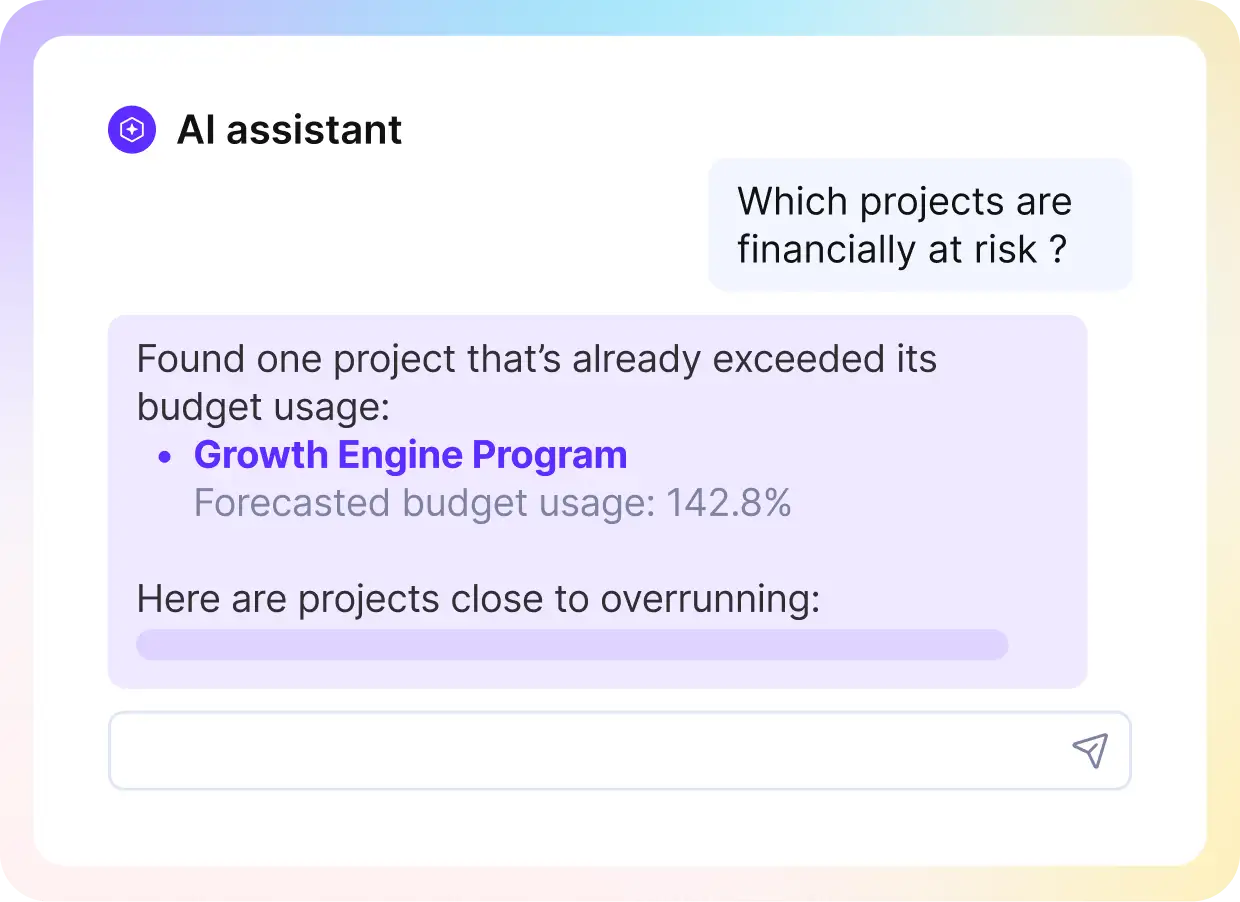
Get straight answers about projects and budgets from the AI finance assistant.
Turn Tracked Hours Into Invoices Without Exporting to a Spreadsheet
The real work with Clockify starts after the hours are in. You export them, match them to cost and billable rates in a spreadsheet. Then you pull the numbers into your accounting tool to bill.
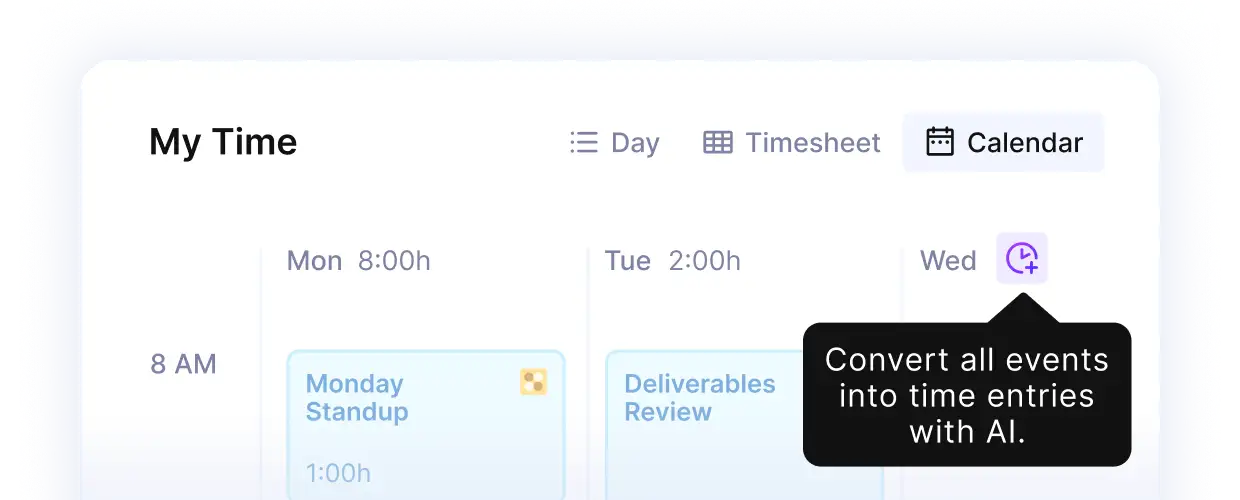
Convert all events into time entries with AI, automatic or manual time trackers.
Productive keeps time, budgets, approvals, and invoicing in one system. You report from the same place the data was created and approved, so there is no export and no rebuild.
When it is time to bill, you raise professional invoices straight from tracked time and expenses.
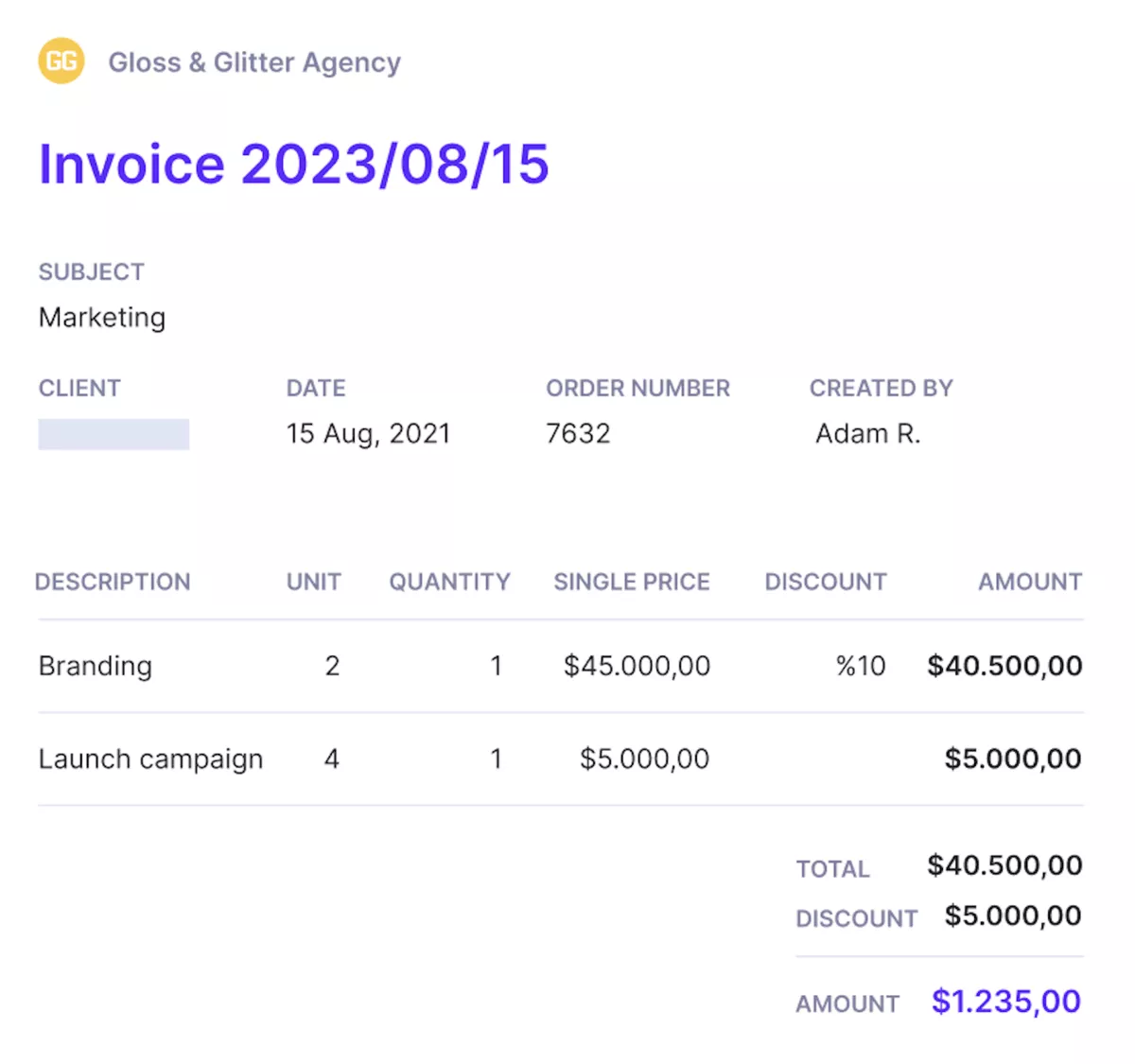
Send automatic or recurring invoices directly from Productive.
That means fewer billing surprises and less month-end reconciling across tools. For the detail work, see our guide to tracking project expenses.
Make Time Tracking and Reporting Automatic, Not Manual
Clockify leaves the manual work to you. Someone forgets to start a timer, backfills the week from memory, and then rebuilds every report by hand.
Productive’s AI takes those steps off your plate. Automatic and AI time tracking drafts hours from your calendar events, so fewer entries go missing.
The AI assistant builds a report from a plain-language question, instead of an export and a spreadsheet. A built-in notetaker turns meeting action items into assigned tasks.
Clockify has none of this, so it stays manual there. In Productive, you review and approve what the AI drafted instead of chasing people for missing time.
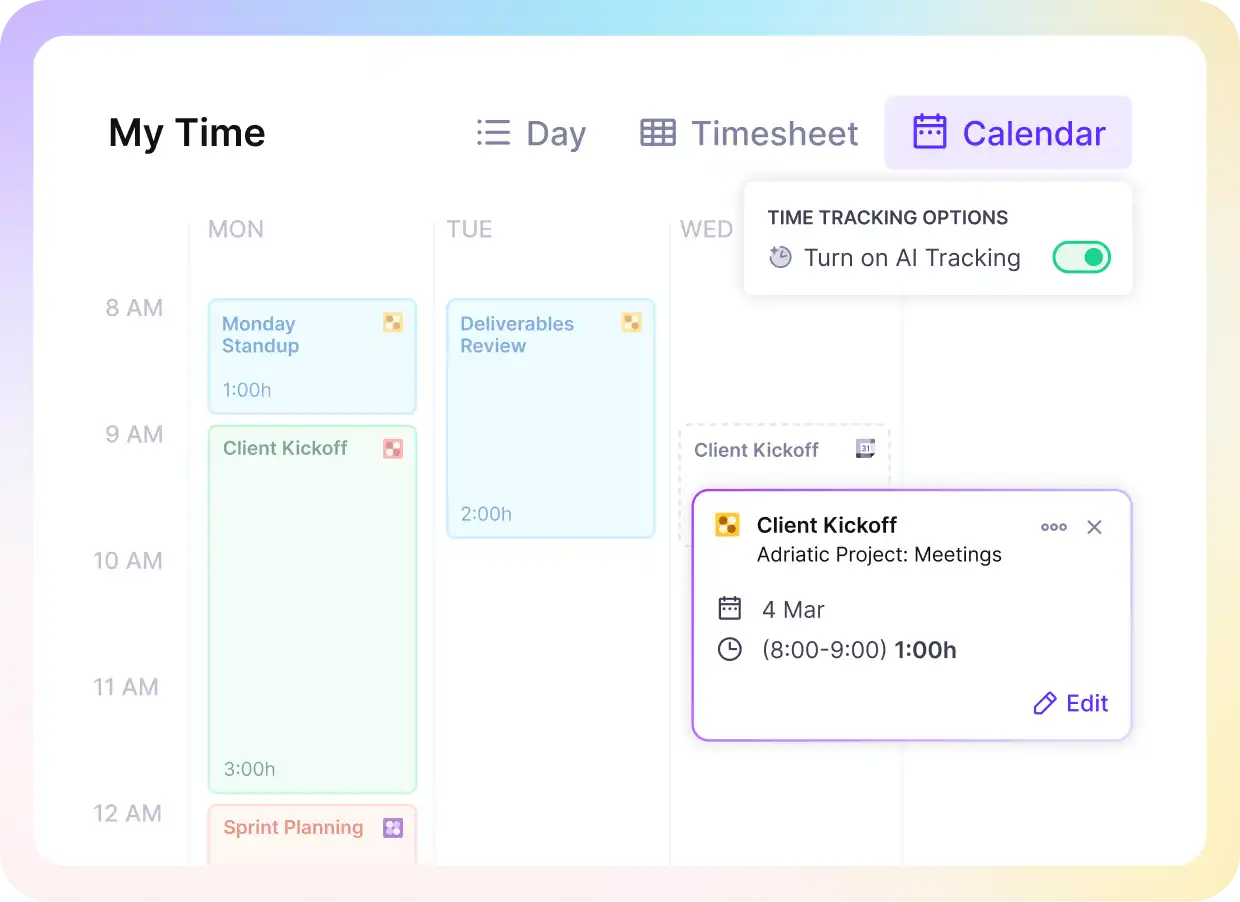
Use Productive’s AI time tracker for smooth and frictionless time tracking.
Pricing
- Plans start with the Essential plan at $10 per user per month, which includes essential features such as budgeting, project & task management, docs, time tracking, expense management, reporting, and time off management.
- The Professional plan includes custom fields, recurring budgets, advanced reports, billable time approvals, and much more for $25 per user per month.
- The Ultimate plan has everything that the Essential plan and Professional plan offer, along with the HubSpot integration, advanced forecasting, advanced custom fields, overhead calculations, and more. Book a demo or reach out to our team for the monthly price per user.
Productive offers a 14-day free trial, so you can see what it can do for your project’s financial health.
See Time, Budgets, and AI Reports in One Place
Productive logs hours automatically, warns you on overruns early, and writes the report you need from a plain-language prompt.

2. MyHours – Best Simple Clockify Alternative for Small Teams
MyHours is a lightweight timesheet tool that organizes hours by client and project, with simple reports you can share quickly. It works best for freelancers and small teams that want a low-friction way to log time, keep billable work tidy, and avoid a heavy setup.
Just in case time management is your main pain point, maybe you should switch to our big list of tools for managing time.
Core Features
- Timer and manual time entries with accurate timesheet views
- Clients and projects with billable rates
- Basic reporting and exports
- Expense tracking support
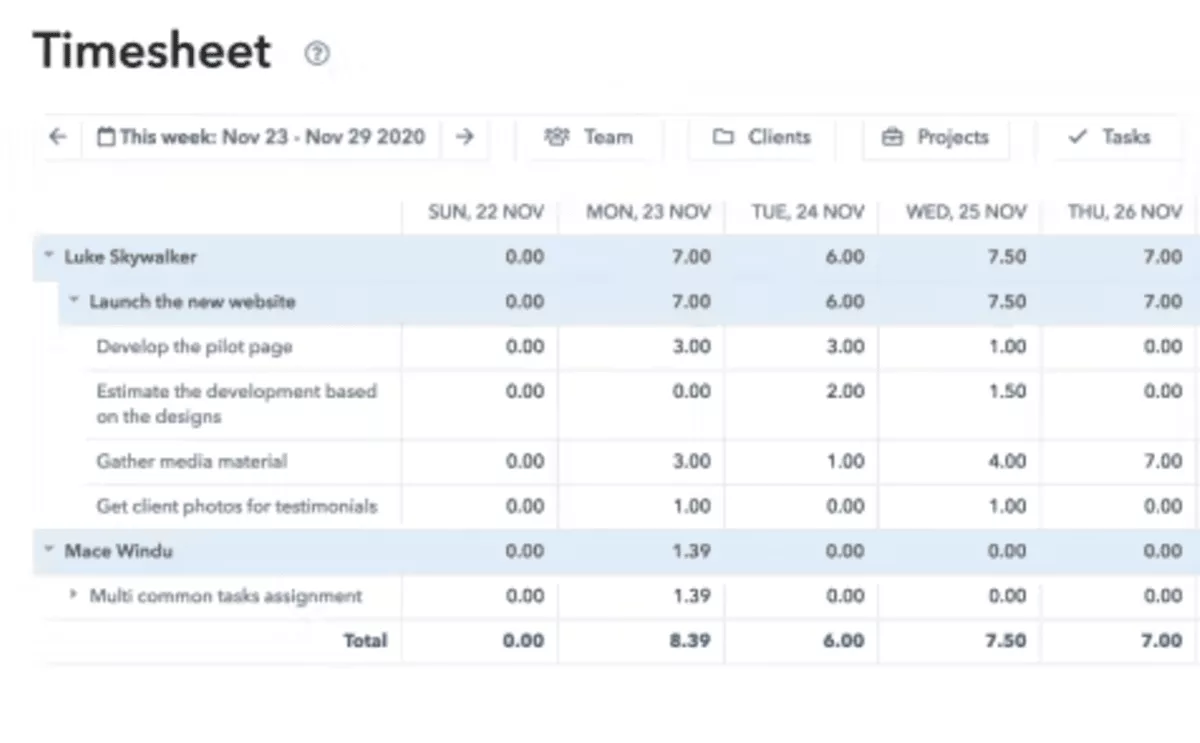
SOurce: myhours
Pros
- Easy to use day to day for both admins and team members
- Quick setup and straightforward rollout for small teams
- Practical reports and filters for client and project visibility
- Good fit when you want a lighter tool than an all-in-one platform
Cons
- Invoicing and client billing features can feel basic compared to billing-first tools
- Integrations can be limited depending on what you connect
- Reporting depth may not hold up for complex delivery teams
- Managing and billing clients and projects can feel cluttered
Final Verdict
My Hours is not built for teams that need approvals, invoicing inside the tool, or multi-layer reporting. It is easier to outgrow when you manage many clients and want stronger integrations and filtering.
3. Harvest – Best Clockify Competitor for Invoicing and Billing
Harvest is one of the most popular online time billing tools. It’s a strong fit for freelancers and services teams that want billable hours to flow into invoices with minimal admin, plus client-friendly summaries that are easy to share.
Core Features
- Web app, desktop app, and mobile apps for logging hours
- Invoicing based on tracked time
- Reporting for projects and team time
- Integrations with common accounting tools
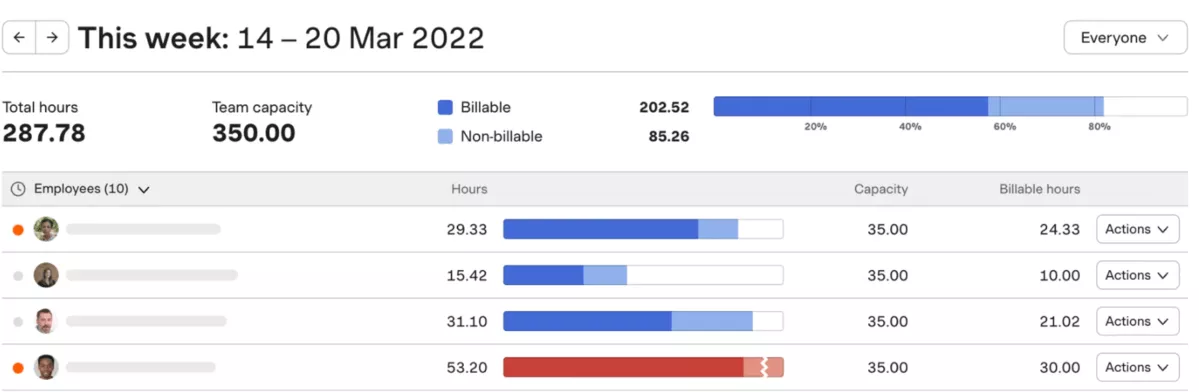
SOurce: harvest
Pros
- Simple invoicing workflow that reduces billing admin
- Clean interface that is easy for teams to adopt
- Client-friendly summaries that are easy to export and share
- Strong fit for small services teams with straightforward billing
Cons
- Limited automation compared to automatic capture tools
- Reporting can feel restrictive for overall project management
- Recent price increase added usage-based fees on top of per-seat plans, with reviewers reporting steep renewal jumps
- Less suited to teams that want deeper operational controls
Final Verdict
Harvest is not the best pick for teams that need automation-first tracking or heavier controls beyond billing. The 2026 Harvest price increase also adds usage fees on top of per-seat plans. Model your real cost before you renew.
4. Traqq – Best Privacy-Focused Clockify Alternative
Traqq is a time tracking software that ensures privacy-first monitoring. It doesn’t take screenshots, doesn’t record personal data, and provides strong security. But teams can still track productivity with the help of data such as app and website usage, activity tracking, idle time, breaks, and AI-powered insights.
Core Features
- Automatic time tracking with offline capabilities
- Customizable reports and AI-powered analytics
- Attendance and no-shows tracking
- Time off management
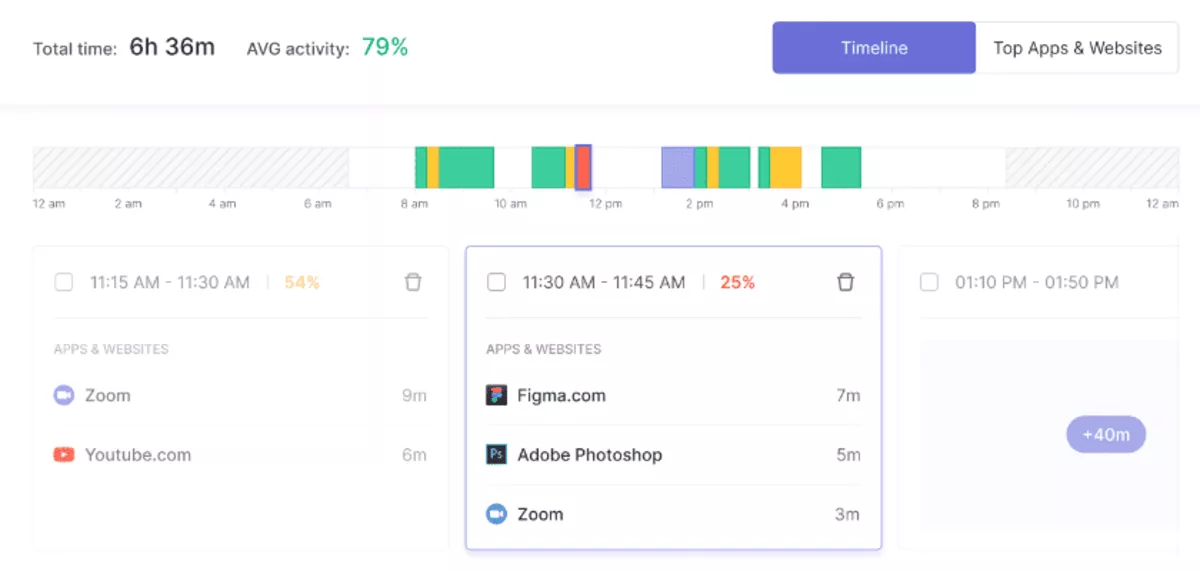
SOurce: traqq
Pros
- Customizable access levels to tracked data
- Smart alerts and notifications
- Easy to set up and start using without a steep learning curve
- Works for teams of any size
Cons
- Doesn’t have integrations with other tools
- Only a desktop app is available
- Doesn’t work for teams that need strict monitoring
- Limited customization options for reporting
Final Verdict
Traqq is not suitable for teams that need screenshot capture or other heavy monitoring methods.
5. TimeCamp – Best for Automated Time Capture With Less Manual Entry
TimeCamp supports automatic time tracking, so teams do not have to rely on perfect timer habits. It is a good fit if you want work to show up more consistently, then turn that data into reports and billing without chasing people for end-of-week cleanups.
Core Features
- Desktop app with automated capture options to reduce manual logging
- Timesheets and reporting for projects and clients
- Invoicing and exports for billing workflows
- Native integrations with common project tools
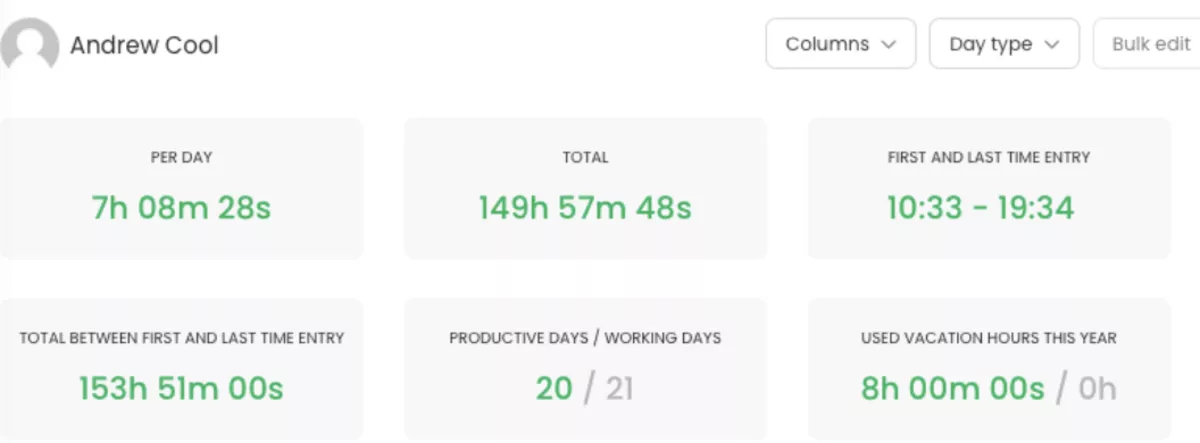
SOurce: timecamp
Pros
- Helps reduce backfilled logs and missed hours
- Supports a mix of automatic capture and manual correction
- Reporting supports project visibility and billing workflows
- Often priced competitively compared to automation-first tools
Cons
- Automated capture can misclassify work and needs review habits
- Setting up takes time if you want reliable rules and categories
- Reporting and exports can vary depending on plan
- Background capture can create rollout friction for some teams
Final Verdict
TimeCamp is a rough fit if your team only wants a clean timer and nothing else, or if automated capture will cause pushback.
6. Toggl Track – Best Lightweight Timer and Reporting
Toggl Track is a timer-first tracking app with a streamlined design that helps individuals and teams build a consistent tracking habit without a heavy rollout. It works best when you want people to start and stop a timer quickly, add basic context like projects and tags, and then pull clean reports for billing or internal visibility.
Core Features
- One-click timer plus manual entries
- Projects, tags, and billable rates
- Reporting, dashboards, and exports
- Browser extension, plus desktop app and mobile apps
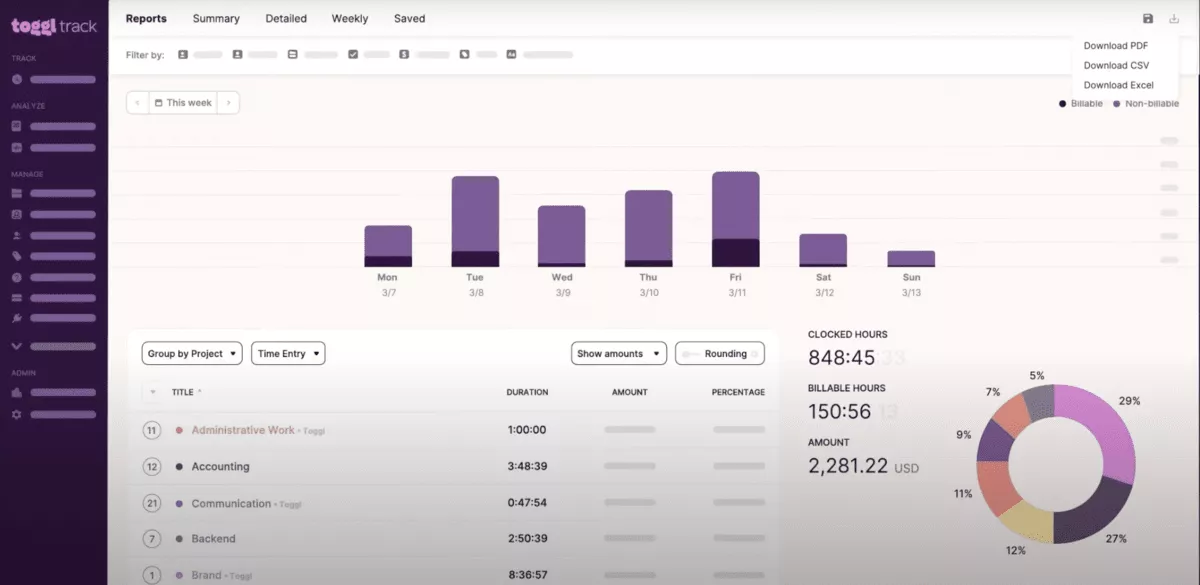
SOurce: toggl track
Pros
- Very fast adoption with minimal training
- Clean UI that keeps daily logging lightweight
- Reports are easy to filter and share for client work
- Works well for individuals and small teams
Cons
- Reporting depth can feel limited for complex operations teams
- Plan limits may affect the features you need at scale
- Timer workflows can get messy with many projects and tags
- Less suited to teams that want strict review workflows
Final Verdict
Toggl Track will frustrate teams that need a formal review layer, tight permissions, or delivery governance tied to budgets.
7. Timely – Best for Automatic Tracking With Minimal Backfilling
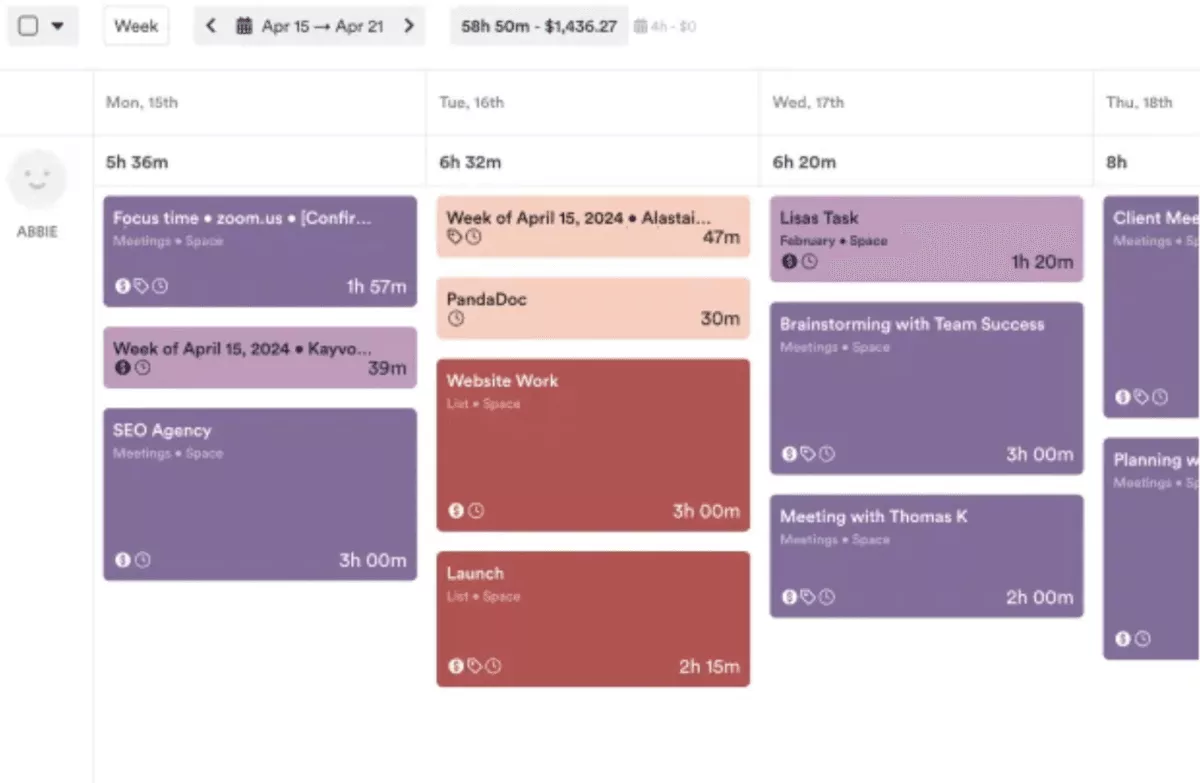
Timely is a time tracking solution built around an activity timeline that captures work across your day, then lets you allocate it to projects later.
It fits best as a software for consultants and services teams that hate backfilling and want more accurate billing without chasing people for end-of-week logs.
Core Features
- Desktop app with a background timeline for automatic time tracking
- Timesheet building and project allocation
- Reporting for clients and invoices
- Integrations and exports for billing workflows
SOurce: timely
Pros
- Reduces manual logging and speeds up timesheet completion and time management
- Helps recover billable work that would otherwise be missed
- Allocation workflow can be faster than starting timers all day
- Client summaries are straightforward to share
Cons
- Background activities can raise privacy questions for some teams
- Categorization is not perfect, so review is still required
- Integrations may be limited depending on your stack
- Can feel expensive compared to timer-first tools
Final Verdict
Timely is a mismatch for teams that do not want background capture or that need a free plan to start.
8. Jibble – Best for Attendance and Shift Timesheets
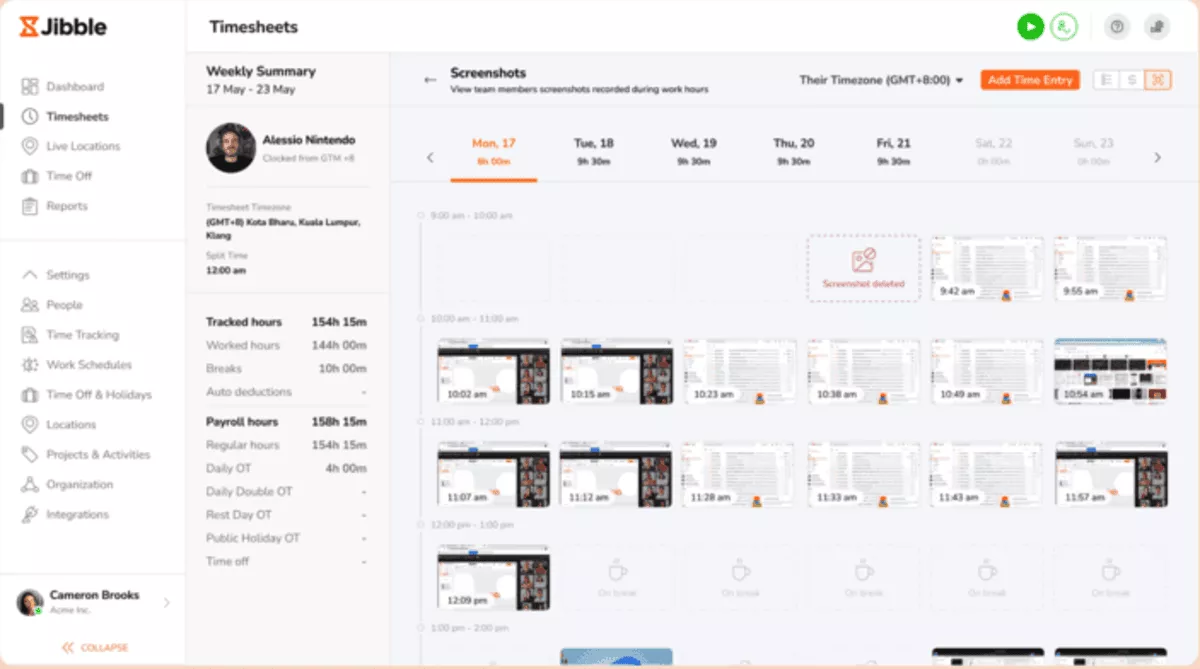
Jibble is an attendance-focused clock-in tool built for clock-in and clock-out routines, especially for teams that work shifts or move between job sites. It fits best when you care about presence, punctuality, and clean hour totals more than project profitability.
Core Features
- Clock-in and clock-out across mobile, web, and kiosk modes
- GPS tracking and geofencing options for location-based attendance
- Timesheets, overtime rules, and attendance reporting
- Leave and break tracking options
SOurce: jibble
Pros
- Simple setup and fast adoption for shift-based teams
- Free time tracking for unlimited users
- Helpful location features for field teams
- Clear timesheets that support payroll routines and attendance reporting
Cons
- Reporting can feel limited for project-based billing
- Location and tracking settings need careful rollout to avoid trust issues
- Mobile performance and syncing can vary by environment
- Integrations may not cover every payroll stack
Final Verdict
Jibble is the wrong tool for agencies that live on project profitability and detailed invoicing. If you bill clients by project and need detailed breakdowns, you may hit reporting limits quickly.
9. Time Doctor – Best Monitoring-Heavy Clockify Substitute
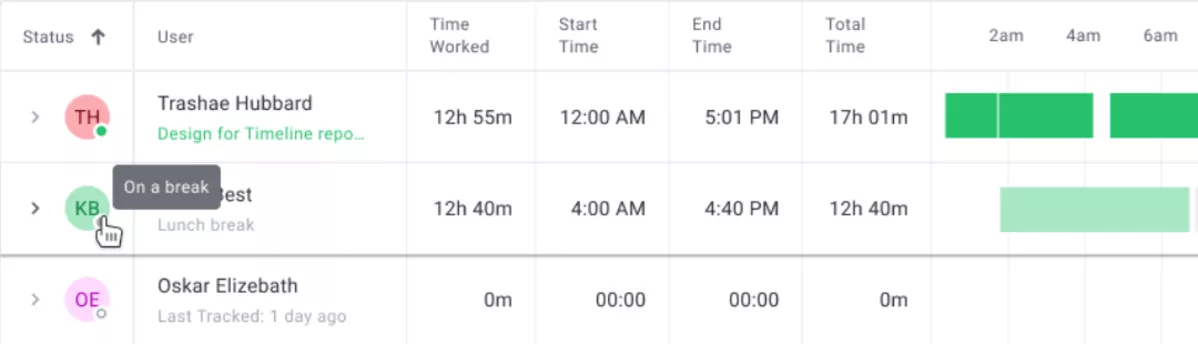
Time Doctor is employee monitoring software with timesheets for teams that want visibility into how work happens, not just how many hours were logged. It includes employee monitoring features such as activity tracking and optional screenshots, so rollout needs clear policies.
Core Features
- Logged hours with activity and productivity reporting
- App and website usage reporting
- Optional screenshot capture and monitoring controls
- Reports for payroll workflows and team oversight
SOurce: time doctor
Pros
- Detailed visibility for managers or business owners in monitoring-first environments
- Useful reports for payroll routines and oversight
- Helps reduce missed hours when teams forget to log
- Can add accountability for distributed teams
Cons
- Monitoring can feel invasive and hurt adoption
- Tracking quality depends on clear policy and consistent setup
- Integrations may not match every workflow
- Rollout requires careful change management
Final Verdict
Time Doctor is a poor fit for privacy-first teams or anyone who just wants a simple client timer.
10. Buddy Punch – Best Clockify Alternative for Employee Time Tracking and Scheduling
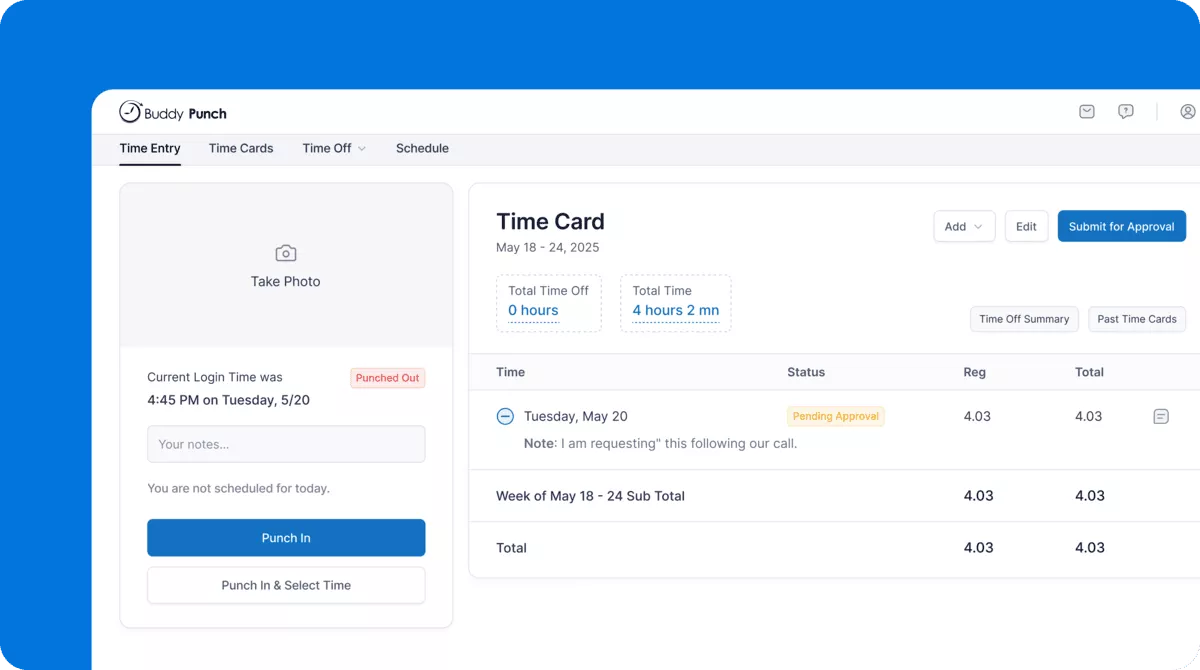
Buddy Punch is an easy-to-use employee time and attendance tracking, scheduling, and payroll platform. It is built for small to medium-sized businesses with hourly employees who work across multiple locations, job sites, and office environments.
Core Features
- Accountability features like GPS tracking, geofencing, and photo verification
- Employee scheduling, shift management, and PTO tracking and accrual management
- Mobile, web and kiosk-based clock-in
- Payroll integrations and overtime alerts
SOurce: buddy punch
Pros
- Easy for hourly employees to learn and use
- Strong scheduling and accountability features
- Practical for multi-location and field-based teams
- Simplifies payroll prep and integrations
Cons
- Client billing and invoicing tools are limited
- Reporting may be too basic for larger operations
- Internet access required for full functionality
- Not a good fit for advanced project management workflows
Final Verdict
Buddy Punch is not a good fit for freelancers or teams that focus primarily on billable project tracking.
Why Do Teams Switch From Clockify?
Teams switch from Clockify because its 2026 update turned the free plan into a paid tool for client billing. Small teams also hit the new 5-user cap, so a free workspace no longer fits a growing team.
In April 2026, Clockify moved several features off its free plan and onto paid tiers. Billable hours, CSV and Excel export, shared report links, project time estimates, and Kiosk now sit on paid plans.
If any of those were part of your weekly routine, free Clockify no longer covers it. Match what you lost to what an alternative still has to do:
- Billable rates moved to paid. You can no longer set hourly rates or split billable from non-billable on free. Confirm your alternative sets rates and tags billable work without an upgrade.
- CSV and Excel export moved to paid. Invoicing and payroll depend on clean exports. Check that the free or entry tier exports the fields finance needs, not just a PDF.
- The Free plan now caps at 5 users. If your team is larger, a thin free tier stops working. Jibble, for example, still offers free tracking for unlimited users.
- Shared report links moved to paid. Client-facing summaries used to be free. Confirm the tool shares a report link or client view without a paid seat.
- Project time estimates moved to paid. Estimate versus actual checks get harder. A tool that ties estimates to tracked time keeps budget drift visible.
Beyond the pricing change, the usual triggers still apply as a team grows:
- Manual timers and late backfilling create messy logs. That leads to invoice questions, weak budget visibility, and end-of-week cleanup.
- Reporting needs outgrow simple exports. You need data that shows what to bill and where work is drifting, without rebuilding it in a spreadsheet.
- Approvals and governance matter more at scale. A simple review step keeps errors and unclear notes out of billing. Many teams also want clearer roles and a basic audit trail.
- Tracking style and privacy expectations differ. Some teams want light, trust-based tracking. Others need attendance controls or monitoring. If the approach does not fit your culture, adoption drops.
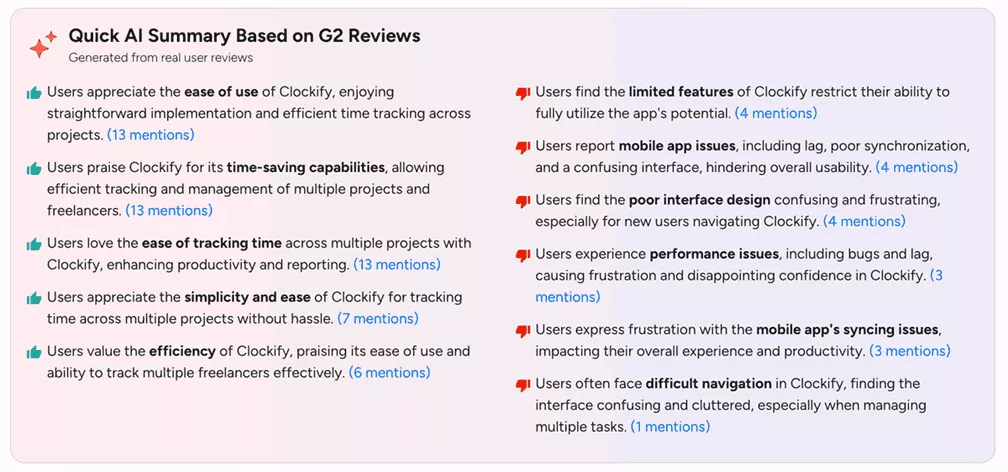
SOurce: G2 reviews
What Are the Key Features of the Best Clockify Substitutes?
The key features of the best Clockify substitutes are time capture, clean reporting, billing, privacy and monitoring, timesheet approvals. It’s also important to take into account the privacy and monitoring, as well as migration (rollout) readiness.
The what’s and why’s are in the table below.
| Key feature | What it is | Why it matters | Who needs it | Tools on this list that support it |
|---|---|---|---|---|
| Time capture | Timer plus fast manual entry, with reminders across desktop and mobile | Matches how work shows up, so hours get logged instead of backfilled | Every team, especially those with fragmented days | All ten; automatic capture on Productive, TimeCamp, Timely, Traqq, Time Doctor |
| Reporting and billing handoff | Billable vs non-billable splits, client and project totals, clean exports | Turns hours into invoices and payroll without rebuilding in a spreadsheet | Teams that bill clients or run payroll from tracked time | All export; in-tool invoicing on Harvest, TimeCamp, Productive |
| Timesheet approvals | A review queue plus the ability to lock a period once billing is final | Keeps bad entries out of billing and internal reports | Agencies and larger teams with client billing or audit needs | Strongest on Productive; limited or plan-gated on the rest |
| Privacy and monitoring | Controls for what gets tracked, who sees it, and whether monitoring is optional | Lets tracking fit your culture instead of hurting adoption | Teams choosing between trust-based tracking and monitoring | Privacy-first on Traqq; monitoring-heavy on Time Doctor; light on most others |
| AI features | AI that fills timesheets from tracked activity, categorizes work, and drafts reports | Cuts manual logging and end-of-week backfilling, so data stays accurate | Teams that lose billable hours to forgotten timers and manual entry | AI timesheet drafting on Timely, TimeCamp, and Productive; AI insights on Traqq; Harvest has no AI layer |
| Migration and rollout readiness | Import of clients, projects, people, and rates, plus a parallel run before cutover | Keeps reports and invoices consistent when you switch off Clockify | Any team moving live client billing off Clockify | Most support CSV import; confirm rate and structure mapping per tool |
How to Choose Your Clockify Alternative?
Choose your Clockify alternative by running a short selection sprint that you can finish in a week. Shortlist two or three Clockify alternatives, then run the same workflow test in each tool: log work for a week, approve it, export it, and compare totals against your real invoice and payroll outputs.
Step 1: Start With Billing and Finance Outputs
Open your last two invoices and one internal payroll report. Write down what must match on each: rates, rounding rules, billable versus non-billable splits, and the fields every entry needs.
In each tool you trial, rebuild those three outputs from its standard reports or exports. If a tool cannot match them without a spreadsheet fix afterward, it fails.
Step 2: Match the Capture Method to Your Real Day
Do a five-minute audit of one typical day. Count how many times you switch context between clients, meetings, email, and deep work.
Then do one practical check: can you track time quickly when you bounce between short tasks, or do people give up and backfill later?
If the day is fragmented, prioritize fast manual add and good reminders. If the day is continuous, prioritize a timer you can start and stop without friction.
Step 3: Make Approvals and Roles Clear Before You Migrate
Before you compare features, draw your approval path on a napkin or make a simple diagram. Who reviews client work, who reviews internal work, and who locks a week once billing is final?
Now test that path inside the tool: can approvers find what they need fast, request fixes, and close a period without spreadsheets. If approvals require constant nudging or back-and-forth comments, billing will slip.
Step 4: Validate Reporting Depth With Three Weekly Questions
Use last week’s data to test reporting, not a demo dataset. Pull one real week of time from your current tool (or export from Clockify) and import it into the tool you are trialing, then generate a report of time spent for the same period.
Next, you’ll run these three checks exactly as written:
- Client overspend check: filter to last week, group by client, sort by total hours, then drill into the top two clients and confirm you can get a breakdown of time spent by project and person.
- Unplanned work check: filter to last week, group by project, then filter to non-billable or internal categories and confirm you can isolate what ate the time.
- Billing readiness check: filter to billable work for one client, export the report, and confirm the output includes the fields finance needs (date, person, project, notes, hours, rate).
Then repeat the process: once as an admin and once as a project lead. If either role has to export and rebuild the view in a spreadsheet, reporting will become a weekly tax.
Step 5: Check Integrations by Simulating One Full Handoff
Instead of listing tools, map one real handoff end-to-end. Example: log hours, approve them, export or sync, invoice, and reconcile.
Make a simple table with five columns: step, owner, current tool, new tool, and what could break. If your team already lives in other productivity tools, focus on whether native integrations remove double entry or just move it.
Step 6: Pressure Test Rollout Effort and Ownership
Pick an owner and give them a clear task list: recreate clients and projects, set rate rules, set roles, create one report for billing, and create one report for leadership.
If you are comparing enterprise pricing, ask for a quote at your peak headcount and confirm what counts as a billable user per month.
How to Migrate From Clockify?
Migrate from Clockify by preserving your key outputs and rebuilding the structure in the new tool. Pilot one week before you switch everyone over. Work through this checklist in order:
- Define what “correct” looks like. Pick three outputs to preserve: one client invoice, one weekly summary by person, one monthly rollup by project. Note what must match: rates, rounding, billable splits, required notes.
- Export from Clockify. Run the Detailed report (CSV or Excel) for your date range. Export projects and user info so you can rebuild names, clients, and emails.
- Build the new workspace first. Recreate clients, projects, and roles. Set rounding, billable defaults, required notes, and who can edit after approval.
- Import a small sample and reconcile. Load one client and one week, reproduce your three outputs, then fix naming and mapping issues.
- Run a one-week parallel pilot. Keep Clockify as your reference while a pilot group tracks in the new tool for five days. Compare totals daily.
- Cut over and lock. Roll out, freeze Clockify, and export a final archive. Publish a one-page logging rule (project, billable status, notes) and set approvers and lock periods.
Final Thoughts
The right pick among Clockify alternatives turns tracked hours into the invoice, payroll, or report you need. Choose for the output that matters most, not the longest feature list.
If your shortlist keeps drifting into resourcing, budgets, and approvals, an all-in-one platform will fit better than another timer.
Book a quick demo to see if Productive fits your setup.
Connect With Agency Peers
Access agency-related Slack channels, exchange business insights, and join in on members-only live sessions.
