Harvest Price Increase 2026: Real Costs, Fixes + 10% Off

The Harvest price increase has turned some renewals into bills 8 to 16 times higher than last year. After Bending Spoons bought Harvest in 2025, flat per-seat pricing gave way to seat fees plus usage charges.
Usage fees depend on your projects, clients, tasks, and invoices, and Harvest does not publish the rates. So you may only see the real cost when the renewal notice arrives.
This guide explains what changed at Harvest and what the company told the press. It shows how to calculate your own increase and what to check before you renew. It also compares the cost of staying with moving to one platform.
If the math no longer works, you’ll find a 10% migration discount at the end.
Key Takeaways
- The new pricing has two layers, not one. Harvest charges a per-seat fee plus usage fees for invoices, projects, clients, and tasks. Seats start at $9 (Teams) or $14 (Enterprise) per month, billed annually. The starting rate is the floor, not the ceiling.
- Bending Spoons acquired Harvest in mid-2025, and usage-based billing reached customer renewals in 2026. Evernote and WeTransfer cut their free plans after earlier Bending Spoons deals, and WeTransfer and Meetup raised prices.
- Profitability reporting starts at Enterprise. It costs $14 per seat on annual billing. Resource scheduling needs Forecast, billed separately, and Harvest is still only exploring end-to-end project management.
- The real cost can be multiples of the pricing page number. One G2 reviewer reported a 600% jump. Press reports from August 2026 cite renewals rising roughly 1,500%.
What Is the Harvest Price Increase?
The 2026 Harvest price increase is a restructuring from a flat per-seat model to a plan-fee-plus-usage system. It reached customer renewals in 2026, after Bending Spoons acquired Harvest in mid-2025.
- The old model charged a flat rate per seat, with no extra fees for account activity.
- The new model has three self-serve plans plus a custom-priced tier. Usage-based billing sits on top of the per-seat base.
The per-seat starting rates are $9/month on Teams annual billing and $14/month on Enterprise annual billing. Those numbers are the starting point, not the total.
Your actual bill scales with how actively your team uses the platform. The more projects you run, clients you manage, and invoices you send, the higher the usage layer climbs.
The 2026 Per-Seat Rate and Plan Changes
Before the change, Harvest offered Free (1 seat, 2 projects), Pro, and Premium. Pro cost $11 and Premium $14 per seat per month on annual billing. Harvest no longer lists these rates. They come from G2’s Harvest pricing page, which shows pricing information last updated February 19, 2025.
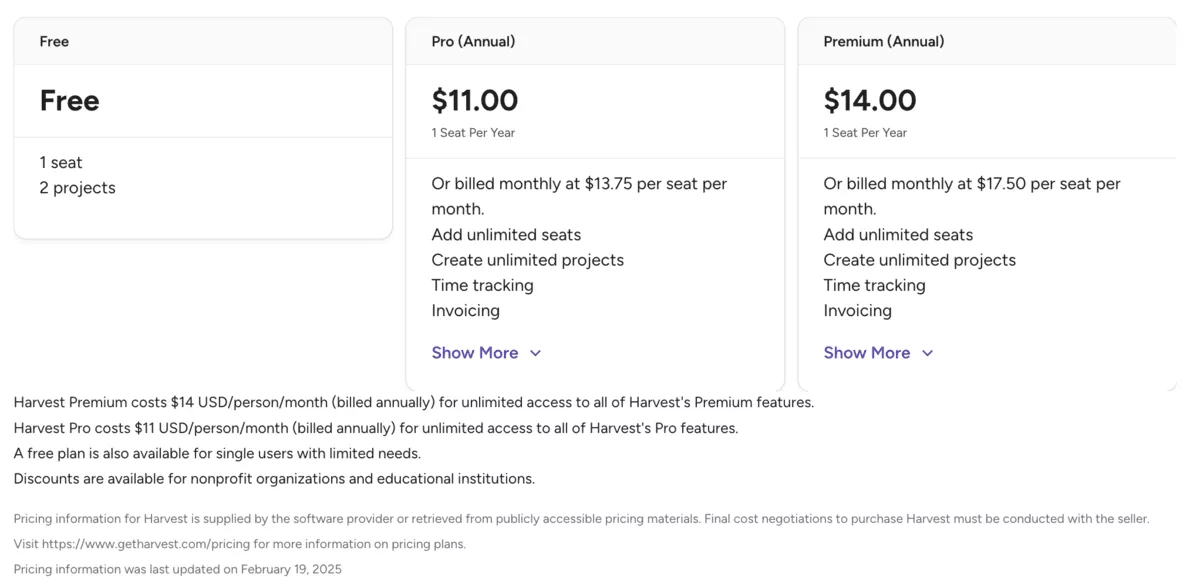
Source: G2
That model is gone. Harvest now sells two self-serve paid plans, Teams and Enterprise, plus a custom-priced tier you get by contacting Harvest. Teams and Enterprise each come in two billing modes:
- Flex usage billing (a per-seat price plus usage charges above a free allowance)
- Unlimited (a fixed usage fee that covers your account activity regardless of volume; Harvest does not publish the fee).
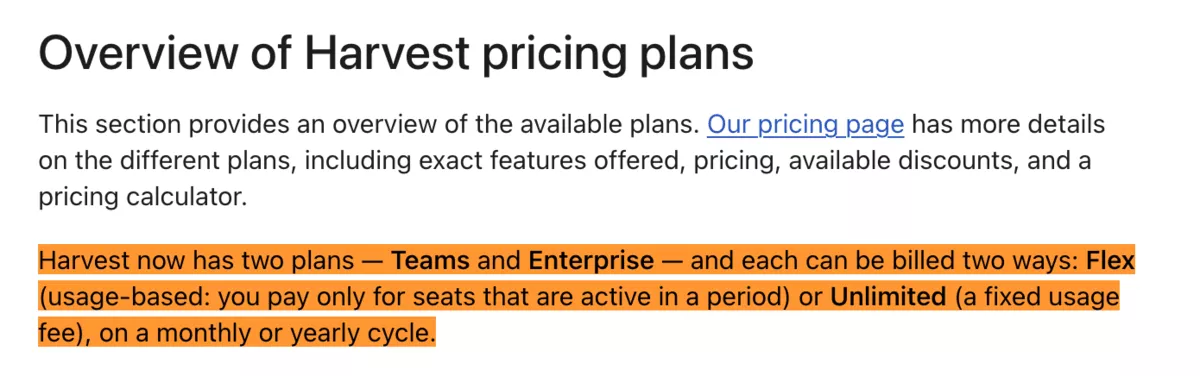
Source: Official help docs
Note: Harvest’s pricing page now uses the names Teams and Enterprise. G2 and some older Help Center pages still show the earlier names, Pro and Premium.
Check this before you subscribe: the checkout screen after a trial period ends pre-selects Enterprise + Annual by default. If you complete the purchase without switching the toggle, you land on the $14/seat tier, not the $9 Teams plan. The Help Center confirms this default.
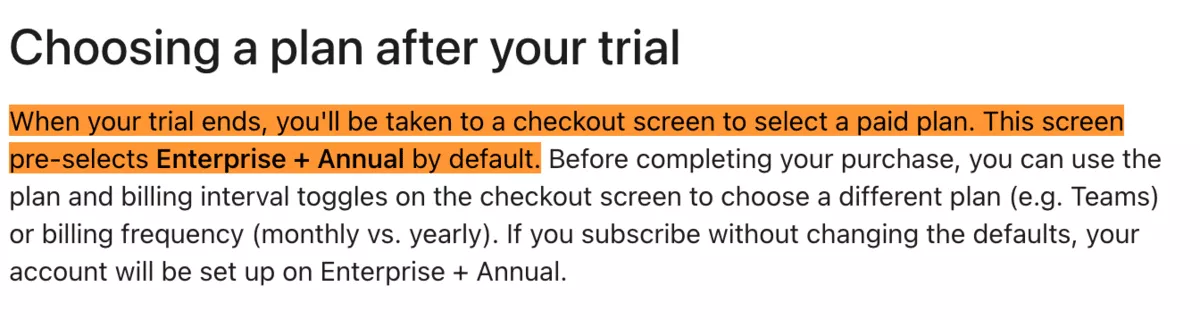
Source: Help Docs
When Does the Cost Increase Hit Your Budget?
The increase lands at your next renewal date, not retroactively. If you are on a legacy annual plan, your old rate holds until that contract renews. For new accounts, Harvest starts usage charges at the second paid renewal, so the first invoice usually covers seats only.
Customers began reporting renewal notices with the new pricing in July and August 2026.
To find your renewal date, go to Settings > Billing inside Harvest.
- If you are on monthly billing, the new pricing applies at your next monthly renewal, so check your latest invoice.
- If you are on annual billing, you have until your renewal date to decide whether the new cost makes sense.
Renewal notices are where the real numbers appear. One r/HarvestApp thread on renewal pricing documents the sticker shock in detail.
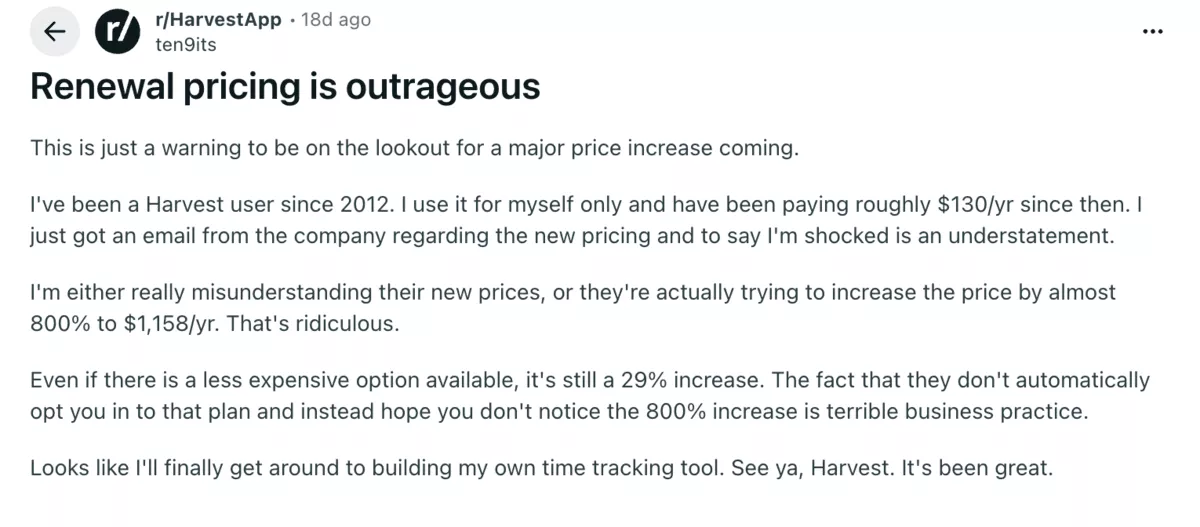
Source: Reddit
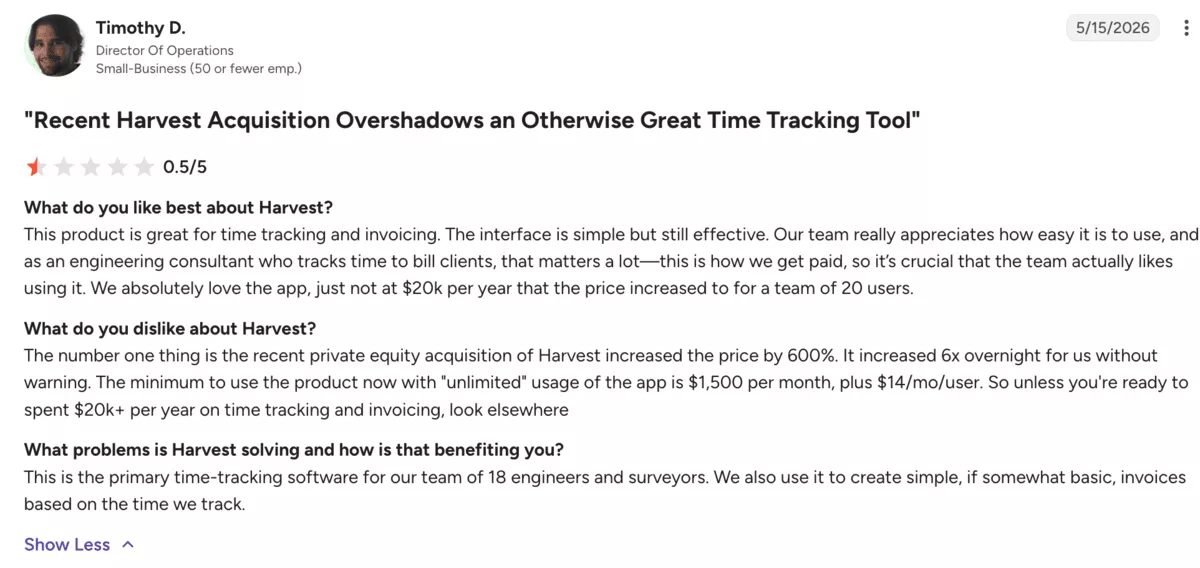
One engineering consultancy with 20 seats left a verified G2 review after the acquisition. It reported annual costs of over $20,000, a 600% increase on what it paid before.
Source: G2
What Happened to Harvest After the Bending Spoons Acquisition?
Bending Spoons, the Milan-based technology company, acquired Harvest in mid-2025. Harvest’s plan changes started before the deal. Accounts that upgraded from a trial before November 7, 2024 keep Legacy plans, priced differently from the current pricing page.
Usage-based billing came later, and customers began reporting renewal jumps in July and August 2026.
Within a year of the deal, Harvest swapped flat per-seat pricing for tiers with usage fees on top. Teams and Enterprise replaced the Pro and Premium plans. The Free plan kept its limit of one seat and two projects.
The pattern is not new. After earlier Bending Spoons deals, Evernote and WeTransfer cut their free plans, and prices rose at WeTransfer and Meetup.
What Did Harvest Say About the 2026 Price Increase?
Harvest told the BBC in August 2026 that the steepest increases hit customers on outdated legacy plans. Some of those plans date back to 2011. Its spokesperson said the product has become far more powerful.
The spokesperson made two more points:
- Customers get renewal emails “30 days and 10 days before their renewal date.”
- Customers can switch plans in one click or ask Harvest for help finding a better price.
Bending Spoons gave Silicon UK a one-line response: its prices are in line with comparable products.
Asking for a better price can work. Salentis, a UK consultancy, rejected a $2,110 monthly renewal. Harvest then offered $1,309 a month for the next year, paid up front. Treat the 30-day email as your deadline: run the six renewal checks, then negotiate before you pay.
How Does the New Harvest Billing Model Actually Work?
Harvest charges a per-seat base rate plus usage-based fees that scale with your account activity. On Flex billing, usage is calculated on your prior billing period: active projects, active clients, active tasks, and invoicing.
Only items with time tracked in that period count. Each plan includes a free usage allowance, and you pay only for usage above it.
The pricing page shows four plans:
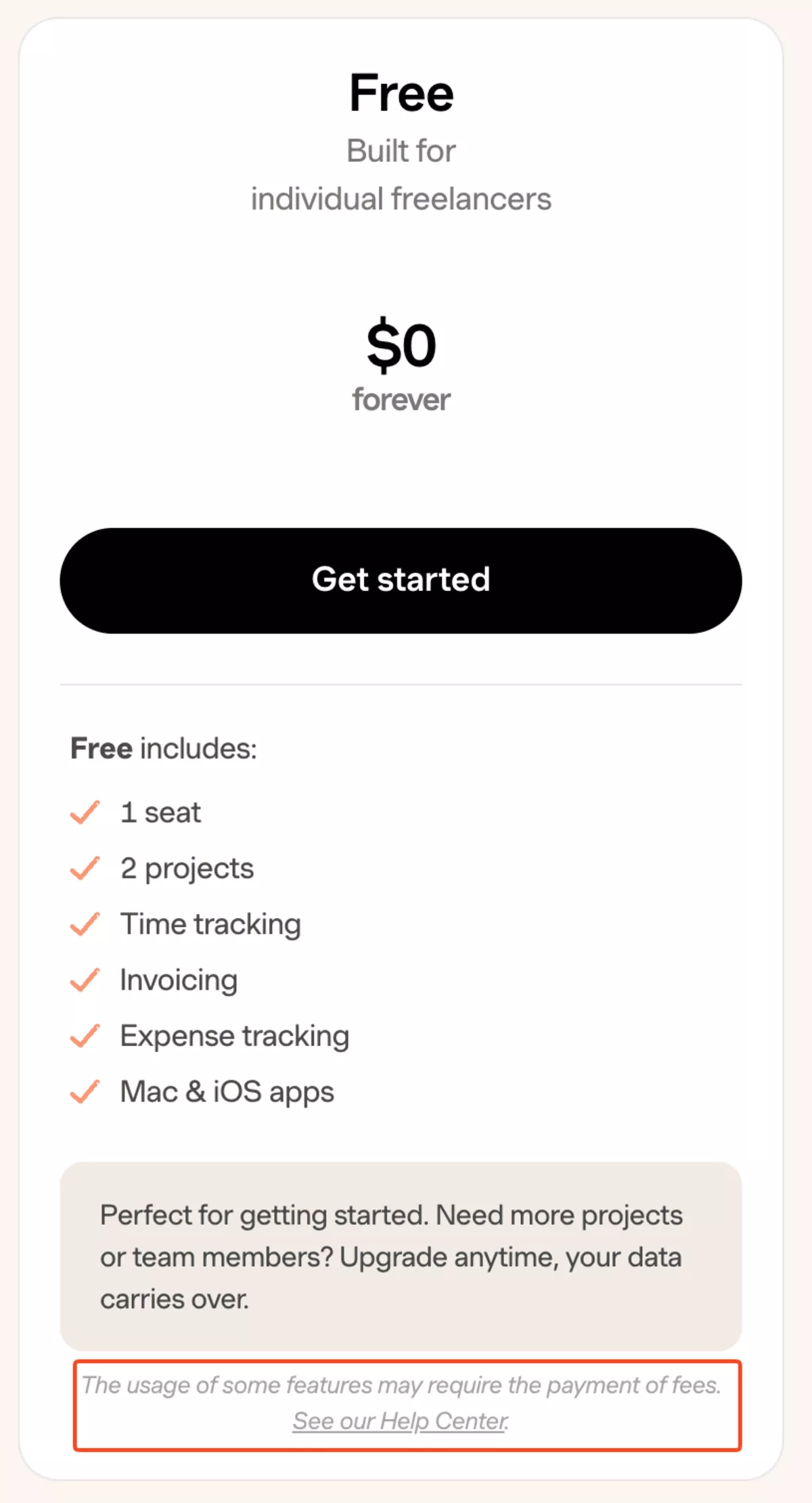
- Free is for solo freelancers: one seat and two projects at no cost. It includes time tracking, invoicing, expense tracking, and the iOS app.
- Teams starts at $9 per seat per month on annual billing ($11 monthly). It covers unlimited seats, time tracking, team reporting, up to four custom reports, invoicing, and accounting and payment integrations.
- Enterprise starts at $14 per seat per month on annual billing ($17.50 monthly). It adds profitability reporting, timesheet approvals, an activity log, SAML single sign-on (SSO), and unlimited custom reports. It can also require notes on every time entry.
- A custom-priced tier is available by contacting Harvest. Its price and features are not public.
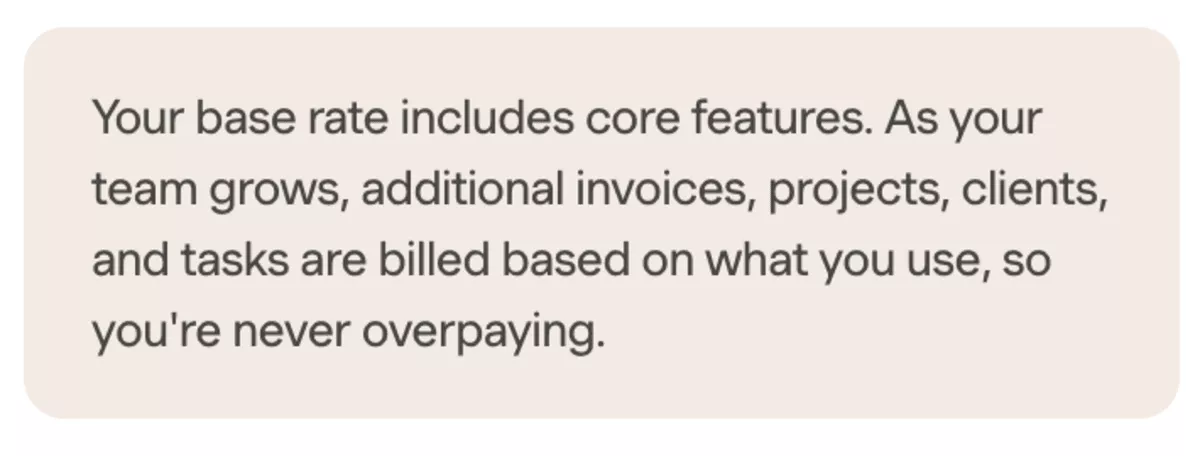
Both Teams and Enterprise carry the same line on the pricing page:
Source: Official pricing page
That line is doing heavy lifting.
It means the per-seat rate is the starting point. The actual bill scales with how actively your team uses the platform. A small team may stay inside the free allowance, though Harvest does not publish its size.
Harvest’s own Help Center shows how fast it adds up. Its example bill goes from a seats-only $44 to $404 once usage is added, roughly nine times the seat cost.
The pricing page does not publish per-unit usage rates or the size of the free allowance. That means you cannot predict the exact usage portion of your bill until you see it. The gap between your listed plan cost and your actual renewal is driven by this layer.
Even the Free plan includes a similar note.
Source: Official pricing page
What Does Each Plan Actually Include?
Teams covers the core time tracking workflow: log hours, run team reporting, send invoices, and connect to accounting tools.
Enterprise adds the features that compliance-heavy or margin-conscious firms need: profitability reporting, approval workflows, audit trails, and single sign-on.
Harvest added AI in 2026. Harvest MCP, shipped in July, lets tools such as Claude and ChatGPT log time, run reports, and draft invoices.
Harvest AI, in beta since September, answers questions about your account data and helps log time and prepare draft invoices. Harvest’s announcements do not mention turning meeting notes into tasks.
Harvest’s Fall 2026 update adds two more items worth knowing. Dashboards, in beta, builds auto-updating charts from time, budget, and billing data. A more connected Harvest and Forecast planning experience is in development, not released.
Productive’s AI features cover reporting, time entry, and meetings:
- AI assistant that builds reports from plain-language prompts
- Automatic and AI time tracking from calendar events
- Built-in notetaker that converts action items into assigned tasks.
Ready to leave Harvest? Get 10% off Productive.
Your renewal went up. Your stack costs keep climbing. Productive replaces Harvest, Forecast, your resourcing tool, and your profitability dashboard in one subscription with zero usage fees. Essential starts at $9/seat with the migration discount.

How Much Will the New Harvest Prices Cost Your Agency?
The real cost depends on three variables: your team size, your plan tier, and your account activity. Usage fees stack on top of the plan fee, so the tables show the minimum annual cost, not the total.
Plan Cost Comparison: Legacy vs. 2026 Pricing
The table models the annual plan cost at four team sizes. Before the restructuring, Pro cost $11 and Premium $14 per seat per month on annual billing. G2’s pricing page last updated these rates in February 2025. Neither plan carried usage-based fees.
| Seats | Legacy Pro ($11/seat/mo) | Legacy Premium ($14/seat/mo) | New Teams annual ($9/seat/mo) | New Enterprise annual ($14/seat/mo) |
|---|---|---|---|---|
| 10 | $1,320 | $1,680 | $1,080 | $1,680 |
| 30 | $3,960 | $5,040 | $3,240 | $5,040 |
| 50 | $6,600 | $8,400 | $5,400 | $8,400 |
| 100 | $13,200 | $16,800 | $10,800 | $16,800 |
At first glance, the Teams annual plan cost looks lower than the old flat rate. That comparison is misleading:
- Legacy plans had no usage fees. The new Teams plan does.
- The real comparison is plan fee plus usage versus the old flat rate.
- In renewals reported in the press, the new bill ran 8 to 16 times the old one.
- If you kept the default Enterprise toggle at checkout, you are already paying $14 per seat before usage fees.
That equals the old Premium rate before any usage is added, and sits $3 above the old Pro rate. On monthly billing, the numbers climb further: Teams monthly runs $11 per seat, Enterprise monthly runs $17.50 per seat. A 50-person team on Enterprise monthly billing pays $10,500 per year in base costs alone.
Usage Fees Can Push the Real Cost Well Beyond the Plan Fee
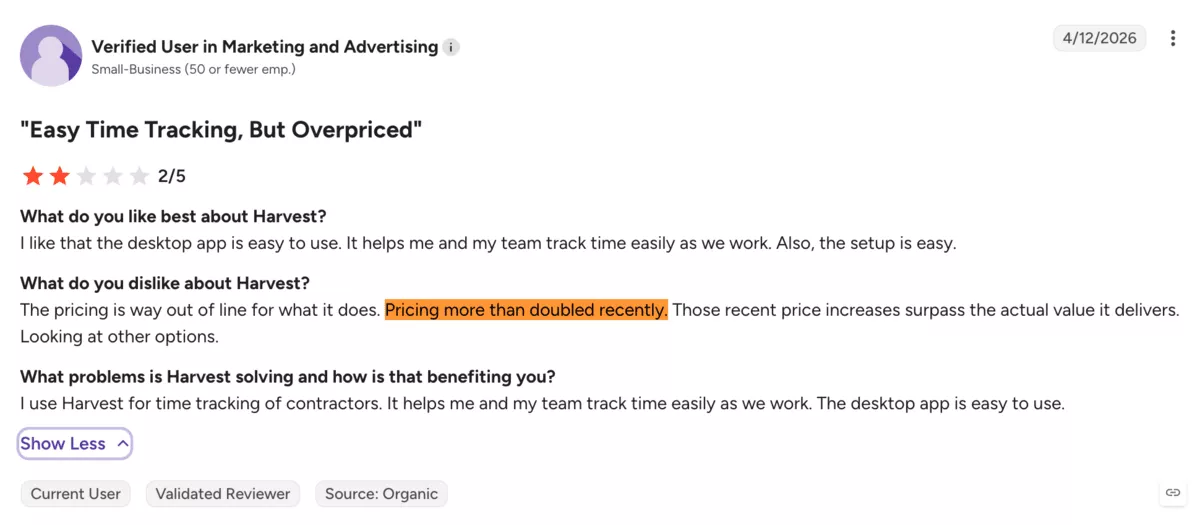
The plan cost table shows only the minimum annual cost. For agencies with active accounts, usage fees can add significantly to the total bill. A separate G2 reviewer wrote that pricing more than doubled after the acquisition and no longer matched the value delivered.
Source: G2 review
The mechanics explain why. Every active project, client, and task with time tracked in the period counts toward usage. So does invoicing. You pay once the total passes the free allowance.
- A freelance web designer’s annual renewal rose from $211.20 to $2,547.60, a twelvefold jump.
- A UK consultancy’s monthly bill went from $130 to $2,110, about 16 times the old cost.
Harvest does not publish per-unit usage rates or allowance sizes. The pricing page no longer shows a cost calculator. The only exact figures are under Settings > Billing in your own account.
Freelancer Roster Changes Inflate Your Seat Count
Those seat costs assume a stable headcount. Agencies that staff projects with freelancers do not have one. A 40-person core team might grow to 70 or 80 seats when freelancers join a busy delivery period. In a per-seat model, every active freelancer is a billable seat.
Adding 30 freelancers on Enterprise adds $420 per month. Say they join at the start of an annual cycle and their seats hold until renewal.
That is $5,040 a year for people who may log time for only six to eight weeks. On Teams at $9 per seat, the same 30 freelancers add $270 per month, or $3,240 over a full year.
Harvest’s pricing FAQ states:
While you can’t remove seats during your current billing cycle, you can indicate inside your account if you’d like your yearly or monthly plan to renew with fewer seats.
Harvest’s Help Center adds that archiving or deleting someone does not remove their seat. You schedule the removal, and it takes effect on your next renewal date.
Because paid seats hold until renewal, 30 freelancers added in Q2 cost you until that billing period ends. That holds even if they stop logging time in week three.
For agencies with dynamic rosters, the annual cost is hard to predict and can exceed the listed plan cost. Factor in your peak headcount, not just your permanent team, when modeling the real cost of time tracking at scale.
How to Calculate Your Own Harvest Price Increase
To calculate your Harvest price increase, count your seats and confirm your plan and billing cycle. Then run the plan math, add usage, Forecast, and peak seats, and compare with last year.
- Count your seats. Log in, go to the Team page, and count every active member. Include freelancers and contractors. That total is your billable seat number.
- Confirm your plan tier and billing cycle. Go to Settings > Billing. Check whether you are on Teams or Enterprise, and whether you pay monthly or annually. If you signed up after a trial without changing the default toggle, you are likely on Enterprise, billed annually.
- Run the plan cost math. Multiply your seat count by your per-seat rate by 12. That is your annual subscription cost. Teams annual: seats x $9 x 12. Enterprise annual: seats x $14 x 12.
- Estimate usage fees. Open your last three billing statements in Settings > Billing and note every line item beyond the per-seat charge. On a new account, the first invoice usually covers seats only. Usage charges start at your second paid renewal.
- Add Forecast if you use it. Harvest Forecast is billed separately from Harvest, at $5 per person per month on annual billing ($6.25 monthly). Everyone you schedule needs a seat, including people without a login. Multiply your seat count by $5 by 12.
- Model your peak season. Calculate the annual cost at your highest freelancer headcount, not just your stable core. Remember: you cannot remove seats mid-billing cycle.
- Now compare the total (base + usage + Forecast + peak seats) to what you paid last year. The gap is your real increase.
Try the best Harvest alternative
Worked Example: 30-Seat Agency on Enterprise Annual
Here is the math for a mid-size agency with 30 permanent staff, occasional freelancers, and the Forecast add-on.
| Line item | Calculation | Annual cost |
|---|---|---|
| Base rate | 30 seats x $14/seat x 12 months | $5,040 |
| Forecast add-on | 30 seats x $5/seat x 12 months | $1,800 |
| Freelancer seats (10 added with 3 months left in the cycle, prorated) | 10 x $14 x 3 | $420 |
| Usage fees | Check past invoices in Settings > Billing | Varies by activity |
| Annual floor (base + Forecast) | $6,840 | |
| Total before usage fees | $7,260 + usage |
What Should You Do When Your Renewal Cost Jumps?
When your renewal cost jumps, clean up seats, confirm your plan, model costs, audit features, total your stack, and compare.
Here’s how to run each check:
1. Pull Your Real Seat Count
Go to Team and count every active user. Include freelancers and contractors, not just permanent staff. Then cross-reference against who actually logged time in the last 30 days. Seats that have not logged time tracking entries in a month are candidates for removal.
Each seat you remove before renewal cuts $108 a year on Teams or $168 on Enterprise, at annual rates.
2. Confirm Your Renewal Date and Plan Tier
Go to Settings > Billing. Your current plan (Teams or Enterprise), billing cycle (monthly or annual), and next renewal date are all visible there. If you kept the post-trial default, you may be on Enterprise + Annual without realizing it.
3. Run the Cost Model
Use the calculation from the previous section. Multiply your cleaned-up seat count by your per-seat rate by 12 months. Add your estimated usage fees (from your last few billing statements).
Add Forecast if you use it ($5/seat/month annual). Add your peak freelancer buffer. Write down the projected annual total.
4. List What You Actually Use
List the features your team used in the last 90 days. If the list stops at time tracking, invoicing, and team reports, Teams covers it.
If you pay $14 for Enterprise but only use Teams features, downgrade. Teams at $9 per seat cuts your subscription cost by 36% with no loss of the features you use.
Time the downgrade before your renewal. Harvest does not switch you from Enterprise to Teams immediately; it schedules the change for your next renewal date.
If you mainly track time, our guide to agency time tracking software compares the options worth evaluating.
5. List What You Pay for Elsewhere
If you run a separate tool for project staffing, capacity reporting, or profitability tracking, add its cost to your total.
That combined number is your real stack cost, and it is the figure you compare in the next check.
6. Compare
Put your total stack cost (Harvest, Forecast, and other tools) next to one platform’s price for the same coverage. If the stack costs more, the renewal is the right moment to consolidate.
If the math works and you use what you pay for, staying makes sense. If it doesn’t, our review of the top Harvest alternatives compares seven options, with review-based pros, cons, and migration advice.
Harvest Stack vs. Productive: 30-Seat Cost Comparison
| Line item | Harvest stack (annual) | Productive Essential (annual) | Productive Professional (annual) |
|---|---|---|---|
| Base rate (30 seats) | $5,040 (Enterprise at $14/seat) | $3,600 ($10/seat) | $9,000 ($25/seat) |
| Usage fees | Varies, not published | $0 | $0 |
| Forecast add-on | $1,800 ($5/seat) | $0 (resource planning built in) | $0 (resource planning built in) |
| Separate resourcing tool | $0 to $3,000+ (only if Forecast doesn’t cover your staffing; this is an estimate, add your actual cost) | $0 (built in on all plans) | $0 (built in on all plans) |
| Separate profitability tool | $1,200 to $2,400+ (this is an estimate, add your actual cost) | $0 (profitability reporting built in) | $0 (full profitability built in) |
| Estimated annual total | $8,040 to $12,240+, plus usage | $3,600 | $9,000 |
Essential includes time tracking, budgeting, resource planning, and profitability reporting. That covers the Forecast and profitability-tool rows without extra tools.
The 10% Migration Discount
Productive is offering a 10% discount for teams migrating from Harvest. On annual billing, that brings Essential to $9 and Professional to $22.50 per seat per month.
Should You Move From Harvest After the Price Increase?
The real cost of the Harvest time tracking app is not the per-seat delta. It is the cost of a split stack: time tracker, Forecast, resourcing sheet, profitability tool, and the exports between them.
The alternative is a single platform that covers all five. If your renewal pushes you to consolidate, run the six renewal checks first. Then book a Productive demo to compare your actual stack costs side by side.
Connect With Agency Peers
Access agency-related Slack channels, exchange business insights, and join in on members-only live sessions.
