The Scrum Framework: Definition, Pillars & Principles

Having a backlog and a daily standup doesn’t mean you’re running the Scrum framework. Scrum is a lightweight Agile framework for delivering complex work in short, fixed-length sprints.
This article covers Scrum’s pillars, values, and principles, its roles, artifacts, and ceremonies, how it compares to Agile and Waterfall, which businesses it suits, and how to adopt it.
Key Takeaways
- Scrum is an iterative and incremental framework built on Agile values that emphasize collaboration and continuous improvement.
- Key roles include: the product owner, Scrum Master, and development team, each with specific responsibilities.
- Workflows are focused on sprints, with ceremonies such as sprint planning, daily stand-ups, and retrospectives, which are organized to refine the backlog and monitor progress. These activities are often managed through PM software Scrum teams use to refine the backlog, track progress, and monitor increments.
- Benefits include adaptability to change, better team collaboration, faster delivery of value, and continuous feedback for ongoing improvements.
What Is the Scrum Framework?
The Scrum framework is a lightweight Agile framework for delivering complex work in short, iterative cycles called sprints. Each sprint lasts one month or less and ends with a usable increment the team can inspect.
The official Scrum definition comes from The Scrum Guide: “a lightweight framework that helps people, teams and organizations generate value through adaptive solutions for complex problems.”
Scrum shares the values of the Agile Manifesto, and its creators were among the Manifesto’s signatories. What makes it different from other Agile methodologies is its specific artifacts and ceremonies, used during project workflows.
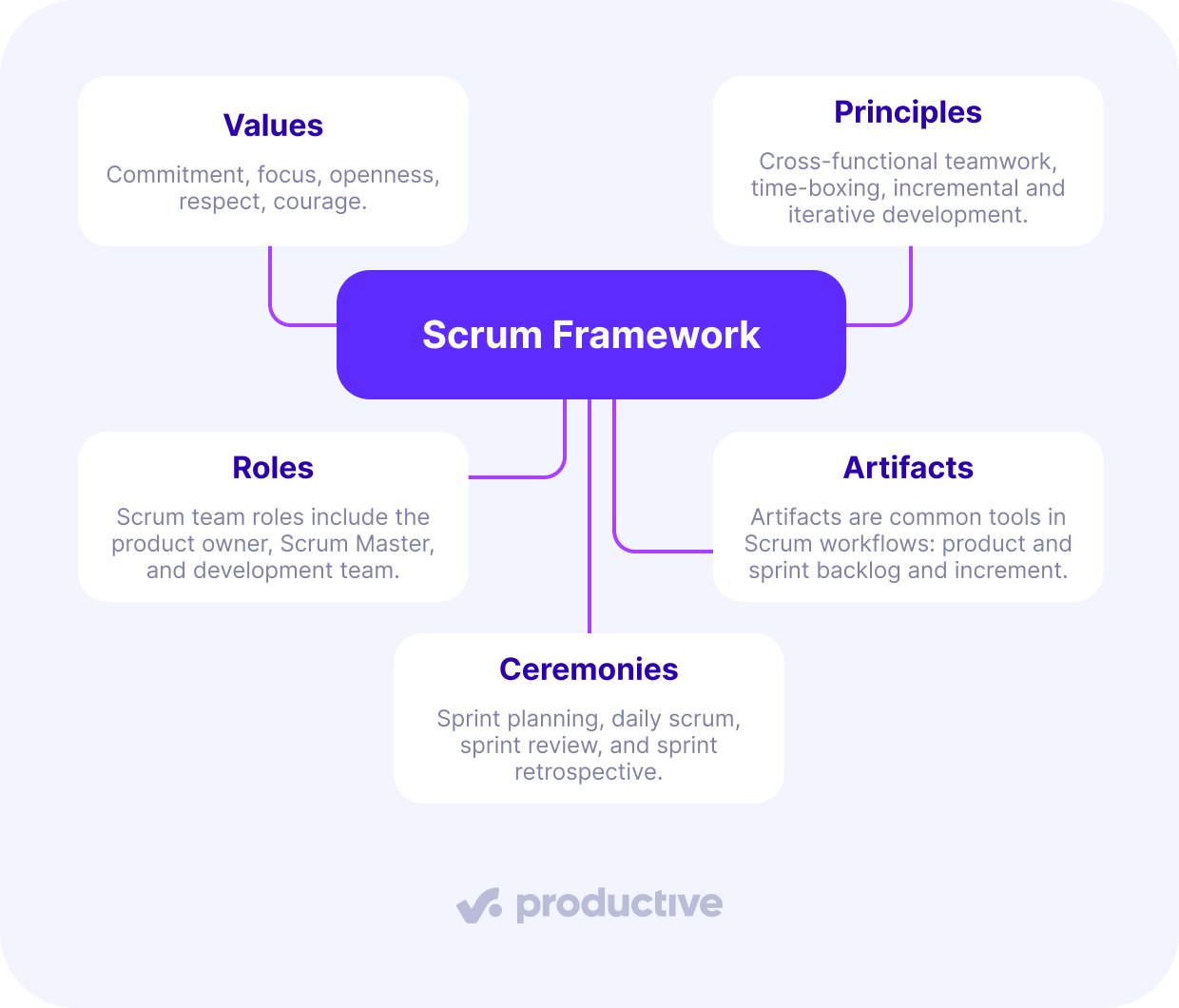
“Lightweight” means the Scrum Guide sets only a few rules: who is accountable for what, which events happen, and which artifacts exist.
Everything else, from how you estimate to which project management software you use, is up to the team. That’s why two Scrum teams can look quite different and still both be running Scrum. What they share is the same loop: build a little, inspect it, adjust.
The framework has a name that predates it.
Why Is Scrum Called Scrum?
Scrum takes its name from the scrum in rugby, the formation where a team packs tightly together to restart play. It isn’t an acronym and doesn’t stand for anything.
Hirotaka Takeuchi and Ikujiro Nonaka used the term in a 1986 Harvard Business Review paper, The New New Product Development Game, after studying product teams at Japanese manufacturers. As Scrum co-creator Jeff Sutherland recounts on his blog, the way those teams worked “reminded them of the Scrum formation in Rugby.”
That is the idea Scrum maintains: the team advances as a unit each sprint rather than handing work from one department to the next.
Ken Schwaber and Jeff Sutherland kept the name when they formalized Scrum and presented it at the OOPSLA conference in 1995.
Underneath the name, the framework rests on three pillars.
What Are the 3 Pillars of Scrum?
The 3 pillars of Scrum are transparency, inspection, and adaptation, the empirical process control principles that make Scrum self-correcting rather than plan-dependent. The Scrum Guide groups them under the heading “Scrum Theory,” so you may see the pillars described as Scrum theory in other resources. Here is what each one means in practice:
- Transparency: shared visibility into the work, its progress, and its challenges, which is what makes the other two pillars possible.
- Inspection: examining the work and processing feedback often enough for teams to identify issues, inefficiencies, or changes needed to improve the product.
- Adaptation: adjusting the plan, scope, or approach during development because, in Scrum, requirements can’t be fully defined up front. Adaptation still needs to be balanced against prediction to avoid chaos.
The pillars describe how Scrum learns. The values describe how the team behaves.
What Are the 5 Values of Scrum?
The 5 values of Scrum are commitment, focus, openness, respect, and courage. They are codified because the framework runs on how a team behaves rather than on process steps alone. Without shared values, the ceremonies and artifacts lose much of their effect. Here is what each value looks like inside a sprint:
- Commitment: the team signs up to one sprint goal together and owns the outcome, not just its individual tickets.
- Focus: nothing that would endanger the sprint goal enters the sprint once it starts, so a fresh client request usually waits for the next planning session.
- Openness: blockers and bad news get raised at the Daily Scrum, so progress and problems stay visible to the team, and to the client at the Sprint Review.
- Respect: the person doing the work owns the estimate, and an account deadline does not overwrite a developer’s or designer’s sizing.
- Courage: the team stops work that does not meet the Definition of Done and challenges a plan that no longer aligns with the client’s actual needs.
For a consultancy running client projects in sprints, courage means the Scrum Master naming scope creep as a risk in the Sprint Review while there is still budget left to renegotiate. That kind of openness needs facts to back it up, and the roles, artifacts, and ceremonies below are how Scrum produces them.
Values shape how the team behaves, and the principles below shape how Scrum structures the work.
What Are the 6 Scrum Principles?
The six Scrum principles are empirical process control, self-organization, collaboration, value-based prioritization, time-boxing, and iterative development. These six come from the SBOK Guide, published by SCRUMstudy and listed on its Scrum principles page. Each describes something the team does:
- Empirical Process Control: the team inspects actual progress and adapts the plan based on what it finds, rather than defending the original estimate.
- Self-Organization: the team decides how the work gets done and who picks up what, which builds accountability and ownership.
- Collaboration: cross-functional members and stakeholders work through continuous feedback rather than handing work across silos.
- Value-Based Prioritization: the highest-value items sit at the top of the backlog, so the most valuable work ships first.
- Time-Boxing: sprints, the daily standup, and every other event run to a fixed length, which keeps the pace predictable and stops ceremonies from taking up billable hours.
- Iterative Development: the team refines the product in increments per sprint rather than committing to a single delivery at the end.
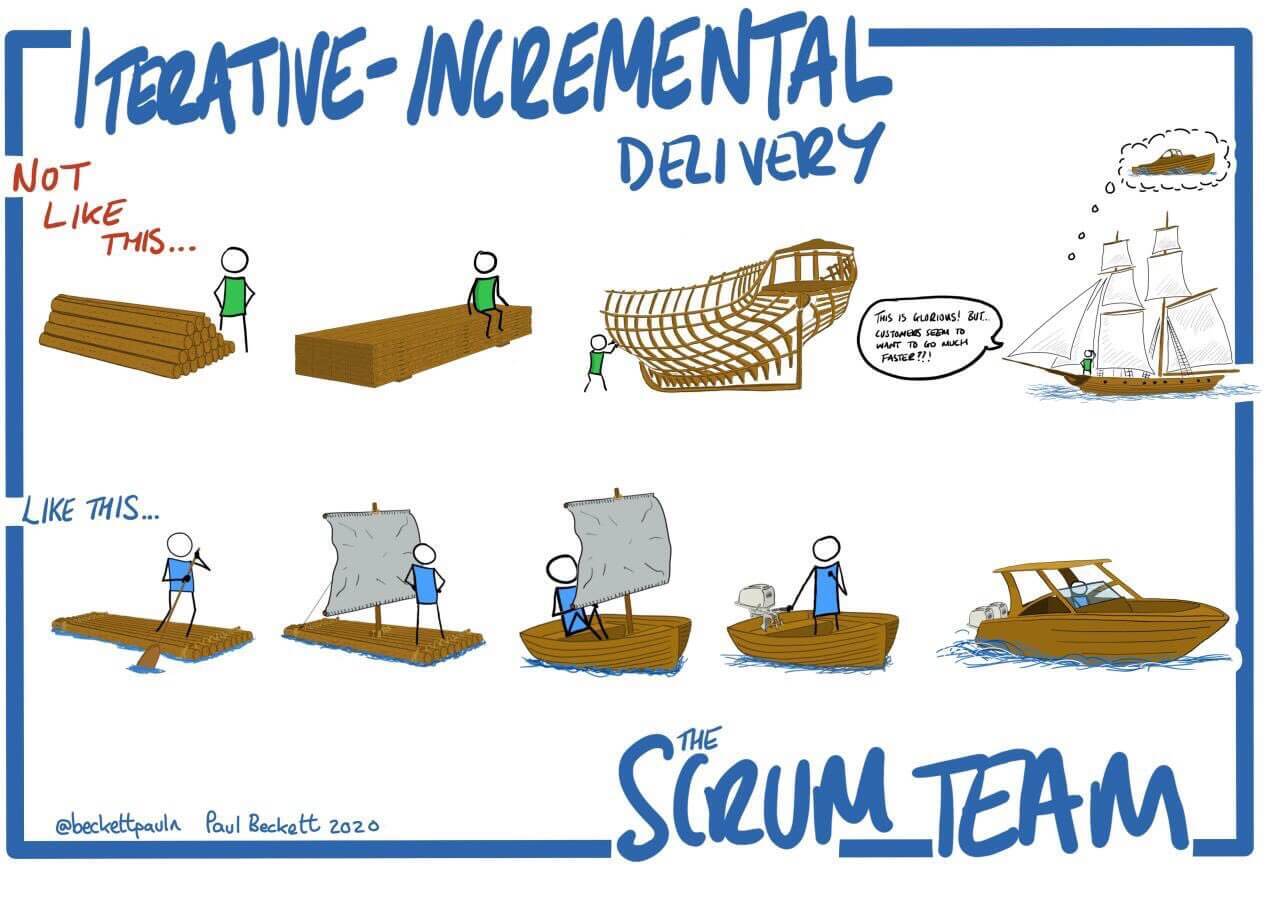
source: Twitter
Those principles become visible in practice through Scrum’s roles, artifacts, and ceremonies.
What Are the Core Concepts of Scrum?
The core concepts of Scrum are its roles, artifacts, and ceremonies: roles decide and build, artifacts make the work visible, and ceremonies set the rhythm that connects them. A Scrum framework diagram shows them as one loop: the sprint. We’ll take a closer look at each.
1. Scrum Roles
The three Scrum roles are the Product Owner, Scrum Master, and Development Team, and together they make up the Scrum team. Each role has clearly defined responsibilities that contribute to the overall success of the project. The first two are strategic and interpersonal roles, while the development team brings the product idea to delivery.
Product Owner
The product owner leads the product vision by deciding which features and functionalities should be included in the final result. The product owner is also responsible for ensuring that they’re implemented in the right order, depending on their importance to the client and potential future users.
The role serves as a point of contact between project stakeholders and development teams and ensures everyone has a clear vision for current and future sprints.
Scrum Master
The Scrum Master ensures that the entire team understands and works together in line with the Scrum values, principles, and practices. Unlike a project manager, this role is more of a leader than a manager. They provide support and coaching to the team and ensure that everyone can work productively without external or internal interference.
In practice, this role often involves:
- Facilitating ceremonies such as daily meetings
- Resolving potential issues with third parties
- Coordinating priorities between multiple teams
- Keeping business stakeholders in sync with progress
Development Team
Finally, the development team is a collection of cross-functional professionals that work on designing, building, testing, and delivering a product. The Scrum Guide describes the whole Scrum Team as “typically 10 or fewer people.” Any more, and close-knit collaboration within the Scrum team becomes more challenging.
Scrum can be, and is, used in businesses with more developers. There, the Scrum Guide recommends splitting into several Scrum teams that share one Product Owner and one Product Backlog, each team with its own Scrum Master.
One technique for coordinating them is the Scrum of Scrums, a regular meeting of representatives from each team. The teams work independently on specific aspects of a product, but align through regular coordination meetings to maintain a shared vision.
2. Scrum Artifacts
The three Scrum artifacts are the Product Backlog, Sprint Backlog, and Increment. Scrum artifacts are the shared records of work that help teams stay organized, track progress, and ensure transparency in development. They provide a clear structure for planning, executing, and delivering work.
Product Backlog
The product owner usually creates the product backlog. It’s a prioritized list of everything needed to improve a product, developed through collaboration between the product owner and project stakeholders.
When developing a new product, product backlog items are usually new features and functionalities, whether written as user stories or plain tasks. For ongoing development or retainers, the backlog will often have improvements to existing features, bug fixes, and other incremental changes.
Items are refined and prioritized according to factors such as value, cost, and risk. The entire process of managing them is known as backlog refinement, or backlog grooming in older material.
Sprint Backlog
The product backlog holds more than a team can finish in one sprint, by design. This is why the Scrum team reviews and selects items during sprint planning. Items expected to be accomplished during a single sprint are part of the sprint backlog.
Items and priorities are flexible within the sprint, allowing adjustments as needed while staying aligned with the sprint goal. The backlog serves as a focused to-do list, guiding daily work and ensuring steady progress toward a working increment.
Increment
An increment, or product increment, is the sum of all completed work at the end of a sprint that meets the Definition of Done. It represents a usable and potentially shippable version of the product. Each sprint should deliver at least one measurable improvement that contributes to overall development.
For this to be valid, all work must be fully tested, meet quality standards, and be release-ready if needed. Even if deployment doesn’t happen immediately, ensuring each update is complete supports continuous progress and transparency.
3. Ceremonies
The four Scrum ceremonies are Sprint Planning, Daily Scrum, Sprint Review, and Sprint Retrospective. Scrum ceremonies are structured meetings that help teams plan, track progress, and improve the Scrum workflow. The Scrum Guide calls them events, and every Scrum event is timeboxed. Let’s examine each in more detail.
Sprint Planning
Sprint planning marks the start of a sprint, where the team decides what work will be completed. The product owner presents high-priority backlog items, and the Scrum team collaborates to select the most achievable tasks based on capacity. The goal is to define a sprint backlog and establish a sprint goal, a clear objective for the sprint. Effective planning helps prevent scope creep and ensures team alignment.
The Scrum Guide timeboxes the session to a maximum of eight hours for a one-month sprint, so roughly two hours per sprint week.
The session also covers breaking down a product backlog item into tasks and determining whether it will fit within the sprint. Or, if the estimation process is more complicated, the development team can handle the task breakdown alone and coordinate with the product owner.
Daily Scrum

Source: reddit
The daily scrum meeting, also known as a standup meeting (not to be confused with standup comedy), is a short, 15-minute meeting where the development team syncs up on progress. A common format is for each team member to briefly share:
- What they completed since the last meeting
- What they plan to do before the next one
- Any blockers or challenges they are facing
The Scrum Master makes sure it happens, but the developers run it; the team self-organizes. The focus is on coordination and progress toward the sprint goal, not problem-solving.
Issues requiring deeper discussion are handled separately. If the Daily Scrum becomes too long or repetitive, steps should be taken to get it back on track.
Sprint Review
The sprint review happens at the end of each sprint to showcase the completed work to the client. The Scrum team presents the increment against the sprint goal to stakeholders, including the product owner and other relevant parties. Stakeholders provide feedback, which helps refine the product backlog and prioritize future work.
This session is interactive. Rather than just a presentation, it promotes discussions about improvements and upcoming priorities. If necessary, the product owner updates backlog priorities based on stakeholder insights. The Scrum Guide caps the review at 4 hours for a 1-month sprint, with shorter sprints receiving a shorter timebox.
Sprint Retrospective
The sprint retrospective is the final ceremony. Unlike a sprint review, which examines the product, the sprint retrospective is an internal ceremony that looks at how the team worked together during the previous sprint. The team reflects on what went well, what didn’t go well, and what can be improved in future sprints.
The Scrum Guide timeboxes it at a maximum of 3 hours for a 1-month sprint, and proportionally less for shorter sprints.
One way to run an effective sprint retrospective that encourages conversation is to:
- Have the team to write at least 3 things that did or didn’t go well
- Group the notes on the wall without making any comments
- Vote silently on top three things to discuss, whether good or bad
This method encourages open and unbiased reflection by letting the team focus on the most impactful topics without singling out one individual to provide (potentially negative) feedback. Learn about the difference between a sprint retrospective and a project retrospective.
A retrospective can go well in the room and still fail afterward, when the agreed improvements sit in a document nobody opens before the next sprint. Retrospective action items must be treated as actual work, not forgotten meeting notes.
Productive’s AI Notetaker helps close this gap by capturing notes during the call and allowing you to convert action points directly into assigned tasks in your workspace.
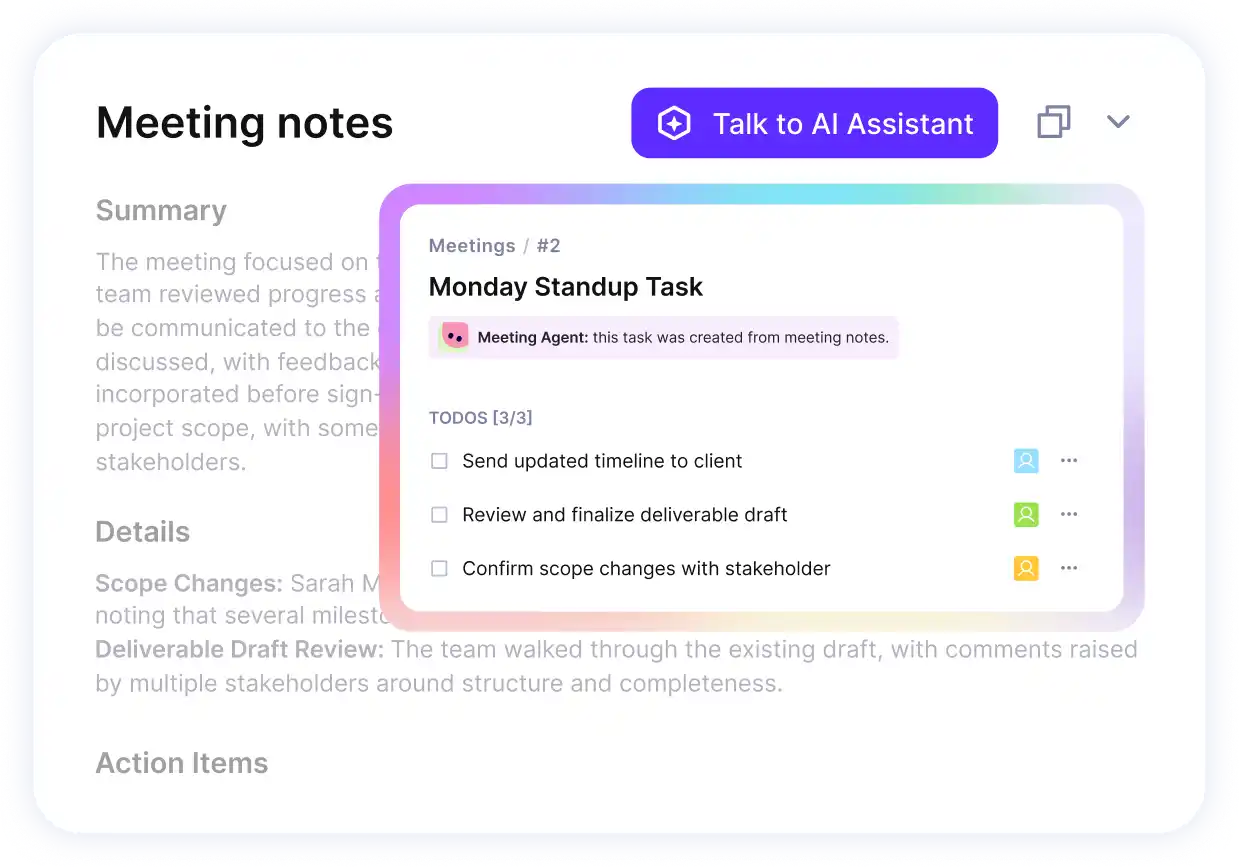
Use the AI Notetaker in Productive.
If you are comparing options, you can take a look at our list of best AI Notetakers.
Turn the talk into next steps in Productive
With the mechanics covered, here is what teams get out of them.
What Are the Benefits of Scrum in Software Development?
The benefits of Scrum in software development are steady delivery on complex projects, faster learning, alignment with business goals, and shared responsibility. We’ll take a closer look at each one:
- Steady delivery on complex projects: in Scrum software development, teams build working software at a sustainable pace, one increment at a time
- Faster learning: short sprints encourage quick updates and learning from mistakes while they are still cheap to fix
- Alignment with business goals: frequent progress checks keep development on track with what the business and its customers actually need, which is what customer satisfaction depends on
- Shared responsibility: a clear but flexible way of working together improves teamwork and accountability
Because of this, Scrum is a strong choice for software teams that need to move fast and deliver valuable products in a competitive market. Scrum isn’t limited to software, as a later section shows. First, here’s how one of the world’s largest equipment makers used it across roughly 500 IT teams.
What Does Scrum Look Like in Practice?
In practice, Scrum is what John Deere’s Global IT Group used to bring roughly 500 teams onto one operating model. Before the change, Agile existed in isolated pockets using different frameworks, and none of it scaled across the organization.
The group rebuilt its way of working on Scrum and Scrum@Scale, paired with DevOps practices and technical training. Scrum Inc., the consultancy founded by Jeff Sutherland, documented the transformation in 2022.
Two years in, Scrum Inc. reports output up 165% and time to market down 63%, well past the targets of 125% and 40%. The pilot team in Order Management went on to ship 10x as many features per sprint as before.
One caveat: those figures come from the consultancy that ran the engagement, not from an independent review.
Results like these raise the question of how Scrum differs from the approaches it replaced.
What’s the Difference Between Scrum, Agile, and Waterfall?
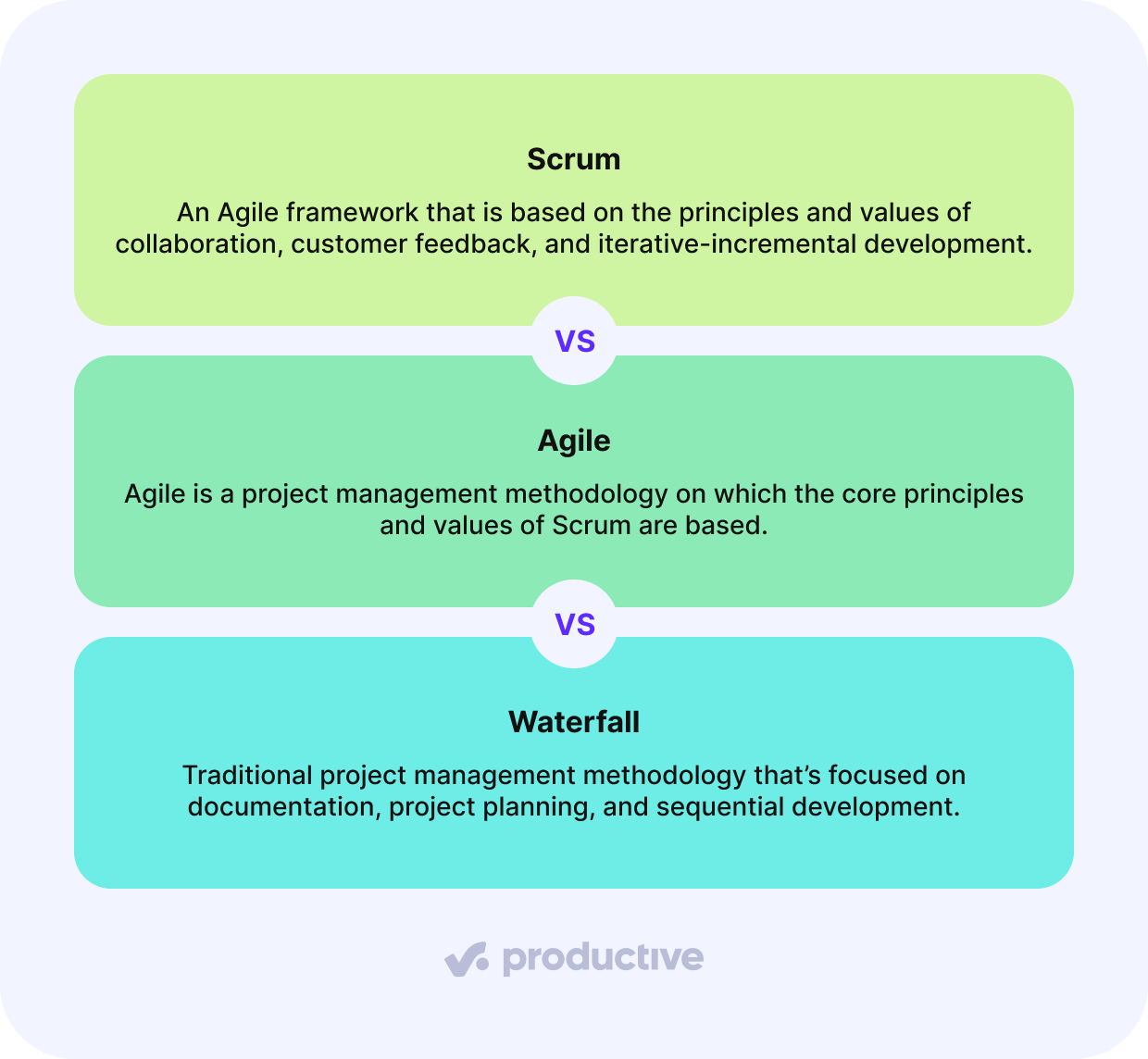
The difference between Scrum, Agile, and Waterfall is that Agile is a set of values, Scrum is a framework that applies them, and Waterfall is a sequential method that plans everything up front.
You’ll see Agile and Scrum written together as “Agile Scrum” or “Scrum Agile,” but they aren’t the same thing.
Agile is not a process you can follow. It’s the four values and twelve principles of the Agile Manifesto, and it prescribes no roles, events, or artifacts. Scrum is one way of putting those values to work, with specific ceremonies, artifacts, and clearly defined roles. Kanban and Extreme Programming are others.
Waterfall, by contrast, gathers requirements, designs, builds, tests, and deploys in sequence, with a project manager owning the plan and each phase signed off before the next begins. It is more rigid and more documentation-heavy, which suits projects with repetitive, well-understood work but poorly supports innovation.
Scrum trades that up-front plan for flexibility, adaptability, and client involvement throughout development. The trade has a cost: implementing Scrum effectively requires a dedication to embracing its values and principles, and may mean training or hiring specialized staff to keep the implementation on track.
Is Scrum a Framework, a Methodology, or a Model?
Scrum is a framework, not a methodology, and “Scrum model” is an informal name for the same thing. It’s a framework because it provides a flexible structure for teams to collaborate, inspect, and adapt rather than prescribing a rigid set of step-by-step instructions.
A methodology is a detailed, predefined approach that must be followed exactly, whereas Scrum fixes only a small set of roles, events, and artifacts. The Scrum Guide calls that core immutable, and leaves the practices around it, from estimation to tooling, for teams to choose.
You might also see it called the Scrum methodology, the Agile Scrum methodology, a Scrum development model, or simply the Scrum model, without drawing these distinctions. All of those terms describe the framework in this article.
Knowing what Scrum is makes it easier to see where it fits.
Which Businesses and Environments Is Scrum Suitable For?
Scrum is suitable for businesses where requirements change while work is in progress, not just for software development. While Scrum was developed in the context of software development projects, Scrum project management is applied in other industries too.
Its core values and principles (collaboration, progress checks, and time-boxed development) make Scrum well-suited to marketing project management, design work, product development, and more.
Instead of industry, other characteristics make a Scrum environment work:
- Projects that are highly innovative and experimental, and traditional and structured approaches can’t be easily applied
- When project goals, customer needs, or market conditions are constantly evolving, an adaptive approach helps team members adjust efficiently
- Scrum thrives in environments where diverse skill sets need to work together to deliver value
The reverse list is just as useful.
When Should You Choose a Different Project Management Methodology?
Choose a different methodology when the scope is locked before work starts, when priorities shift too often for a sprint commitment to hold, or when the work is a repeatable process rather than a product. Scrum theory pays off in an environment where the backlog is allowed to change. The clearest cases:
- Fixed-scope, repetitive work. When the deliverables are signed off up front, and the steps are well understood, a traditional methodology like Waterfall gives you a reliable, linear plan to track against.
- Constantly shifting priorities that make a two-week sprint commitment meaningless. Kanban, standalone or in a Scrum Kanban hybrid (often called Scrumban), keeps work in progress visible without the sprint promise.
- Process improvement work. A data-oriented approach like Six Sigma targets variability in a process, which iteration alone doesn’t address.
If Scrum does fit, the next question is how to adopt it without disrupting delivery.
How Do You Start Using Scrum?
Start by understanding the principles before you change them, giving people time to adjust, and protecting the time you set aside for improvement. Let’s take a better look at each one:
- Understand the principles before modifying them. Adapting Scrum practices to your needs is normal, but do so only once you understand its principles and values. Otherwise, your modifications can lead you astray.
- Give people time to adjust. Scrum requires an extensive shift in mindset, and this won’t happen overnight. Expect the first sprints to focus on learning the events, not on speed.
- Start with a new project. Adopting Scrum mid-project risks adding delays and confusion to work already in flight. A new project lets all principles be in place without the pressures of in-progress development.
- Protect time for continuous improvement. Businesses sometimes skip daily standups or retrospectives, finding them a waste of time. However, inspection and adaptation are two of Scrum’s three pillars, and those events are where they happen.
Once a single team runs well, the next challenge is to get more than one team running well.
How Does Scrum Work in Larger and Hybrid Environments?
In larger and hybrid environments, Scrum is implemented in ways that adapt it to complex projects, large teams, or unique business needs. This article has focused mainly on the basics, but the same core carries over.
Techniques like scaled Scrum frameworks (e.g., SAFe, LeSS, Nexus) help coordinate multiple Scrum teams working on the same product.
You can also refine backlog management with dual-track Scrum, introduce Kanban-Scrum hybrids for continuous delivery, or enhance sprint reviews with customer-driven validation.
Hybrid project management combines elements from Scrum, Kanban, and Lean with Waterfall.
By tailoring the practices around Scrum, you can apply its core values and principles in large-scale or highly dynamic environments.
Support Your Process With Software
Scrum is a framework, not a rulebook. While Scrum can be run with simple physical boards, the right project management software can help teams track work, manage availability, and keep budgets visible in real time.
Productive keeps task boards, time tracking, resource planning, and budgeting in one system, so a sprint is planned against real capacity and reviewed against real spend.
Book a demo with Productive to learn how it can support your professional services business.
Keep Projects on Time and Budget With Productive
Switch from multiple tools and spreadsheets to an all-in-one platform for project management, resource planning, and financial management.
