Top 5 Screendragon Alternatives (Paid & Free) – 2026 Review

Screendragon alternatives often come up when your team needs better-fit workflows, simpler day-to-day work, or a system that aligns with how you actually run projects and approvals.
To help you out, we put together this guide to five actual replacements, with a focused shortlist, a comparison table, key features, review-based pros and cons, and clear best-fit guidance.
You’ll also get practical advice on choosing the right tool for your team without dragging out the evaluation process. At the end, you can use the free migration checklist to plan the move with less risk.
What Are the Best Screendragon Alternatives in 2026
The best Screendragon alternatives in 2026 are Productive, Function Point, Adobe Workfront, Wrike, and Workamajig amongst many other project management software to compare.
These alternatives made it to the list because they are actual replacements for teams that need stronger agency operations, structured workflows, approvals, or project management without falling back on a broad-name tool that only overlaps on the surface.
Shortlist of the Best Screendragon Replacements
Alternative Tools to Screendragon Comparison Table
| Tool | Best for | Choose this if | Skip this if | Free version available |
|---|---|---|---|---|
| Productive | All-in-one agency operations | You want delivery, resourcing, project management, time, and budgets in one system | You only need a lighter workflow layer | No |
| Function Point | Creative agency operations | You want agency-focused project management and financial control | You want a lighter tool with a more modern feel | No |
| Adobe Workfront | Enterprise marketing workflows | You need structured intake, workflow automation, and process control across large teams | You want a simple rollout with low admin overhead | No |
| Wrike | Flexible work management | You want a configurable work management tool and a lighter starting point | You need agency-specific financial and delivery control | Yes |
| Workamajig | All-in-one creative agency management | You want deeper operational control and can accept more setup | You want something faster to learn and easier to run | No |
How We Chose These Tools?
We chose these tools by looking for actual replacements on software review sites and vendor pages, then narrowing the list based on category fit, recurring user feedback, and practical overlap with Screendragon’s workflows. We used sources like G2 and Capterra to compare review volume, user ratings, and the kind of problems each tool is built to solve.
The goal was to find tools that could realistically replace Screendragon for teams that need project structure, approvals, agency management software depth, stronger workflow management, or more flexible collaboration software.
If you want a broader decision framework behind that filter, our agency project management guide gives a more detailed view of what agencies should evaluate.
1. Productive – Best All-In-One Replacement for Agencies and Professional Service Teams
Productive is the best Screendragon replacement for agencies that want an all-in-one option built around how delivery actually works. Instead of splitting projects, resourcing, time tracking, and budgets across separate tools, Productive keeps them connected in one system.
Try the best Screendragon replacement
Keep Project Delivery, Budgets, and Reporting in the Same Place
One of the biggest frustrations with heavy workflow tools is that work can move while the budget picture stays blurry. A timeline shifts, scope expands, or more hours go in than planned, but nobody gets a reliable answer until someone exports the data and rebuilds it by hand.
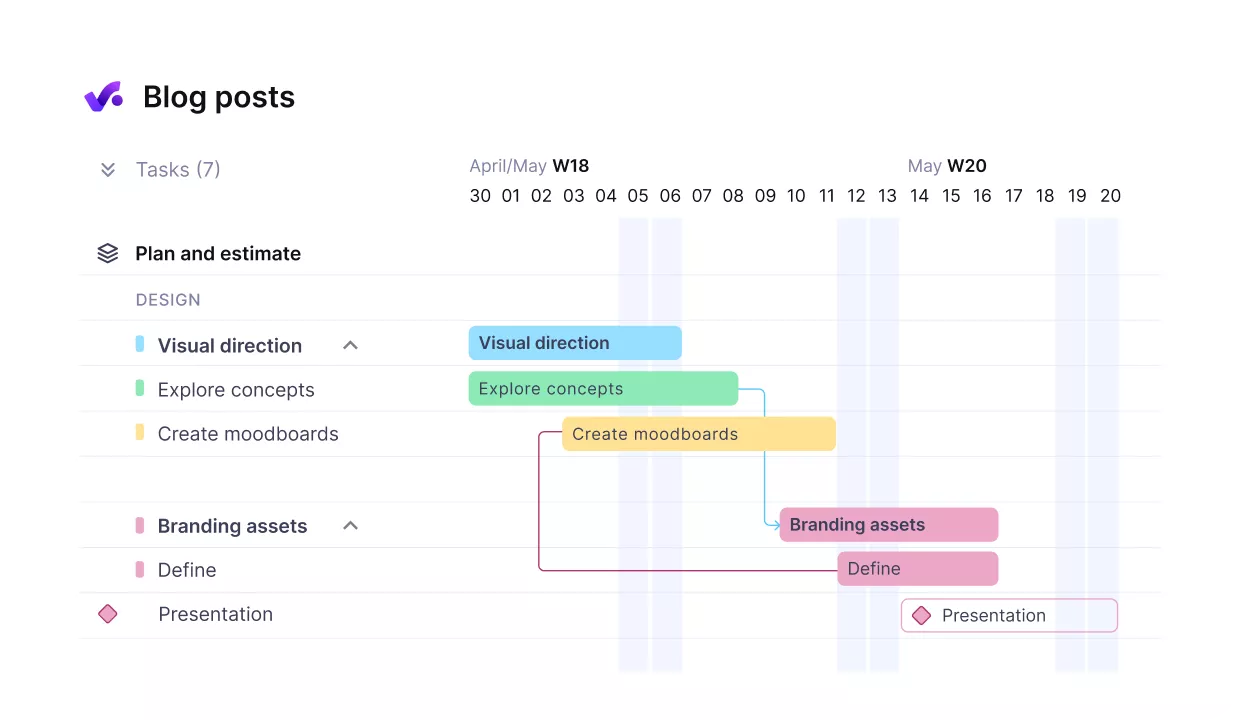
Break up projects in to phases with dependent subtasks.
Productive keeps project management, time tracking, budget management, and reporting connected. That gives teams a clearer view of delivery while the work is still live, so project leads do not have to chase status in one place and budget truth in another.
Catch Capacity Issues Before They Become Deadline Issues
A lot of teams do not switch because they need more task management. They switch because they still cannot see who has room, who is overloaded, and what happens when work moves between people.
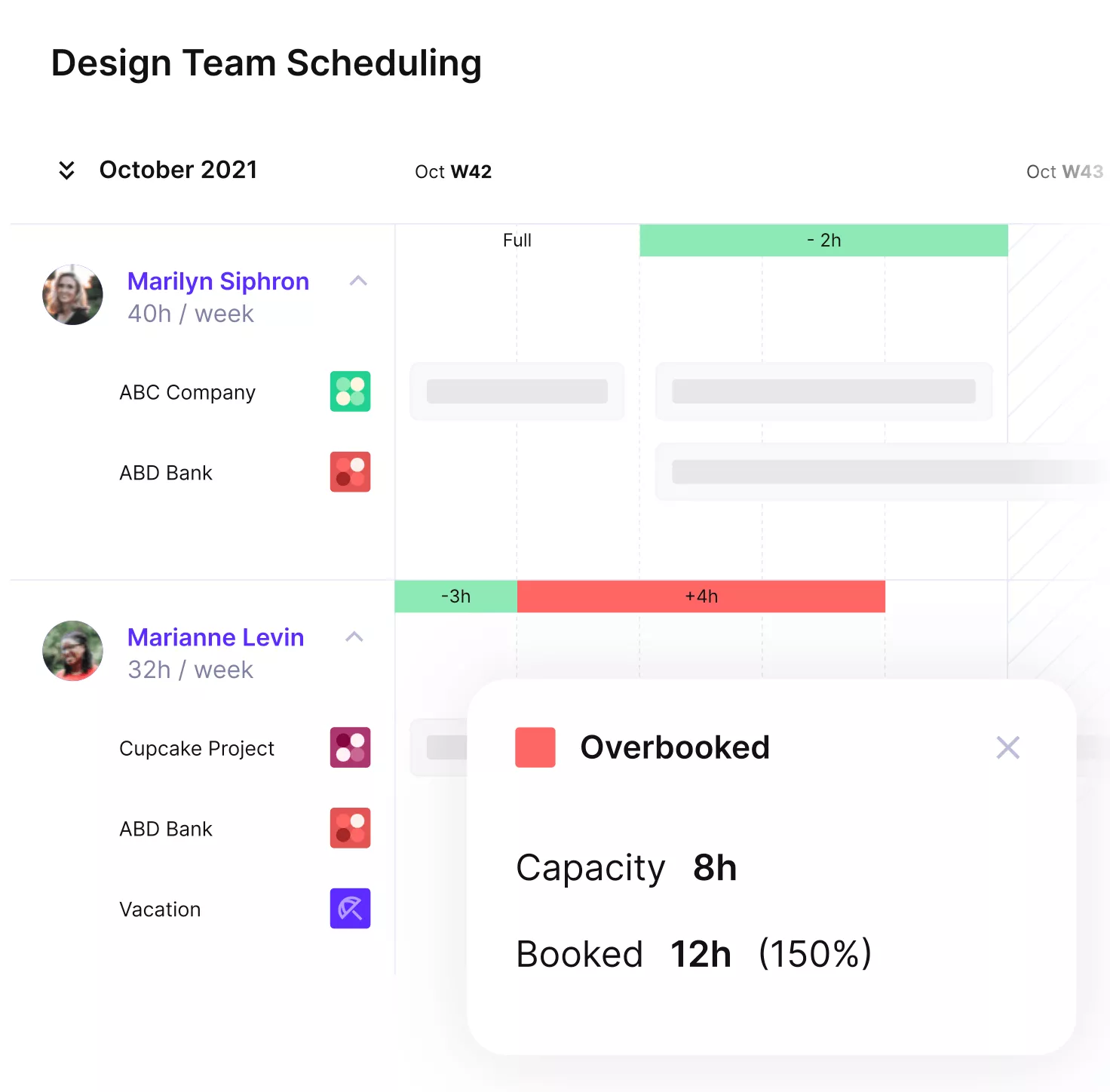
Schedule team members without overbooking or idle hours.
Productive’s resource planning and workload view keeps resource management close to live project work, so it is easier to spot pressure early, rebalance workloads, and support team capacity planning before a staffing problem turns into a delivery problem.
Plan Tentative Work Without Guessing
Pipeline work creates a different kind of chaos. If likely work lives outside the delivery system, staffing decisions begin to rely on instinct rather than a visible plan.
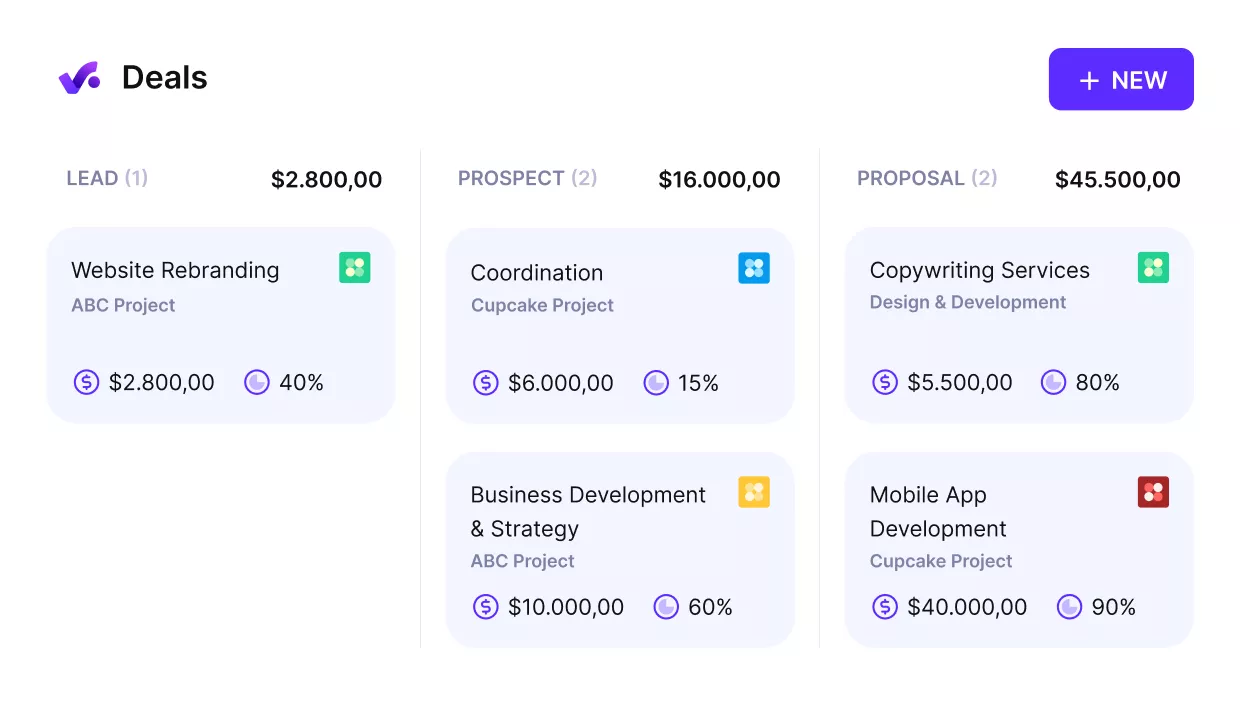
Turn won deals into started projects.
Productive’s workload planning tools support tentative bookings, so teams can model likely demand before it becomes confirmed work. That gives agency leads a cleaner way to think about future workload, contractor coverage, and hiring pressure without treating every possible project as locked.
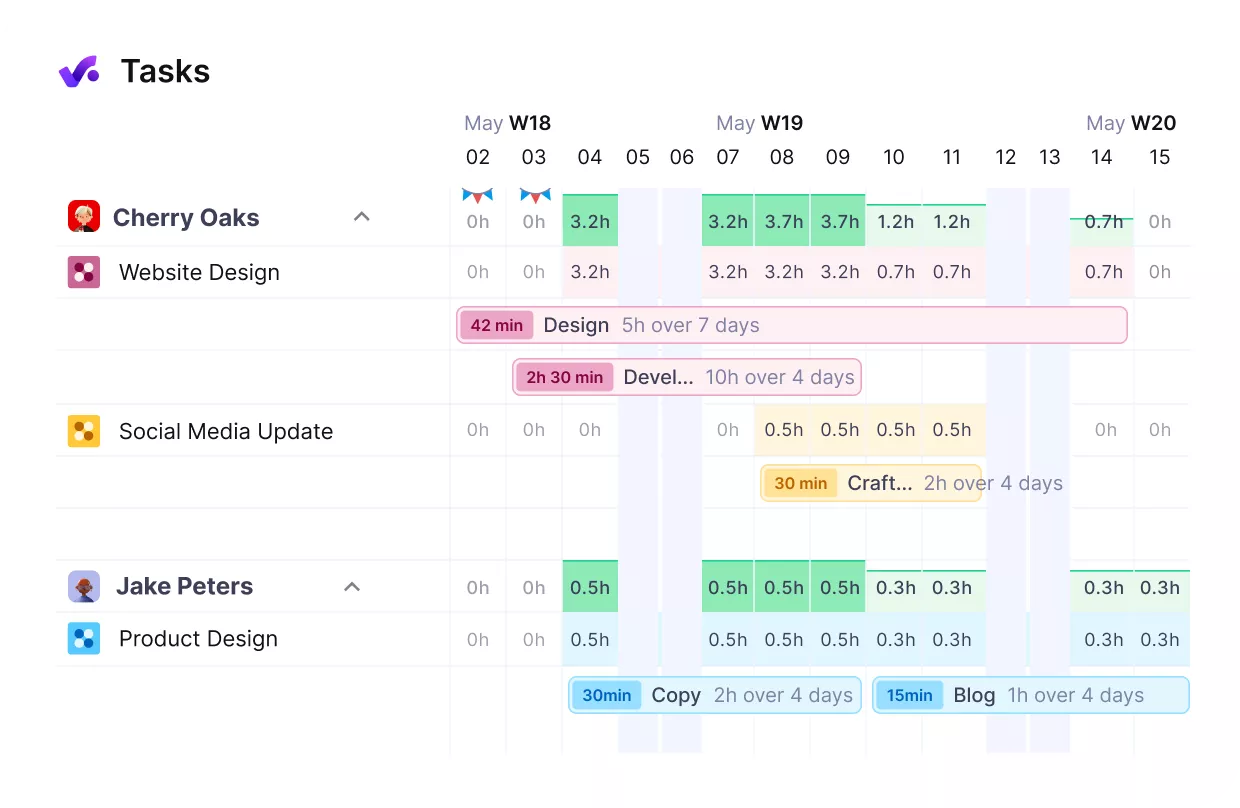
get real-time overviews of your team’s workloads.
Review Time Before It Becomes Cleanup Work
Time data usually becomes a problem at the last minute. The team logs it, the delivery moves on, and then reporting or billing reveals gaps that are harder to fix.
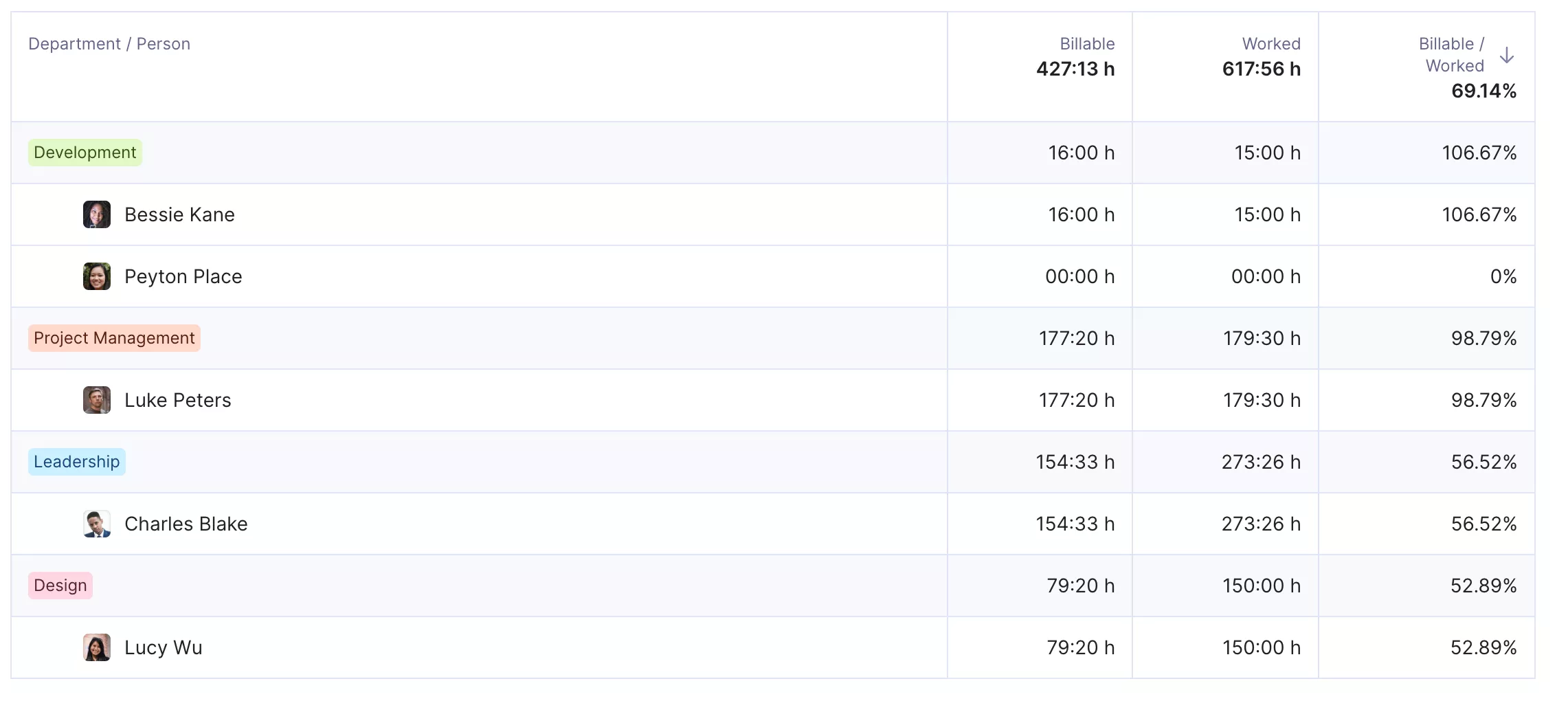
Connect tracked time with budget management.
Productive adds a cleaner approval step before time tracking flows into reporting and budget visibility. That helps teams catch issues while the work is still fresh and makes it easier to run agency management software without the usual handoff mess between delivery and finance.
Pricing
- Plans start with the Essential plan at $10 per user per month, which includes essential features such as budgeting, project & task management, docs, time tracking, expense management, reporting, and time off management.
- The Professional plan includes custom fields, recurring budgets, advanced reports, billable time approvals, and much more for $25 per user per month.
- The Ultimate plan has everything that the Essential plan and Professional plan offer, along with the HubSpot integration, advanced forecasting, advanced custom fields, overhead calculations, and more. Book a demo or reach out to our team for the monthly price per user.
You can also try Productive with a free trial.
Replace Screendragon With a System That Covers the Whole Workflow
If your team has outgrown separate tools for project delivery, resourcing, time, and budget visibility, Productive gives you one place to run the work and see what it means while the project is still moving.

2. Function Point – Best for Creative Agency Operations
Function Point is agency management software built for creative teams that want project planning, project management, client oversight, time tracking, resource visibility, and financial control in one place. It is the best alternative for agencies and professional service providers that need an operating system for client management and delivery, not just another task tool.
If staffing visibility is one of the biggest issues behind your switch, this resource planning guide for agencies is a useful reference point while you compare tools.
Key Features
- Project management tools with timesheets and project briefs
- Resource planning and workload forecasting
- CRM and client management for pipeline and scoping work
- Agency financials, invoicing, and business reporting
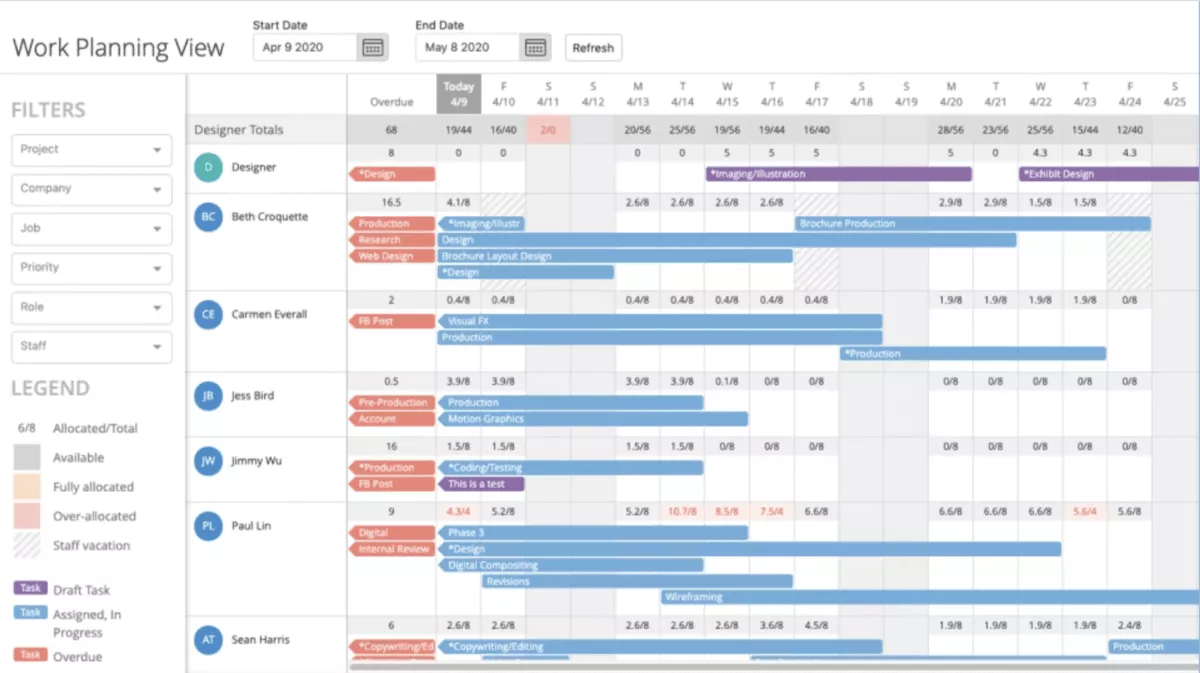
SOurce: function point
Pros
- Brings project management, logged hours, and financials together in one system
- Makes proposals and estimates changes easier during client work
- Supports team collaboration and customization for agency workflows
- Helps agencies track hours and get useful reporting for day-to-day management
Cons
- Has a real learning curve for new users
- Some actions feel slow and take too many steps
- Reports can be hard to find and understand
- CRM and estimating workflows can feel too manual
Final Verdict
Function Point more sense for agencies willing to accept some setup and usability trade-offs in exchange for deeper agency management software coverage.
3. Adobe Workfront – Best for Enterprise Marketing Workflows
Adobe Workfront suits large marketing teams that need one platform for intake, planning, workflow automation, approvals, enterprise coordination, and workflow management. It is a better fit for complex content workflows, digital proofing, and review-heavy approval processes than for smaller teams that want speed and simplicity.
Key Features
- Custom request queues, forms, and templates for structured intake
- Online proofing and digital proofing for review and approval workflows
- Resource planning and capacity visibility across teams
- Workflow automation with reporting dashboards and enterprise reporting
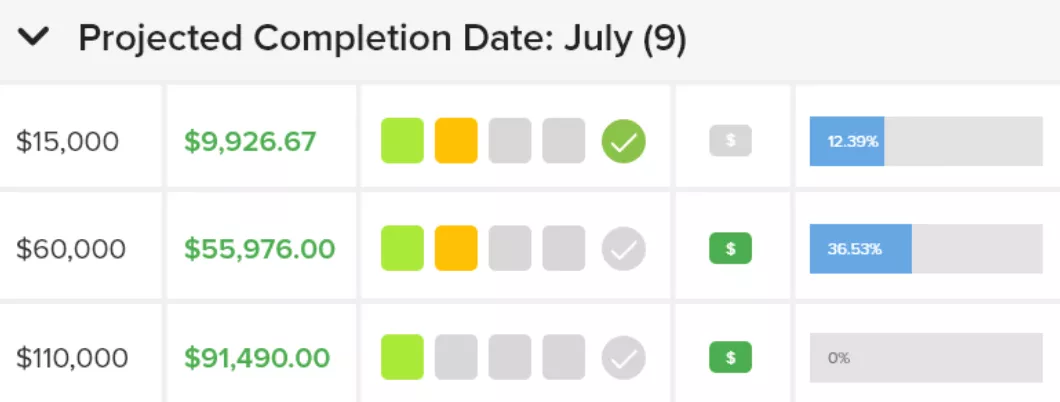
SOurce: adobe workfront
Pros
- Gives enterprise teams a strong intake and workflow structure
- Improves visibility across requests, projects, and team workloads
- Handles proofing and approvals in the same system as project work
- Scales well for large, cross-functional marketing operations
Cons
- Takes real training and setup before teams get comfortable
- The interface can feel hard to navigate for non-admin users
- Some workflows and admin rules are cumbersome to manage
- Performance and rollout effort can become a burden at scale
Final Verdict
Skip Workfront if your team wants a tool that feels light, fast, and easy to learn without admin overhead. Choose it when structured approvals, process control, and enterprise scale matter more than day-one simplicity.
4. Wrike – Best for Flexible Work Management
Wrike is the lighter option in this list for teams that want work management software with flexible setup, strong visibility, and less agency-specific overhead.
It fits teams that need project management, task management, team collaboration, Kanban boards, Gantt charts, and lighter workflow management, but do not need deep agency operations in the same system.
If you want a closer look at that trade-off, our detailed breakdown of Wrike alternatives goes deeper into where it fits and where it falls short.
Key Features
- Custom workflows, request forms, and dashboards
- Approvals and proofing for review-heavy work
- Board view with Kanban boards, Gantt charts, and timeline planning
- Reporting, resource visibility, and workload views
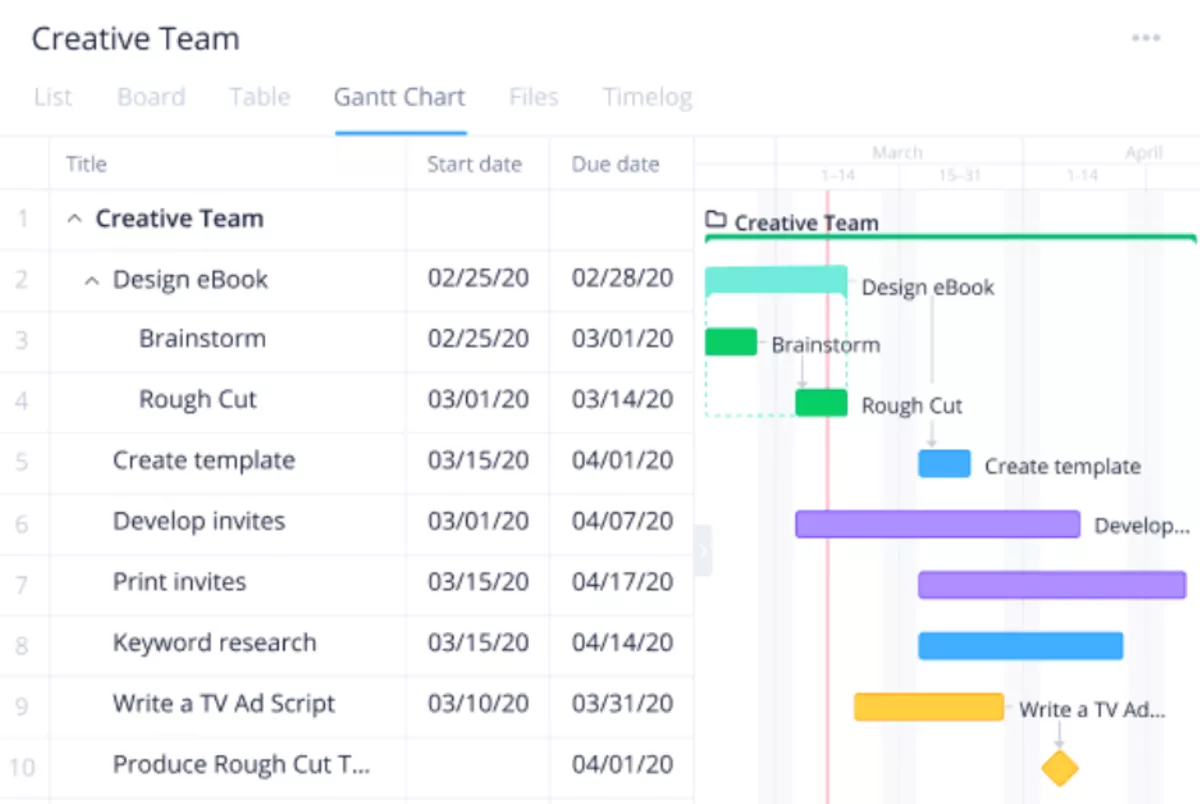
SOurce: wrike
Pros
- Flexible enough to fit many team workflows
- Gives teams clear visibility into work and ownership
- Strong for cross-functional collaboration
- Offers useful views and structure for day-to-day project work
Cons
- Takes time to learn well
- The interface can feel unintuitive at first
- Reporting and setup can get complex
- Some valuable capabilities sit on higher-tier plans
Final Verdict
Wrike works best when you want a configurable work tool and can live without agency-specific financial depth. It is a weaker fit if you are replacing Screendragon because you need a more purpose-built agency operations system, not just a flexible project layer.
5. Workamajig – Best for Creative Agency Management
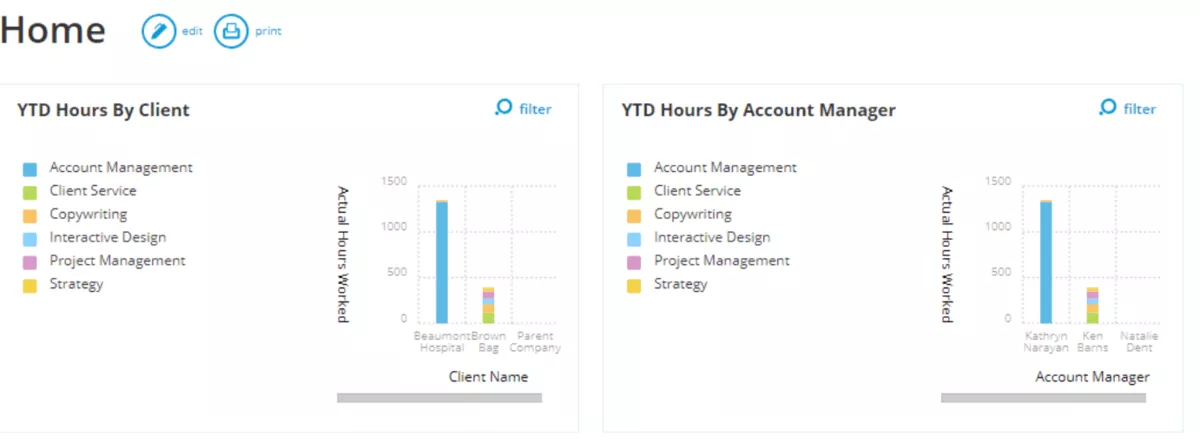
Workamajig is one of the better replacements for creative teams that want agency management software with project tracking, resource management, budget management, and time tracking in one system. It fits agencies that want deeper operational control, including client portals and approval-heavy workflows, without stitching together multiple tools.
Client portals matter here because agencies often need a cleaner client-facing layer as well as internal control. If you want to compare that position more closely, our full guide to Workamajig alternatives breaks down where the tradeoffs show up, and offers extra replacement tools.
Key Features
- Project tracking, task management, and timesheets in one workspace
- Resource management and staff scheduling for agency teams
- Budget management, finance, and billing tools
- Client portals, proofing, and approval workflows
SOurce: workamajig
Pros
- Covers agency operations in one system instead of splitting work across multiple tools, including client portals for client-facing workflows
- Gives teams strong customization for portals, dashboards, and workflows
- Helps with scheduling, reporting, and day-to-day operational visibility
- Offers solid support and training for teams that need help during rollout
Cons
- It can feel overwhelming at first because the system is so broad
- Some workflows are not intuitive without training
- Parts of the product still feel dated in how they work
- The reporting setup can take trial and error for newer users
Final Verdict
Do not choose Workamajig if your team wants a clean, lightweight tool that people can pick up with almost no training. It makes more sense for agencies that are willing to trade simplicity for deeper control across projects, resources, and finance.
Why Are People Looking for Screendragon Alternatives
People look for Screendragon alternatives because they want the same control over complex approvals and delivery workflows, but with a better fit for their team, a simpler rollout, or a more intuitive day-to-day experience.
- The platform can feel broad and hard to fully adopt. On paper, the tool covers a lot. In real work, that can mean teams only use part of the system, while other features stay underused because people are still figuring out where things live or how the workflow should be set up.
- Some teams want less complexity in daily use. This usually shows up when project leads, account teams, or reviewers need to move fast, but the system feels heavier than the job at hand. Instead of helping work move, the process starts to feel like another layer to manage.
- The fit is not always right for smaller or less process-heavy teams. Screendragon makes more sense when a company needs structured approvals, reporting, and cross-team control. Teams with simpler delivery models often start looking for a tool that is easier to run without giving up too much visibility.
- Buyers want a closer match to their operating model. Some teams need agency operations depth with budgets, resourcing, and finance in one place. Others want a lighter project layer with approvals and collaboration.
- Implementation effort becomes part of the decision. Even when the product is capable, buyers still weigh how much admin setup, training, and change management they can realistically support. That is often the point where they start comparing tools that solve a similar problem with a different level of operational overhead.
These are not small complaints. They are buying signals that help narrow the shortlist, because they tell you whether you need another structured enterprise platform, a true agency operations system, or a lighter tool with fewer moving parts.
How to Choose the Best Screendragon Replacement? (Step By Step Porcess)
Choose the best Screendragon replacement by checking how each option handles the work your team already does, not the version of the workflow shown in a polished demo. The goal is to find a tool your team can run every day without rebuilding your process around it.
Step 1: Map the Workflows You Cannot Afford to Break
Start with one plain-English list: how work gets requested, who reviews it, how it gets assigned, where deadlines change, how status gets reported, and whether asset management or digital asset management still sits in a separate system. Do not write “project management” or “approvals” as labels. Write the actual sequence your team follows now.
A better test is to ask each vendor to show that workflow back to you. For example, a campaign request comes in, a creative lead reviews it, a PM reassigns it, task dependencies shift, and finance needs the final time logged against the right job.
Step 2: Decide Whether You Need Agency Operations or Just a Workflow Layer
This is where shortlists usually get messy. Some teams need agency operations depth with budgets, resourcing, billing, and delivery in one place. Others just need software that makes requests, reviews, and ownership clearer.
Make that decision before comparing tools. If your biggest pain is finance, resourcing, or delivery control, a lighter collaboration software layer will not solve it. If your biggest pain is workflow speed and visibility, a heavier operating system may be more than you need.
Our agency operations guide is a useful way to frame that difference before you narrow the shortlist.
Step 3: Pressure-Test Approvals, Resourcing, and Handoffs
Ask the vendor to walk through three common moments: a request gets sent back for changes, a deadline moves and work needs to be reassigned, and one team member is overloaded so another person has to pick it up.
These are the moments where tools break down.
This is also where resource management software and capacity planning software matter. You need to see whether the tool shows who is available, who is overbooked, and what happens when work shifts between people or teams.
Step 4: Use Your Real Reporting Questions as the Scorecard
Most teams already know which questions keep coming up every week. Which projects are drifting? Which jobs are over budget? Who is overloaded? Which approvals are stuck? Use those exact questions in the evaluation.
Do not ask for a generic dashboard tour. Ask the vendor to show how the tool answers one of your real questions in front of you, including whether budget management and delivery reporting still make sense when work changes. Reporting dashboards are only useful if your team can trust them when work changes.
That gives you a much better sense of whether the reporting is actually useful.
Step 5: Score Rollout Effort Before You Score Features
A tool can look strong on paper and still fail because the team will not adopt it. Ask what setup has to be done before your first live workflow runs, who has to own the admin work, and how much training different roles will need.
This matters more than people admit. A tool with slightly less depth can still be the better choice if your team can actually roll it out without months of cleanup, rework, and change management.
Step 6: Write the Tradeoffs the Way Your Team Talks About Them
Before the final decision, make a one-page internal comparison for each finalist. Keep the language simple: best for, painful for, hardest team to onboard, and biggest compromise. That is much more useful than a long scoring sheet full of vendor language.
This also makes it easier to compare different alternatives with colleagues who do not care about feature names but do care about how the switch will affect their work. If your shortlist is still too broad, this roundup of agency management software options can help you narrow the category before you make the final call.
Step 7: Run One Live Pilot Before You Commit
Pick one active workflow and test it with the people who actually use it. That should include at least one requester, one reviewer, one project owner, and one person affected by team capacity planning or cross-team collaboration software.
A short-lived pilot tells you whether the tool works under normal pressure. It also shows where the setup still breaks, what confuses people, and whether the new system actually feels better in practice.
Migration Checklist
- Audit what it is like today. List every active project, approval flow, recurring workflow, dashboard, report, digital libraries, and integrations your team still depends on. Include tools like Google Workspace or Microsoft Teams if they are tied to task updates, file sharing, notifications, or asset management.
- Mark the workflows you must rebuild first. Highlight the processes that cannot break without affecting delivery, approvals, or billing. That usually includes intake, review steps, task scheduling, task dependencies, and status reporting.
- Decide what historical data actually needs to come over. Split your data into three groups: active work, recent reporting history, and archive-only records. This keeps the migration smaller and makes document management much easier.
- Map projects, owners, and approval rules into the new tool. Define where each project lives, who owns it, who approves work, how task dependencies move between teams, and where client management details need to live before anyone starts rebuilding workflows.
- Test one live workflow with a pilot group. Include the people who request work, review it, manage it, and report on it. A small pilot will show you faster than any checklist whether the setup works under normal pressure.
- Lock the rollout sequence before you switch everyone over. Decide which group moves first, which workflows follow, what stays in Screendragon temporarily, and when the old system stops being the source of truth.
Are These Alternatives Worth It?
The switch usually makes sense when you need a better fit, a simpler rollout, or a system that is easier to run every day. Some teams need deeper agency management software with project management, budget management, delivery, and financial control in one place. Others want lighter work management without the same operational overhead.
If that is where you are, the best next step is to shortlist tools that align with your operating model and pressure-test a live workflow before deciding. If you want all-in-one agency management software built for agency operations, Productive is the best place to start.
Book a demo to see how it handles the workflows you actually need to replace.
Connect With Agency Peers
Access agency-related Slack channels, exchange business insights, and join in on members-only live sessions.
