Resource Leveling for Professional Services: A 2026 Guide

Three client projects have the same specialist booked next week for more hours than that person has available. Resource leveling is how you move work so bookings fit the hours people have.
This guide covers what leveling is, when to use it, and how it differs from smoothing. It also covers the six steps, the techniques it gets confused with, and what software can take on.
Key Takeaways
- Resource leveling means moving work around so nobody is booked past their hours; a delivery date can be moved to make that happen, but you do not hire anyone new.
- Smoothing keeps the deadline; leveling keeps the team: if the finish date is locked, you smooth; if the team is locked, you level, and a date moves.
- The leveling process runs in six steps: pull every engagement into one schedule, list the over-allocations, rank the conflicting bookings, make the change, recheck for new overloads, and confirm the revised dates.
- Software turns leveling into a weekly check: it compares booked hours against available hours on a cadence, and an agent can run that check and make the change instead of only flagging it.
What Is Resource Leveling?
Resource leveling is the practice of rescheduling work so that booked hours align with the hours a person actually has. That means changing when work happens and how long it takes. If a delivery date has to move to make it fit, it moves. The one thing you do not do is add people.
Those hours have a name. Availability is someone’s capacity minus any approved time off, and it is the ceiling every booking has to fit under.
For example, a UX lead is booked for discovery with one client and a design review with another. Both bookings fall in the same week, and together they need more hours than the lead has. Leveling moves the review to the following week, or hands it to a designer who already has room. Either way, the lead’s hours now fit, and no one new has joined the firm.
In a services firm, you are never leveling one project on its own. Your senior people are booked across several clients at once. So the question is always which client’s work moves.
Leveling is one of three strategies inside resource planning, alongside allocation and smoothing. Our resource planning guide covers all three.
That leaves the question of when a services team should reach for it.
When Should You Level Resources?
You should level resources when a shared specialist is booked beyond capacity across engagements, when a scope change occurs and the booking plan no longer fits, or when someone takes time off and their work has to be moved.
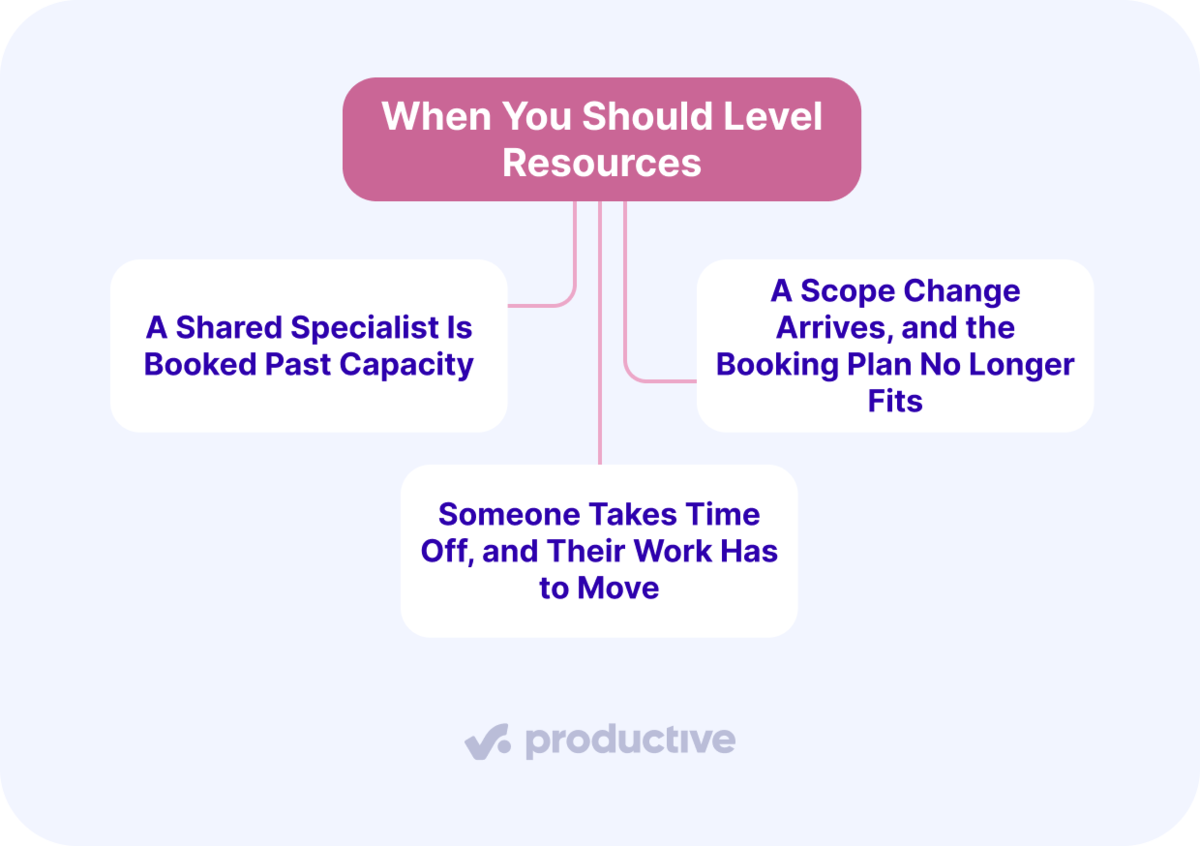
These are our own recommendations. We’ll take a closer look at each.
A Shared Specialist Is Booked Past Capacity Across Engagements
One person is booked on two or three projects in the same week. The bookings add up to more hours than they have. Each project owner booked against their own budget, and no one added the totals.
Take your only data engineer, booked for a client migration, a dashboard build, and an internal integration. All three land in the same sprint. Each booking looked reasonable on its own project.
It stays hidden because the resourcing plan sits apart from everything else. When firms describe their setup to us, resourcing usually still runs in a spreadsheet, updated by hand. Project management, time, and financials sit in other systems.
Productive’s Resource Planner puts all active engagements on a single schedule. Its By Person view uses capacity indicators, a heat map where red marks someone booked over their availability.
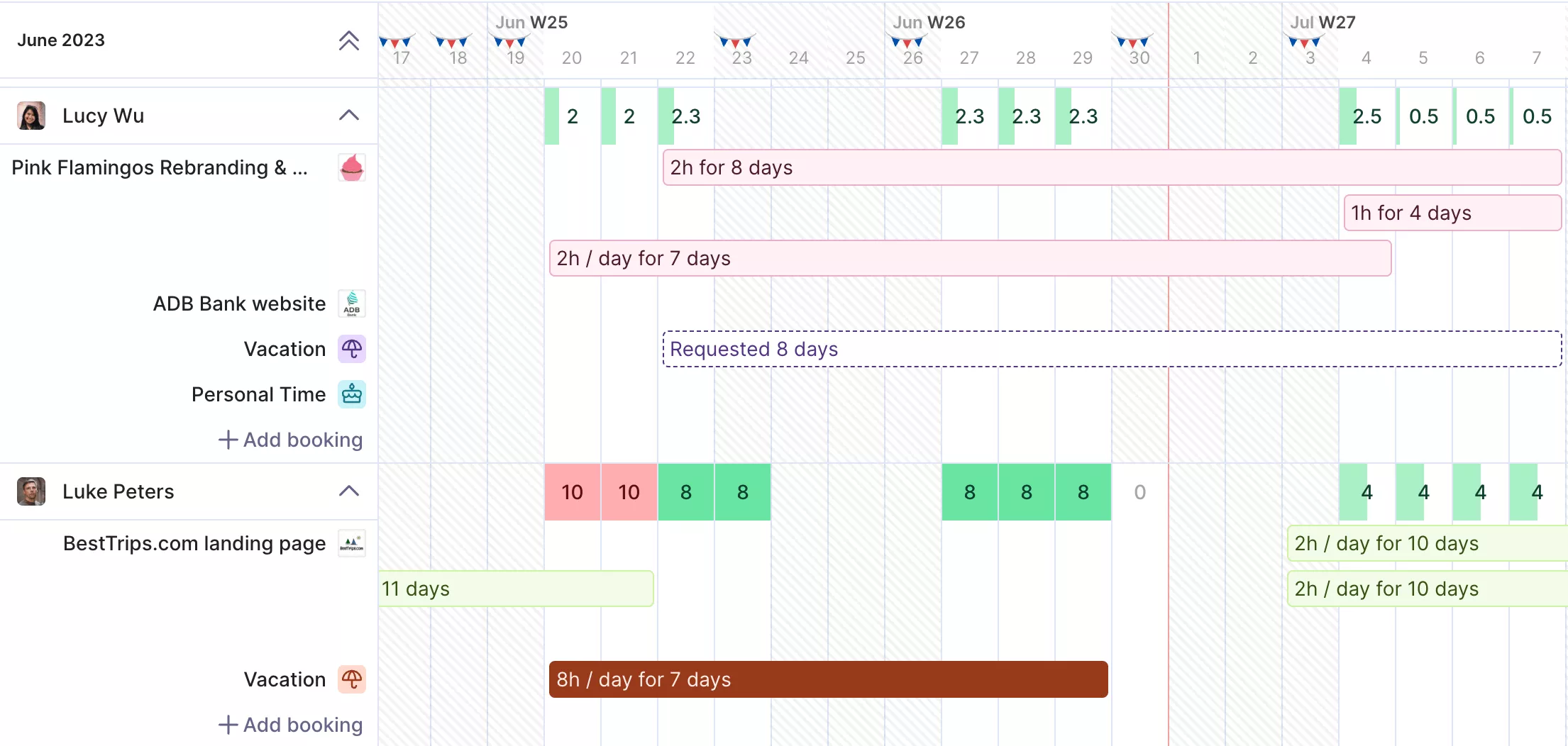
Track capacity indicators in Productive.
The shade deepens the further over they are, and approved time-off and national-holiday calendars automatically reduce availability.

We want to make sure clients are properly serviced and that no one on the team is quietly burning out. If someone is consistently working 60-hour weeks, Productive makes that visible, so we can step in and fix the situation.
Read the full customer story to see how Muhlert Digital avoids overloading people with Productive.
A Scope Change Arrives, and the Booking Plan No Longer Fits
A change request lands mid-engagement, and the hours no longer fit the plan. Small requests cause the most trouble, because each one looks harmless on its own.
Say a client asks for two extra rounds of revisions and a new report format. None of it is large. Together, it is another week of your designer’s time that was never booked.
Teams then cannot confidently say whether someone is overbooked. A hand-maintained plan is out of date the moment a request lands.
Someone Takes Time Off, and Their Work Has to Move
Approved time off reduces a person’s availability, and the bookings sitting in that window have to go somewhere. Nothing about the work changed, only the hours available to do it. That makes it the most clear-cut leveling situation there is.
For example, a developer takes three days off in a sprint where they were already fully booked. Those bookings do not disappear. Either they move to a later week or to someone with room.
The complication is that time off is often approved in one system while the bookings sit in another. Firms tell us they run time off through an HR platform and then need it to reach the resourcing plan. Availability drops in one place while the plan stays unchanged in the other.
With the triggers clear, the next job is separating leveling from the practice it gets confused with.
What Is the Difference Between Resource Leveling and Smoothing?
The difference between resource leveling and smoothing is what you are allowed to move. Leveling lets a delivery date move so the work fits the team. Smoothing keeps the finish date and shifts work into spare time already in the schedule.
The two are easiest to separate side by side.
Leveling and smoothing in professional services terms
| Practice | What it does | The locked constraint | Whose date can move |
|---|---|---|---|
| Leveling | Moves work to fit the team you have | The team | The lower-priority engagement |
| Smoothing | Shifts work into spare time already in the schedule | The deadline | None, you stay inside the spare time |
One example of each makes the difference concrete.
Leveling: a copywriter is booked for 45 hours this week across two clients, with no spare time. You move one client’s copy to the following week and tell them the new date. The workload now fits, and one deadline moved.
Smoothing: the same copywriter has 30 hours booked this week and 10 next, against a launch date that cannot move. You shift 10 hours of copy into next week. The launch holds because those hours had spare time.
So if the deadline is contractual, you smooth. If the team is what you cannot change, you level and pick which date moves.
Refuse to move either date and you are no longer leveling. You are compressing the schedule instead, which is a different technique covered further down. Both are everyday moves in the wider resource management toolkit.
With the distinction settled, here is what a leveling pass looks like on a live schedule.
How Do You Level Resources Step-by-Step?
You level resources in six steps: pull every engagement into one schedule, list every over-allocation, rank the conflicting bookings, make the change, recheck for new overloads, and confirm the revised dates.
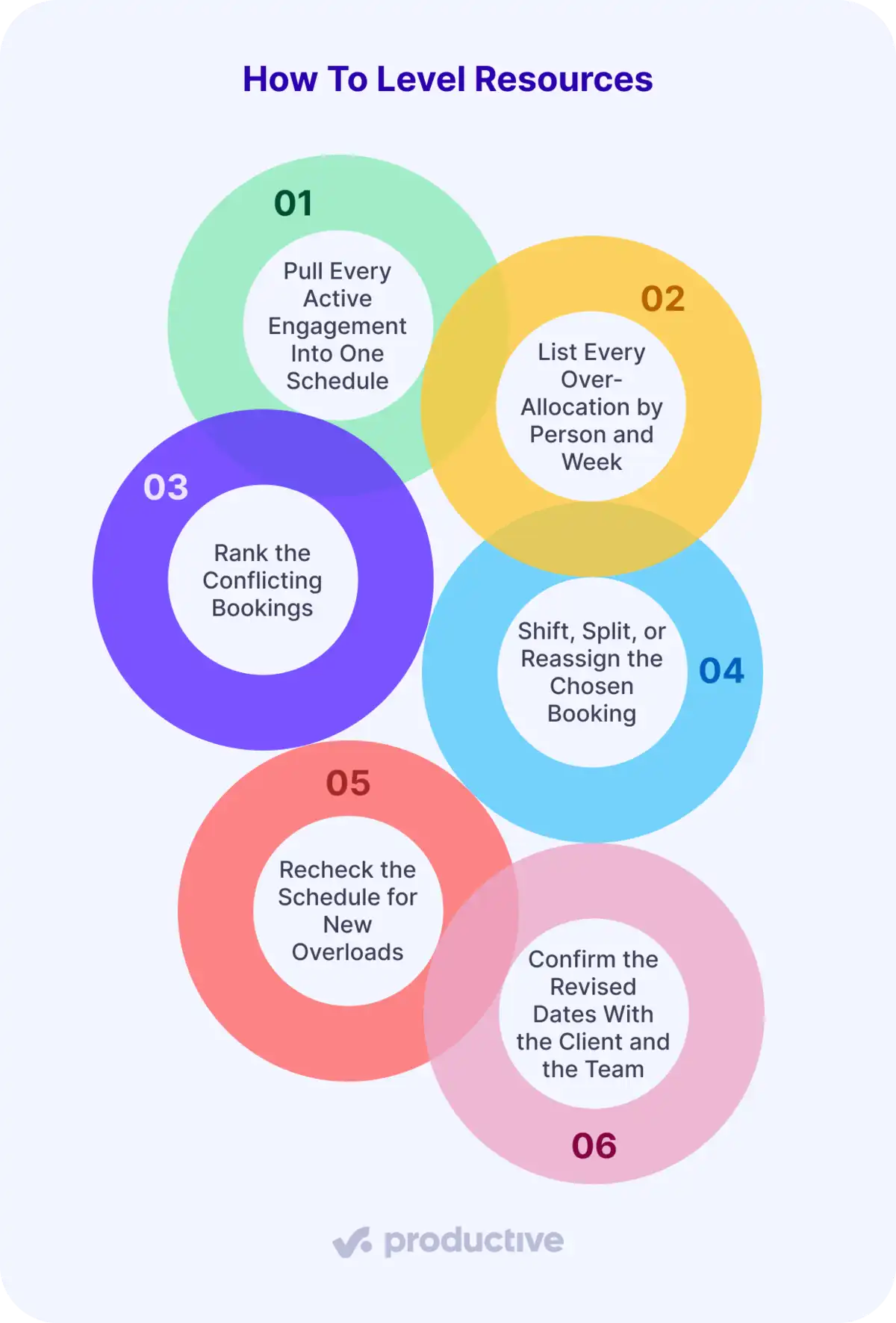
This process is our own. Let’s look at each.
Step 1: Pull Every Active Engagement Into One Schedule
Get every booking for every person into a single view before you touch anything. Leveling from one project’s plan is how the overload got created.
The view needs availability next to the bookings, with time off and holidays already deducted. A person with two days off is not carrying a five-day week. A plan that ignores that looks balanced when it is not.
Step 2: List Every Over-Allocation by Person and Week
Compare booked hours against available hours for each person, one week at a time. An over-allocation exists the moment booked hours exceed available hours. The size of the gap tells you how much has to move.
Do this by person rather than by project. The point is to see the total that no single project owner can see.
Step 3: Rank the Conflicting Bookings by Spare Time and Billing Impact
Sort the conflicting bookings on two axes: how much spare time the work has, and what the hours are worth. A booking with spare time and no billing urgency moves first. A critical-path booking, meaning work that cannot slip without moving the whole delivery date, stays put on a high-margin retainer.
Ranking on both axes is what separates portfolio leveling from schedule tidying. You are not looking for the booking that is easiest to move. You are looking for the move that protects the most value across the portfolio.
Step 4: Shift, Split, or Reassign the Chosen Booking
Apply one of three edits. Shift moves the whole booking to a later week. Split keeps the hours that fit and moves only the overflow, so less of the work slips. Reassign hands it to someone else already on your team who has the availability.
Shift and split change when the work happens. Reassign changes who does it. All three get the person back under their available hours, which is the whole point of the pass.
None of the three is free. What each one does to your billing and your margin is covered further down.
Step 5: Recheck the Schedule for New Overloads
Look at the whole schedule again before you treat the conflict as solved. A shift that clears this week can create a fresh over-allocation in the next one. It can also push the problem onto whoever sits downstream of a dependency.
Rechecking is quick, and skipping it turns one leveling pass into three. Confirm the new picture holds before you lock the bookings in.
Step 6: Confirm the Revised Dates With the Client and the Team
Tell the affected client and the reassigned person what changed before work resumes. Name the deliverable that moved, the new date, and the effect on the next invoice milestone.
That makes the move a decision you owned rather than a slip the client discovered. It also prevents the disputed invoice that tends to follow an unannounced date change.
Be realistic about this step. Spotting the overload is the easy part. Telling a client their date has moved is the hard part, and no schedule view makes that conversation comfortable.
Those are the moves leveling actually uses. Four other techniques get grouped with it, and they do something different.
Which Techniques Are Confused With Resource Leveling?
The four techniques confused with resource leveling are the critical path method, critical chain, fast-tracking, and crashing. None of them is a resource leveling technique. Two are scheduling methods, and two are schedule compression.
The classifications come from PMI’s own Practice Standard for Scheduling. It treats the critical path method and critical chain as scheduling methods. It identifies crashing and fast-tracking as the two schedule-compression techniques. Resource leveling sits in a third category, resource optimization, alongside resource smoothing.
What the four actually are
| Technique | Correct category | Does it level a workload? | What it costs |
|---|---|---|---|
| Critical path method | Scheduling method | No. It shows you where leveling will move a date | Nothing to run |
| Critical chain | Scheduling method | No. It protects the constrained person with a buffer | Buffer time you cannot bill |
| Fast-tracking | Schedule compression | No. It protects the date instead of the person | Rework risk on hours already spent |
| Crashing | Schedule compression | No. It adds people instead of moving work | Delivery cost, straight out of margin |
Each one is useful in its own right. None of them levels a workload, and knowing which is which stops you reaching for the wrong one. We’ll take a closer look at each.
Critical Path Method: The Analysis You Run Before You Level
The critical path method works out the longest chain of dependent tasks in a project. That chain decides the finish date. None of the tasks on it has spare time, which schedulers call slack or float. Delay one of them, and the whole engagement will finish later.
It is analysis rather than a move. You run it to learn what leveling is going to cost you.
Take a client audit that must be completed before the report can start. Both sit on the critical path, so moving the audit moves the delivery date. A stakeholder interview that could happen any week that month has spare time. Move that one and the delivery date stays where it is.
Leveling picks the interview. That is why you run the analysis first.
Critical Chain: A Scheduling Method Built on the Critical Path
Critical chain takes the same longest chain of dependent tasks and changes where the safety time sits.
Ask anyone for an estimate, and they build in a cushion. A designer who needs three days asks for five. Do that on every task and the cushions end up spread thinly across the chain, hidden inside individual estimates.
The trouble is that a hidden cushion gets used whether or not it was needed. The project spends all its safety early and has none left when a task genuinely slips.
Critical chain takes those cushions out of the tasks. It holds them as one shared buffer at the end of the chain. Estimates get tight. Anything that slips draws from the buffer, and anything that finishes early hands straight on.
For resourcing, there is a second version of the same idea. Put a block of spare time in front of the person every project waits on. Their delays then land on that block, not on a client’s date.
Fast-Tracking: Compressing the Schedule Instead of Leveling
Fast-tracking means starting a task before the one it depends on has finished. You overlap work instead of waiting for each piece in turn.
It protects the date rather than the person, which is why it is not leveling. Nobody’s workload gets lighter, and the calendar gets shorter.
The cost is rework. If an early task changes after a later one has started, someone redoes work you have already paid for.
Crashing: Paying to Protect the Date
Crashing means buying speed. You put more people, or more hours, onto the tasks that have no spare time, so the chain finishes sooner.
Say a migration needs three weeks of work and you have two. Leveling would push the date. Crashing brings in a second engineer so the same work fits the shorter window.
It is the clearest opposite of leveling. Leveling holds the team and moves the date. Crashing holds the date and grows the cost.
The catch on a fixed fee is that revenue does not move with the cost. You are buying the date out of your own margin. It also only works where the work can genuinely be split. Two people on a task one person has to think through does not halve the time.
Every booking you move carries billable hours with it, so the next question is what that does to the numbers.
How Does Leveling Affect Utilization and Margin?
Leveling affects utilization and margin because every booking you move carries billable hours and a cost rate with it. Our resource utilization guide covers the metric itself.
Most moves just change the timing. Push work to a later week, and you still bill the same hours at the same rate, just later. Your utilization dips this week and rises next week, and over a month it usually evens out. Crossing a month end can also drag that month’s invoicing with it.
Leveling done badly means pushing work into a week that is already full. Every hour in that week was already sold to another client. The moved work now takes hours you could have billed elsewhere, and salaries stay the same either way. The lost revenue comes straight off your margin. Pick a week with room instead.
Across the industry, a shrinking share of people’s time is billable. That makes the billable work you already have worth protecting. SPI Research surveyed 509 professional services organizations for its 2026 Professional Services Maturity Benchmark. The release on EIN Presswire says “billable utilization declined to 66.4%, the lowest level recorded in SPI Research’s 19-year history.”
Reassignment, handing the booking to someone else, is a move that can change the cost rate. A mid-level person costs less per hour than a senior, but may need more hours for the same work. On a fixed fee project, the swap helps margin only if the hours grow less than the rate drops. On time and materials projects, you also bill the lower rate, so revenue drops with the cost.
Productive’s profitability reporting ties logged hours and cost rates to each budget. The reassignment then shows up as a margin change on that project.
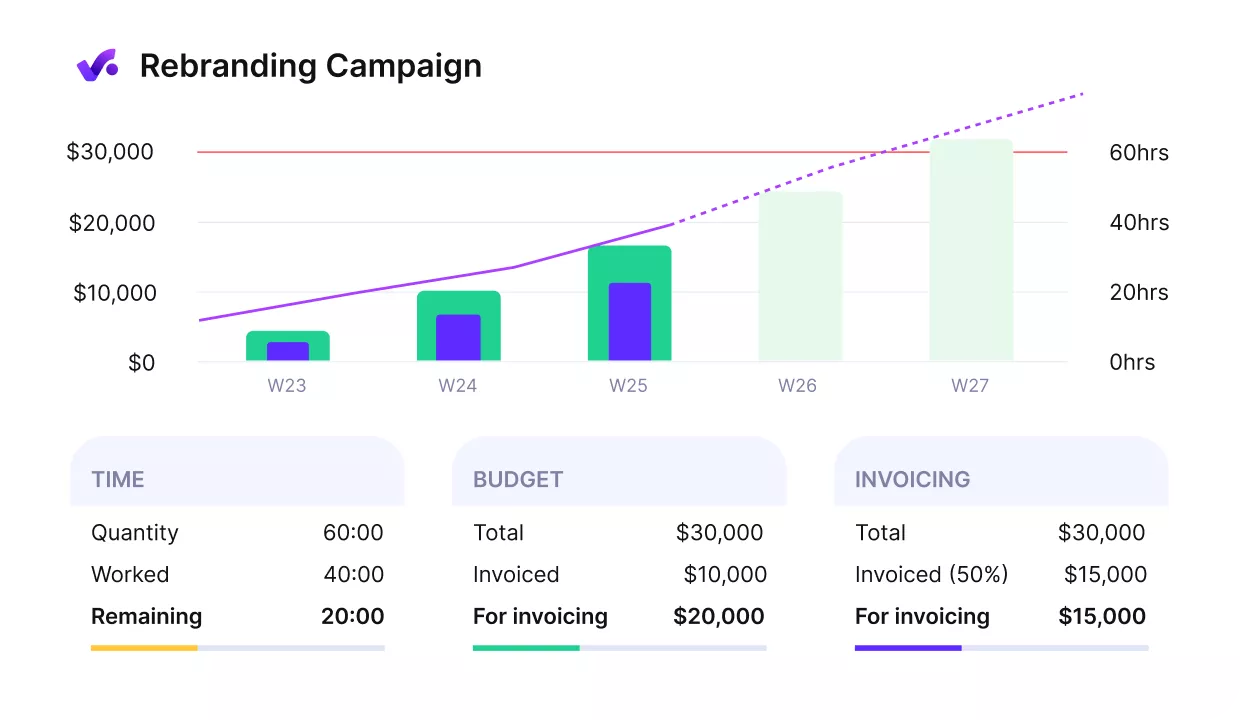
See track budgets and profitability in Productive.
Overhead costs can be spread across budgets for a fuller picture.
Track all your costs in Productive.
Doing this by hand once is manageable. Doing it every week is where software starts to matter.
How Does Software Support Resource Leveling?
Software supports resource leveling by running the resource overload check for you, on a cadence. The six steps above are a loop you repeat every week, not a one-off repair. Done by hand, they may only happen when somebody notices a problem, which can be after a date has already slipped. The cadence argument is our own.
A tool makes that check short enough to repeat. Booked hours against available hours, for everyone, on one screen. Run it every Monday whether or not anyone is worried.
Most overloads then get caught while they are still easy to fix. The gain is not that the tool decides for you. It is that the check still happens in a week when nobody thinks to look.
That still depends on somebody remembering. An AI agent can be set up for one area of work and handle a recurring job in the background, so the check runs without the reminder.
You can configure one of Productive’s AI agents to help with your resourcing. An agent can review bookings, allocations, capacity, and time off. It then flags anyone over a threshold.
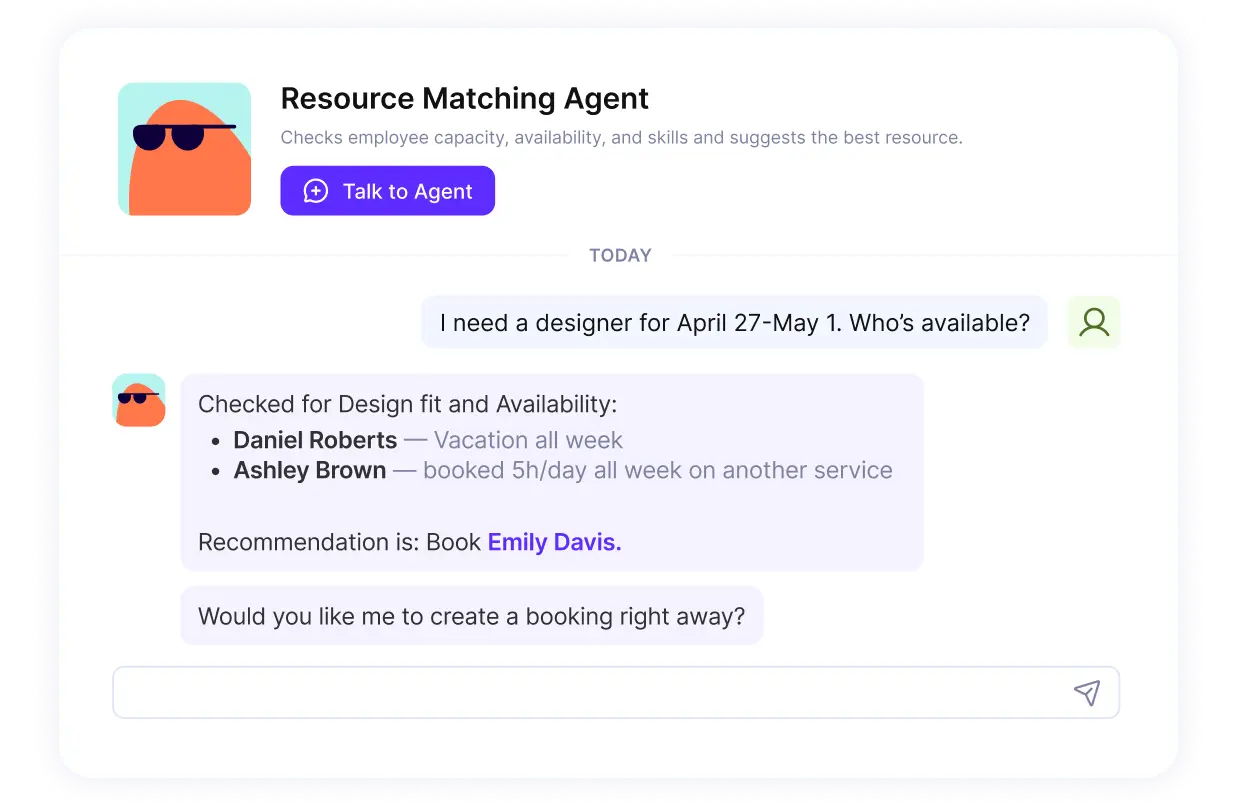
Configure an AI Agent and let it handle your work in Productive.
From there, it can recommend and make the change: moving a booking to a later week, splitting it across two weeks, or handing it to someone with room.
Weighing up tools that can carry this loop? We ranked the main options in our roundup of the best resource management software.
Manage Your Resources in One Place
Managing resources in one place is what makes leveling possible. You cannot rebalance a workload you cannot see. In a professional services firm, this is a portfolio decision with a margin attached, not a scheduling chore. Lock the deadline and you smooth. Lock the team and you level, then follow the move into utilization and per-project margin.
Productive puts resource planning, time tracking, budgets, and profitability in one system. The overload is visible on the schedule. The cost of fixing it is visible on the budget. You see both before you decide.
To see it running on your own projects, book a demo with Productive.
Rebalance Workloads Without the Spreadsheet
Productive puts every client engagement on one schedule with time off already deducted, so you can spot who is over and fix it in the same place.
