What Is Project Coordination? A Guide for Services Firms (2026)

Checking who is working on what means opening four calendars and a spreadsheet. Project coordination is the work of keeping schedules, task status, and ownership current across every live client project, so that answer sits in one place.
This guide covers what coordination is, how it differs from project management, what a coordinator does, and the skills involved. It then covers coordination across several client projects, the margin cost, and how software helps.
Key Takeaways
- Project coordination covers every live client project at the same time: those projects share the same people, so a delay on one changes the plan for another.
- A project manager owns the result and the budget, while a coordinator owns the logistics that keep the plan deliverable: the manager decides and commits, and the coordinator tracks the timeline, chases updates, and escalates.
- Coordination is commercial work, because the schedule decides what gets billed: hours freed by a moved booking either get billed to another client or go unbilled, and hours past what a fixed fee bought come out of margin.
- Software helps by keeping resourcing, time, and financial data in one record instead of three: the same numbers then serve the schedule, the client update, and the bill, so nobody re-enters or reconciles anything.
What Is Project Coordination?
Project coordination is the day-to-day work of keeping schedules, task status, and ownership up to date across every client project a firm is running. Its job is to show when commitments that share the same people are about to collide.
In practice, one person knows which project milestones are coming up, who is booked on what, and which other projects are affected when one of them slips. The project goals stay the same. The route to them keeps changing. You have to look at all the projects together. A single project plan cannot show you that your one senior developer has been promised to two clients in the same sprint.
Even when coordination runs smoothly, it absorbs a serious share of the working week. Progress Software’s 2026 State of Client Collaboration report, published on GlobeNewswire, surveyed 355 professional services firms. Those firms spend “nearly 20 hours a week collecting documents and signatures, following up with clients, clarifying requests and tracking tasks,” at “a median annual cost of nearly $60,000 in nonbillable client-service work.”
Those are administrative tasks rather than delivery, and none of them are billable. The survey leans toward accounting, legal, and financial services rather than agencies, so do not take it as a benchmark.
Coordination is routinely confused with project management, so that distinction comes first.
What Is the Difference Between Project Coordination and Project Management?
The core difference between project coordination and project management is who decides. Project management decides what the firm commits to: the project scope, the price, and the delivery result. Coordination does not decide any of that. It keeps those commitments deliverable, and escalates when they are not.
Management sets the promise. Coordination protects it. Side by side, the rest of the differences look like this.
Project coordination vs project management
| Dimension | Project Coordination | Project Management |
|---|---|---|
| Authority | Escalates the call | Makes the call |
| Time horizon | This week and the next few | The whole engagement |
| What it acts on | Schedules, tasks, status, records | Scope, budget, delivery result |
| Client interaction | Reports what has happened | Agrees what will happen |
| Financial role | Surfaces hours running past a budget | Sets the price and owns the margin |
| Failure mode | Stale status, broken sequence, collisions | Scope drift, mispriced work, blown budget |
On a brand campaign, project management agrees the fee, the deliverables, and what happens if the client asks for another round. Coordination checks the designer is actually free the week the copy lands, and tells everyone when the date moves.
Neither one substitutes for the other. A well-managed project still slips if nobody is sequencing it, and a well-coordinated project still loses money if the scope was priced wrong in the first place.
These six dimensions are our own comparison, and no standard defines exactly where the line falls. In a smaller professional services firm, both kinds of work sit with the same person, which blurs the split without removing it.
Once a firm is big enough, that split becomes two separate jobs. Our comparison of project coordinator vs project manager covers the question at role level, including how much each role makes.
Coordination itself breaks down into four kinds of work.
What Does a Project Coordinator Do?
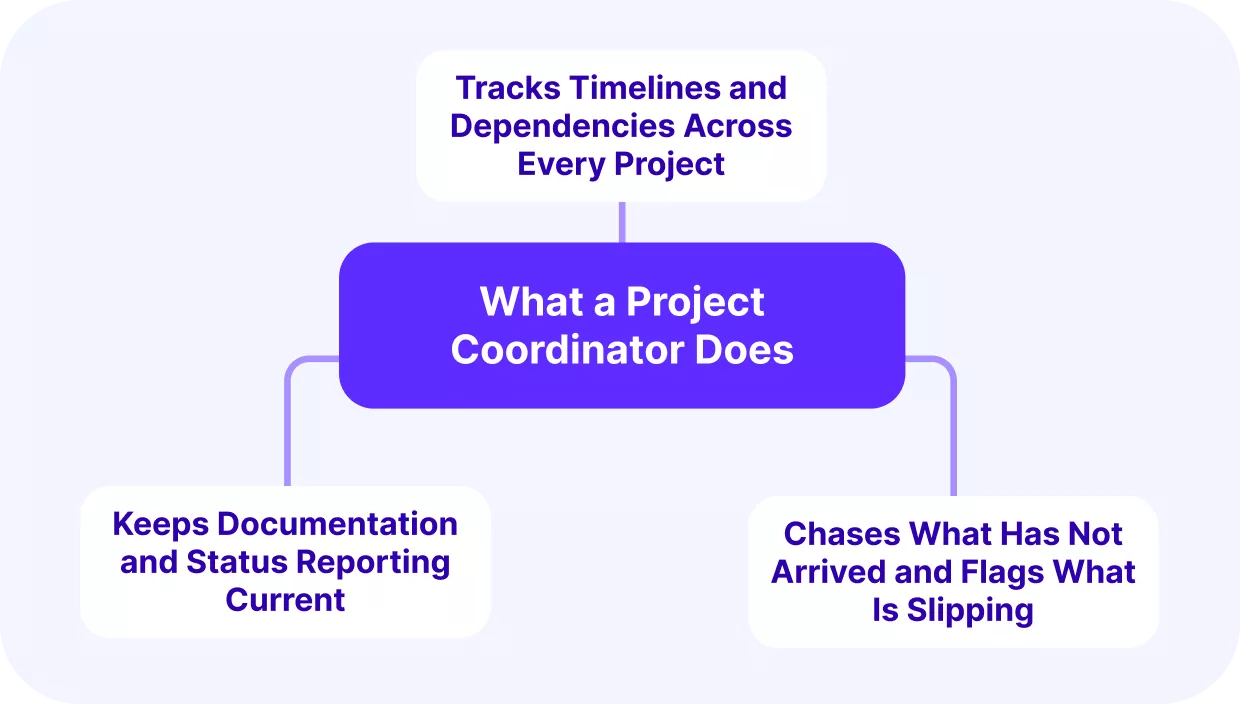
A project coordinator tracks timelines and dependencies, assigns tasks and balances workload, keeps documentation and status reporting current, and chases the missing updates that hold everything up.
A project coordinator job description usually lists these job duties in some form, though the wording changes from firm to firm. The four project coordinator responsibilities are our grouping.
We’ll take a closer look at each.
Tracks Timelines and Dependencies Across Every Project
The coordinator monitors dates across all live projects and keeps each project’s schedule aligned with actual capacity. A date is only worth committing to if the hours behind it are still available once current bookings are accounted for.
So when a website build waits on copy that is running late, somebody has to surface that dependency before it stalls the rest of the project timeline. Project dependencies that cross projects are the ones nobody owns, because each plan only shows its own half.
A client’s requested launch date is a request, not a schedule. It becomes a schedule once somebody has checked it against what the team has left.
Keeps Documentation and Status Reporting Current
The coordinator oversees meeting notes, project documentation, and a consistent reporting cadence. Progress tracking and stakeholder communication are the same job here, because the client update is built from the internal record.
Firms often tell us their status updates live in email threads and shared drives. That leaves no single record of what has shipped and what is still open.
Our guide to writing project management reports covers what belongs in a status report and who it is for.
Chases What Has Not Arrived and Flags What Is Slipping
Much of coordination is following up on what has not arrived. An unfinished timesheet, a task nobody has moved, an approval still sitting with a client. None of it is visible until somebody goes looking for it.
This is what task management looks like from the coordinator’s side. Not assigning the work, but keeping the record of it honest, because a task whose status is out of date is worse than no task at all. People plan around it.
Done early enough, deadline management shades into risk management, since a deadline that is going to slip usually shows a sign first. One operations lead told us she is “still chasing like maybe five people” every week for the previous week’s time entries. Automatic reminders had not fixed it.
Handling all three across several projects takes a particular mix of skills.
What Skills Does a Strong Project Coordinator Need?
The project coordinator skills that matter split into hard skills (scheduling, documentation, and tool fluency) and soft skills (prioritization, communication, and attention to detail). These six are our selection.
We’ll take a closer look at both clusters.
Hard Skills: Scheduling, Documentation, and Tool Fluency
Scheduling is the ability to sequence work against real dates, which is how a clash between two projects gets spotted early rather than on the day. Documentation gives each project a written record the next person can pick up, which matters most when somebody leaves mid-project.
Tool fluency is what makes the other two repeatable. A coordinator who knows the firm’s system can read live status across every client, instead of rebuilding the same picture by hand every week.
Soft Skills: Prioritization, Communication, and Attention to Detail
Prioritization determines which client gets the senior developer this week, and that decision determines whether extra scope is priced or absorbed. When nobody can sequence competing demands, the extra work tends to arrive unquoted.
Team communication keeps a distributed group and its clients working from the same picture. It is also what keeps stakeholder expectations matched to reality. Attention to detail catches missed dependencies or hours logged to the wrong client, while the fix is still cheap.
Those skills pay off across every project at once rather than one project at a time.
How Do You Coordinate Across Multiple Concurrent Client Projects?
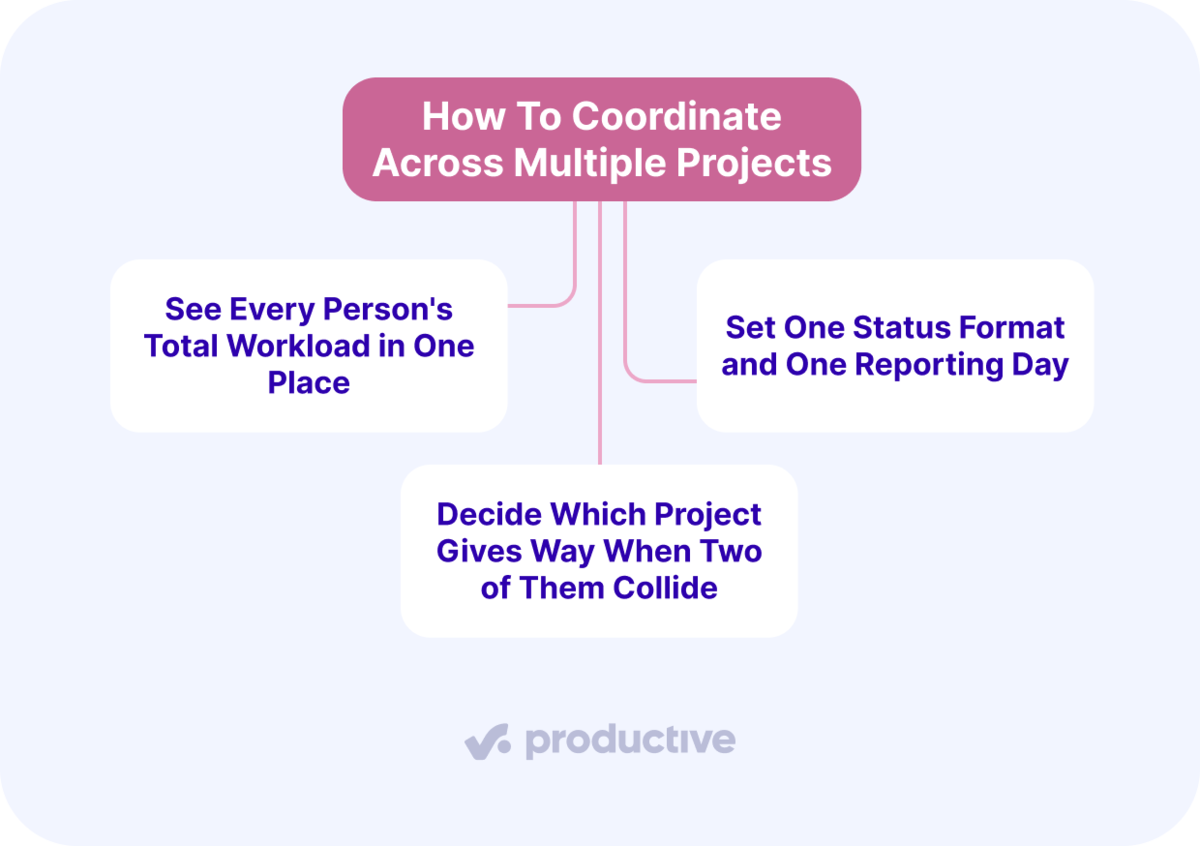
You keep several client projects moving at once by seeing every person’s total workload in one place, by setting one status format and one reporting day, and by deciding which project gives way when two of them collide. Those three are our recommendations, shaped by the problems firms bring to us in prospect calls.
We’ll take a closer look at each.
See Every Person’s Total Workload in One Place
Everything else depends on this one. If the bookings are spread across separate files, nobody can add up what one person is carrying, so every decision after that is a guess. This is a resourcing view, and coordination is what reads it every day.
In our prospect conversations, we often hear this pattern. Resourcing still runs in a spreadsheet, while project management, time, and financials live somewhere else.
Teams describe keeping a resourcing sheet broken out by person, listing every project that person touches, then estimating hours week by week. It gives them a picture, and the picture is out of date as soon as the next request arrives. A stale sheet is also how you end up promising one person full-time to two retainers that start in the same month.
Productive’s Resource Planning puts bookings for all active projects on a single schedule. The By Person view uses capacity indicators, a heat map where red marks somebody booked over their availability.
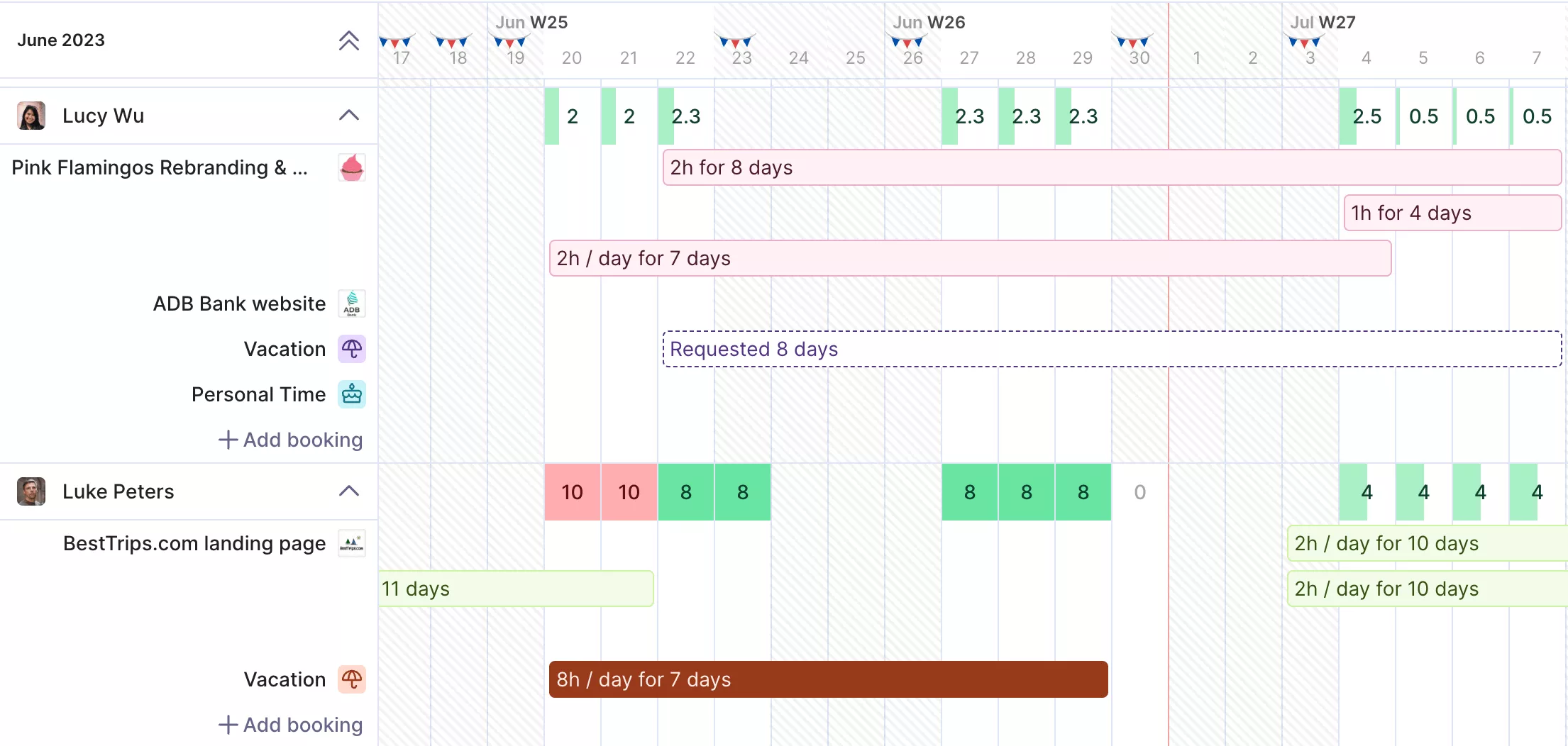
Track capacity indicators with the Resource Planner in Productive.
The shade darkens the further over they are. Approved time off reduces availability, and national holiday calendars reduce capacity, so the schedule stays accurate without anyone having to adjust it by hand.
If you are comparing tools, we ranked the main options in our roundup of the best resource management software.
Set One Status Format and One Reporting Day
Decide what an update contains, who writes it, and which day it goes out, then keep all three fixed. A predictable update stops people asking for one, which is much of what status chasing actually is.
Keep the questions the same as well: what moved, what is blocked and who is holding it, and whether the date and the budget still look right. Project reporting only earns its time once you can put two weeks side by side and see the difference.
One agency told us their project managers were each sending out weekly status updates in their own templates. A personal template might feel tailor-made for one client, but it makes comparing progress across your agency’s full portfolio nearly impossible.
Decide Which Project Gives Way When Two of Them Collide
Sooner or later two clients want the same person in the same week. No amount of visibility makes that go away. One of those dates has to move.
Choosing which one is a commercial call, and it sits with whoever owns the budget. Coordination’s job is to put the conflict in front of them early enough to have a choice.
Rank the competing work by how much slack it has and what the hours are worth. A project with room in its timeline and no billing milestone attached is the one to move.
Those decisions change how many hours get billed, which is where coordination becomes commercial.
How Does Coordination Affect Utilization and Margin?
It affects utilization and margin in four ways: moving a booking shifts billable hours between weeks, hours past a fixed fee turn into unpaid work, misfiled time hides which clients are profitable, and unrecorded changes and deliveries never reach the invoice.
Those four connections are our own. We’ll take a closer look at each.
Moving a Booking Shifts Billable Hours Between Weeks
Reprioritizing moves people, and moving people moves billable hours with them. So the same edit can be read two ways: as a schedule change and as a change in utilization. Utilization is the share of paid hours a firm recovers as billable work. When one project slips, the hours it frees either go to another client or go unbilled.
Utilization targets are not uniform. A strategy director and a designer should not be held to the same number. Read a dip against the target for that role, not against a firm-wide average.
Hours Past a Fixed Fee Turn Into Unpaid Work
On a fixed fee or a retainer, extra hours are not extra revenue. The team keeps working, and the price stays where it was, so anything past the agreed number comes out of margin. On time and materials, those same hours get invoiced, which is why this particular loss belongs to fixed-price work.
Over-servicing is hard to catch because nobody builds a report on a problem they have not yet noticed. Coordination’s part here is narrow. Somebody has to be watching hours against the budget line while the work is still happening.
With Productive’s Budgeting, you can track budget burn as work happens, because logged time is compared against the budget in real time.
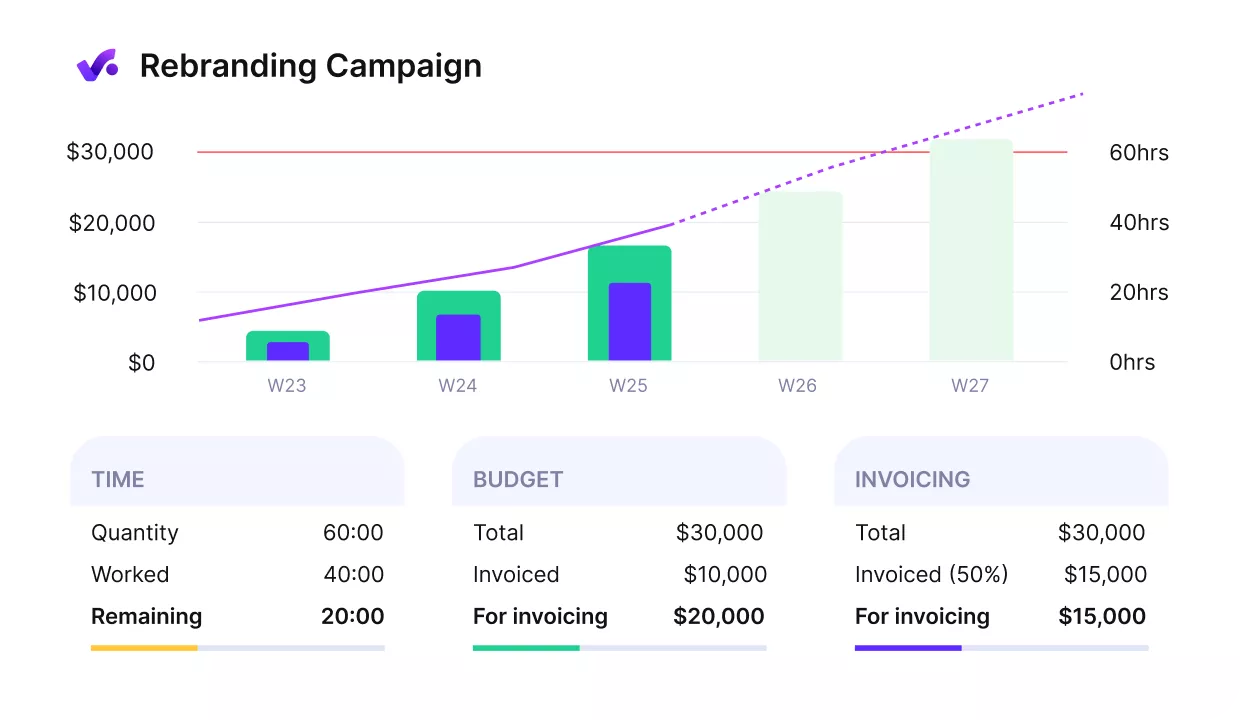
Track budget consumption in Productive.
Budget warnings notify the owner once a set percentage of billable time is used. The overrun becomes something you see during delivery rather than something you discover afterward.

I find having financial visibility and a real-time overview of profitability across dozens of projects to be invaluable.
Read the full customer story to see how Capptoo runs multiple businesses in Productive.
Misfiled Time Hides Which Clients Are Profitable
Per-project profitability requires time, cost, and revenue to be joined up at the project level. That only works if the hours land on the right project. Getting them in at all takes chasing, and that part is coordination work.
An hour on the wrong client makes two projects wrong at once. One looks more profitable than it is, the other looks worse.
Margins are thin enough that the difference matters. Promethean Research’s 2026 agency survey reports that “in 2025, the average digital agency earned a 13% after-tax net margin,” down from 14 percent in 2024. Larger firms fare worse: “agencies with 50 or more FTEs averaged 8%.”
Unrecorded Changes and Deliveries Never Reach the Invoice
Extra work that was never written down gets absorbed, and delivered work that misses an invoice never becomes revenue at all. In both cases the missing piece is a record. A change nobody wrote down, or a delivery nobody checked against the invoice.
Firms tell us in prospect conversations that they get to month-end and have to ask whether anything was forgotten during invoicing. They also describe extra scope arriving as small requests that were never re-quoted, each one too minor to argue about on its own. Those requests still become project deliverables, and somebody still builds them.
An invoice is built from the approval record and the delivery record. Keep both in one place, and make sure the invoice matches what actually shipped.
Every one of those four depends on the system underneath keeping up.
How Does Software Support Project Coordination?
Software supports project coordination by keeping one shared record instead of a second round of data entry, by letting you ask for the update instead of assembling it, and by giving clients somewhere to check progress without asking anyone.
Those three are our reading of the gaps firms describe to us. We’ll take a closer look at each.
One Shared Record Removes the Second Round of Data Entry
When resourcing, time, and financial data sit in separate tools, someone has to keep them in sync. Every export and import is a point where the two sets of numbers can stop matching. One system was updated, but the other was not, or a correction was made in only one place.
Teams tell us they maintain the same view across two systems and then track the time in both, which is double entry by another name. The cost is not only the typing. In one call, a prospect said he does not trust an integration to carry revenue data, so he reconciles it by hand, ultimately checking the same numbers twice.
When one record serves all three, the status a client sees and the budget a manager watches are the same data. A project dashboard built on that record is current by default because there is nothing to refresh from elsewhere. Reporting stops being an act of assembly.
Ask for the Update Instead of Assembling It
Collating is the expensive part of a status update, not writing it. The same Progress Software survey found that “nearly 70% of respondents said at least one out of every ten of their quarterly engagements are delayed by missing information or workflow-related issues.”
A shared project workflow reports some of it on its own, since a task that moves to the next stage has already announced itself. For everything else, you can ask.
Inside a project, Productive’s AI Assistant answers plain questions about where the work stands. Ask it to pull the information together as an Artifact, and the answer comes back as formatted output, using metric cards, project lists, and status indicators.
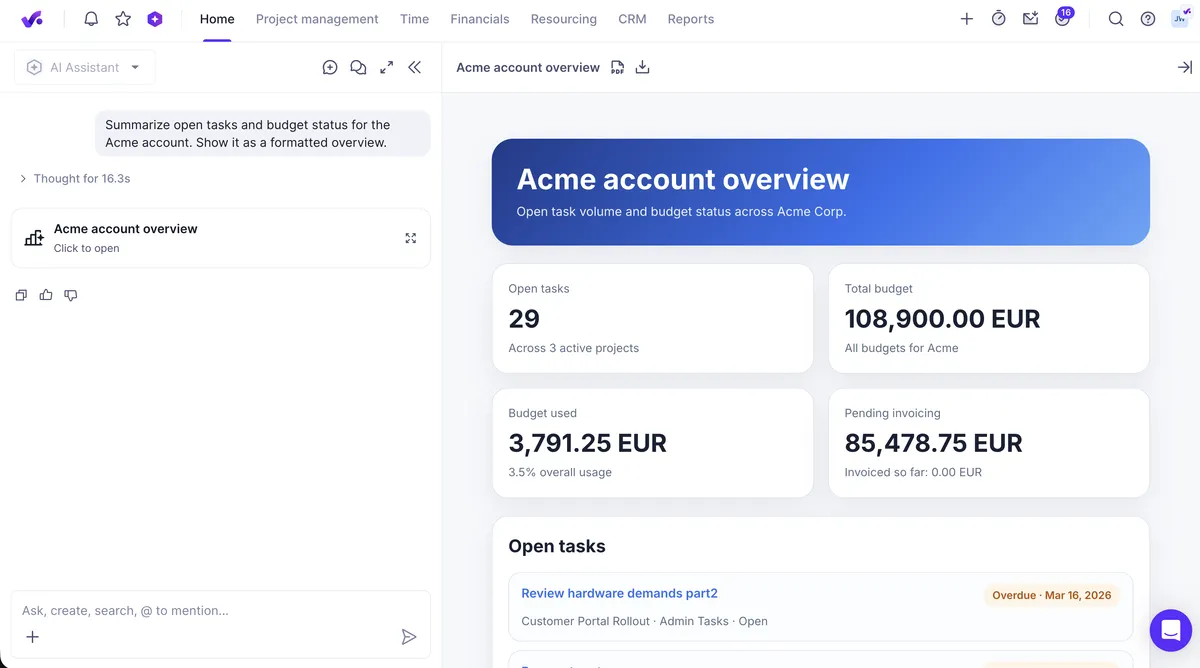
Ask the AI Assistant for a project summary in Productive.
You can then download it as a PDF or HTML file and send that to the client.
Visualize data with Artifacts in Productive.
Clients Can Check Progress Without Asking Anyone
Giving the client somewhere to look answers the update request before it is sent. Firms describe sharing milestones and documents over email or a file drive. The client’s view of progress is whatever they last received, with no way to check whether anything has moved since.
So they ask, and somebody rebuilds an answer that already existed somewhere. Client-facing access is worth scoping carefully, because cost rates and margin should stay internal even when delivery status does not.
Coordinate Every Client Project in One System
Coordination is what makes a clash between two client projects visible while there is still time to move something. To get the job done, you have to view the entire workload before you commit anyone, maintain a status cadence that nobody has to chase, and follow every scheduling decision through to utilization and margin.
Running that across four clients is hard when the numbers are spread across four places. Productive puts project management, resource planning, time tracking, budgets, and invoicing in one system. An overload shows up on the schedule, and an overrun shows up on the budget, while you can still do something about either.
To see how that works against your own projects, book a demo with Productive.
See Who Is Working on What Across Every Client
Productive connects resource planning to live budgets, so a capacity conflict and its cost show up in the same place instead of two spreadsheets and a guess.
