Top 8 Operational Planning Software (S&OP) Guide for 2026

Operational planning software is a tool that connects revenue, capacity, and project plans with the work your teams do.
Instead of another feature dump, this article is a decision guide that helps you compare planning software and operational planning tools. For each option, you’ll get core features, pros, cons, and ideal use cases.
We’ve also added practical advice on choosing between FP&A platforms and operations-centric tools, so you can build a shortlist that fits your team’s workflow.
What Is the Best Operational Planning Software?
The best operational planning software and operations planning tools are Productive, Drivetrain, Anaplan, Pigment, Workday Adaptive Planning, Vena, NetSuite Planning and Budgeting, and Float, which we cover in detail below.
Scan the list to spot the best fit for your team, then use the links to jump straight to each tool and see more details.
1. Productive – Best for Project-Based Operational Planning and Delivery
Productive is an all-in-one operations platform for agencies, consultancies, studios, and other project-based teams.
It brings projects, resource planning, capacity planning, time tracking, budgets, and real-time reports into one place so leaders see a single operational view of work, capacity, and profitability instead of juggling spreadsheets and disconnected tools.
In case you’re running an agency or managing a professional service team, head over to our agency operations guide for best practices and know-how.
Plan operations with Productive
See Real Resource Capacity Before You Say Yes
Many companies still plan people in spreadsheets or simple tools. It’s common that only managers really know who is available, who is overbooked, or when critical roles will roll off projects, so hiring and sales decisions often rely on instinct rather than informed decision-making.
Productive gives you a unified resource and capacity planning view where every person, project, and tentative booking sits on the same schedule.
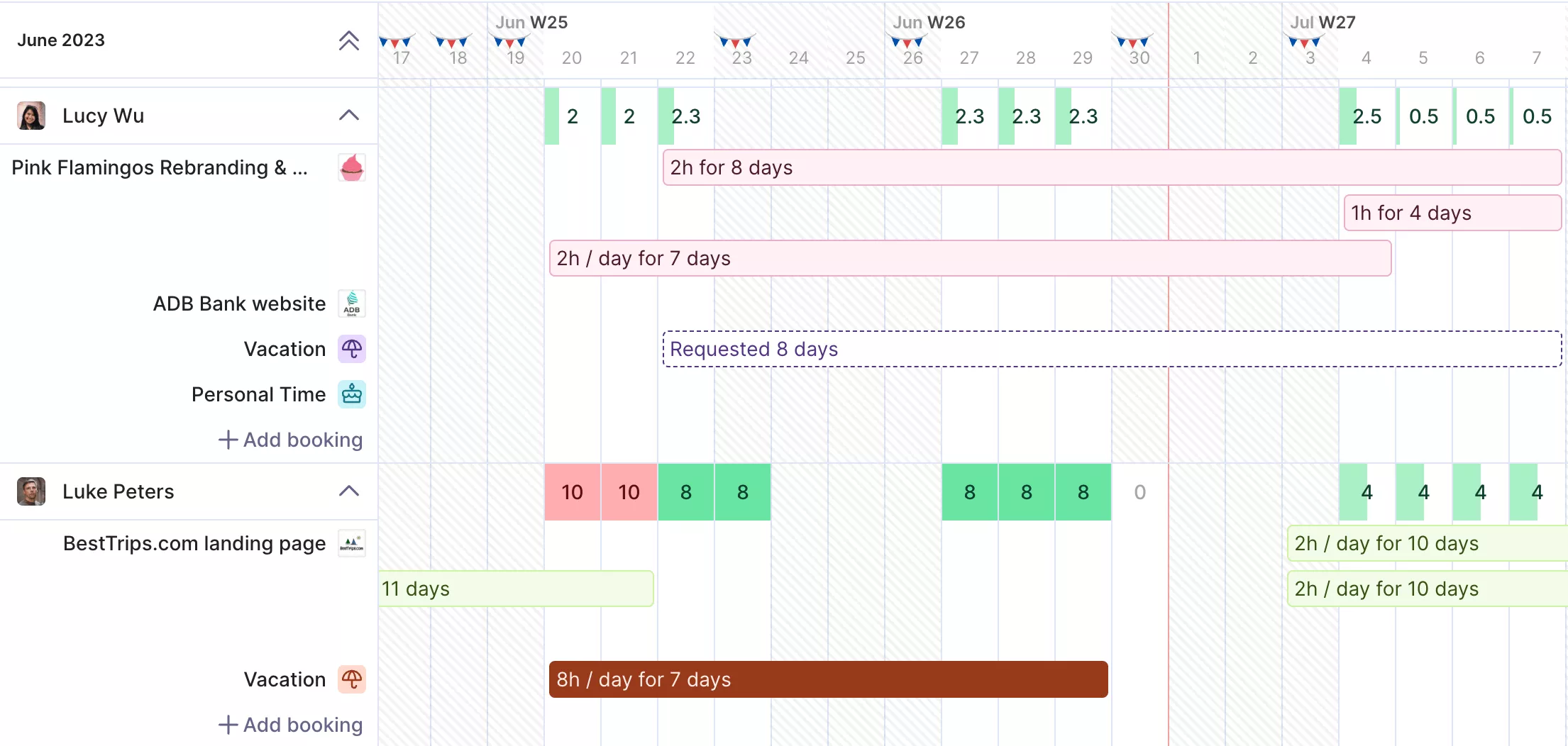
Use Productive to get a real-time overview of your resources.
Manage workloads with full visibility on who has room, who is working overtime, and when new roles will be available. Filters for roles, skills, and teams help you match the right people to upcoming work and plan capacity months in advance, rather than reacting week by week.
Replace Disconnected Systems with One Operational Hub
A typical operations stack runs projects in one tool, resources in another, time tracking in a third, and financials somewhere else. Pulling a weekly report means exporting data into spreadsheets, reconciling numbers by hand, and still not knowing which system is right.
Productive replaces that mix with one operations hub. Project management, company resource planning, time tracking, budgeting, and reporting all live in the same platform.
When someone logs time, it automatically updates budget burn, utilization, and forecasted margins. Integrations with accounting and CRM systems keep key data in sync, so everyone shares the same current view of project status, capacity, and profitability.
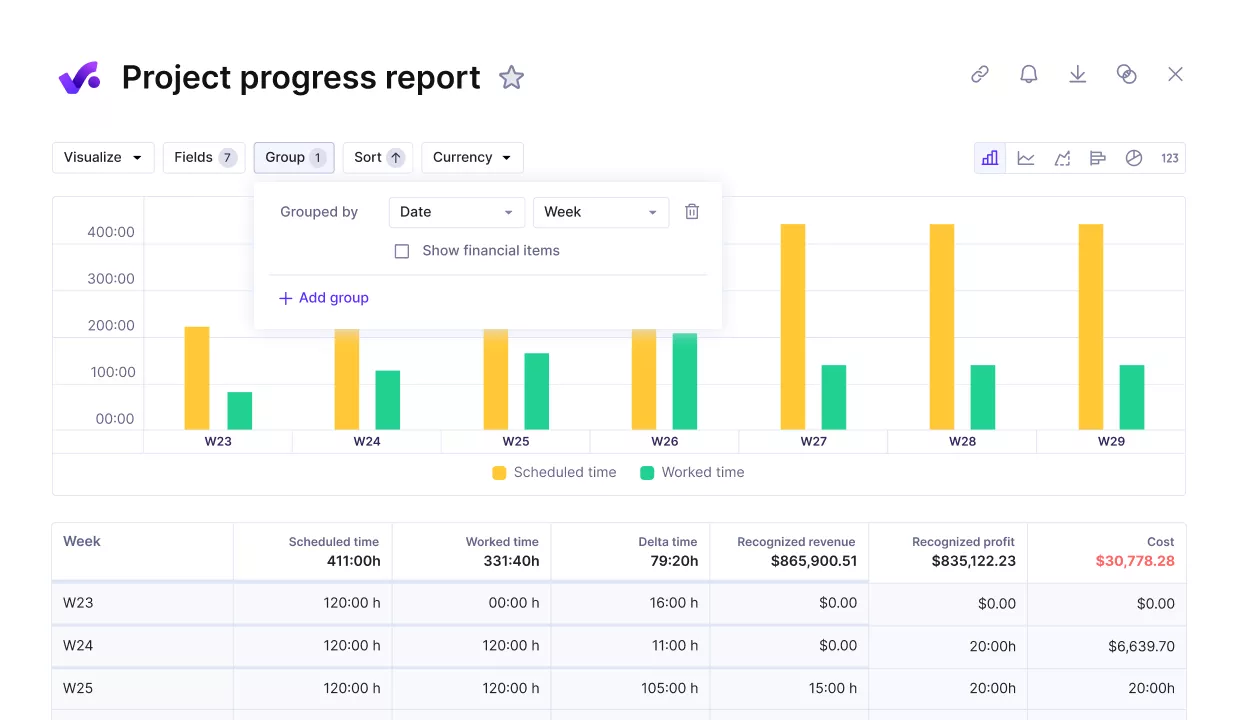
Compare the project progress against key performance metrics.
Forecast Workload and Revenue Instead of Guessing
Without a clear link between pipeline, schedules, and budgets, teams rely on guesses, not actual data that backs their decisions. They do not know what utilization will look like in three to six months, whether they can take on a new retainer, or when they will need contractors.
If you want to play it smart and accurate, you should forecast budgets and availability.
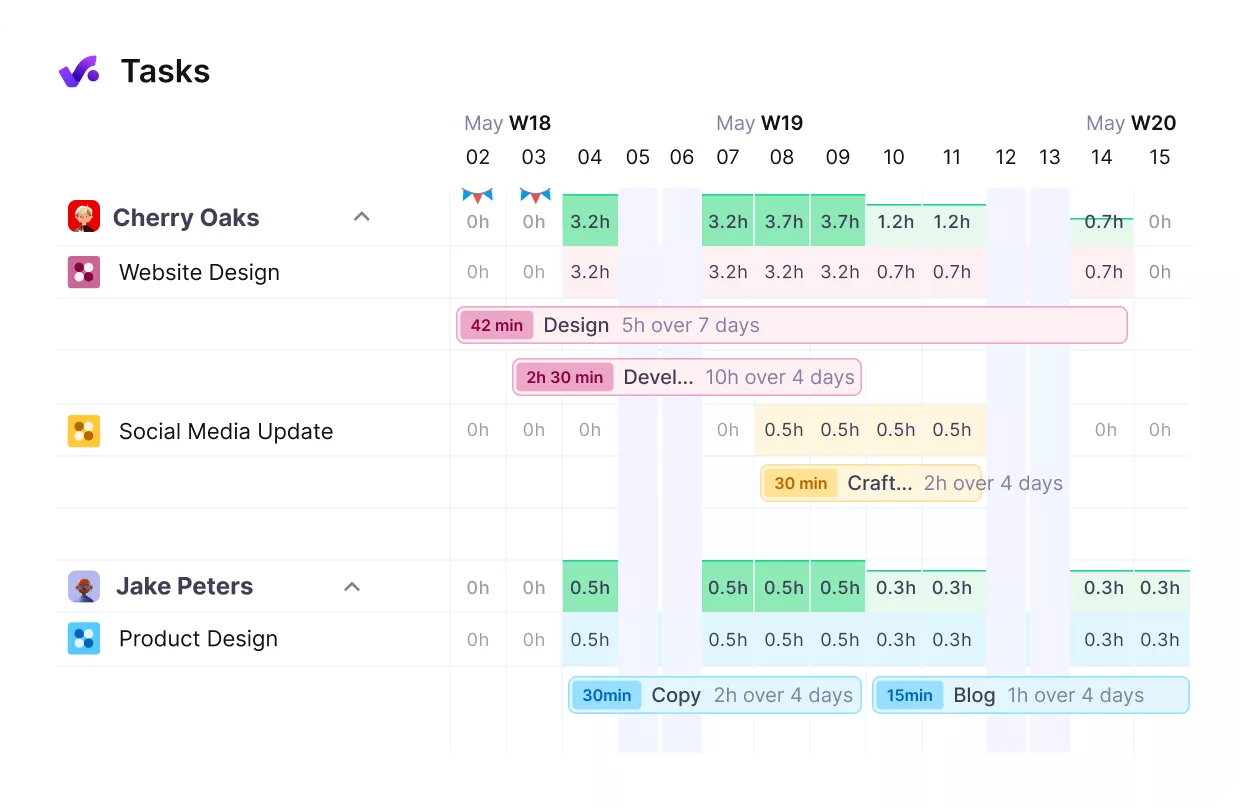
Forecast your workloads and tie them to your financial plans.
Productive connects scheduling and financial planning so you can see projected utilization, revenue, and capacity in one place, supporting rolling forecasts rather than static annual plans.
Scheduled work and approved budgets feed into forward-looking reports that highlight when teams will have space, when they will hit limits, and how that translates into revenue and profit.
For more context and best practices, head over to our revops fundamentals guide.
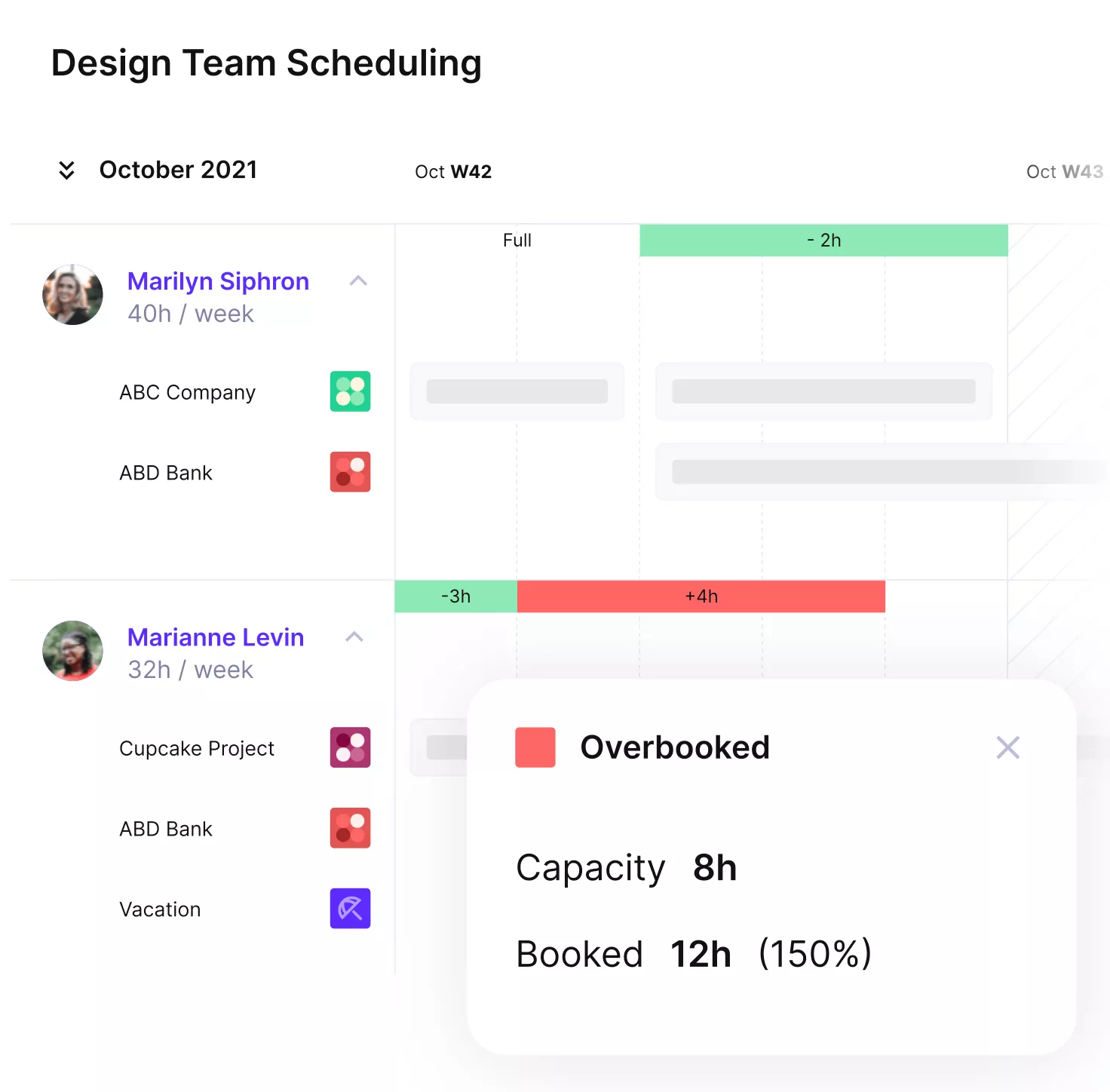
Use Productive to avoid overbooking or reduce idle hours.
By linking opportunities from your CRM to tentative bookings, you can see how new deals affect workload before they close and decide whether to hire, shift timelines, or bring in contractors.
Productive’s Core Features that Support Operational Planning
Operational planning in Productive isn’t in a separate model. It’s inside the same workflows your teams already use to run projects, so plans and execution always stay connected.
- Resource Planner and scheduling: a central schedule for projects and people, including partial allocations and tentative bookings, so you can make hiring and staffing decisions with reliable capacity data.
- Budgets and real-time profitability: project and retainer budgets that update as time and expenses are logged, showing live budget burn and margins at project, client, and company levels.
- Time tracking that feeds decisions: multiple ways to track time that reduce friction for the team and give you accurate data for billing, estimating, and understanding true project costs.
- Forecasting and reporting: forward-looking reports for revenue, utilization, and capacity that combine budgets, schedules, and time data into one set of numbers for leadership and delivery teams.
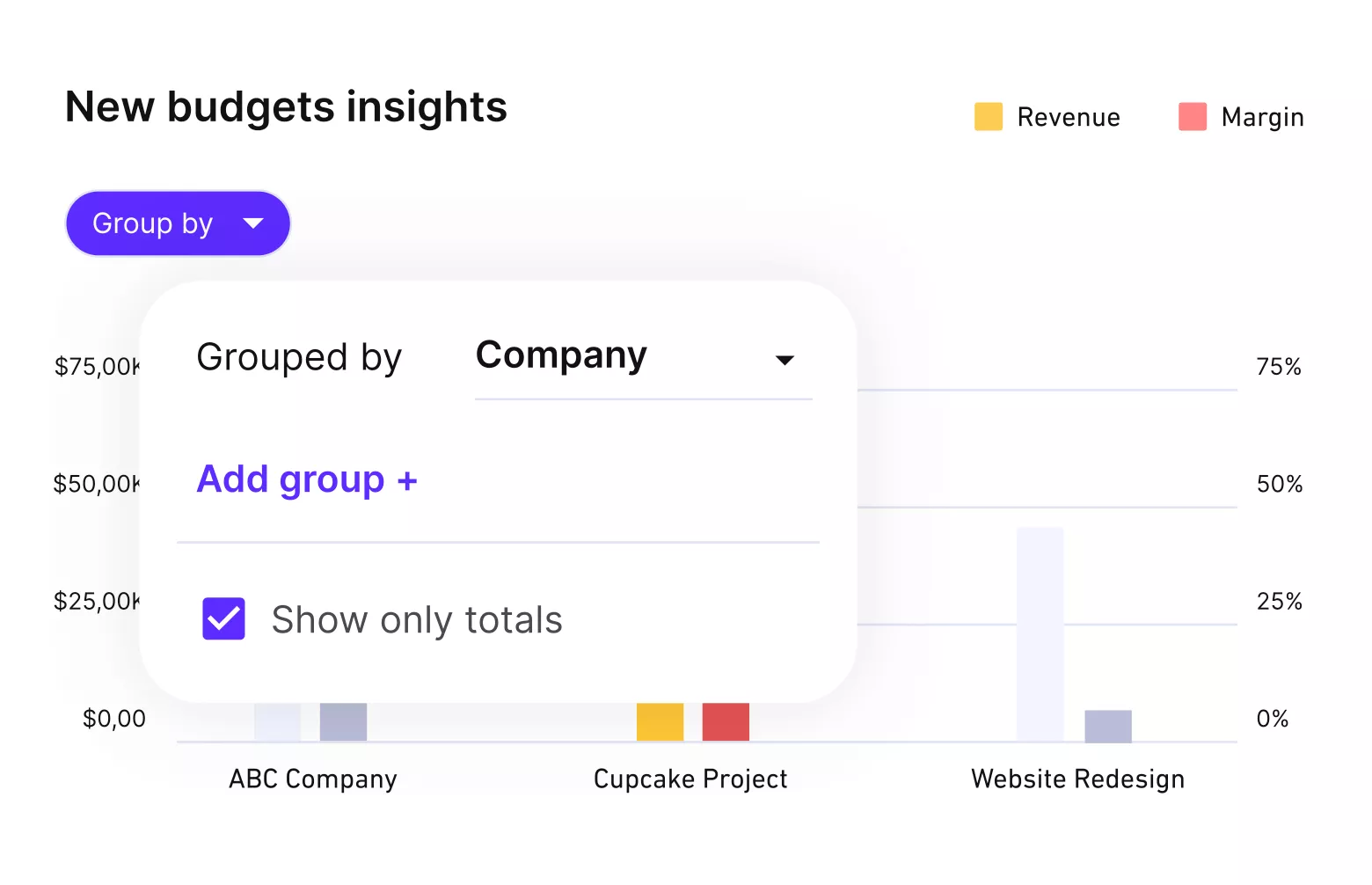
Get real-time updates on budgets and profitability.
For more general know-how about the broader topic of operations, head over to our operational planning guide.
Pricing
- Plans start with the Essential plan at $10 per user per month, which includes essential features such as budgeting, project & task management, docs, time tracking, expense management, reporting, and time off management.
- The Professional plan includes custom fields, recurring budgets, advanced reports, billable time approvals, and much more for $25 per user per month.
- The Ultimate plan has everything that the Essential plan and Professional plan offer, along with the HubSpot integration, advanced forecasting, advanced custom fields, overhead calculations, and more. Book a demo or reach out to our team for the monthly price per user.
Productive offers a 14-day free trial, maybe you should try it out.
Test Your Next Planning Cycle In Productive
Take one upcoming quarter and build it in Productive instead of spreadsheets. See how much easier it is to plan capacity, manage projects, and track profitability in one place.

2. Drivetrain – Best for SaaS Revenue and Operational Plans
Drivetrain is revenue-focused planning software for SaaS and subscription businesses. It connects CRM, billing, and headcount data so finance and operations work from the same live model instead of static spreadsheet forecasts.
Core Features
- Pipeline-driven revenue and ARR forecasting
- Driver-based models for SaaS unit economics
- Scenario planning for growth and churn cases
- Dashboards for key SaaS and operations metrics
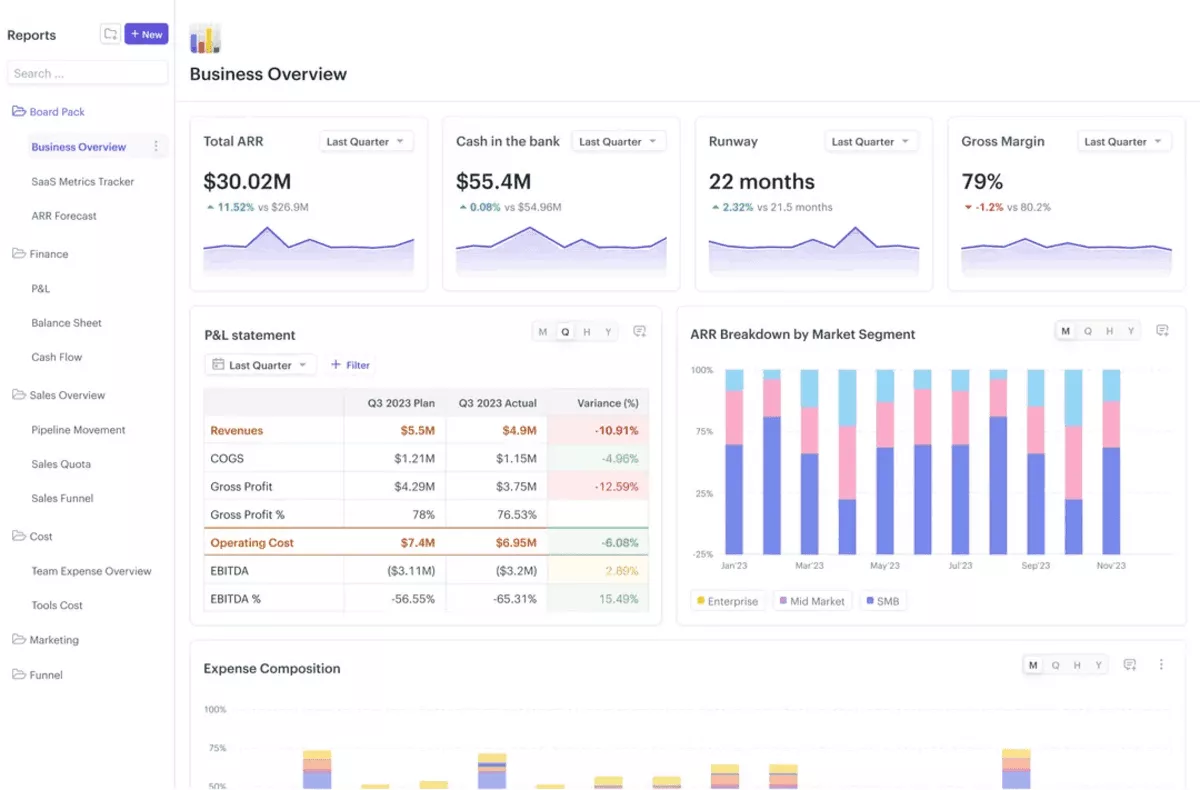
SOurce: Drivetrain
Pros
- Strong CRM and billing integrations keep revenue, pipeline, and bookings in sync.
- Rolling plans let leaders see the impact of new deals or churn on runway within minutes.
- Links headcount, quotas, and ARR targets so hiring plans match realistic revenue expectations.
- Built around common SaaS metrics, so finance and RevOps use familiar concepts.
Cons
- Optimised for SaaS and subscription models, so other business types get less value.
- Depends on clean CRM and billing data, so messy source systems limit trust in the plan.
- Implementation and change management require more effort than simple spreadsheet-based processes.
Final Verdict
Drivetrain belongs on your shortlist if revenue planning is a key part of your operational plans and you already track detailed pipeline metrics.
It is less useful if most of your planning questions are about project delivery rather than ARR and churn, where an operations-centric platform such as Productive is usually a better fit.
3. Anaplan – Best for Large Enterprises That Need Connected Planning
Anaplan is connected planning software built for large and complex enterprises. It lets finance, operations, and other teams work in one shared model instead of keeping separate spreadsheets in every department.
Core Features
- Multi-dimensional models for complex hierarchies and driver-based plans
- Connected financial, workforce, and operations data in one platform
- Workflow and approvals for budget and forecast cycles
- Governance, version control, and audit trail for regulated environments
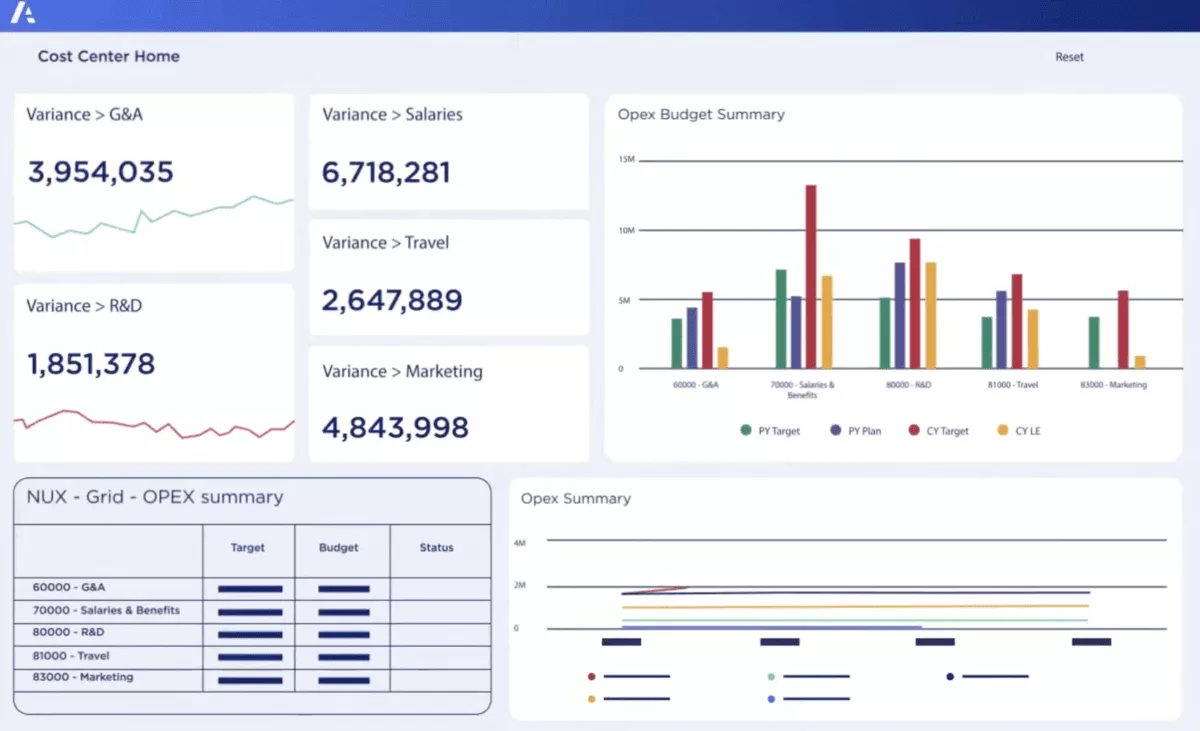
SOurce: anaplan
Pros
- Flexible modelling engine that reflects complex enterprise structures and business rules.
- Strong support for connected planning across finance, supply chain, sales, and HR.
- Cross-departmental scenario planning helps leaders see the impact of changes before they commit.
- Supports formal planning calendars with clear ownership and approvals.
Cons
- Implementation is significant and usually requires specialist Anaplan model builders or partners.
- It can feel heavy for smaller organisations or teams that mainly need project-level delivery and staffing decisions.
- Licensing and ongoing maintenance costs are higher than in lighter planning tools.
Final Verdict
Anaplan is worth considering if you coordinate planning across many departments and geographies and need strict governance around budgeting and forecasting.
It is usually more than project-based service businesses need, especially if most of their operations planning is done with day-to-day project tools rather than enterprise models, where an operations-focused platform often makes more sense.
4. Pigment – Best for Modern FP&A Teams With Complex Scenarios
Pigment is a modern FP&A and business planning platform for high-growth companies that have outgrown spreadsheet-only models. It uses driver-based models to connect revenue, costs, and headcount so finance and operations see the same live plan.
Core Features
- Driver-based models for revenue, costs, and headcount
- Scenario planning for revenue, hiring, and cost control
- Real-time dashboards that update as assumptions change
- Collaboration and workflow for shared models across teams
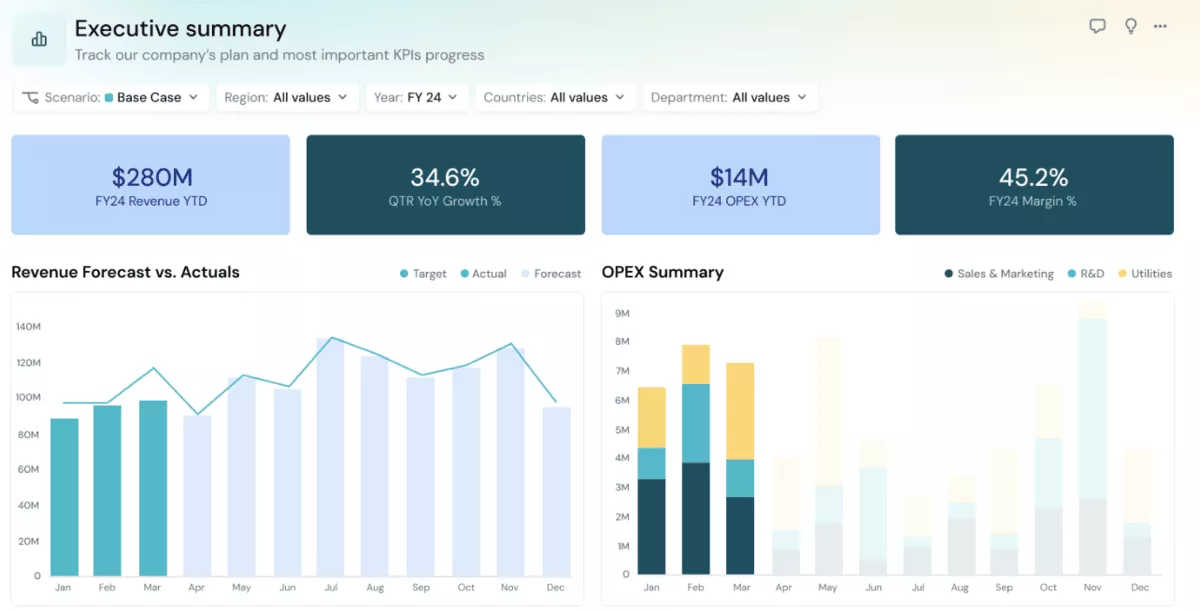
SOurce: Pigment
Pros
- Replaces fragile spreadsheet models with a central planning environment that can scale with growth.
- Makes it easy to compare growth scenarios side by side and see how hiring or churn changes cash and capacity.
- Visual dashboards help non-finance leaders understand plans without digging through formulas.
- Supports joint ownership between finance and operations so models stay close to real decisions.
Cons
- Requires time and expertise to design good models, so smaller teams may need external help at first.
- Works best when core data from CRM, HR, and billing is clean and reliable.
- Licence and setup costs can be high if you only need basic budgeting rather than full operational planning.
Final Verdict
Pigment should be on the shortlist for companies that want a modern FP&A environment with strong scenario planning and a single source of truth for revenue, cost, and headcount.
It is less suitable if your main operational planning questions revolve around individual projects and tasks rather than a central model, where project-based teams often prefer operations-centric tools that are connected with delivery.
5. Workday Adaptive Planning – Best for Mid-Market Organizations Standardizing Planning
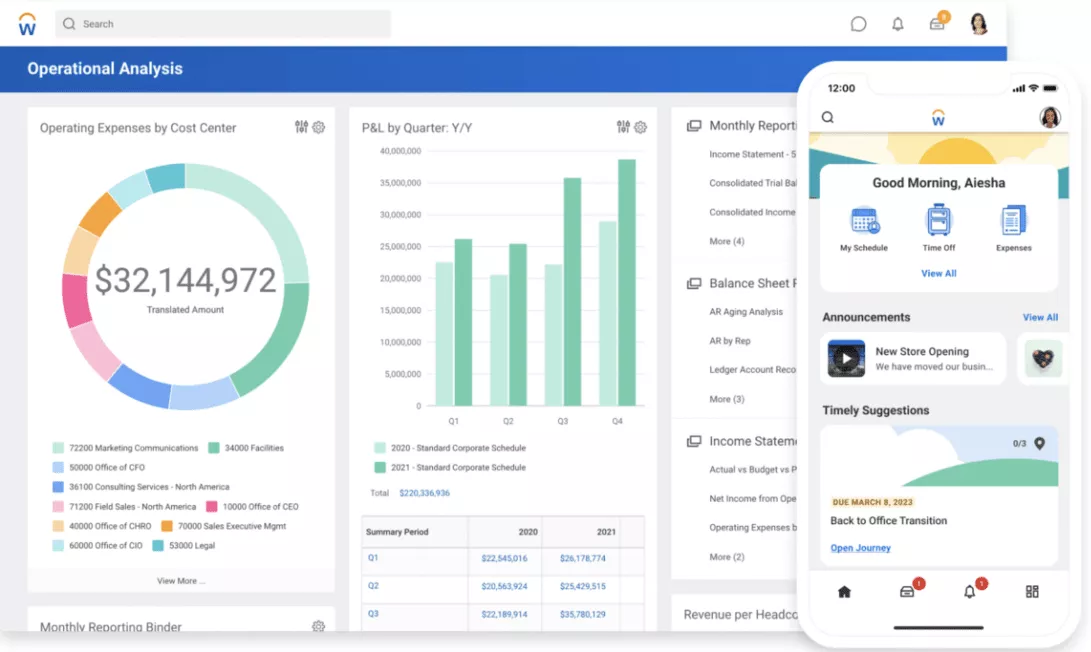
Workday Adaptive Planning is Workday’s cloud-based financial planning and workforce planning software for organisations that want to standardise budgeting, forecasting, and reporting. It connects workforce, financial, and operational data so teams can build one plan instead of separate spreadsheets in every department.
Core Features
- Budgeting and forecasting for revenue and expenses
- Workforce plans for headcount and compensation
- Operational models that connect departments in one plan
- Native integration with the wider Workday platform
SOurce: Workday
Pros
- Fits naturally for organisations that already use Workday for HR and finance data.
- Integrated workforce, finance, and reporting workflows reduce manual data exports.
- Gives finance and HR a shared view of headcount, costs, and capacity.
- Formal workflows support structured budget and forecast cycles with clear ownership.
Cons
- Often feels heavy for smaller teams that mainly need project-based operations planning rather than full corporate models.
- Implementation and change management take time, especially if current models live in scattered spreadsheets.
- Licensing and setup costs can be high compared to tools focused only on project-level decisions.
Final Verdict
Workday Adaptive Planning is a strong option if you are already in the Workday ecosystem and want enterprise-level plans built into the same platform as HR and finance.
For project-based service businesses that care more about day-to-day capacity, project delivery, and profitability by client, a dedicated operations platform is usually a more direct fit.
6. Vena – Best for Finance-Led Teams that Want Structured Planning with Excel
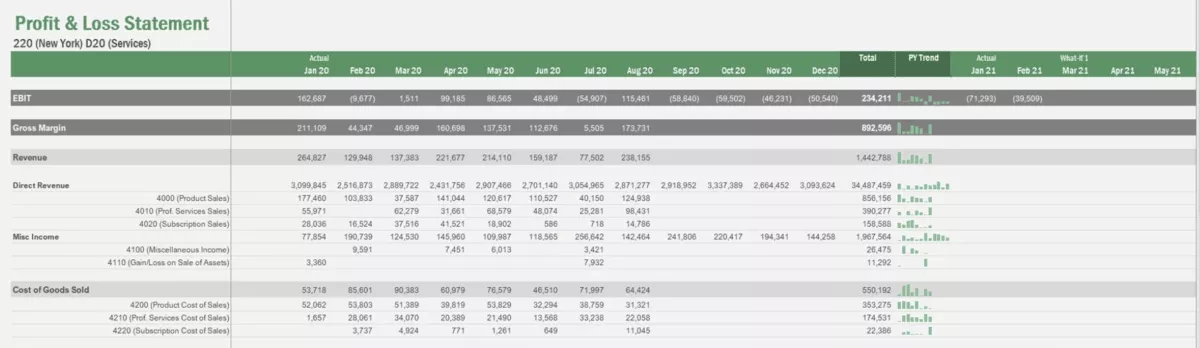
Vena is an Excel native FP&A and planning platform for budgeting and forecasting that centralises data, templates, and workflows while letting teams keep the Excel interface they know.
It appeals to finance-led teams that run most of their budgeting in spreadsheets but need more control and consistency.
Core features
- Excel-based interface on top of a centralised database
- Prebuilt templates for budgeting, forecasting, and reporting
- Workflow for submissions, reviews, and approvals
- Consolidation of data from multiple source systems
SOurce: Vena
Pros
- Helps Excel-heavy finance teams adopt a structured planning process without abandoning familiar spreadsheets.
- Templates and workflows turn ad hoc budgeting into a repeatable cycle with clear deadlines.
- Centralised data and an audit trail reduce version chaos and speed up reviews.
- Works well when finance owns planning, and other teams simply submit numbers through guided templates.
Cons
- Still assumes comfort with Excel, which can be a barrier for non-finance users.
- Keeps planning close to spreadsheet thinking, which can limit how deeply plans connect to daily operations.
- Implementation effort and licences can be a stretch for smaller organisations that only need light budgeting and reporting.
Final Verdict
Vena is a solid option if you want to keep Excel at the centre of planning but need guardrails, workflows, and a controlled database behind it.
It works best when finance leads the process. If your biggest gap is tying plans to projects, capacity, and client work, operations-centric platforms such as Productive will usually be a better fit than Excel-anchored planning.
7. NetSuite Planning and Budgeting – Best for NetSuite Users
NetSuite Planning and Budgeting is NetSuite’s planning layer for organisations that already use NetSuite for financials and operations. It connects budgets, forecasts, and actuals to the same chart of accounts, dimensions, and entities you use in the ERP.
Core Features
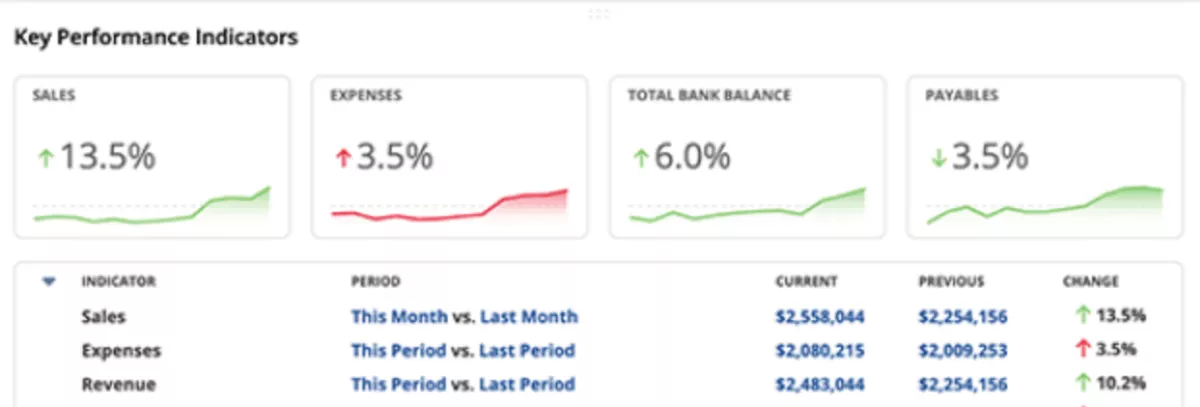
- Budgeting and forecasting for revenue, expenses, and cash flow
- Scenario modelling on NetSuite data and dimensions
- Integration with the NetSuite general ledger and entities
- Built-in reporting for budget versus actual and variance analysis
SOurce: netsuite
Pros
- Native NetSuite integration keeps data and dimensions consistent between planning and accounting.
- Reduces manual reconciliation work for finance teams that already live in NetSuite.
- Supports multi-entity and multi-currency planning for complex organisations.
- Built-in reports help leadership track performance from the same system they use for financials.
Cons
- Offers the most value only if you are already a NetSuite ERP customer.
- Implementation and configuration can be complex for smaller finance teams.
- Interface and workflows are geared towards finance users rather than day-to-day project delivery.
Final Verdict
NetSuite Planning and Budgeting belongs on your shortlist if NetSuite is already your financial system of record and you want budgeting and forecasting in the same stack. It works best for finance-led planning across entities and departments.
If your main challenge is connecting plans to projects, capacity, and client delivery, you may get more value from an operations-centric platform such as Productive and keep NetSuite as the accounting backbone.
8. Float – Best for Clear Resource and Workload Visibility
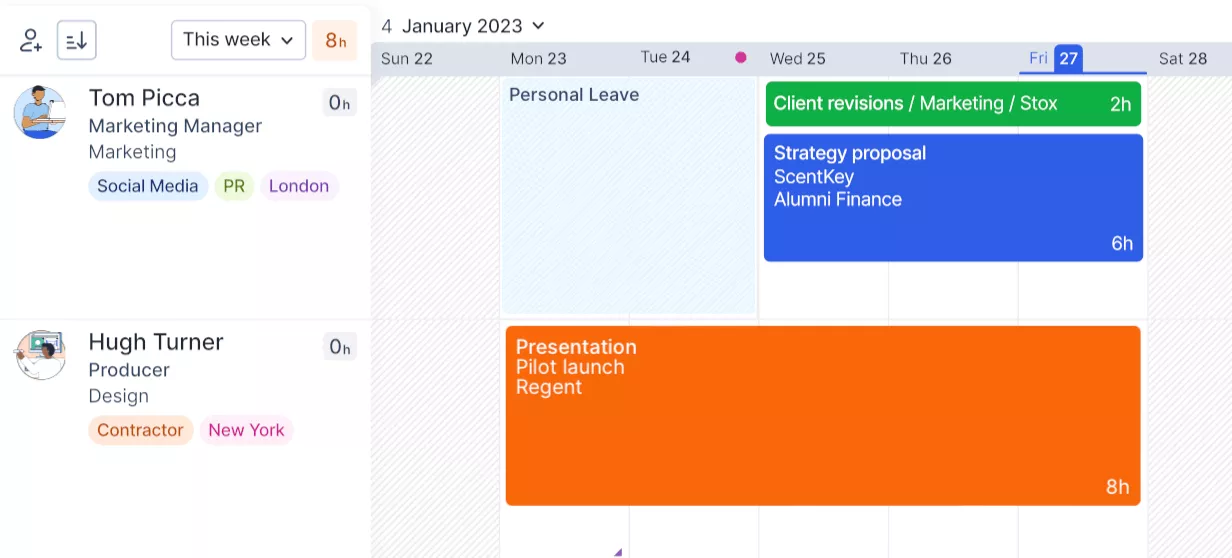
Float is a resource and capacity planning tool for project-based teams that want a clear view of who is booked and who still has room for work. It focuses on people and time rather than budgets.
Core Features
- Visual resource scheduling across projects and clients
- Capacity planning by person, role, or team
- Utilization and workload reporting
- Simple scenario style views for upcoming projects and changes
SOurce: float
Pros
- Makes it easy to see who is overbooked, underused, or available for new work.
- Fast to roll out for agencies and studios that already track work in project tools.
- Supports operational planning decisions like whether you can accept a new project next month or need to move timelines.
- Clear visual schedules are easy for team leads to understand without spreadsheets.
Cons
- Not a full planning solution for budgets, revenue, or detailed forecasting.
- Reporting depth is more limited than in dedicated analytics or FP&A tools.
- You still need a separate system for detailed project management, tasks, and financials.
Final Verdict
Float is a strong choice if your main operational challenge is knowing whether your team has the capacity to deliver the work you have sold. It gives project-based teams a simple way to align schedules and staffing with the project pipeline.
If you also need tight links between projects, budgets, and profitability, a broader operations platform like Productive will be a more natural home for your planning.
What Features Should You Look for in Operational Planning Tools?
The key features to look for in operational planning tools are strong scenario and forecasting capabilities, solid capacity and resource planning, reliable data integrations, collaboration and approvals, and clear dashboards and reporting that support both strategic planning and day-to-day execution.
Feature 1: Scenario and Forecasting Capabilities
Look for planning software that lets you build multiple versions of a plan, set key drivers, and compare scenarios side by side so you can run meaningful scenario planning and stress tests.
Good tools support both growth and downside cases, such as losing a large client, winning an unexpected deal, or delaying hiring, and help you turn those options into practical operational plans.
Feature 2: Capacity and Resource Planning
Your operations software should combine project plans, people’s skills, and availability so you can see demand and capacity in one view. That makes capacity planning and resource allocation easier and helps you see progress trends before they turn into delivery risks.
Feature 3: Data Integrations and Single Source of Truth
Operational planning only works when your data matches reality across CRM, finance, and resource management software. Good tools connect to the systems where work and money already live, so clients, projects, and cost centres stay consistent, and you are not rebuilding everything from manual processes at month-end.
Feature 4: Collaboration, Ownership, and Approvals
Operational plans are rarely maintained by one person, so collaboration features matter. Team leads should be able to own parts of the plan, comment on assumptions, and suggest changes without breaking formulas, and key changes should flow through simple approval workflows that support organisational accountability.
Feature 5: Dashboards, KPIs, and Reporting
Dashboards should make it easy to see if plans are working and to communicate results to leadership. At a minimum, your platform should show utilization, on-time delivery, forecast versus actual revenue, and basic KPI tracking in views that non-finance leaders can understand.
Operational Planning Tools Comparison Table
Use this comparison table to review the main operational planning tools side by side. It shows which category each tool fits into, who it is best for, and how it approaches planning across finance and operations.
| Tool | Type of tool | Best for | Typical company size | lanning focus | Notable strenghts |
|---|---|---|---|---|---|
| 1. Productive | Operations management and planning platform | Project based agencies, consultancies, and studios | Small to mid market service businesses | Operations first with a strong finance layer | Connects projects, capacity, time, and profitability in one place |
| 2. Drivetrain | Revenue and forecasting platform for SaaS | SaaS companies focused on ARR, pipeline, and hiring plans | VC backed scale ups and mid market SaaS | Finance first with tight revenue and operations link | Ties CRM and billing data into live revenue and headcount models |
| 3. Anaplan | Enterprise connected planning platform | Global enterprises with complex structures | Large, multi entity organisations | Finance first, multi department connected planning | Flexible models for finance, supply chain, sales, and workforce plans |
| 4. Pigment | Modern FP&A platform | High growth companies that have outgrown spreadsheets | Mid market to enterprise | Finance first or hybrid, depending on model design | Driver based models and visual scenarios for revenue and headcount |
| 5. Workday Adaptive Planning | FP&A and workforce platform in the Workday stack | Organisations standardising financial and workforce plans | Mid market to large organisations using Workday | Finance first with strong workforce planning | Integrated HR, finance, and reporting workflows in one system |
| 6. Vena | Excel native FP&A platform | Finance teams that want structure while keeping Excel | Mid market organisations with Excel heavy finance teams | Finance first, spreadsheet centric | Templates, workflows, and a central database behind Excel models |
| 7. NetSuite Planning and Budgeting | ERP integrated planning and budgeting layer | Companies already running NetSuite ERP | Mid market to enterprise NetSuite customers | Finance first planning tied to the general ledger | Native integration for budgets, forecasts, and variance reporting |
| 8. Float | Resource and capacity planning tool | Project based teams that need clear workload visibility | Small to mid sized agencies and studios | Operations first, focused on capacity and schedules | Simple, visual scheduling for people and projects |
How To Choose the Right Operational Planning Tool?
You choose the right operational planning tool by matching it to how your team actually plans and executes work.
Start by mapping your planning cycles and data sources, decide whether you need an FP&A first, operations first, or a hybrid solution, then test a small shortlist in a real planning cycle to see which platform your team will actually use and trust.
In case you still have some questions about the process, we’ll break it up in the sections below.
Step 1: Map How You Plan and Execute Today
List your main business planning cycles, such as annual planning, quarterly reforecasting, and hiring plans.
For each cycle, note which tools, spreadsheets, and people you use today, from CRM and project boards to time tracking and accounting, and highlight where plans and execution drift apart.
Step 2: Decide if You Need FP&A First, Operations First, or a Hybrid
Next, decide which planning category fits you best. FP&A first tools emphasize rich financial models and detailed forecasting.
Operations first tools emphasize visibility into projects, workloads, and delivery risk, keeping planning close to real work. Hybrid tools cover both areas well enough for many growing companies that want joined-up planning.
Step 3: List Your Data Sources and Integration Must-Haves
Make a list of where your key data is today, including CRM, project and ticketing tools, time tracking, HR, payroll, and accounting.
Mark which integrations are non-negotiable for phase one, and ask vendors to show live examples, not just slides, so you can see how well operational data flows into the planning environment.
Step 4: Prioritise Scenarios, Capacity, and Reporting Needs
Rank your needs across three areas: scenarios and forecasting, capacity and workload, and dashboards and reporting, so you can choose the right mix of FP&A tooling and operations planning software.
If you have slow re-forecasting and weak scenarios, you may favour FP&A first tools. If utilisation and delivery risk are the main issues, prioritize operations-centric platforms such as Productive or Float.
Step 5: Shortlist Tools and Run a Trial Planning Cycle
Turn your research into a small experiment instead of a full-scale rollout. Shortlist three to five operations management tools, then run a trial planning cycle, such as building the next quarter’s capacity and revenue plan.
Compare each tool on the time it takes to build the plan, how easy it is to adjust assumptions, and how well team leads understand and trust the outputs.
How Good Planning Practices Show Up in Meetings?
Effective operational planning meetings bring people from across the entire organization together to review the current status, real-time reports, and progress trends.
When you replace manual processes and endless spreadsheets with a clear planning style, teams can make informed decisions faster, enjoy reduced meetings, run more effective strategy sessions, and protect valuable time while maintaining organizational accountability.
This kind of operational alignment supports operational success and efficiency in healthcare organizations, government organizations, and other complex environments. It gives strategy consultants and customer success managers (or the customer engagement team) measurable impact, measurable progress, and quantitative updates they need from strategy meetings.
Clear, high-level solutions and real-time, live updates also help you measure performance more consistently, keep the frequency of updates under control, and avoid the issues that plague operational planning in many capital projects.
Final Thoughts on Choosing Operational Planning Software
Choosing operational planning software comes down to how closely a tool can mirror your real planning cycles and day-to-day work.
If you are a project-based business, an all-in-one operations platform such as Productive that combines delivery, capacity, and profitability insight in one place will usually create more value.
Save time and effort, book a Productive demo and get started today.
Connect With Agency Peers
Access agency-related Slack channels, exchange business insights, and join in on members-only live sessions.
