Top 5 Nutcache Alternatives (2026) + Migration Checklist

Finding the right Nutcache alternatives can get frustrating fast, especially since most search results are directory pages that tell you what exists but not what actually fits your workflow.
To help you out in this time of need we’ve written this guide that covers five true replacement options.
For every Nutcache substitute here, we’ve included real user-review-based pros and cons, key features, best-fit recommendations, and a buyer-focused comparison table.
You’ll also get practical advice on how to choose the right fit and a free migration checklist you can use with your team.
What Are the Best Nutcache Alternatives in 2026
The best Nutcache alternatives in 2026 are Productive, Teamwork, Avaza, Kantata, and Accelo. Below is a shortlist with “best for” fits and free option remarks.
A Comparison of the Alternatives (What Buyers Actually Care About)
| Tool | Choose this if | Skip this if | Best for | Free plan or trial |
|---|---|---|---|---|
| Productive | You want projects, budgets, resourcing, billing, and reporting to work together in one system | You only need a lightweight tool for simple projects and basic invoicing | Agencies and professional services teams that need stronger financial visibility, resourcing, and billing control | Trial available |
| Teamwork | You run client work and want stronger delivery structure, budget visibility, and billable-work oversight | You want the lightest possible setup for simple internal work | Client-service teams that want stronger project delivery and budget visibility | Trial available |
| Avaza | You want a simpler all-in-one tool for projects, expenses, invoicing, and tracked work | You need deeper customization, heavier reporting, or more advanced operational control | Smaller teams that want projects, expenses, invoicing, and tracked work in one simpler tool | Free version available |
| Kantata | You need deeper resource planning, forecasting, and financial oversight across a larger services operation | You want a fast, lightweight rollout with minimal setup | Professional services organizations that need deeper resourcing and operational control | Trial available |
| Accelo | You want tighter quote-to-cash workflow coverage across client work, budgets, billing, and operations | You want minimal setup and the simplest user experience | Service businesses that want stronger quote-to-cash workflow coverage | Trial available |
How We Chose These Tools?
These are true Nutcache replacement candidates we chose based on real-user reviews. The tradeoffs in each section are based on verified product positioning and real review patterns, so the article helps you compare fit instead of just scan feature lists.
That matters more here because Nutcache buyers are usually comparing project management software with very different strengths around delivery, billing, and visibility.
1. Productive – Best for Agencies and Professional Services Teams That Need Stronger Financial Visibility, Resourcing, and Billing Control
Nutcache works well for freelancers and smaller teams that want projects, time tracking, invoicing, and budgeting in one place.
Productive is a stronger fit when that same workflow starts to break down under agency complexity, especially once reporting, resourcing, billing models, and financial visibility need to work together more cleanly.
Where Nutcache starts to feel like a capable small-team tool with some limits, Productive feels more like an operating system for growing agencies and professional services teams.
They the best all-in-one Nutcache alternative
See Profitability and Budget Health Without Piecing Reports Together
Reviews point to limits in Nutcache’s reporting depth once teams need to understand profitability by client, project, service, or team, not just track work and send invoices.
Productive gives agencies a stronger reporting layer built around budget burn and company finances, utilization, billable versus non-billable work, and profitability, so the value is not just more reports but better visibility into whether work is healthy before the month is over.
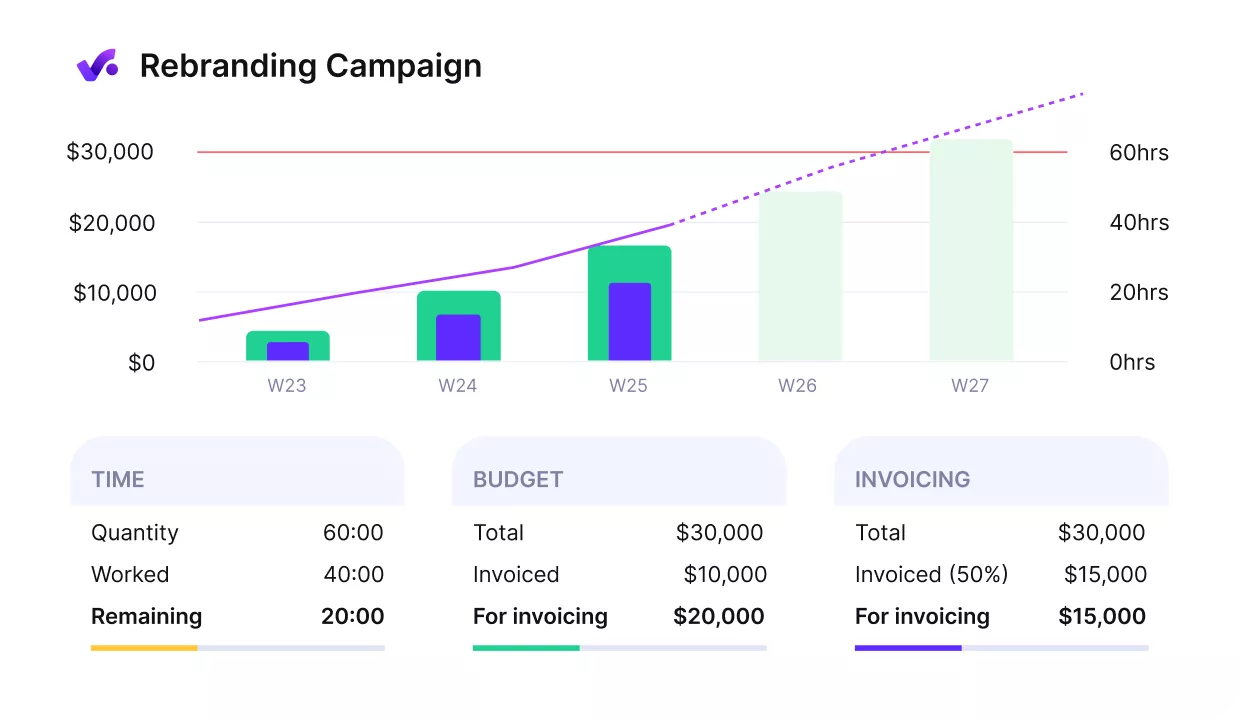
Get early warnings of budget overruns with Productive.
Turn Tracked Work Into Billing With Less Friction
Nutcache covers invoicing, but user feedback suggests the billing flow can get awkward once teams need more flexibility or a cleaner handoff from tracked work to invoices.
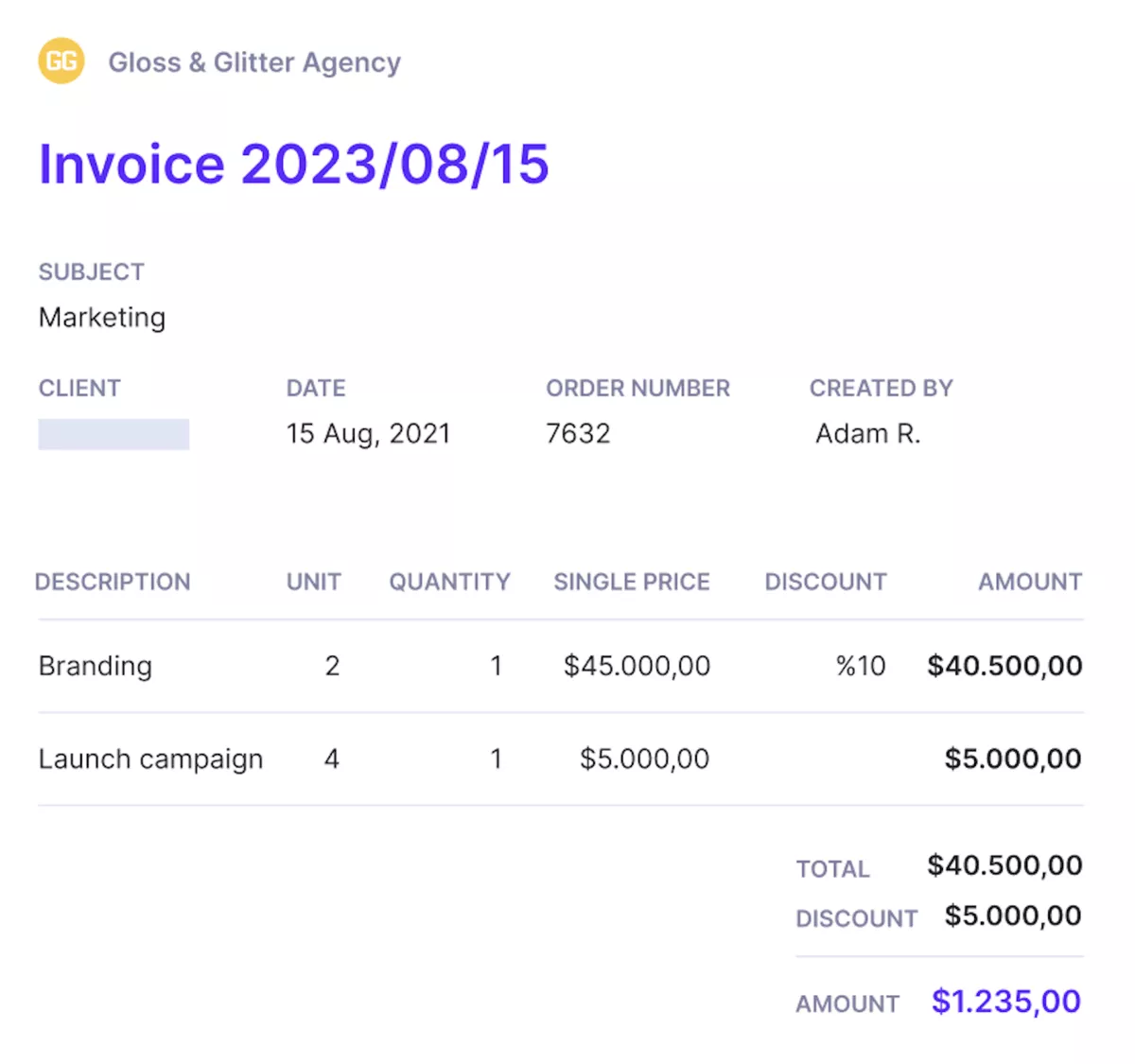
Generate and send invoices from the same place you track work and budgets.
Productive is stronger when billing needs to stay close to delivery, because teams can manage budgets and tracked work in the same environment, then use that structure to support invoicing across different billing models.
Plan Capacity Before Delivery Problems Show Up
Nutcache covers projects, but it is not the tool agencies move to when they need real forward-looking resource planning.
Productive’s Resource Planner lets teams schedule work ahead of time, see availability across the team, and compare planned work with actual tracked work. This straightforward capacity view gives companies a much better way to manage utilization, spot overload early, and make staffing decisions before margins start slipping.
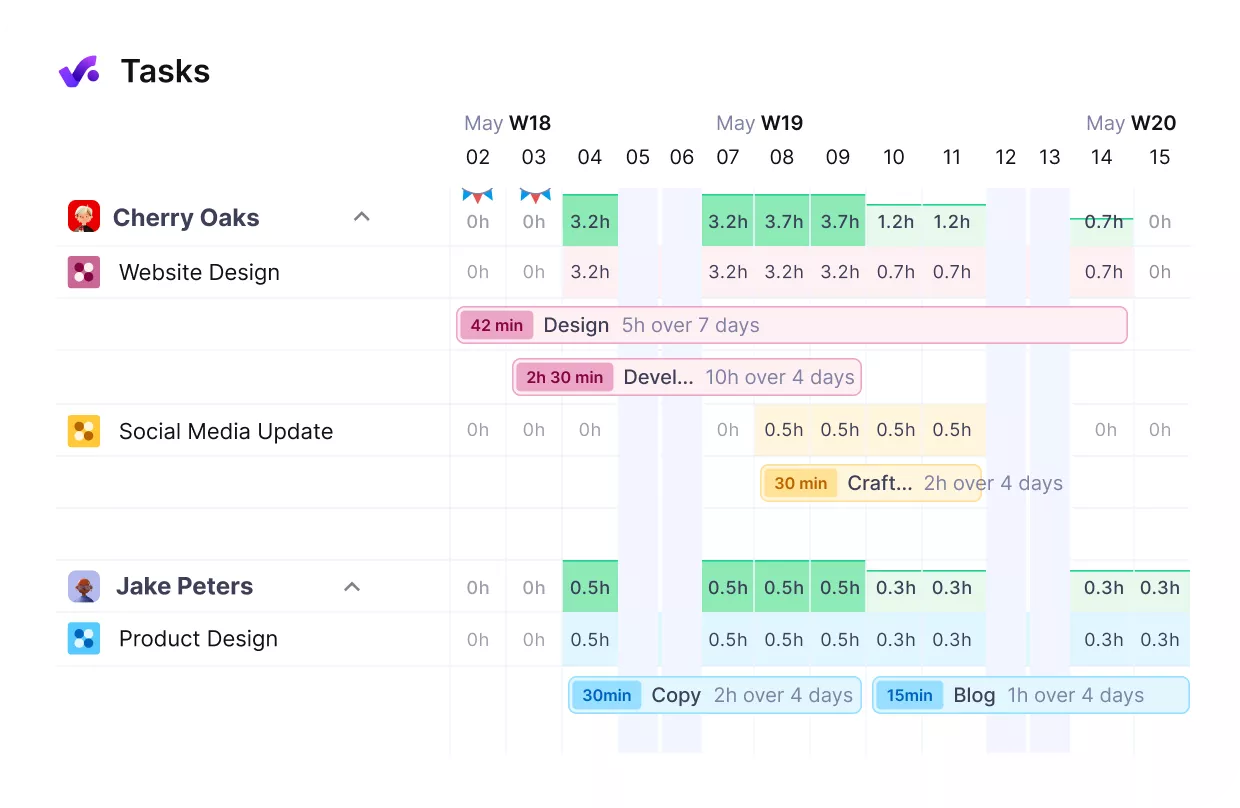
Plan and manage your resources from Productive.
Keep Delivery, Finance, and Sales Data More Connected
Productive fits better when the goal is not just to replace one tool, but to reduce the mess around it. Productive’s project management keeps deliver, financial and operational data aligned instead of rebuilding the same story in multiple places.
It also helps when sales, finance, and delivery need stronger team collaboration around the same client work.
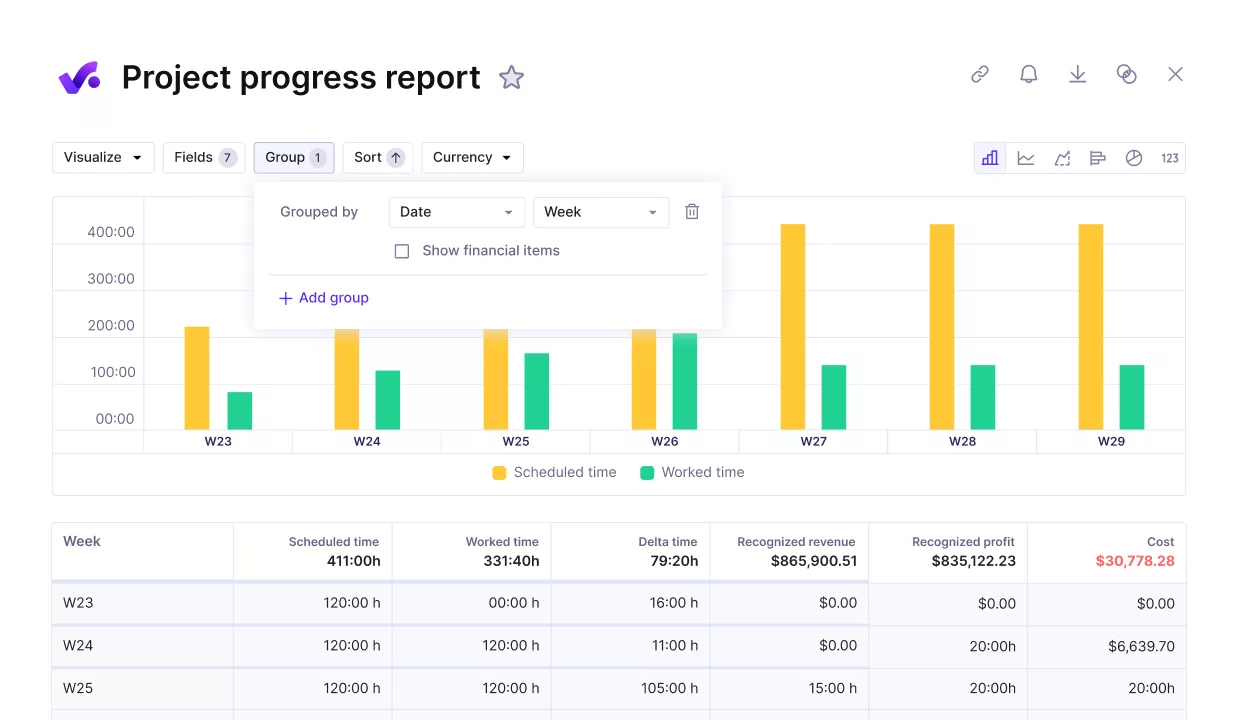
Compare the project progress against key performance metrics.
Pricing
- Plans start with the Essential plan at $10 per user per month, which includes essential features such as budgeting, project & task management, docs, time tracking, expense management, reporting, and time off management.
- The Professional plan includes custom fields, recurring budgets, advanced reports, billable time approvals, and much more for $25 per user per month.
- The Ultimate plan has everything that the Essential plan and Professional plan offer, along with the HubSpot integration, advanced forecasting, advanced custom fields, overhead calculations, and more. Book a demo or reach out to our team for the monthly price per user.
You can go for a free 14-day trial before you decide to check out a paid plan.
Replace Nutcache With a Tool Built for Growing Teams
Productive helps agencies and professional services manage delivery, profitability, resource planning, and billing in one system, so you do not have to patch workflows and reports as you grow.

2. Teamwork – Best for Client-Service Teams That Want Stronger Project Delivery and Budget Visibility
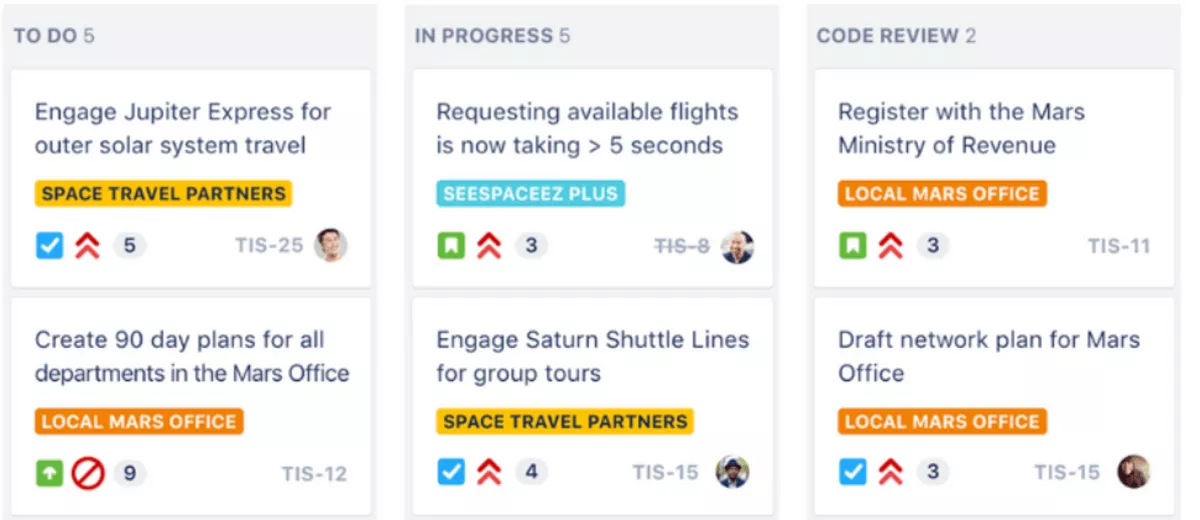
Where Nutcache covers the basics well, Teamwork pushes further into client-service delivery with stronger project management structure, built-in time tracking, and clearer visibility into budgets and profitability.
Key Features
- Built-in time tracking tied to billable work, capacity, and profitability
- Budgeting and profitability tools for monitoring project health
- Resource and workload planning for client-delivery teams
- Client-facing collaboration tools and delivery workflows
SOurce: teamwork
Pros
- Strong fit for client-service teams that need projects, budgets, and clients in one workspace
- Helpful visibility into workload, deadlines, and project progress
- Time entries connect more naturally to billing and budget oversight than in lighter tools
- Templates, task structure, and collaboration features support repeatable delivery work
Cons
- The interface can still feel busy when teams only need a simpler setup
- Some teams may find the platform deeper than they need for straightforward internal work
- Advanced functionality can take time to learn and configure well
- It is a better fit for client delivery than for teams looking for a lightweight general management software tool
Final Verdict
Keep Teamwork on your shortlist if Nutcache no longer gives you enough control over client delivery, budgets, and billable work.
Skip it if you want the lightest possible project management tool, because its value comes from having more operational depth, not from keeping everything minimal. For a deeper breakdown of where it fits, see our detailed list of the best Teamwork alternatives.
3. Avaza – Best for Smaller Teams That Want Projects, Expenses, Invoicing, and Tracked Work in One Simpler Tool
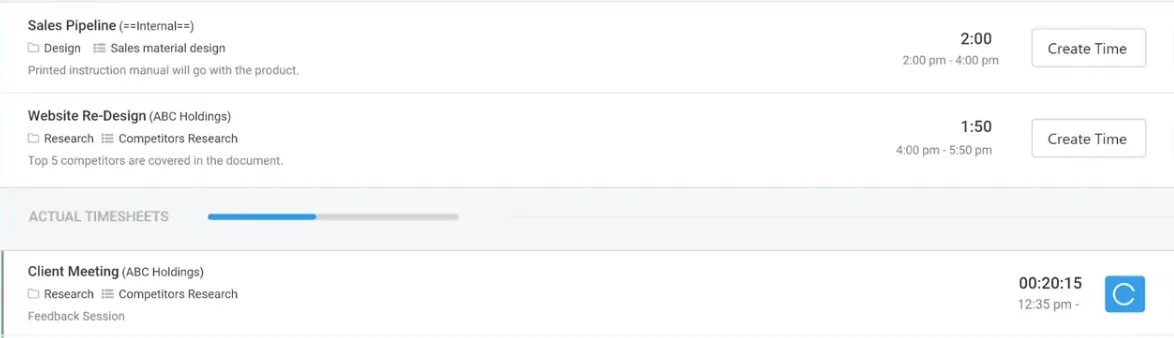
For teams that do not need a heavier PSA-style system, Avaza often feels closer to what they hoped Nutcache would become as they grew. It keeps the features that matters most, like projects, time tracking, expenses, invoicing, and resource scheduling, but packages it in a simpler, smaller-business-friendly setup that is easier to adopt.
Key Features
- Project management, task planning, and resource scheduling in one workspace
- Built-in time tracking, timesheets, and billable rate support
- Expense management with reimbursable and billable expense workflows
- Quotes, invoices, and payments connected to client work
SOurce: avaza
Pros
- Strong all-in-one fit for smaller service teams that want projects, billing, and admin work in one place
- Easier to learn and roll out than many larger project management platforms
- Time, expense, and invoicing workflows are tightly connected for day-to-day client work
- Customer support gets consistently positive feedback from users, including for the mobile app
Cons
- Customization is lighter than what some growing teams may want
- Reporting can feel limiting when teams need deeper analysis or more tailored views
- Some task and workflow details are less flexible than in more advanced systems
- It is better for smaller service businesses than for teams looking for a highly customizable management software setup
Final Verdict
Avaza is worth keeping in the mix when you want a Nutcache replacement that stays close to the same core workflow but feels cleaner and more unified for a smaller team.
It starts to lose ground when your buying criteria shift toward deeper customization, heavier reporting, or more complex project management control. For more context on the tradeoffs, see our guide to Avaza alternatives.
4. Kantata – Best for Large Teams That Need Deeper Resourcing and Operational Control
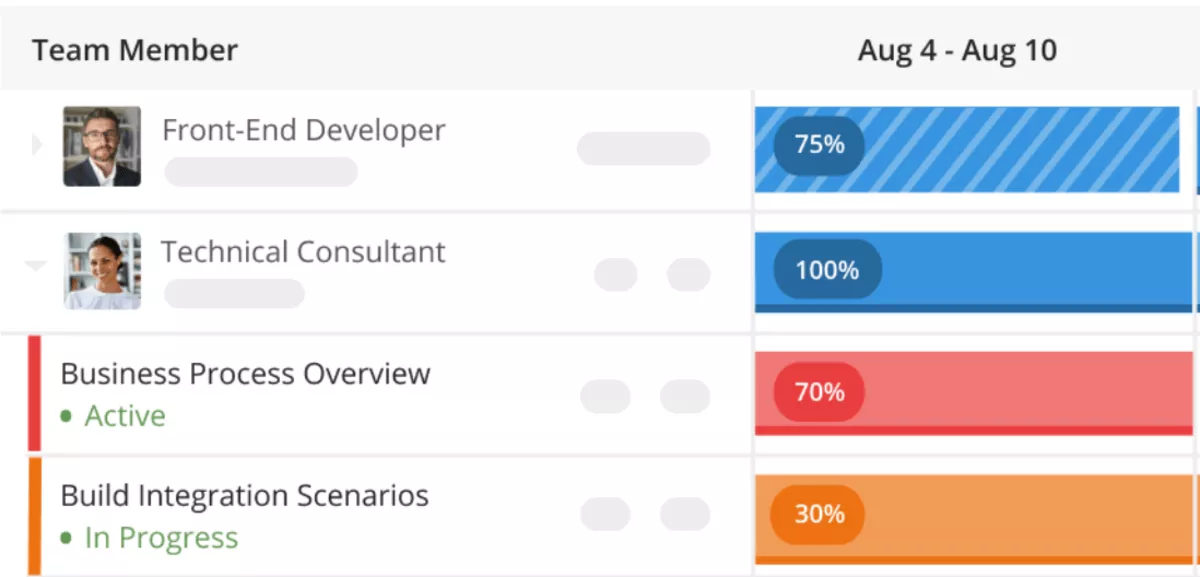
Kantata belongs on this list for teams that have moved past Nutcache’s lighter all-in-one appeal and now care more about forecasting, resource coordination, and financial oversight across a larger delivery operation.
It asks more from the team in return, but that tradeoff makes sense when project management, time tracking, and revenue visibility all need to work at a more advanced level.
Key Features
- Resource management and forecasting built for professional services teams
- Financial management with project margin, revenue, and profitability oversight
- Project management with milestone, delivery, and portfolio visibility
- Time tracking and expense workflows tied to broader delivery operations
SOurce: kantata
Pros
- Strong resource planning and forecasting depth for services organizations
- Better visibility across projects, people, and financial performance than lighter tools
- Broad PSA-style coverage for teams that want delivery and operational control in one system
- Customer support and implementation partnership get positive feedback from many reviewers
Cons
- The platform can feel heavy for smaller teams or simpler workflows
- Reporting and dashboards still seem underused or hard to optimize for some teams
- Setup and adoption demand more effort than lighter tools in this category
- The value is harder to justify if you do not need enterprise-leaning services management depth
Final Verdict
If you want Nutcache to feel more strategic across resourcing, financial oversight, and delivery planning, you should consider kantata. If your team values speed, simplicity, and lighter setup more than operational depth, it is probably not the best pick for your team.
5. Accelo – Best for Service Businesses That Want Stronger Quote-to-Cash Workflow Coverage
Accelo is the clearest fit for teams that do not just want better project execution than Nutcache, but tighter control over everything that happens before and after delivery too.
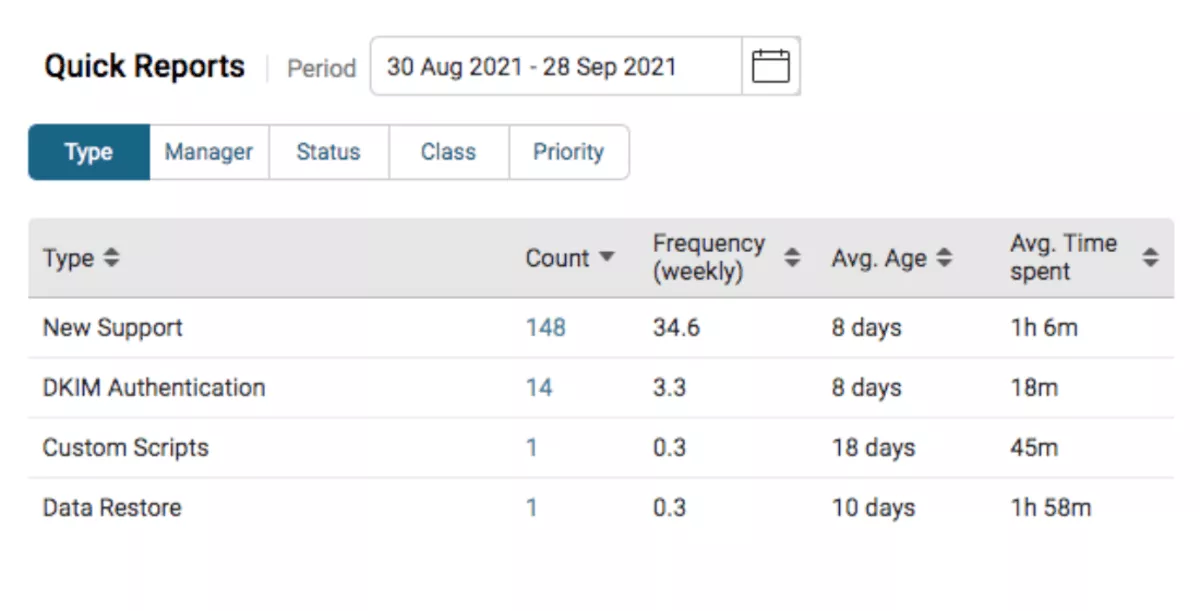
It is built around quote-to-cash operations, so the value is not just stronger project management and time tracking, but a more connected handoff between client work, budgets, billing, and operational visibility.
Key Features
- Project management linked to budgets, resources, and client records
- Built-in time tracking, timesheets, and budget oversight
- Billing and invoicing tied to project work and financial workflows
- Quote-to-cash workflow support across sales, projects, and operations
SOurce: accelo
Pros
- Strong operational fit for service businesses that want projects, billing, and client work connected in one system
- Automation helps reduce admin load across recurring delivery workflows
- Better visibility across budgets, work in progress, and delivery operations than lighter tools
- Broad PSA coverage makes it useful for teams that have outgrown basic project management software
Cons
- Configuration can feel complex, especially early in rollout
- Some teams may find the mobile and project views less polished than they want
- Customization and usability tradeoffs still come up in user feedback
- It asks more from the team than a lighter management software tool built for simpler workflows
Final Verdict
Accelo is the option to keep in play when Nutcache no longer feels connected enough across client delivery, budgeting, and billing.
It is not the tool to pick for minimal setup or the lightest user experience, but it makes a strong case when operational continuity matters more than simplicity. For a closer look at similar tradeoffs, see our review of the best Accelo alternatives.
Why Are Teams Looking for Nutcache Substitutes?
Teams are looking for Nutcache substitutes because the platform can start to feel limiting once project management, time tracking, invoicing, and day-to-day visibility all need to work more smoothly together.
Nutcache does a lot in one place, but the review pattern shows that some teams still run into friction around usability, billing workflows, client visibility, and the level of operational control they need as they grow.
- Billing and invoicing issues create more friction than they should. Some users like how quickly they can turn quotes into invoices, but others report problems with sending invoices, overdue invoice tracking, or browser behavior that gets in the way of billing work. That usually becomes a bigger issue once the team needs more structured professional services billing workflows.
- Time entry is not always as easy as teams expect. Nutcache is often praised for covering time tracking and billing in one tool, but some reviewers still describe the time tracker as awkward or harder to use regularly than it should be.
- Some workflows start to feel too constrained as teams grow. Reviewers who like the all-in-one setup still point to limits around client views, reporting depth, or the level of detail available when they need tighter operational control.
- The product can feel polished in some areas and rough in others. That split shows up in reviews that praise the interface, dashboards, and broad feature coverage, while also calling out small issues that make the overall experience feel less refined than expected.
How to Choose the Right Nutcache Alternative for Your Team? (Step-by-Step Process)
You should choose a Nutcache alternative by mapping the workflow you need to replace, narrowing the shortlist to tools that actually match it, testing the daily experience, and checking what happens to billing, reporting, and team adoption after rollout.
In other words, the right replacement is not the tool with the longest feature list. It is the one that fits the way your team plans work, tracks time, handles delivery, and turns completed work into usable financial data.
Step 1: Identify what Nutcache is actually doing for your team
Before you compare vendors, write down the jobs Nutcache handles today. For most teams, that includes some mix of project management, time tracking, invoicing, budgeting, expense logging, or internal coordination.
This step matters because many alternatives look similar on a landing page, then fall apart once you realize one of your core workflows depends on a feature the new tool handles weakly or not at all.
A simple way to do this is to split your current use into three columns: daily work, financial workflows, and management visibility.
- Daily work covers tasks, projects, collaboration, and timesheets.
- Financial workflows cover budgets, billable time, expenses, invoicing, and profitability.
- Management visibility covers reporting, workload oversight, and the level of control leadership needs.
Once you see which column matters most, it gets much easier to eliminate tools that only solve one-third of the problem.
Step 2: Separate true replacements from partial replacements
The biggest evaluation mistake is treating every good-looking tool as a real substitute. Some platforms are strong project management tools but weak on billing. Others handle time tracking and invoices well but offer less depth once delivery gets more complex.
A few are broad service-operations systems that can replace Nutcache more fully, but only if your team is ready for the extra structure.
That is why you should define your replacement type early. If you want a cleaner all-in-one tool for a small team, your shortlist should look different from a shortlist built for an agency or a professional services organization.
This is where alternatives to Nutcache start to separate into meaningful categories instead of one giant undifferentiated list. It also helps to know what stronger professional services project management actually looks like before you commit to a new system.
Step 3: Test the workflows people will use every day
Once the shortlist is down to two or three tools, stop reading feature pages and run a live workflow test. Build one real project, assign people, track time, review budgets, and check how work moves toward invoicing or reporting.
If the core flow feels clumsy during a trial, it usually does not get better once the full team is inside the tool.
Focus especially on repeat actions. This means answering questions like:
- Can team members enter time without friction?
- Can managers review project status without digging through cluttered views?
- Can finance or operations leads pull usable numbers without cleaning up exports every week?
These questions matter more than an impressive feature grid because they reveal whether the software will actually stick.
Step 4: Compare the cost of simplicity versus the cost of complexity
Some teams switch because Nutcache no longer gives them enough control. Others switch because they want less friction, not more depth. That is why the decision is rarely about finding the most powerful option. It is about deciding what kind of tradeoff your team can live with.
A lighter tool may win on speed, ease of use, and faster rollout, but force you to keep other systems around for billing or reporting. A deeper platform may improve operational control, but add setup work, process overhead, and a longer adoption curve.
The right choice depends on whether your next pain point is workflow sprawl or workflow complexity.
Step 5: Choose the tool your team can actually adopt
Before you decide on your replacement, ask a few practical questions like:
- Who needs to live in this tool every day?
- What information has to stay accurate?
- Where does bad adoption create downstream problems?
For one team, missed time entries may be the biggest risk. For another, it may be weak budget visibility or poor handoff between delivery and billing.
Make the final call based on the workflow that matters most, not on the broadest marketing promise. If the tool supports the way your team already works, adoption usually follows.
If it fights the real operating model, no amount of extra functionality will save it.
How to Migrate from Nutcache?
You can migrate from Nutcache by auditing the workflows you use today, cleaning the data you plan to move, rebuilding one live workflow in the new tool, and only then rolling the change out to the rest of the team.
The safest migration plan is not the fastest one. It is the one that protects billing history, time tracking habits, project structure, and reporting logic before you ask everyone to work in a new system.
If billable work is part of the move, it helps to review a clean process for how to track billable hours before you finalize the migration plan.
Free Migration Checklist
- List every workflow you currently run in Nutcache, including projects, budgets, invoicing, expenses, and time tracking.
- Mark each workflow as must keep, can simplify, or can drop before you touch the new tool.
- Export active clients, open projects, team members, budget data, unpaid invoices, and recent timesheet history.
- Clean naming issues, duplicate records, old project templates, and inactive client data before import.
- Decide which historical data really needs to move and which data can stay archived for reference.
- Map Nutcache fields to the structure of the new platform before importing anything.
- Rebuild one real project with its budget, tasks, team assignments, and billing flow as a pilot.
- Test the full path from work logged to invoice draft so finance and delivery can both sign off.
- Check what managers need for oversight, including dashboards, budget visibility, and recurring reports.
- Train the team on the few daily actions that matter most, especially logging time, updating work, and reviewing status.
- Run one short overlap period if the team is moving active billing or sensitive financial workflows.
- Set a cutover date, assign one owner for migration questions, and track issues during the first two weeks after launch.
Closing Thoughts – What Tool From the List Should you Choose?
The right replacement depend on what your team needs next, but the strongest choice usually comes down to how much of your delivery, financial, and operational workflow you want to manage in one place.
If you want a simple replacement, some tools on this list will get the job done. If you want a system that gives you stronger control over projects, budgets, resourcing, billing, and day-to-day operations, Productive is the option with the clearest all-in-one fit.
Book a demo to see how it could work for your team.
Connect With Agency Peers
Access agency-related Slack channels, exchange business insights, and join in on members-only live sessions.
