Cost Baseline in Project Management: Definition and Example

Without a cost baseline in project management, a fixed-fee project can run over, and nobody can say against what. It’s the approved plan of what a project should cost, week by week.
In this article, you’ll get the cost baseline definition, how it differs from a budget, what goes into it, and related baseline types. Then come reasons why it matters, four steps to create it, a worked example, re-baselining, and how software tracks spend against it.
Key Takeaways
- A cost baseline is the approved, week-by-week plan of what a project should cost: It’s frozen at sign-off, and the project budget adds a reserve for unforeseen problems on top.
- The costs in a baseline are labor, non-labor direct costs, and a contingency reserve: Labor goes in at cost rates plus overhead, because billing rates already contain your margin.
- The baseline matters because it shows overruns while weeks remain: Each week, you compare what finished work cost with what the baseline planned for it.
- Creating the baseline takes four steps: Estimate each phase by role, check past timesheets, spread costs across the schedule, and lock it once approved.
What Is a Cost Baseline in Project Management?
A cost baseline is an approved, time-phased plan of project cost, meaning cost spread week by week. It’s frozen at sign-off, so you can measure actual spend against it.
The project manager builds it from the cost estimate, with delivery leads. The sponsor or account lead approves it before kickoff. From then on, it’s the yardstick for every delivery week.
That approval is also what separates it from an estimate and a budget.
How Does the Baseline Differ From a Budget and an Estimate?
The baseline differs from an estimate by being approved, and from a budget by leaving out management reserve.
An estimate is a working number you build from hours and cost rates, then revise while scoping a deal. Management reserve is money the budget holds back for problems nobody can predict.
The three differ in what they hold, when they exist, who controls them, and when they change:
Estimate, baseline, and budget compared
| Estimate | Baseline | Project budget | |
|---|---|---|---|
| What it holds | Hours per role at cost rates, direct costs, and any contingency you price | The approved estimate with contingency, spread week by week | The baseline plus management reserve |
| When it exists | Before sign-off, while you scope the deal | From sign-off until the project closes | From sign-off until the project closes |
| Who controls it | The project manager | The project manager | Leadership or the agency owner |
| When it changes | Any time before sign-off | Only through a signed change order | When leadership approves new funding |
The mix-up starts when a firm prices a fixed fee, calls it “the budget,” and tracks hours against it. That fee contains your profit, so the team can spend the whole margin while still under budget.
If you sell fixed-fee work, record the client fee, the budget, and the baseline as three separate numbers. On time and materials, the fee flexes with hours, but the baseline shows whether work costs what you planned.
On a retainer, set a monthly baseline against the fixed monthly fee, so overservicing shows that month.
Next comes what goes into the baseline itself.
Which Costs Go Into the Baseline?
The costs that go into the baseline are labor, non-labor direct costs, and a contingency reserve. Labor goes in at cost rates, and management reserve stays outside. The grouping is our own. We’ll take a closer look at each.
Labor at Cost Rates, Not Billing Rates
Price each role at what you pay them per hour, plus your overhead per hour.
A billing rate already contains your margin. With the baseline at billing rates and actuals at cost rates, overrun hours can still read as under plan.
Non-Labor Direct Costs
Non-labor direct costs are purchases made for one client project: subcontractors, freelance overflow, software licenses, and stock assets.
Shared costs, such as office software, don’t count here. They reach the baseline only through the overhead in your cost rates.
Contingency Inside, Management Reserve Outside
A contingency reserve is money for named risks, such as one extra client feedback round. You draw on it inside the baseline when that risk happens.
Management reserve stays in the budget only and needs leadership approval to release. Folded into the baseline, it hides overruns behind spare money.
If your firm keeps one buffer, split it at sign-off: named risks into the baseline, the rest to leadership.
Each cost also needs the scope and dates it pays for.
What Are the Types of Baselines in Project Management?
The types of baseline in project management include scope, schedule, and cost. PMI calls these three together the performance measurement baseline, as PM Study Circle’s guide to project baselines explains. In plain terms, it’s the project baseline: the approved plan for what you deliver, when, and at what cost.
Each layer covers one part of that plan:
- Scope baseline: the approved scope statement and the deliverables split from it, often kept in a project scope management plan.
- Schedule baseline: the approved project schedule, with dates for each deliverable. A schedule baseline example: design in weeks three to six, development in weeks five to ten.
- Cost baseline: the money tied to that work in those weeks, and the layer that shows whether margin holds.
Say the client asks for one more page template midway through. The scope baseline moves first, then the schedule baseline and cost, as the extra hours land in specific weeks.
If the template slips in without a signed change order, those hours look like a delivery overrun. The real cause is scope creep.
With all three locked, the cost layer becomes a weekly figure you can hold spend against.
Why Is a Cost Baseline Important?
A cost baseline is important because it shows cost overruns while weeks remain and settles what the fee covers. Both reasons are our own selection. We’ll take a closer look at each.
It Shows Cost Overruns While Weeks Remain
The baseline shows cost overruns while weeks remain, through one weekly check. Compare what your project team’s finished work cost with what the baseline planned for it.
PMI’s Pulse of the Profession 2025 report surveyed almost 3,000 project managers and senior leaders. Those with high business acumen reported 73% of projects finishing within their initial budgets, against 68% for the rest. Even in the stronger group, 27% of projects didn’t finish within their initial budget.
Actual cost is what your time entries and supplier invoices show you spent, at the same cost rates. The gap between baseline cost and actual cost for finished work is cost variance.
A gap shows up the week it opens, so you can trim scope or raise it with the client. Without a baseline, it can stay hidden until invoicing, when a fixed-fee margin is already spent.
In Productive, you can set up an AI Agent that runs weekly and flags budgets that exceed a threshold.
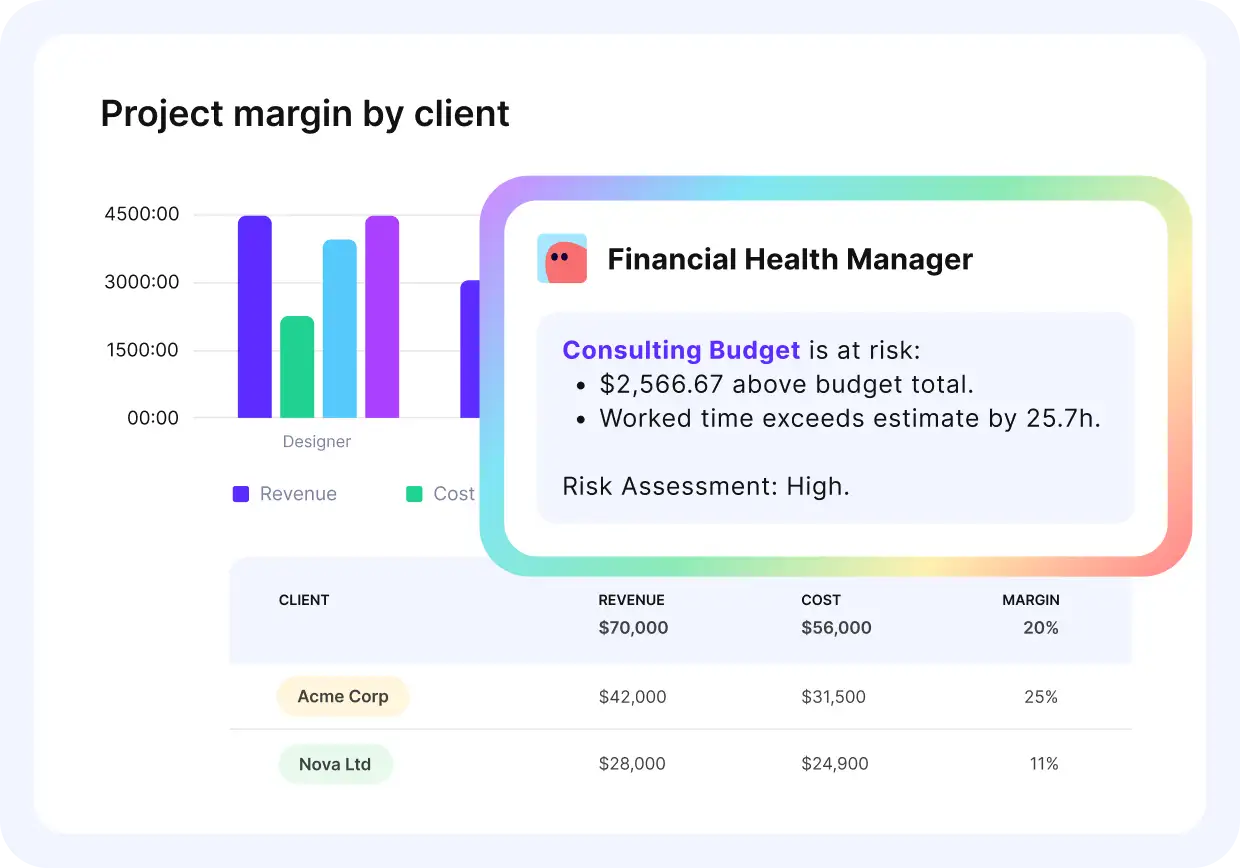
Flag budgets that run over estimate each week with an AI Agent in Productive.
Let AI Agents monitor your budgets
It Settles What the Fee Covered
The baseline settles what the fee covered, because it’s a signed record of the original scope and cost.
When the client asks for that extra page template, the account lead shows what the fee included. They then price the change order from the same cost rates.
Those benefits hold only when the baseline is built from your own scope, rates, and schedule.
How Do You Create a Cost Baseline Step by Step?
You create the baseline in four steps: estimate each phase by role, check estimates against past timesheets, spread costs across the schedule, and lock the approved baseline. The steps are our own breakdown. The worked example is a made-up case: a 12-week, €60,000 fixed-fee website redesign.
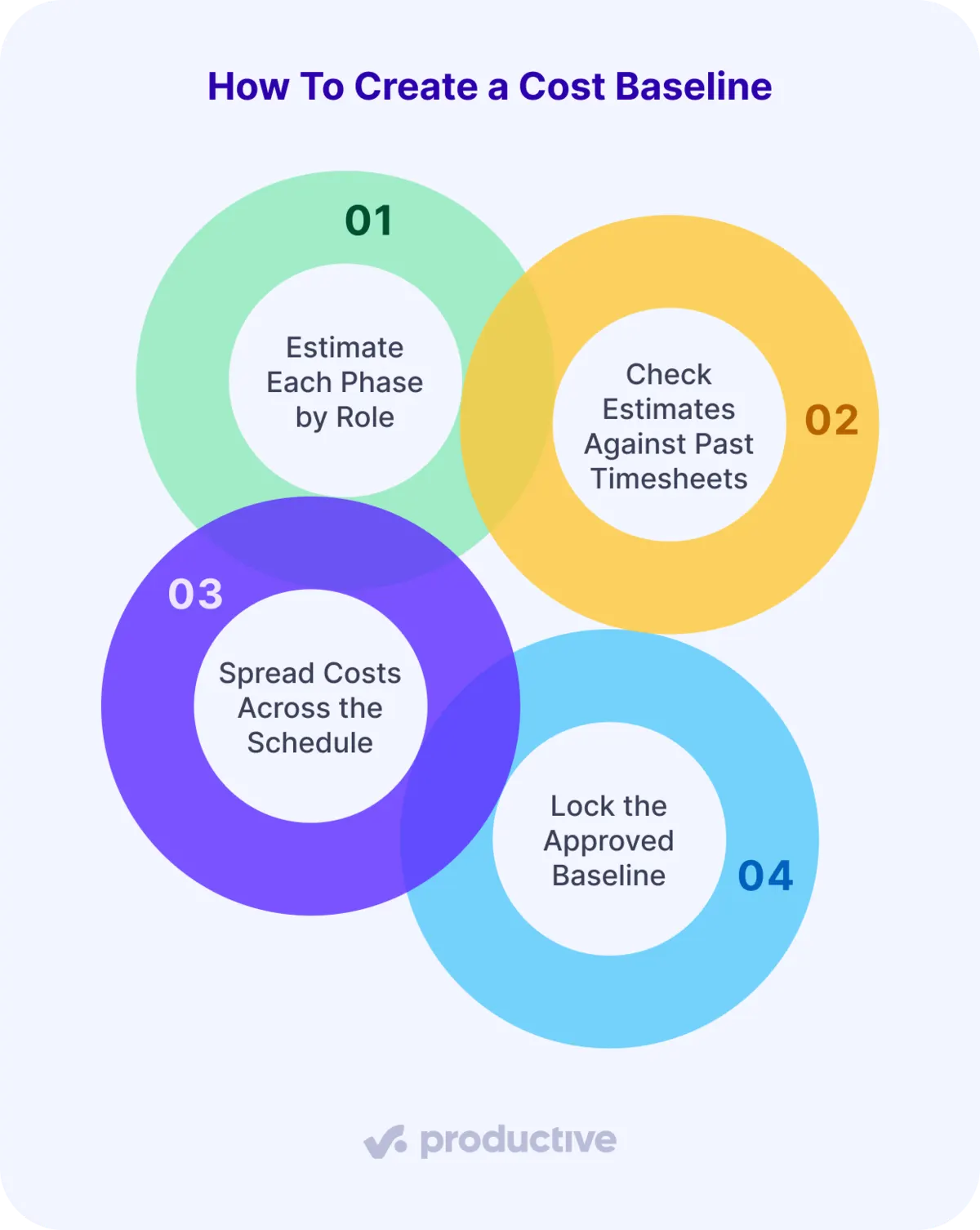
Let’s look at each.
Step 1: Estimate Each Phase by Role
Estimating each phase by role starts with breaking the agreed scope into phases or deliverables. For a website redesign, these might be discovery, design, development, and launch.
For each phase, list the roles involved and their hours. Multiply each role’s hours by its internal hourly cost, including any overhead, then add non-labor costs.
Say the developer’s hourly cost is €65. Development’s 280 hours come to €18,200, plus €800 in licenses, or €19,000.
In this example, the four phases total €39,000. You’re done when every scope line belongs to one phase.
Step 2: Check Estimates Against Past Timesheets
Checking estimates against past timesheets means comparing the largest or least certain estimates with similar finished projects.
If you expect development to take 280 hours when a comparable project took 320, note what’s different. Reused components might explain it, so check that assumption with the delivery lead.
You’re done when your biggest estimates have a past project or a delivery lead behind them.
Step 3: Spread Costs Across the Schedule
Spreading costs across the schedule means placing each phase’s cost in the weeks its people are booked. On your estimate sheet, development runs from week five to week ten.
Then add an agreed contingency for identified risks. Here, the team reserves €3,000 for a possible extra design revision round.
That brings the proposed baseline to €42,000. You’re done when every phase has its weeks on the sheet.
Step 4: Lock the Approved Baseline
Locking the approved baseline means having the budget owner or sponsor approve the estimate, contingency, and schedule. Save that approved €42,000 version as the baseline.
After that, record every change through your agreed approval process.
With Productive’s Budgeting, each phase can be a section of services. You record an estimated cost per service, then compare estimated and actual costs.
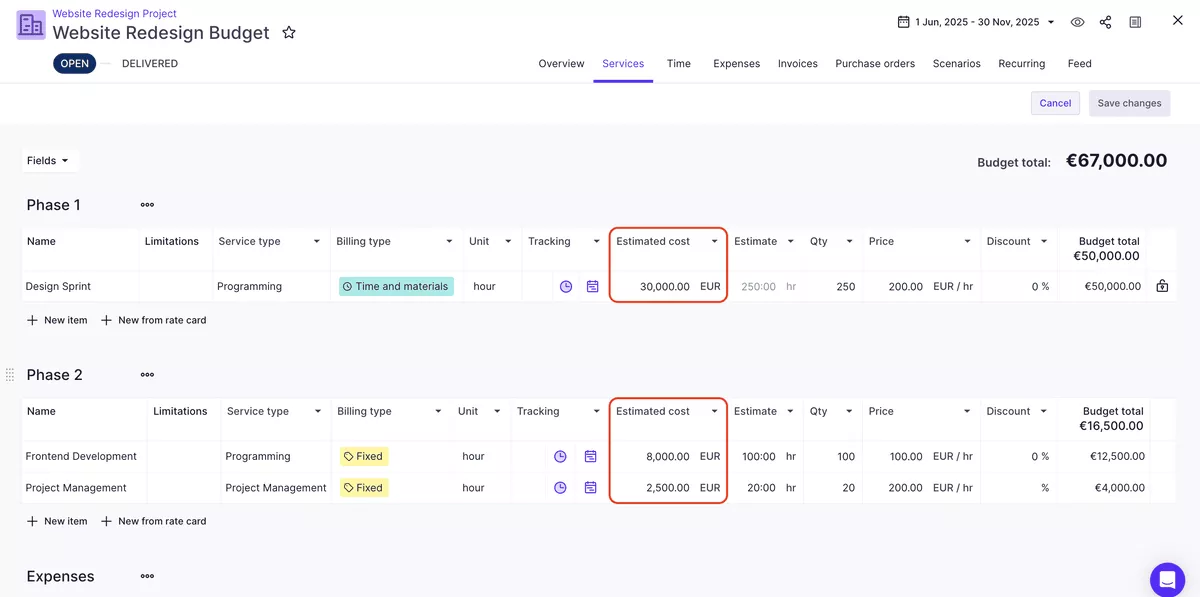
Compare estimated and actual cost per service in Productive.
There’s no dedicated baseline feature, though. The field holds one editable figure per service, and the budget’s feed logs every change. The weekly plan and the freeze come from your approval, not from a lock in the tool.
If you’re comparing tools, check out our list of the top project budget management tools.
Cost Baseline Example: A 12-Week Website Redesign
The baseline for this 12-week website redesign is each phase’s planned cost, placed in the weeks it runs. Delivery comes to €39,000, plus €3,000 contingency.
All figures are illustrative:
Website redesign baseline
| Phase | Weeks | Planned cost | Running total |
|---|---|---|---|
| Discovery | 1 to 2 | €4,000 | €4,000 |
| Design | 3 to 6 | €12,000 | €16,000 |
| Development | 5 to 10 | €19,000 | €35,000 |
| Launch | 11 to 12 | €4,000 | €39,000 |
| Contingency | When a named risk happens | €3,000 | €42,000 |
At week six, discovery and design should be finished. Compare what they cost with the €16,000 planned. If they cost more, you know with half the project still ahead.
Contingency gets its own line because nobody knows when the extra design round will happen. At €42,000 against the €60,000 fee, €18,000 is planned margin, or 30%.
When the client changes scope mid-project, the baseline needs a new version.
When Should a Project Be Re-baselined?
Re-baseline a project only after an approved change to project scope or schedule, never to make an overrun disappear.
That sets two conditions: a change that justifies a new baseline, and its approval. Both are our recommendation. We’ll take a closer look at each.
When Scope or Schedule Changes, Not When Estimates Miss
A new baseline is justified when scope or schedule changes, not when an estimate misses. Valid triggers include an approved scope change, a major client-driven schedule shift, and a pivot that rewrites deliverables. The list is our own.
A month-long client pause counts as a shift, since it moves when hours land. Each one changes what the fee buys, or when work happens, so the old weekly line stops fitting.
If development needs 340 hours instead of 280, the plan stays frozen. The extra 60 hours show up when you track cost variance. That variance should shape your next estimate, so erasing it destroys the evidence.
After the Change Order Is Signed
Re-baseline only after the change order is signed, through a formal change control procedure. Say the redesign client adds an e-commerce module mid-development:
1. The account lead files a change request describing the module.
2. The project manager prices it at the same cost rates as a revised estimate.
3. The sponsor approves the change order, raising the fee by €20,000.
4. A dated version goes next to the original, never over it.
The signed change produces a second version of the baseline:
Original and revised redesign baselines
| Original (v1) | Revised (v2) | |
|---|---|---|
| Client fee | €60,000 | €80,000 |
| Delivery cost | €39,000 | €52,000 |
| Contingency | €3,000 | €4,000 |
| Baseline | €42,000 | €56,000 |
| Duration | 12 weeks | 16 weeks |
| Planned margin | €18,000 (30%) | €24,000 (30%) |
Keep measuring work finished before the change against v1, the original plan. Any overrun from before the change stays on record. Version two governs only the weeks after its signed date.
Keeping each version current depends on how logged hours reach the plan every week.
How Does Software Help Track Spend Against the Plan?
Software helps track spend against the plan when it links logged time, cost rates, and budgets. Variance then updates as hours are logged. That’s our recommendation, so check what your team actually needs.
When hours are logged in a separate timesheet tool, someone exports the entries each week. They map them to work packages and multiply them by rates. Until that copy happens, the sheet shows last week’s spend.
Skip one export, and the €21,000 checkpoint at week six gets checked a week late. Before choosing a tool, confirm that each person has a cost rate, so logged time converts to spend automatically. Once several client projects run at the same time, that weekly copy repeats for each one.
With Productive, you can monitor project profit margins as time is logged. Leadership then sees which projects are losing margin.
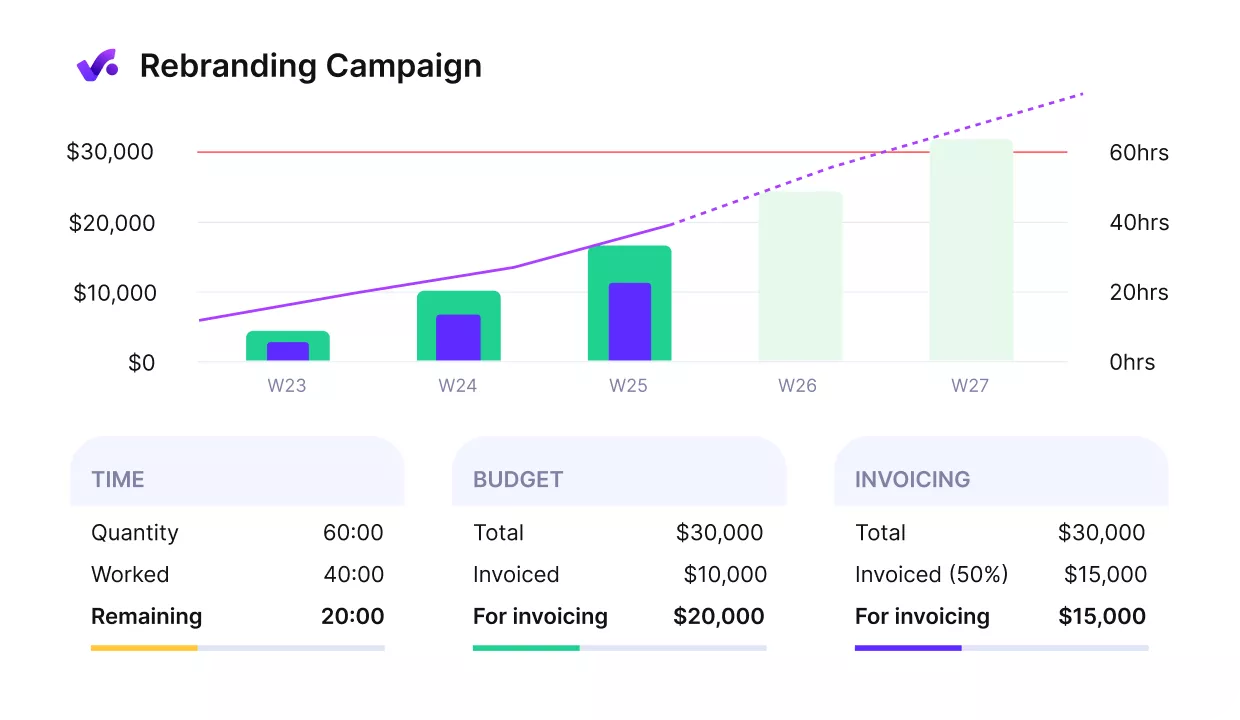
Monitor spend and profit on a budget overview in Productive.

From a managerial point of view, the main benefit of the tool is seeing your profitability in real time.
Read how ENKI tracks project profitability in real time with Productive.
Keep Planned and Actual Cost in One Platform
An estimate becomes a cost baseline in project management once it is approved, time-phased, and frozen. From then on, you can measure variance against a fixed plan each week.
Productive doesn’t lock a baseline for you, but it runs resources, projects, and finances in one platform. You can compare your approved cost estimates with the hours your team logs, in one tool.
Book a demo with Productive to track budget spend and profit in real time.
FAQ
What Are the Four Types of Costs in Project Management?
The four types of costs in project management are direct, indirect, fixed, and variable. Direct costs serve one project, like a designer’s hours on the redesign. Indirect costs are shared, like office software, and reach projects through overhead.
Fixed costs stay the same as workload changes, like a fixed-fee subcontractor. Variable costs rise with workload, like freelance overflow hours. The pairs overlap, so one cost can be both direct and variable.
What Is a Baseline in Project Management?
A baseline in project management is the approved version of a plan that you measure progress against. Teams set baselines for scope, schedule, and cost, and together they form the project baseline.
Catch Cost Overruns While Weeks Remain
Record an estimated cost per service in Productive and compare it with actual cost as your team logs time.
