Top 5 BambooHR Alternatives (Paid & Free) – Curated Guide

If you’re looking up different BambooHR alternatives, you’re at the right place.
In this buyer’s guide, you will get a short, curated list of the best options for 2026, with pros, cons, and best-for notes based on real user feedback.
You will also get a buyer’s comparison table, a clear note on any free version available, a BambooHR migration checklist, and a step-by-step way to choose the right tool for your BambooHR needs.
Let’s start.
What Are the Best BambooHR Alternatives in 2026?
The best BambooHR alternatives in 2026 are Productive, HiBob, Bitrix24, Darwinbox, and Zoho People.
Use the quick list below as jump links. Click a tool name to jump to the full breakdown with key features, review-based pros and cons, and a short final verdict that spells out the tradeoff.
Quick List of the Best BambooHR Alternatives and HR Platforms
Buyer’s Comparison Table
If you are scanning top BambooHR alternatives to build a shortlist fast, start here. If you only need something similar to BambooHR for core HR, the BambooHR row helps you sanity-check whether you even need to switch.
| Tool | Best for | Choose if | Skip This Tool If | HRIS Depth (High, Medium, Low) | Setup Effort (Low, Medium, High) | Free version |
|---|---|---|---|---|---|---|
| Productive | Agencies and professional services teams | You want to stop maintaining HR data and project delivery data in two places and reduce manual reconciliation. You need project-level time tracking (client → project → task) and want time off visibility to support planning and utilization. | You need a full HRIS as your system of record for employee records, onboarding, and HR administration. | Low (Not an HRIS Replacement) | Medium | No |
| BambooHR | HR teams that want a dedicated HRIS | You want core HR in one HR system and do not need detailed project time tracking or project profitability context inside the same platform. | You need one place for HR plus project delivery operations, or you are trying to eliminate duplicate time entry across tools. | High | Medium | No |
| HiBob | HR teams focused on employee lifecycle | You want an HR system centered on employee lifecycle workflows and HR ownership, and you are primarily replacing HRIS workflows. | Your biggest pain is connecting HR data to project delivery operations, utilization planning, and project time tracking. | High | Medium | No |
| Bitrix24 | Teams that want HR workflow automation plus collaboration | You want a broader collaboration workspace and structured internal workflows, and HR is one piece of a wider operations setup. | You need a clean HRIS-first experience, or you want a strict HR system of record plus deep project time tracking and profitability workflows in one place. | Medium | Medium | No |
| Darwinbox | Enterprise HR teams | You need an end-to-end HCM suite for larger orgs with structured HR processes and enterprise requirements. | You are a smaller team that wants a fast rollout, or your main goal is to connect HR data with project delivery ops and eliminate dual tool maintenance. | High | High | No |
| Zoho People | Teams in the Zoho ecosystem | You already use Zoho apps and want an HRIS that fits that ecosystem, with a budget-friendly starting point. | You need an HRIS that scales cleanly without edge-case limits, or you are trying to solve disconnected HR and project delivery data with one delivery ops platform. | High | Low to Medium | Yes |
Productive is a strong BambooHR alternative when your real problem is not core HR. It is the mess around delivery operations that sit next to HR. Think projects, budgets, utilization, and approvals.
BambooHR can stay your HRIS system of record, while Productive becomes the place where your team plans and delivers client work.
Try the all-in-one BambooHR replacement
Stop Logging Hours in Two Different Systems
If your team tracks time in BambooHR and again in a project tool, the fix is to choose one place for work logs. In Productive, people can log hours at the level you actually need, like client, project, and task.
That removes the back-and-forth and makes reporting cleaner.
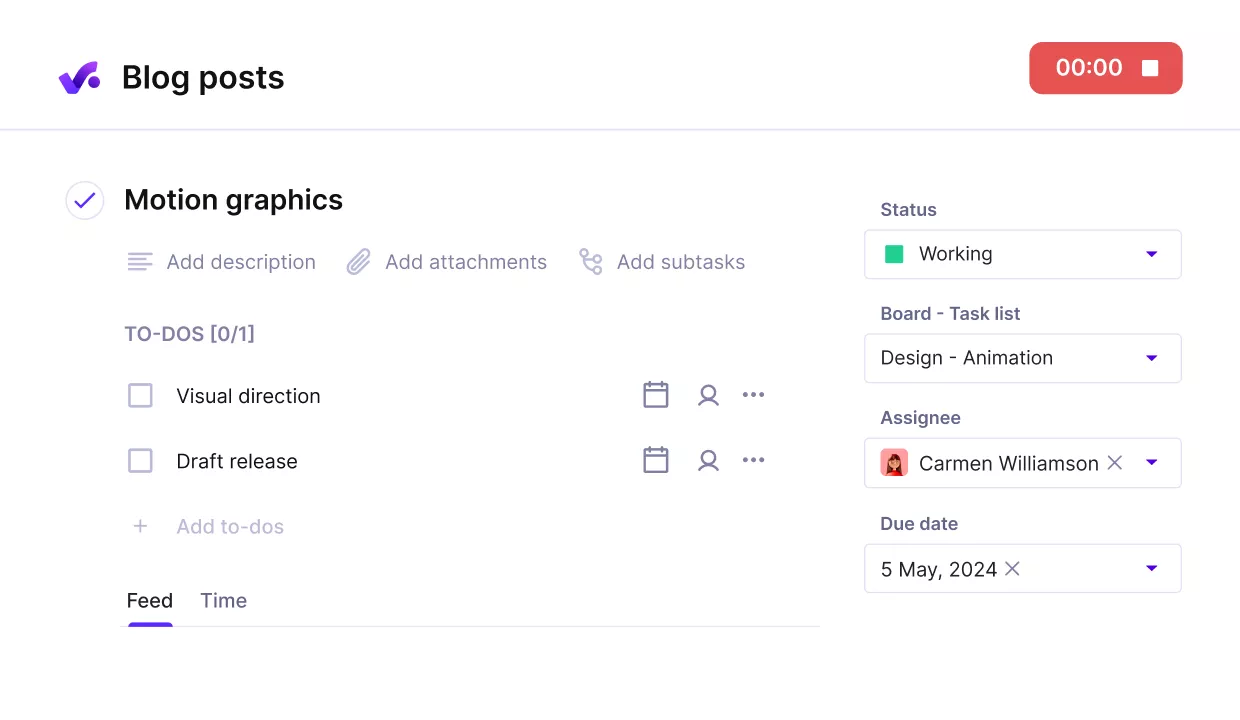
Track time directly on tasks, without friction, using Productive’s automatic time tracker.
To make it stick, you can turn on time approval so time entries become official only after review. Budget owners can approve or reject entries before they are visible to clients or included in reports. That is how you keep the data reliable without chasing people in Slack.
Make Resourcing Decisions With Confirmed Availability
Many HR tools track time off, but they do not help you plan delivery. In Productive, time-off requests go through time-off management with approvals, and confirmed absences appear in the Resource Planner.
That makes employee scheduling easier when assigning work and avoiding conflicts.
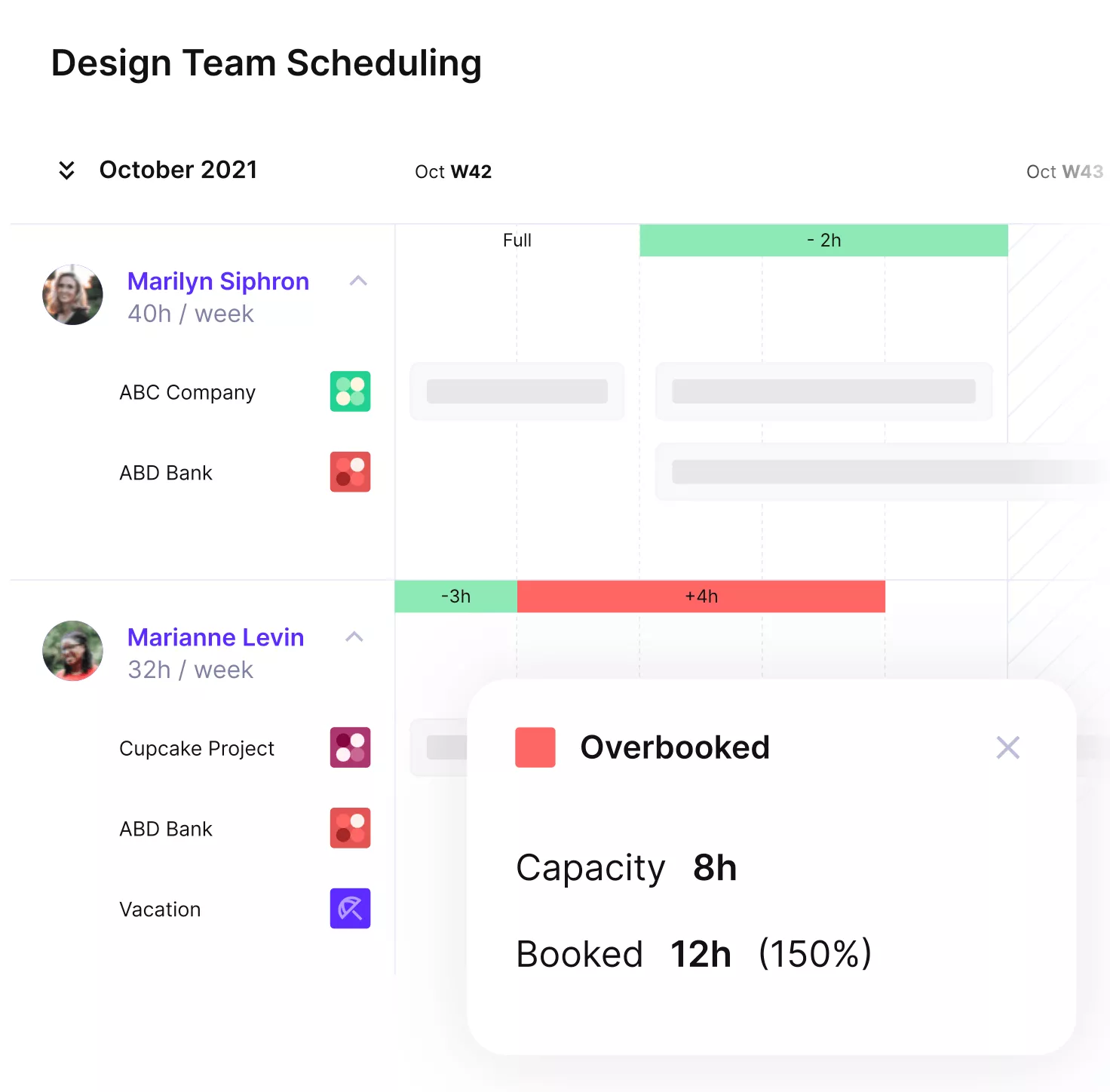
Get notified when your team members are overbooked.
Instead of guessing who is available next week, you can check the planner first and adjust allocations. It is employee scheduling based on real availability, not assumptions.
Tie Project Work to Budgets and Profitability
BambooHR is not built for project budgets or delivery profitability. Productive is. Once timesheets are in one place, you can connect hours to project budgets and see how delivery is trending while the work is still happening.
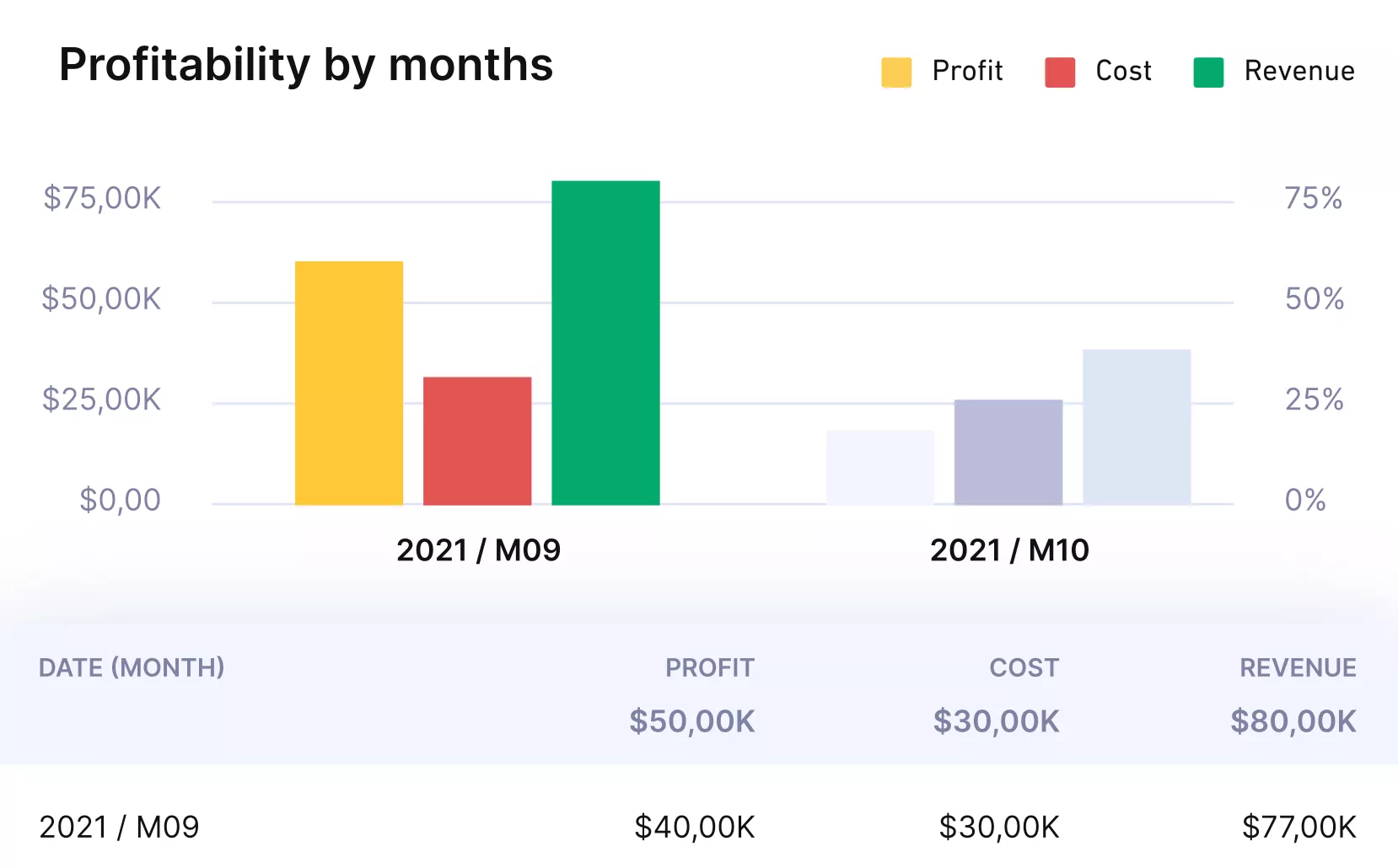
Get real-time budget or profitability updates with Productive.
This is useful when you need to answer basic questions fast. Are we burning the budget too quickly? Are we spending too many hours on non-billable work? Which projects need a scope reset?
Keep Approvals Simple Across Time, Expenses, and Time Off
Approvals tend to break when HR and delivery live in different tools. Productive keeps the review steps inside the workflows people already use. Time approval helps you validate time entries before they flow into client reporting. Time off approvals make sure absences are confirmed before they affect planning.
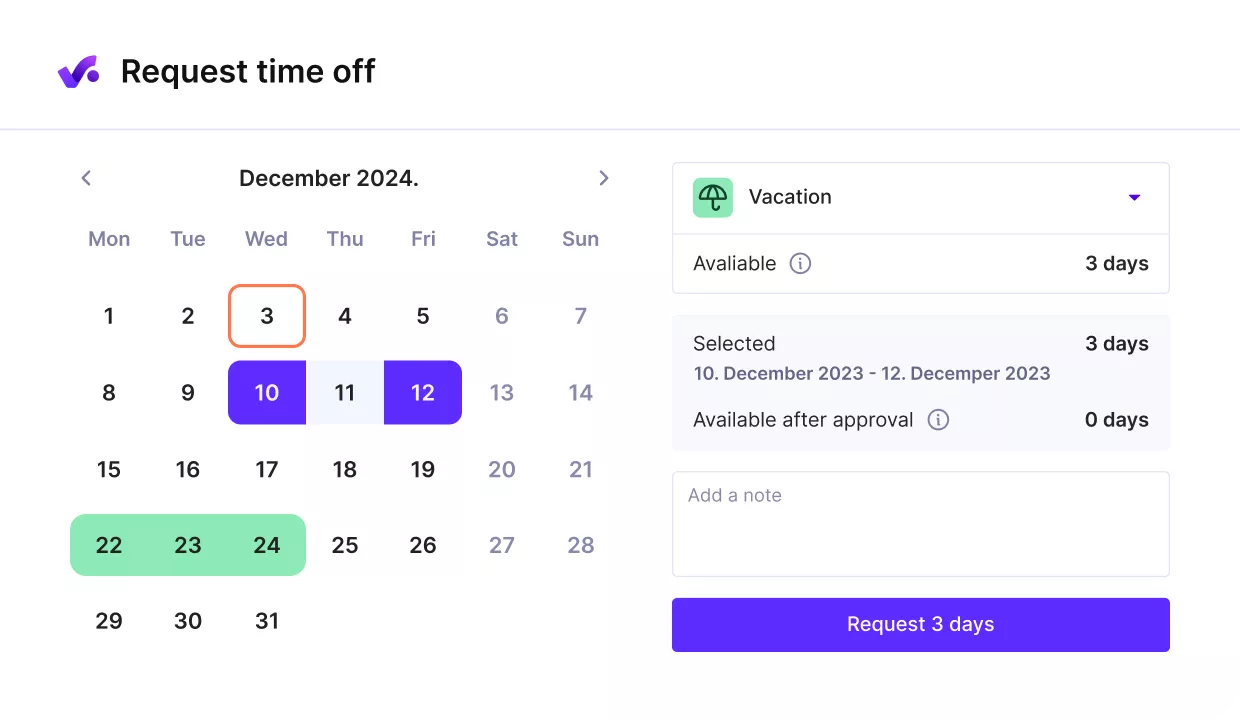
Sync time off with your capacity plans.
If expenses are part of your process, Productive also supports expense approval on the Ultimate plan, where budget owners can review, edit, approve, or reject submissions.
Pricing
- Plans start with the Essential plan at $10 per user per month, which includes essential features such as budgeting, project & task management, docs, time tracking, expense management, reporting, and time off management.
- The Professional plan includes custom fields, recurring budgets, advanced reports, billable time approvals, and much more for $25 per user per month.
- The Ultimate plan has everything that the Essential plan and Professional plan offer, along with the HubSpot integration, advanced forecasting, advanced custom fields, overhead calculations, and more. Book a demo or reach out to our team for the monthly price per user.
You can go for a free 14-day trial before you decide to check out a paid plan.
Make the BambooHR Switch to an All-In-One Solution
With automatic user provisioning and clear approvals, Productive reduces manual upkeep while giving you a cleaner operational layer next to BambooHR.

2. HiBob – Best for HR Teams That Want an Employee Experience Platform
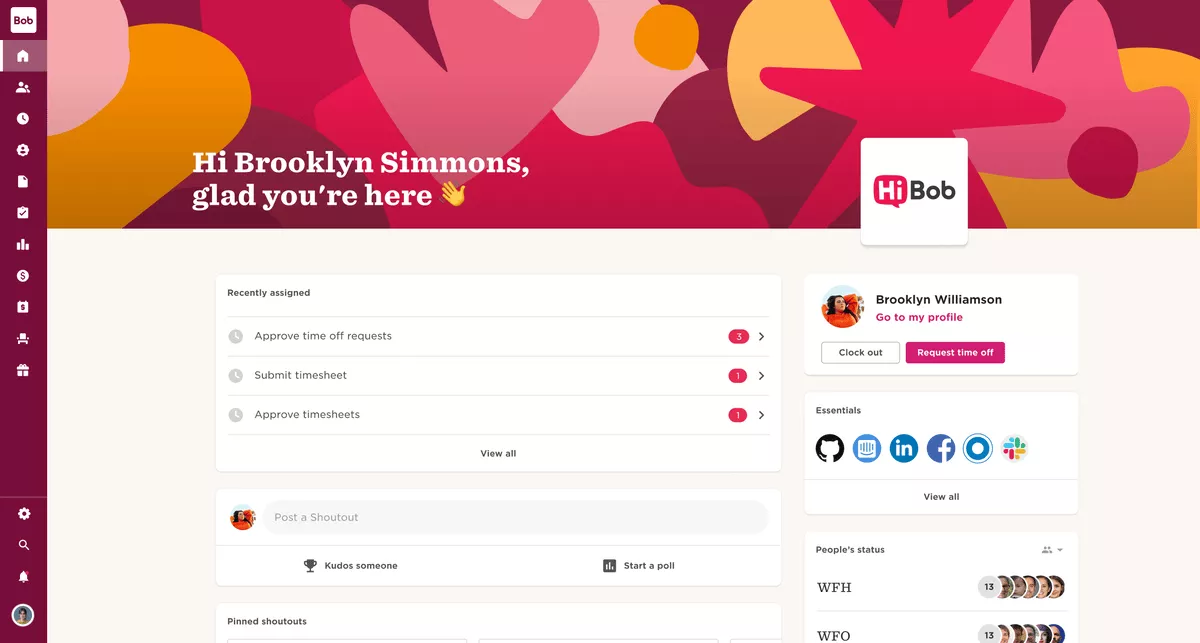
HiBob is a solid pick if you want an employee experience platform that helps HR run clean lifecycle workflows without turning everything into a separate process.
You can set up onboarding steps, manager check-ins, and feedback cycles in one place, but it is not the best fit if your main goal is connecting HR data to project delivery and utilization.
Key Features
- Employee profiles and org structure
- Onboarding workflows and task checklists
- Time off tracking with approvals
- Performance Management workflows for reviews
SOurce: hibob
Pros
- Many teams like how the employee experience feels for managers and employees day to day
- Reviewers often mention smoother onboarding and clearer ownership across HR tasks
- A common win is better visibility into employee engagement signals and follow-ups
- HR admins say it works well as an HR system when you want HR to own the process
Cons
- Several reviewers point to reporting that takes setup to get exactly right
- Some teams mention the admin work can grow as policies and org structure get more complex
- Users sometimes call out UX or navigation quirks that slow down everyday tasks
- Integrations can feel limiting if you need HR data to drive non-HR workflows
Final Verdict
This is not the right choice if you are trying to fix duplicate systems between HR and delivery operations. HiBob works best when HR needs a strong employee experience layer and structured performance management, but you are comfortable keeping project work in a different tool.
3. Bitrix24 – Best for Teams That Want HR Workflow Automation Plus Collaboration
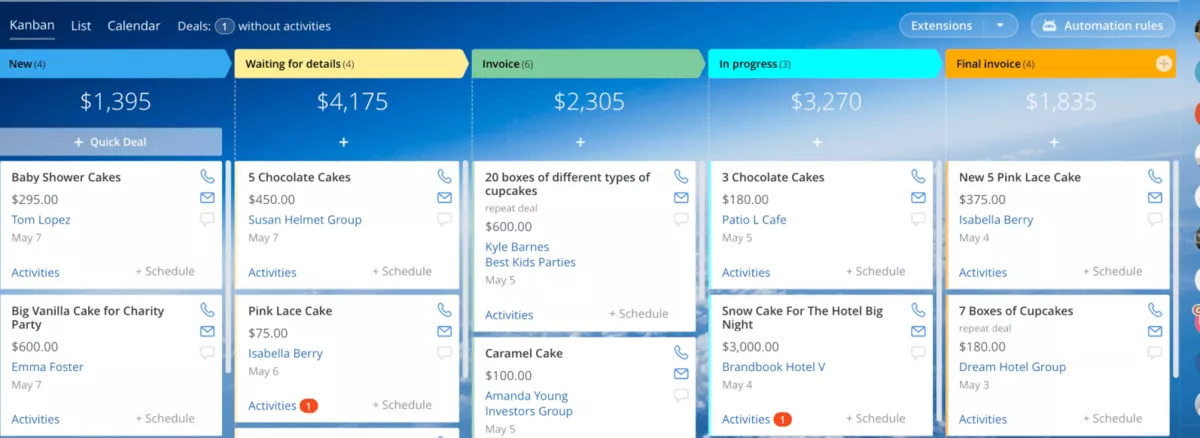
Bitrix24 makes sense when you want HR workflow automation inside a broader work hub, not a pure HRIS. It can also suit teams that want workflow orchestration across requests, approvals, and internal collaboration. It can centralize requests, approvals, and a self-service portal, but it can feel like a lot if you only need clean HR basics.
Key Features
- HR workflow automation for routine requests and approvals
- Employee self-service portal for common HR actions
- Time tracking to capture work hours
- Time and attendance management for schedules and presence
SOurce: bitrix24
Pros
- Users often like having HR requests, chat, and tasks in one place
- Many teams mention the flexibility to build simple approval flows without extra tools
- Timesheets can be useful when managers want visibility into work hours
- Some reviewers call out that the platform covers many use cases in one system
Cons
- The interface can feel busy, especially for first-time admins
- Setup can take time if you want the system to stay consistent across teams
- Reporting can require extra configuration to match what HR needs
- Time and attendance management can be awkward if you need strict policy controls
Final Verdict
This falls short if you want a clean, HR-first experience with minimal setup. Pick Bitrix24 when your priority is linking HR workflow automation to day-to-day collaboration, and skip it if you only need a straightforward HRIS replacement.
In case you’re considering this tool already, there’s an amazing list of Bitrix alternatives on our blog.
4. Darwinbox – Best for Enterprise HR Teams That Need an End-to-End HCM Suite
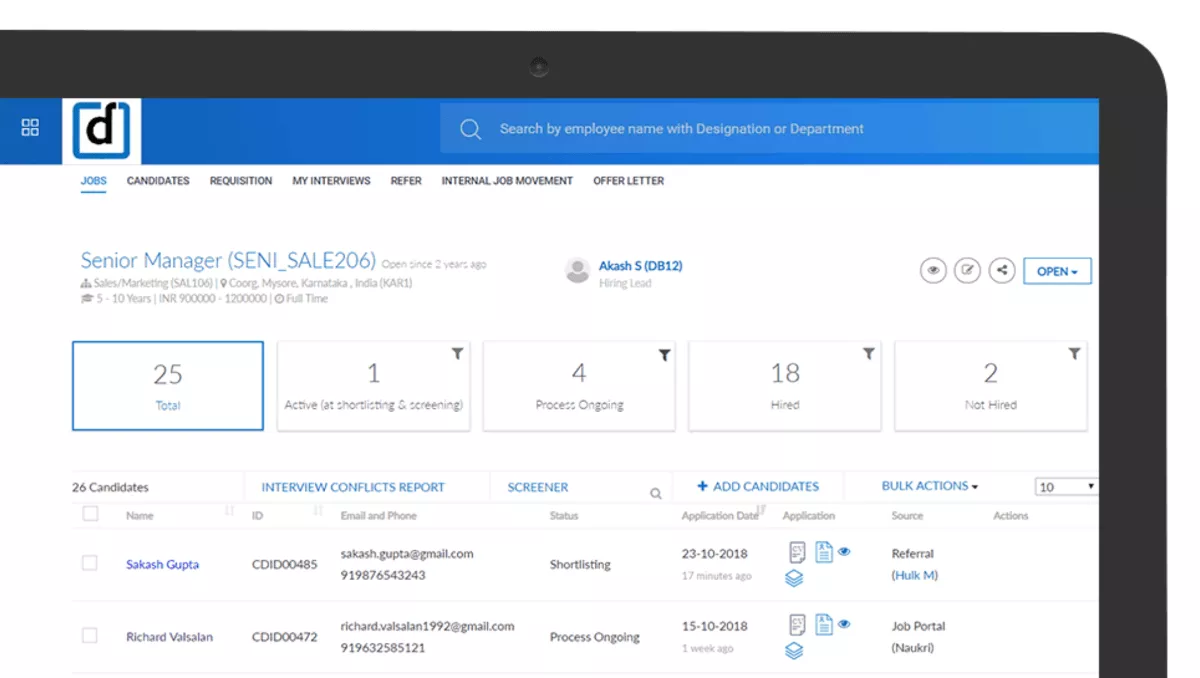
Darwinbox is built for enterprise HR teams that need structured processes and regulatory compliance across regions and business units. At this tier, custom pricing and longer rollouts are common. It is one of the HCM suites to consider when you run formal performance management cycles, but it is not a lightweight switch.
Key Features
- Core HR and employee records for large orgs
- Performance Management workflows and goal cycles
- Performance Reviews with configurable review steps
- Controls designed for compliance requirements
SOurce: darwinbox
Pros
- Many users mention it can support complex org structures with clear controls
- Performance Reviews workflows often feel more complete than basic HR tools
- Teams that run formal Performance Management cycles like having everything in one place
- For global teams, regulatory compliance is a common reason it makes the shortlist. If regulatory compliance drives your selection, ask for proof points in your industry.
Cons
- Implementation can be heavy and needs real internal ownership
- Admin complexity grows as you add policies, fields, and custom reporting
- Some teams say training is needed before managers use it smoothly
- Regulatory compliance features can add setup work if your needs are simple. Custom pricing can also make shortlisting harder if you do not align on the budget early.
Final Verdict
You will struggle with this if you want a fast rollout for a small team. Darwinbox is a fit when regulatory compliance and enterprise HR structure are non-negotiable, but most mid-sized teams will find it heavier than they need.
5. Zoho People – Best for Teams in the Zoho Ecosystem That Want an HRIS (Free Version Available)
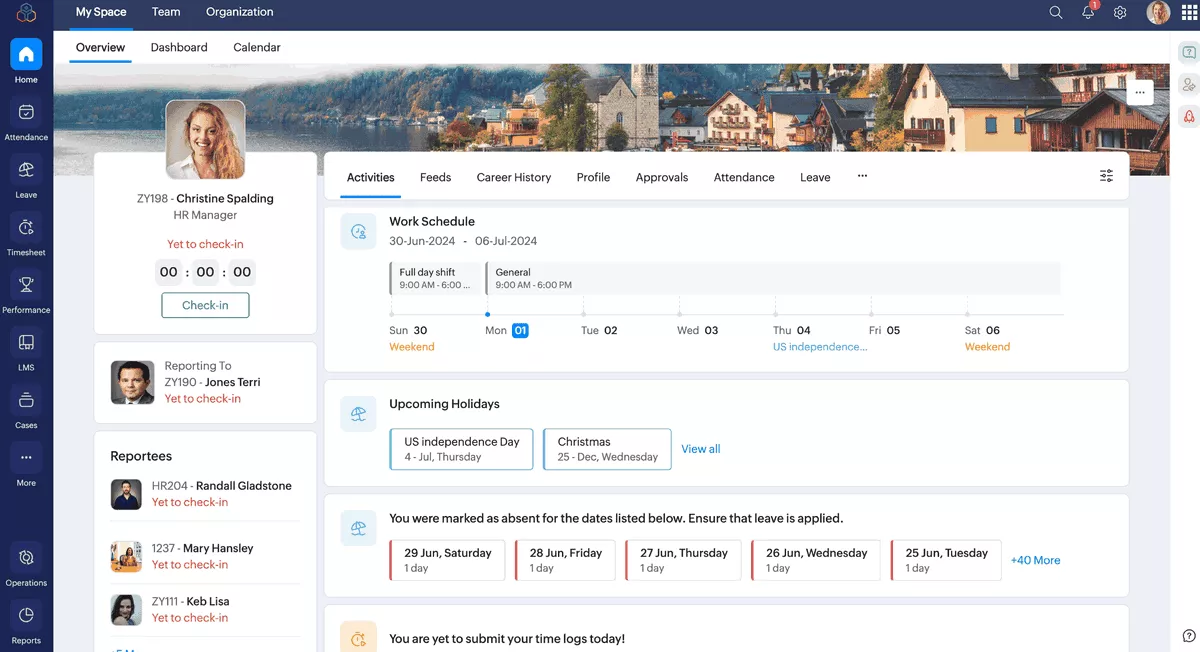
Zoho People is a practical pick if your company already runs on Zoho apps and you want an HRIS that fits into that setup. It covers the everyday HR basics, but you should think twice if you need deeper enterprise controls or you expect a lot of edge cases as your team scales.
Key Features
- Employee records and team member data management
- Time off tracking with approval flows
- Onboarding checklists and HR tasks
- Integration options across Zoho apps
SOurce: Zoho People
Pros
- Many teams, like that Zoho People feels familiar if they already use other Zoho tools
- Reviewers often mention good value for smaller teams starting with an HRIS
- A common positive is having employee records and approvals in one place
- Some users call out flexible integrations inside the Zoho ecosystem
Cons
- Reporting can take extra setup to match what HR stakeholders expect
- Admin work can increase as policies and team member data get more complex
- The UI can feel less polished compared to HR-first platforms
- Integration options outside the Zoho ecosystem may not fit every stack
Final Verdict
Not a fit if you want a premium, HR-first platform without compromises. This tool is a reasonable HRIS choice when you are committed to the Zoho ecosystem, but teams with complex reporting or scaling needs will likely outgrow it.
Why Teams Look for BambooHR Replacements?
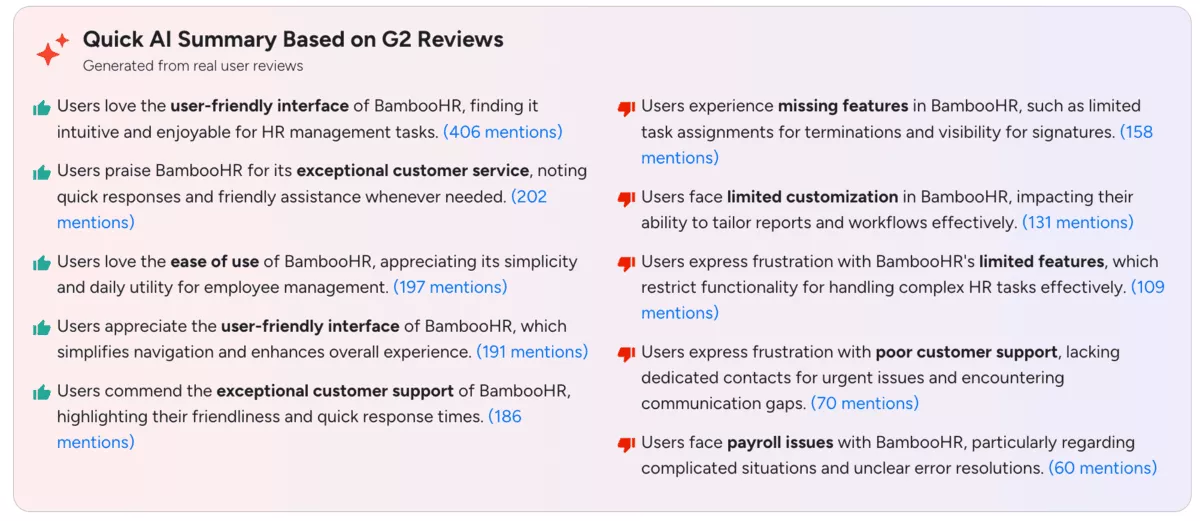
The most common reasons people look for BambooHR replacements are missing features, limited customization for reports and workflows, and gaps that show up once HR processes get more complex.
Some reviewers also call out support issues for urgent problems and payroll edge cases that are hard to resolve.
- Missing features: limits around termination task assignments and signature visibility come up often.
- Limited customization: teams struggle to tailor reports and workflows to how they actually run HR.
- Not enough depth for complex HR: users mention that the feature set can feel restrictive for more advanced needs.
- Support gaps: some reviewers describe not having a dedicated contact for urgent issues and communication gaps.
- Payroll problems: complicated payroll situations and unclear error resolution are a recurring frustration.
Source: G2 review
How to Choose a BambooHR Alternative That Works Best for Your Team? (Step-by-Step Process)
You should choose a BambooHR alternative by turning your needs into a quick test: list your must-have workflows, run two real scenarios in a trial, check reporting before you commit, verify integrations, then plan a low-risk rollout.
Before you kick off with the final choice, it might be a good idea to get back to the basics and check out our HR planning guide.
Step 1: Define What Needs To Be Replaced
Write down the top 3 to 5 BambooHR jobs you rely on most. Include benefits administration, applicant tracking, engagement surveys, and offboarding flows if those are part of HR today. Keep it specific, like employee records, onboarding steps, time off approvals, performance reviews, or monthly reports.
Then decide what category you are buying. If you need a human resources information system that can be your HR source of truth, keep your shortlist to HRIS tools. If you are really trying to fix delivery operations around HR, keep that in mind as you compare options.
Step 2: Turn Your Needs Into a Short Test Plan
Make a must-have list you can test in 30 minutes. Include at least one workflow orchestration test, like a request that needs an approval and a clear audit trail. Focus on the workflows that break first when a tool is the wrong fit, like approvals, permissions, and reporting.
Add 2 to 3 dealbreakers that will make you walk away. Treat this shortlist as your validation process, not a wishlist. Examples are weak audit trails, limited manager access, or reporting that cannot answer basic HR questions without workarounds.
Step 3: Run Two Real Scenarios in a Trial
Pick scenarios your team actually runs and walk them through end-to-end. Pay attention to the user experience for managers, not just HR admins. For example, add a new hire, assign onboarding tasks, request time off, approve it, and confirm it shows up in the right place.
You are looking for friction. Count clicks. Note where you need manual work. Pay attention to how easy it is for managers to follow the process.
Step 4: Check HR Data & Reporting Before You Commit
Open the reporting area and recreate the 2 to 3 reports you use most. If you get stuck, use the question to test customer support, not your own patience. Try filtering by team, manager, and time period. Export the report and check if it is clean enough to share.
If HR reporting feels like a puzzle you have to solve every month, that tool will cost you more time than it saves.
Step 5: Verify Integrations and Admin Overhead
List the systems you cannot break, like payroll software, identity, and accounting. If payroll runs in ADP Workforce Now, confirm the integration and test a real employee change. Confirm the integrations you need exist and look realistic to maintain. If your IT team requires a self-hosted edition, confirm that early so it does not derail the project.
Then estimate the ongoing admin work. Before you commit, test customer support with one real question and check whether the help docs are usable. Check how roles, permissions, and custom fields are managed.
A tool can look great in a demo and still be a headache if it creates constant cleanup work.
Step 6: Plan a Low-Risk Rollout
Pilot the new tool with a small group first. Run BambooHR in parallel for a short window, then switch once the data and workflows match.
Set a clear cutover date and write down what changes for employees and managers. That keeps the rollout calm and avoids a messy halfway state.
How to Migrate From BambooHR? (Step-by-Step Process)
You should migrate from BambooHR by treating it like a data project first, then a rollout. If you are switching because benefits administration or approvals break across tools, map those workflows up front.
Your goal is to export what matters, clean it up, map it into the new tool, and run a short parallel period to catch mistakes.
Step 1: Prep Your Data Before You Export
Start by cleaning your team member data in BambooHR. Fix duplicates, missing managers, outdated departments, and inconsistent job titles. If you skip this step, your new system will inherit the mess, and reporting will be harder to trust.
Step 2: Export BambooHR Data and Map It Into the New Tool
Export the employee records and org fields you need, plus the parts tied to time off management. Capture PTO balances and policy rules so you can validate them after import.
Next, export team member data into a single folder and create a simple mapping sheet. Write down what each BambooHR field becomes in the new tool.
Step 3: Set Up Roles, Permissions, and Approvals Before the Full Import
Build roles and permissions early so managers and HR know what they can see and edit on day one. Lock down who can change team member data fields, then test one real approval flow end-to-end.
If you rely on external systems, confirm the integrations you rely on now so you do not discover a blocker after launch. If you use ADP Workforce Now, validate the data flow before the full rollout.
Step 4: Run a Short Parallel Period to Catch Mistakes
Migrate a small group first, then run BambooHR in parallel for a short window. If your team depends on customer support during rollout, agree on response times and escalation paths in advance. Spot-check team member data, time off balances, and the reports you rely on.
Use this period to test those integrations with real inputs and outputs, then fix issues before you migrate everyone.
Bonus Migration Checklist
- Clean duplicates and missing fields in BambooHR
- Export employee records, org fields, and time off policy data
- Create a field mapping sheet and test with 5 to 10 employees first
- Set up roles, permissions, and approval routes in the new system
- Import the test set and validate reports and balances
- Run a short parallel period, fix issues, then migrate the rest
- Confirm payroll integration (ADP Workforce Now if relevant)
- Communicate the cutover date and what changes for managers and employees
Final Thoughts: Are These Alternatives Worth the Switch?
Yes, these alternatives are worth the switch if they remove the work that BambooHR cannot cover for you, like duplicated time entry across tools or HR data that never connects to delivery planning.
If you run an agency or professional services team and want delivery ops and financial visibility in one place, an all-in-one tool like Productive can be the simplest upgrade path.
Book a demo to see whether it fits your workflow.
Connect With Agency Peers
Access agency-related Slack channels, exchange business insights, and join in on members-only live sessions.
