Top 7 Harvest Alternatives After the 2026 Price Increase

Most teams searching for Harvest alternatives right now have the same trigger: a surprise price increase at renewal.
In this guide, we compare the best options and break down each alternative’s key features, pros, cons, and clear skip signals. You also get a comparison table, a step-by-step way to choose, and a free migration checklist.
In case you’re already a Harvest user, there’s a 10% discount on a tool that covers Harvest’s gaps without the big usage fees.
What Are the Best Harvest App Alternatives in 2026?
The best Harvest alternatives in 2026 are Productive, Hubstaff, Toggl Track, Everhour, Beebole, Clockify, and QuickBooks Time.
List of Top Harvest Alternatives
In case you need a quick overview with jump links, scan the list below (each replacement has a descriptive tag, with free options marked).
Harvest Substitutes Comparison (What Buyers Want To Know)
| Tool | Best fit | Invoicing | Budgeting & profitability | Resource planning | Timesheet approvals | Skip if | Free option available |
|---|---|---|---|---|---|---|---|
| Productive | Services teams | Built-in, syncs with Xero and QuickBooks | Budgets, budget burn, and profitability reports | Full resource planner with utilization | Approvals plus timesheet lock dates | You only need simple time entry and reports | No (14-day trial) |
| Hubstaff | Distributed teams | Built-in client invoicing | Project budgets and cost tracking | Work schedules and shifts | Timesheet approvals | Monitoring would strain trust on your team | No |
| Toggl Track | Freelancers and small teams | Billable rates, minimal invoice creation | Project time estimates and alerts from the Starter plan up | None built in | Timesheet approvals on Premium and Enterprise | You need invoicing and budgets in the same tool | Yes (up to 5 users) |
| Everhour | Teams using Asana or Trello | Built-in, exports to Xero and QuickBooks | Time and money budgets with alerts | Basic team scheduling | Timesheet approvals and locking | You want resource planning and profitability reporting | Yes (limited) |
| Beebole | Huge enterprise teams | No built-in invoicing, integrates with Xero and Stripe | Hourly or fixed budgets tracked in real time | Resource planning with capacity tracking | Structured timesheet approvals | You want broader project planning and billing | Yes (limited) |
| Clockify | Small teams tracking time only | Invoicing on Standard plans and up | Budget and expense tracking on higher tiers | Scheduling and PTO on paid tiers | Timesheet approvals on paid plans | You want billing features without a paid plan | Yes (5 users, limited) |
| QuickBooks Time | QuickBooks payroll users | Via QuickBooks Online | Payroll and job costing via QuickBooks | Shift scheduling | Time approvals | You need agency-style project delivery and resourcing | No |
If you are switching from a standalone time tracker, buyers usually care about three things: whether the tool replaces extra apps, whether you get budget and profit visibility while work is running, and whether billing is easier.
How Did We Choose These Tools?
We pulled repeated themes from G2 and Capterra reviews, then sanity-checked real switching experiences on Reddit and YouTube. From that, we shortlisted true Harvest replacements and verified every feature claim against vendor documentation.
1. Productive – The Best Harvest Alternative for End-to-End Professional Service Management
If a standalone time tracker is only one part of your stack, Productive is the upgrade. It brings time tracking, project delivery, resourcing, budgets, and billing into one system.
Teams usually switch when they need answers while work is still running. Are we on budget? Are we profitable? Who is actually available? Productive is built around those questions, not just logging hours.
Try Productive as your alternative
Track Time Once, Not in Two Tools
If hours live in Harvest and tasks live in Asana, someone updates both by hand, because the two don’t talk. Timers run on the task itself through Productive’s time tracking, with a desktop widget so the app can stay closed.
Approvals happen in bulk, and lock dates stop edits after a cutoff. Productive’s AI also converts calendar events into time entries, so meeting hours stop leaking from timesheets.
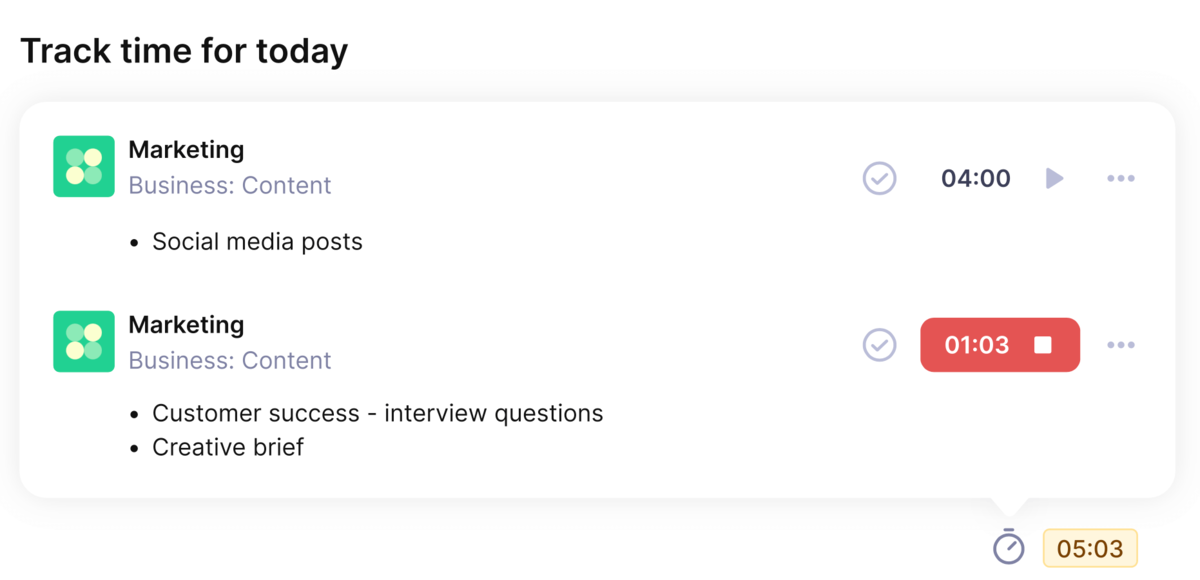
Timers run directly on tasks and feed budgets and margins.
Catch Budget Risk While Work Runs, Then Bill From the Same Numbers
Harvest shows tracked hours; profitability usually lives in a spreadsheet you rebuild every month. Productive’s budgeting tools tie tracked time to budgets per project or phase, so burn and margin update as hours land.
Forecasting in Productive combines scheduling and budget data to flag revenue and margin risk early. When it’s time to bill, invoices pull from tracked work, recurring budgets handle retainers, and Xero and QuickBooks integrations keep accounting in sync.

Budget burn and profitability update in real time.
Plan Capacity and Time Off Without Another Tool
Harvest has no scheduling or utilization views, and holiday tools rarely link up, so availability gets retyped by hand. Productive’s resource planning connects bookings to projects, budgets, and tracked time, with time off inside the same planner. HRIS integrations sync leave from tools like BambooHR, Breathe, and Rippling.
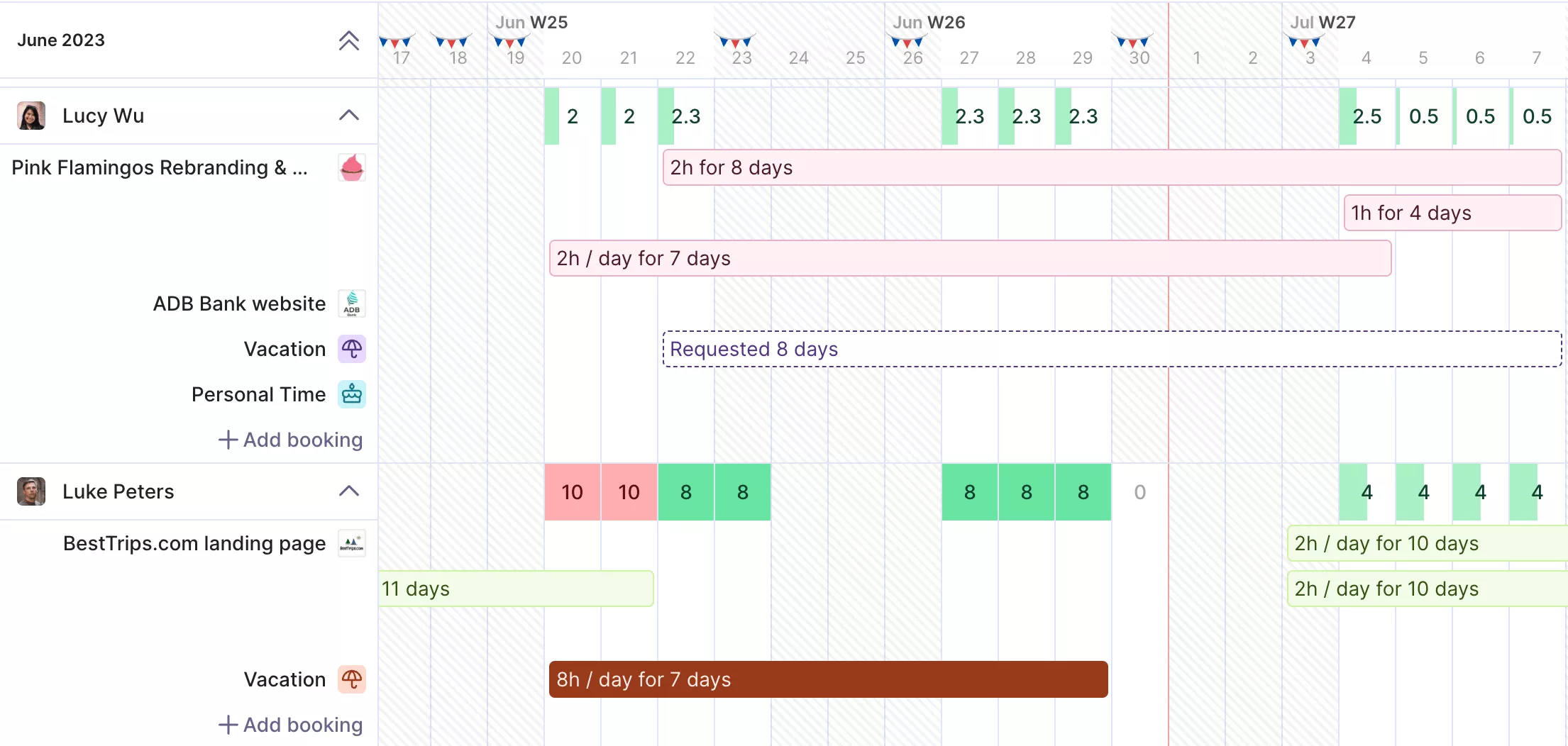
Manage and plan your resources in real time.
Build Reports by Asking, Not Exporting
Basic reporting is a top reason teams leave Harvest, and spreadsheets are where the gaps usually get patched. With reporting in Productive, you can build reports in natural language or start from templates for utilization, budget burn, and profitability by project.

Before using Productive, we had less clarity and control over projects and time tracking.
Read the rest of Karla’s story of gaining more control over projects with Productive.
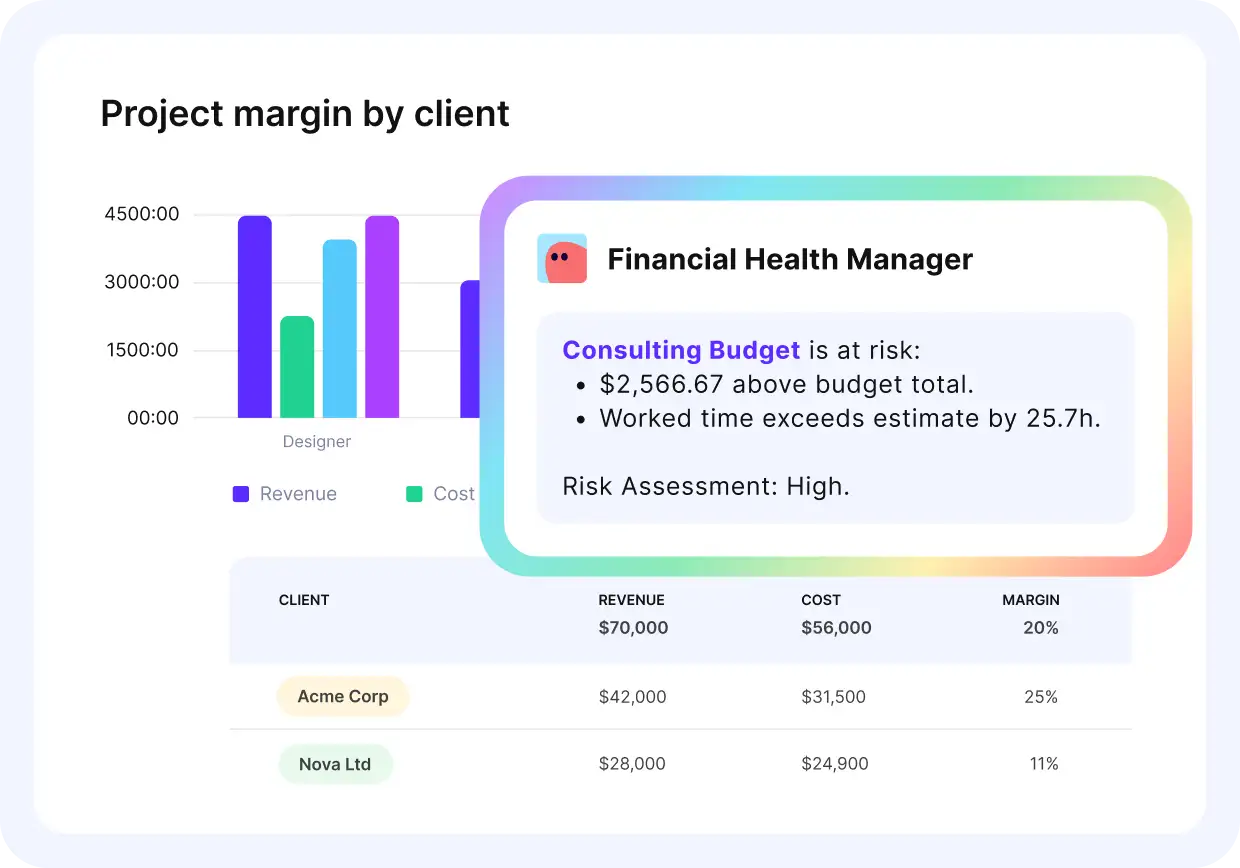
Ask Productive’s assistants for project updates in plain language.
Pricing
- Plans start with the Essential plan at $10 per user per month, which includes essential features such as budgeting, project & task management, docs, time tracking, expense management, reporting, and time off management.
- The Professional plan includes custom fields, recurring budgets, advanced reports, billable time approvals, and much more for $25 per user per month.
- The Ultimate plan has everything that the Essential plan and Professional plan offer, along with the HubSpot integration, advanced forecasting, advanced custom fields, overhead calculations, and more. Book a demo or reach out to our team for the monthly price per user.
You can go for a free 14-day trial before you decide to check out a paid plan.
Switching From Harvest? Get 10% Off Productive
Bring time tracking, budgets, capacity, and invoicing into one system, and claim the 10% discount for Harvest switchers

2. Hubstaff – Time Tracking With Built-In Monitoring for Distributed Teams
Hubstaff is a time tracker built around visibility into how work happens. It pairs logged hours with activity levels, app and URL usage, and optional screenshots.
Key Features
- Time tracking with activity levels, app and URL usage, and optional screenshots
- Automated payroll with payments through PayPal or Wise
- GPS tracking and geofencing for field teams
- Timesheets with approvals and detailed reporting
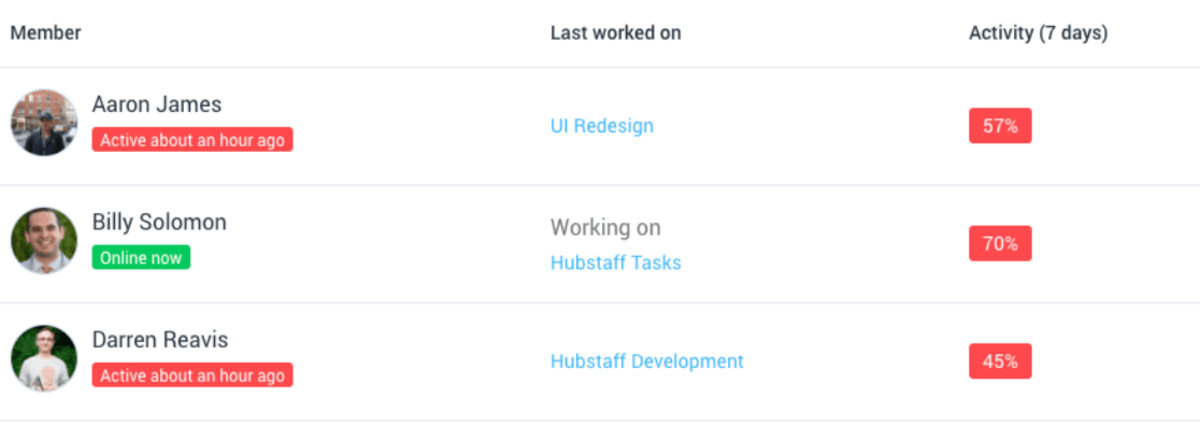
SOurce: hubstaff
Pros
- Fast to roll out. Setup takes minutes and needs almost no training across desktop, web, and mobile.
- Payroll runs itself. Tracked hours flow straight into automated payments through PayPal or Wise.
- Deep reporting. Reports break productivity down by project and person and are easy to customize.
- QuickBooks and Asana sync. Tracked time lands in accounting and project tools with no manual entry.
Cons
- Monitoring can strain trust. Screenshots and activity tracking feel intrusive, especially for creative or research work.
- Activity scores punish thinking time. Idle detection reads calls, reading, and planning as inactivity and fires false alerts.
- Timers occasionally drop hours. Trackers can stop after app updates or sync failures, which forces manual corrections.
- Essentials cost extra. Payroll, scheduling, and advanced reports sit in higher tiers or paid add-ons.
Final Verdict
Hubstaff works when you pay remote or field teams and want activity data behind every hour. Skip it if screenshots would damage trust, and see our guide to time management tools and techniques instead.
3. Toggl Track – One-Click Time Tracking for Freelancers and Small Teams
Toggl Track keeps time tracking down to one click: start the timer, work, stop. It runs on web, desktop, and mobile, with calendar sync and reporting built around billable hours.
Key Features
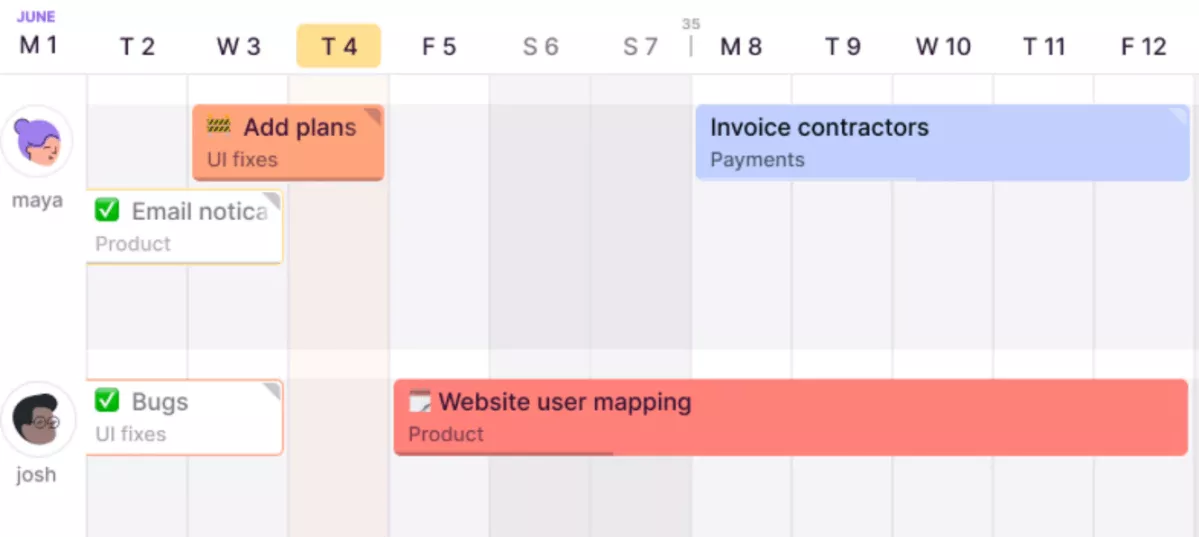
- One-click timer with editable manual entries
- Billable rates by client, project, or team member
- Reports filtered by client, project, or team, with shareable public links
- Calendar sync with Google Calendar and Outlook, plus 100+ integrations
Source: toggl track
Pros
- Nothing to learn. Hit the timer and work; new team members track correctly on day one.
- Meetings track themselves. Calendar sync pulls Google and Outlook meetings in as time entries.
- Client-ready reports. Filter time by client, project, or period and share a live report link.
- A free plan you can actually use. Unlimited clients and projects for up to five people.
Cons
- Weak invoicing. Billable rates are solid, but turning hours into client invoices means exporting to another tool.
- Depth is paywalled. Detailed reporting, richer filters, and billable tracking extras need an upgrade.
- Sync can lag between devices. Timers sometimes fail to start or stop when you switch from desktop to phone.
- Forgotten timers are on you. Missed starts mean reconstructing entries by hand later.
Final Verdict
Toggl Track is the fastest path from working to logged hours. Don’t use it if invoices, budgets, and resourcing need to live in one tool.
4. Everhour – Time Tracking Inside the Project Tool You Already Use
Everhour is a simple Harvest alternative for logging hours, with budgeting features that integrate with popular project tools like Asana, Trello, and Jira. The tracking tool allows users to track time on tasks, set up budgets, and create custom reports.
Key Features
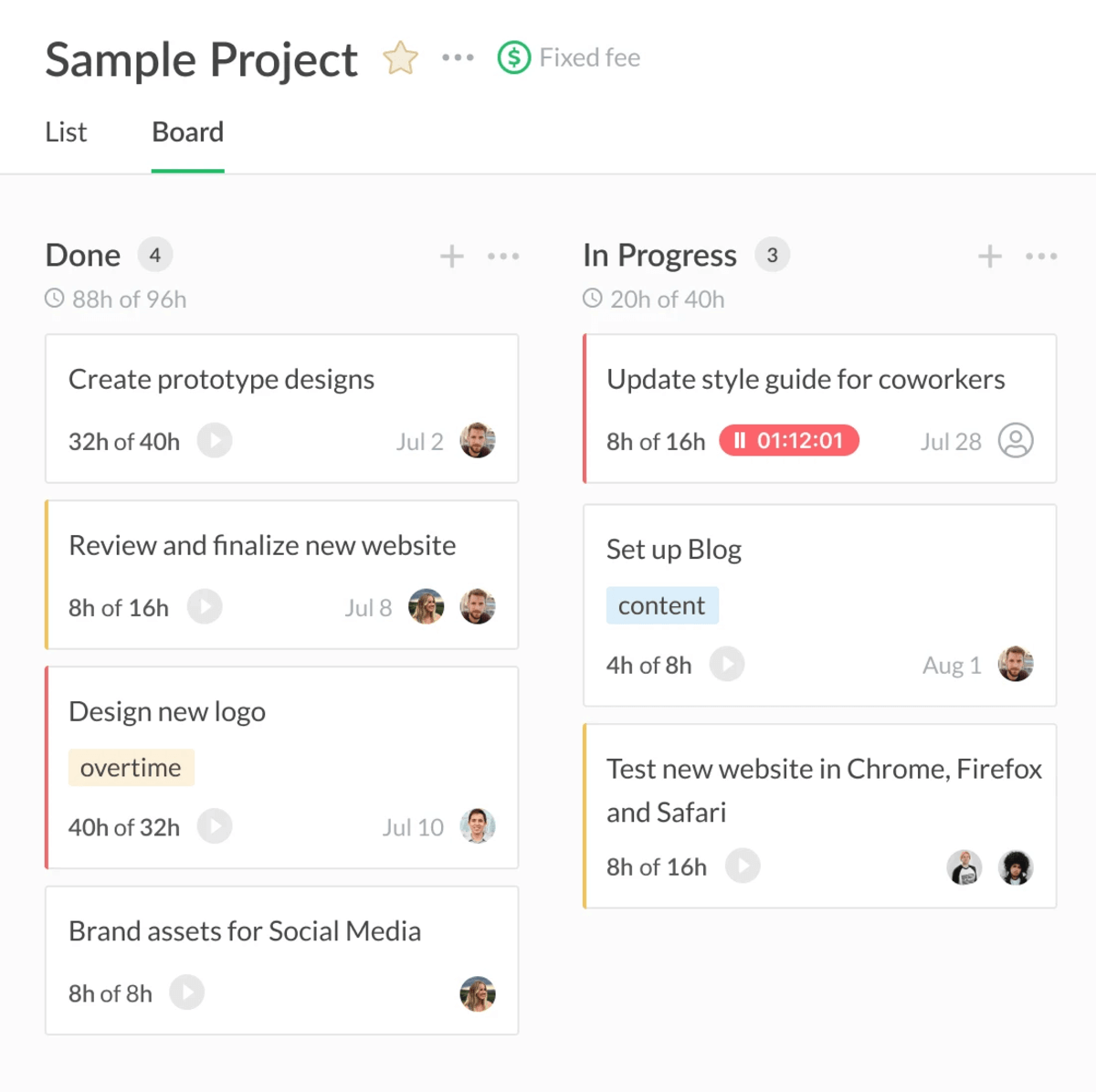
- In-task timers inside Asana, Trello, Jira, ClickUp, and Monday
- Time and money budgets with threshold alerts
- Timesheet approvals with entry locking
- Invoicing from tracked time, with Xero and QuickBooks export
source: everhour
Pros
- Lives inside your PM tool. Track time on the task itself, with no separate project setup to maintain.
- Budgets warn you early. Set time or money budgets per project and get alerts before you cross the limit.
- Approvals and locking built in. Managers approve or reject timesheets, then lock entries for payroll or billing.
- Invoices come straight from tracked time. Billable hours turn into branded invoices that export to Xero or QuickBooks.
Cons
- The mobile app trails the browser. Time entry works on the go, but most management features need the web version.
- The timer can hiccup. It sometimes lags or keeps running after you hit stop, so entries need manual fixes.
- Admin settings hide in nested menus. Finding where timesheets, reports, and approvals live takes some hunting.
- The paid tier starts at five seats. Teams of two or three pay for capacity they don’t use once they outgrow the free plan.
Final Verdict
Everhour is the pick when you’d rather extend your project tool than replace it. Avoid it if you need resource planning and profitability reporting; our guide to Everhour alternatives covers those.
5. Beebole – Best for Flexible Time Tracking for Enterprises
Beebole is an enterprise-grade time tracking platform used by 1,000+ companies across 60+ countries. It layers structured approvals, budgets, and custom reporting on top of unlimited clients, projects, and tasks.
Key Features
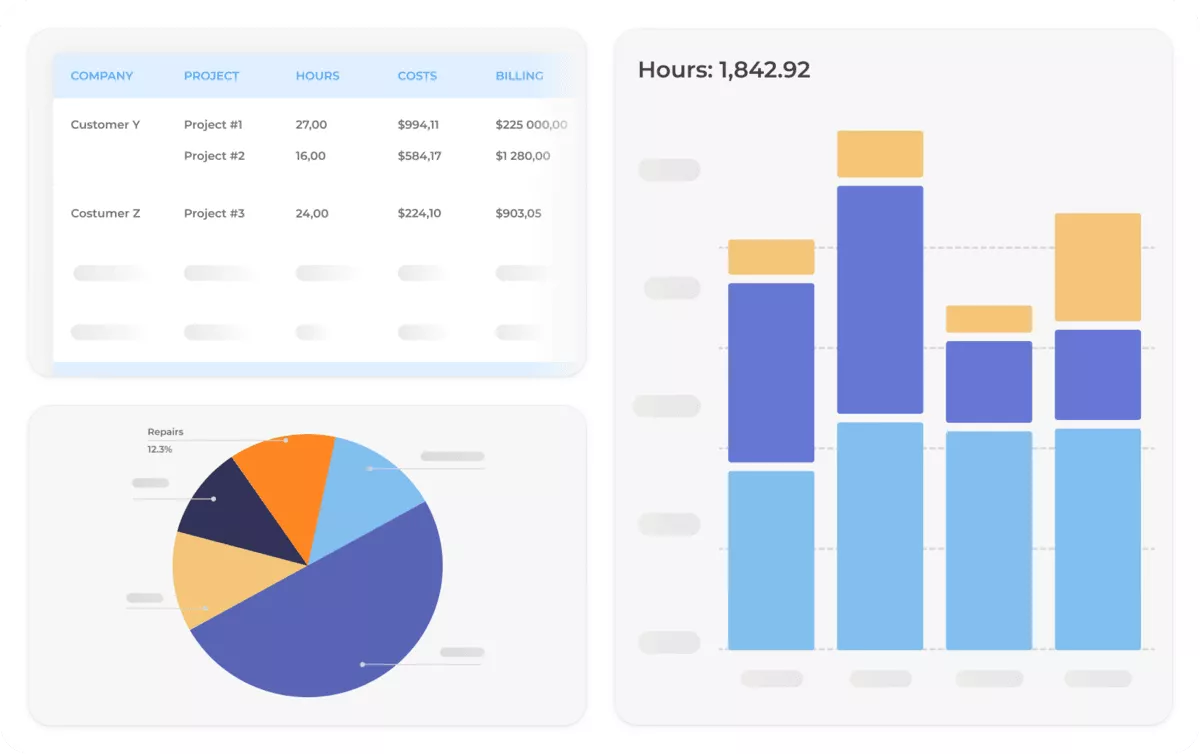
- Project time tracking with unlimited clients, projects, tasks, and activity tiers
- Resource planning with Gantt and Kanban views, capacity tracking, and dependency management
- Project financials with configurable cost and billing rates, expense tracking, and multi-dimensional budget tracking
- PTO and time off management with custom absence types, accruals, and balance tracking
source: beebole
Pros
- Approvals hold up under audit. Timesheets and expenses route through structured approval flows with role-based permissions.
- Reporting is the strong suit. Custom reports slice time, costs, and project performance by any dimension you set up.
- Budgets track as hours land. Hourly or fixed project budgets show burn in real time, not at month-end.
- Structure never runs out. Unlimited clients, projects, tasks, and activity tiers, each with its own permission level.
Cons
- No native invoicing. Billable amounts export to Stripe or Xero, so the invoice itself is created outside the tool.
- No app-store mobile app. Mobile tracking runs through a progressive web app you add from the browser, though it works offline.
- Few native integrations. Beyond Excel, Google Sheets, and a short list of apps, connections run through Zapier, Pipedream, or the API.
- Setup comes before tracking. Screens, widgets, roles, and permissions are modular and need configuring to match how you bill.
Final Verdict
Beebole suits finance and ops teams that value timesheet control and reporting depth over delivery features. It’s the wrong pick if you want project planning, invoicing, and billing handled in one tool.
6. Clockify – Free Time Tracking for Up to Five Users
Clockify built its reputation on a free plan with unlimited users. Since April 2026, free seats cap at five, and billable rates, exports, and invoicing sit on paid plans.
Key Features
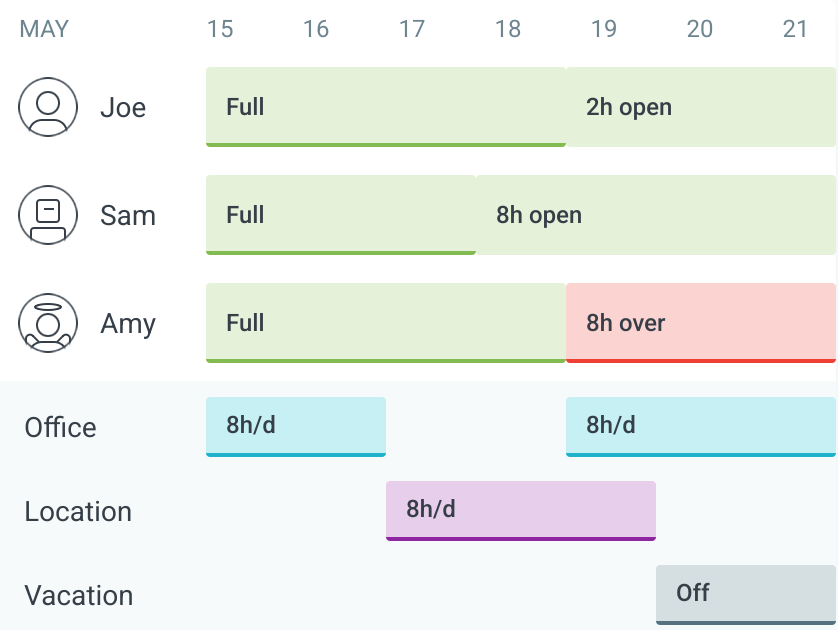
- Timers, timesheets, and calendar view across web, desktop, and mobile
- Invoicing and timesheet approvals on Standard plans and above
- Scheduling, PTO management, and kiosk clock-ins on higher tiers
- 80+ integrations including Asana, Jira, ClickUp, and Notion
source: clockify
Pros
- Setup is genuinely instant. Create a project, start the timer, and you’re tracking; no onboarding or training needed.
- Many ways to capture time. Timers, timesheets, calendar entries, and kiosk clock-ins cover desk and shared-device teams.
- Approvals and team controls. Managers review and approve timesheets and control who sees which data.
- Timers run where work happens. The extension puts tracking inside Asana, Jira, ClickUp, Notion, and 80+ other tools.
Cons
- The free plan shrank in April 2026. Seats now cap at five, and billable rates, CSV exports, and shared report links moved to paid tiers.
- Billing means upgrading. Invoicing sits on the Standard plan and up, which stings if Harvest’s pricing pushed you here.
- The interface clutters at scale. Many active projects and tasks make navigation feel crowded.
- Mobile is the weak spot. Slow sync and sluggish performance show up most on the Android app.
Final Verdict
Clockify still fits small teams that track time and little else. Move on if you came for free billing and time tracking, and see our guide to Clockify alternatives for tools that include it.
7. QuickBooks Time – Payroll-Ready Time Tracking for QuickBooks Users
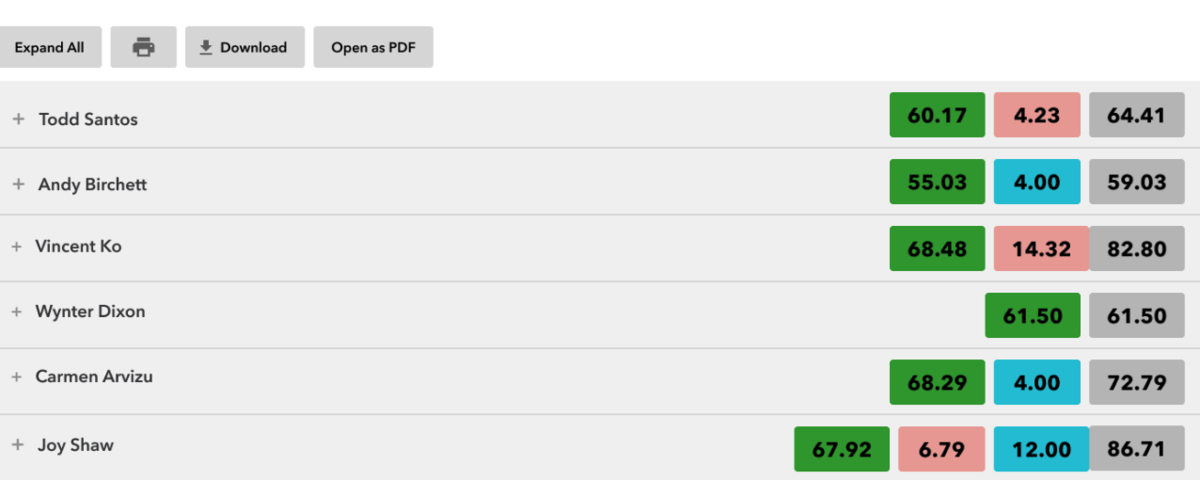
QuickBooks Time is Intuit’s time tracker, built to push hours straight into QuickBooks payroll and invoicing. GPS, geofencing, and kiosk clock-ins point it at field and shift teams.
Key Features
- GPS tracking and geofenced clock-ins for field teams
- Shift scheduling with clock-in reminders
- Time and time-off approvals feeding QuickBooks payroll
- Overtime and PTO tracking with custom rules
source: quickbooks
Pros
- Hours land in payroll automatically. Approved time flows into QuickBooks payroll and invoicing with no duplicate entry.
- Built for crews in the field. GPS tracking, geofenced clock-ins, and shift reminders cover teams that never sit at a desk.
- Approvals take a couple of clicks. Managers sign off on shifts and time-off requests right before running payroll.
- The mobile app holds up. Clock-ins, timesheets, and tracking all run smoothly on phones.
Cons
- A base fee sits on top of per-seat pricing. Small teams pay proportionally more than on flat per-user tools.
- Client billing takes manual work. Splitting one tracked time block across several clients means typing it in yourself.
- The web app feels dated. Anything beyond basic tracking is functional rather than intuitive to navigate.
- Weak outside the Intuit stack. Integrations beyond QuickBooks are limited, and exported reports need cleanup in Excel.
Final Verdict
QuickBooks Time only makes sense if QuickBooks already runs your books. It’s not for your team if you run agency-style delivery across many clients; our NetSuite vs QuickBooks comparison helps if you’re still choosing.
Why Look For a Harvest Replacement App?
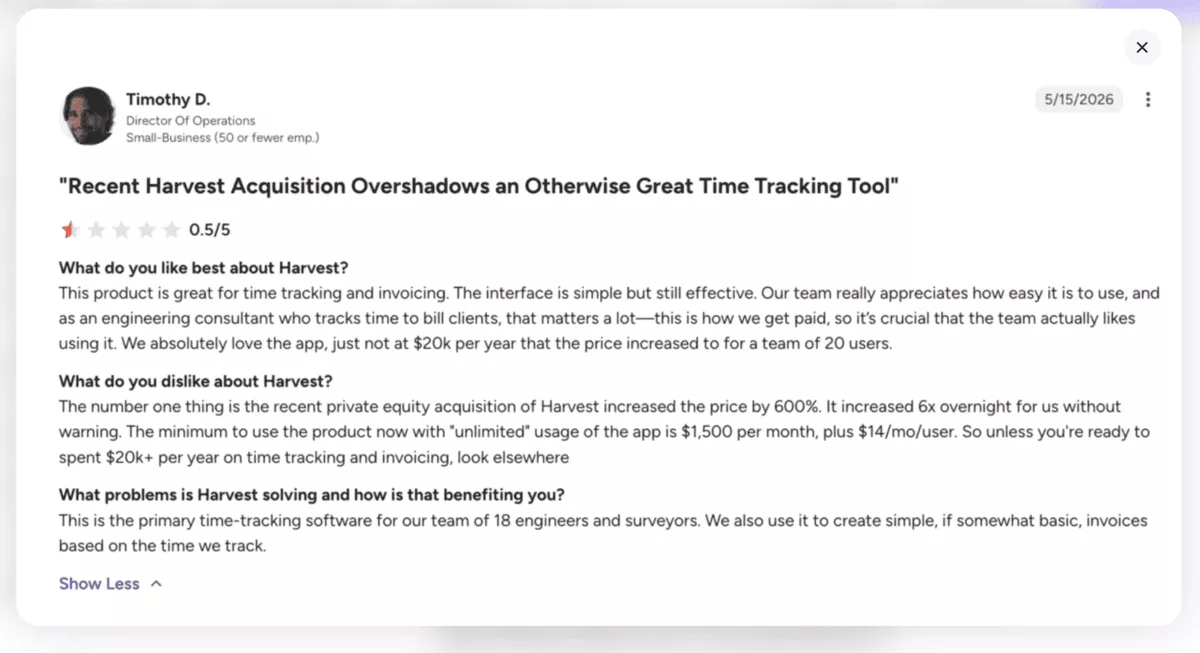
Teams are leaving Harvest because of an misleading new pricing model of charging usage fees that many only discover at renewal.
Bending Spoons acquired Harvest in mid-2025 and replaced flat per-seat pricing with a per-seat base plus usage fees.
- The usage layer bills things like active projects, clients, tasks, and invoices. That means your bill can grow even when your headcount doesn’t.
- The free plan also shrank to a single user and two projects. And while prices climbed, AI didn’t arrive in the tracker itself. Harvest points to its separate Forecast tool for AI scheduling and predictions, one more app to run.
- The older complaints stand too: reporting feels basic, admin fields like PO numbers are missing, and edits to logged time are hard to audit.
Backlash After Price Increase
In early 2026, a wave of users reported surprise renewal changes. The common theme was not just the size of the increase, but the lack of clarity.
Some people say they received an email notice that their account would be moved to a higher tier automatically at renewal, with costs jumping from a low monthly fee to thousands per month.
In case you’d like to learn more, here’s a link to the full Harvest price renewal Reddit thread.
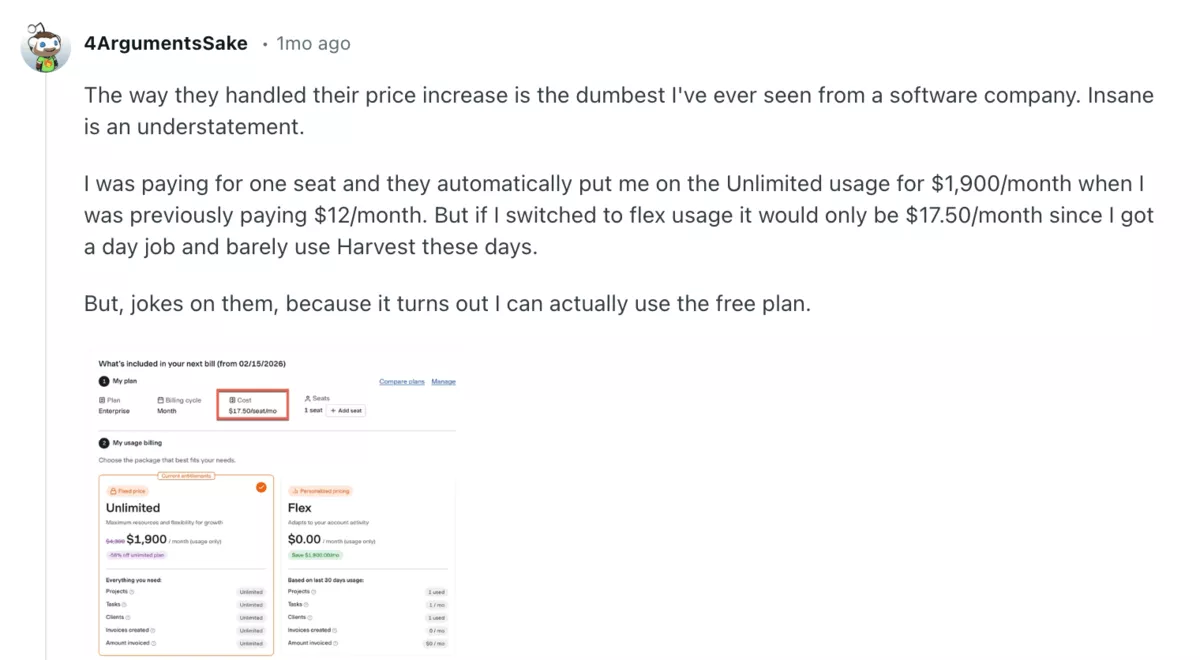
Source: reddit.com
Others describe a new usage-based model where the bill can rise based on things like projects, tasks, clients, invoices, or invoiced volume, and that the triggers were not obvious from the pricing page.
Several users say the renewal email was the first time they saw the real number.
One wrote:
I was paying for one seat and they automatically put me on the Unlimited usage for $1,900/month when I was previously paying $12/month. But if I switched to flex usage it would only be $17.50/month since I got a day job and barely use Harvest these days.
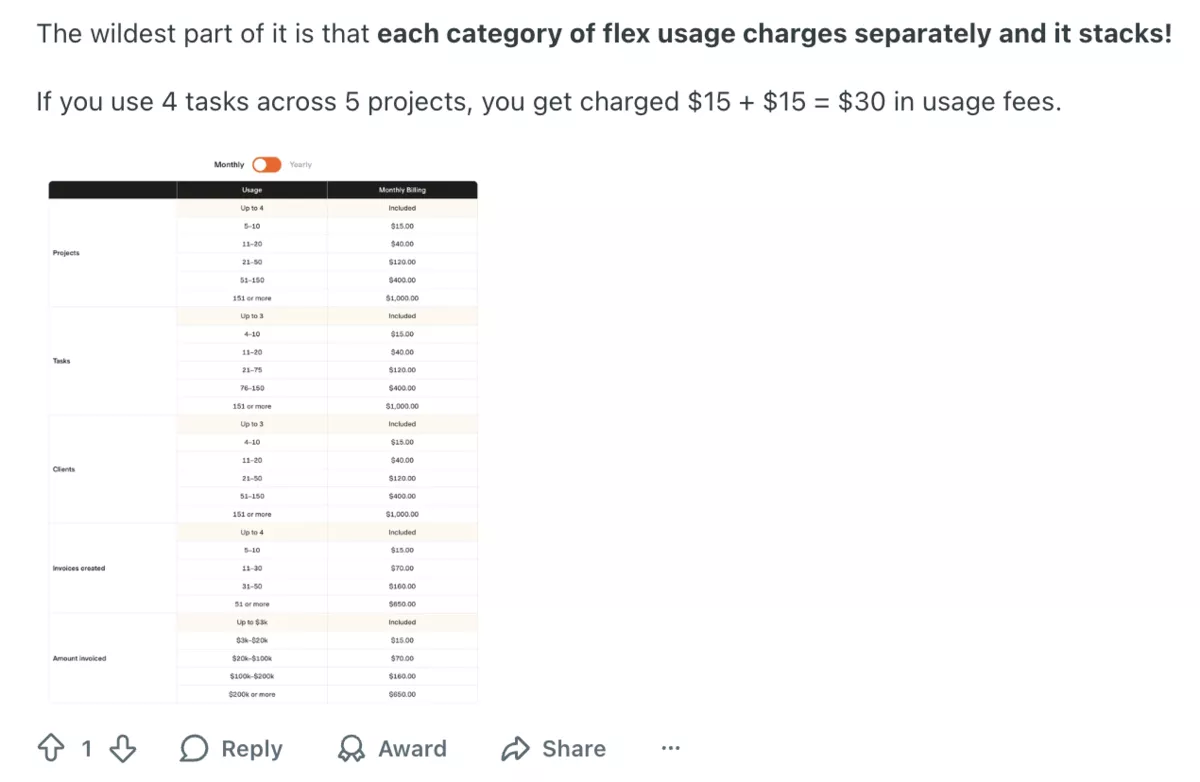
Source: reddit.com
If you’re already a user and your renewal is coming soon, head over to our article about the Harvest price increase. There we talk about what changed and what to do, with numbers, reviews, and help docs.
How To Choose a Harvest Replacement?
Choose a Harvest replacement by validating workflow fit, financial visibility, and rollout risk before you migrate any data. A tool that demos well can still fail on your real projects, so test each step below on live work.
Step 1: List Your Non-Negotiables
Split one page into two columns: what Harvest did that you must keep, and what it never did that pushed you here.
Anything in neither column is a nice-to-have, not a reason to pick a tool.
Step 2: Confirm Your Core Workflows
Most Harvest teams ran delivery in a second tool, because Harvest has no Kanban boards, Gantt charts, or task dependencies. Decide upfront whether the new tool replaces that pairing or plugs into it.
Then rebuild one live project in the trial, with real tasks and recurring work, and see where it breaks.
Step 3: Test the Money Path
Recreate one real client project and run it from tracked hours through budget burn to a finished invoice. Compare that invoice line by line against the last one Harvest produced: rates, billable versus non-billable time, expenses.
If you bill retainers or fixed-fee projects, confirm recurring budgets and overage handling before you commit.
Step 4: Check Reporting Depth
Basic reporting is one of the main reasons teams leave Harvest, so don’t recreate the problem. List the three reports you rebuilt in spreadsheets every month, then try producing each natively.
Utilization, project profitability, and billing status are the usual suspects. If a report needs an export to answer a simple question, count that as a fail.
Step 5: Decide on Capture Style
Harvest relies on manual timers, and forgotten timers are why many timesheets never matched reality. Decide whether your team needs reminders, calendar-based entries, or automatic time tracking from apps and websites.
Pick the capture style your least disciplined tracker will actually use, not the one that demos best.
Step 6: Run a Short Pilot
Have a small group log one week of real work in the new tool while Harvest still runs. Compare totals, invoices, and reports against Harvest’s numbers before you cut over.
Start at least a month before your renewal date, so the deadline doesn’t make the decision for you.
Free Harvest Migration Checklist
Use this checklist to move off your current tracker without losing data, breaking billing, or confusing the team.
- Set the cutover date and owners. Pick the week you will stop logging hours in your current tracker (avoid month-end if you invoice monthly). Assign one owner for the migration and one for billing and reporting sign-off.
- Map your current setup in one page. List what your current tracker covers today (time, expenses, invoicing, approvals, reporting) plus every connected tool (project tool, scheduling, accounting).
- Export and clean your data. Export People, Clients, Projects, Tasks, Time entries, Expenses, and invoices (if used). Archive closed projects, remove duplicates, and standardize names before importing.
- Define mapping rules and must-have reports. Decide how clients, projects, tasks, billable rates, and cost rates map over, plus rules for billable vs. non-billable time and leave, including vacation days, sick days, and tracking of vacation requests. Lock the reports you need to match after migration (budget burn, utilization, profitability, WIP, invoice status).
- Configure the new tool with guardrails. Set teams, roles, permissions, time entry rules, and timesheet lock rules. Recreate the workflows your team relies on, such as Kanban boards, Gantt charts, recurring tasks, and task dependencies.
- Import in the right order and validate. Import clients and active projects first (with rates), then import history for the smallest useful period (often the current quarter). Spot check totals against your export before you move on.
- Rebuild billing and accounting, then test. Recreate your invoicing workflow (tracked time, fixed fees, milestones) and connect accounting (Xero or QuickBooks). Generate a test invoice and confirm the sync behaves as expected.
- Pilot, cut over, and audit the first cycle. Run a 3 to 5 day parallel test with a small group, then freeze edits in the old system on cutover day. After the first billing cycle, compare invoices, time totals, and expenses, and fix any gaps.
Conclusion: Are These Alternatives Worth the Switch?
Yes, for most teams they are.
Most tools on this list offer better value once you factor in what they replace. If you only need a lightweight tracker, pick one that keeps billing simple.
If you want fewer tools and cleaner numbers, all-in-one platforms like Productive connect projects, budgets, capacity, and billing in one place.
Start your migration and book a personalized demo now.
Connect With Agency Peers
Access agency-related Slack channels, exchange business insights, and join in on members-only live sessions.
