Top 10 Paymo Alternatives (Paid & Free) – Curated Guide 2026

Finding the right Paymo replacement is hard when you need project management software that covers task management, time tracking, timesheets, and invoicing in one flow.
This guide compares 10 Paymo alternatives with best-for picks, key features, and review-based pros and cons. You will also get a comparison table, a Paymo migration checklist, and step-by-step advice on how to choose and switch.
What Are the Best Paymo Alternatives in 2026?
The best Paymo alternatives in 2026 are Productive, Teamwork, Avaza, Accelo, BigTime, BQE CORE, Replicon, Wrike, Harvest, and Zoho Projects.
Each tool covers a slightly different mix of project management, billing, budgeting features, dashboard views, and approvals, so the best choice depends on what you need to keep from Paymo.
Top Paymo Alternatives with Jump Links
Use the jump links below to scan the shortlist. Then open the full tool sections to see key features, review patterns, and the main tradeoff before you decide.
Buyer’s Comparison Table
If you are comparing Project Management Software, pay attention to budgeting features, dashboard views, and the pricing structure for approvals and reporting.
| Tool | Best for | Where it is strongest | Where it can fall short | Time to invoice | Budget visibility | Resource planning | Retainers and recurring billing | Service rates and markups | Reporting depth |
|---|---|---|---|---|---|---|---|---|---|
| Productive | Replacing Paymo plus the spreadsheets around budgets, billing, and capacity | Budgets, invoicing, forecasting, and the Resource Planner in one flow | More setup than a simple timer if you only need timesheets and basic invoices | Yes | Strong, includes forecasting and limits | Strong | Strong, recurring budgets and rollover insight | Strong, service rates and rate cards | Strong, profitability and budget views |
| Teamwork | Delivery-focused project execution with timesheets | Project structure, collaboration, timesheets, light billing | Advanced reporting and dashboards can feel limited | Partial | Basic | Solid | Limited | Limited | Medium |
| Avaza | Simple project to invoice flow for smaller ops | Quotes, time, expenses, invoicing tied to projects | Audit trail and deeper scheduling can be weak | Yes | Basic | Basic | Limited | Limited | Medium |
| Accelo | More structured service ops and delivery controls | Delivery workflows tied to billing and account activity | Setup takes time and can feel complex | Yes | Medium | Medium | Medium | Medium | Medium |
| BigTime | Time, budgets, and billing discipline for services | Timesheets, budgets, invoicing, reporting for billability | Mobile and some integrations can be a pain point | Yes | Strong | Medium | Medium | Medium | Strong |
| BQE CORE | Accounting-grade time, expense, and invoicing | Detailed billing, expense handling, reporting depth | Heavier UX and steeper rollout | Yes | Strong | Medium | Medium | Medium | Strong |
| Replicon | Approvals, policies, and audit-ready time | Timesheet approvals and controls for complex billing | Can feel heavy for simple needs | Partial | Medium | Limited | Limited | Limited | Strong |
| Wrike | Workflow-heavy project planning and visibility | Dashboards, custom workflows, multiple project views | Invoicing is not the core workflow | No | Limited | Medium | No | Limited | Medium |
| Harvest | Simple timesheets plus clean invoicing | Fast time entry and simple invoices | Limited planning and deeper reporting | Yes | Basic | Limited | Limited | Limited | Basic |
| Zoho Projects | Structured planning, especially inside Zoho | Gantt planning, task structure, timesheets | Billing usually needs Zoho Invoice or Zoho Books | Partial | Medium | Limited | Medium | Limited | Medium |
1. Productive – Best All-in-One Paymo Alternative
Productive connects project work with Time Tracking, budgets, and invoicing, so billing is based on the same data your team logs and plans against. If Paymo forces you into exports and manual checks at month-end, Productive is designed to make that routine repeatable.
Try the all-in-one Paymo replacement
Turn Tracked Time into Invoice Drafts Without Spreadsheets
Instead of exporting time entries, you can generate invoice drafts from budget activity through Productive’s billing and invoicing workflow. You can also automate invoice creation based on budget updates or on a recurring schedule.
Invoices are based on logged hours or days, with rates defined on the budget.
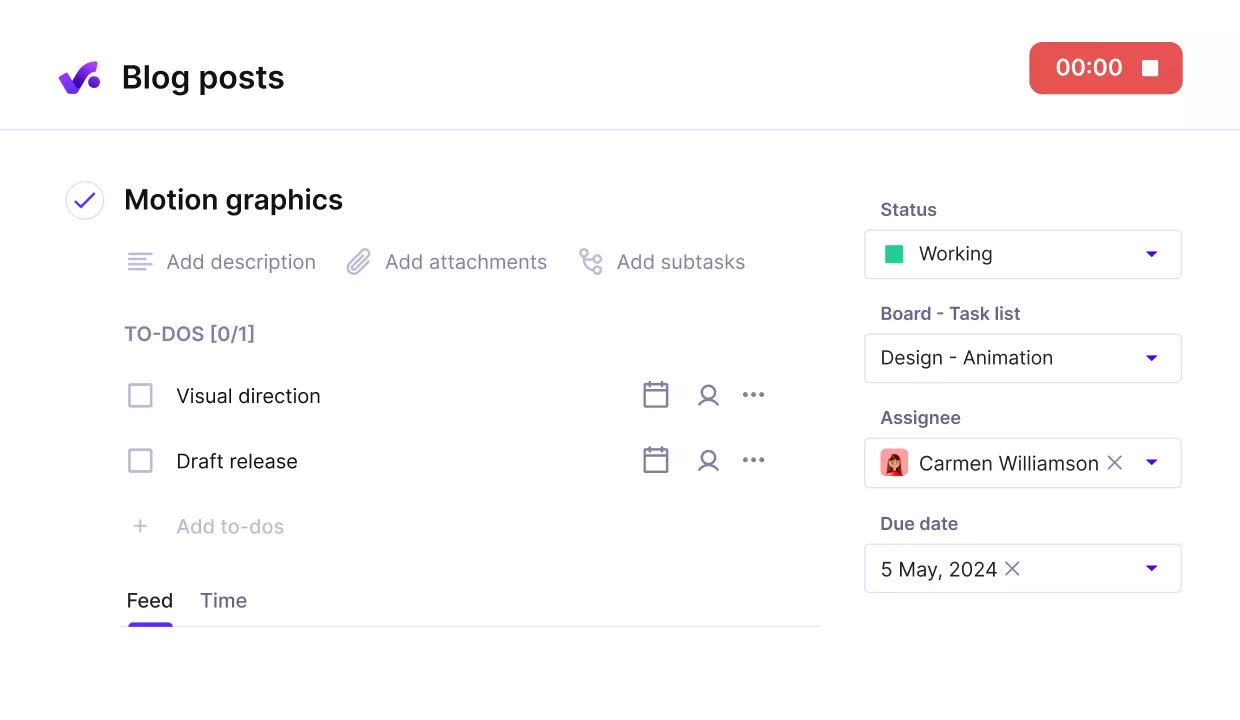
Track time on tasks, without friction using Productive’s automatic time trackers.
Keep Delivery, Resourcing, and Financials Connected
Tasks, timesheets, budgets, invoicing, and the Resource Planner live in one system, so your resource planning is tied to the same data you use for delivery and billing.
Bookings in the Resource Planner feed budget forecasting and profitability, so planned work and actuals show up in the same financial view. That makes it easier to answer basic questions without rebuilding reports.
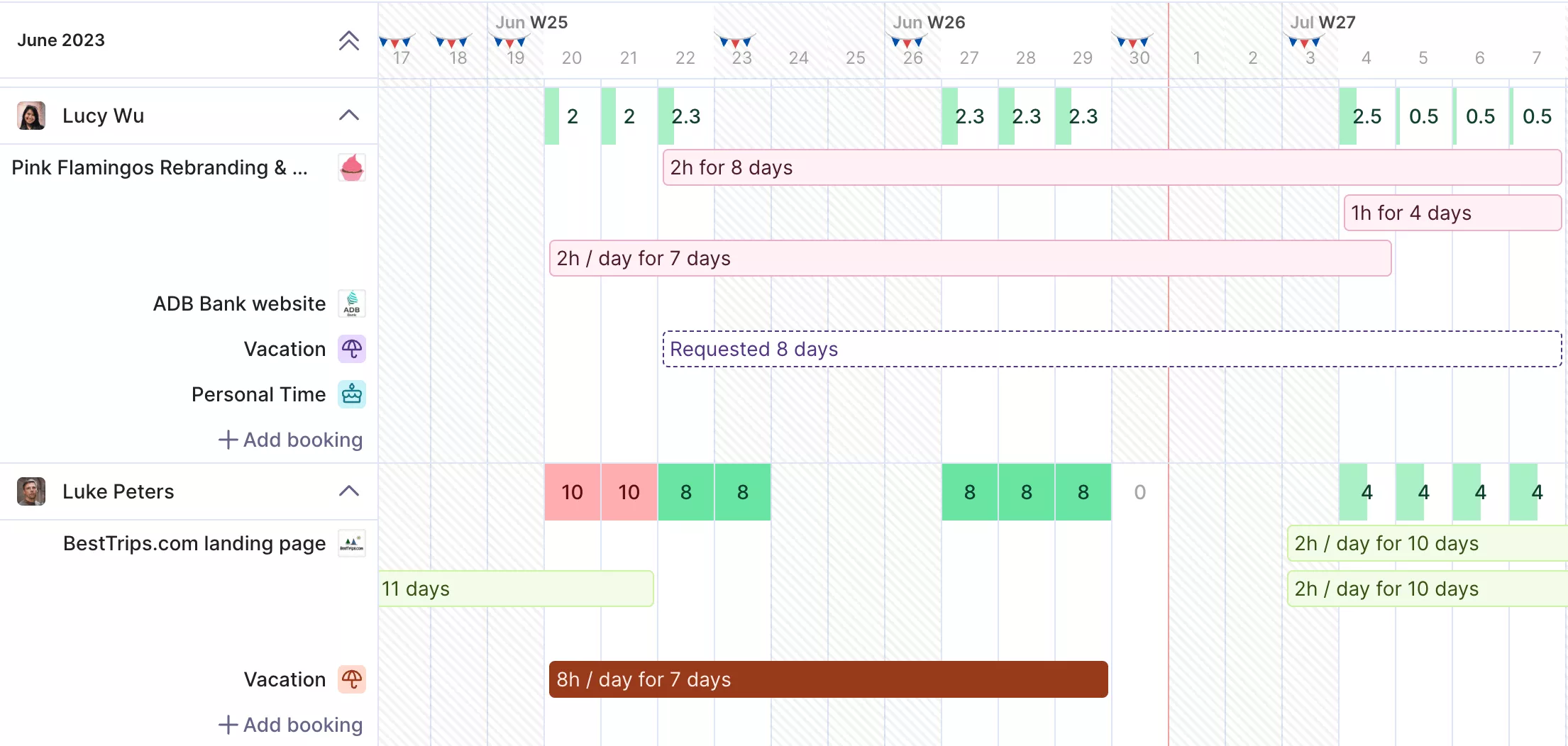
Get a real time overview of your staff’s availability and other resources.
Get Earlier Budget Warnings with Forecasting and Limits
Budget charts combine past data with scheduled bookings, so you can spot budget risk earlier using Productive’s forecasting and profitability views. If over-servicing is a recurring problem, budget overrun limitations can block time entry at the service limit.
For cleaner billing inputs, time approval lets budget owners review time entries before they are visible to clients or used in reports.
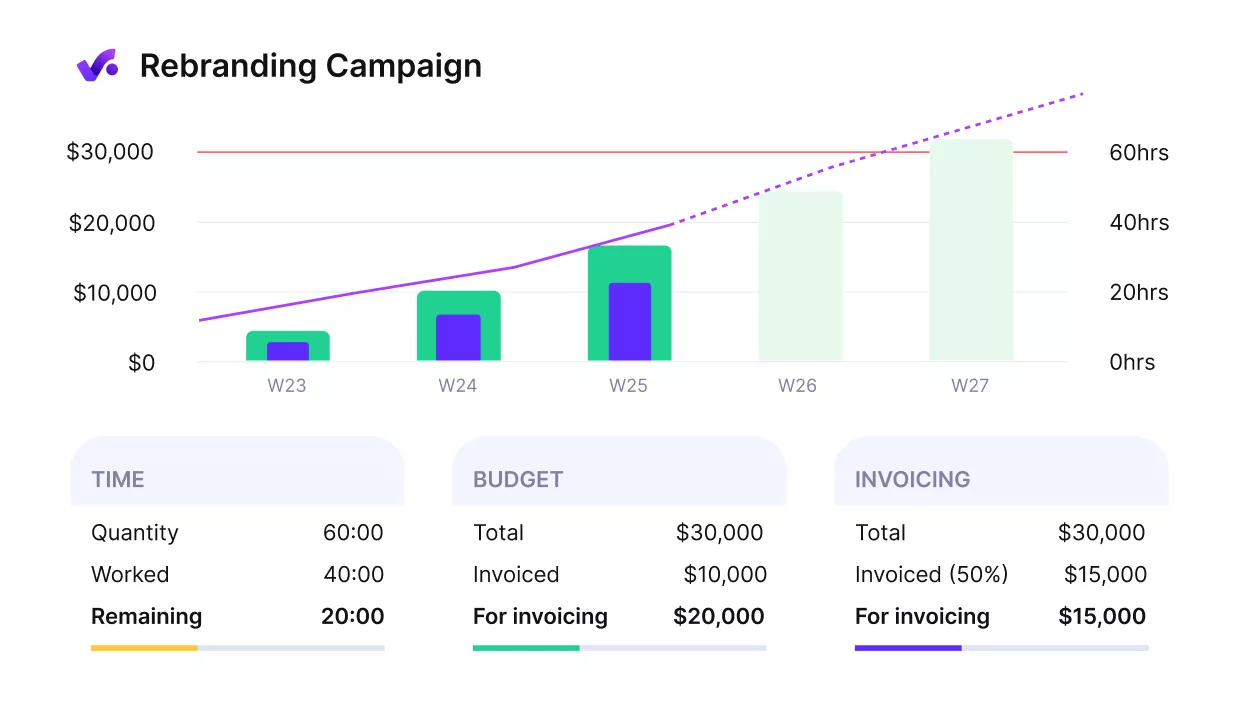
Get early warnings of budget overruns.
Handle Service-Based Pricing Without Manual Markup Work
Productive supports service rates and rate cards, so the same person can log hours to different services at different billable rates. That helps when billing depends on what was done, not only who did it, and reduces the need to rework invoices in spreadsheets.
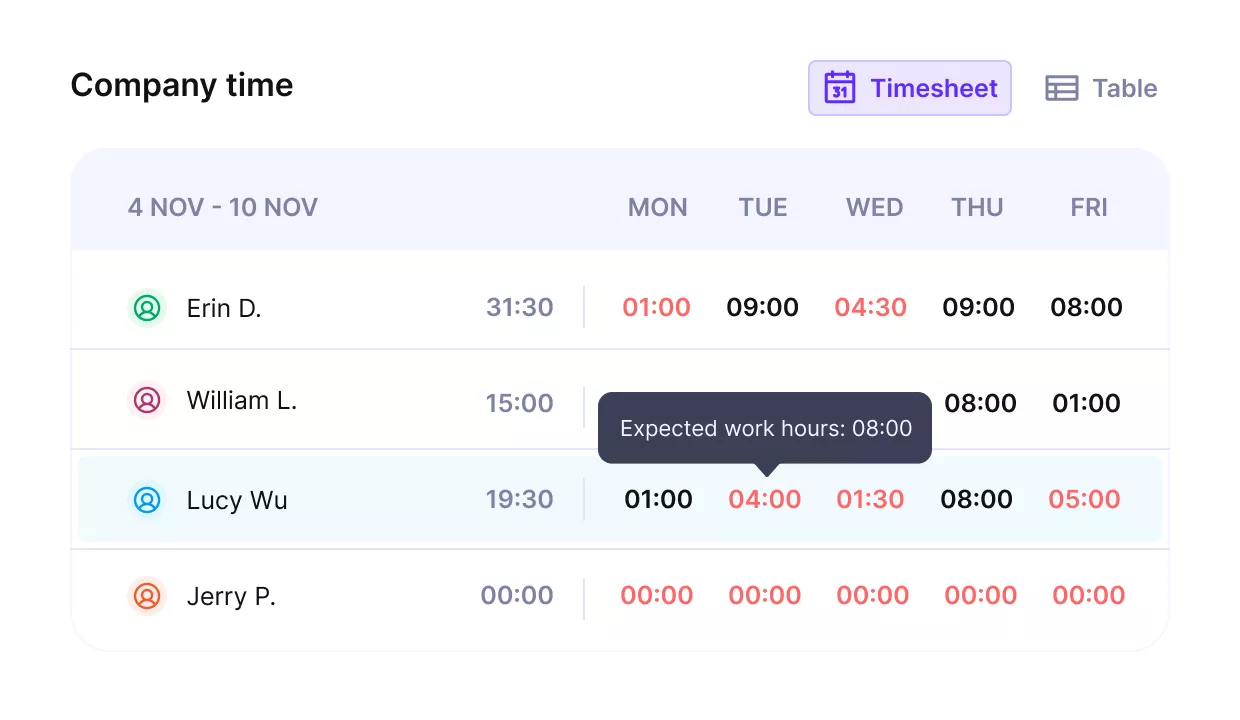
See your staff’s utilization and recurring work in a single view.
Make Retainers Predictable with Recurring Budgets and Rollover Insight
Recurring budgets help you avoid rebuilding the same setup every month, and Productive budgeting keeps retainer tracking connected to delivery and invoicing.
Retainer Hours Rollover carries unused or overused hours from one period to the next for visibility, without affecting invoicing accuracy. You can also automate invoice drafts for recurring budgets, so retainers do not become a monthly admin project.
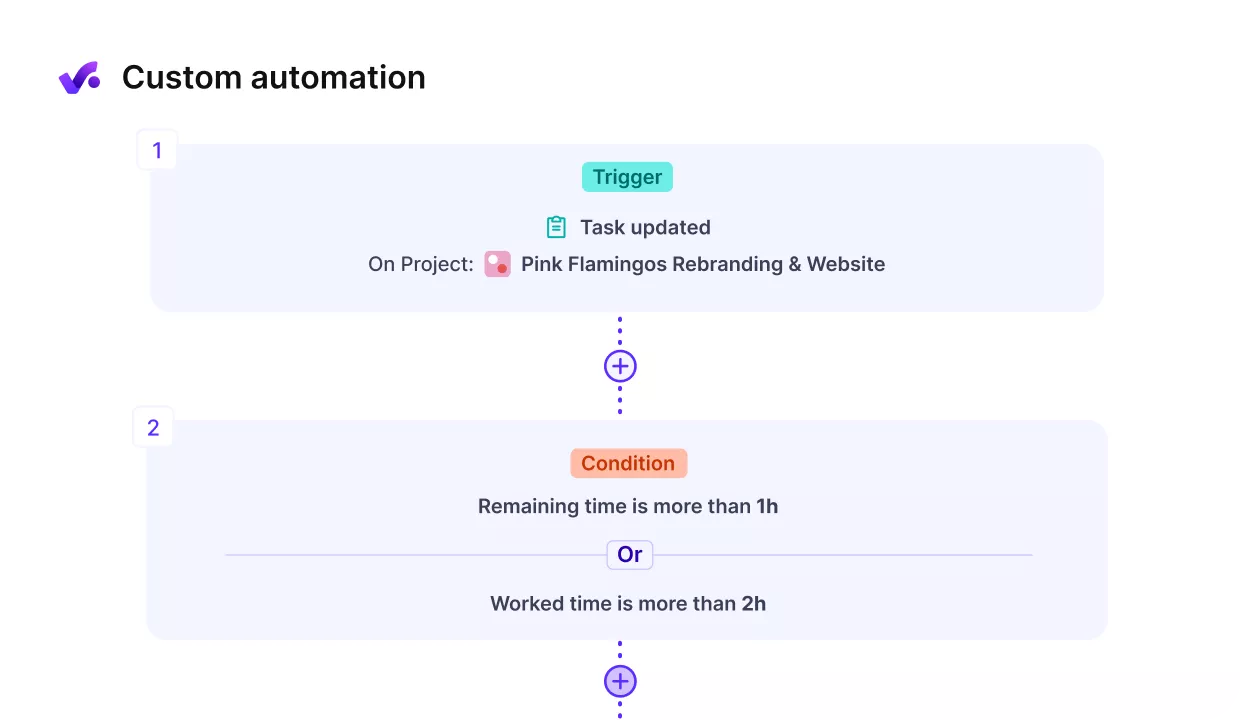
Automate routine tasks with Productive’s no-code animations.
Plan Capacity and See the Financial Impact
Productive’s Resource Planner supports resource scheduling, so you can schedule work, see availability, and plan around time off. Because bookings feed forecasting, you can see how staffing plans affect budget consumption before the work happens.
Pricing
- Plans start with the Essential plan at $10 per user per month, which includes essential features such as budgeting, project & task management, docs, time tracking, expense management, reporting, and time off management.
- The Professional plan includes custom fields, recurring budgets, advanced reports, billable time approvals, and much more for $25 per user per month.
- The Ultimate plan has everything that the Essential plan and Professional plan offer, along with the HubSpot integration, advanced forecasting, advanced custom fields, overhead calculations, and more. Book a demo or reach out to our team for the monthly price per user.
You can go for a free 14-day trial before you decide to check out a paid plan.
Run Projects, Billing, and Capacity in One Place
If Paymo is no longer enough, Productive helps you replace the extra tools and keep delivery and staffing tied to the same numbers.

2. Teamwork – Best for Client Delivery Teams That Need Projects Plus Timesheets
Teamwork Projects is project management software for client delivery teams that run multiple projects at once and need clearer task ownership and deadlines.
It is strongest when you want task management, task dependencies, reliable timesheets, and light billing support, without turning your setup into an accounting system.
Key Features
- Project planning with milestones, task dependencies, and templates
- Built-in timers and timesheets tied to tasks and projects
- Invoicing that can pull in unbilled time and expenses
- Workload and capacity views for planning who does what next
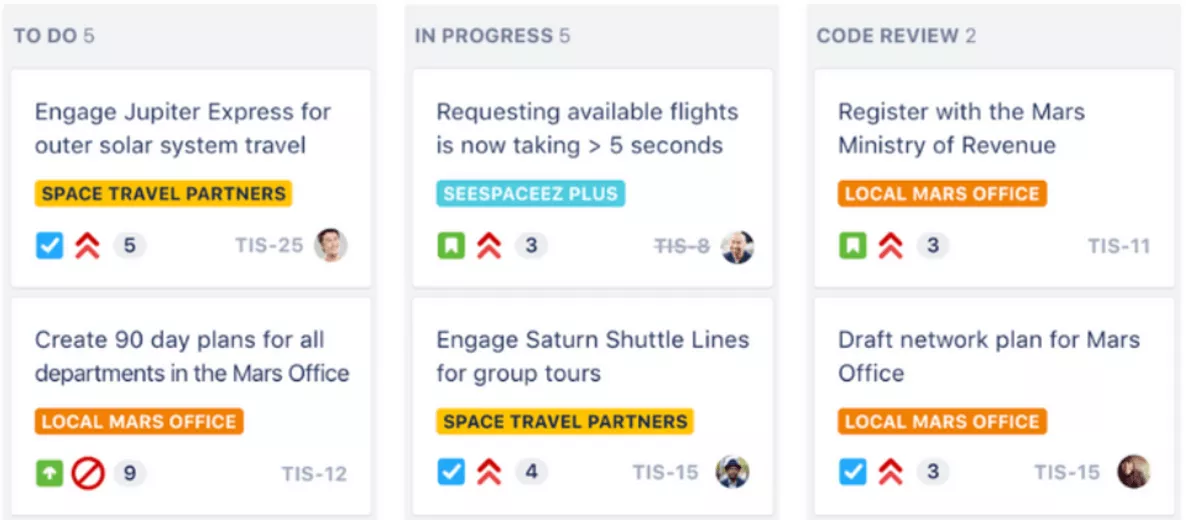
SOurce: teamwork
Pros
- Keeps client work in one place, improving team communication and reducing context switching across collaboration tools.
- Makes capacity planning simpler with workload visibility when you are juggling multiple projects.
- Timesheets fit naturally into delivery, which helps teams bill consistently and track budgets.
- Support gets good feedback, especially during onboarding and workflow changes.
Cons
- The interface can feel busy, and some settings or features take time to locate.
- Reporting can feel restrictive if you need highly custom dashboard views or deeper drilldowns.
- Performance and mobile app usability come up as pain points for some teams.
- Costs can climb as you add more users or need higher-tier functionality.
Final Verdict
Teamwork is not for teams that need highly flexible reporting and dashboards without extra setup. It is also a weak fit if you want a minimal interface and do not plan to use timesheets consistently.
3. Avaza – Best for Simple Project-to-Invoice Workflows
Avaza is project management software that combines quotes, timesheets, expenses, and invoicing, which makes it useful when you want one clear path from project work to billing. It stands out for keeping quotes, time, expenses, and invoicing tightly linked to the same project workflow.
Key Features
- Task management software with multiple views for planning work
- Timesheets and expense tracking connected to projects
- Quotes and invoices are built into the same workflow
- Basic resource scheduling so you can plan who is available
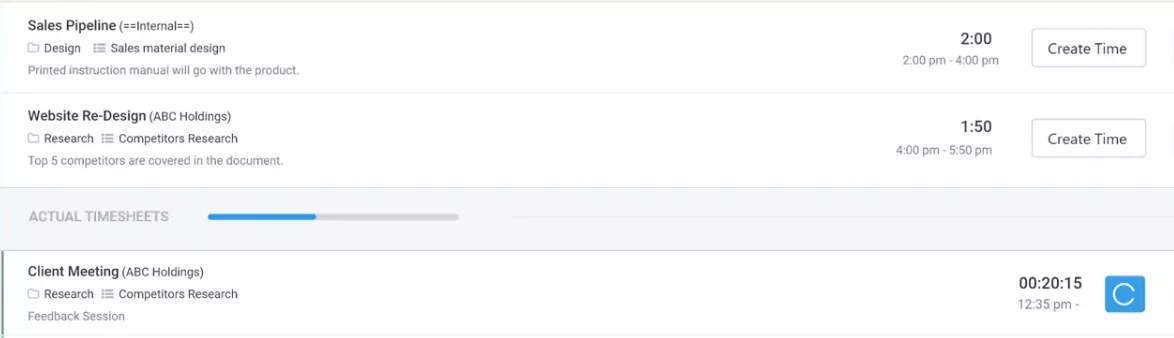
SOurce: avaza
Pros
- Easy to learn, with an interface that lets new users find tasks, timelines, and invoices fast.
- Helpful support when you are setting up workflows or asking for missing features.
- Timesheets map cleanly to billing, so it is easier to keep billable work from slipping.
- Solid all-in-one coverage for teams that do not want to stitch together multiple apps.
Cons
- Change tracking and audit history can be a weak spot if you need to see who edited what.
- Resource booking can feel slow or clunky when schedules change daily.
- Some teams run into feature gaps and end up relying on support requests or workarounds.
- Chat and collaboration can feel limited for larger groups, depending on how you use them.
Final Verdict
Avaza is not a fit if you need strict auditability and detailed change logs for every project update. It also falls short for teams that want deep scheduling and capacity planning without friction.
4. Accelo – Best for Service Operations That Want Tighter Billing Workflows
Accelo is project management software for service teams that need stronger delivery ops than Paymo, especially when handoffs, approvals, and billing rules start getting messy.
Key Features
- Project delivery with workflows that connect sales handoff to delivery
- Timesheets and approvals to support accurate billing
- Billing and invoicing that stay connected to project work
- Dashboard views plus reporting and analytics for visibility across delivery
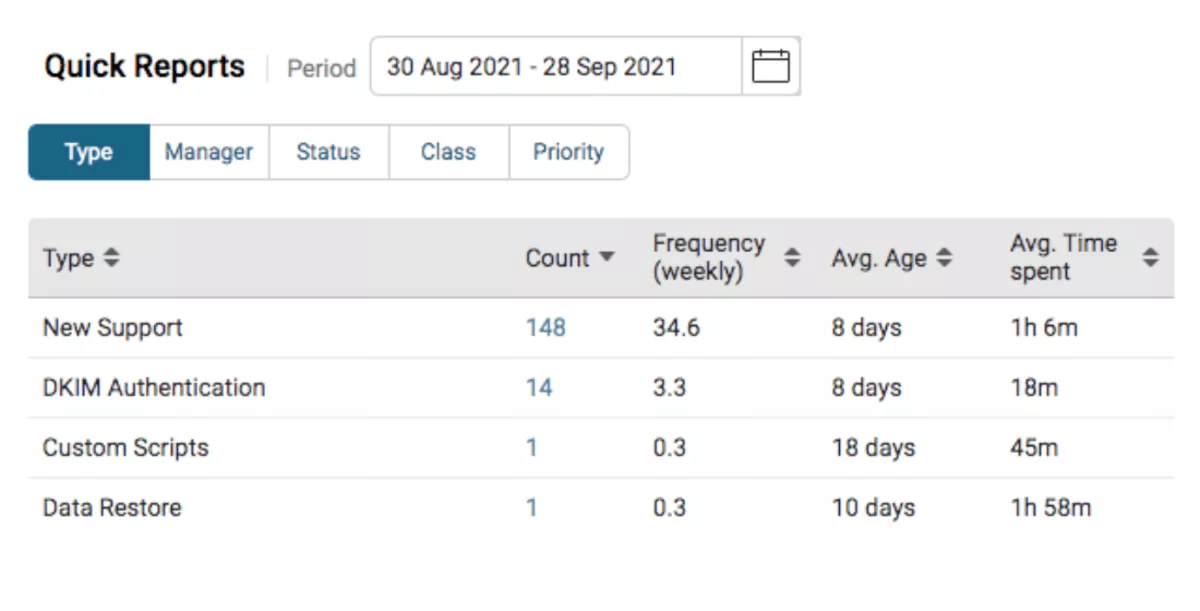
SOurce: accelo
Pros
- Strong centralization for client work, including visibility into team emails and account activity.
- Flexible setup, once it is configured, with templates and lists that can be tailored to how you deliver.
- Good onboarding and implementation help when you are rolling it out across teams.
- Helpful for teams that want one system to run delivery and billing, not a patchwork of tools.
Cons
- Setup takes time, and workflow automation can be easy to break if you test changes carelessly.
- The platform can feel complex, especially for smaller teams that just want simple tracking.
- Some users run into glitches with filters, dashboards, or reporting.
- Customization has limits, so certain edge cases may still require workarounds.
Final Verdict
Accelo is not for teams that want a lightweight tool they can adopt in a day with no admin effort. It works best when you have someone willing to own the configuration and keep workflows tidy.
5. BigTime – Best for Services Teams Focused on Time, Budgets, and Billing
BigTime is a Paymo alternative for professional services teams that care most about budgets, invoicing, and reporting, and want budgeting features that hold up at month-end. It works best when you need tighter billing discipline and want resource management to reflect what is actually being delivered. For a broader shortlist, see our BigTime alternative guide.
Key Features
- Time Tracking with timers, work codes, and approvals
- Expenses tied to projects, including multi-currency expenses
- Budget and billability tracking with utilization and resource management reporting
- Invoicing that pulls approved time and expenses, plus QuickBooks integration
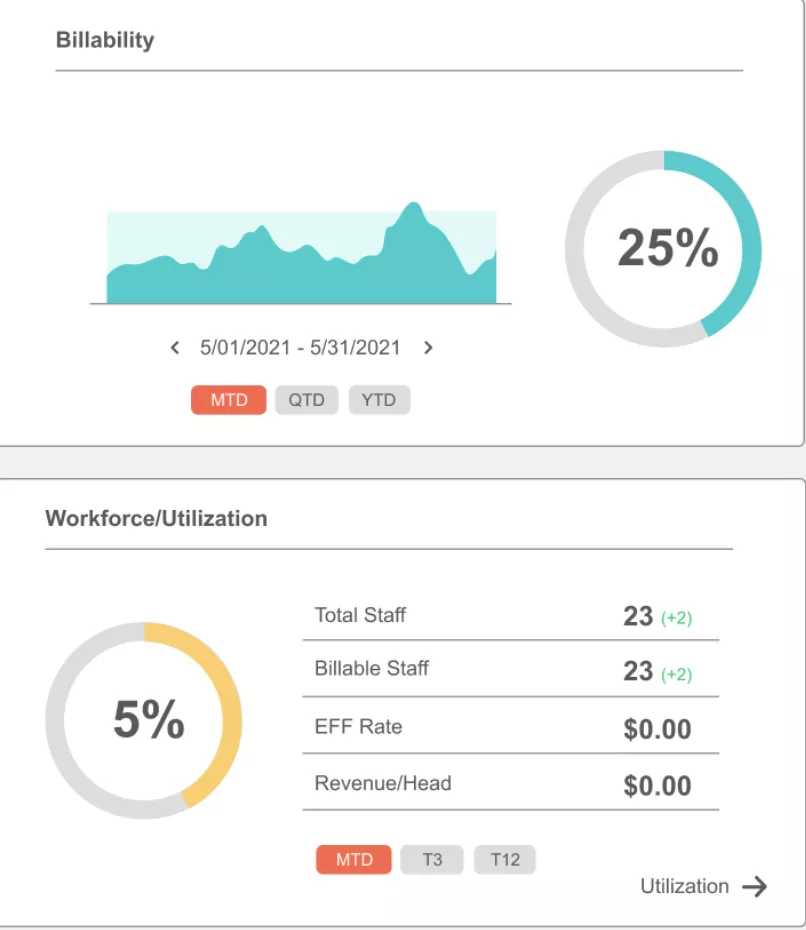
SOurce: Bigtime
Pros
- Fast time entry once codes are set, with helpful weekly totals and billable versus non-billable visibility.
- Reporting and filtering give finance teams a cleaner way to slice budgets, work codes, and project status.
- The built-in timer helps people capture work without backfilling at the end of the week.
- Good project visibility for teams that want to see the budget remaining before invoices go out.
Cons
- The mobile app is a common weak spot, especially compared with the desktop experience.
- Some users mention occasional timeouts or lost entries if a page refresh happens at the wrong time.
- Integrations can take work, and QuickBooks sync comes up as a pain point for some teams.
- When invoice issues do happen, a few reviewers say the resolution can take longer than expected.
Final Verdict
BigTime is a weak choice if your team needs a polished, mobile-first experience for time entry. It is a better match for firms that will actually use budgets, billing rules, and financial reports as part of delivery.
6. BQE CORE – Best for Firms That Want Accounting Workflows
BQE CORE is a Paymo replacement for firms that need accounting-grade time, expense, and invoicing workflows, especially in architecture, engineering, and consulting. Its budgeting features and billing workflows are deeper than what most lightweight tools offer. If you want more options in this space, see our BQE CORE alternatives roundup.
Key Features
- Timesheets and expense tracking tied to projects and phases
- Billing and invoicing tools for detailed client invoices
- Project management with milestones, tasks, and Gantt charts
- Resource planning for staffing and capacity
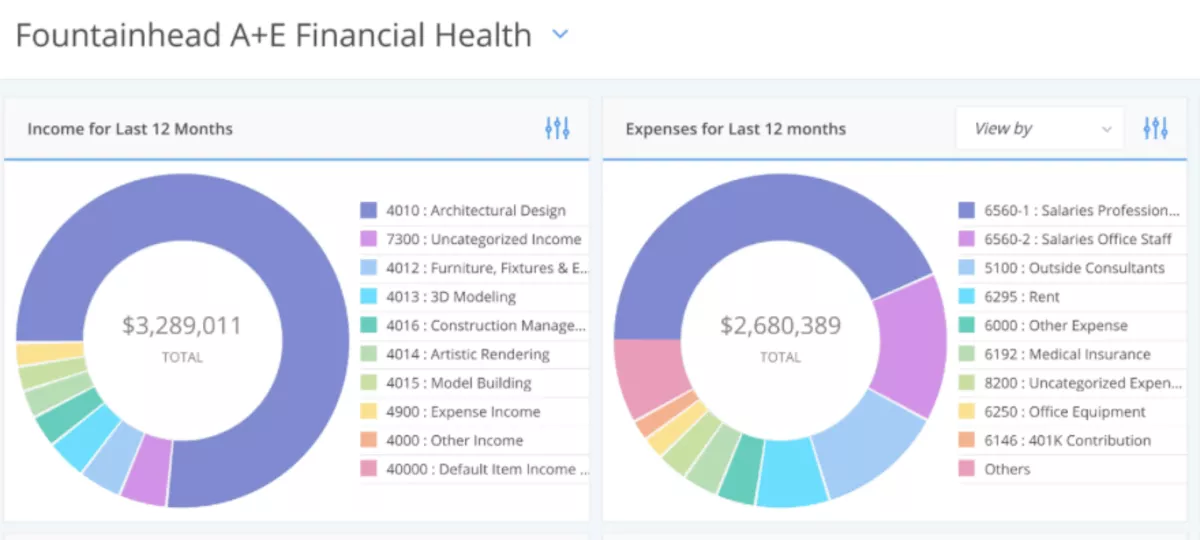
SOurce: bqe core
Pros
- Invoicing and expense adjustments get strong feedback for being quick and practical.
- Reporting is detailed enough for teams that want to stay on top of budgets without exporting everything.
- Timesheets and expense tracking feel reliable once the system is configured to your codes and phases.
- Customer support is often mentioned as helpful when teams hit setup questions.
Cons
- Performance can be slow when you are working with complex data or larger datasets.
- Setup and transition can be challenging, and new users often mention a learning curve.
- Some workflows feel click-heavy, with small UX frustrations that add up over time.
- Mobile app performance is not always consistent for teams that log time away from a desk.
Final Verdict
If you do not have someone to own setup and training, CORE will feel like overkill. It is also the wrong pick if you only need lightweight project management software and basic invoicing.
7. Replicon – Best for Advanced Time Approvals and Billing Controls
Replicon is not project management software. It is a timesheet and billing platform built around approvals, policies, and audit-ready time data. It is most useful when billable work needs to be reviewed before it reaches billing, payroll, or client reporting.
Key Features
- Configurable timesheets for project and client work
- Multi-level approvals, including limited approvals for project managers
- Time and billing workflows that support complex billing models
- Compliance and reporting controls for regulated work
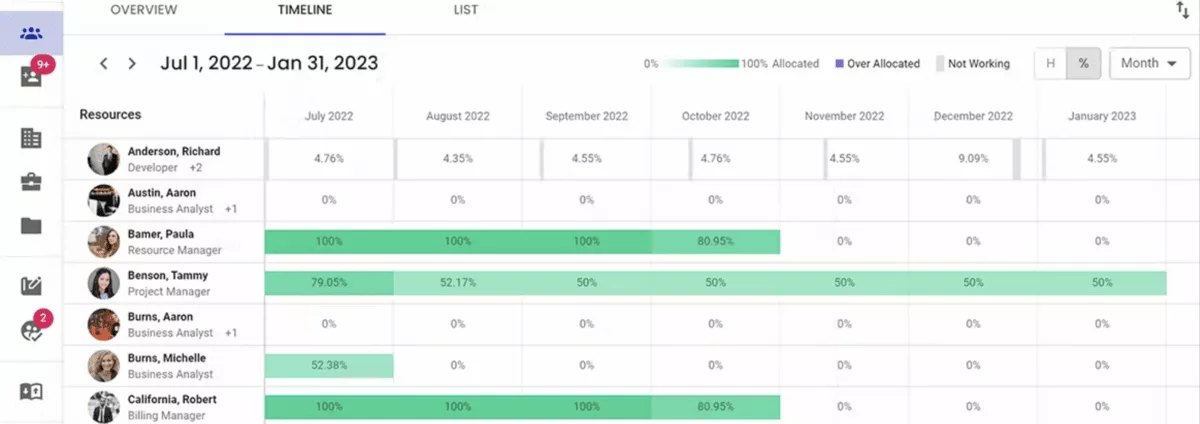
SOurce: replicon
Pros
- Approvals are a real strength, including manager-based approvals and options to limit what approvers can see.
- Timesheets feel robust for multi-project work, with clearer visibility into where hours go.
- Billing-focused features help reduce missed billable work when time needs to be validated before invoicing.
- The platform can be shaped around policies and rules instead of forcing a one-size workflow.
Cons
- Reporting can feel clunky until you learn the settings, and some report names are not intuitive.
- The interface gets harder to manage when there are lots of rows, especially on smaller screens.
- Support coverage can be frustrating across time zones, based on how responses are handled.
- It can feel heavier than Paymo if all you need is quick timesheets and basic invoices.
Final Verdict
Replicon is not a good pick if you want a lightweight Paymo replacement with minimal admin work. It earns its keep when approvals, policies, and billing controls are non-negotiable.
8. Wrike – Best for Work Management Teams That Still Need Timesheets
Wrike is Project Management Software built for custom workflows, project dashboards, and multiple project views, with time logs available through time tracking.
It can replace Paymo for planning and coordination, but billing usually happens in another system or through integrations. If you want more options in this category, see our Wrike alternatives guide.
Key Features
- Workflows and dashboards for different project types
- Project views like Gantt charts and Kanban boards
- Timesheets with a timer or manual time logs
- Reporting tools for status visibility and performance
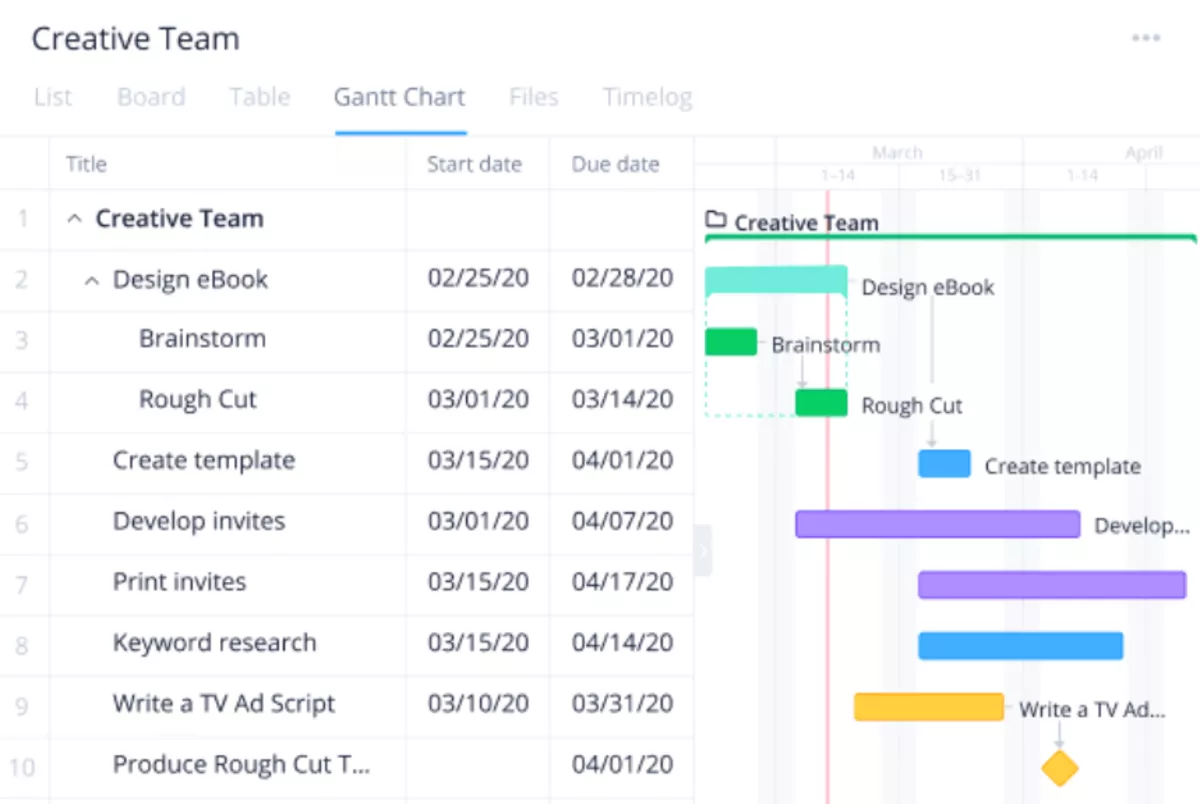
SOurce: wrike
Pros
- Flexible workflows and templates make it easier to standardize how projects run.
- Project visibility is a strong point, especially when you rely on Gantt charts and dashboards.
- Task management features like ownership and reminders help keep day-to-day coordination from slipping.
- Timesheets work well for logging time against tasks, especially when people use the timer.
Cons
- The feature depth can feel overwhelming, and some users only use a small slice of what is available.
- Glitches come up in reviews, especially around file handling and day-to-day usability.
- Search can feel less helpful than expected when you are trying to find older items fast.
- Integrating Wrike with other tools can be harder than it should be.
Final Verdict
Wrike is the wrong choice if you need built-in invoicing and a simple time-to-invoice workflow. It is a strong option when the bigger problem is messy workflows and weak visibility across projects.
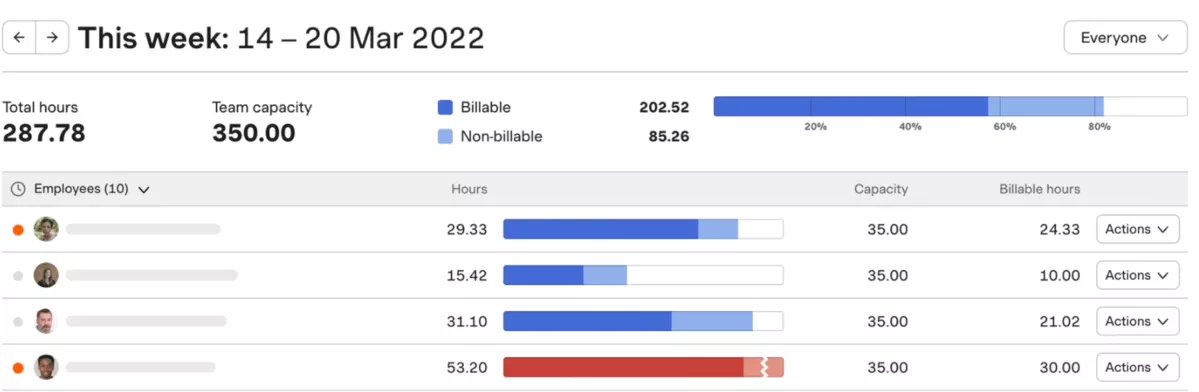
9. Harvest – Best for Lightweight Timesheets Plus Invoicing
Harvest keeps timesheets simple and makes it easy to turn logged hours into client invoices. It is not full project management software, so planning usually lives elsewhere.
It is a good pick when you want clean timesheets, basic budget visibility, and billing that stays out of the way.
Key Features
- Timer and timesheets tied to projects and clients
- Invoices that pull in unbilled time and expenses
- Expense tracking for reimbursable and billable costs
- Reporting for budgets, billable time, and project progress
SOurce: harvest
Pros
- The interface is easy to learn, so people actually log time instead of backfilling later.
- Invoicing feels straightforward because it is built around the time and expenses you already tracked.
- Integrations help connect Harvest to tools people already use, like project and accounting apps.
- Reporting is simple, but it is enough for checking budgets and billable hours without a lot of setup.
Cons
- Reporting can feel too basic when you need deeper filters, custom fields, or complex rollups.
- The mobile app experience comes up as a weak spot for some users.
- It is not built for complex project planning, so you may still need a separate delivery tool.
- Anyone looking for automatic time capture will not find it here.
Final Verdict
Harvest is not the right choice if you need advanced reporting or detailed project planning in the same tool. It works best when your priority is fast, consistent time entry and clean invoices.
10. Zoho Projects – Best for Teams That Already Use Zoho Apps
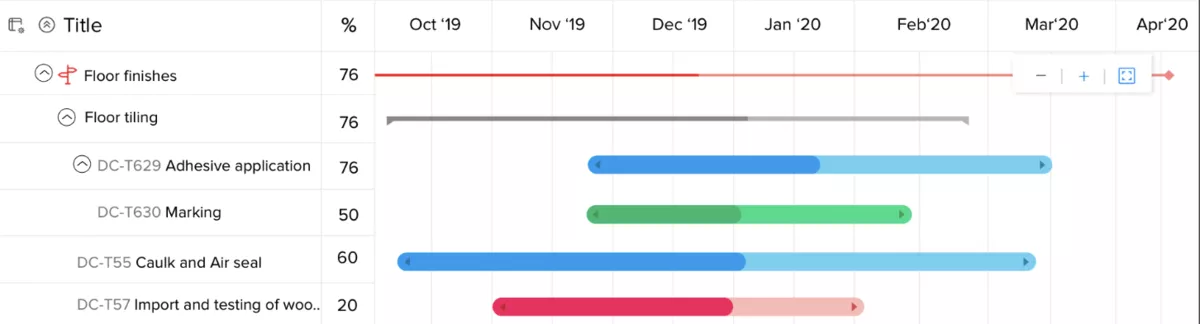
Zoho Projects is project management software built for structured planning, with solid task management, Gantt schedules, and built-in timesheets. When you need client billing, it usually means pairing it with Zoho Invoice or Zoho Books.
Key Features
- Task lists, milestones, task dependencies, and Gantt charts
- Timers and timesheets
- Workflows for structured project delivery
- Zoho integrations for billing and business workflows
SOurce: zoho projects
Pros
- Strong planning features for the price, especially if you rely on Gantt charts.
- Timesheets are built in, which helps keep project reporting and timesheets connected.
- Works smoothly inside the Zoho ecosystem when you already use Zoho apps.
- Good flexibility for organizing projects with fields, views, and task structure.
Cons
- Reporting can feel limited until you learn the filters and configuration.
- The interface can take time to get used to, especially for new users.
- Mobile app usability comes up as a frustration in some reviews.
- Some features are missing in lower tiers, which can be a surprise during rollout.
Final Verdict
Zoho Projects is a weak fit if you need broad third-party integrations outside the Zoho ecosystem. It is a solid pick when your priority is structured planning plus timesheets, and billing can live in Zoho Invoice.
Why Are People Looking for Paymo Alternatives?
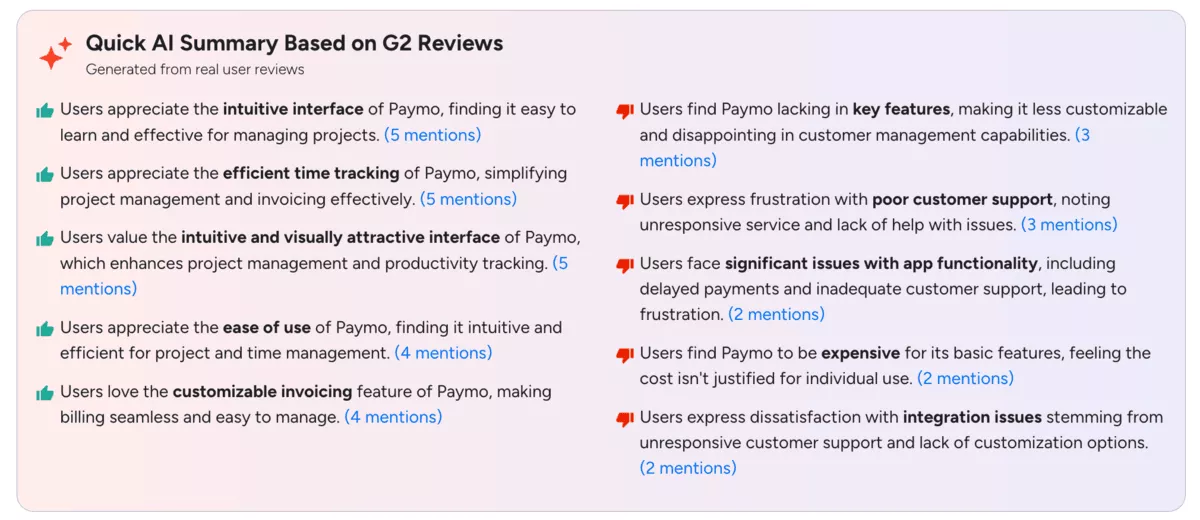
Users are looking for Paymo alternatives because the Paymo workflows that affect invoicing, reporting, and day-to-day admin do not scale cleanly.
The common trigger is not “more features.” It is the same recurring set of frictions that show up when a tool becomes part of billing, payroll, and client reporting.
If profitability is part of the problem, our guide to project financial management breaks down what to track so you can spot leaks earlier.
- Invoicing and payments create extra admin: When invoices, payment status, or invoice edits are harder than they should be, month-end turns into manual checking and follow-ups instead of a repeatable process.
- Reporting does not answer delivery questions fast: If you cannot quickly see budget burn, billable versus non-billable time, or which projects are slipping, you end up exporting data to spreadsheets to build the view you need.
- Limits around fields, approvals, and permissions: When you cannot enforce a simple review step for time or expenses, or you cannot model how your team works, the process relies on “tribal knowledge” and errors creep into billing.
- Reliability issues feel risky: Time entries not saving, delays around transfers, or one-way actions that are hard to undo create rework and mistrust in the numbers.
- Integrations do not stay clean: When sync gaps appear with accounting or other tools, teams patch data by hand, and that breaks routines like resource management planning that rely on accurate time and billing data.
Source: paymo G2 reviews
How to Choose the Best Paymo Alternative?
Start choosing your Paymo alternative by testing the exact project management workflow you run today, not by skimming a feature list. The right tool is the one that can run your weekly timesheet, keep Time Tracking consistent, and handle your month-end invoice cycle and basic reporting without manual cleanup.
Below is a step-by-step process you can run in a single afternoon, then repeat during a one-week pilot. If budgets are a big reason you are switching, this walkthrough of project budget management can help you define what “good” looks like before you test tools.
1. Define three pass or fail outputs for your business: approved weekly timesheets, expenses tied to the right project, and invoices generated from approved time.
2. Build a test pack from Paymo: export one active project, one completed project, the project data for those projects, last month’s time entries, last month’s expenses, and two recent invoices.
3. Recreate the active project in each tool using the same structure in the task management software, then confirm that both a Kanban board and a Gantt chart are usable for how you plan work.
4. Do an invoice rehearsal: log time for two people, mark billable work, approve it, generate an invoice draft, then check that exclusions and rate edits do not break the record.
5. Validate next month: add the next month’s assignments, review workload management, and confirm resource planning is quick enough to update when priorities shift. Before you commit, sanity-check the pricing structure for approvals, budgeting features, dashboard views, and reporting, and make sure the user experience is good enough for daily use.
How to Migrate from Paymo?
You can migrate from Paymo by moving your data in two rounds: first, a clean export of your project data and history, then a short pilot before full cutover. Start by deciding what you will bring over (clients, projects, tasks, time, expenses, invoices), then pick one Paymo alternative to pilot with a single live project.
Use the checklist below to keep the switch controlled and avoid losing billable history. If capacity planning is part of the change, this overview of project resource management can help you map roles and scheduling rules before you rebuild them in a new system.
Free Paymo Migration Checklist
- Export clients and contacts, then remove duplicates and fix naming so the same client does not appear twice.
- Export active projects and project templates, then decide what stays active versus what you archive.
- Export time entries and expense entries for the last 3 to 6 months, then tag anything billable versus non-billable.
- Export invoices (or invoice summaries) and save them as your “billing record,” even if the new tool will start invoicing from day one.
- Create your core project setup in the new tool: task lists, milestones, roles, and the fields you use to report (service, phase, client, or cost type).
- Recreate billing rules: billable rates, rounding rules if you use them, and what counts as non-billable.
- Set permissions and approvals: who can approve time and expenses, and what happens when something is rejected.
- Run a one-week pilot with one live project: log time daily, approve timesheets, generate an invoice draft, and compare it to what Paymo would have produced.
- Freeze Paymo for new entries on a chosen day, export anything created since the first export, then import or recreate it in the new tool.
- Keep Paymo read-only for a month so you can reference history while the new workflow settles.
Final Thoughts
Switching is worth it when your current Paymo setup slows down invoicing, hides reporting signals, or creates extra admin around approvals and billing.
If you run a professional services business and you are tired of stitching tools together, an all-in-one option like Productive is often the cleanest way to replace Paymo without adding more overhead.
Book a demo to see if it fits your delivery and billing workflow.
Connect With Agency Peers
Access agency-related Slack channels, exchange business insights, and join in on members-only live sessions.
