5 Best NetSuite Alternatives in 2026 (Prices and Reviews)

The best NetSuite alternatives are Productive, Sage Intacct, Microsoft Dynamics 365 Business Central, Acumatica, and Odoo. The right pick depends on whether you replace NetSuite or keep it for the books.
We cover each tool’s key features, review-based pros and cons, pricing, G2 rating, and who should skip it. Use the comparison table, selection steps, and migration checklist to pick two tools to demo.
What Are the Best NetSuite Alternatives in 2026?
In 2026, the best NetSuite alternatives for services firms are Productive, Sage Intacct, Business Central, Acumatica, and Odoo. Productive is the best NetSuite alternative for agencies and consultancies that want projects, people, and budgets in one system.
It sends invoices to NetSuite’s ledger now, and to Xero or QuickBooks Online if you leave.
Jump to a tool:
At a glance for NetSuite buyers (prices and ratings checked November 3 and 4, 2026)
| Tool | What it replaces in your NetSuite setup | Why pick it over NetSuite | Skip it if | Price | G2 rating (out of 5) |
|---|---|---|---|---|---|
| Productive | Projects, time, resourcing, budgets, and invoicing, while NetSuite, Xero, or QuickBooks Online keeps the ledger | Budgets forecast burn from scheduled work, and you plan people where they log time | You make or ship physical products | $10 Essential or $25 Professional per user a month, billed yearly; Ultimate (for the NetSuite integration) on quote | 4.7 (97 reviews) |
| Sage Intacct | The ledger, plus modules for project costing, revenue recognition, and scheduling | Dimensions report profitability by project, department, or location without a long chart of accounts | Project managers, not finance, will run their day in it | Custom quote built from the modules you include | 4.3 (4,530 reviews) |
| Business Central | Finance and projects, with accounting, project budgets, and time sheets | It works inside Outlook, Excel, and Teams, and its prices are published | Many contractors need full access, because every full seat is paid | $80 Essentials or $110 Premium per user a month, billed yearly; 30-day free trial | 4.0 (918 reviews) |
| Acumatica | The whole ERP, with an edition for professional services firms | Everyone can log in, because the price follows applications and usage instead of seats | Your ledger works and only project delivery is the problem | Custom quote with no seat fees | 4.4 (2,055 reviews) |
| Odoo | One module at a time: accounting, projects, timesheets, planning, and CRM | Every app comes in the Standard plan, while NetSuite sells its PSA as an add-on | You need board-ready reports without partner help | Standard from $24.90 or Custom from $37.40 per user a month, billed yearly (first-year price) | 4.2 (366 reviews) |
How We Chose These Tools?
We looked for software like NetSuite that handles project budgets, people scheduling, and accounting for services firms. We read vendor product and pricing pages and 2026 G2 reviews, plus Productive’s help docs for its limits.
Why Services Firms Look for NetSuite Alternatives
Services firms look for NetSuite ERP alternatives because projects need add-ons, licenses grow yearly, and changes take months. Finance picked NetSuite to run the books, but your project managers are the ones using it every day.
- Project work needs add-on modules. NetSuite, an enterprise resource planning (ERP) system, sells SuiteProjects and SuiteProjects Pro as add-ons, like CRM and commerce. SuiteProjects Pro, formerly NetSuite OpenAir, has a 3.7 out of 5 G2 rating from 231 reviews. Resource management often moves to spreadsheets, and budget burn shows after hours are logged. An ERP built for professional services puts project tools in the core instead.
- The license grows every year. NetSuite’s annual license fee combines the core platform, optional modules, and the number of people with access. Multiyear contracts usually include a built-in annual price increase. So every module or seat you add raises the renewal, beyond that yearly increase.
- Setup and changes take months and specialists. NetSuite’s own estimate for moderately complex implementations at mid-market companies is 4 to 11 months. Ongoing administration also needs people who know the system well. So a new rate card or project template waits for an admin or a partner.
Three Ways to Replace NetSuite (or Keep It)
Each NetSuite alternative takes one of three routes: another ERP system, split books and delivery, or keep NetSuite’s ledger.
- Route one: another ERP. This route means one system again, and the books move with it. NetSuite ERP competitors such as Acumatica and Odoo also run CRM in the same system. If you already run on Microsoft 365, look at Microsoft’s Dynamics 365.
- Route two: split accounting from delivery. Pick it if your finance team wants lighter accounting software than a full ERP. Finance moves the books to Sage Intacct, Xero, or QuickBooks Online, and Productive runs projects, people, and invoicing. Productive sends invoices to Sage Intacct on Professional and Ultimate, creating missing customers and projects there. To weigh delivery tools on their own, compare dedicated PSA software.
- Route three: keep NetSuite as the ledger. Choose it if you just finished a NetSuite rollout or have years of history in it. Productive replaces the project side, and finalized invoices go back into the ledger. The books don’t move, so finance keeps its reports and close process.
1. Productive – Best for Agencies and Consultancies Running Projects, People, and Budgets in One Place
Productive is a professional services automation (PSA) platform that runs projects, time tracking, scheduling, budgets, and invoicing for agencies. Finished invoices go to your accounting system, whether that stays NetSuite or moves to Xero or QuickBooks Online.
Try the best NetSuite alternative

The truth is, we can quickly get a pulse for where we are, at any given time. One way to get a pulse on the business is to get the monthly financials, but for the monthly financials to come in, it takes the accounting department about 15 days after the month ends before we get a picture of how we really did that month. Whereas, with the financial tools that Productive offers, you can check it on a daily basis. We have clear visibility at any given time.
Read the full story of how Clear Launch checks its numbers daily.
See a Budget Running Out Before the Project Does
If budget burn in NetSuite comes from logged hours, you find a fixed-fee overrun after the hours are spent. Productive’s budgeting tools track every hour and cost against the budget as work happens.
Forecast charts combine that past data with scheduled bookings, and you get a heads-up when a budget runs low.
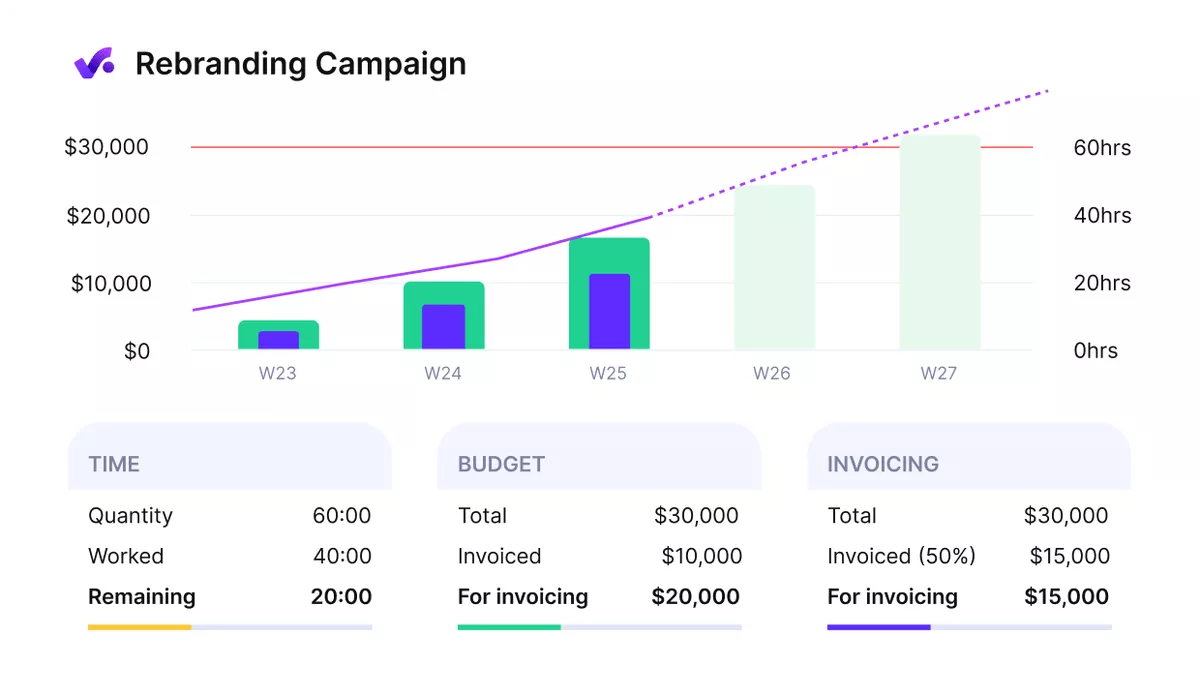
Spot a budget running low while there’s still time to act.
Plan People in the Same Place They Log Time
When resource management runs in a spreadsheet outside NetSuite, you keep schedules and logged time in two places. Productive’s Resource Planner shows who’s overbooked, and approved time off updates availability.
Each booking then appears as a pre-filled time suggestion, so you confirm scheduled hours instead of typing them.
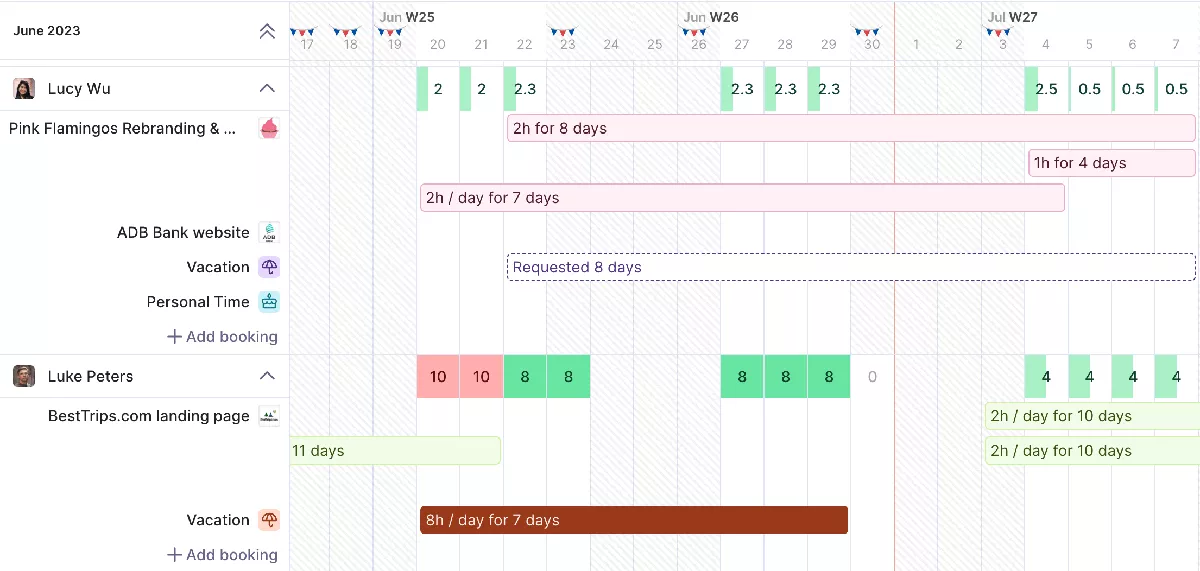
See who’s overbooked before you add one more project.
Keep NetSuite for the Books, or Move Them When You’re Ready
Your finance team chose NetSuite for the books, so delivery can’t change tools without breaking billing. On the Ultimate plan, Productive’s NetSuite integration copies finalized invoices and their companies into NetSuite, one way.
If finance leaves NetSuite later, the same invoices go to Xero or QuickBooks Online on Professional or Ultimate.
Pros
- Profitability is easy to see per project. Simple timesheets and overhead cost tracking show what each project earns after costs.
- New staff get up to speed quickly. That matters if your team is still worn out from a long ERP rollout.
- Support resolves issues fast. The team also takes customer suggestions into account.
Cons
- Budget figures depend on tracked time. If your team won’t log hours, budgets and forecasts have little to work with.
- Sales email features trail a dedicated CRM. If your sales team works from email, keep HubSpot or your current sales tool alongside it.
Who Should Skip Productive?
If you make or ship physical products, skip Productive. It has no inventory management, so stock and production would still need another system.
Productive holds a 4.7 out of 5 rating on G2 from 97 reviews.
Pricing
- Plans start with the Essential plan at $10 per user per month, which includes essential features such as budgeting, project & task management, docs, time tracking, expense management, reporting, and time off management.
- The Professional plan includes custom fields, recurring budgets, advanced reports, billable time approvals, and much more for $25 per user per month.
- The Ultimate plan has everything that the Essential plan and Professional plan offer, along with the HubSpot integration, advanced forecasting, advanced custom fields, overhead calculations, and more. Book a demo or reach out to our team for the monthly price per user.
Fix NetSuite’s Project Side Without Moving Your Books.
Productive forecasts each budget from scheduled bookings and sends finalized invoices to your accounting system.

2. Sage Intacct – Best for Finance Teams That Want Accounting Built Around Projects
Sage Intacct is Sage’s cloud financial management software, built around a general ledger. You add modules for project work, such as project costing and billing, on top of that core.
Sage Intacct as an Alternative
Both NetSuite and Sage Intacct quote a core plus modules, so the real difference is how reporting works. Sage Intacct tags transactions with dimensions (labels such as project, department, or location) and reports on any of them. You get profitability by project or revenue by location from one report, with fewer account codes to maintain.
Key Features
- Project accounting
- Scheduling by skills and availability
- Time and expense tracking
- Milestone-based revenue recognition

Source: Sage Intacct
Pros
- Daily accounting work is easier to manage. That covers transactions, payables, and bank reconciliations, with accounts payable reports built in.
- Managers see their budgets in real time. Directors and managers can open their own budgets and view them as they change.
- It’s economical for small and midsize firms. You get full accounting at a price smaller finance teams can justify.
Cons
- Workflows and configuration are hard to set up. Country-specific tax settings are especially tricky to get right.
- The interface feels dated and can be slow. Filtering inside modules is one of the slower spots.
Pricing and G2 Rating
Sage Intacct has no public price list, and Sage builds each quote from the modules you include. Its G2 rating is 4.3 out of 5, from 4,530 reviews.
Who Should Skip Sage Intacct?
Sage Intacct is the wrong choice if project managers, not finance, will run their day in it. Its dashboards are built per owner rather than per project, so tracking one project’s status takes extra work.
3. Microsoft Dynamics 365 Business Central – Best for Firms That Already Work in Microsoft 365
Built for small and mid-market businesses, Microsoft Dynamics 365 Business Central is Microsoft’s ERP and financial management software. It supports project accounting, so you budget project resources, track hours on time sheets, and invoice on a schedule.
Dynamics 365 as an Alternative
Like NetSuite, it covers finance and projects in one ERP, and it works inside Outlook, Excel, and Teams. Anyone with a Microsoft 365 license can view its data in Teams at no extra charge. Its prices are published, unlike NetSuite’s quote-only annual license.
Key Features
- Project budgets against actual usage
- Resource capacity by period
- Time sheets with approvals
- Invoicing on a schedule
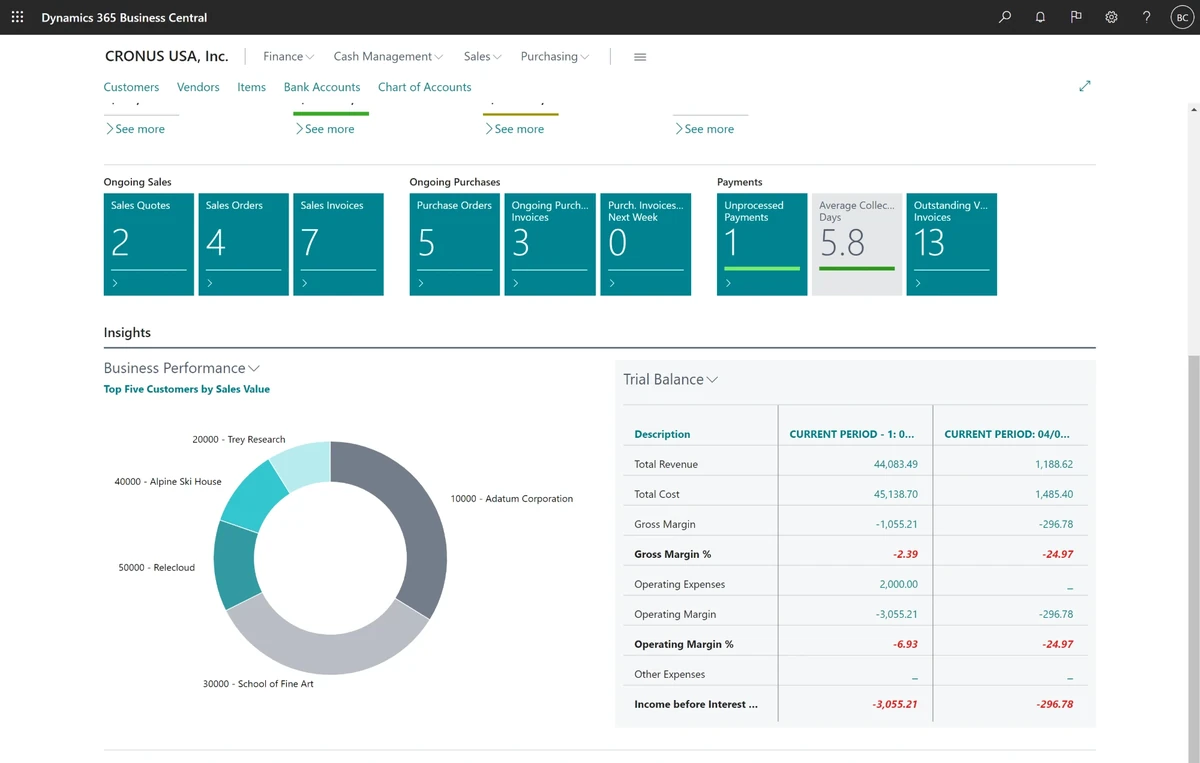
Source: Microsoft Dynamics 365 Business Central
Pros
- It’s directly connected to the Microsoft environment. If your firm already runs on Microsoft 365, your team keeps working in tools it opens daily.
- Finance, sales, and reporting connect without manual reconciling. You get real-time visibility of financial information across those areas.
Cons
- New people need time to learn it. Some features take a while to learn, so budget training time for new hires.
- Settings and search are hard to find your way around. Finding a specific setting isn’t always simple, and search could be more intuitive.
Pricing and G2 Rating
Essentials costs $80 and Premium $110 per user a month, paid yearly, and Team Members access costs $8. There’s a 30-day free trial, and it scores 4.0 out of 5 on G2 from 918 reviews.
Who Should Skip Dynamics 365?
Firms with many contractors who need full access should skip Business Central. Every full-access contractor needs a paid seat under per-user pricing, and Team Members licenses cover only limited access.
4. Acumatica – Best for Firms That Want a Full ERP Without Per-User Fees
Acumatica sells a cloud ERP in editions by industry, including one made for professional services firms. Projects, time entry, billing, CRM, and accounting share one database, so nothing needs syncing between projects and the books.
Acumatica as an Alternative
Acumatica is the closest like-for-like replacement for NetSuite, since both are full ERPs for finance and operations. NetSuite’s annual license counts seats, while Acumatica prices on applications and usage, so contractors can log time too.
Key Features
- Project accounting
- Mobile time entry with approvals
- Resource scheduling by utilization
- Unbilled revenue reporting
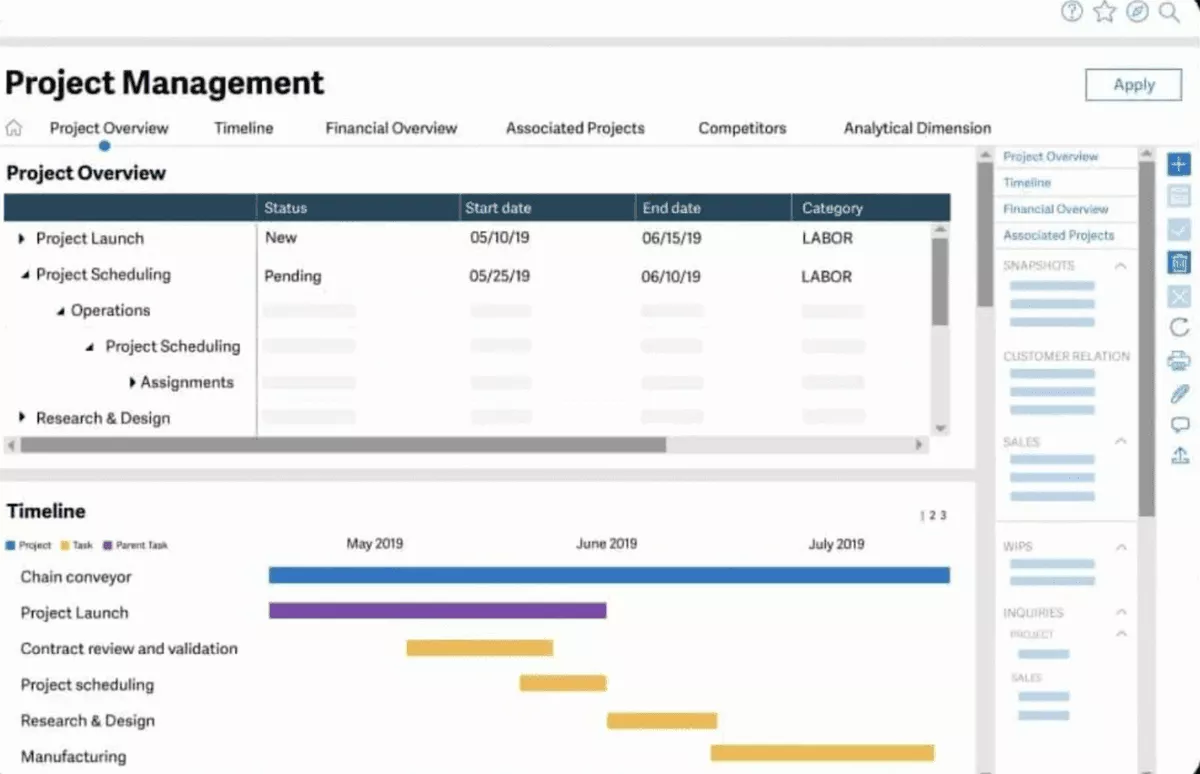
Source: Acumatica
Pros
- Changes don’t need a developer. Your team can adapt it without understanding code.
- The initial setup goes smoothly. That shortens the switch if you move finance and projects at the same time.
Cons
- Unclear error messages slow down troubleshooting. When something breaks, the message often doesn’t say why, so fixes take longer.
- Contract management has fewer options than other areas. That matters if you bill retainers or recurring service contracts.
- Twice-yearly upgrades bring bugs. Plan time to retest your setup after each major release.
Pricing and G2 Rating
Acumatica charges no seat fees and quotes on the applications you need, your usage, and how it’s deployed. Its 2,055 G2 reviews average 4.4 out of 5.
Who Should Skip Acumatica?
Skip Acumatica if your ledger works today and only project delivery is the problem. As a mid-market ERP, it replaces the whole system, so your books would move too.
5. Odoo – Best for Small Firms That Want a Low-Cost ERP They Can Add to One App at a Time
Odoo packages its ERP as separate apps, such as accounting, projects, timesheets, planning, and CRM. Its apps are integrated, so data entered in one app is available in the others.
Odoo as an Alternative
NetSuite sells its PSA as an add-on, while Odoo’s Standard and Custom plans include every app. So you can move off NetSuite module by module, adding apps without paying more for each one.
Key Features
- Project app
- Timesheets app
- Planning app
- Accounting app

Source: Odoo
Pros
- Everyone sees project status in one place. Team members can check what’s happening in a project and who is working on what.
- It replaces several separate tools. Accounting, sales, and operations run in one system, so you stop connecting separate tools by hand.
Cons
- Templates and workflows need an Odoo administrator. Setting up modules or custom workflows can get complicated without one.
- Sales and marketing apps lean toward manufacturers. If you sell services, expect to adapt them to your pipeline.
Pricing and G2 Rating
Standard starts at $24.90 and Custom at $37.40 per user a month, billed yearly. After 12 months, or for seats added later, Standard is $31.10 and Custom $46.70. On G2, Odoo ERP rates 4.2 out of 5 from 366 reviews.
Who Should Skip Odoo?
Odoo is one to skip if you need board-ready financial reporting from day one without partner help. It’s a low-cost pick among NetSuite alternatives for small business, but reports are only as good as the setup.
When NetSuite Is Still the Right Choice
NetSuite is still the right choice if you run several subsidiaries, sell products too, or rely on heavy customization.
- You run several subsidiaries. NetSuite OneWorld manages multi-subsidiary companies in one system, with multiple currencies and financial roll-ups. If your monthly close consolidates several entities, moving that multi-entity consolidation is a major project.
- You sell products too. Its core ERP covers inventory management, orders, and procurement, which a mid-market firm selling products needs. If you moved, the replacement would need inventory too, which rules out services-only tools.
- You depend on years of customization. Every custom script would need rebuilding in a new system. Upkeep runs roughly 10% to 15% of the build cost a year, so price that against a rebuild.
Even then, you can keep NetSuite and still compare NetSuite competitors for the project side alone.
How to Choose a NetSuite Alternative for a Services Firm
To choose a NetSuite alternative, list weekly modules, rebuild your messiest project in a trial, and price three years. Here’s how to do it in three steps:
Step 1: List the NetSuite Modules Your Team Opens Each Week
Open your last NetSuite renewal quote and the roles list in your account. Mark each module on the quote as used weekly, monthly, or never. A tool fails if it can’t cover every weekly module, either itself or through an integration you can name.
Anything marked never is license spend to cut, whichever route you take.
Step 2: Rebuild Your Messiest Project in a Trial
Pick last quarter’s project that mixed a fixed fee with hourly work and had a change order. In the trial or vendor demo, rebuild its budget, four weeks of its bookings, and one invoice. It fails if its budget burn differs from your spreadsheet, or if anyone retypes hours for the invoice.
Step 3: Price Three Years, Not the First One
Ask every vendor for a written three-year quote covering seats, modules, implementation, and support. That sum is your three-year total cost of ownership.
Compare it with three years of NetSuite at your current renewal, including the contract’s annual price increase. Cross off any tool that costs more over three years, unless it replaces a tool you pay for today.
Pick a NetSuite Alternative That Shows Budget Burn Early
Productive combines logged time with scheduled bookings to show when a budget might run out.

How to Migrate Off NetSuite
Migrate off NetSuite by moving billing records first, rebuilding live projects, running parallel invoices, and timing cutover to renewal.
- Run the data migration around billing records. Your finance lead exports customers, open invoices, unbilled time, and rate cards. The open-invoice total must match NetSuite’s receivables aging report.
- Rebuild only active projects. Project managers recreate each live project with its remaining budget and the next eight weeks of bookings. Archive closed projects in the export instead of rebuilding them.
- Run one invoice cycle in both systems. Billing prepares one month’s invoices in both systems but sends them from NetSuite only. Cutover waits until every invoice matches line by line.
- Give notice before the renewal deadline. Operations checks the notice period in your NetSuite contract and gives notice before it closes. Miss it, and the license can renew for another term.
Frequently Asked Questions
How Much Does NetSuite Cost?
NetSuite doesn’t publish prices; you pay a custom annual license fee plus a one-time implementation fee. The license is priced on the core platform, the modules you choose, and how many people need access. Standard support commonly adds 10% to 20% of the annual license fee each year.
Is QuickBooks Like NetSuite?
QuickBooks Online is like NetSuite only on the accounting side, because it’s accounting software rather than an ERP. Services firms on QuickBooks Online often pair it with a separate tool for projects and time. NetSuite adds inventory, orders, and procurement, and our NetSuite vs QuickBooks comparison has the details.
Is NetSuite an ERP or a CRM?
NetSuite is an ERP system, and its suite includes a full CRM module alongside finance and operations. It isn’t sold as a stand-alone CRM, so you buy it as part of the ERP.
What Is the Best Alternative to NetSuite PSA for Time Tracking?
The best alternative to NetSuite PSA for time tracking is a PSA where scheduled work becomes the timesheet (like Productive). Check for timesheets pre-filled from the schedule, approval before hours reach an invoice, and billing without retyping.
Productive’s time tracking covers all three, and with approval on, logged time becomes billable only once approved.
Final Thoughts: Replace the Part of NetSuite That Slows Delivery
For most services firms, NetSuite’s ledger works; the cost shows up in late budget burn and spreadsheet schedules. So pick a NetSuite alternative for the project side first, and decide on the ledger at renewal.
That improves delivery now, and the books move only if the three-year numbers justify it. If you want budgets, bookings, and invoices together while NetSuite runs your accounting, book a demo of Productive.
Connect With Agency Peers
Access agency-related Slack channels, exchange business insights, and join in on members-only live sessions.
