Top 5 FinancialForce Alternatives (Paid & Free) 2026 Review

Most FinancialForce alternatives (now Certinia) lists mix PSA platforms, ERP systems, accounting tools, and project management apps without explaining what can actually replace what.
To fix that common hiccup, we’ve written this buyer’s guide that narrows the search to five true replacements for service teams (and agencies) and compares their key features, review-based pros and cons, best-fit use cases, and category fit.
You’ll also learn how to choose between PSA depth, financial management, modular ERP flexibility, and a broader all-in-one services platform.
To make the switch less risky, the guide ends with a migration checklist that separates delivery, finance, reporting, and system ownership before you commit to a new tool.
What Are the Best FinancialForce Alternatives (Now Certinia Alternatives) in 2026?
The best FinancialForce alternatives (now Certinia) alternatives, in 2026 are Productive, Kantata, NetSuite SuiteProjects Pro, Sage Intacct, and Odoo.
There is no single replacement tool that fits every buyer, because some teams are replacing PSA workflows, while others need finance, ERP, or a connected services operating system.
The shortlist below keeps these options grouped by the job they actually replace.
Shortlist of Certinia Replacements
Best Certinia (ex-FinancialForce) Competitors Comparison Table
| Tool | Best for | Choose this if | Skip this if | Free option | Category |
|---|---|---|---|---|---|
| Productive | Agencies and professional services teams | You want projects, resourcing, budgets, time, billing, and reporting connected in one system | You need a Salesforce-native financial management suite | Free trial, no free plan | All-in-one services operations |
| Kantata | Enterprise services teams | You need mature PSA workflows for capacity planning, delivery, and project financial visibility | You want a lighter tool with simpler setup | No public free plan listed | Enterprise PSA |
| NetSuite SuiteProjects Pro | NetSuite-based services teams | Your services workflows already sit inside the NetSuite ecosystem | You are not committed to NetSuite as your ERP backbone | No public free plan listed | NetSuite-native PSA |
| Sage Intacct | Finance-led professional services teams | You are replacing financial management, accounting, or project accounting workflows | You need a delivery-first PSA for resourcing and project execution | No public free plan listed | Financial management and accounting |
| Odoo | Teams that want modular ERP flexibility | You want a configurable app ecosystem with a free-start path | You need a purpose-built PSA that works out of the box | One App Free |
How We Chose These Tools?
We chose these tools by filtering for real Certinia and FinancialForce replacements first, then separating them by category so PSA, financial management, ERP, and project management needs were not mixed into one generic list.
We also checked official vendor sources for feature claims.
We used G2, Reddit, YouTube, and other review signals to spot recurring issues around the Salesforce ecosystem, learning curve, implementation effort, and total cost of ownership.
1. Productive – Best All-in-One Solution for Agencies and Professional Services Teams
Productive is best for agencies and professional services teams that want projects, resourcing, budgets, time, invoicing, and reporting in one system, rather than building operations around Salesforce.
Replace Financialforce with Productive
Replace Salesforce-Heavy Setup With a Workflow Your Team Can Actually Use
Certinia can work well for Salesforce-centered organizations, but that setup often creates a dependency on Salesforce admins, consultants, and custom reporting knowledge.
That becomes a problem when project managers, delivery leads, and finance teams need quick answers without waiting on the person who understands the system best.
Productive keeps the core services workflow in one place. Teams can manage deals, projects, budgets, time, resources, invoices, and reports without treating Salesforce as the operating layer for every delivery and finance process.
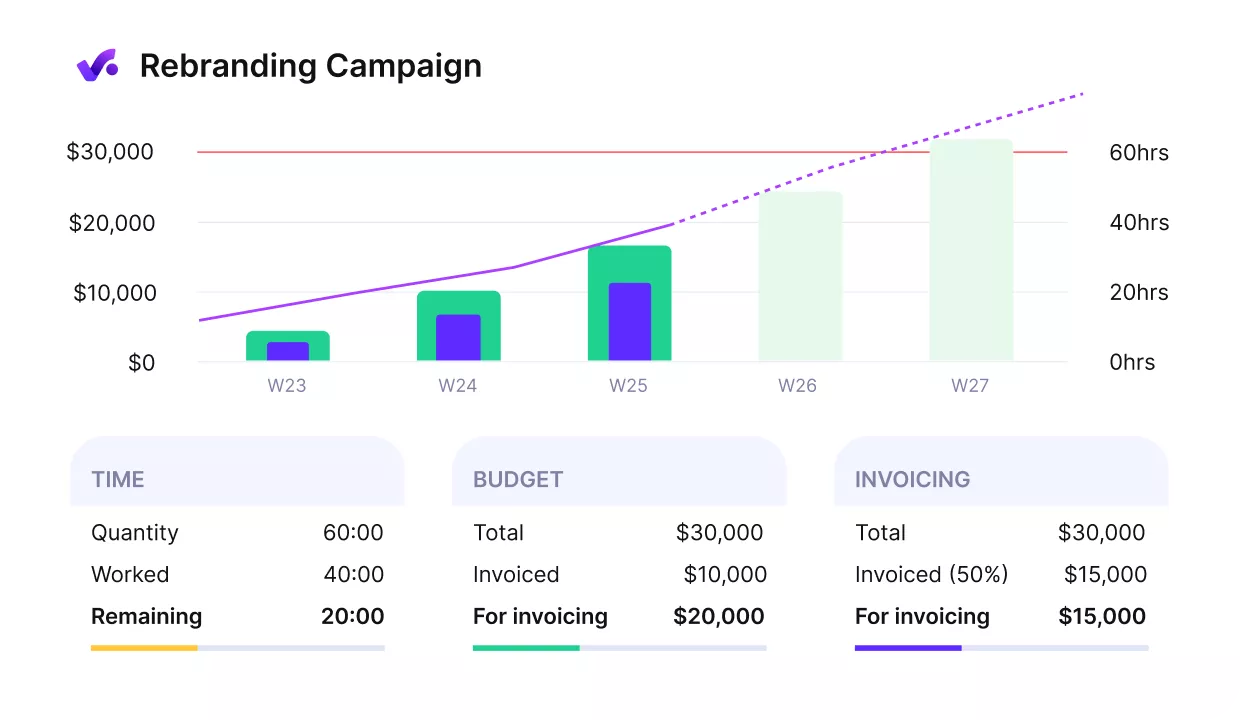
Get early warnings of budget overruns.
See Budget Burn, Margin, and Utilization Without Shadow Spreadsheets
One of the biggest problems in complex PSA setups is trust in the numbers. If utilization, margin, budget burn, or invoice totals need to be checked in Excel, the system is not really giving leaders a single source of truth.
Productive connects time entries, cost rates, billable rates, budgets, expenses, and invoices to the same project data.
Its project budget and profitability tracking make it easier to review budget burn, project profitability, billable utilization, and revenue forecasts without rebuilding the math outside the tool.
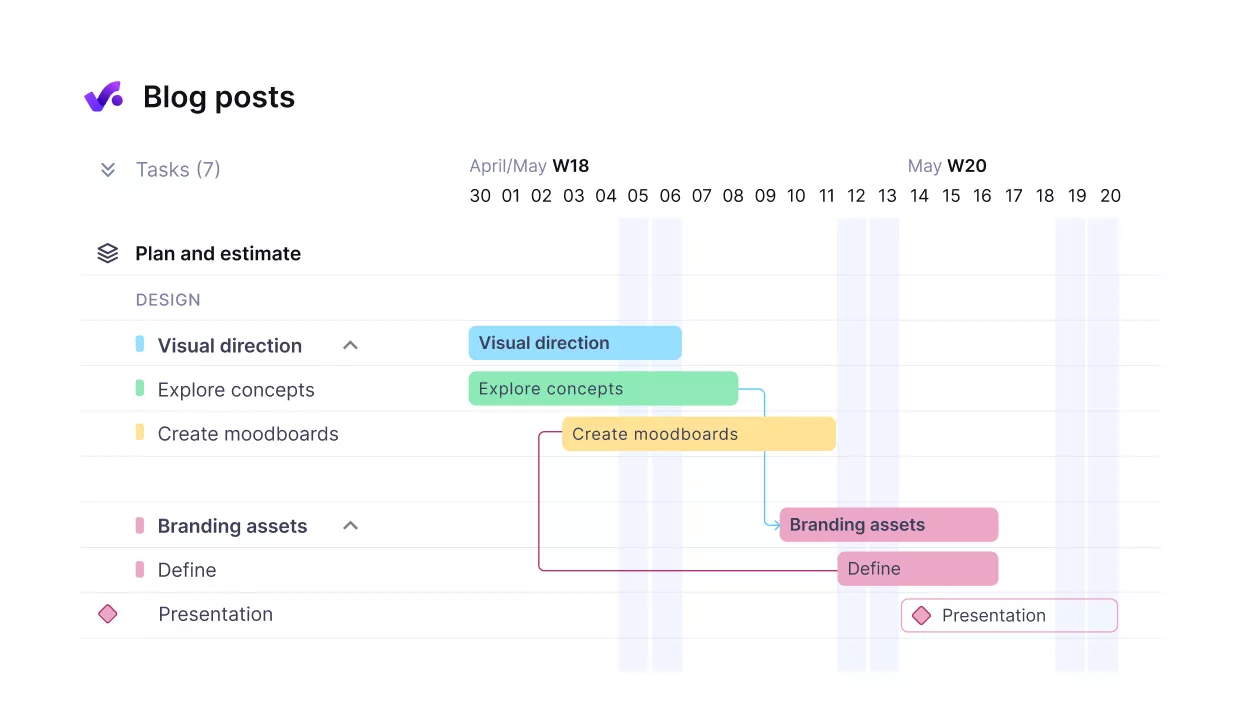
Get early warnings of budget overruns.
Plan Resources With Clearer Committed and Tentative Work
Capacity planning gets messy when sales opportunities, tentative bookings, confirmed work, and time off are not visible together. Teams either protect work that may never happen or move people away from confirmed delivery commitments.
Productive helps services teams plan capacity with resource bookings and availability views, placeholders, tentative work, and confirmed projects in one schedule.
That gives operations a clearer view of what is actually committed, what is still at risk, and where hiring or reshuffling decisions may affect margin.
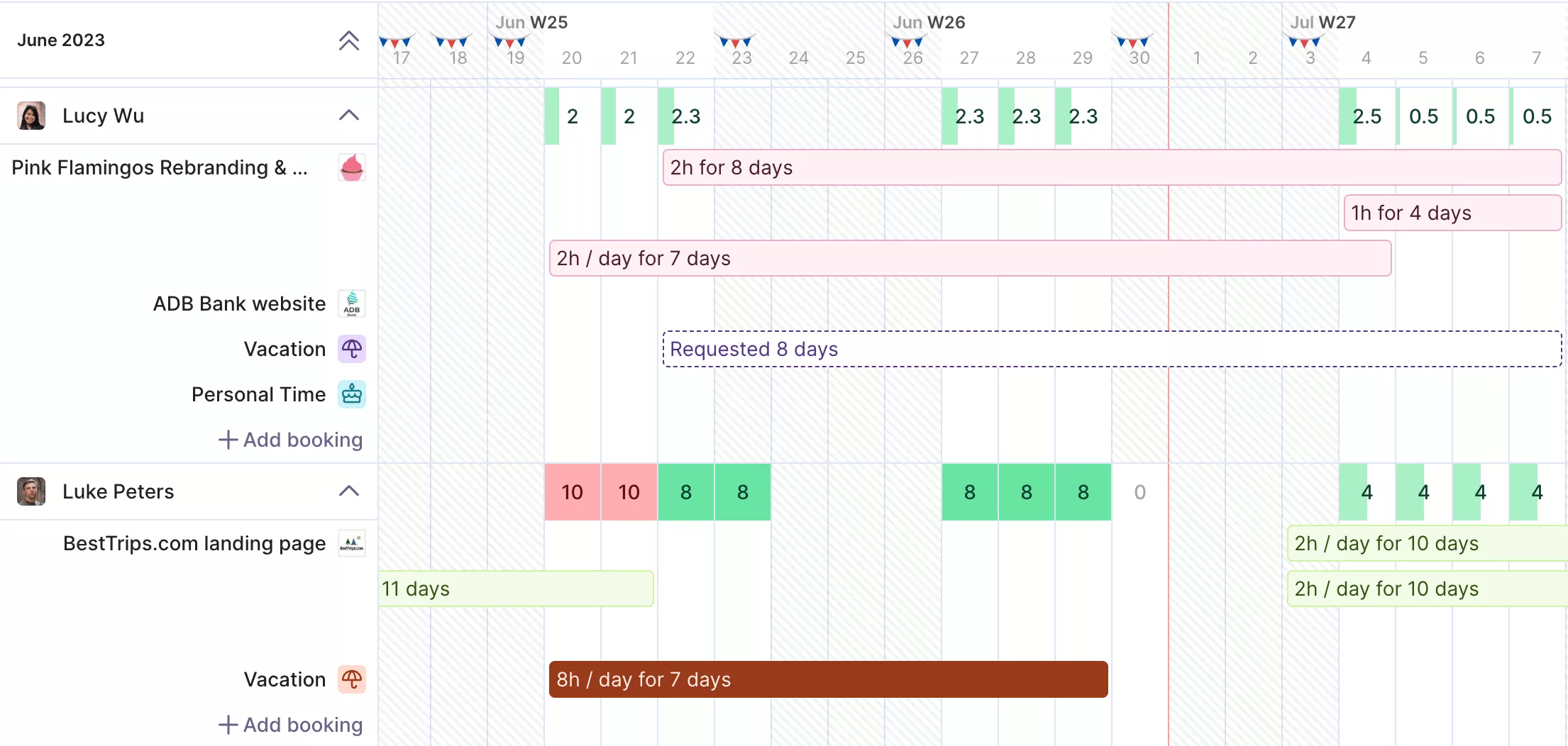
Get real-time updates on your resources.
Connect Delivery and Finance Before Month-End
Certinia buyers often run into a split between delivery needs and finance needs. Delivery teams need simple project management, time tracking, and resourcing. Finance needs clean budget, billing, and reporting data.
Productive is useful when those teams need to work from the same operational data.
Its project delivery and collaboration workflows connect time, budgets, expenses, invoices, and reports so teams can see how projects, clients, teams, and services are performing.
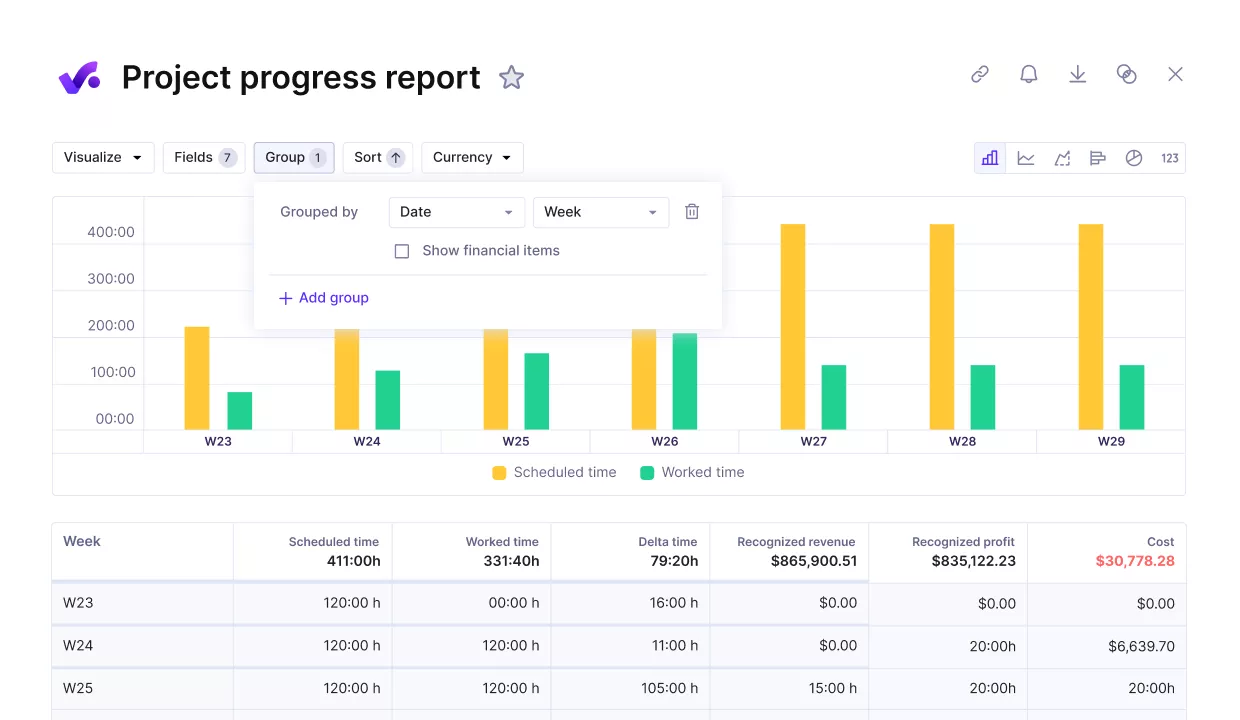
Compare project progress agains key performance metrics.
Pricing
- Plans start with the Essential plan at $10 per user per month, which includes essential features such as budgeting, project & task management, docs, time tracking, expense management, reporting, and time off management.
- The Professional plan includes custom fields, recurring budgets, advanced reports, billable time approvals, and much more for $25 per user per month.
- The Ultimate plan has everything that the Essential plan and Professional plan offer, along with the HubSpot integration, advanced forecasting, advanced custom fields, overhead calculations, and more. Book a demo or reach out to our team for the monthly price per user.
Productive has a free 14-day free trial, so you can try out what the tool can offer to your professional services firm.
Replace Financialforce With One Operating System for Services Work
Plan resources, manage budgets, track time, invoice clients, and report on profitability from one place with Productive.

2. Kantata – Best for Enterprise PSA and Resource Planning
Kantata fits professional services teams that need a heavier Professional Services Automation platform for resource planning, project delivery, and financial visibility.
It is strongest when the buyer wants enterprise PSA depth and has the team capacity to manage a more advanced system.
Key Features
- Resource Management and capacity planningPortfolio
- Management through project and portfolio health views
- Project financial management with forecasting and reporting
- Time & Expense Tracking for delivery and billing workflows
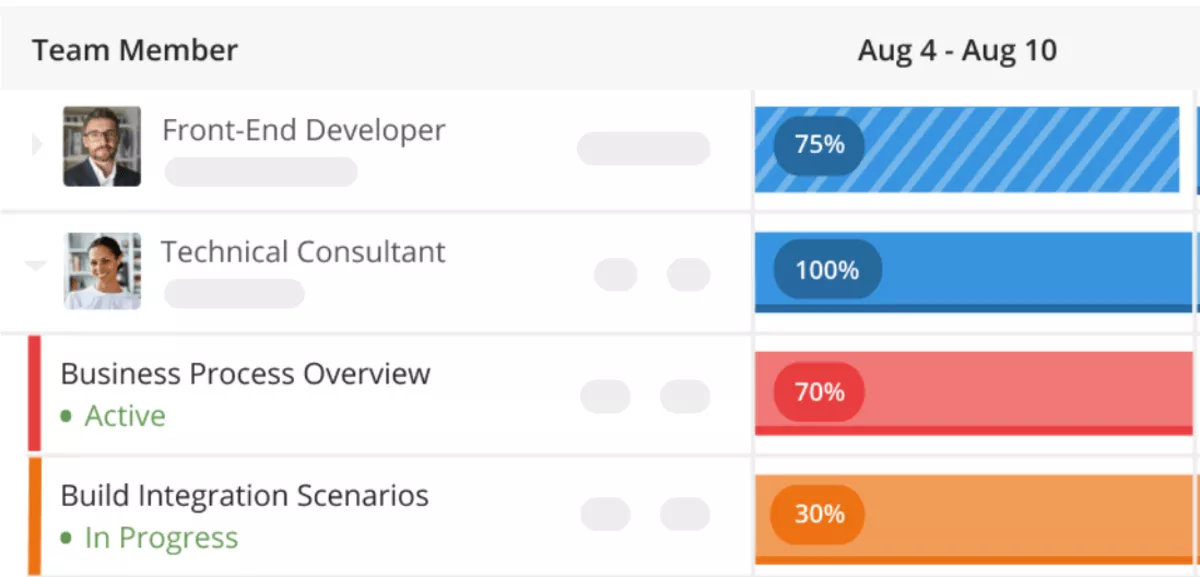
SOurce: Kantata
Pros
- Strong visibility across delivery, resources, and financial performance helps larger teams manage projects from one place.
- Capacity planning is a serious strength for teams balancing availability, utilization, skills, and demand across many engagements.
- Reporting can support project health, margin, and utilization analysis when teams invest time in setup.
- Kantata can replace several delivery and operations tools for teams ready to consolidate PSA work.
Cons
- New or occasional users may need training before advanced workflows feel natural.
- Reporting and customization can take setup effort, especially for teams with complex business logic.
- Task and template workflows can feel rigid for teams that need flexible recurring work patterns.
- It may be too heavy for smaller teams that only need simple project tracking and time capture.
Final Verdict
Kantata is not the right pick for smaller service teams that need simple project tracking, straightforward resourcing, and a faster rollout.
It fits better when the team has enough operational structure to use its deeper PSA, reporting, and staffing workflows properly. For a closer look at tools in the same PSA category, compare our Kantata alternatives guide.
3. NetSuite SuiteProjects Pro – Best for NetSuite-Based Services Teams
NetSuite SuiteProjects Pro fits services teams that already use NetSuite and want project delivery tied closer to ERP, billing, and finance workflows.
It is a stronger match for NetSuite-centered teams than for buyers comparing standalone project management, accounting software, and operations tools from scratch.
Key Features
- Project management for planning, tracking, and delivery workflows
- Resource management for staffing and utilization planning
- Time & Expense Tracking connected to project accounting and billing
- Reporting for project performance, budgets, invoices, and services operations
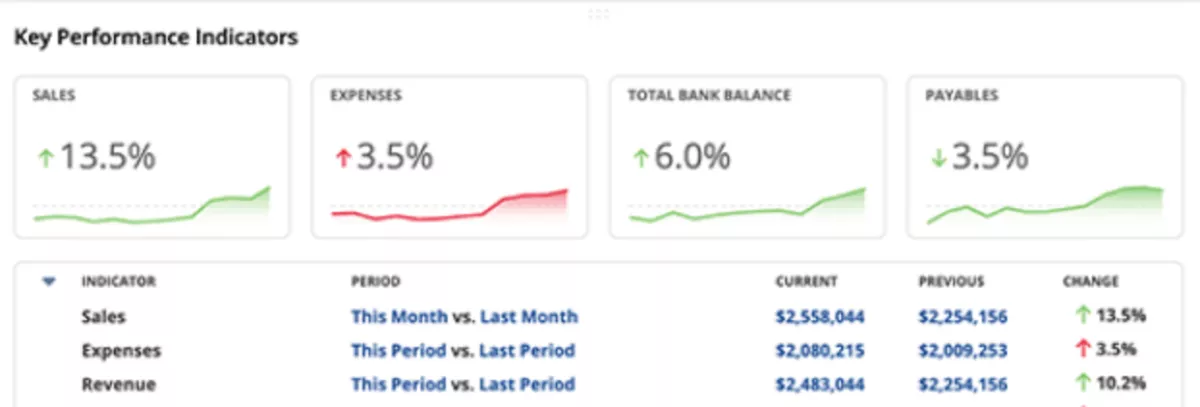
SOurce: NetSuite SuiteProjects Pro
Pros
- Project management is the strongest review-backed theme, especially for teams that need projects, time, expenses, resources, and reports in one PSA workspace.
- Reporting gets repeated praise from users who need project metrics, portfolio views, and exportable data for operational review.
- Resource management is useful for teams that need to book people, assign tasks, monitor planned hours, and connect staffing to delivery.
- Time tracking works well for service teams that need timesheets, expense entries, approvals, and repeatable weekly time workflows.
Cons
- The interface is a recurring weak spot, with users calling out dated design, UI friction, and room for a more user-friendly experience.
- Setup and adoption can be heavy, especially for teams without internal admin support or consultants.
- Navigation and search can slow users down when they need to find specific tools, timesheets, or project information quickly.
- Performance and reliability issues appear in several reviews, mostly around slow loading, glitches, or saved timesheet data.
Final Verdict
Look elsewhere if your team is not already committed to NetSuite or does not want PSA work tied to an ERP backbone.
SuiteProjects Pro is a better fit for NetSuite-centered services teams that need project delivery, time, expenses, resources, billing, and reporting closer to finance.
For more context on this overlap, use our guide to project financial management to separate delivery data from finance workflows.
4. Sage Intacct – Best for Finance-Led Professional Services Teams
Sage Intacct is cloud accounting software for finance teams that need stronger financial management, reporting, billing, and project accounting workflows.
Use it when the replacement problem sits with accounting and finance, not when delivery teams need a PSA for resource scheduling, project execution, and day-to-day services operations.
Key Features
- Core financials for accounts payable, accounts receivable, cash management, general ledger, order management, and purchasing
- Dashboards and reporting for real-time financial views
- Project accounting for costs, time, expenses, billing, and revenue recognition
- Accounts receivable and recurring invoice automation for cash flow workflows
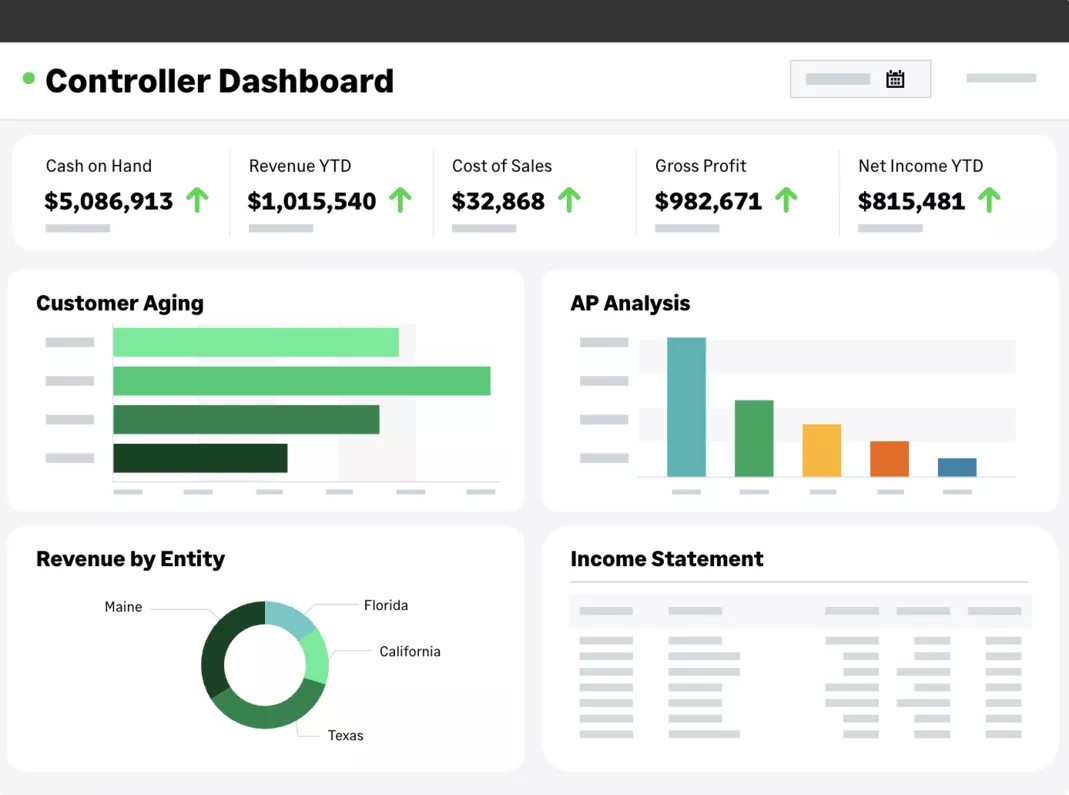
SOurce: sage intacct
Pros
- Reporting is the clearest strength, especially for finance teams that need real-time views, drill-downs, custom dashboards, and dimension-based analysis.
- Automation reduces manual accounting work across areas like accounts payable, invoicing, reconciliations, revenue recognition, and reporting.
- Daily finance tasks feel approachable for many users because searching, navigation, entries, and report access are often described as easy.
- Multi-entity and growth-stage finance teams can use it to centralize financial data, structure reporting, and support more complex operations.
Cons
- The learning curve is real for new teams, especially when they need advanced configurations, modules, reporting, or cloud accounting training.
- Some users run into missing or limited workflow functionality, including approval flow gaps and feature limits in common accounting tasks.
- Permission rules and access limitations can slow down work when finance teams need quick edits, transfers, deletions, or community support.
- The interface and configuration depth can feel less intuitive when teams need to customize reports, learn multiple menus, or train staff quickly.
Final Verdict
Sage Intacct should not be your first pick if the biggest pain is project delivery, resource scheduling, or day-to-day PSA adoption. It belongs on the shortlist when finance owns the decision and the replacement target is accounting, reporting, billing, cash flow, or project accounting.
5. Odoo – Best Free-Start Modular ERP Alternative
Odoo is modular ERP software for teams that want accounting, projects, CRM, inventory, timesheets, and other business apps in one configurable system. It is the free-start option in this list, but it works better as a flexible Cloud ERP path than as a direct PSA replacement for service delivery teams.
Key Features
- One App Free plan for one app with unlimited users
- Modular Enterprise Resource Planning apps for accounting, CRM, project, inventory, expenses, planning, and timesheets
- Customization options through Odoo Studio, custom developments, APIs, and community apps
- Connected workflows across sales, invoicing, accounting, projects, and operations
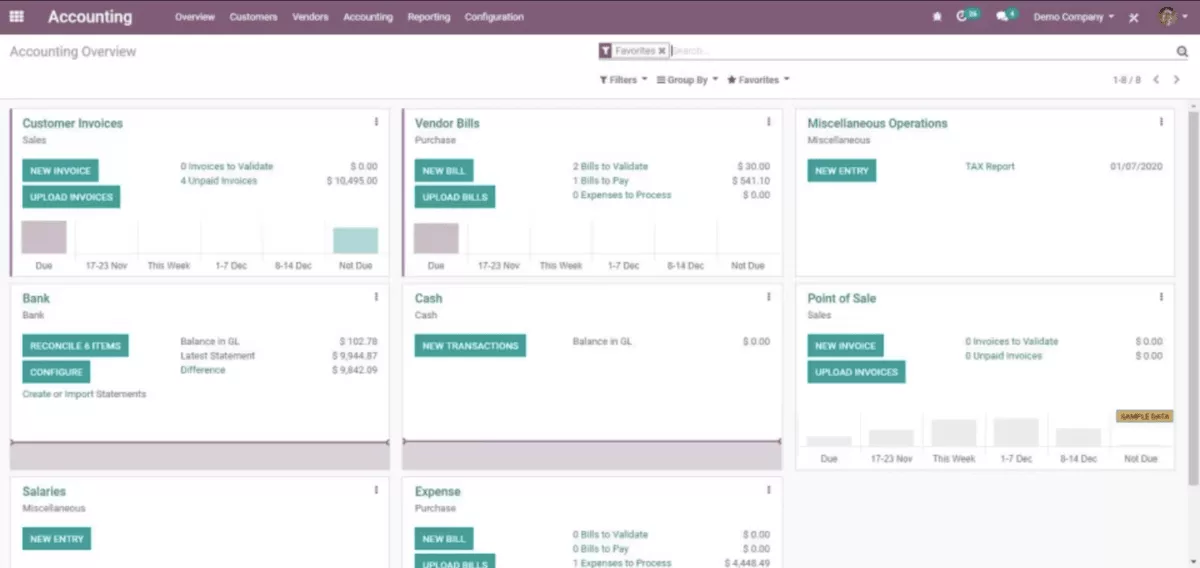
SOurce: odoo
Pros
- Odoo gives teams a broad app ecosystem, which helps when the replacement goal is one connected ERP solution instead of another single-purpose tool.
- Modularity is a real strength for companies that want to start with a few apps and add more workflows over time.
- Users often praise the interface once the system is configured, especially for navigation, daily entries, and basic operational tasks.
- Integration between modules can reduce duplicate work across accounting software, CRM, inventory, invoicing, and reporting.
Cons
- Odoo can become hard to learn when buyers add many modules, custom workflows, or country-specific requirements.
- Setup and configuration need careful planning, especially for teams without ERP implementation experience.
- Customization can add cost and complexity when the standard modules do not match the company’s exact workflow.
- Performance, navigation, and support quality are recurring concerns in reviews, especially in larger or more customized implementations.
Final Verdict
Odoo is the wrong replacement if your service team needs a purpose-built PSA with mature staffing controls, project controls, and delivery reporting from day one. It is a stronger option when you want a modular ERP system with a free-start path and enough flexibility to build around finance, operations, and general business workflows.
Why Do People Look for FinancialForce Alternatives?
People look for FinancialForce alternatives when Certinia becomes too expensive to implement, too dependent on Salesforce admins, or too slow for delivery teams to use every day. The search usually starts when leaders cannot get clean project margins, utilization, budget burn, staffing demand, or billing data without extra configuration, manual data entry, or help from finance and Salesforce specialists.
- Salesforce dependency shapes every workflow: Certinia’s Salesforce-native setup can be valuable when the company already runs on Salesforce. It can also create extra admin work when delivery workflows, permissions, reports, and integrations all depend on the Salesforce ecosystem.
- Implementation work can slow time to value: PSA deployments often require careful setup around project structures, rate cards, approval rules, billing logic, and reporting. Teams that want faster adoption may look for a replacement with simpler operating rules.
- Finance and delivery needs can pull in different directions: Finance may want controls, billing accuracy, and revenue visibility, while delivery teams need usable staffing visibility, project updates, and time entry workflows. When one system does not serve both sides well, teams start comparing separate PSA, ERP, and all-in-one options.
- Reporting gaps create project risks: Leaders need to see utilization, budget burn, project margin, staffing demand, and delivery health without rebuilding reports every week. If budget visibility is the recurring problem, our guide to managing project budgets explains which controls need to be in place before project risks show up late.
- Tool weight can outgrow the team’s needs: Some teams do not need an enterprise PSA or a Salesforce-native financial suite. They need enough structure to manage projects, resources, budgets, time, and invoices without turning everyday delivery work into system maintenance.
How to Choose Your Best Replacement? (Step By Step Process)
You should choose your best Certinia replacement by testing each tool against the workflows that break most often in service businesses: resourcing, project financials, time and expenses, billing, reporting, and Salesforce handoffs.
The right process is not to compare every feature, but to prove which tool can handle the five or six workflows your team depends on every week.
Step 1: Identify the Workflow You Cannot Afford to Break
Pick the workflow that creates the most risk when it fails. For a delivery lead, that might be staffing capacity because team changes affect timelines and margin. For finance, it might be project billing because missing time, expenses, or budget changes can delay invoices.
Write that workflow as a plain sentence: “We need to see budget burn before invoicing,” “We need to forecast staffing demand before deals close,” or “We need project margin without rebuilding reports.” This sentence becomes the main test for every vendor.
Step 2: Separate PSA Needs From ERP Needs
Use the workflow sentence to decide which category belongs in the shortlist. If the test is about staffing, utilization, project delivery, time, expenses, or services reporting, compare PSA replacements, such as PSA or all-in-one services operations tools.
If the test is about general ledger, revenue recognition, billing controls, consolidation, cash flow, or finance approvals, compare ERP and financial management tools. If both sides matter, do not force one category to solve everything. Compare one delivery-first option, one finance-first option, and one connected platform that can cover both sides well enough.
Step 3: Build a Three-Tool Shortlist, Not a Directory
Choose three tools at most for demos. One should be the strongest match for your core workflow, one should be the safest enterprise option, and one should be the flexible alternative that could reduce complexity or cost.
For example, an agency replacing PSA workflows might compare Productive, Kantata, and NetSuite SuiteProjects Pro. A finance-led professional services team might compare Sage Intacct, Odoo, and its current Certinia setup against the same billing, reporting, and approval workflows.
Step 4: Give Every Vendor the Same Five Tasks
A good demo should show your daily work, not the vendor’s favorite dashboard. Ask every vendor to walk through the same five tasks: create a client project, assign people by availability, approve time and expenses, check budget burn, and produce a project margin or billing report.
If budget control is the hardest part to replace, use a separate comparison of tools for project budget control before deciding whether your PSA can cover estimates, burn, and margin.
Do not let the demo move forward until each task is shown end-to-end. If a vendor needs exports, manual updates, custom fields, or separate tools to complete the flow, write that down as implementation effort, not as a solved workflow.
Step 5: Check the Reports Your Leadership Actually Uses
Pick the reports that drive weekly or monthly decisions. Useful tests include utilization by person or team, budget burn by project, project margin, forecasted revenue, unbilled time, open invoices, and staffing demand.
If the team also needs forward-looking planning, use our guide to budget forecasting to learn how to separate operational reports from forecast models.
For each report, ask where the data comes from, who updates it, and what happens when a project changes. The best replacement should reduce manual data entry and make the report easier to trust, not just display a cleaner chart.
Step 6: Use Reviews to Stress-Test the Shortlist
Read G2 reviews after the workflow demos, not before. At that point, you know which tools passed the functional test, so reviews can help you judge adoption risk.
Look for repeated complaints about learning curve, implementation effort, reporting friction, admin dependency, support, and daily usability. If the same weakness appears across reviews and matches a problem your team already has, treat it as a serious risk before the final decision.
How to Migrate from Certinia?
Migrating from Certinia should start by deciding which workflows are moving, which reports must survive, and which Salesforce dependencies still matter.
A PSA migration usually centers on projects, resources, time, expenses, utilization, and delivery workflows, while an ERP migration centers on billing, accounting, revenue, controls, and finance reporting.
Before cutover, assign owners for data cleanup, Access Control, integrations, BI dashboards, and customer view requirements so project risks are caught before teams lose trust in the new setup.
Migration Checklist
- Confirm what is actually being replaced: Mark each workflow as PSA, finance, Salesforce, or shared. Include projects, budgets, resources, time, expenses, invoices, revenue reports, dashboards, permissions, and customer records.
- Decide what stays in Salesforce: List every handoff between sales, delivery, finance, and reporting. Keep Salesforce-native workflows only when they still serve a clear business purpose.
- Clean the data before importing it: Remove duplicate clients, inactive projects, outdated rate cards, old services, unused approval paths, and custom fields nobody owns.
- Map project and finance data separately: Treat staffing, utilization, time, and delivery status differently from billing, revenue, accounting codes, and invoice history.
- Rebuild the reports people actually use: Prioritize utilization, budget burn, project margin, unbilled time, open invoices, forecasted revenue, and delivery health before recreating nice-to-have dashboards. If finance needs scenario planning beyond the migration itself, keep that evaluation separate with a list of financial forecasting tools.
- Test permissions with real roles: Check what project managers, finance leads, executives, and delivery teams can view, edit, approve, and export before rollout.
- Run one controlled pilot: Choose one team, service line, or client group with enough complexity to expose problems without disrupting the whole business.
- Compare old and new outputs: For the same reporting period, check whether margins, invoices, time totals, expenses, utilization, and forecast numbers match or explain the difference.
- Document the new operating rules: Write down who owns project setup, resource changes, time approvals, invoice review, report changes, and integration maintenance.
- Cut over only after signoff: Do not retire Certinia workflows until finance, delivery, operations, and leadership confirm that data, reports, approvals, and ownership rules work in the new system.
Final Thoughts
The best FinancialForce alternatives depend on the problem you need to solve first: PSA depth, financial management, modular ERP flexibility, or a connected services operating system.
If your agency or professional services team wants delivery, resourcing, budgets, time, billing, and reporting in one place, Productive is a the best all-in-one option to review.
Book a demo to see how it would fit your current workflow before you replace Certinia.
Connect With Agency Peers
Access agency-related Slack channels, exchange business insights, and join in on members-only live sessions.
