Top 10 Airtable Alternatives (Paid & Free) – Guide for 2026

This guide compares the best Airtable alternatives for 2026, so you don’t have to go over endless feature lists and tool drops.
You’ll get a shortlist of 10 tools, a comparison table, and per-tool breakdowns of key features, pros, cons, best use cases and a final verdict.
We use recurring feedback from G2 and Capterra reviews to highlight the tradeoffs that matter in real teams. To top it all off, we’ve added choosing advice for your ideal replacement.
What Are the Best Airtable Alternatives in 2026
The best Airtable alternatives in 2026 are Productive, Stackby, Notion, Baserow, Asana, SeaTable, Basecamp, Quickbase, Smartsheet, and NocoDB.
The list below has jump links, click on individual tools to zoom-in on the pros, cons, key features, and our final verdict.
Airtable Alternatives Comparison Table
If you want one tool to run day-to-day client delivery and understand profitability without stitching tools together, Productive is the strongest all-in-one option on this list.
| Tool | Best for | Database-first (Airtable-like tables) | Time tracking | Budgets and profitability view | Client-facing access | Free plan or trial | What you’ll likely still need | Avoid the tool if |
|---|---|---|---|---|---|---|---|---|
| Productive | End-to-end client delivery | No | Native | Native | Client portal | Trial | Nothing essential for running projects end to end (optional integrations only if you want them) | You only need a simple database for lists |
| Stackby | Spreadsheet-first databases on a budget | Yes | Not native | Not native | Shareable views (not a portal) | Free plan | Time tracking, budgeting, and client delivery workflows | You need strict governance or heavy automation |
| Notion | Docs, wiki, and lightweight tracking | Partial | Not native | Not native | Guests (not a portal) | Free plan | Dedicated project delivery, time tracking, and budget visibility | You need reliable ops workflows and reporting at scale |
| Baserow | Airtable-style database builder | Yes | Not native | Not native | Shareable views (not a portal) | Free (open source) | Time tracking, budgeting, client collaboration workflows | You want a polished SaaS with many native integrations |
| Asana | Task workflows and planning | No | Tier dependent | Limited | Guests (not a portal) | Free plan | Budget and profitability tracking, plus database use cases | You are replacing Airtable as a relational database |
| SeaTable | Airtable-style tables with plugins | Yes | Not native | Not native | Shareable views (not a portal) | Free plan | Time tracking, budgeting, and agency delivery workflows | You want a big native integrations ecosystem |
| Basecamp | Simple coordination and client comms | No | Limited (not core) | Not native | Client access (not a portal) | Trial | Time tracking, budgeting, reporting, structured workflows | You need automation, reporting, or data models |
| Quickbase | Governed internal apps | Partial (you build it) | Possible (depends on build) | Possible (depends on build) | Possible (depends on build) | Trial | Someone to own setup, plus agency ops features if you need them | You want plug-and-play setup with low admin overhead |
| Smartsheet | Spreadsheet planning and dashboards | Partial | Add-on/extra tooling | Limited | Client sharing (not a portal) | Trial | Time tracking and profitability, plus database-style workflows | You want Airtable-like relational databases |
| NocoDB | Airtable-like UI on your database | Yes | Not native | Not native | Shareable views (not a portal) | Free (open source) | Support, onboarding, and agency workflow layers | You want a managed tool with vendor support |
What buyers want to know fast
| Tool | Pick it when | Biggest tradeoff | What you’ll likely still need |
|---|---|---|---|
| Productive | You want one system for delivery + financial visibility | Less “build anything” flexibility than Airtable | Nothing essential (optional integrations only if you want them) |
| Stackby | You want a low-cost spreadsheet database | Not an agency ops system | Time tracking, budgets, profitability tracking, client workflow tooling |
| Notion | You want docs and light databases together | Not built for operational control | Time tracking, resourcing, budgets, and client delivery workflows |
| Baserow | You want an Airtable-style database builder | Less polish and fewer native integrations | Agency delivery layer (time, budgets, client workflows) |
| Asana | You want structured execution and timelines | Not a database replacement | Profitability and budget visibility tooling |
| SeaTable | You want Airtable-style tables and plugins | Smaller ecosystem than mainstream tools | Time tracking and financial visibility tooling |
| Basecamp | You want simple coordination with low friction | Limited automation and reporting | Budgeting, time tracking, and deeper reporting |
| Quickbase | You need governed internal apps | You own the build | Admin ownership, and possibly PSA-style finance workflows |
| Smartsheet | Your org runs on spreadsheets and dashboards | Relational database workflows are awkward | Time tracking, resourcing add-ons, and profitability visibility |
| NocoDB | You want Airtable-like UI on your own database | You own setup and maintenance | Support, onboarding, and workflow layers for agencies |
1. Productive – The Best All-in-One Airtable Alternative
Productive is built for agencies and professional services teams that run client work every day. It brings projects, time tracking, resourcing, and budgets into one place.
If you used Airtable as a lightweight database for lists and records, Productive may feel like more tool than you need. If you built a whole delivery setup in Airtable, it is a much cleaner way to run it.
The core areas of productive are:
Replace Airtable with Productive
Stop sinking time into maintaining your Airtable setup
Airtable lets you build almost anything. The catch is you end up owning the build. Views, formulas, and automations need care, and small changes can ripple through the whole base.
With Productive, you start from a project setup that is already connected. You create a project, assign work, and track progress without rebuilding your system every time the workflow changes.
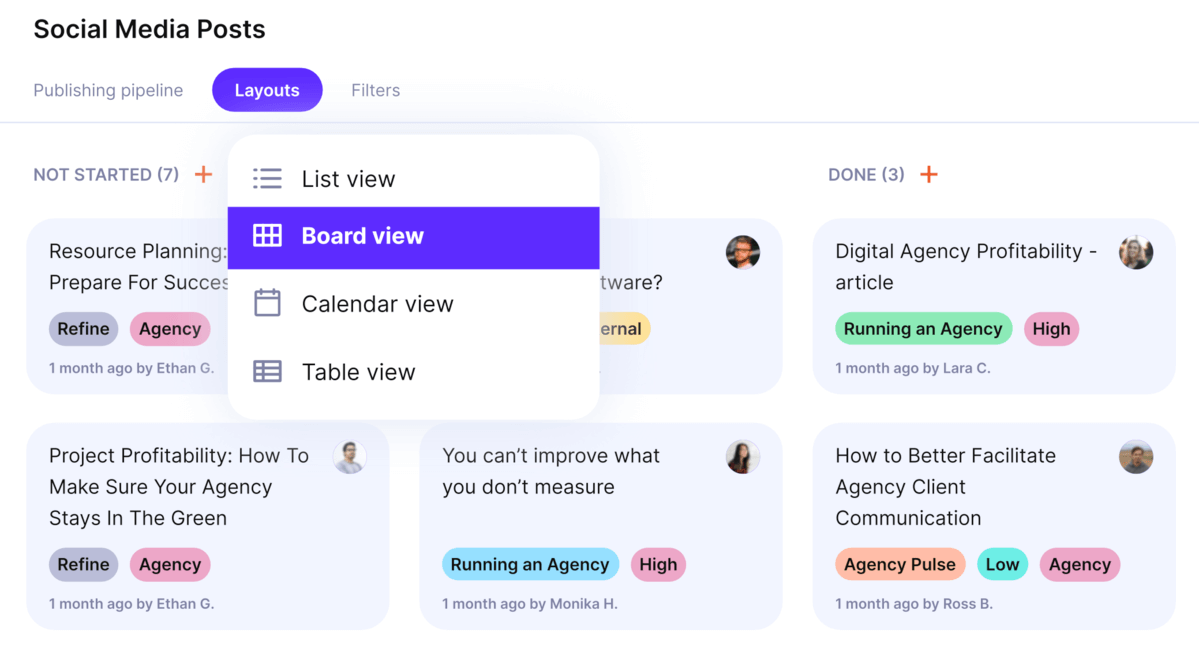
Manage projects from proposal to invoice with Productive.
Make it obvious what people should work on
When Airtable becomes your project hub, people have to learn your base structure just to answer simple questions. What is due today. What is blocked. Who owns this.
Productive is project-first. Teams work from tasks and project views, including a timeline view like Gantt when you need it. You can also use permissions and automations to keep updates moving without constant manual chasing.
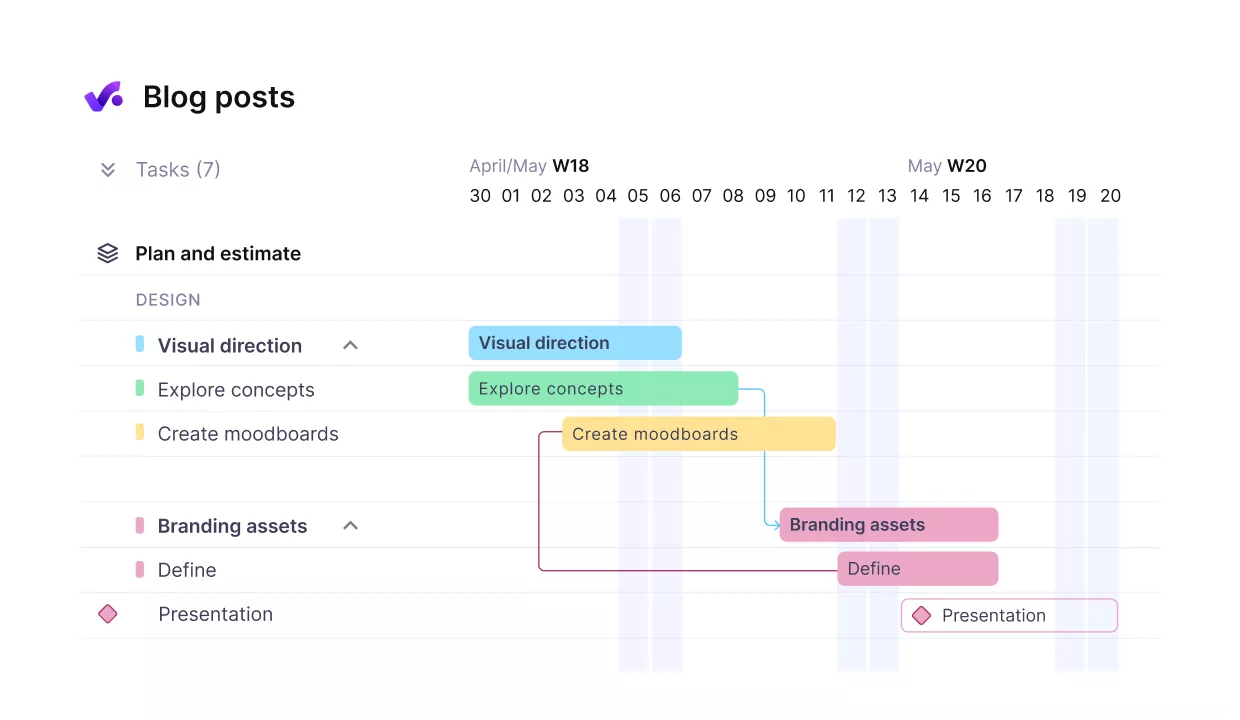
Break up work in timelines with dependent tasks.
If you want a deeper walkthrough of day-to-day delivery workflows, see agency process examples & best practices .
Keep an eye on budgets without exporting anything
Airtable is not designed to show budget status as work happens. Many teams end up exporting time and costs into spreadsheets just to see where they stand.
Productive ties tracked time and expenses to budgets, so you can see how much has been used and what is left while a project is still running.
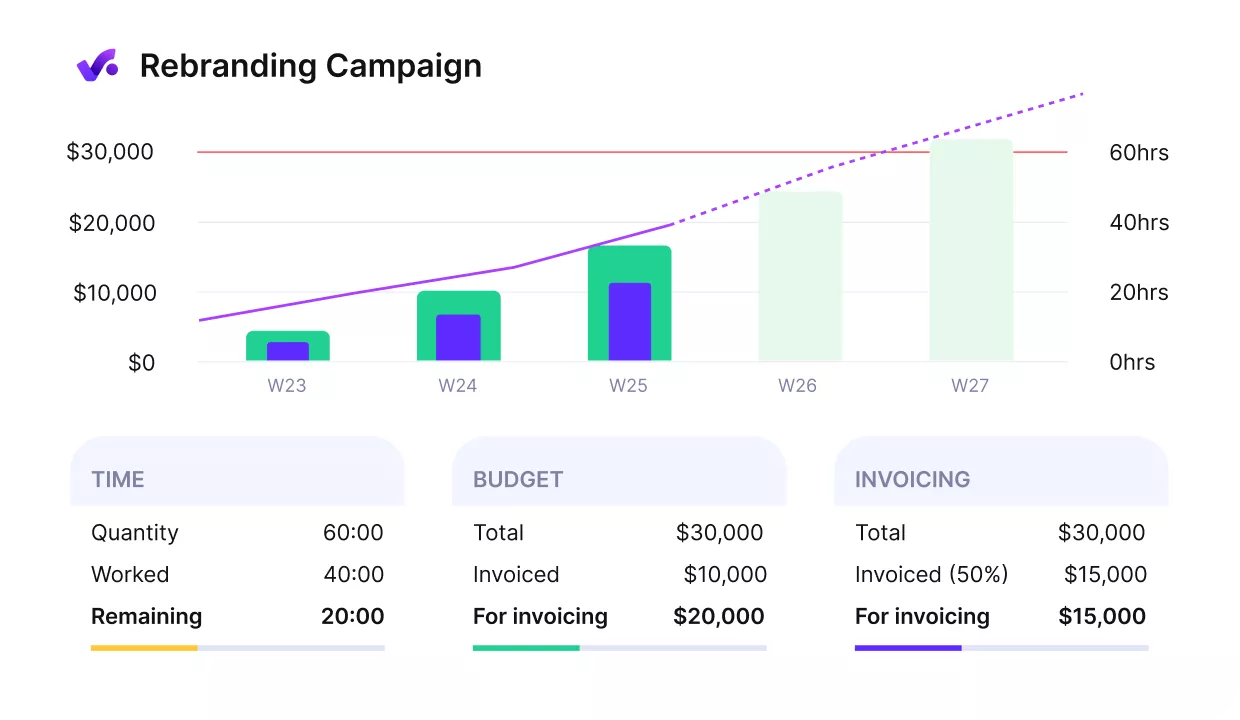
Manage projects with early alerts of budget overruns and profitability hits.
Pricing
- Plans start with the Essential plan at $10 per user per month, which includes essential features such as budgeting, project & task management, docs, time tracking, expense management, reporting, and time off management.
- The Professional plan includes custom fields, recurring budgets, advanced reports, billable time approvals, and much more for $25 per user per month.
- The Ultimate plan has everything that the Essential plan and Professional plan offer, along with the HubSpot integration, advanced forecasting, advanced custom fields, overhead calculations, and more. Book a demo or reach out to our team for the monthly price per user.
Productive offers a 14-day free trial, so you can decide if it’s the right choice for your business.
Choose the Best Airtable Alternative
Tailor your software to your business needs and workflows with Productive.

2. Stackby – An Affordable Spreadsheet-style Database
Stackby is a spreadsheet-style database that helps you track work in tables, views, and templates. Go with Stackby if your team thinks in spreadsheets and wants a quick setup. It is less suited to complex workflows where you need strict governance or heavy automation.
Key Features
- Custom database creation with Excel and Google Sheet import
- Numerous column customizations and types for easier data management
- Various ways to view and organize data, including Kanban and Table
- Extensive app integrations and powerups for complex workflows
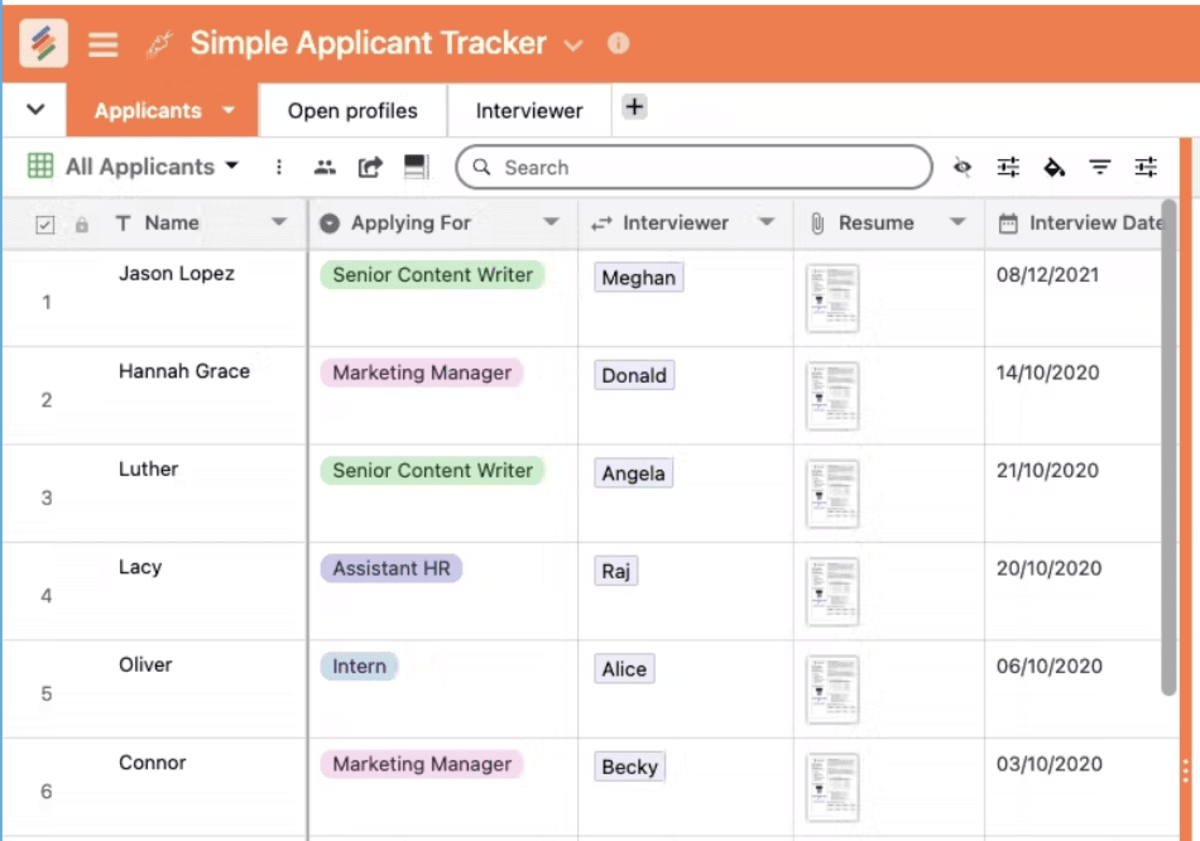
SOurce: stackby
Pros
- Many reviews mention it is easy to learn
- Users often praise responsive customer support
- A common theme is strong value for money
- Templates and add-ons come up as a real time saver
Cons
- Some reviewers want deeper customization
- Performance complaints mention slow loading or refresh times
- Bugs come up in reviews from time to time
- The mobile experience gets mixed feedback
Final Verdict
Stackby is not the right fit if your team depends on deep automations or heavy-duty customization. It works best for lighter tracking, where a simple table and a few views are enough.
3. Notion – A Flexible Workspace for Docs and Lightweight Databases
Notion is an all-in-one workspace for docs, wikis, and lightweight database views.
Pick Notion when you want docs, notes, and lightweight tracking in one place. If you need a database-first tool with strict permissions and predictable performance, you will likely outgrow it.
If you are trying to replace Airtable with a full delivery platform, this guide on end-to-end project management will help you spot what Notion does and does not cover.
Key Features
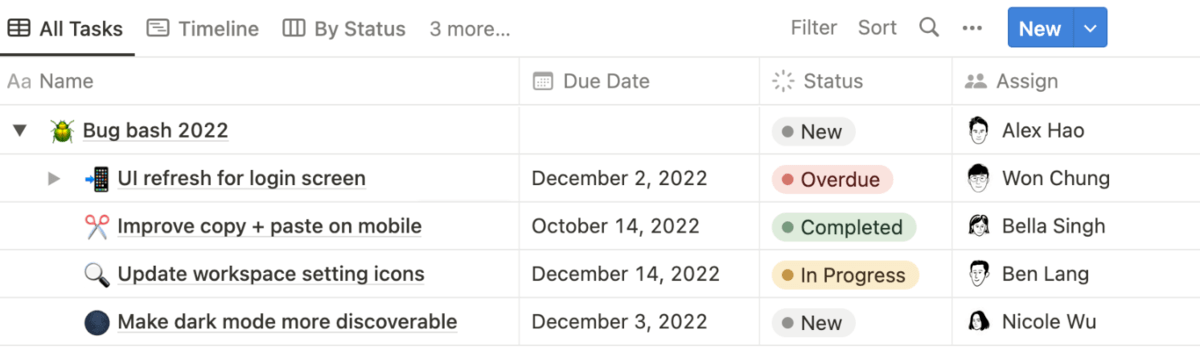
- Customizable user interface with board, table, timeline, and more customization options
- Multiple ready-made templates for various types of work management
- Team collaboration features with tasks, subtasks, and progress bars
- Native documentation and file-sharing capabilities
SOurce: notion
Pros
- Flexibility is the top praise in reviews
- Teams like keeping docs and tracking together
- Templates help people get started quickly
- Collaboration features are a frequent positive
Cons
- Expect a learning curve if you build databases
- Larger workspaces can feel slower, based on user feedback
- Admin controls and governance feel light for some teams
- Offline access is still limited
Final Verdict
Notion is not a great choice if you rely on relational data and strict admin controls. It shines for docs and lightweight databases, but larger workspaces can feel slower and harder to govern.
4. Baserow – An Open-source Airtable-style Database Tool
Baserow is an open-source, no-code database builder you can run in the cloud or self-host.
Use Baserow when open source and self-hosting options matter, and you still want an Airtable-like table view. If you want a mature app builder with a polished UI and many native integrations, it may feel limited.
Key Features
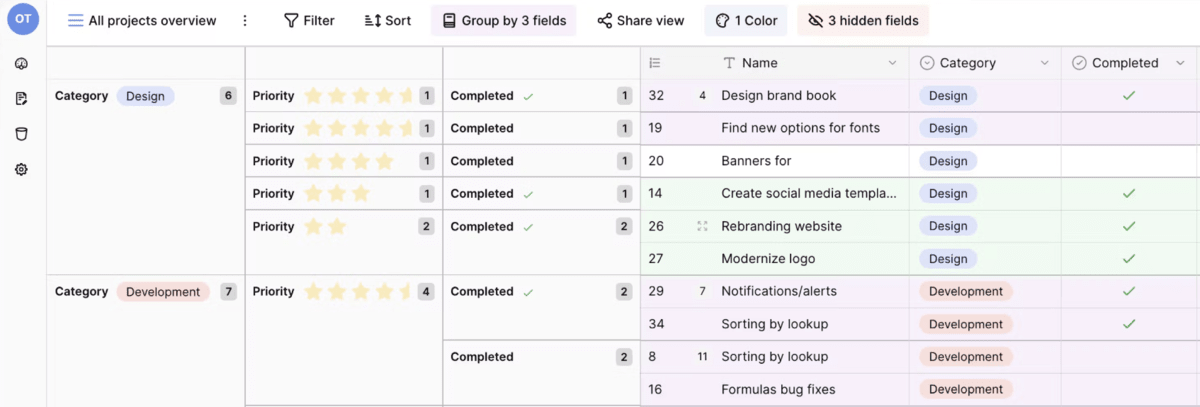
- Database Builder with designated field types, filtering, and linking features
- Application Builder with drag-and-drop components and templates library
- Options for enterprise, cloud-based, and self-hosted implementation
- Integration with Zapier for data synchronization and workflow management
SOurce: baserow
Pros
- Value for money comes up often in reviews
- Open-source and self-hosting flexibility are common positives
- The interface is frequently described as clean and simple
- API access helps teams connect other tools
Cons
- App-building depth still feels early for some use cases
- UI polish can lag behind Airtable
- Fewer native integrations than bigger platforms
- Advanced workflow features can feel incomplete
Final Verdict
Baserow is not ideal if you want Airtable’s polish and a wide set of native integrations out of the box. It is a strong option when self-hosting and control matter more than UI refinement.
5. Asana – A Structured Tool for Task Workflows
Asana is a project and task manager built for teams that want clear owners, deadlines, and a consistent workflow.
It is a solid Airtable alternative if you mainly used Airtable to run projects. It is not a database-first tool, so it is a weaker fit if your work depends on relational tables and heavy customization.
If you are comparing it with other work management tools, see our Wrike vs Asana vs Productive comparison.
Key Features
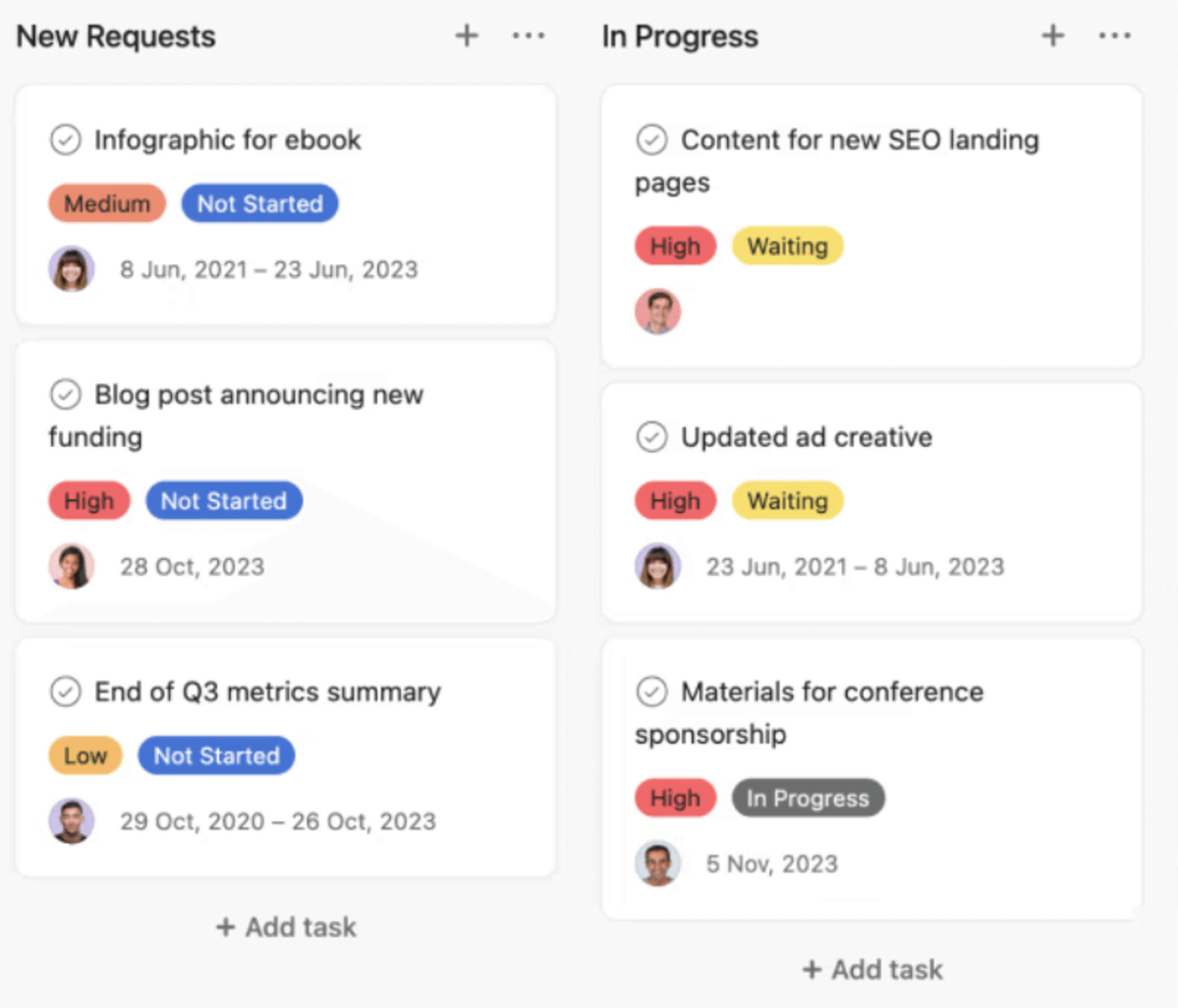
- List, board, calendar, and timeline views for projects
- Custom fields, templates, and forms for request intake
- Rules and automation, plus approval tasks for reviews and sign-off
- Time tracking fields for estimates vs actuals, with optional timesheets and budgets add-on
SOurce: asana
Pros
- Many users praise the clean interface and task organization
- Teams like having multiple views for the same work, especially Timeline for planning
- Integrations and automation rules help reduce manual handoffs
- Good for cross-team coordination when work is mostly task based
Cons
- Advanced reporting and governance can feel limited unless you move up tiers
- Some users find the setup confusing at first, especially with subtasks and dependencies
- Mobile experience gets mixed feedback
- Costs can rise quickly as you add more users
Final Verdict
Asana is not the best choice if you are replacing Airtable as a database layer. It works when the problem is delivery and coordination, but it can feel like the wrong shape once your workflow depends on table relationships and deeper reporting.
6. SeaTable – An Airtable-style Database with Plugins
SeaTable is a no-code database tool built around tables, views, and plugins, with cloud and self-hosted options.
Choose it if you want an Airtable competitor that still feels like a spreadsheet database. If you want a large marketplace, polished UX, and lots of native integrations, it may take more effort to make it stick.
Key Features
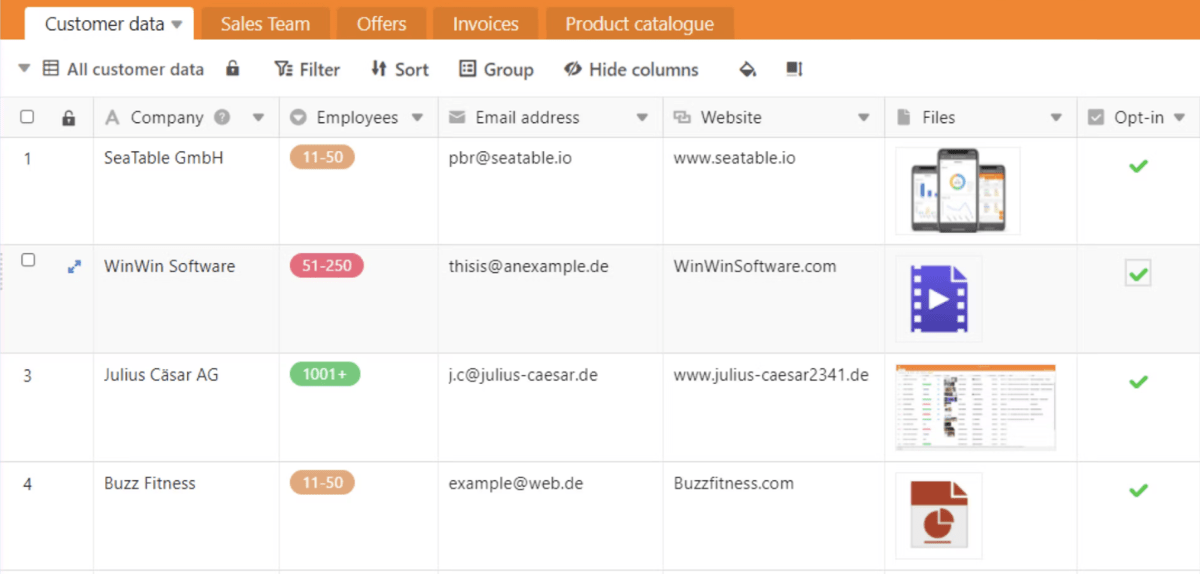
- Table-based databases with filtering, grouping, and linked records
- Views and plugins like Kanban, Calendar, Timeline, and SQL
- Templates and real-time collaboration with comments and notifications
- Cloud, dedicated instances, or on-premises deployment
SOurce: Seatable
Pros
- Users often call out flexibility for building custom processes
- Reviews highlight useful plugins for different teams and use cases
- Support and value for money are common positives
- Self-hosting options are a plus for data control
Cons
- Smaller ecosystem than bigger Airtable alternatives
- Some teams report UI rough edges and occasional bugs
- Advanced setups can require more admin work
- Fewer native integrations compared to mainstream tools
Final Verdict
SeaTable makes sense when you want Airtable-like tables and you care about deployment options. If your team needs a very polished experience and a wide integrations catalog out of the box, other alternatives to Airtable will feel easier.
7. Basecamp – A Simple Hub for Team Coordination
Basecamp is a lightweight project hub for to-dos, discussions, schedules, and file sharing.
It is a good option when you want fewer moving parts and a tool your team can learn in a day. If you are looking for apps like Airtable with database tables, automations, and reporting, Basecamp will feel too limited.
If you are evaluating simple project hubs for service teams, this list of creative agency project management software can help. You can also see more tools in our WorkflowMax alternatives guide.
Key Features
- To-do lists with owners, due dates, and simple progress tracking
- Message boards and team chat for async communication
- Schedules and check-ins for recurring work
- Docs and file storage inside each project
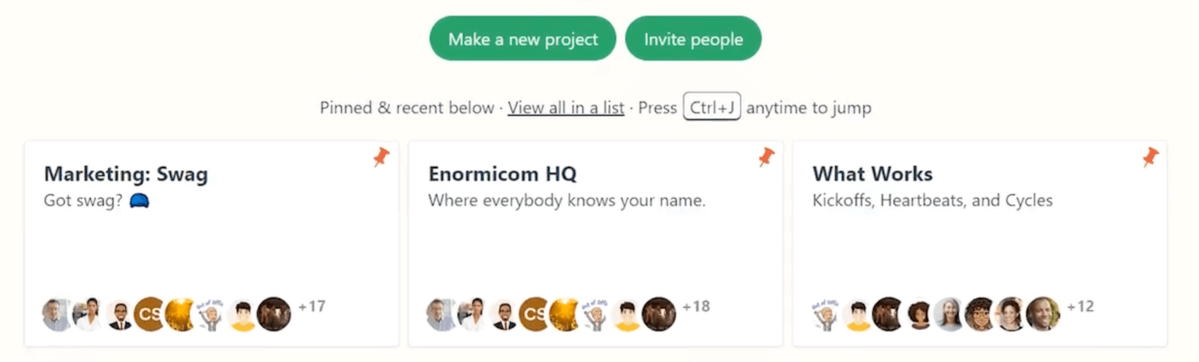
SOurce: basecamp
Pros
- Reviews often praise the simplicity and fast onboarding
- Teams like having messages, files, and tasks in one place
- Great for client communication when you want a clean project space
- Works well for smaller teams that hate complicated setup
Cons
- Limited customization, reporting, and automation
- Not ideal for complex projects with dependencies or detailed workflows
- Can feel rigid if you want to model unique processes
- Some teams want more advanced views and analytics
Final Verdict
Basecamp is a strong fit for straightforward coordination and client communication. It is not the right Airtable alternative if your workflows depend on structured data, custom fields everywhere, and repeatable automation.
8. Quickbase – A No-code Platform for Governed Apps
Quickbase is a low-code platform for building internal apps and workflows around structured data.
It works well when you need permissions, auditability, and consistent processes across teams. It is often too heavy if you just want a simple Airtable alternative for lightweight tracking.
Key Features
- No-code app builder for tables, forms, and workflows
- Role-based permissions and governance controls
- Workflow automation, including approval steps
- Reporting and dashboards, plus integrations and API options
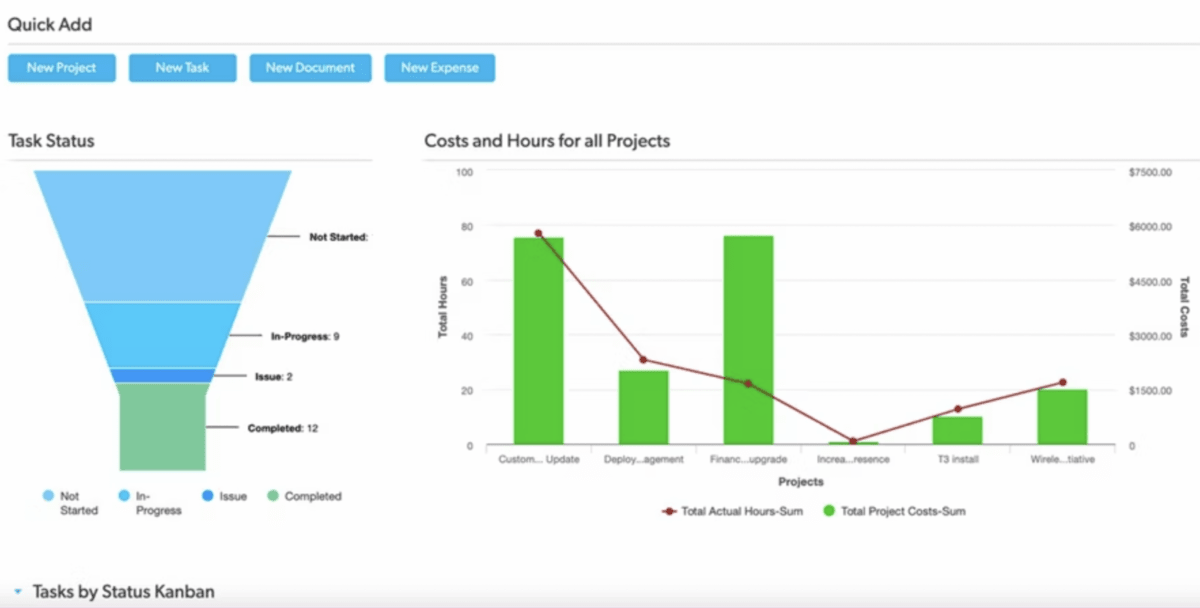
SOurce: quickbase
Pros
- Users often mention you can build apps quickly once the basics click
- Reviewers like the flexibility for custom workflows and data models
- Reporting and dashboards are a common reason teams adopt it
- Support and training resources get positive mentions
Cons
- The interface can feel dated compared to newer Airtable competitors
- Customization still takes time and planning
- Pricing can be hard to justify as more seats are added
- Admin overhead grows when the system becomes complex
Final Verdict
Quickbase is not the best fit for small teams that want something simple and fast to maintain. It makes more sense when you are willing to invest in setup so you get governance, permissions, and process visibility at scale.
9. Smartsheet – A Spreadsheet Airtable Alternative for Project Tracking
Smartsheet is a spreadsheet-like work management tool that adds automation, reporting, and dashboards on top of a sheet-based workflow.
It is a strong option if your team already plans work in spreadsheets and needs clearer ownership and stakeholder reporting. If you are looking for apps like Airtable with relational tables and database logic, Smartsheet can feel like the wrong shape.
If capacity planning is a key reason you are switching, see our capacity planning guide. If you are cross-shopping enterprise work management, our Adobe Workfront alternative guide may also help.
Key Features
- Spreadsheet-style sheets with formulas, attachments, and comments
- Gantt and calendar views for timeline planning
- Dashboards and automated reports for stakeholders
- Forms and automated alerts for intake and status updates
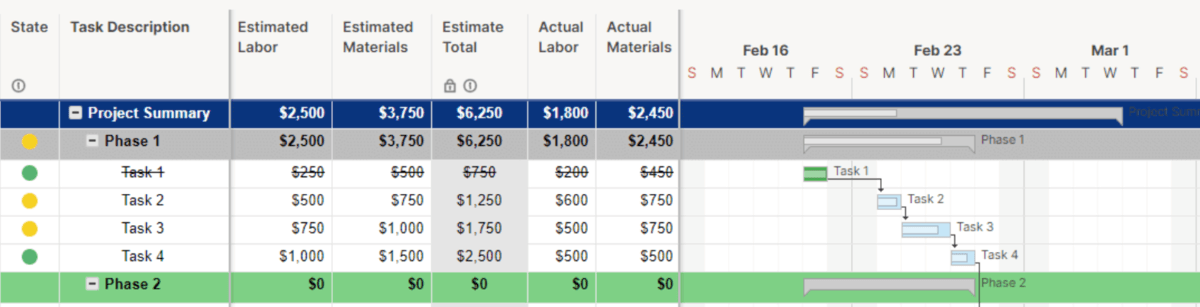
SOurce: smartsheet
Pros
- The spreadsheet interface feels familiar for many teams
- Dashboards and reporting are frequently praised
- Automation and alerts help reduce manual follow-ups
- Works well for cross-team visibility when everyone follows the same setup
Cons
- Navigation and overall usability get mixed feedback
- Licensing and pricing can feel confusing
- Customization has limits compared to a database-first tool
- Without clear rules, sheets can drift and become inconsistent
Final Verdict
Smartsheet is not the right Airtable alternative if you depend on relational data and app-like experiences. It shines when the goal is spreadsheet-based planning with better reporting and workflow control.
10. NocoDB – A Self-Hosted Open-Source Airtable Alternative
NocoDB is an open-source tool that gives you an Airtable-like interface on top of your own database.
Use it when self-hosting and data control matter, and you want a free Airtable alternative that still supports multiple views. It is a weaker fit if your team wants plug-and-play onboarding and vendor support.
Key Features
- Connects to existing SQL databases and exposes tables in a grid interface
- Views like Kanban, Gallery, Forms, and Calendar
- API access and role-based access controls
- Self-hosted deployment, with integrations depending on your setup
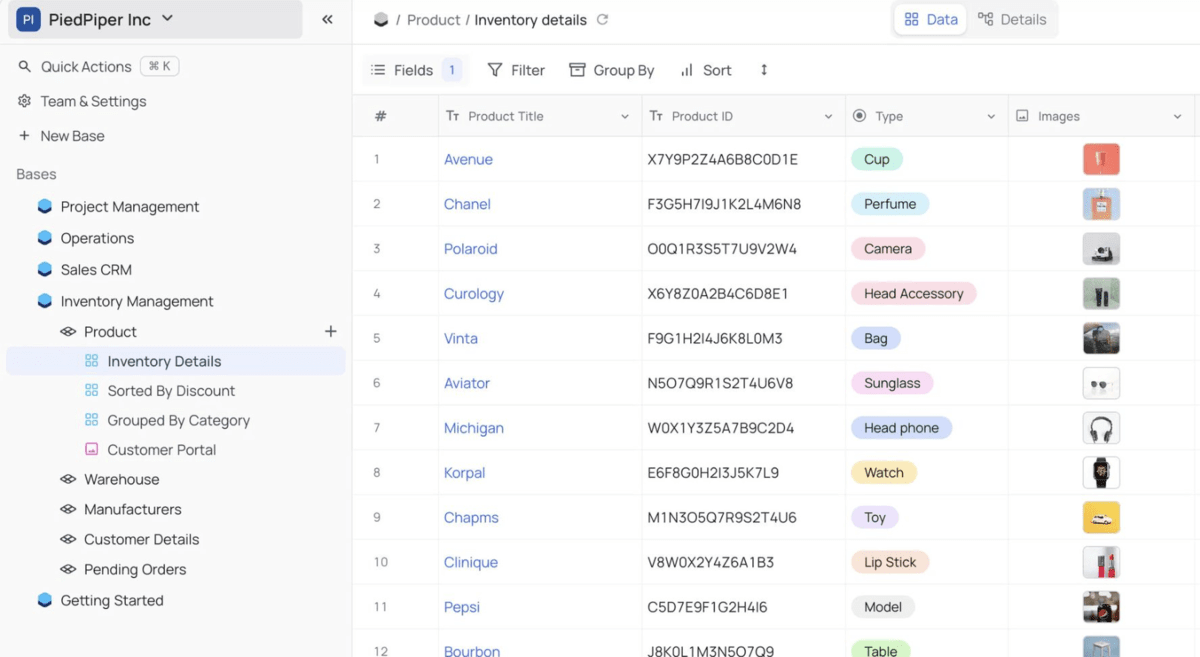
SOurce: NocoDB
Pros
- Data ownership is a major reason teams pick it
- Works well if you already have a database and want a friendly UI
- Multiple views make it easier to share data with non-technical users
- Active community and frequent updates
Cons
- Setup and maintenance require technical time
- Smaller ecosystem than mainstream Airtable alternatives
- Polished templates and guided onboarding are limited
- Some teams hit gaps on advanced permissions and workflow features
Final Verdict
NocoDB is not ideal if you want a managed SaaS with support and training built in. It is a great option when you want an open-source Airtable alternative you control, and you are comfortable running it yourself.
Why Look for Airtable Alternatives?
Teams look for Airtable alternatives because Airtable can be flexible, but it can also get harder to standardize and maintain as more people build in the same base.
One G2 reviewer noted that “the base can become messy and harder to manage” if you do not define conventions early.
A Capterra reviewer also pointed out that “some of the features are locked behind the paid plan”.
In reviews, the most common reasons for switching tend to be:
- A steep learning curve and a setup that gets messy if you do not define naming rules, relationships, and automations early
- Pricing that becomes harder to justify as more seats are added, especially when key features live on higher tiers
- Performance and usability friction on larger bases, including slower loading and more troubleshooting as complexity grows
- Workflow limits, like caps on how many automations you can run inside a single base
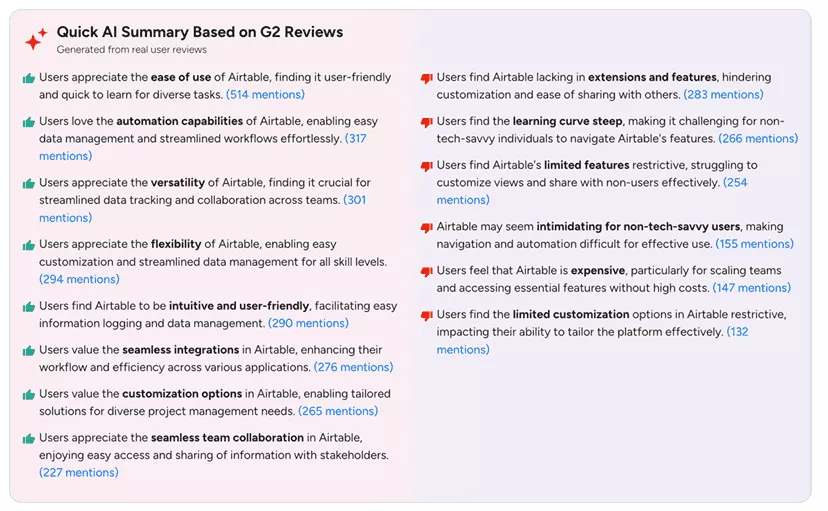
Airtable G2 reviews
What Are the Key Features of Airtable Alternatives?
The key features of best Airtable alternatives are flexible views, workflow automation, reporting, integrations, and a setup that stays manageable as your team grows.
Some tools function similarly to Airtable by using databases and a spreadsheet-like interface. Other tools solve similar needs by combining data and workflows in a single system, with capabilities from collaboration to financial visibility.
In our comparison, we focused on professional services automation tools and other options that satisfy one (or all) of these five main criteria:
- Customizable features: This includes various ways to depict or manage your data, such as custom views like a Kanban board or Gantt chart
- Automation: Automation features that work in similar ways to Airtable, such as linking various actions to reduce repetition. For example, a message is sent to Slack when a task is updated.
- Reporting: Internal tools for collating, customizing, and sharing business intelligence.
- Integrations: Considers which native integrations each tool offers and how comprehensive they are without them.
- Additional features that support day-to-day operations : For example, capacity planning (which can include resource plans and workload balancing), project budgeting and forecasting, and CRM tools
No matter how complex your software solution is, it should provide a hassle-free experience.
Therefore, we’ll also consider whether a particular tool is user-friendly and intuitive and how steep the learning curve is based on user reviews.
Learn more how DotDev grew 50% while using Productive.
Final Takeaway: What Are Common Alternative Solutions to Airtable?
Common alternative solutions to Airtable usually fall into two buckets: database builders that mimic Airtable’s table model, and work management tools that focus on standardized delivery workflows.
- Tools like Productive provide a single platform for your data, but focus less on flexibility and more on offering a structured approach to business management.
- Baserow and Stackby are both very similar to Airtable, though they offer slight differences. Stackby is considered more affordable and streamlined, while Baserow is open-source and offers self-hosting.
- Notion is a streamlined option for documentation and lightweight collaboration when you don’t need a full database builder.
The right software can integrate project management, resource planning, and client collaboration, responding to dynamic requirements from various agencies.
All this with a user-friendly interface and responsive customer team to make implementation and onboarding a smooth experience.
Book a demo with Productive to see how easy it is to upgrade your project management game with data tracking and seamless workflows.
FAQ
Which Airtable alternatives are open source?
The most notable open-source Airtable alternatives in this guide are Baserow and NocoDB. Other open-source options you can look into include Grist and Rowy.
What are free Airtable alternatives?
The best free Airtable alternatives depend on what you mean by free. Some tools offer free plans with limits, while open-source tools can be free if you self-host.
If you want to start with options from this list, look at Notion and SeaTable for free plans, and Baserow or NocoDB if you are open to self-hosting.
What are the best free Airtable alternatives?
Airtable and Baserow are both low-code relational database software solutions that offer the creation of customizable apps.
The biggest difference is that Baserow offers self-hosting and is open source, while Airtable is a cloud-based SaaS software solution only.
Is there a free alternative to Airtable that you can self-host?
If self-hosting is a must, Baserow and NocoDB are two popular picks. The tradeoff is that setup, upgrades, and maintenance sit with your team.
Which Airtable competitors are closest to Airtable for databases?
If you want an Airtable competitor that still feels like a spreadsheet database, start with Baserow, SeaTable, NocoDB, or Stackby. They focus on tables, views, and structured data instead of just tasks.
What apps are like Airtable but better for project delivery?
If you used Airtable to run client work, you may get more value from a structured platform than a database builder.
Productive, Asana, and Smartsheet are often a better fit when you need consistent workflows, clearer ownership, and reporting.
What is a good Airtable alternative if you mostly need docs and lightweight tracking?
Notion is a strong Airtable alternative for teams that want docs, wikis, and simple databases in one workspace.
It is less suited to database-heavy operations where you need strict governance and predictable performance.
What is the difference between Airtable vs Baserow?
Airtable and Baserow are both low-code relational database tools that let you build customizable apps. The biggest difference is that Baserow is open source and can be self-hosted, while Airtable is cloud based.
What is the difference between Airtable vs Notion?
Airtable is a spreadsheet-based database tool built around structured tables and views. Notion is a workspace that combines docs with lightweight databases, and it is usually a better fit when documentation is the main need.
What is the difference between Airtable vs NocoDB?
Airtable is a managed SaaS tool, while NocoDB is open source and typically self-hosted. NocoDB gives you an Airtable-like interface on top of your own database, which is great for control but adds setup and maintenance work.
Connect With Agency Peers
Access agency-related Slack channels, exchange business insights, and join in on members-only live sessions.
