Product Updates
Every week we deliver new features, updates and bug fixes.



Product Updates, Delivered — Get monthly updates to your inbox.
Modules

October 2026
NEW RELEASE • OCT 6 2026
Productive 5.4
How did your Q3 wrap up? We closed ours with a busy month, and plenty of new features to show for it.
The AI Assistant now supports voice to text, so you can chat to it instead of typing. Additionally, we released the Slack Connector, which vastly improves how you can work with AI in Slack. Other big features include significant improvements in Proposals, and managing overtime in Time Tracking Policies.
AI ✨
- You can now talk to Productive 🎙️ Dictate messages in the AI Assistant, as well as in task and document comments, so you can write prompts and replies faster.
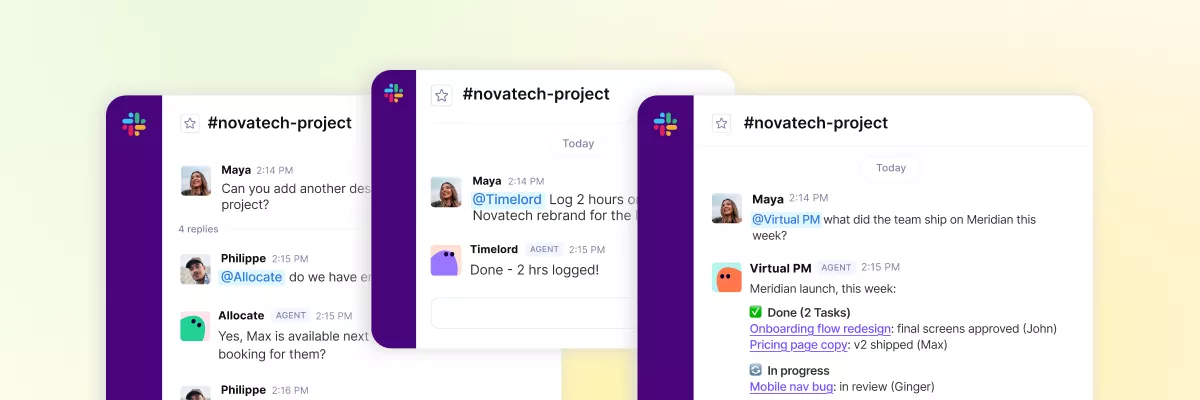
- With the new Slack Connector, you can do so much more in Slack, with the help of AI: Search for files, post messages, and ask for summaries of channel activities. And it works with Agents, too — mention agents in Slack and let them post updates in channels or even straight to your DMs.
- The AI Assistant just became an expert on Productive. Ask anything and get an answer grounded in articles from our Help Center, with screenshots and sources.
- From now on, GPT-5.6 Terra is the default model in the AI Assistant. If you’d like to change to a different model, you can do that from the AI Assistant > Settings > Model.
- You can also choose the model and thinking effort that your Agents run on. You can tweak this in Agent Details for each individual agent.
- Don’t want to use certain models? Admins can now restrict the AI models their organisation has access to in Settings > AI.
- Do you have an Artifact that you use regularly? Favorite it, so you can find it in the Favorites sidebar, or in Artifacts Library > Favorites.
Notetaker 🗒️
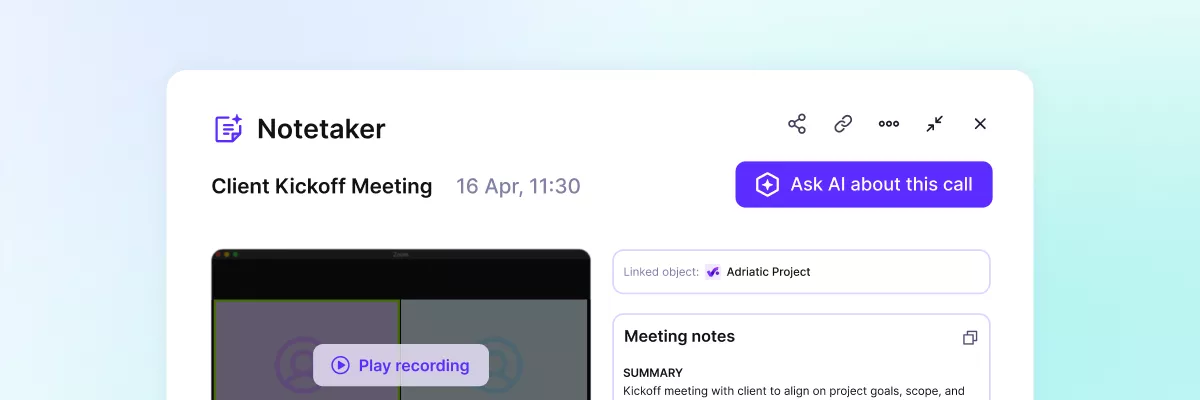
- When you link a meeting to a Deal, it will automatically be shared with the Deal Owners and members, so everyone can get access to relevant information.
- Need more recording hours? Admins can now add a Notetaker package through Billing > Add-ons, without going through a sales representative.
Budgets & Deals💰
- There has been a suite of improvements to Deal financial forecasting, previously known as Deal revenue distribution: you can now enter fixed revenue amounts per period, add revenue distribution start or end dates to Deal reports, and more.
- Overhead costs can now be calculated per subsidiary (per person), so only the work done within your subsidiary is counted as overhead. To see hours people outside of your subsidiary tracked on your budgets, you can use the Intercompany hours field.
- When adding Services in Budgets/Deals, you can now add descriptions to each section. You’ll also find this as a new field, Section description, which you can use in Reports.
- Additionally, the Document Templates for Budgets/Proposals can now include Section descriptions. You’ll find this under Customization > Table. Some options have been renamed to accomodate for this update (ex. Table heading > Section name), but they work the same.
- Check out two new fields in your Services tab and reports: Tentative scheduled time and Future tentative scheduled time. This is especially useful when applying Scenarios, so you can see the full picture of your resourcing.
- In Services, your discount per line item can now added as a percentage, or a fixed amount.
Deals: Proposals ✏️
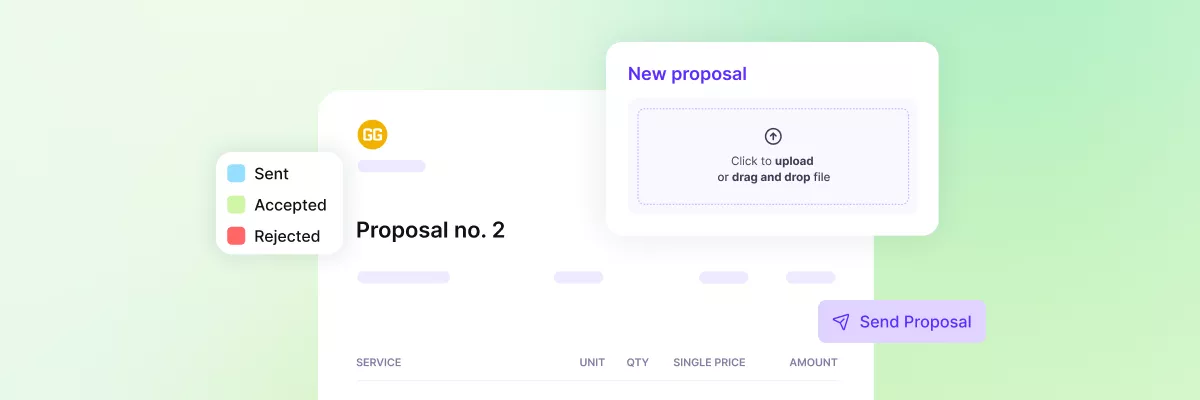
- Proposals can now be created in more ways: from a Scenario, or by uploading an existing PDF. This means that you can use the client signing flow, even if you don’t use Productive to create your sales offers.
- Speaking of signing, clients can now also decline a proposal and add an optional reason, which will be displayed on your proposal.
- When sending a Proposal by link, there are now additional security options: email verification, link expiry, and password protection.
- Each proposal now has its own unique number, so you can keep your document versions in order. Quick tip: Create a custom numbering scheme with the deal_number variable to keep it connected to its Deal.
Integrations 🧩
- Microsoft Office 365: Approved Time off in Productive will now create a matching event in your Outlook Calendar, so it’s visible in your schedule.
- In Netsuite, created Invoice Payments can now be synced into Productive.
Project Management ✅
- When setting up a Project Template, you can now define people placeholders and set relative dates. For example, set a “Designer” placeholder on a task, that you can switch out for a person later. Or, set a task deadline to be “10 days after Project Start”.
- You can now create Tasks without having to sort them into a Task list first. All tasks created like this will be sorted into “No task list”.
- In Docs, you’ll notice a series of dashes that represent your headings. Hover over them to expand the full document outline, and navigate to the heading you’re interested in.
Resourcing 👥
- Group and Sort in the Resource Planner to get more clarity over bookings. For example, group people by Role to see everyone working as a Designer, or group Budgets by Client to see all of a client’s Budgets at a glance.
- A small but impactful change: In the “by Budget/Deal” layout, you’ll now only see budgets and deals that span the particular period you’re viewing, so you don’t have empty items cluttering up your view.
Time Tracking ⏰
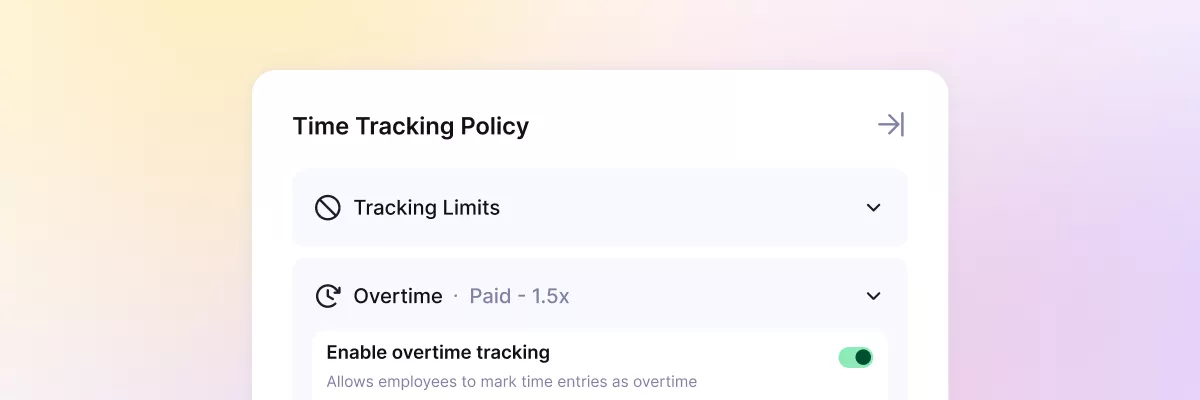
- You can now track overtime. In Time Tracking Policies, define how much more expensive overtime hours are with a coefficient, define which users can track overtime, and see the split between regular vs overtime hours worked in the new Overtime by person report.
- When restarting a timer during your time tracking, you can now set it to create a new entry, instead of resuming an existing one. You can find this option in Settings > Time Tracking.
Settings & Platform ⚙️
- There’s a new type of custom field: Progress custom field. Define a minimum and maximum range, and as you fill in values, a chart will appear to visualize your progress. You can use it in Projects, Tasks, Budgets, or wherever fits best.
- In Table columns (Layout > Table), you can now enable text wrapping, so that the contents are fully displayed. Just click on the column and toggle the new Wrap text option.
- There’s a new Superadmin permission: Change manager and subsidiary, so you can regulate who can carry out this action in Productive.
- Your Settings have been redesigned. The navigation now includes a fixed, always-visible sidebar that you can click through more easily.
Introducing Overtime Tracking in Productive
Get a full overview of how much your OT hours cost in Productive. ⏱️ Set which projects allow overtime tracking, use a prebuilt report Overtime by person report to see the costs and hours breakdown across your team, or just ask the AI Assistant to give you quick insights. It’s available now, in the Ultimate plan.
September 2026
NEW RELEASE • SEP 2 2026
Productive 5.3
In this release, the AI Assistant gets a few new tricks, including the ability to create templates, remember context in Docs, and follow your own instructions. Plus, we’ve added Auto-Join to Notetaker, two new Connectors, and plenty of smaller improvements across Project Management, Resourcing, Reports, and Time Tracking.
AI ✨
- Choose your preferred model to power the AI Assistant, be it Claude, Gemini, or ChatGPT.
- Artifacts now have their own dedicated library, from where you can share, send, or edit them.
- Use the AI Assistant to create templates in the Template Center. Use prompts like: “Save this budget as a template” or “Create a project from the Monthly Advertising Retainer template”.
- Numerous under-the-hood improvements for when you’re using AI with Docs: For example, Agents can now access version history context and tell you what the Doc you edited two weeks ago was.
- Add your own instructions to the AI Assistant, so you don’t have to repeat them in every single chat.
- Define AI Champions, those are your teammates who lead the implementation of AI features in your Productive account.
Notetaker 🗒️
- Toggle Auto-Join to have the Notetaker join all of your meetings. It will check your calendar every 15 minutes and will be present in all your meetings in the next 30 days. Of course, you can always disable it for certain meetings.
Budgets & Time Tracking💰
- User Roles are a new way to classify people across your organization. Unlike job titles, they’re defined on an organizational level in Settings > Roles, and are more suitable for Reporting, Resourcing, and financial features.
- The AI Assistant can now manage Time Tracking Policies, meaning that it can create, update, and assign them to a specific user.
Integrations & Connectors 🧩
- We’ve added two new Connectors: Carta and Clay. To connect them, an Admin needs to enable them first in Settings > Connectors. Then each user can add them in Settings > Connectors and use them across the AI Assistant, Agents, and Skills.
Project Management ✅
- The option to minimize Tasks has been phased out. You can use the Favorites option to access your frequently opened Tasks quickly, or you can ask the AI Assistant.
- Task Hierarchy (Task > Subtask) will now be shown when sorting Tasks in the List view, but there’s a toggle to turn it on or off, depending on how detailed you want to see it.
- Filters are now remembered on each Project’s Time tab. This means that every Project can have its own unique set of filters.
Resourcing 👥
- When using the Resourcing tab on a single Project, you’ll now be able to access Tasks as well – there’s a dedicated panel.
- If you drag a Task from the panel mentioned in the point above to the resource planner, it will create a prefilled booking form.
Reports & Dashboards 📈
- When creating Tasks in Resourcing, you’ll now be able to see the planned time along with other data (billable time, worked time, initial estimate) in Reports.
- Customize Reports and Dashboards by changing the color of chart segments.
August 2026
NEW RELEASE • AUGUST 6 2026
Productive 5.2
This release includes a little bit for everyone: new ways to set up agents, tools to keep time entries complete, extra context when you schedule, and a brand new integration.
AI ✨
- AI can now read many more file types. Upload your images (png, jpeg), textual (txt, rtf), PDF, Word, and Excel (csv, xlsx) files, and AI will be able to read content from them all.
- We’ve improved the look and feel of your prompt visualizations, or Artifacts. Have a bunch of project data you want to clearly showcase? Just ask the Assistant to pull the information and create an artifact, then download it as a PDF or HTML file.
Agents 🤖
- Action triggers now work within agents. This means that you can set agents to trigger automatically at the exact moments that matter — like when a budget is created or a task is updated. This unlocks a lot of additional workflows, so check it out and see what you can build.
- Note: the “Start Agent” option has been removed from Automations, as this is now part of the agent workflow.
Notetaker 🗒️
- Meeting notes with your action items can now be sent directly to your email. You can turn this on as an individual setting in Notifications > Meetings > Meeting summary.
Budgets & Deals 💰
- There’s a new permission that allows you to choose whether the same person should edit the full time entry or expense, or simply the billable details: Edit billable details.
- The timesheet PDF that is attached to your invoices can now be customized. Just go to Settings > Invoicing and add a report as your new template.
- You can now change which currency is displayed on your Budget & Deal Overview tabs.
- You can now more easily add Services from rate cards by filtering and searching the table for individual rates.
- Expense forms have been updated with a description field, so you can add as much information to them as you need.
Docs ✍️
- In Docs, each page that has subpages can now display them as a hyperlink in the header, so you can easily view and navigate to them. Choose whether you want to see your subpages in the Document menu > Show subpages.
- There’s also a brand new Table of Contents element, that shows a hierarchical list of all headings in the document and updates automatically. Clicking on a heading will send you to that exact one for easier navigation.
Integrations 🧩
- You can now integrate Productive with Microsoft Teams. The personal integration lets you receive your notifications in Teams, but you can also set up an organization-wide integration to send reports and automated messages to channels.
- The BambooHR integration now includes user filtering, so you can choose which employees are synced into Productive. Additionally, you can choose which categories will sync as time off or WFH, or will not be synced into Productive.
- We rolled out big improvements to the Visma E-conomic integration: Paid and booked invoices are now detected far more reliably — with payment status, invoice links, PDFs, and invoice numbers all kept in sync automatically. You can also book invoices directly from Productive on export, and bookings are picked up in real-time, instead of periodically.
Resourcing 👤
- In the Resource Planner, you can now get context from one layout, while scheduling work in another. For example, in the “by project” layout, click on a person’s name and a panel will open on the bottom, showing their full schedule and capacity. The Resourcing Panel is also editable, so you can make quick changes without navigating off your screen.
- There’s a new Planning tab in each user’s profile, which you can use to get a quick look into your or anyone else’s schedule, depending on user permissions.
- Resource Request forms have been simplified so they’re quicker to fill out — the optional max cost per hour field is now under “Requirement”, and can be added to the form if necessary.
- Additionally, you can now use fields from linked Budgets and Deals to filter, group, and report on your Resource Requests.
Time Tracking ⏰
- On individual Budgets and Deals, you can now choose whether tasks and/or notes are mandatory for each time entry logged, keeping entries complete and consistent. You can find this option in the Budget/Deal sidebar > Settings > Time entry requirements.
- Changes on time entries can now be tracked in the Audit log. Under Filter > Type, choose Time entry to see changes and updates, and who made them.
- For non-Ultimate organizations that use the Time approval feature, new budgets will have the budget owner set as the approver by default.
- Small visual fix: In the Calendar view, all-day events that stretch throughout multiple days are more clearly depicted.
System ⚙️
- In Settings > Usage, admins can now see the usage on their Automations and Meeting hours in one place.
- When you’re creating a new Deal, Budget, or Project, you can now quickly add a new Company, even if you need to fill a required custom field first — previously, you would have to set the Company up in your CRM first.
More Ways to See Who’s Scheduled and Where
We’re introducing three new features that let you plan resources where you’re already working: Check out the new Planning tab to see individual schedules, manage your resourcing directly in Projects, and borrow context from multiple layouts to get the full picture in the Resource Planner.
July 2026
4 New Features That Make Deals Work the Way You Do
Deals just got a major upgrade. Four new features make managing your pipeline easier than ever: represent recurring contracts as a single retainer Deal, manage Deal Value, add multiple stakeholders to a single Deal, and track progress with new Deal Aging fields.
NEW RELEASE • JUL 2 2026
Productive 5.1
In this release the AI Assistant learns a few impressive new tricks, Retainer Deals finally land in Sales, and there’s a brand new billing type that does the maths for you. Plus plenty of smaller improvements across the board.
AI ✨
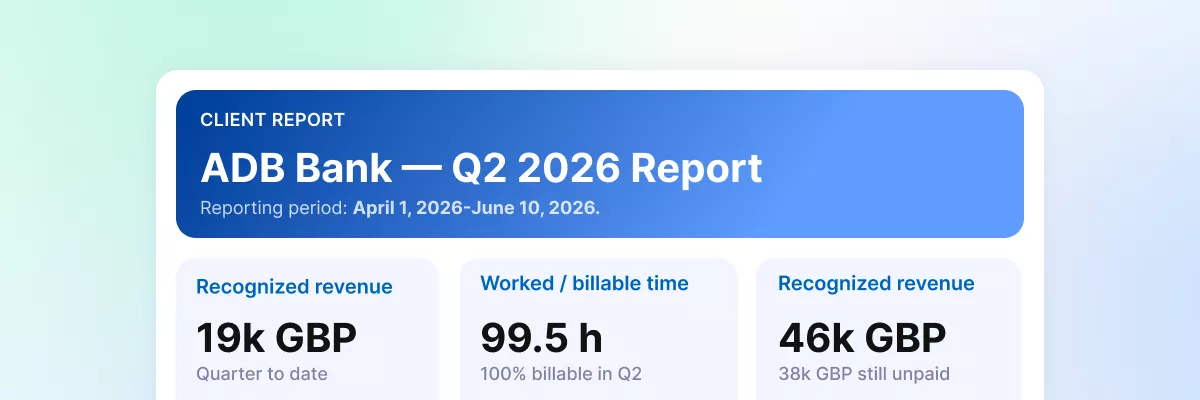
- The AI Assistant can now create Artifacts (or visualizations). Describe what you want – like a “Q2 client report”, and you’ll get an entire visual dashboard with your data, ready to download as a PDF or HTML file.
- Report interpretation gives you instant data visibility. Ask The AI Assistant for a one-sentence summary or a full report on the state of your business: profitability, utilisation, time off, revenue forecasts, and more. You get the exact data you need, written in plain language, not a complex report you have to interpret yourself.
- The AI Assistant can now work with Scenarios in the Scenario Builder. It can create them, but also compare and apply them if you ask.
Automations 🤖
- When you create a Project from a template, all Automations from that template now come along with it.
- Custom fields are now available as rules in Automations. For example, an Automation can start when a certain custom field value is added.
- Automations built through the AI Assistant are now more accurate.
Budgets & Time Tracking ⏰
- We introduced a brand new billing type that lets you add a fee automatically calculated as a percentage of the revenue recognised on other billable services in the same budget section. You’d use it whenever you charge a fee that’s proportional to the rest of the work, such as a 10% project management or studio fee applied on top of all the billable services in a budget section.
- Should you need it – approvers can now edit submitted time entries.
Integrations & Invoicing 🧩
- You can now send Invoices, Purchase Orders, Proposals, and payment reminders using your email integration, whether you’re on Google Gmail or Microsoft Outlook.
- Payment terms now come with three options: invoice date, end of the month, or due upon receipt. You can modify each of them with extra days, and define them for specific companies or for all clients.
Project Management ✅
- We made numerous under-the-hood improvements to Docs, so your tables will look better than ever.
Resourcing 👥
- We’ve rolled out a big UX update to the Booking popover in Resourcing, making it much more streamlined for creating and managing Bookings. You can now switch between a Compact state and an Expanded state that opens in a sidebar, keeping all your resourcing context visible.
- You can also see the remaining hours left on a Service, which supports resourcing much better than the old Worked/Estimated fields, and you can even define whether that calculation includes future scheduled hours or not.
- A project manager (as a role) can now be added as an approver on absence approval policies.
Reports & Dashboards 📈
- Reports can now be grouped and sorted by data on adjacent objects, meaning you can group Budgets by project manager or client, or sort time entries by Project name.
- You can now manually define recognised revenue in Productive. When set, this will override your default revenue recognition settings. As always, this applies to fixed service types only. Time and materials will continue to follow the usual logic.
Sales 💰
- Retainer Deals are here, letting you represent an entire recurring contract as a single Deal. Once this type of Deal is won, it automatically creates a recurring Budget, which allows for much more accurate financial tracking and organisation.
- When creating a new Deal, the numbering sequence is now separate from Budgets.
System ⚙️
- When filtering, you’ll now see frequently used filters, including suggestions from our side as well as your own once you start adding them.
- Custom fields can now be managed in bulk, so you can add a certain type of custom field to multiple Projects with just one click.
- When importing a CSV file, you’ll now get a more detailed error message if something is wrong with the file, so you know exactly what to fix.
- Workplace is now renamed to Subsidiary across the app.
- If you’re using Adobe Acrobat or a similar Chrome extension, all PDF files will now display their actual file name instead of a generic “document.pdf” name.
- Using our desktop app? Be sure to update it to v1.17.3.
- Thanks to a new custom permission, users can now see their own cost rates on their profile, under the Cost Rates tab.