Staffing and Scheduling: Key Differences and Best Practices

Some can mix up staffing and scheduling, while in reality they solve different problems. In professional services, knowing each well is key to avoiding overbooking employees and eroding margins.
This guide covers how the two differ, how they work together, and what it costs when they go wrong. We’ve also included a step-by-step process for creating a project schedule, best practices for staffing and scheduling, and how tools help.
Key Takeaways
- Staffing sizes the team; scheduling assigns it to projects: staffing is whether your portfolio has the right people for incoming work, and scheduling puts named people on specific phases.
- Idle capacity, overbooked seniors, and turned-away work are the costs of getting staffing and scheduling wrong: you pay for unbillable time, your senior workers burn out, and potential work is left on the table.
- Reserving capacity early, buffering bookings, and cross-training keep staffing and scheduling steady: you hold capacity as soon as a deal closes, leave room in bookings for scope creep, and make sure no single role can stall a project.
- A resourcing tool shows availability across projects and connects bookings to budgets and financials: you see who is free and whether a project is still profitable, without stitching it together by hand.
What Is Staffing and Scheduling?
Staffing is building the right billable capacity across engagements, and scheduling is assigning named people to specific project phases. We’ll take a closer look at each.
Staffing Is Building the Right Billable Capacity Across Engagements
Staffing is capacity planning: having the right people and skills ready for the work coming in. Get it right, and you can take on a new engagement without overloading current teams or eroding margin on live work.
It runs on the unglamorous parts: tracking skill mix, managing bench time between engagements, and forecasting hiring lead times against demand. The core question is easy to ask and hard to answer: who has genuine capacity for a new client, across every team and role?
Scheduling Is Assigning Named People to Specific Project Phases
Scheduling puts named people on specific project phases and resolves the clashes when the same person is needed in two places. It assigns specialists to client work. So when a senior designer is booked on a brand refresh and a product launch at once, scheduling surfaces the conflict before it hits delivery.
The challenge grows with team size. As more projects run in parallel, the gap between who looks available and who is genuinely free widens. A shared schedule closes that gap by making bookings explicit, visible, and tied to real capacity.
The contrast between the two is clearest side by side.
What Are the Core Differences Between Staffing and Scheduling?
The core difference between staffing and scheduling is that staffing is the strategic, longer-term work of building capacity, while scheduling is the operational, short-term work of allocating it. The table below breaks down the contrasts through a professional services lens.
Comparison: Staffing vs. Scheduling
| Dimension | Staffing | Scheduling |
| Time horizon | Weeks to months ahead | Days to weeks ahead |
| Decision type | Strategic (hire, bench, restructure) | Operational (book, allocate, reassign) |
| Primary question | Does the portfolio have the right capacity? | Who does this phase, and when? |
| Key input | Sales pipeline, utilization targets, skill gaps | Project phases, team availability, existing bookings |
| Key output | Headcount plan, bench management decisions | Published schedule, booking confirmations |
| Margin lever | Bench cost, hiring cost, utilization ceiling | Overallocation, overtime, idle time, delivery risk |
| Owner | Operations lead, resource manager, leadership | Delivery director, project manager, resource manager |
| When it breaks | Wrong skill mix for incoming work | Senior people double-booked; deadlines missed |
| Utilization link | Sets the target the team should hit | Determines whether that target is met |
The distinction matters because the fix is different. Low utilization from a thin pipeline is a staffing and business development problem. Low utilization from poor booking practice is a scheduling problem, solved by keeping coverage aligned to project phases. Treat one as the other, and you waste time and money.
Now that we know the difference, let’s look at how the two work together.
How Do Staffing and Scheduling Work Together?
Staffing and scheduling work together as a closed loop: good staffing creates the capacity pool scheduling draws from, and scheduling data feeds back into staffing decisions. We’ll take a closer look at each direction.
Good Staffing Creates the Capacity Pool Scheduling Draws From
Good staffing sets the ceiling. Hiring, bench management, and utilization targets decide how many hours of each skill are available across the portfolio.
Say a product launch lands that needs a senior designer already leading a brand refresh. Because staffing planned for it, a delivery director can put a mid-weight designer on the concept phase without a conflict. The capacity is there to draw on.
Scheduling Data Feeds Back Into Staffing Decisions
Scheduling data is an early warning for staffing. When the same few senior people are booked over capacity, week after week, that is a sign of understaffing, not just a scheduling problem.
The firm needs to hire, shift work to more junior staff, or push back on new business. Left alone, that pattern risks overtime and turnover.
Next, let’s look at what poor resourcing actually costs your firm.
What Does Poor Scheduling and Staffing Cost Your Firm?
Poor scheduling and staffing cost your firm margin in three places: idle bench time, overbooked senior staff, and work you turn away because you cannot see spare capacity. We’ll take a closer look at each.
Idle Time Erodes Margin
Every hour a billable person sits unscheduled is a direct cost. Salaries, benefits, and overhead continue whether or not that person generates revenue.
Missed revenue like this is easy to overlook. A missed deadline gets noticed right away. Low utilization often is not, because many professional services still track it by hand.
Productive’s Reporting breaks down utilization by person, so a dip is hard to miss.
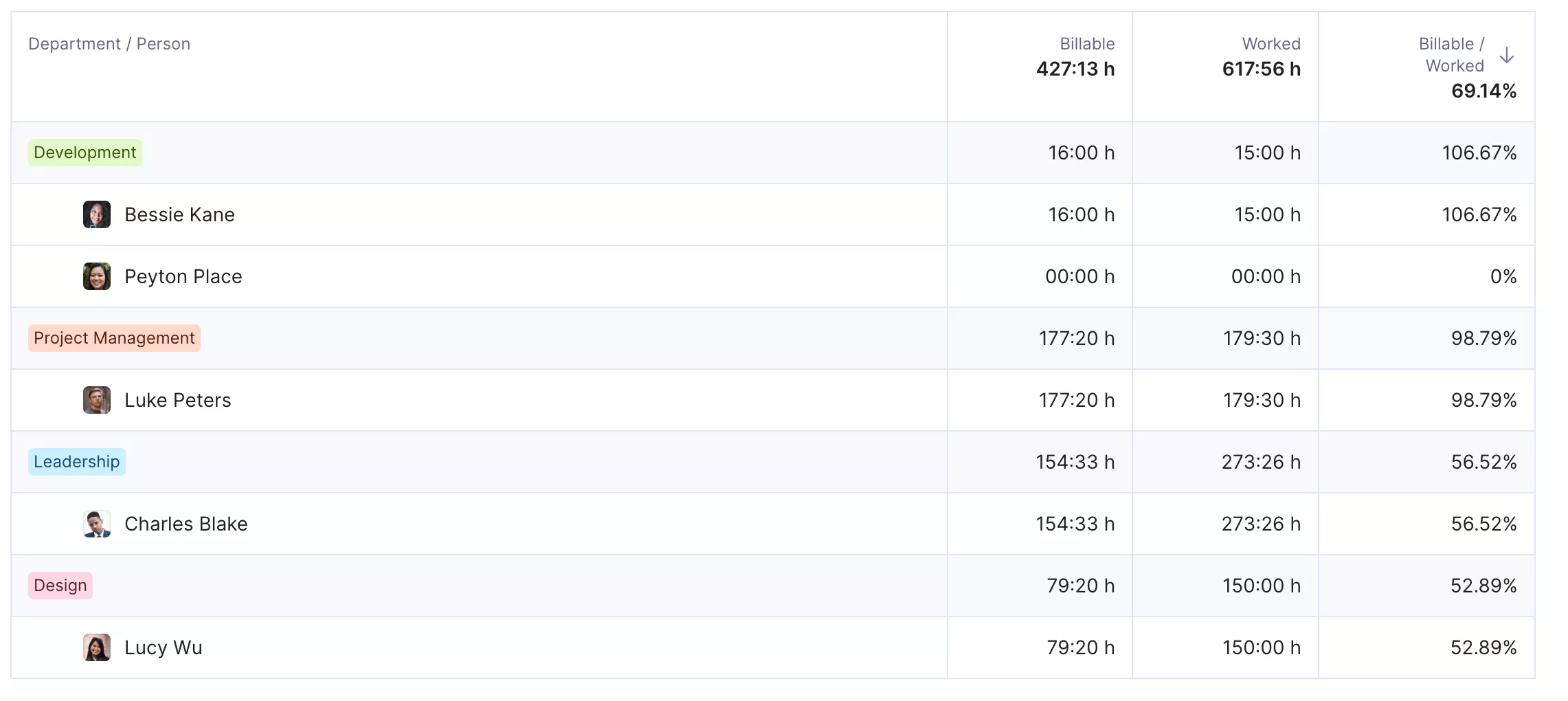
Pull up utilization reports in Productive
You can also set up utilization targets for each team member to see precisely how they are performing against their goals.

We can pull up data really quickly now, tailor it to our needs, and create all kinds of reports in a fraction of time compared to before.
Read the full story on how Degordian optimized business results with Productive.
Overbooked Senior Staff Raise Delivery Risk
When the same senior designer carries two overlapping engagements at full capacity; delivery risk on both rises. Overtime creeps in, deadlines slip, and quality drops.
The longer-term cost is employee burnout and the turnover it drives. Eagle Hill Consulting’s 2025 workforce survey found that 55% of US workers report burnout, and that burned-out employees are nearly three times more likely to plan to leave. Overbook your senior people month after month, and you pay to recruit, onboard, and ramp their replacements.
Work You Turn Away Because You Cannot See Spare Capacity
The flip side of idle bench is saying no to work you could have delivered. When no one can see who has real capacity, the safe answer to a new engagement is “not right now.” A firm that cannot confidently say yes leaves billable work, and revenue, on the table.
The same blind spot delays starts. A project waits a week not because no one is free, but because no one can prove it.
You avoid most of these costs by planning the schedule deliberately.
What Are the Steps To Create a Project Schedule?
A project schedule comes together in six steps: develop the work breakdown structure, define work packages and activities, define dependencies, define resources, define the timeframe, and analyze the schedule. This scheduling process follows PMI’s scheduling best practices.
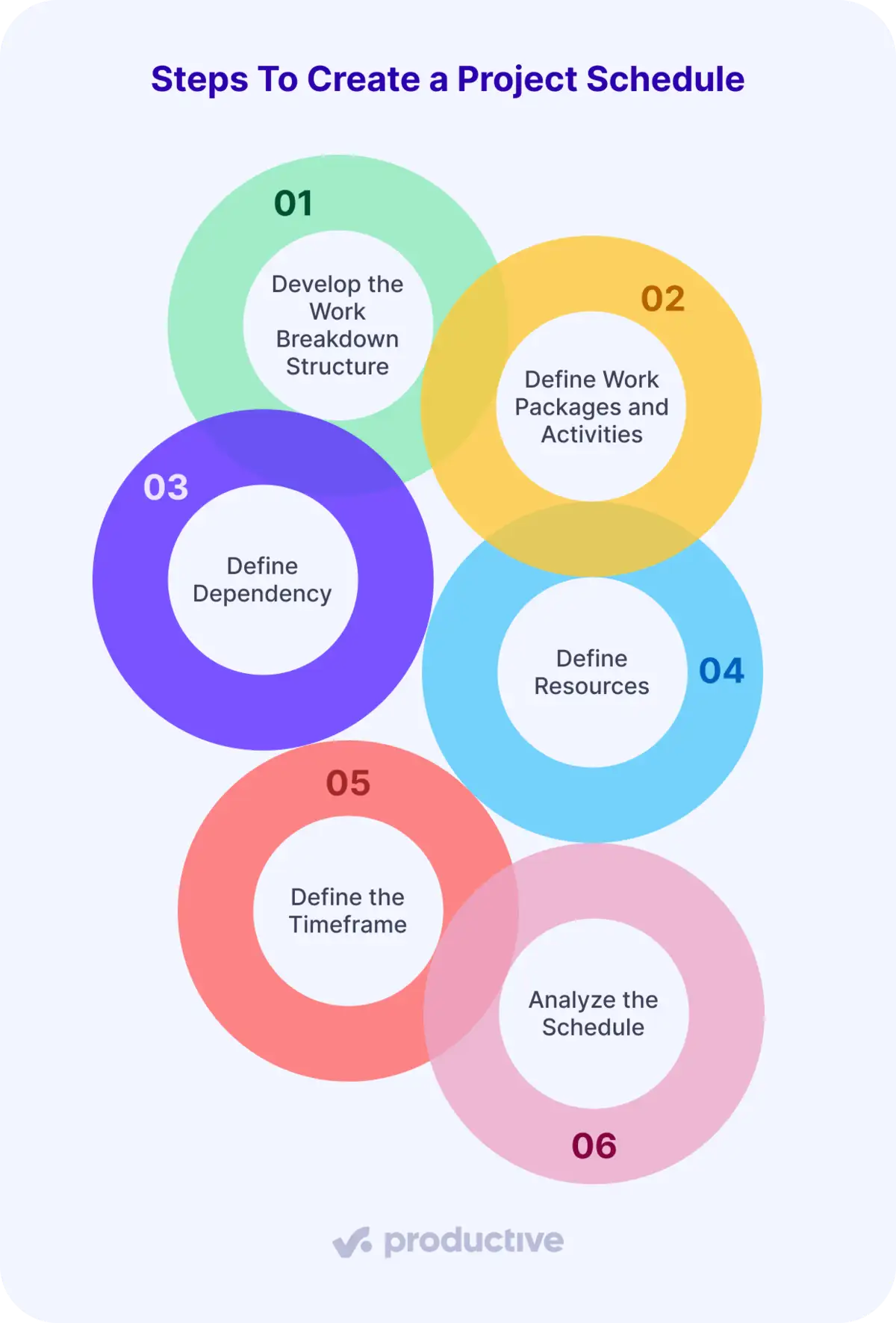
We’ll take a closer look at each.
Step 1: Develop the Work Breakdown Structure
A work breakdown structure (WBS) splits a project into smaller, manageable pieces before you assign a single date or person. It makes the full scope visible so nothing slips through once you start booking people. Most teams organize it by deliverable (the assets or outcomes you owe the client) or by phase (discovery, design, build, QA).
Step 2: Define Work Packages and Activities
Break each branch of the WBS into work packages: chunks small enough to estimate, schedule, and assign with confidence. Inside each package sit the activities, the specific tasks a person performs.
This is where a vague “design phase” becomes wireframes, two review rounds, and final handoff, which is what you can put hours and a name against.
Step 3: Define Dependencies
Put the activities in the order they have to happen. A dependency is the real link between two tasks, like build cannot start until the client signs off on designs. Mark which tasks block others, and flag the external ones, such as client approvals, content, or access, since those quietly stall an agency schedule.
Our project scheduling guide breaks down the four dependency types and the rest of the process in detail.
Step 4: Define Resources
Now attach real people to the work and confirm the hours exist. Compare demand, the hours the project needs, against staff availability, the hours your team can give once you subtract time off and existing bookings.
Productive’s Resourcing Agent can read a project’s resource needs, suggest and match the best available person, and draft a schedule from current capacity. The allocation call then starts from options, not a blank timeline.
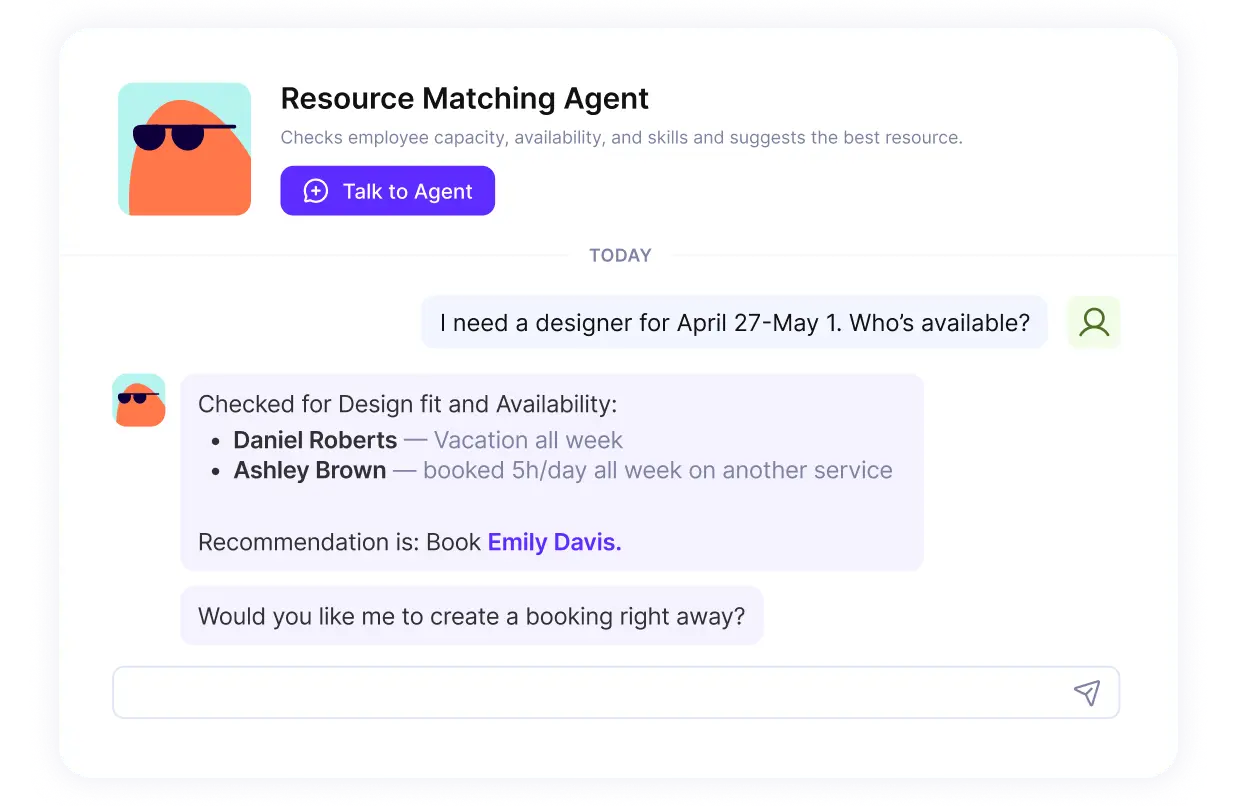
Let Agents match people to work, in Productive.
Try out Agents in Productive.
Step 5: Define the Timeframe
Turn the sequenced, resourced tasks into dates. Estimate how long each will take, but treat the numbers as ranges, not promises, especially for new or complex work. The aim is a timeline that bends without breaking when a revision round lands or an approval runs late.
Step 6: Analyze the Schedule
Before work starts, pressure-test the plan. Check that contractual dates, milestones, and delivery commitments still hold now that every task, dependency, and booking is in place. It is far cheaper to catch an over-committed senior designer or an impossible deadline here than in week three.
A schedule you build once is only as good as the habits that keep it accurate.
What Are the Best Practices for Resource Scheduling and Staffing?
The best practices for resource scheduling and staffing are reserving capacity at deal-won, building scheduling buffers for scope creep, and cross-training to remove single points of failure.
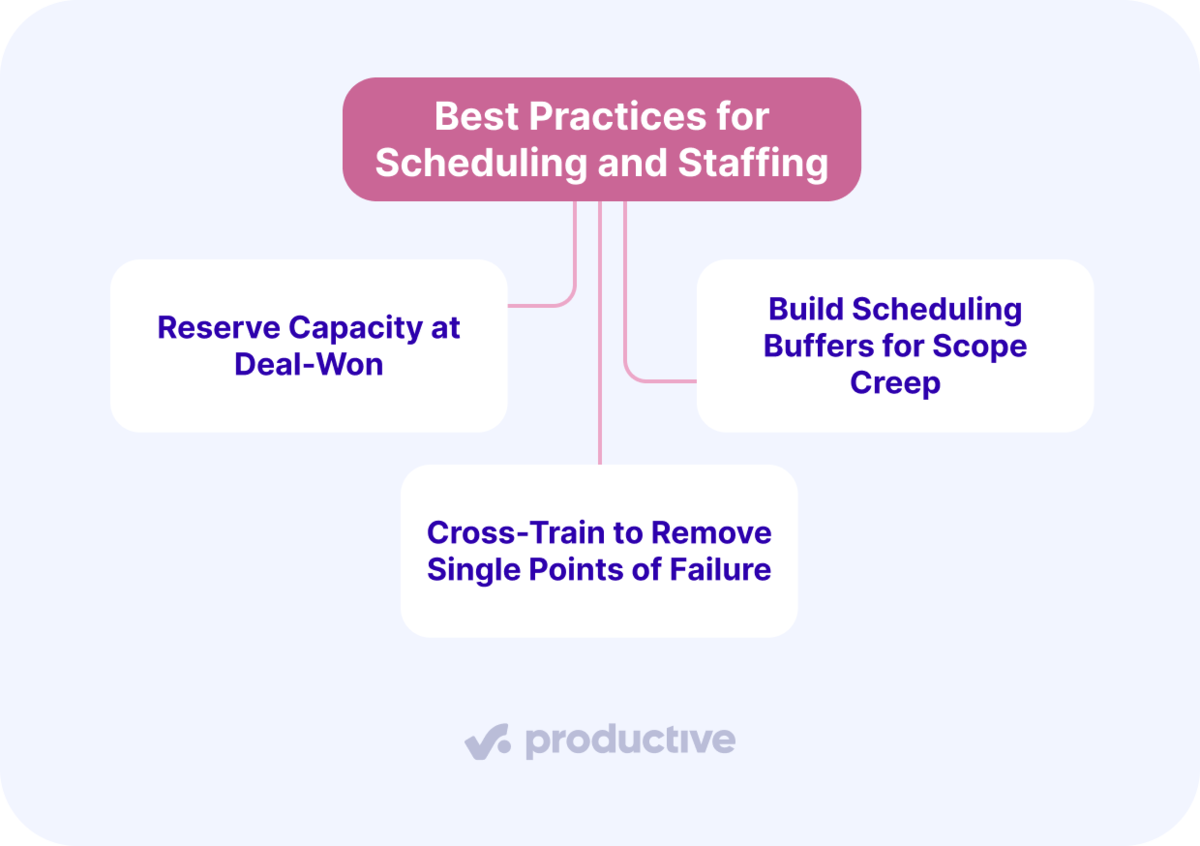
We’ll take a closer look at each.
Reserve Capacity at Deal-Won, Not at Kickoff
Reserve capacity when a deal is won, not when the project kicks off. By the time a project formally starts, the specialists it needs are often already booked, so you either delay the start or pull someone off another client. Reserving earlier avoids both.
In practice, this is demand forecasting. The resource manager reviews the pipeline weekly, flags deals likely to close in the next four to six weeks, and holds tentative bookings against them.
Build Scheduling Buffers for Scope Creep
Scope creep is a familiar problem in professional services. A booking that fills someone to 100% of their hours leaves no room for last-minute changes, like an extra round of revisions or a brief that expands mid-project.
A practical buffer is leaving some of a project’s hours unbooked, instead of scheduling every hour against a task. That slack absorbs the extra work scope creep brings, without missing the deadline or pulling someone off another client to cover it.
Cross-Train to Remove Single Points of Failure
Cross-train so more than one person can cover specialized work. When only one person can do a type of work, every scheduling decision involving them carries delivery risk. If the senior designer is unavailable, the project stalls.
A mid-weight designer who has shadowed senior concept work can carry a phase alone, freeing the senior designer for the work where their involvement is irreplaceable. It also cuts the risk of leaning on a small group of specialists for every high-priority project.
Habits hold better when the tool behind them connects the dots.
How Do Resourcing Tools Help Staffing and Scheduling?
Resourcing tools help in two ways: they show who is genuinely available across every project, and they connect bookings to budgets and financials. We’ll take a closer look at each.
They Show Real Availability Across Every Project
The first job of a real tool is to show who is genuinely free. A shared view across every active project puts current bookings, utilization, and time off in one place, so someone on leave never reads as available.
Spreadsheet scheduling struggles to keep up with this. A weekly export could be stale by the time it is shared, and it can be difficult to track new bookings and approved leave in real time.
They Connect Bookings to Budgets and Financials
Seeing availability tells you who can take the work. Connecting that to money tells you whether the project stays profitable. Bookings need to connect directly to budgets and financials, or the firm reconciles instead of deciding, and labor costs stay hidden until they’ve already eaten into margin.
Productive connects operations and finance, so logged time and resource bookings automatically update your budget overview. A manager can monitor real-time profitability from there. Forecasting charts show whether a project is tracking to margin, all in one tool.
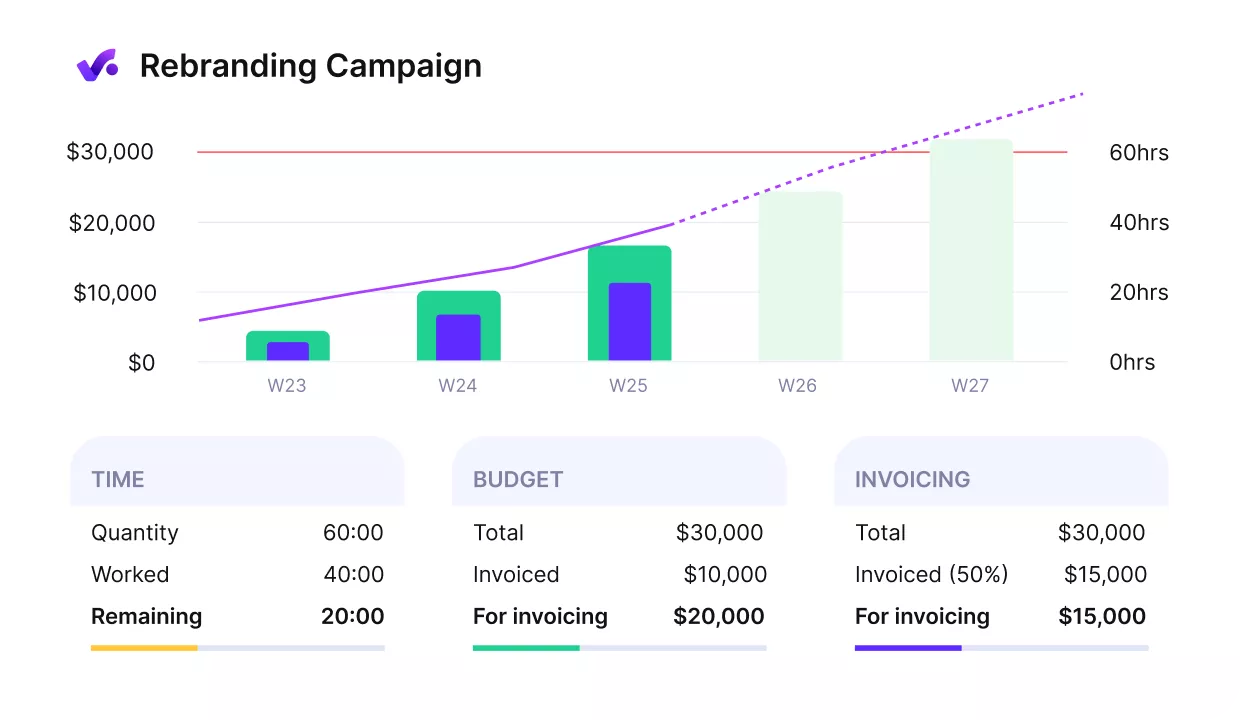
See real-time profitability in Productive.
If you are comparing tool options, our list of resource scheduling software is a good place to start.
Keep Your Resources in One Place
Scheduling resources breaks down when the project, the budget, and the logged hours live in separate tools.
Productive solves this by bringing project management, time tracking, and budgets together in one place. Your schedule stays current in real time, with no worries that anything gets left behind.
If you want that peace of mind, book a demo with Productive to see it in action.
Schedule Your Resources in a Single Tool
A project schedule gives clarity when it is updated in real time. Productive links resources, budgets, and time tracking in one place.
