Resource Management in 2026 – A Practical Guide

Without effective resource management, even well-planned projects can suffer from misaligned assignments, scope creep, and profit loss. To avoid these challenges and bring clarity to your resource planning, stick with this guide.
Inside, you’ll learn what resource management is, how the process works, and get a practical planning template to get started. We’ll also cover common problems, best practices, and the top tools to help you manage resources reliably.
Key Takeaways
- Resource management is all about balance: you’re weighing resource availability, demand, and delivery risk, not just “filling calendars”.
- Effective resource management protects both profitability and delivery: it reduces margin loss, ensures the right people are assigned to the right work, and identifies hiring needs before they become urgent.
- A resource plan is meant to evolve: it only remains effective if it’s updated as priorities, scope, and staffing change.
- Resource management directly impacts financial outcomes: the right software connects resource schedules with budgets and projections, and Productive excels at this.
What Is Resource Management?
Resource management is the strategic process of planning, scheduling, and resource allocation to enable teams to deliver work efficiently and achieve project or business goals.
In practice, it means deciding how to allocate human talent, time, technology, and financial resources across projects to maximize efficiency. This approach ensures the right resources are available at the right time, minimizing waste and preventing conflicts.
For professional services firms, this is especially important because people are the product. You sell time and expertise, and the same team is often split across multiple projects. When resourcing is unclear, delivery becomes reactive, and small decisions can jeopardize project success.
Now that the basics are clear, let’s look at what businesses actually gain from strong resource management.
What Are the Benefits of Managing Resources?
The benefits of managing resources are profitability growth, skill fit optimization, and hiring need identification.
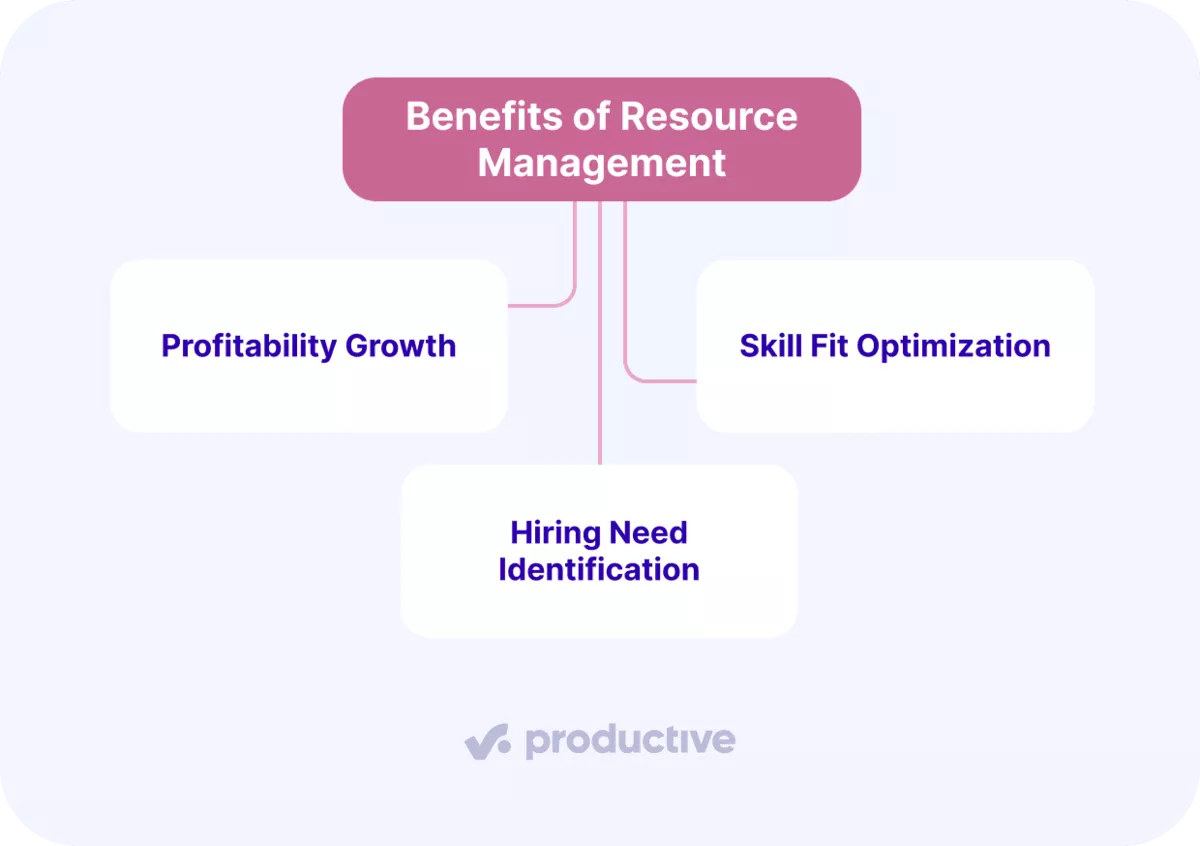
Let’s look at each benefit in more detail:
Profitability Growth
Resource management boosts profitability by reducing the small delivery issues that quietly eat away at margins.
When work is poorly planned, teams lose time to avoidable issues and run into resource constraints. People may be assigned to the wrong projects, handoffs break down, and tasks are repeated because ownership and priorities are unclear. These wasted hours increase costs and stall project progress.
Clear resourcing keeps work stable. The right people stay on the right tasks, projects progress with fewer interruptions, and you spend less time fixing preventable problems. You also avoid bench time by spotting unused capacity early and filling it with the right work.
Skill Fit Optimization
Resource management plans help teams match the right skills to the right work. As a result, projects move faster and require fewer corrections.
This also reduces bottlenecks among senior staff. Instead of constantly pulling experienced people into rescues, teams can plan reviews and provide support more deliberately.
Hiring Need Identification
Resource management plans reveal hiring needs before they become delivery problems. If certain roles are consistently unavailable, or particular people are stretched across too many projects, it signals a structural capacity or skills gap, not just a short-term planning issue.
With a clear view of current availability and future resource needs, teams can decide whether to hire, bring in contractors, or adjust project scope.

We have team X, whose Scheduled/Available ratio is 110% when looking into the upcoming quarter. This means that we’ll need an extra 10% of our current capacity to be able to do the work we have scheduled. Then we translate those percentages into the numbers of full-time employees we actually need and signal this to HR so that they can start with the hiring process.
If you want to see how a larger team does this at scale, read the full story of how Infinum manages resources with Productive.
Before we get into the process and techniques, let’s clarify the types of resources most service teams manage day to day.
What Types of Resources Exist?
The types of resources in resource management include human resources, time and availability, financial resources, and material resources. We’ll look at each type more closely.
Human Resources
These are your people and their skills. Roles, seniority, and specialized experience all affect human resource management and how quickly work moves and how much support is required.
Time and Availability
This refers to the actual time your people have for project work. Meetings, internal tasks, time off, and client communication all reduce real availability, even when someone appears “free” on paper.
Financial Resources
Financial resources determine the project’s budget. Rates, expected costs, and the amount of work required all influence financial resource management and define whether your staffing plan is financially viable.
Material Resources
These are shared physical resources that can limit delivery even when people are available. In agency settings, these might include a photo or video studio, a small pool of QA test devices (phones or tablets), or an edit suite that can be used by only one team at a time.
Now that you know the types of resources you’re managing, the next step is to understand how to manage them effectively.
What Does the Resource Management Process Include?
The resource management process includes resource analysis, resource planning, monitoring resources, and change management.
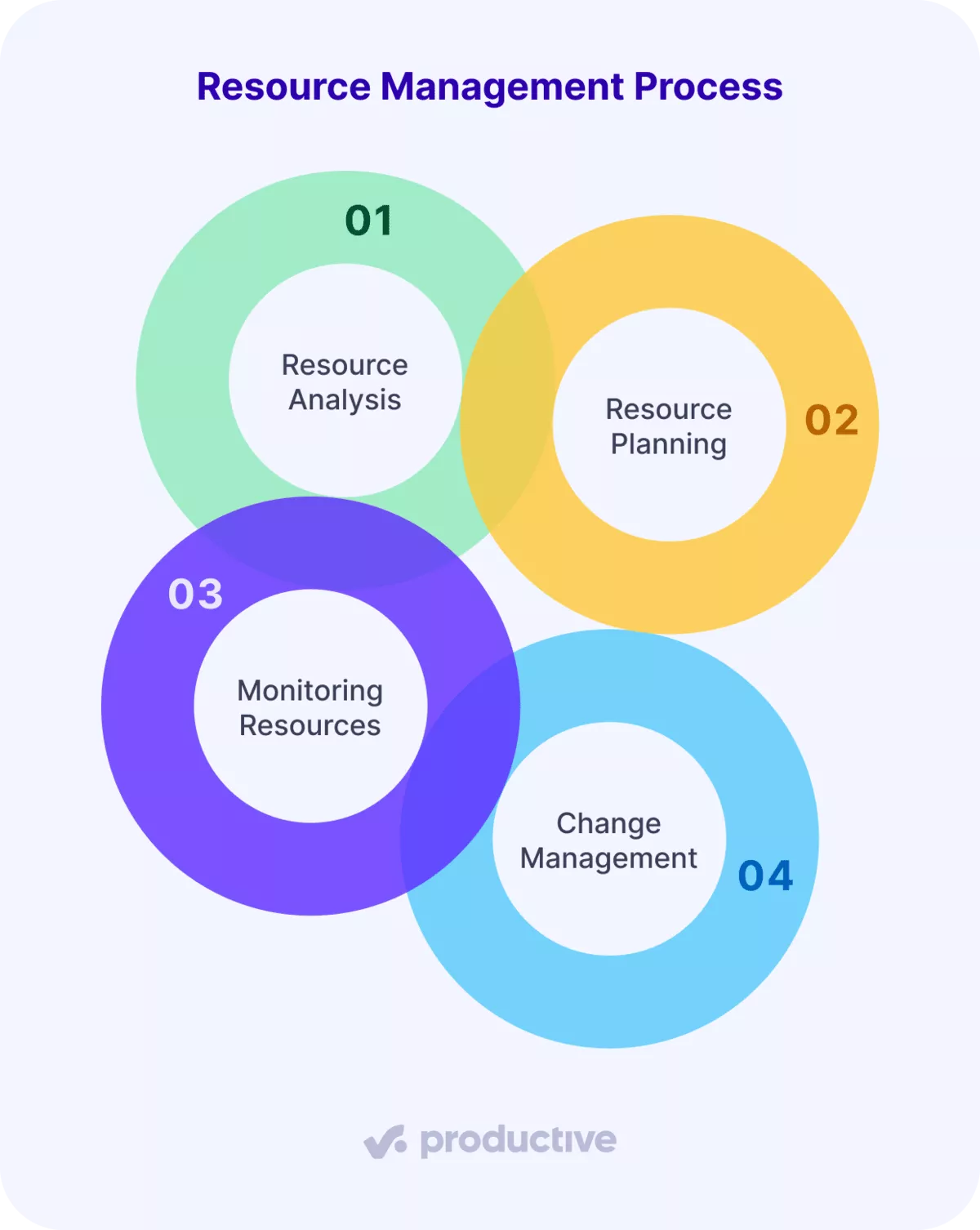
Let’s take a closer look at each step.
Step 1: Resource Analysis
Resource analysis is the process of determining what the work will require and whether your team has the resource capacity to deliver it.
Start by checking your team’s resource capacity and availability. Be sure to account for any resource constraints, such as time off, internal work, and other commitments. Then, compare this to resource demand, the work that needs to be completed. This helps you spot gaps, overload, or unused capacity early.
Step 2: Resource Planning
Resource planning defines what project resources you need, when you need them, and how you will use them. Good strategic planning considers both skills and timing, so you don’t spread people thin or overload the same specialists.
This is also where tools start to matter. In Productive, you can book people in the Resource Planner by entering specific hours per day, using a percentage of availability, or assigning total hours without a daily breakdown.
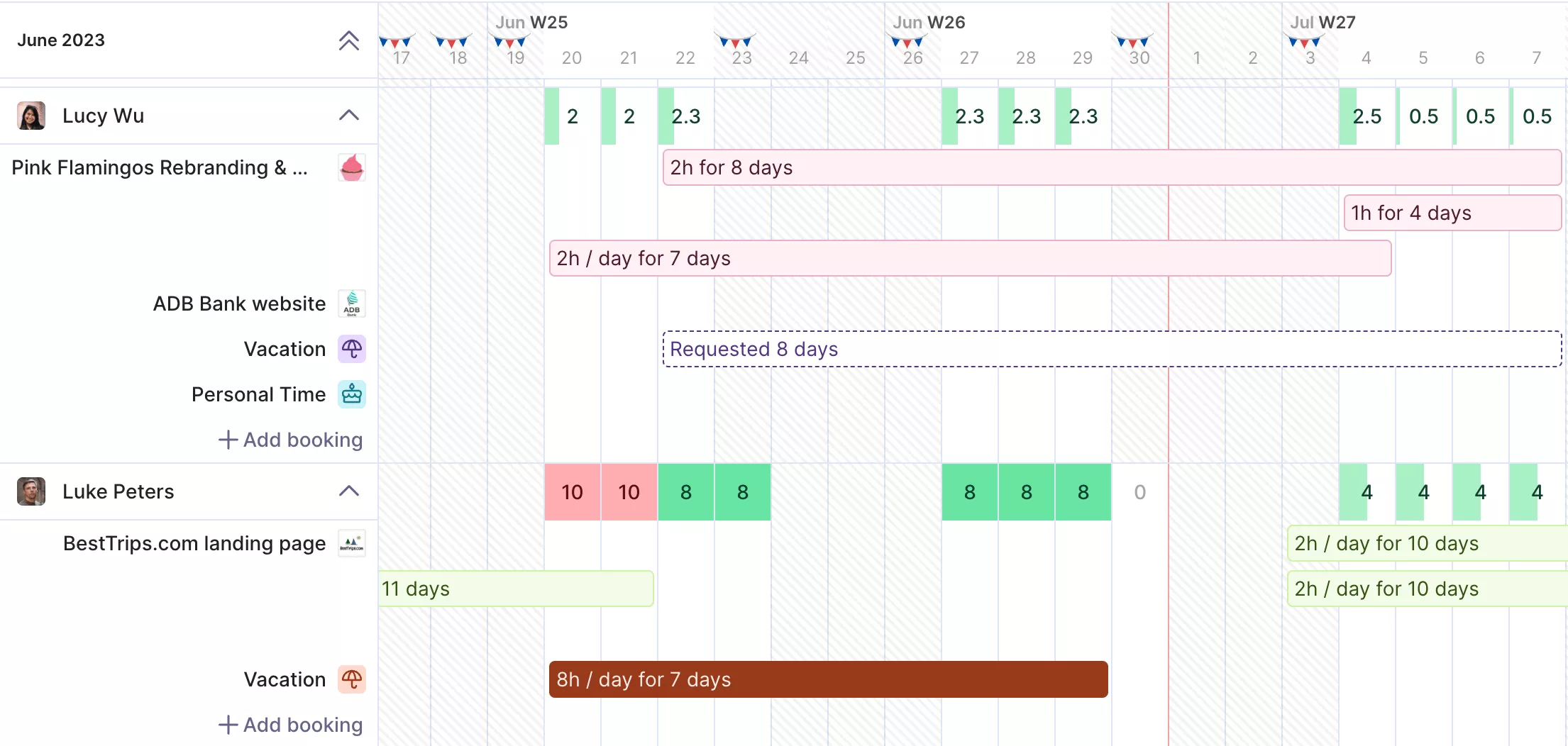
USE PRODUCTIVE’S RESOURCE PLANNER TO SCHEDULE YOUR RESOURCES.
Because time off is included in the same view, you can’t allocate people who are already unavailable.
Manage resources in Productive
Step 3: Monitoring Resources
Monitoring resources keeps your plan accurate as work moves and priorities shift.
Check at least once a week for overbooking, delayed work, or project milestones that are at risk. If the project timeline changes, update bookings to reflect the new reality.
Step 4: Change Management
Change management is about adapting your plan when circumstances change or problems arise with the original approach.
These changes can come from many sources, like a shift in project scope, a new deal closing, unexpected delays, or a team member suddenly becoming unavailable. At this stage, you’ll need to reallocate resources, adjust schedules, and make any other updates necessary to keep your project on track.
Now that you understand the process, the next step is choosing the right techniques for specific resource management situations.
Which Resource Management Techniques Should You Use?
Resource management techniques you should use are gap analysis, resource forecasting, resource allocation, resource utilization, resource leveling, and resource smoothing.
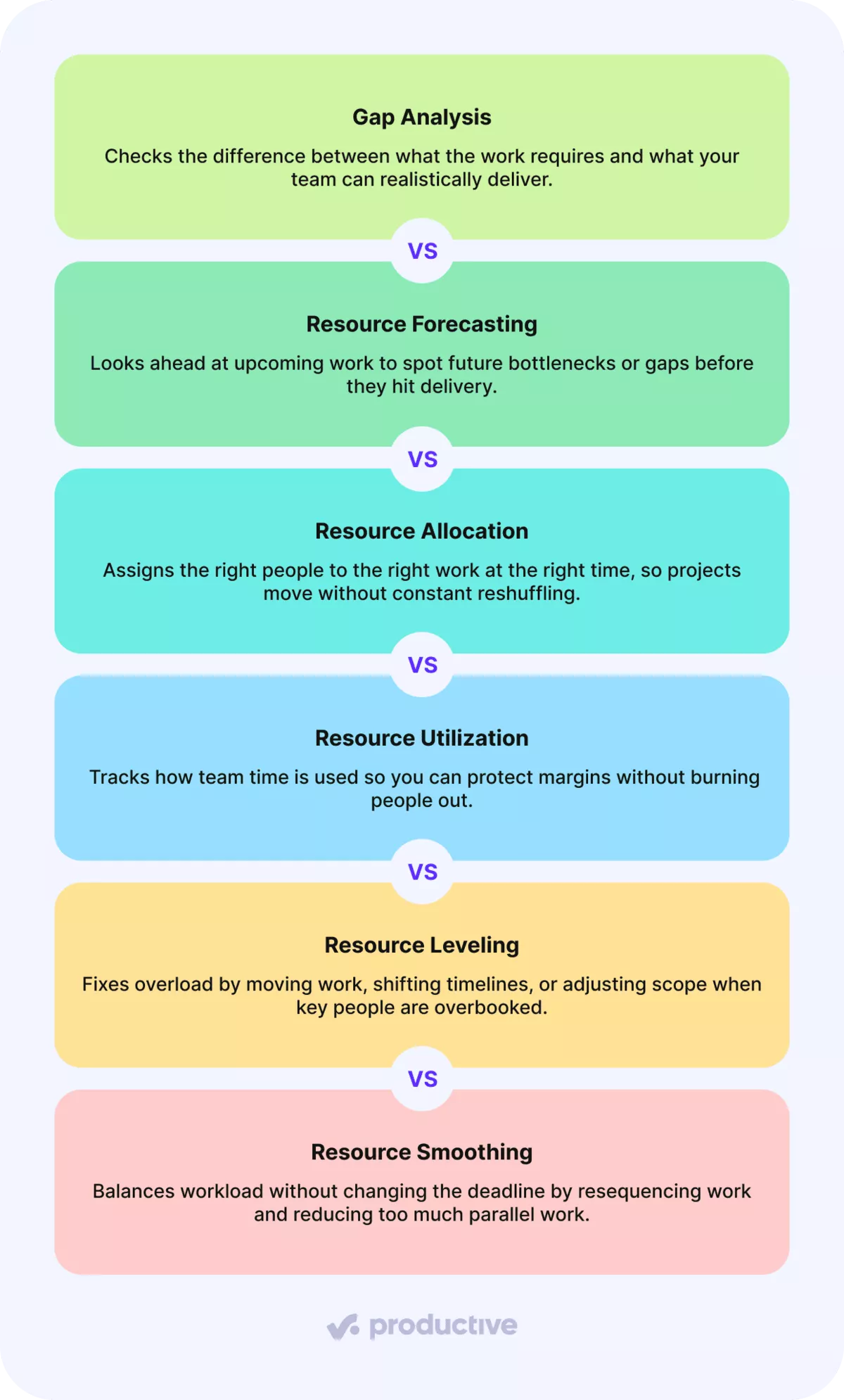
Let’s look at each one in more detail.
Gap Analysis
Gap analysis helps teams see the difference between what a project needs (resource demand) and what the team can realistically provide (resource availability).
This comparison shows whether the work you want to schedule fits within the time you have, or whether it would cause overload or underuse.
Resource Forecasting
Resource forecasting means looking ahead to see where future work might strain your team or where you have room to take on more.
The challenge is that many teams still forecast in spreadsheets. A survey by the Resource Management Institute found that 75% of teams rely on spreadsheets for resource forecasting, making it harder to keep plans up to date as priorities change.
To forecast well, you need a shared view of upcoming work and current commitments. Good forecasting software supports this by keeping updates in one place, so your forecast stays usable as change happens.
Resource Allocation
Resource allocation (resource booking) is about how you assign work, not just about assigning it. Effective allocation balances availability, skills, and risk. Instead of overloading seniors with too many assignments, teams prioritize work by deadlines, complexity, and where the right skills are truly needed.
Resource Utilization
Resource utilization, sometimes called billable utilization, shows the portion of a person’s scheduled billable hours during a given period. In other words, it measures how much of their work is tied to revenue-generating tasks.
This matters because utilization is an early signal. If it’s too high, people get stretched and risk burnout. If it’s too low, teams spend more time on the bench and miss out on revenue opportunities. The goal isn’t to maximize utilization, but to keep it in a healthy range that supports steady delivery.
Productive visualizes utilization across departments, skill sets, or individual team members. You can also forecast utilization for future projects to see whether upcoming work aligns with your team’s availability.
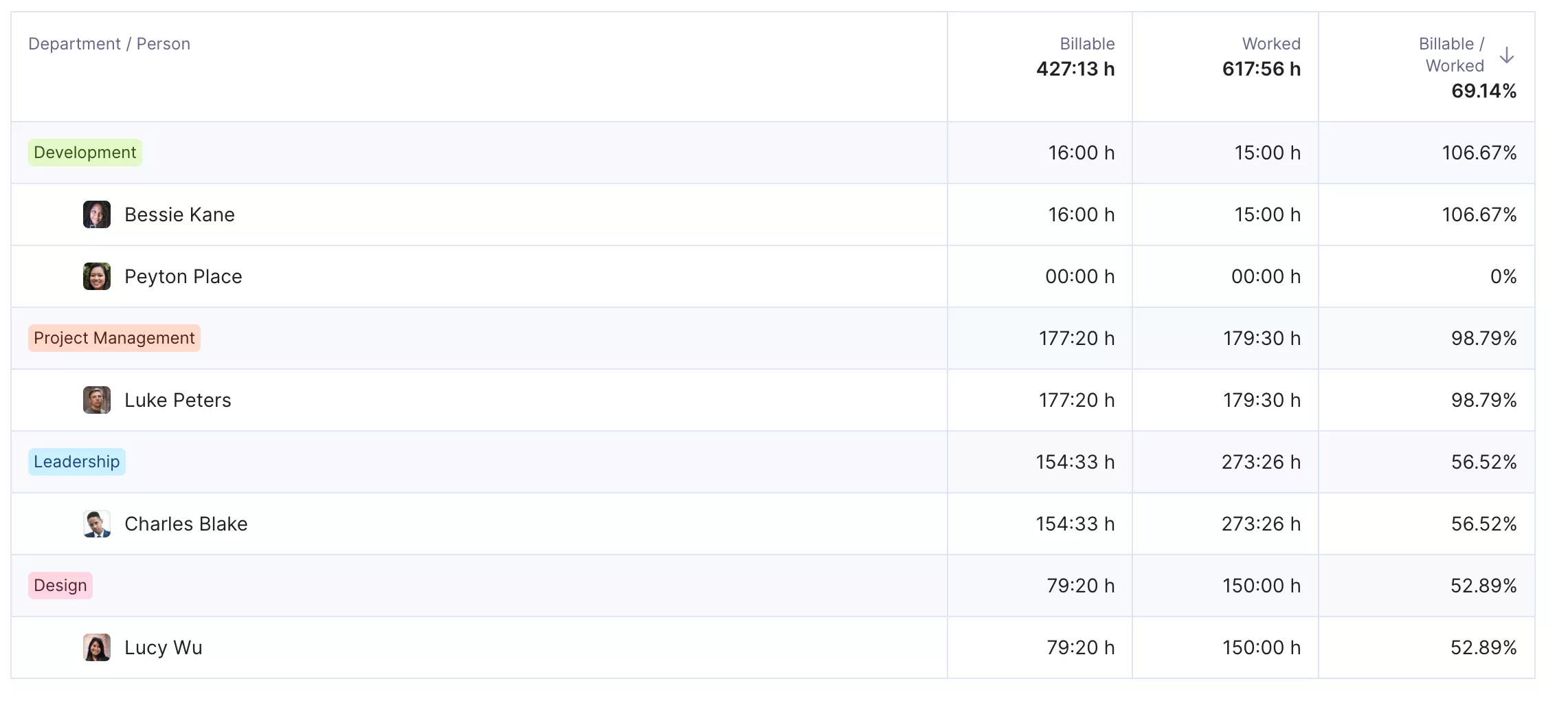
USE PRODUCTIVE TO VIEW BILLABLE UTILIZATION ACROSS TEAMS AND ROLES.
When used this way, resource utilization helps teams make better decisions before problems show up in delivery.
Resource Leveling
Resource leveling is how you fix overbooking by adjusting the project scope. When someone is booked for more work than their availability allows, leveling spreads the workload across other team members. In practice, this could mean moving work to later dates and shifting priorities to keep delivery realistic.
Use resource leveling when timelines are flexible. It helps teams reduce pressure and avoid missed deadlines.
Resource Smoothing
Resource smoothing helps balance workloads while keeping the project end date unchanged. Instead of adjusting the scope, smoothing adjusts the sequencing of work. Tasks are spread more evenly, parallel work is reduced, and short bursts of overload are flattened where possible.
This technique works best when deadlines are fixed, but there is flexibility within the schedule. It helps teams maintain momentum without pushing people into unsustainable workloads.
Knowing the techniques is one thing. Dealing with real-world constraints is another. Let’s look at the main challenges next.
What Are the Main Challenges in Project Resource Management?
The main challenges in project resource management are poor capacity planning, lack of communication, and deadline drift. Let’s look at each issue in more detail.
Poor Capacity Planning
Poor capacity planning makes it difficult to meet project goals without adding unnecessary costs or pressure. When capacity isn’t planned well, the impact typically shows up in several predictable ways:
- Higher operational costs: you pay for capacity that is not used, while critical roles still get stretched.
- Lower customer satisfaction: projects slip or quality drops when demand exceeds availability.
- Lower employee engagement: some people burn out from overload, while others sit underutilized.
- Missed opportunities: you can’t take on new work confidently, even when resource demand exists.
Better planning starts with a simple baseline of team capacity, reviewed weekly. This helps teams spot problems early and adjust before they affect delivery.
To get started, use this capacity planning template to schedule time for billable and non-billable tasks, track workloads, and gain insights into utilization with built-in formulas.
Free Capacity Planning Template
Download our template to schedule time for billable vs non-billable tasks, track workloads, and get insights into utilization with preset formulas.

Lack of Communication
Lack of communication happens when people aren’t working from the same resource plan. A schedule may be updated in one place, a change shared in chat, and important context stored in documents that not everyone can access.
The solution is to use software as a central hub for resourcing. Keep progress updates linked to the work, store key documentation in one shared place, and collaborate there. When everyone uses the same source of truth, changes are easier to spot, and teams stay aligned.
Deadline Drift
Deadline drift happens when extra work is added bit by bit, without updating the plan. A client might ask for a small change, one task turns into two, and before you know it, the deadline is pushed back, and the team is overloaded.
The solution is to make changes visible as they occur by using resource planning software. When work slips, milestones are updated, bookings are adjusted, and expectations remain realistic.
Next, we’ll cover the best practices teams use for their resource management plans.
What Resource Management Best Practices Should You Know?
The resource management best practices you should know are comparing scenarios, planning with skills, and tracking resources in real time.
Let’s look at each one more closely.
Comparing Scenarios
Even small changes in people or timing can make a big difference, especially when team members are spread across multiple projects.
Rather than debating options in a spreadsheet, model a few scenarios and compare the outcomes. This makes conversations concrete because you can see what changes when you swap team members, move start dates, or adjust costs.
Productive’s Scenario Builder, you can create multiple project scenarios by adjusting who does the work, when they can start, and the cost.
Compare scenarios side by side, then choose the best path forward.
Matching Work to Skills
Matching your team members’ skills to the work they do is a core part of workforce planning. Keeping skills visible during project management planning helps teams make better decisions upfront, ensuring project success.
Even a basic understanding of each team member’s strengths leads to fewer handovers, less rework, and more predictable delivery.
Tracking Resources in Real Time
Real-time resource tracking means you always know who is available and who is not, based on what’s actually happening. When plans live in spreadsheets or are updated too late, project teams end up making decisions using outdated information.
Resource planning software is crucial because it keeps resource information up to date. Most platforms make this easier through common project views like a Kanban board, a timeline view, a Gantt chart, a work calendar, and dashboard views.
When bookings, timelines, or availability change, the plan updates in one place. This gives everyone the same view of reality and makes it easier to trust resource decisions.
As you may have noticed, we have mentioned software a lot, and it is clear that software is essential for taking resource management plans seriously. Now it’s time to look at the best resource management software.
What is the Best Resource Management Software?
The best resource management software is Productive, Bonsai, and Scoro.
Let’s take a closer look at each tool and what makes it stand out.
Productive – The Best All-in-One Resource Management Tool
Productive is an all-in-one professional services automation (PSA) platform built for agencies and service teams.
What sets Productive apart is how closely resourcing and finances are connected. When you schedule people, Productive automatically shows how those decisions affect budgeting and finances. You can see real-time projections for profitability, revenue, and budget burn across upcoming weeks and months.
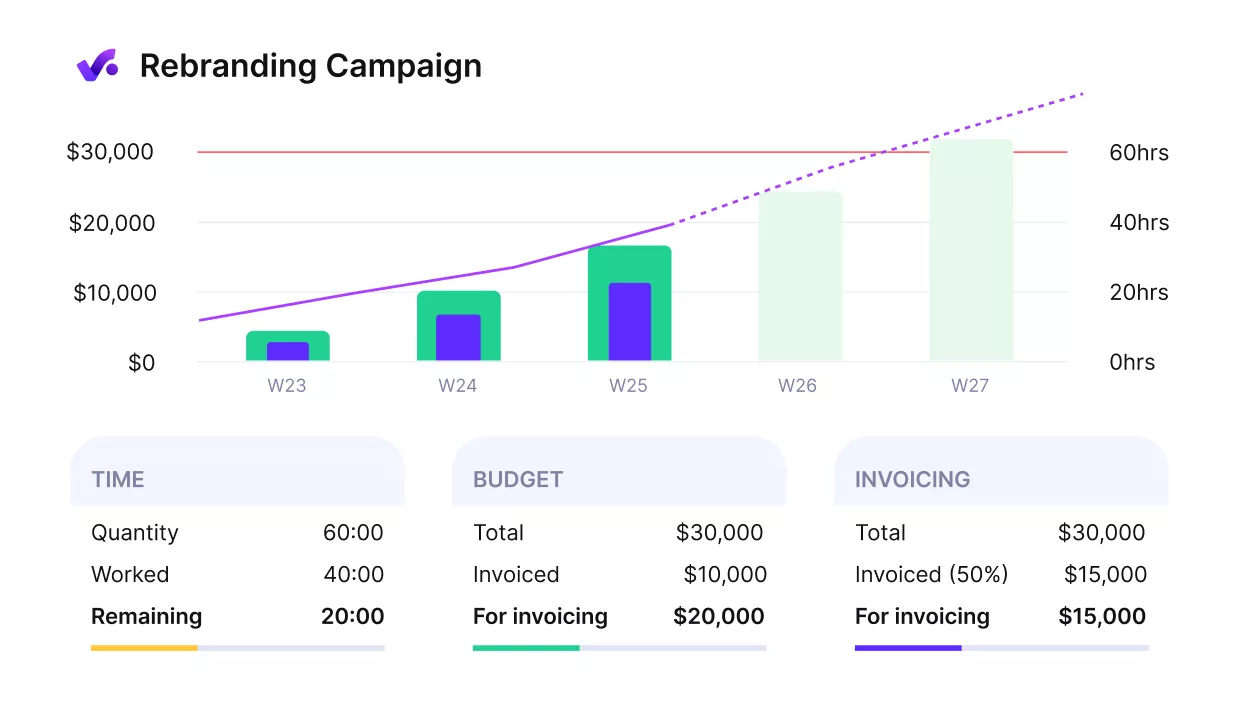
VIEW PROFITABILITY, REVENUE, AND BUDGET BURN IN PRODUCTIVE.
If a project starts trending toward unprofitability, you can reassign team members and immediately see how that change impacts the bottom line.
Features also include:
- Time tracking
- Project management
- Automations
- AI-powered docs
- AI reporting
- A built-in sales CRM
- Integrations with tools like Slack, Google Calendar, Gmail, Outlook, HubSpot, and more.
Bonsai – Best for Client & Financial Integration
Bonsai is a business project management platform designed for service-based teams that want to connect resourcing, client work, and finances in one place.
Its strength is linking team workload to financial outcomes. By tying resource assignments to projects and clients, Bonsai helps teams see how utilization affects profitability and cash flow, not just delivery timelines.
Key features include:
- Workload assignment across the project team
- Capacity and utilization reporting
- Time tracking with billing
- Project and client profitability insights
- Client communication portal
- Financial forecasting based on bookings and rates
Scoro – Best for Connecting Resource Planning With Profitability
Scoro is a professional services automation (PSA) tool built for service firms that need more than a basic workload view.
It connects resource management plans with project delivery and financial reporting, so teams can plan in one tool and report in another. Capacity, utilization, scheduling, and profitability all live in the same system, which helps teams understand how resourcing decisions affect project outcomes.
Key features include:
- Tentative bookings for high-level project management
- Utilization heatmaps
- Time tracking with time off included
- Resourcing linked to project budgets and profitability
If you want to explore more options, check out our full list of resource management software.
Feature Checklist for Your Teams’ Resource Management Tools
Make sure your team’s resource management tools include the following features:
- Workload management: clear views of capacity and availability to balance work and avoid burnout.
- Time tracking and timesheets: visibility into how hours are split between client work and internal activities.
- Project planning: one place for high-level resource allocation and resource scheduling, without jumping between tools.
- Budgeting and cost tracking: insight into how resource allocation decisions affect project spend and margins.
- Real-time dashboards: a single view for monitoring key metrics without manual reporting.
- Skills management: support for matching the right people to the right work in project management.
Final Thoughts
Good resource management brings people, time, and budgets together, so decisions are based on reality, not assumptions. That only works when the plan stays current, which is why software is no longer optional for growing professional services firms.
Productive supports resource management by connecting everything you need in one place. You can plan capacity, allocate people at the right level, track time, and see how resourcing decisions affect profitability as projects unfold.
If you want to see how Productive supports resource management in practice, book a demo and explore it with your use cases.
FAQ
What Is Meant by Resource Management?
Resource management means planning and coordinating people, time, and budgets to deliver work as efficiently as possible.
What Is an Example of Resource Management?
An example of resource management is planning next month’s projects by checking who is available, what skills are needed, and how much work is already committed. For example, an agency reviews upcoming client work, sees that design is already close to full capacity, and adjusts timelines or staffing before accepting more work.
Is Resource Management the Same As HR?
Resource management is not the same as HR. HR manages employees (hiring, policies, performance, compensation). Resource management manages project staffing (who works on what, when, and for how long).
What Skills Are Needed for Resource Management?
The skills needed for resource management are planning, clear communication, and decision-making. It also helps to understand project delivery, basic financial impact, and how different skills fit different types of work.
Manage your resources in one place
Plan capacity, account for time off, and keep workloads realistic as projects change. Productive brings resourcing, delivery, and finances into a single system that teams actually keep up to date.
