Resource Availability – A Guide for Professional Services

Most professional services firms struggle to see who is actually free to take on new work. Resource availability is the number of hours each person is genuinely free for client work, and it gets harder to pin down the more projects you run.
This guide covers what availability is, how it differs from capacity, and how to calculate it with a simple example. Then we cover why availability matters, how to track it across a portfolio, the challenges to watch for, and how the right software keeps the picture up to date.
Key Takeaways
- Availability is the hours a person can take on new work: the working time left after leave and holidays are deducted, before any project claims it.
- Availability keeps projects profitable and prevents burnout: accurate numbers let you hit resource utilization targets and rebalance work before anyone is overloaded.
- Fragmented visibility, over-reliance on key people, and last-minute scope changes are potential challenges: each can cause overbooking that surfaces only once a deadline is at risk.
- Software helps manage availability by giving a real-time view: a shared schedule shows who’s bookable across the portfolio and updates the instant a booking or leave request changes.
What Is Resource Availability?
Availability is the number of hours a person is genuinely bookable for client work across all active engagements, not just one project. It answers a simple question: can this person take on new work without stealing hours from an existing commitment?
Availability is also the foundation of effective resource allocation. You can only assign work with confidence when you know what is genuinely free, and whether new resource demand can be absorbed without overcommitting the team.
Tracking availability is where good resource planning starts. For the wider picture, see our guide to resource management.
To use that number well, you first have to stop confusing it with capacity.
What Is the Difference Between Resource Availability vs Resource Capacity?
The difference between resource availability vs resource capacity is that capacity is the ceiling of total working hours, while availability is what remains after every prior claim on a person’s time has been subtracted.
Availability vs Capacity at a Glance
| Dimension | Capacity | Availability |
|---|---|---|
| Definition | Total working hours in a period before any deductions | Hours genuinely bookable for new or active client work |
| What reduces it | Public holidays, part-time contracts | Vacation, sick leave, other planned absences |
| Planning use | Sets the maximum possible workload for team capacity planning | Determines whether a new engagement can be staffed |
The practical danger is planning against capacity instead of availability. A month may show 160 hours, but holidays, leave, and part-time schedules have already claimed some of them.
Book against the full figure and the person quietly runs over. That overage surfaces later as a missed deadline or unbilled overtime. Availability is the honest number to plan from, because it reflects the hours that are genuinely there.
Once you understand the distinction, the next step is knowing how to calculate availability.
How Do You Calculate Availability?
You calculate availability by subtracting absence from a person’s resource capacity.
The resource availability formula is:
Resource Availability = Resource Capacity − Absence (Vacation, Sick Leave, and Other Absences)
Resource capacity itself is calculated first:
Resource Capacity = (Working Days × Hours per Day) − Hours Lost to National Holidays
National holidays are non-working days that reduce total capacity before you account for planned leave. Once you have capacity, subtract any vacation, sick leave, or other time off. That leaves the hours a person is actually available to work.
Here’s a worked example:
Sam West has 22 working days in a given month, working eight hours per day, with one national holiday. His capacity is (22 × 8) − 8, which equals 168 hours. He then takes five days of vacation, removing 40 hours. His availability for that month is 168 − 40, which equals 128 hours.
That figure is what matters for planning. Committing him to projects that total more than 128 hours means he is overbooked before the work begins.
The same formula scales to a portfolio. A senior consultant with 160 working hours and 16 hours of leave has 144 hours of availability. Once you layer in 80 hours already booked on two retainers, only 64 hours are left to sell.
Productive’s Workload view compares estimated task hours against each person’s daily availability and flags anyone who is overloaded. That turns workload management into a daily glance and lets you rebalance assignments before overbooking becomes a delivery problem.
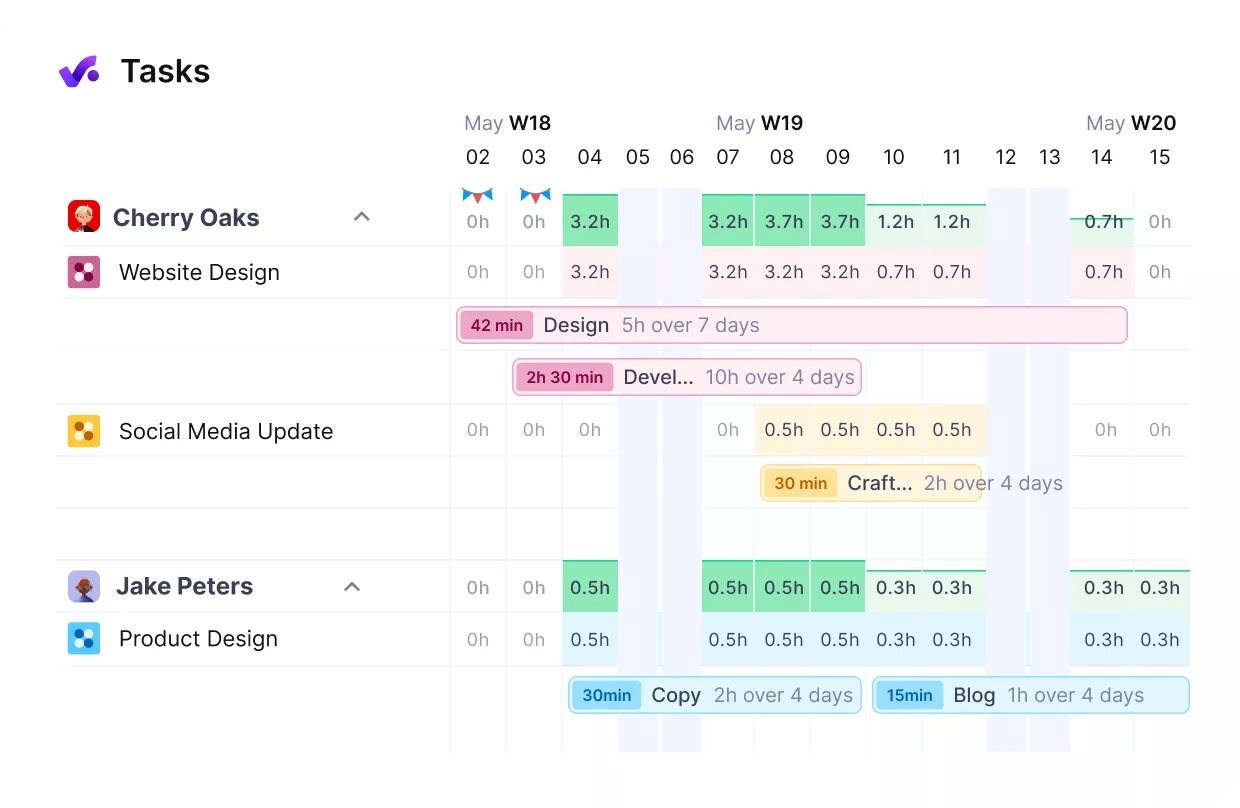
See overloads before they happen in Productive.
That keeps workloads manageable, supporting team well-being and helping protect project profitability.

With Productive, our resourcing process is so efficient that what used to require a full-time role in spreadsheets is now streamlined, allowing our team to focus on higher-impact work.
See the complete customer story to understand how Productive supports professional services teams.
Knowing how to calculate availability is one thing. Knowing why it deserves your attention is another, and that is where the real payoff sits.
Why Is Availability Important?
Availability is important for keeping utilization on target and preventing burnout. We’ll look at each in more detail.
Accurate Availability Keeps Utilization on Target
Most services firms aim for around 75% billable utilization, high enough to keep the business healthy, low enough to avoid burning people out. But you can only hit a target you can plan against.
When you know exactly how many hours each person can actually take on, you can allocate work to land near 75% on purpose, instead of guessing against 40-hour weeks that shrink once you subtract time off, admin, and absences. And healthy utilization protects agency profitability.
Visible Availability Prevents Burnout
Availability tracking keeps utilization near target without pushing people to 100% for months at a time. A delivery role sitting at 85% or above for an extended period is often a burnout warning sign, and catching it early depends on having the data before the person flags it. That is burnout prevention in practice: redistribute work before overload becomes a retention problem. When people sit at that level month after month, the same data becomes the business case for adding staff.
That payoff only lands if you track availability consistently, so here’s the process.
How Do You Track and Manage Availability?
You track availability by auditing each person’s available hours, layering in bookings, matching remaining hours to tasks, and reviewing weekly.
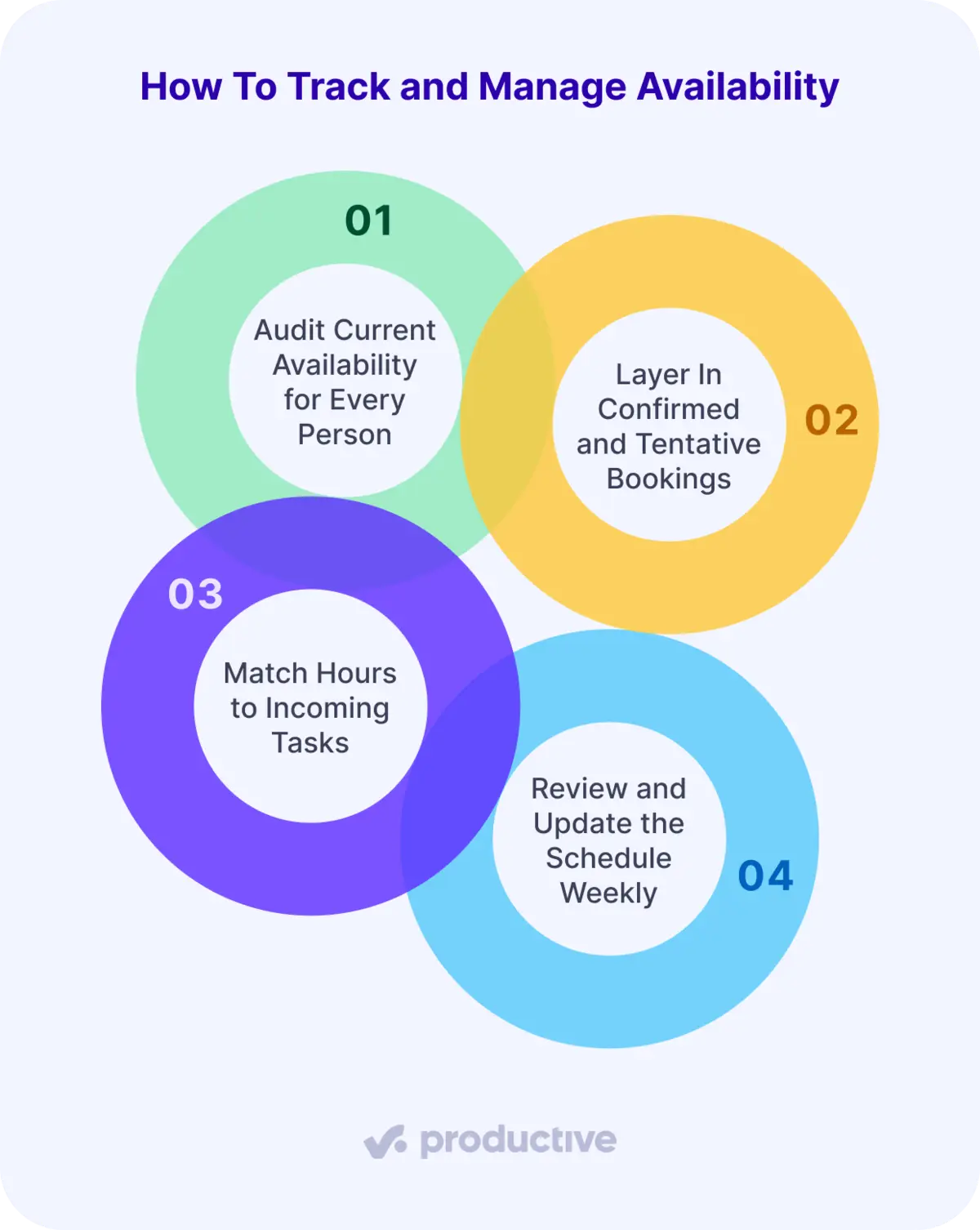
Let’s take a better look at each step.
Step 1: Audit Current Availability for Every Person
Start with contracted hours per week, then subtract public holidays and any approved leave for the period. Do this per person, not as a blanket 40-hour assumption. Part-time contracts, staggered start dates, and regional holiday calendars all move the number. This gives you each person’s baseline available hours before any project claims time.
Step 2: Layer In Confirmed and Tentative Bookings
Pull every active project booking, including tentative ones on pitches that are likely to convert. Weight the tentative ones by how likely they are to land. Ignore them, and you either double-book when the deal closes or leave people idle if it slips. Subtract these from the available figure to see what is genuinely free.
Step 3: Match Remaining Hours to Incoming Tasks
Assign people to new work based on residual available hours, not total capacity. Check skill availability alongside hours fit. Factor in seniority and cost too, or you risk matching the right skill at a budget-breaking rate. Someone with ten free hours but the wrong specialization is not actually available for the role you need to fill.
In Productive, you can configure a resourcing Agent to handle this matching for you. Point it at an upcoming project, and it surfaces the best person for the job.
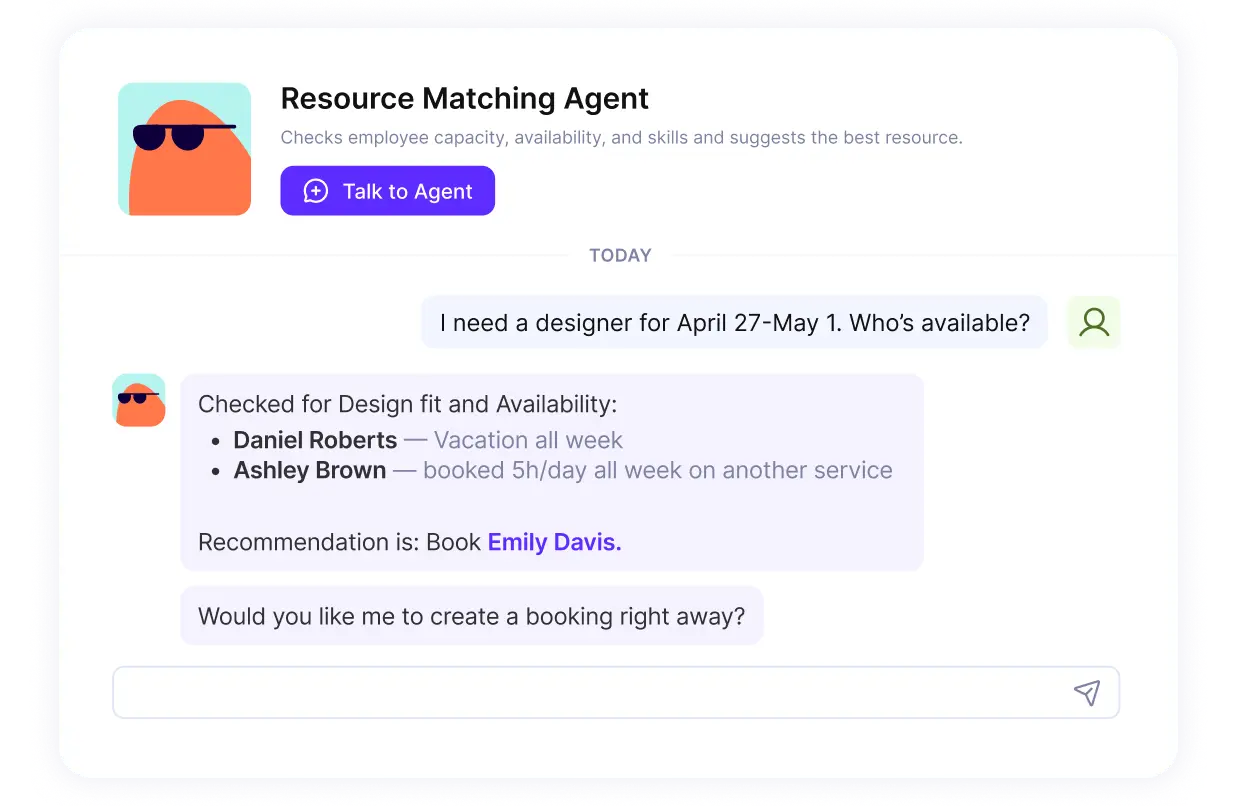
Let Agents match the right person to the work in Productive.
It can also resolve booking conflicts, keeping resource scheduling free of double-booked hours.
Let Agents handle your work
Step 4: Review and Update the Schedule Weekly
Availability changes constantly as projects shift scope, leave is approved, and new work comes in. A schedule accurate on Monday may be wrong by Thursday without a regular refresh. Assign a role, typically the resource manager or ops lead, to own this cadence.
Running these steps well still won’t make availability problems disappear. Some obstacles can surface across most teams, and they are worth knowing before they cost you a deadline.
What Are the Potential Challenges of Managing Availability?
The potential challenges of managing availability are fragmented visibility, over-reliance on key individuals, and last-minute scope changes.
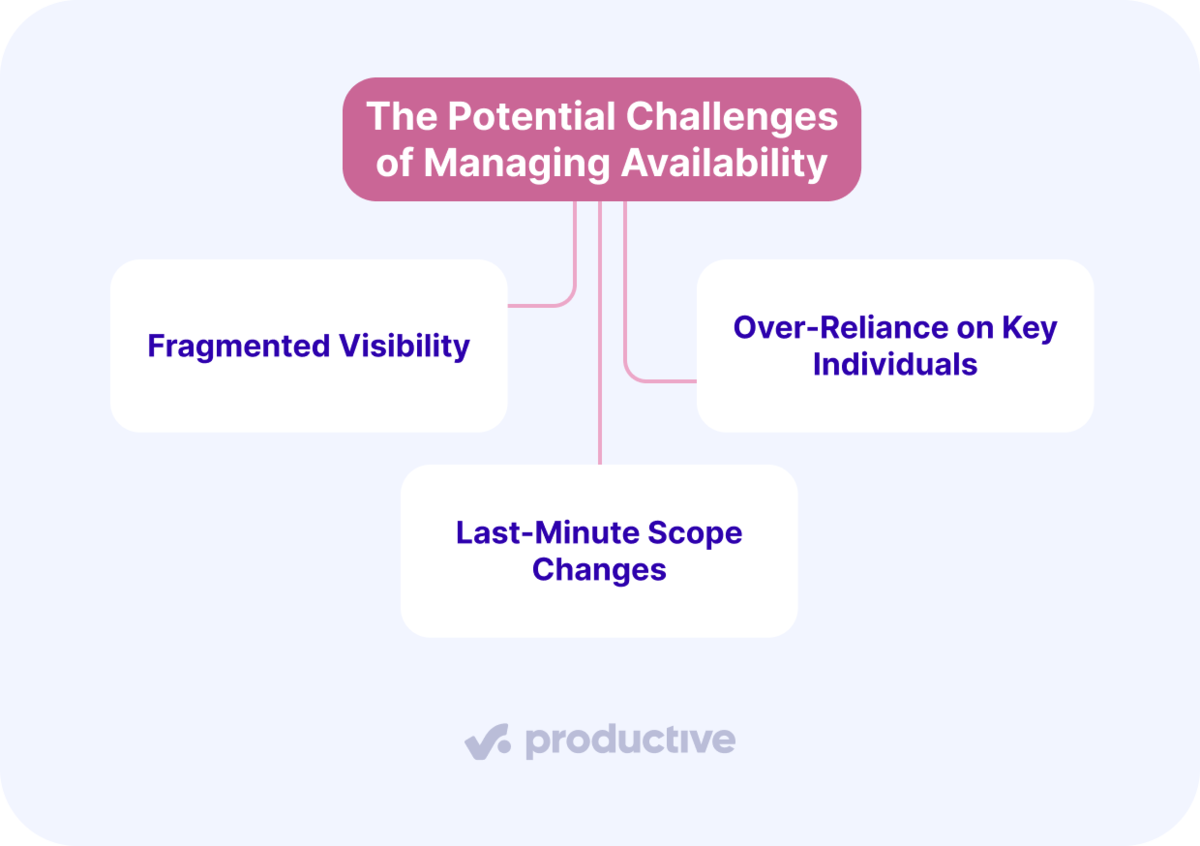
Each one has a practical mitigation, but none disappear without a deliberate process to catch them early.
Fragmented Visibility
When a resource manager cannot see all active bookings in one place, staffing decisions can get made on incomplete information. Siloed data makes this worse: when scheduling lives in spreadsheets or chat threads, one person’s availability can look fine in isolation, but they can already be committed on two other projects that no one checked. The result is overbooking that often surfaces as project delays.
The fix is a shared schedule where every booking is visible to anyone making a staffing decision. When the hours picture is wrong, resource forecasting built on expected billable output is wrong by the same margin.
Over-Reliance on Key Individuals
When one or two senior consultants are the default answer for every complex engagement, their availability becomes the firm’s primary delivery constraint, and the tightest resource constraint to plan around. A scope change that pulls them in for an extra 20 hours immediately creates a gap on another project, and that gap rarely gets flagged until a deadline forces the issue.
The mitigation is to build a forecasting buffer into senior roles so their schedule is never booked to 100%. Spreading specialized knowledge across more team members reduces the single-point-of-failure risk over time. A delivery director who tracks this proactively can redistribute work before a commitment has already been made to the client.
Last-Minute Scope Changes
Scope changes are unavoidable in services work. The problem is not the change itself but the delay between when the change is agreed and when the availability impact reaches whoever owns the schedule. That lag is where overcommitment happens. Controlling scope goes a long way to protecting the deadline. In PMI’s 2025 Pulse of the Profession, 93% of professionals name scope management a critical focus area under project timeline constraints.
Tracking scope changes in the same system as where you schedule work closes that gap. When the availability impact is visible the moment a change is confirmed, replanning can happen before a deadline forces the issue rather than after.
Knowing how software supports that kind of real-time visibility is the natural next step.
How Does Software Help Manage Availability of Resources?
Software helps manage availability of resources by giving every stakeholder a real-time view of who is bookable across the whole portfolio, without requiring someone to manually reconcile spreadsheets each week. That single shift, from reactive to visible, is what separates teams that catch overallocation early from those that discover it during delivery.
The features that matter most for availability management:
- Real-time schedule views that reflect both confirmed and tentative bookings
- Leave integration so approved time off reduces available hours automatically
- Time tracking connection so logged hours update the availability picture as work progresses
- Resource utilization reporting that shows booked against capacity against logged across the whole team
Together, these features turn availability from a weekly guess into a live number. The moment a booking is added, leave is approved, or hours are logged, the schedule updates, so staffing becomes informed decision-making rather than guesswork.
Productive’s Resource Planner provides a central view of all team bookings and time off. When a booking is created, or an absence request is approved, everyone’s availability updates instantly. This allows managers to see who is free for new work without checking multiple calendars or spreadsheets.
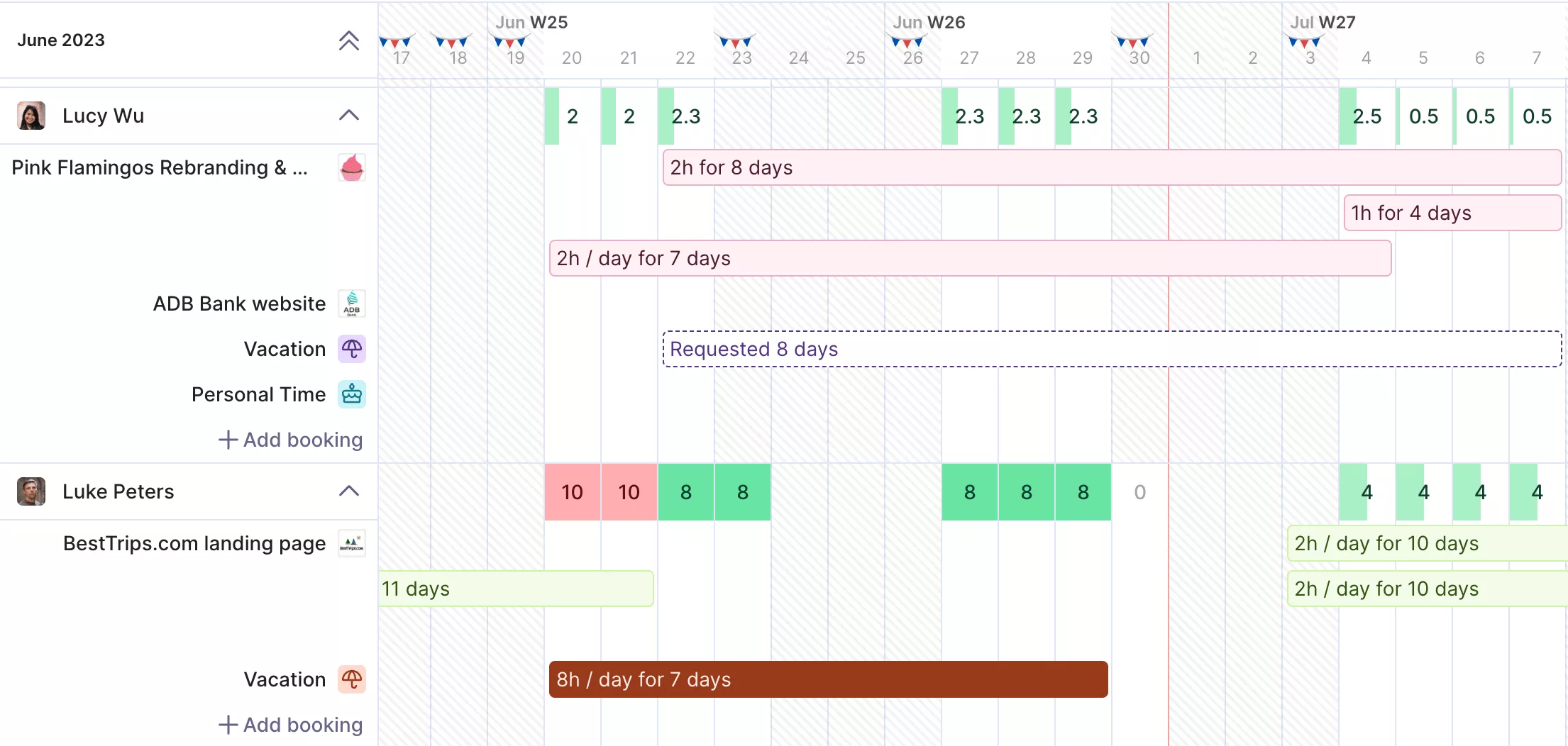
See who’s free across the whole team in Productive.
If you’re comparing tools, this list of resource management software covers the leading picks and what each one is for.
Manage Available Resources Across a Portfolio of Projects
Availability is about who is bookable across your whole book of work, not who is free on a single project. Get that number right before work is assigned, and you protect resource utilization, defend profitability on fixed-price work, and keep your team off the path to burnout.
Getting it right consistently requires a single, up-to-date view of leave, bookings, and part-time schedules, rather than spreadsheets that are already out of date by the time you read them.
If you want to see this in action, book a demo with Productive and see how your whole professional services business can run from one tool.
Stop juggling spreadsheets and start planning resources in one place.
With Productive, you can track availability, balance workloads, and forecast future capacity in one place. No more chasing updates or fixing plans after they break.
