Project Prioritization: A How-To Guide for Professional Services

Five client projects can’t all have your team’s full attention at once. Project prioritization is a structured way to decide which client work gets your team’s hours, and in what order.
This guide covers why prioritizing projects matters, the frameworks that fit client work, the prioritization process step by step, the traps to avoid, and who owns the call.
Key Points
- Project prioritization is deciding which client projects get your team’s hours first: you end up with an ordered list, each project given a start date and someone accountable for it.
- Prioritizing balances workloads, protects your dates, and guards your margin: without it, some people carry everything, start dates become guesses, and your hours go to whoever asks loudest rather than what pays best.
- Scoring each project on margin and capacity gives you an order you can defend: rate both one to five, weight them, and the totals decide what comes first.
- A call from your biggest client, blanket urgency, a shiny new logo, and unfunded internal work each break the prioritization order: score them like everything else, or they simply jump the queue.
What Is Project Prioritization?
Project prioritization is the structured process of evaluating, ranking, and selecting competing initiatives to focus finite resources on the work that delivers the highest strategic value.
In professional services, that finite resource is your team’s time. Strategic value is mostly margin and the client relationships worth keeping, so you are deciding which client work gets the hours you actually have.
Picture a consultancy with a discovery engagement, two implementations, and a retainer, all needing the same lead consultant for three weeks. Prioritization decides which one wins those hours, in what order, and what gets pushed back.
What happens when nobody makes that call is the subject of the next section.
Why Does Prioritizing Projects Matter for a Services Firm?
Prioritizing projects matters because it balances workloads across your team, sets realistic deadlines, and puts your hours on better work. We’ll take a closer look at each.
Prioritizing Balances Workloads Across Your Team
Prioritizing balances workloads because it sequences work instead of starting it all at once. Without an order, some people end up part-allocated to everything while others sit light, and nobody planned either outcome.
Sequencing spreads the same work more evenly. Fewer things in flight per person, less time lost moving between them, and a workload you can actually see and adjust.
It will not fix a real staffing shortage. If you have sold more work than you have people to deliver it, sequencing will not save you. What it fixes is the avoidable overload: people stretched across work that could have waited a fortnight.
In Productive’s Resource Planner, easily spot burnout risks with visual capacity indicators. Cells turn red when someone is overbooked, and a quick hover reveals a breakdown of their projects.
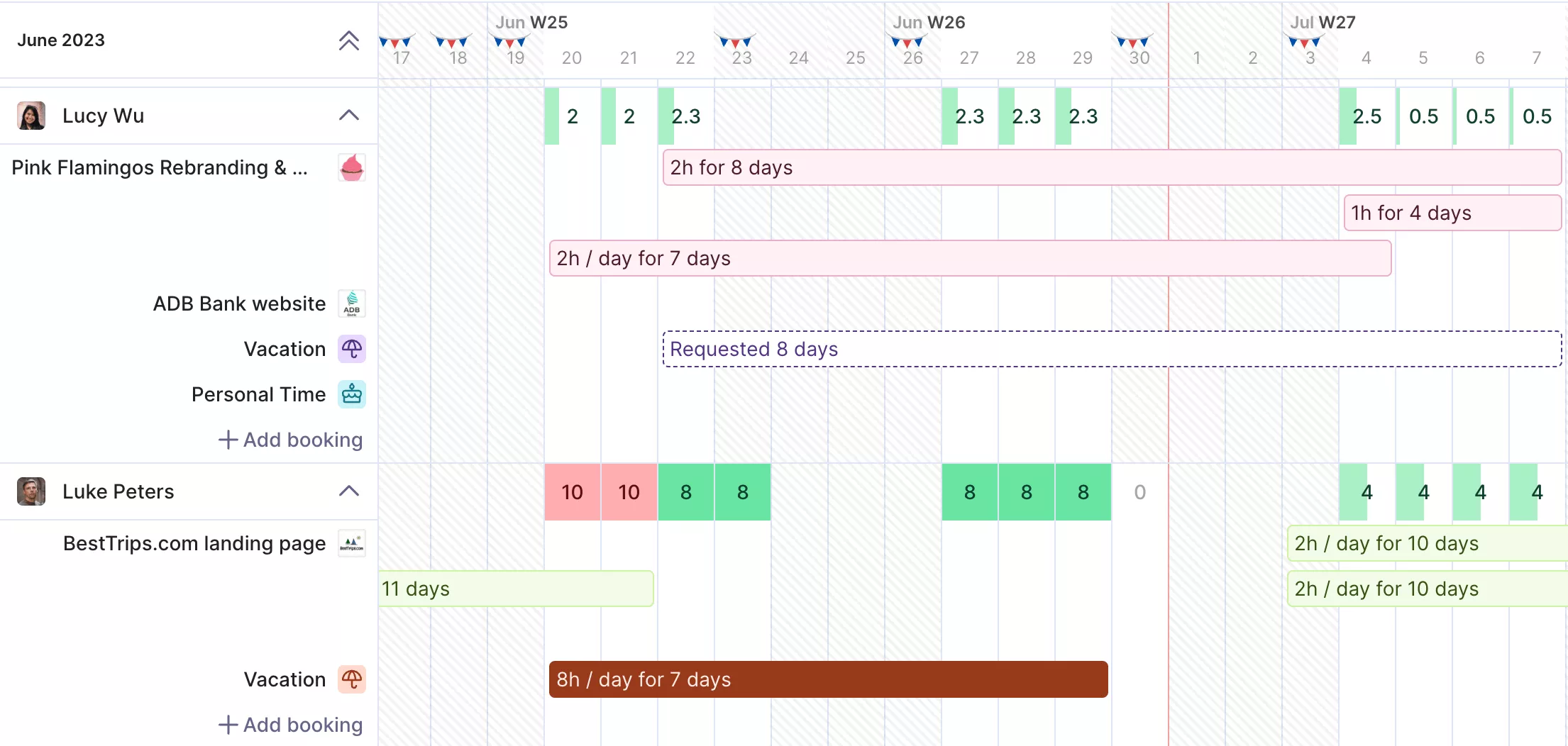
Spot overbooked people at a glance in Productive.
For more accurate forecasting, you can even include tentative bookings to see how unconfirmed work impacts future capacity.
Track resources in Productive.
Prioritizing Sets Realistic Deadlines
A date you give a client is only as good as what you know about your team’s schedule when you give it. Without an agreed order, that date is a guess, and once it is in a contract, the new work lands on top of whatever your team is already doing.
That’s when the reshuffling starts: plans rewritten weekly, people pulled off tasks mid-way, gaps patched on the day. Prioritizing removes the guess, because you already know what’s committed before you commit to something new.
Prioritizing Puts Your Hours on Better Work
Your hours are finite, so what you spend them on sets the blended margin of the whole firm. A deliberate order puts them on the work that returns most.
Without one, they go to whatever arrived most recently or asked most loudly, which is rarely the most profitable work you have. That is how a firm stays busy while project profitability drifts down.
There are more reasons than these three. What they all need is a repeatable way to decide rather than a fresh argument each time, which is what the frameworks below offer.
Which Prioritization Frameworks Fit a Services Firm?
The frameworks that fit are MoSCoW, the Eisenhower Matrix, value versus effort, Kano, and weighted scoring.
The table below shows where each one fits and what ties it to money or capacity.
Prioritization frameworks and where they fit
| Framework | Best for | Financial or capacity tie |
|---|---|---|
| MoSCoW | Scope decisions inside one engagement | Protects the hours you priced for |
| Eisenhower Matrix | Urgent versus important triage on one project | Separates real deadline risk from noise |
| Value versus effort | Quick sort of inbound client requests | Weighs return against hours it costs you |
| Kano | Classifying client-request types | Which asks justify the capacity |
| Weighted scoring | Ranking whole engagements in the portfolio | Margin and capacity weights |
The split there is scope, not preference. The first four sort work inside or into a single project. Weighted scoring is the one that compares engagements against each other, so it comes last. We’ll take a closer look at each.
MoSCoW for Protecting Scope Inside One Engagement
MoSCoW sorts the deliverables in one project into four buckets:
- Must have: the project fails without it
- Should have: important, but there is a workaround
- Could have: worth doing if there is room
- Won’t have: explicitly out of scope this time
It comes out of agile delivery practice, and the Agile Business Consortium adds two guardrails worth borrowing: keep Must Haves under 60% of the work, and hold roughly 20% in Could Haves.
On a fixed-fee website build, the payment integration is a Must and the animated homepage is a Could. That Could pool is the contingency: if the project runs tight, those are the items that get dropped so the Musts still land on time.
The Eisenhower Matrix for Separating Real Deadlines From Noise
The Eisenhower Matrix sorts requests on two axes, urgent and important, which gives four responses:
- Urgent and important: do it now
- Important, not urgent: put it in the calendar.
- Urgent, not important: push back, or hand it to someone else
- Neither: drop it
The discipline is in the middle two. A contractual milestone three weeks out is important and not yet urgent, so it needs a date in the calendar rather than a scramble later.
A client emailing twice about a nice-to-have feels urgent but is not important. Those requests quietly eat hours you had planned for something else.
Value Versus Effort for Sorting Inbound Requests
Value versus effort plots each inbound request on a grid, reading effort as the hours it costs you rather than how hard the work is. That gives four boxes:
- High value, few hours: do it first
- High value, many hours: plan it properly
- Low value, few hours: use it to fill gaps
- Low value, many hours: decline it
A reporting view the client keeps asking for, at three hours of work, is the first box. A bespoke integration worth three weeks of your one developer is the last box, unless it changes the account.
This looks like the Eisenhower Matrix, and one axis is doing similar work. The difference is the second axis: Eisenhower asks whether a request is time-pressured; this one asks what it will cost you.
It is a rough cost-benefit analysis rather than a full one, and quick enough to run in a meeting, which is the point.
Kano for Telling Basics Apart From Extras
Kano sorts requests by how they move client satisfaction, which is not the same as how much work they take. ASQ’s summary of the model sets out the categories:
- Must-be: expected as standard. Present, it barely lifts satisfaction. Missing, dissatisfaction is high. Weekly status reporting sits here.
- One-dimensional: the more you meet it, the more satisfied they are, and the less you meet it, the less satisfied. Turnaround speed sits here.
- Attractive: not expected, so its absence costs nothing while its presence creates a jump in satisfaction. An unprompted competitor teardown sits here.
- Indifferent: present or absent, it barely registers. Worth spotting, because these are the requests you can decline cheaply.
Sorting a request this way tells you what happens if you say no. Say no to a must-be and the relationship takes damage. Say no to an indifferent ask, and nothing happens at all.
Weighted Scoring for Comparing Whole Engagements
Weighted scoring compares whole engagements. You pick a handful of criteria, decide how much each one counts, score every engagement against them, and rank by the totals.
The criteria and the weights are your choice, which is what lets the same method fit a consultancy and an IT services firm. It is also the one method here that puts two unrelated projects side by side on the same numbers. Built out, it becomes a prioritization matrix, which the next section works through step by step.
How Do You Run the Prioritization Process Step by Step?
You run the process in seven steps: capture requests, group them, score them, rank them, balance the mix, book people, then review. The structure is inspired by PMI’s portfolio management lifecycle rather than a strict implementation of it.
The table below shows the closest lifecycle stage behind each step. The order is ours, not theirs.
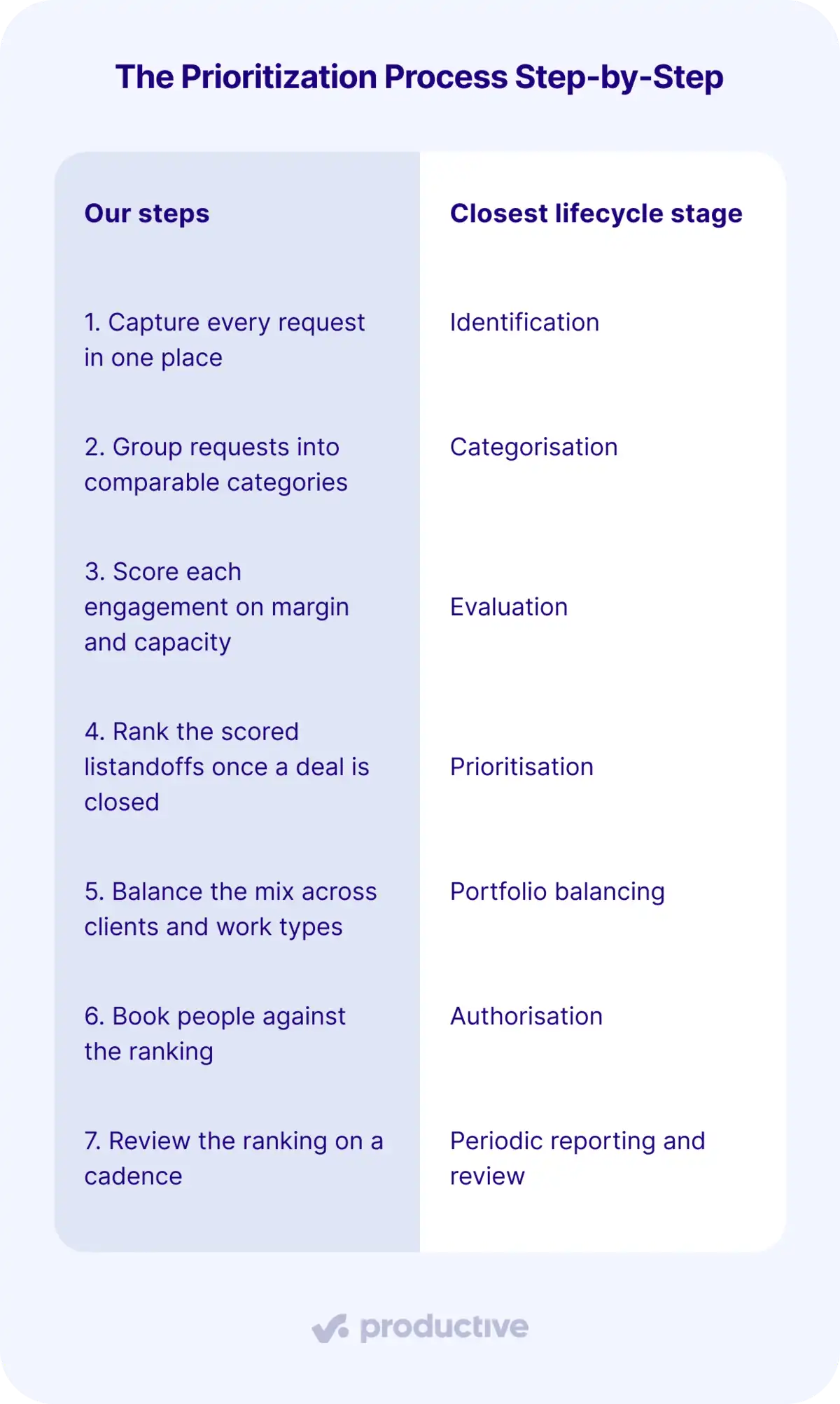
Selection is the one stage without a step of its own. It shortlists against available capacity, which here happens at step six instead: engagements that never get people booked to them do not run.
Let’s look at each.
Step 1: Capture Every Request in One Place
Centralize every inbound request so nothing lives only in a personal list or a chat thread. That covers client asks, commitments an account manager has already made, and internal initiatives.
Capture the same few details for each one, chosen so you can score it later: the fee on the table, the hours it will take, and the role it needs.
The failure to watch for is intake living in someone’s notes or a personal spreadsheet instead of a shared system. When that happens, no one can total the hours already promised against next month’s capacity.
Step 2: Group Requests Into Comparable Categories
Group requests so you score like against like: retainers, fixed-fee projects, new business, and internal work. A retainer renewal and an internal tooling job answer to different tests, so scoring them on identical criteria flatters one and buries the other.
Categories also let you reserve capacity by group and weigh strategic alignment where it applies. Work that serves a stated strategic goal, like opening a new service line, competes inside its own group rather than against a retainer renewal.
Step 3: Score Each Engagement on Margin and Capacity
Score each engagement on margin and capacity impact, rating both one to five. Nobody can hand you your prioritization criteria, since PMI’s Standard for Portfolio Management leaves them to the project manager and leadership, so these two are our pick for services firms:
- Margin is revenue minus the true cost of delivering the work. Rank on revenue alone and you pick wrong: a 200,000 project at 15 percent returns less cash than an 80,000 project at 45 percent.
- Capacity impact is what the project takes off other billable work. It scores in reverse, so the less it displaces, the higher it rates. Name the roles as you score it, because “lead architect, 60 hours” says more than generic availability.
Margin is hard to pin down. For work you have done before, you know the real number. For a new project, it is an estimate from the fee and the hours, and it stays an estimate until tracked time and costs meet revenue at the engagement level.
In Productive, Budgeting tracks project financials in real time as your team logs time and expenses against a budget. Your spend and profit margin update instantly, which removes the wait for month-end reports.
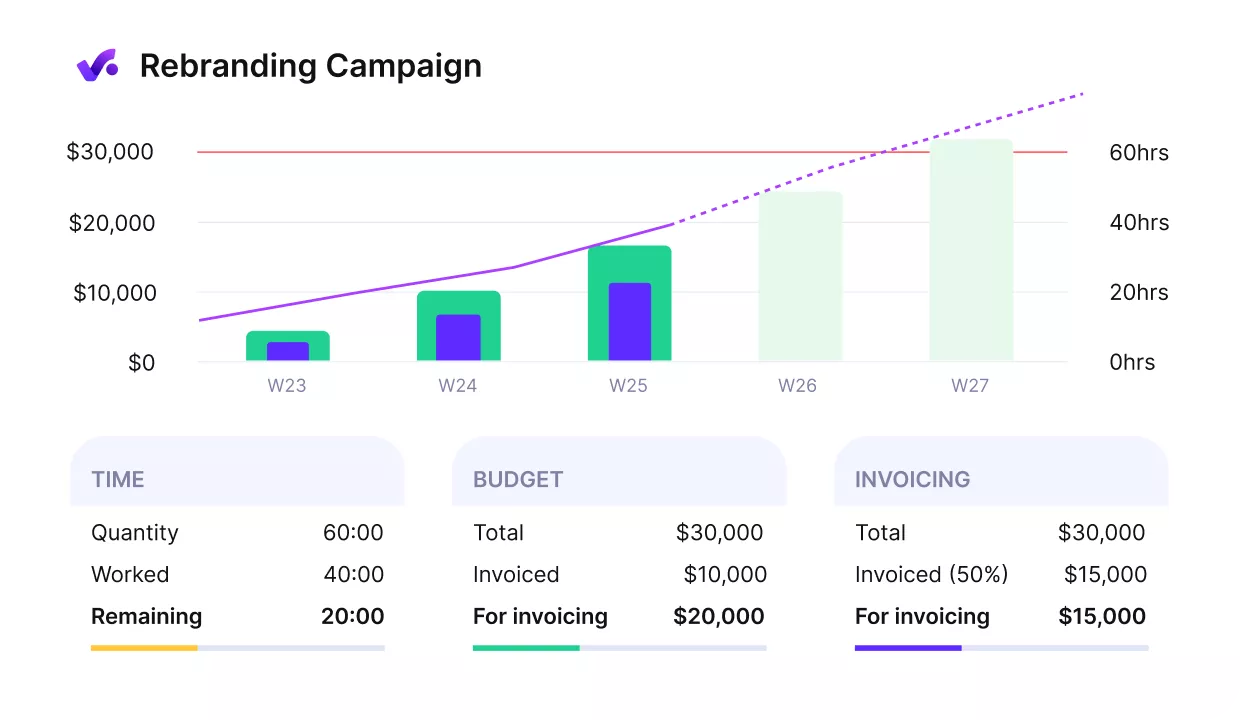
See real margin per engagement in Productive.
Forecasting charts go further, combining logged data with future resource bookings to predict when a project will be depleted.

From a managerial point of view, the main benefit of the tool is seeing profitability in real time. It’s there. We don’t have to calculate it or ask for financial reports from our accountant
Read the full story on how ENKI runs 50 recurring projects with a team of seven.
Step 4: Rank the Scored List
Multiply each score by its criterion weight and rank by the totals, inside the categories from step two.
The matrix below weights margin at 60 and capacity impact at 40. The weights and scores are illustrative, so set your own based on what your firm needs to protect.
Worked matrix: five engagements competing for one consultant
| Engagement | Margin (×60) | Capacity impact (×40, inverted) | Weighted total |
|---|---|---|---|
| Retainer renewal (consultancy) | 5 | 4 | 460 |
| Compliance migration (IT services) | 4 | 3 | 360 |
| Brand campaign (agency) | 3 | 3 | 300 |
| New-logo build (high strategic fit) | 3 | 2 | 260 |
| Internal tooling project | 2 | 3 | 240 |
Remember the capacity column runs backward. The retainer renewal scores 4 because it needs relatively little of the constrained person, not because it needs a lot.
The result is the point of the exercise. The new build lands fourth, despite high strategic fit and real internal excitement, once margin and capacity enter the score.
Bring the ranked list to a leadership review and the debate shifts from opinion to which engagement returns the most margin per hour booked.
Step 5: Balance the Mix Across Clients and Work Types
Balance the mix by checking the ranked list for concentration before you commit to it. If the top four engagements all belong to one client, a single renewal decision now controls most of next quarter, and the ranking has quietly become a risk.
Treat this as a quick risk assessment on the list as a whole, then adjust the order so the mix holds.
That might mean deliberately booking a smaller account that ranked below the cutoff, or protecting the internal-work capacity you set aside in step two so a top-ranked client project does not eat into it.
Step 6: Book People Against the Ranking
Resource allocation starts here. Book the people your top-ranked engagements need before anything lower down claims the same hours. When you run out of people, you have found the end of the list for this cycle.
Likely-but-unsigned work should sit as tentative, not committed. Booking turns the ranking into a plan: names against dates, with each person’s workload visible.
Visibility is the problem it fixes. As headcount grows, one question gets hard to answer: how many hours are actually free next month. Booking in rank order surfaces the gap before anyone promises a date.
Step 7: Review the Ranking on a Cadence
Re-run the ranking on a set cadence, for example monthly or fortnightly. Otherwise it freezes at a snapshot, and some of what it ranks has already been delivered and invoiced.
Share the reasoning with every stakeholder, not just the order. When account managers can see how the retainer scored against the new client, there is less to argue about in side conversations. A project roadmap built from the ranking keeps the current order visible between reviews.
Even a good process has predictable ways of coming apart.
What Pitfalls Should You Watch For When Prioritizing Projects?
The pitfalls to watch for are the whale client who jumps the queue, permanent urgency, chasing new clients over retained work, and internal work losing to billable projects. Each tends to bypass the scoring model, and each has a corrective. We’ll take a closer look at each.
The Whale Client Who Jumps the Queue
The whale is your largest account, and its requests can move ahead of everything behind them. One call, and the consultant booked to a high-margin retainer moves to a low-margin ad hoc ask.
The correction is to score the whale’s asks like everything else, which needs a real view of what is already committed this week. Scored properly, a low-margin ask often loses to the work it would displace, whale or not.
Everything Arrives Flagged Urgent
If every request arrives marked urgent, nothing gets prioritized at all. Scope creep dresses itself as a deadline, and the loudest voice takes hours already priced into a fixed-fee scope.
The correction is to score criteria over volume. Run each urgent request through the urgent-versus-important split first. Much of the urgency evaporates once a contractual date is separated from a request that is merely new.
Chasing New Clients at the Cost of Retained Work
This is the pull of a new client name, sometimes called new-logo FOMO, against work you already have. The deal reads as growth even when it pays a lower margin than the retained work it displaces.
Retainers are what most agencies are trying to build toward in the first place. In SparkToro’s 2025 State of Digital Agencies survey of 376 agencies, 85% said they prefer working with clients on a retainer basis, up from 81% the year before.
So before you say yes, ask whether the new work’s margin per hour beats the retainer capacity it will consume.
You can use Productive’s Scenario Builder to prototype different versions of a deal with specific services and rates. Assign people on the scenario timeline, and you see their availability alongside existing bookings and time off.
As you adjust resources, the scenario calculates projected revenue, cost, and profit margins. Compare the options, then apply the most profitable one to the live deal.
If you are weighing up tools for this, our roundup of scenario planning software can help you out.
Internal Work Loses to Billable Projects
Internal work like tooling, process, or your own website stalls because billable projects outrank it every time it is scored. It scores low on margin by definition, so it can lose out by default.
The fix is to protect a defined slice of capacity before billable work absorbs it, at whatever share your firm can carry. Booking that time as confirmed internal work, as in step six, is what keeps it from reading as open.
These four are not the whole list; any pressure that reaches your team outside the scoring model belongs in the same category. Corrections hold better when someone owns them.
Who Owns Prioritization Decisions and How Should Governance Work?
Prioritization is owned by leadership, an ops lead, delivery leads, and finance. Governance works when each of those four has a named job and a monthly review to bring it to, rather than a heavyweight PMO.
PMI’s Standard for Portfolio Management describes portfolio work as spanning executive management, a portfolio office, operations, and delivery teams. The split below follows that, with finance added because the margin numbers have to come from somewhere:
- Leadership and partners: approve which engagements win capacity, sign off on margin trade-offs, and answer to the stakeholders behind them.
- PMO or ops lead: collect intake, apply the weighted scores, and produce the ranked list.
- Delivery leads and project managers: book people against confirmed priorities, watch the workload, and flag conflicts.
- Finance: confirm the margin figures feeding the scores.
Access Your Insights From One Place
Access to the right numbers is what makes a priority call easy: what the work returns, what it costs in hours, and who is already committed. Prioritizing well is then mostly about deciding deliberately and holding the order you agreed.
Spread across spreadsheets and separate tools, those numbers arrive too late to change anything. Productive keeps budgets, projects, and your resources together, so margin per project and current workload are there when you need them.
Book a demo with Productive to see how it fits your firm.
Projects, Budgets, and People in a Single Tool
Productive connects bookings, budgets, and tracked time, so the information behind a priority call is in one system.
