Project Manager vs Account Manager – What’s the Difference in Agencies?

In agencies, the roles of project manager vs account manager often overlap, so people start mixing them up. That overlap can create internal friction, especially when people juggle multiple tools and work from different sources of information.
Here we’ll teach you how to avoid the mess by explaining the differences between project managers and account managers, how the two roles collaborate during client work, and how the right software helps both sides stay aligned.
Key Takeaways
- The difference is in what each role owns, who they work with, and how they are measured: project managers own delivery and work mainly with internal teams, while account managers own the client relationship and work mainly with clients and stakeholders.
- Each role keeps a different part of the project on track: project managers plan timelines, coordinate the team, and ensure delivery, while account managers manage client communication, expectations, and relationship health.
- Both roles need to review changes before they affect the project: small requests can quickly turn into scope creep, budget issues, or messy client communication when nobody checks the impact first.
- Software helps both roles work from the same live data: when both roles can see project progress, tracked hours, budget usage, and client updates in the same system, teams avoid miscommunication and catch scope issues earlier.
What Is the Difference Between a Project Manager vs Account Manager?
The difference between a project manager (PM) vs account manager (AM) is that PMs focus on delivery, AMs focus on the relationship, PMs work mostly with internal teams, AMs work mostly with clients and stakeholders, PMs are measured by delivery performance, and AMs are measured by account health.
We will break each of those differences down in more detail below.
- PMs focus on delivery. They turn approved work into a plan, keep it moving, and protect the scope when a project starts to drift.
- AMs focus on the relationship. They lead account management, keep communication clear, and make sure the client knows what is happening and what comes next.
- PMs work mostly with internal teams. In most digital agency management setups, they coordinate designers, marketers, consultants, or developers so the work gets done in the right order.
- AMs work mostly with clients and stakeholders. They handle updates, manage expectations, and keep commercial conversations from spilling into delivery every five minutes.
- PMs are measured by delivery performance. Their work is usually judged by deadlines, budget, and how smoothly the team delivers.
- AMs are measured by account health. These management roles are closer to retention, satisfaction, growth, and the overall strength of the relationship with the client.
When you look at both managerial roles side by side, their differences become clear. The table below offers a quick comparison before we dive deeper into what each manager actually does in daily agency work.
| Area | Project Manager | Account Manager |
|---|---|---|
| Primary focus | Project delivery and execution | Relationship with the client and account health |
| Main responsibility | Planning, coordinating, and delivering project work | Managing communication, expectations, and satisfaction |
| Works mostly with | Internal delivery teams | Clients and stakeholders |
| Success metrics | On-time delivery, budget adherence, and delivery efficiency | Client retention, satisfaction, and account growth |
| Perspective | Internal project execution | External relationship with client |
This difference also changes what each role needs to see. In many agencies, that information sits in separate tools, so people make decisions with only part of the picture. The goal is not to give everyone access to everything. It is to give each role the visibility it needs without exposing sensitive cost data.
Productive’s Permission Builder does exactly that. It lets each role work from the same underlying project data while limiting access to details they should not see.
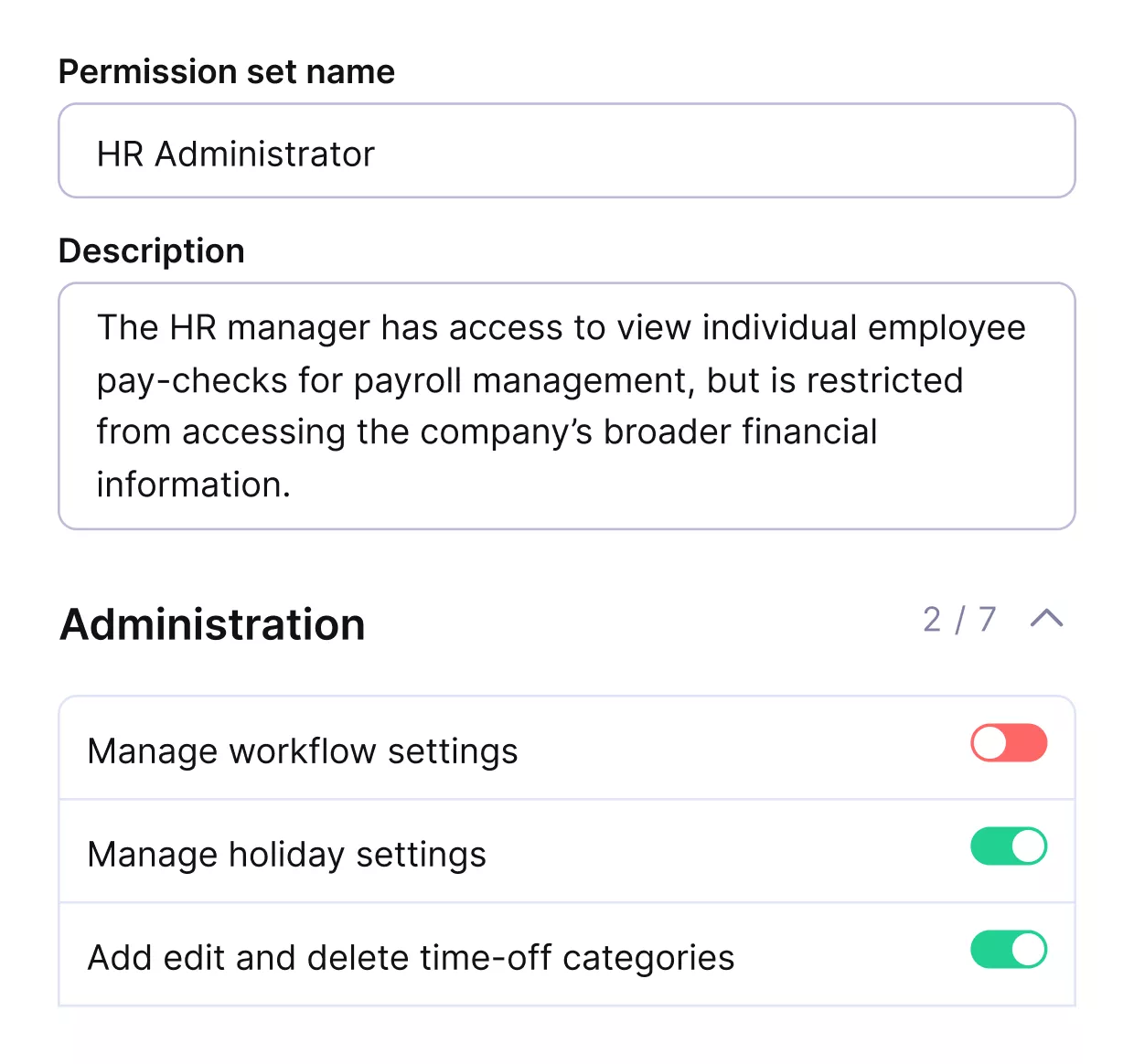
PRODUCTIVE PERMISSION BUILDER ENSURES EACH MEMBER SEES ONLY THE PROJECT DATA THEY NEED.
This means both roles can make decisions using the same underlying data, just at the right level of detail.
Control your employees’ permissions in Productive
With the difference clear, the next step is to look at each role on its own and see what that role really entails, especially in a digital marketing agency where handoffs can get messy fast.
What Does a Project Manager Do?
A project manager plans and protects delivery so projects stay on track, within scope, and are made easier for the team to execute.
The importance of this role is only growing. According to the Project Management Institute, the global economy will need up to 30 million additional project professionals by 2035, which shows how central structured delivery has become across industries.
PMs rely on a clear set of responsibilities to keep delivery moving without creating extra admin for the team.
PM Responsibilities:
- Turn approved work into a clear project plan, timeline, and work schedule.
- Coordinate tasks, owners, handoffs, and resource allocation across the team.
- Manage project scope, dependencies, and project execution.
- Track progress, support timeline management, flag risks early, and remove blockers.
- Support budget management to keep delivery realistic.
This is also where project coordinator vs project manager becomes a useful distinction, because the project manager role carries greater ownership of scope, timelines, and delivery decisions.
Those responsibilities only work if the person in the role brings the right skills to the job.
PM Skills:
- Planning and prioritization
- Communication and team management
- Problem-solving and attention to detail
- Enough technical background to understand technical aspects when needed
A strong manager role needs good judgment as much as organization. PMs need to see risk management problems early, make sensible trade-offs, and keep delivery clear without overcomplicating it.
That covers the delivery side of the picture. Next, it helps to look at the role that stays closest to the client and keeps the relationship moving.
What Does an Account Manager Do?
An account manager handles client relationship management so communication stays clear, expectations stay aligned, and the account has room to grow.
Account managers are guided by a well-defined set of responsibilities to maintain that relationship.
Account Manager Responsibilities:
- Manage day-to-day client communication across meetings, emails, and follow-ups.
- Understand client goals, priorities, and what good outcomes look like.
- Align expectations around timelines, deliverables, and next steps.
- Share updates, handle client service questions, and keep communication moving.
- Spot renewal, upsell, or expansion opportunities that support business growth.
These responsibilities help account managers protect the relationship without losing sight of the work behind it. Those responsibilities only work when the role is backed by the right skills.
Account Manager Skills:
- Relationship building
- Communication and negotiation
- Strategic thinking and problem-solving
- Sales skills paired with good judgment
A strong manager needs to balance customer care with clarity. The best managers keep relationships strong, protect client satisfaction, and know how to support client retention without making promises the team cannot deliver.
That covers the client side of the picture. Next, it helps to examine how the two agency roles work together once a project is underway.
How do Project and Account Management Roles Collaborate During a Client Project?
Project and account management roles collaborate during a client project through handoffs at each stage of the project and by reviewing changes early.
We will look at both in more detail below.
They Collaborate Through Handoffs at Each Stage of the Project
The exact handoff depends on the stage of the work, which is why it helps to look at the project step by step.
| Project stage | How the roles collaborate |
|---|---|
| Client goals and project brief | The AM gathers goals, priorities, and context from the client, then hands that information to the PM. |
| Scope alignment | Both roles check that the requested work, timeline, and expectations still match the agreed scope of work. |
| Project planning | The PM turns the brief into timelines, owners, and delivery steps, while the AM pressure-tests the plan against client expectations. |
| Delivery execution | The PM leads day-to-day delivery and flags risks, while the AM stays close enough to prepare the client for updates or changes. |
| Client updates | The AM leads communication with the client, using delivery input from the PM to keep updates accurate through project reports and visual updates. |
| Renewal or expansion | The AM leads the commercial conversation, while the PM adds delivery context if future work depends on team capacity or scope. |
In most management setups, that handoff runs back and forth between the client and the team. The AM brings in the client’s view. The PM works with a cross-functional team, creative teams, operational teams, and creative leads to turn that into delivery.
They Collaborate by Reviewing Changes Early
This is where the relationship gets tested a bit more. Once a project is underway, new feedback, small requests, and shifting priorities can all affect scope, timing, or cost.
That is usually where scope creep starts. One extra revision or one extra meeting does not seem dramatic at first. But if project and account management aren’t reviewing those changes together, small adjustments pile up quickly.
Shared budget visibility helps here. Many agencies run into trouble because account managers keep saying yes to protect the relationship, while project managers track tasks but do not always see the live budget burn.
Productive’s Budgeting helps by showing budget consumption in real time, so both roles can spot risk earlier, see when a project is drifting, and raise the scope conversation before the budget is gone.
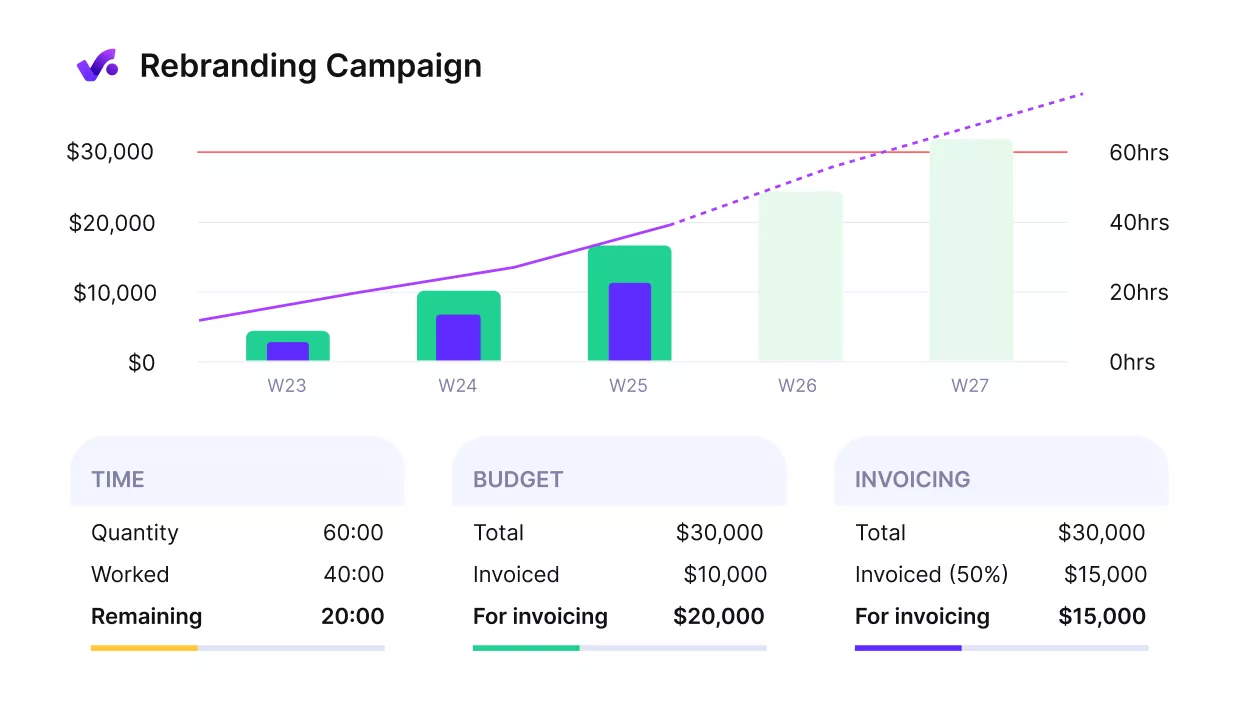
PRODUCTIVE’S BUDGET TRACKING HELPS MANAGERS SPOT SCOPE CREEP BEFORE IT AFFECTS PROFITABILITY.
If you want to compare some options for this part of the workflow, check out our list of project budget management tools.
That working relationship matters most when projects are already moving. The next question is how software helps management stay aligned once the work is in motion.
How Does Software Help Project Management and Account Management Stay Aligned?
Software helps project management and account management stay aligned by giving both roles a clear view of active projects and by helping teams set up new projects properly.
We will look at each of these in more detail below.
Gives Both Roles a Clear View of Active Projects
A clear view of active projects makes day-to-day work much easier for both sides. When PMs and AMs view the same live data, progress, timeline, budget status, and reporting, everything becomes easier to follow.
In practice, shared visibility helps teams in multiple concrete ways:
- Clearer project updates. Both roles can reference the same project reports and visual updates, rather than rebuilding status from different tools.
- Less time chasing information. Account managers do not need to track down project managers for every update.
- Faster issue detection. Teams can spot delivery delays or budget problems earlier.
- Better internal coordination. Everyone works from the same project management tools instead of scattered spreadsheets.
This is where strong agency management software also helps internal operations. When delivery data lives in one place, both roles can spot issues earlier, answer questions faster, and spend more time managing the work instead of chasing it.
This kind of visibility also helps teams support the resource manager role, because capacity and workload decisions are easier to make when active projects live in one place.
Helps Teams Set Up New Projects Properly
This is where many agencies run into trouble without realizing it. An account manager or sales team closes work in HubSpot, Pipedrive, or another CRM, and the project manager inherits it in Float, ClickUp, Monday, or another delivery tool.
Because those systems rarely talk to each other, several important checks often get skipped:
- Capacity validation. Teams do not confirm whether the right people actually have time to deliver the work.
- Estimated costs review. Budget assumptions may not be tested before the project begins.
- Delivery feasibility. Timelines or scope may already be unrealistic.
- Margin visibility. The business impact of the work may be unclear from the start.
Productive’s CRM connects directly to projects and resource planning. A deal in the pipeline can be used to model capacity impact before the contract is signed.
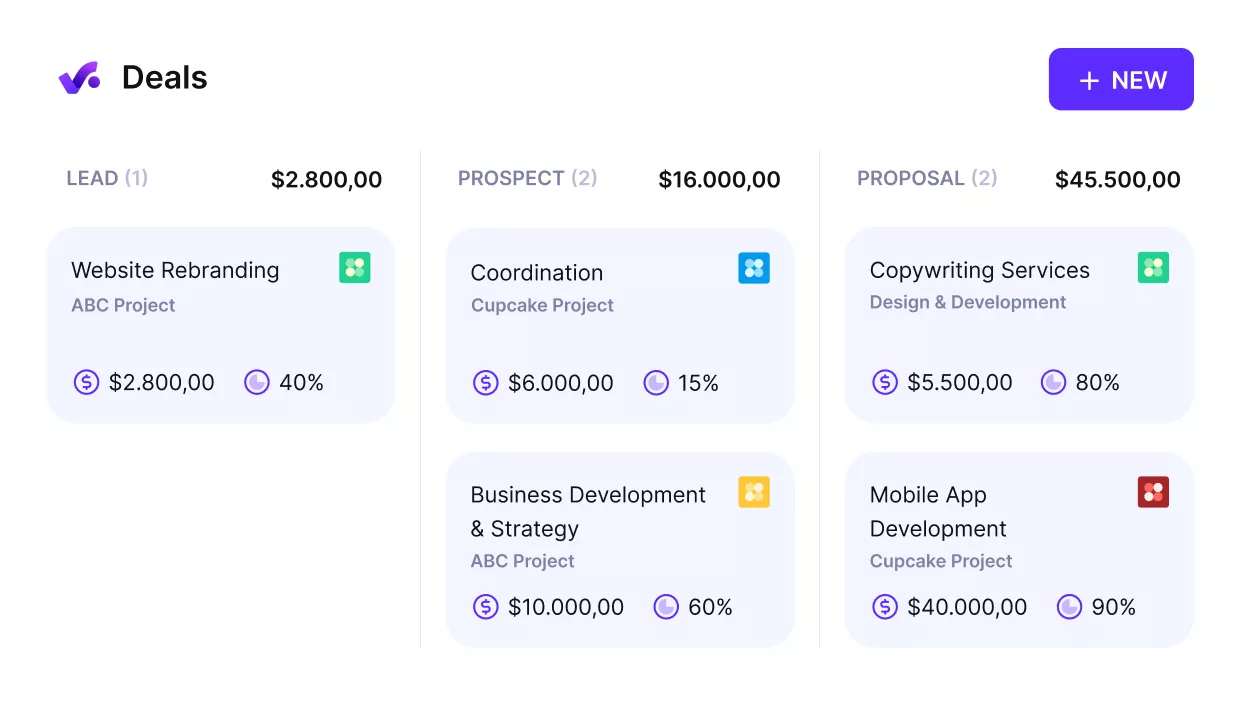
USE PRODUCTIVE TO MANAGE YOUR PIPELINE AND CLOSE DEALS WITH PROPOSALS, ALL IN THE SAME WORKSPACE.
When the deal closes, it flows into the project without a manual handoff. This way, AMs and PMs work from the same dataset, not two separate systems that need to be reconciled.

People no longer have to switch between multiple tools, and we don’t encounter issues where an update in one tool causes a problem in another. Everything is in one place now, which has made a huge difference. I can confidently say that the work required for financial reporting has been significantly reduced.
Read the whole customer story to see how wild keeps everything in one place with Productive.
Agency Management Works Better With Shared Visibility
In many agencies, delivery updates, client communication, and financial data are stored in separate tools. That makes it harder for project and account teams to make decisions using the same information.
Software matters because it closes that gap. Productive connects projects, budgets, and reporting, so both roles can see the current project status, spot issues earlier, and stay aligned without piecing together updates by hand.
Experience it in practice and book a demo with Productive to discover how it can support your projects from start to finish.
Stop Managing Projects and Clients in Separate Tools
Connect CRM, projects, budgets, and resource planning in Productive so your team can plan work, manage clients, and track profitability without spreadsheets.
