Operations Management Explained in 2026 – A Practical Guide

A lot of companies don’t get their operations management right. Managers are often faced with handling multiple projects and team members at the same time, and their critical information is scattered across too many places. If you are also having problems with operations, stick with this guide.
We’ll break down what operations management is, why it matters in professional services, and what the process looks like. You’ll also learn which KPIs to track, what an operations manager does, and what software can help you manage operations more effectively.
Key Takeaways
- Operations management organizes how work gets done: it defines how work is designed, planned, executed, and reviewed, so teams don’t have to rely on guesswork or constant back-and-forth to stay on track.
- A clear operations plan is what keeps delivery predictable: It improves efficiency, supports consistent service quality, and lowers risk.
- Budgeting is a core part of managing operations: tracking budget burn and profitability as work progresses keeps project operations on track.
- Software is essential because operations need a unified place to track work: a single system puts project progress, resource capacity, and financial performance into context.
What is Operations Management?
Operations management is a core component of business management that shows how operations can be planned, implemented, and optimized to help organizations meet strategic objectives (Baker College).
Simply put, operations management is about ensuring daily work runs smoothly to achieve strategic goals. It involves the decisions and routines that keep work progressing, even when priorities shift or resources are stretched.
One way to understand this is to examine the operations themselves. Baker describes operations as the daily activities and workflows that keep goods and services moving. In professional services, these workflows include intake, scoping, resourcing, approvals, delivery handoffs, and billing.
When workflows are coordinated effectively, teams spend less time guessing about next steps. This leads to clearer ownership, fewer avoidable delays, and a greater likelihood of delivering on promises.
This focus is critical in professional services, where people are the main products. Even small gaps in how work moves through the team can lead to missed deadlines, overworked specialists, and dissatisfied clients.
With a foundational understanding of operations management, it’s helpful to look at the different forms it can take. Next, we’ll explore the main types of operations management and how each supports the unique needs of various organizations.
What Are the Types of Operations Management?
The main types of operations management include supply chain management, inventory management, production management, project management, quality management, and service operations management.
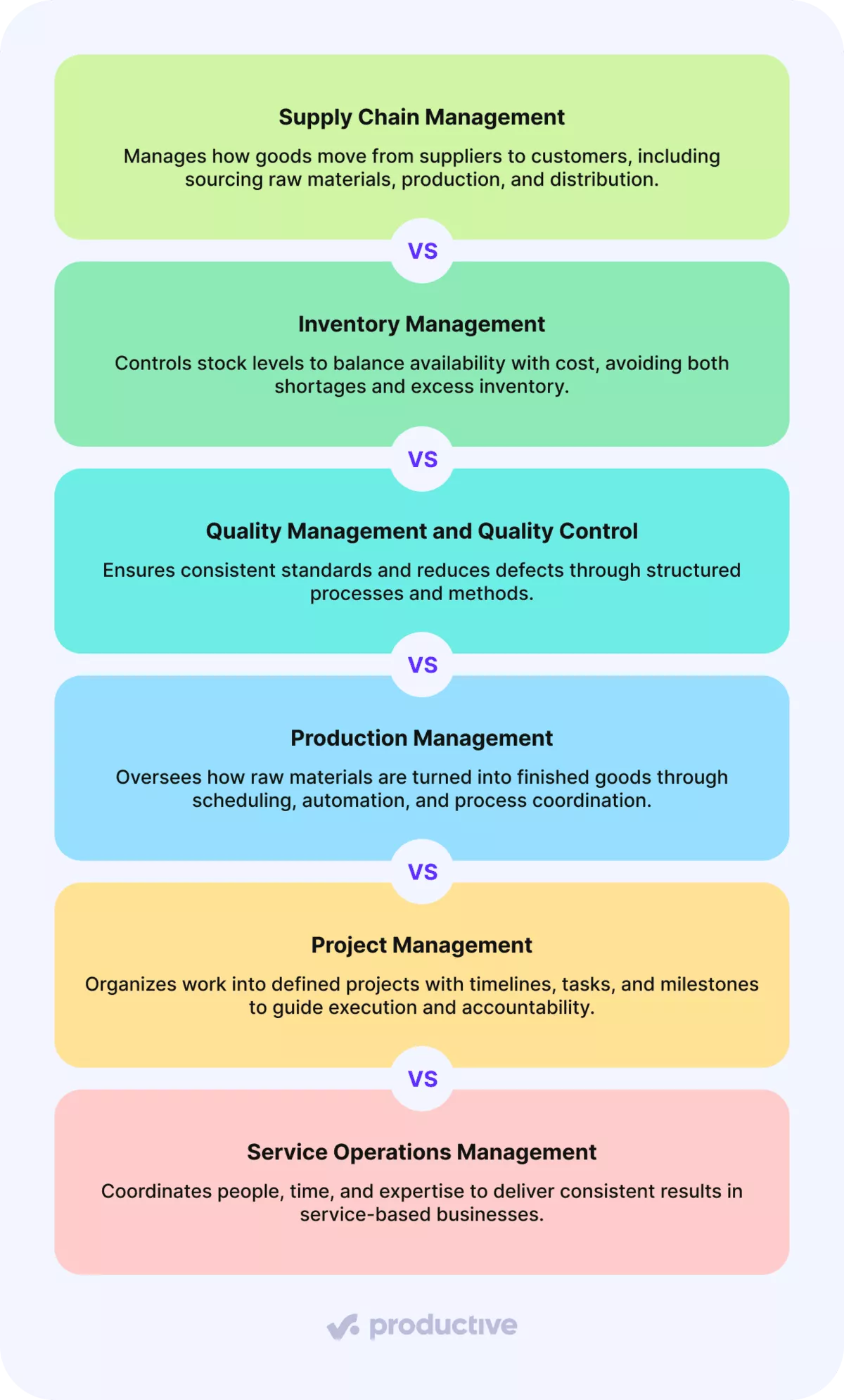
We will take a look at each type in more detail:
Supply Chain Management
Oversees the entire journey of goods from suppliers to customers. This includes sourcing raw materials, coordinating production, managing logistics, and ensuring products arrive on time and in the right place.
Inventory Management
Manages stock levels, storage, and replenishment. The objective is to balance having enough inventory to meet demand while minimizing excess and associated costs.
Quality Management and Quality Control
Focuses on maintaining high standards and minimizing errors. Quality management establishes how standards are set and achieved, while quality control ensures outputs meet those standards. In manufacturing, this often involves continuous improvement methods such as Six Sigma to reduce defects and variability.
Production Management
Oversees the processes that transform raw materials into finished products. Key activities include scheduling, optimizing production lines, implementing production automation, and ensuring smooth handoffs between production stages.
Project Management
Structures work into defined projects with clear timelines, tasks, and milestones. It’s closely linked to operations, as projects are a primary way organizations plan, deliver, and track progress.
Service Operations Management
Applies operations principles to services rather than to physical products. Here, the emphasis is on coordinating people, time, and expertise to ensure consistent outcomes. Agency operations is a specialized subtype of service operations, tailored, of course, toward agencies.
These types show how broad managing operations can be, depending on what a business delivers. Furthermore, we’ll narrow the focus and explain why operations management matters so much.
Why Is Managing Operations Important?
Managing operations is important because it improves operational efficiency and enables reliable delivery, which directly affects cost control, customer satisfaction, and business stability (Emeritus).
Let’s examine each benefit in more detail.
Improves Operational Efficiency and Increases Profitability
Efficient operations eliminate friction from daily work. Clear workflows, stronger coordination, and fewer handoffs reduce wasted time and rework.
Automates Operational Processes and Facilities Innovation
By reducing manual work and standardizing task handling, operational management gives teams more room to improve their workflows. Rather than constantly reacting, organizations can refine processes and adapt more quickly to change.
Keeps Execution Aligned With Business Objectives
Operational management links daily work to broader goals. Through planning, prioritization, and performance oversight, organizations ensure that effort is focused on what truly moves the business forward.
Ensures Delivery of Services and Increases Customer Satisfaction
When teams rely on consistent processes, clients encounter fewer surprises and clearer timelines. That consistency is hard to achieve without operational discipline. For example, Wellingtone’s State of Project Management report found that just 34% of organizations mostly or always deliver projects on time, a reminder that reliable delivery remains a significant challenge for many teams.
Ensures Regulatory Compliance and Reduces Risk
Clear processes and defined ownership lower the risk of errors and missed obligations. For service global businesses, this translates into more consistent delivery and fewer last-minute fixes that put pressure on teams.
Next, we’ll break down what operations management looks like in practice by walking through the process step by step.
What Does the Operations Management Process Include?
The operations management process includes designing, planning, executing, and controlling operations (Western Governors University).
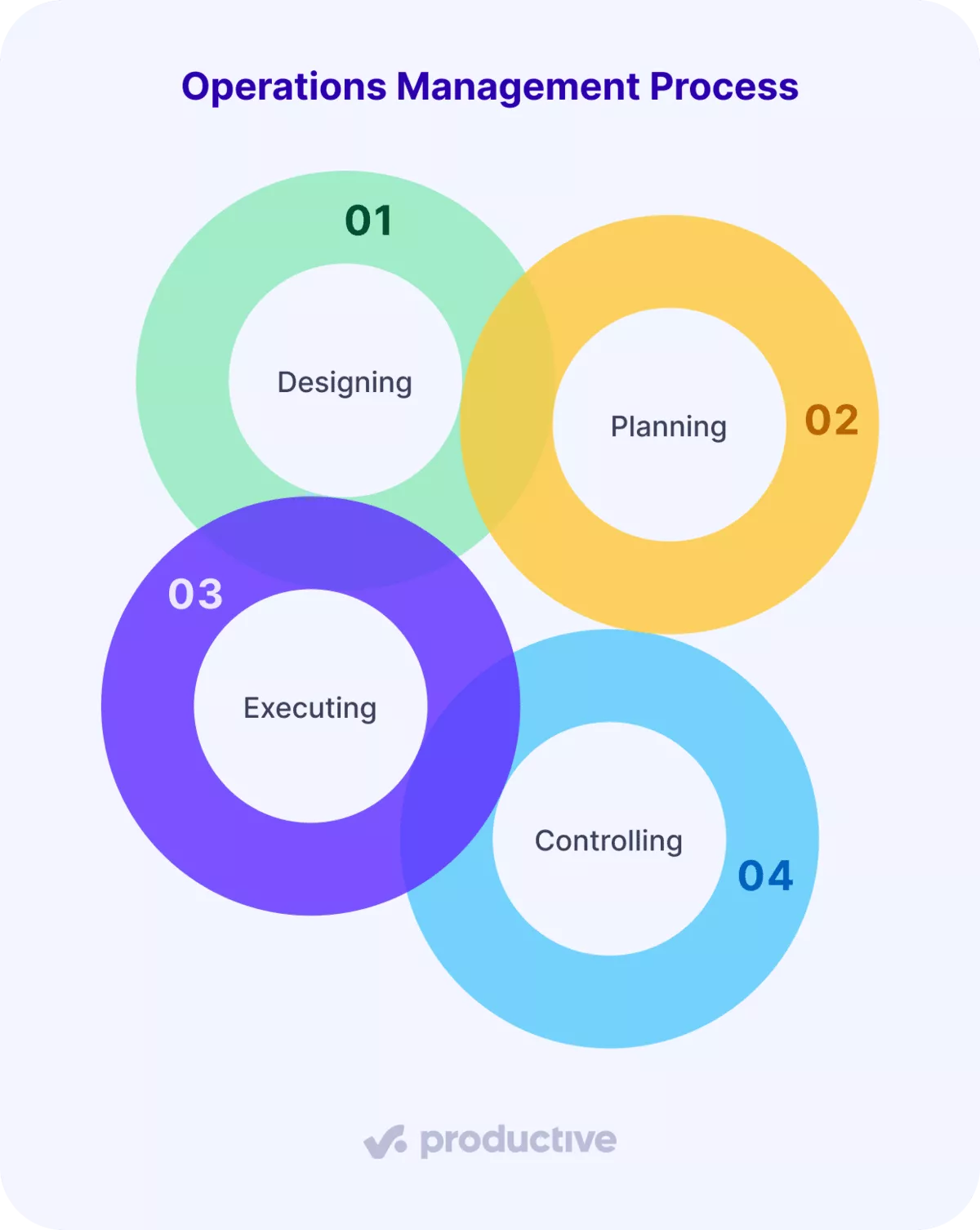
Below, we break down each step and explain how it shows up in real service delivery.
Step 1: Designing
Designing is where operational management sets the rules before any work begins. This step involves defining:
- How should the workflow function?
- Who is responsible at each stage?
- What standards will guide delivery?
Good design reduces guesswork later. When expectations, roles, and workflows are clear from the start, teams spend less time asking what comes next and more time actually delivering.
One practical way teams support this step is by standardizing workflows in the tools they use every day. Clear workflow stages help teams agree on how work moves from start to finish and reduce confusion during handoffs.
Step 2: Planning
Planning is where teams translate long-term goals into actionable steps for the near future. This stage focuses on forecasting demand, assessing available resources, and determining what can be accomplished within a given timeframe.
In professional services, planning is largely about managing trade-offs. New client projects compete with ongoing delivery, internal initiatives, and scheduled time off. Effective planning makes these trade-offs visible and intentional, helping teams sequence work realistically rather than overcommitting and hoping for the best.
Tools like Productive’s Resource Planning provide a clear, visual overview of workload and team availability. With these insights, teams can allocate work based on true capacity, prevent burnout, and better anticipate future needs.
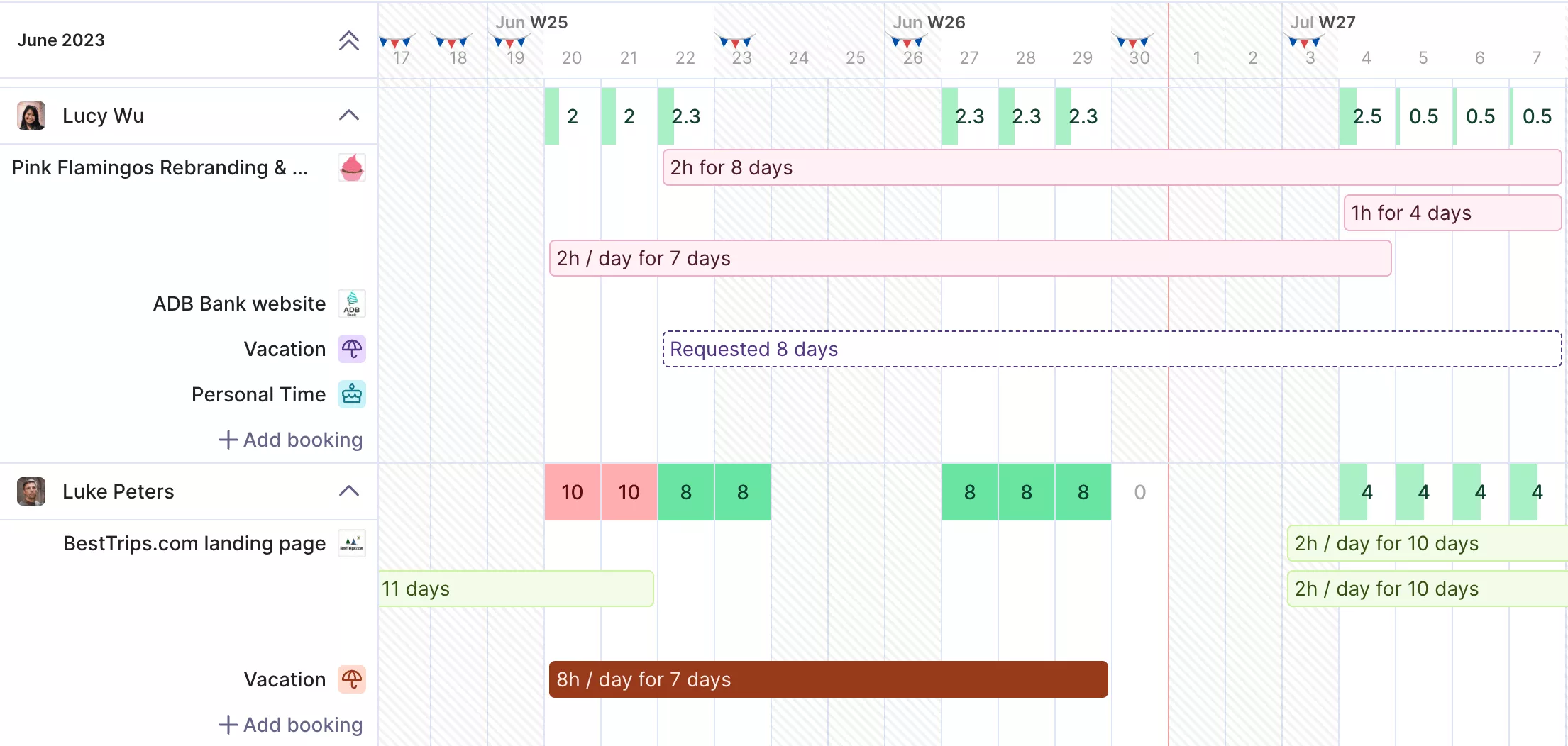
Visualize team availability and prevent bottlenecks with Productive’s Resource Planner.
With heatmaps, you can avoid situations where one employee has too much to do, while another is being underutilized. You can even account for future staff with placeholder entries.

We go through our team and see our workload for the next week or even for the next month, or for the next three months, and then we can schedule our people accordingly. Before we had a lot of Excel sheets, people were doing this in PowerPoint or Word. They were not in one place, and the data wasn’t extractable from one place.
Read more about how BICG handles its business operations with Productive.
Step 3: Executing
Execution is the stage where plans are put into action, and work becomes tangible. At this point, teams deliver on projects and client commitments, making operations most visible to those carrying out the day-to-day tasks.
In professional services, execution is rarely a straight line. Teams must juggle several projects simultaneously, respond to client feedback, and adjust as priorities change. Strong execution relies on coordination: knowing who is working on what, keeping workloads balanced, and making proactive adjustments to avoid bottlenecks and keep everything on track.
Strong execution isn’t about rigidly sticking to the plan; it’s about maintaining momentum, even as circumstances change. When managed well, teams can absorb shifts in direction without losing pace, ensuring delivery stays predictable without becoming overwhelming or overly restrictive.
Step 4: Controlling
Controlling is what keeps operations on track after work has started. This stage involves monitoring progress in real time, identifying early warning signs, and making proactive adjustments before minor issues escalate into missed deadlines or margin problems.
Controlling also closes the loop between plans and reality. It highlights where assumptions were inaccurate, where processes need refinement, and where future planning can be improved. In this way, controlling isn’t just the final step; it’s what drives continuous improvement for the next cycle.
Once the process is in place, the next step is to measure whether it’s working, which is where KPIs come in.
Which KPIs Matter Most?
The KPIs that matter most are billable utilization, revenue by client, and profit margin by client. Let’s look at each one more closely below.
Billable Utilization
Billable utilization measures the percentage of your team’s available time spent on billable work. When tracked effectively, it reveals overload, underuse, and staffing imbalances. For production roles, aim for 70-90%. Lower numbers often show that something is not being used enough. Numbers near 100 percent for long periods are a risk of burnout and declining quality.
Revenue by Client
Revenue by client shows where your income is coming from and how dependent you are on specific accounts. It also supports revenue operations (RevOps) by clarifying which accounts drive growth and which ones create risk.
From an operations perspective, this metric supports better prioritization and helps you plan more realistically when demand shifts.
Profit Margin by Client
Profit margin by client links the delivery effort to financial results. It reveals which clients are healthy to serve and which consistently require more resources than expected. This metric is a clear signal when operations and pricing are misaligned.
Together, these three metrics provide a solid operational baseline. For a broader view, including delivery reliability and forecasting, see the full list of professional services KPIs.
Once you know what to measure, the next step is understanding what typically gets in the way of improving those numbers.
What Common Challenges Arise When Managing Operations?
Common challenges in managing operations include disconnected documentation, poor capacity planning, and managing scale and complexity. We will look at each challenge in more detail.
Disconnected Documentation
A frequent operations problem is that critical information is scattered across too many places. Procedures might be stored in shared drives, project notes in various tools, decisions in chat, and important context in people’s heads. Over time, this leads teams to use outdated instructions or incomplete information, often without realizing it.
Teams can address this by centralizing operational documentation where work already occurs, ensuring everyone uses the same, up-to-date information.
Poor Capacity Planning
Poor planning of capacity makes it difficult to meet project goals without incurring unnecessary costs or pressure. When demand exceeds availability or when availability goes unused, the impact tends to show up in a few predictable ways:
- Higher operational costs: You pay for time that is not used, while critical roles still get stretched.
- Lower satisfaction of customers: Projects slip or quality drops when demand exceeds availability.
- Lower employee engagement: Some people burn out from overload, while others sit underutilized.
- Missed opportunities: You cannot take on new work confidently, even when demand exists.
Better planning starts with a clear, regularly reviewed baseline of team availability. This approach helps teams spot problems early and make adjustments before delivery is impacted.
To get started, use this capacity planning template to schedule time for billable and non-billable tasks, track workloads, and gain insights into utilization with built-in formulas.
Free Capacity Planning Template
Download our template to schedule time for billable vs non-billable tasks, track workloads, and get insights into utilization with preset formulas.

Managing Scale and Complexity
Managing scale becomes a challenge when the number of clients, projects, and people grows faster than the systems that support them. Processes that worked for a small team often break down as coordination requires more handoffs and shared resources.
Software becomes the practical answer here. A growing team needs one place where work is planned and tracked, where ownership is visible, and where updates live next to the task or project they affect. Without that, information spreads across docs, chats, and meetings, and every small change creates a trail of follow-ups.
It’s now worth exploring the best practices that can help teams drive ongoing success.
What Best Practices Help Professional Services Manage Operations?
The best practices that help professional services manage operations are automation of core workflows, real-time updates, and transparent communication.
We will explain each in more detail.
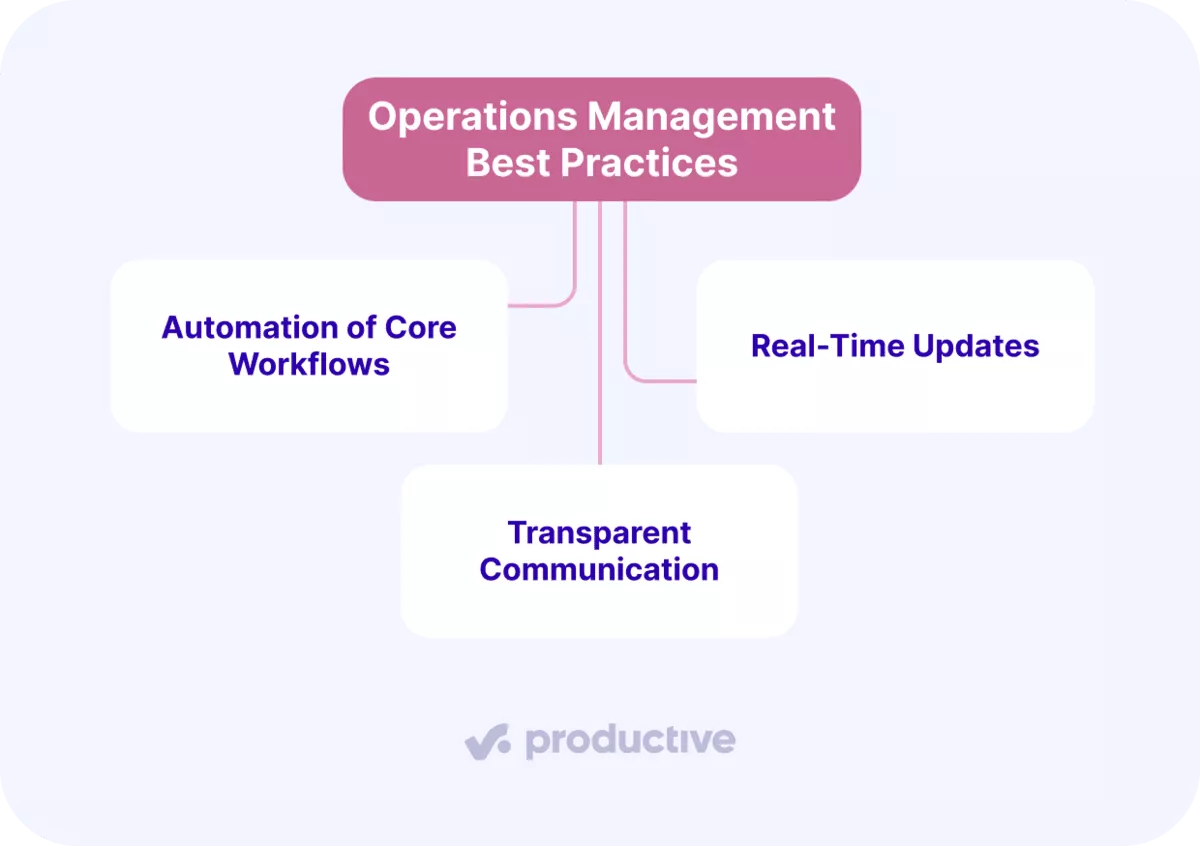
Automation of Core Workflows
High-performing teams start by mapping out how work should flow before seeking optimization. Clear, standardized workflows reduce ambiguity, speed up onboarding, and make delivery more predictable. Once this foundation is set, automation is the natural next step. Automating repeatable operational tasks minimizes manual effort, reduces errors, and frees teams to focus on higher-value work.
For example, Productive lets teams design custom workflows with clearly defined stages for each task, ensuring every project follows a consistent path from start to finish.
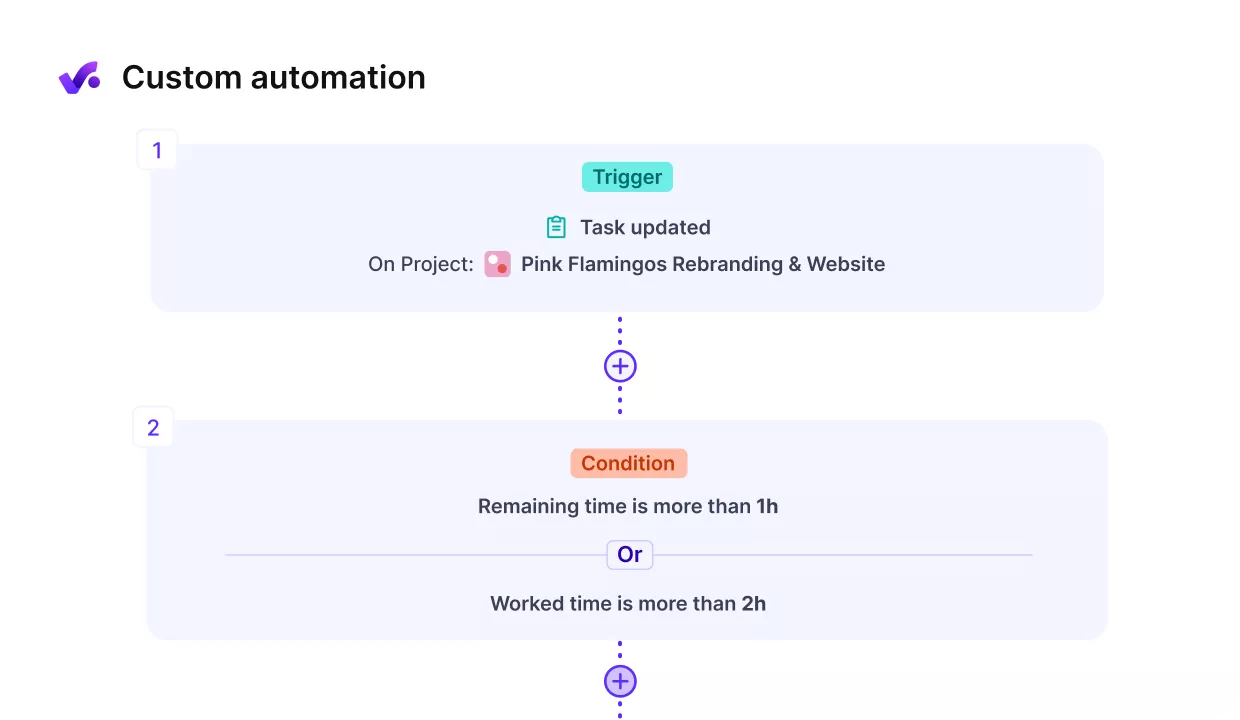
Standardize operational processes by creating custom workflows in Productive.
Automate workflows in Productive
Real-Time Updates
Keeping work up to date in real time requires a centralized platform as the single source of truth for status, progress, and blockers. When updates live where the work happens, there’s no need to chase emails, spreadsheets, or side conversations to stay informed.
In practice, this means updating task statuses as work progresses, logging changes when scope shifts, and capturing decisions where everyone can see them. This reduces surprises, shortens feedback loops, and helps teams react early, rather than after deadlines have slipped.
Transparent Communication
Transparent communication is most effective when information remains connected to the work it influences. By storing decisions, approvals, and client feedback directly within your project management software, right on the relevant task or project, everyone stays aligned and up to date.
A good rule of thumb: whenever something impacts how work is delivered, update it directly in the system where the work is tracked. This approach minimizes repeated questions, streamlines handoffs, and gives project managers real-time visibility into issues, without the need to chase down updates.
Next, it’s important to look at the pivotal role an operations manager plays in making it all work.
What Does an Operations Manager Do?
An operations manager ensures that work is realistically planned, consistently delivered, and clearly measured across the business. They design and maintain the systems that enable teams to deliver smoothly without constant firefighting.
Their core responsibilities include:
- Defining how work flows: establishes and maintains clear processes for intake, project scoping, delivery handoffs, and billing.
- Planning capacity and priorities: reviews upcoming demand against team availability and guides teams in making realistic trade-offs.
- Maintaining operational systems: ensures project, resource, and time data remain accurate, providing a reliable basis for decision-making.
- Monitoring delivery health: tracks key indicators such as utilization, margins, and delivery risk to identify and address issues early.
- Improving broken processes: addresses recurring problems by identifying and fixing root causes within operational systems, rather than relying on temporary workarounds.
This type of managerial role is often confused with project management or finance, but it has a distinct focus. Project managers oversee the delivery of specific projects, while finance reviews performance after the fact.
Given this broad scope, operations managers collaborate closely with delivery leads, finance, and leadership. Doing that well requires a specific set of skills that shape how they think, communicate, and make decisions day to day.
Skills Required for Operations Managers
Western Governors University highlights these as key skills for operations managers:
- Communication: ensures delivery remains aligned across teams and departments by making priorities, handoffs, and changes clear and understandable.
- Organization: builds and maintains schedules, plans, and operational routines to keep work coordinated as projects progress.
- Data analysis: utilizes data to identify inefficiencies, uncover the causes of overruns, and select the best process improvements.
- Problem-solving: identifies and eliminates the root causes of recurring issues, rather than applying short-term fixes.
- Decision-making: makes timely and informed decisions when plans shift, considering the impact on delivery, availability, and profitability.
- Strategic thinking: continuously improves how operations run in the long term, rather than focusing only on immediate needs.
- Leadership and people management: sets clear expectations, guides teams through change, and sustains execution without micromanaging.
With the role and required skills defined, the next step is choosing software that supports these responsibilities in practice.
What Are the Best Operations Management Software Options?
The best operations management software options are Productive, Asana, and CloudTalk. Below, we’ll look at each tool more closely and explain what it is best suited for.
Productive – The Best All-in-One Operations Management Solution
Productive is an all-in-one project management platform designed to streamline day-to-day business operations for professional services. It brings projects, resourcing, time tracking, budgeting, invoicing, and reporting into a single system, eliminating the need for fragmented tools.
By centralizing everything in one place, Productive serves as a single source of truth. This enhances data accuracy and makes it easier to understand what’s happening across delivery, capacity, and finances without manual reconciliation.
One of Productive’s standout features is its budgeting and financial visibility. You can create budgets for various engagement types, fixed price, hourly, hybrid, or retainer, and split complex projects into phases for clearer cash flow tracking.
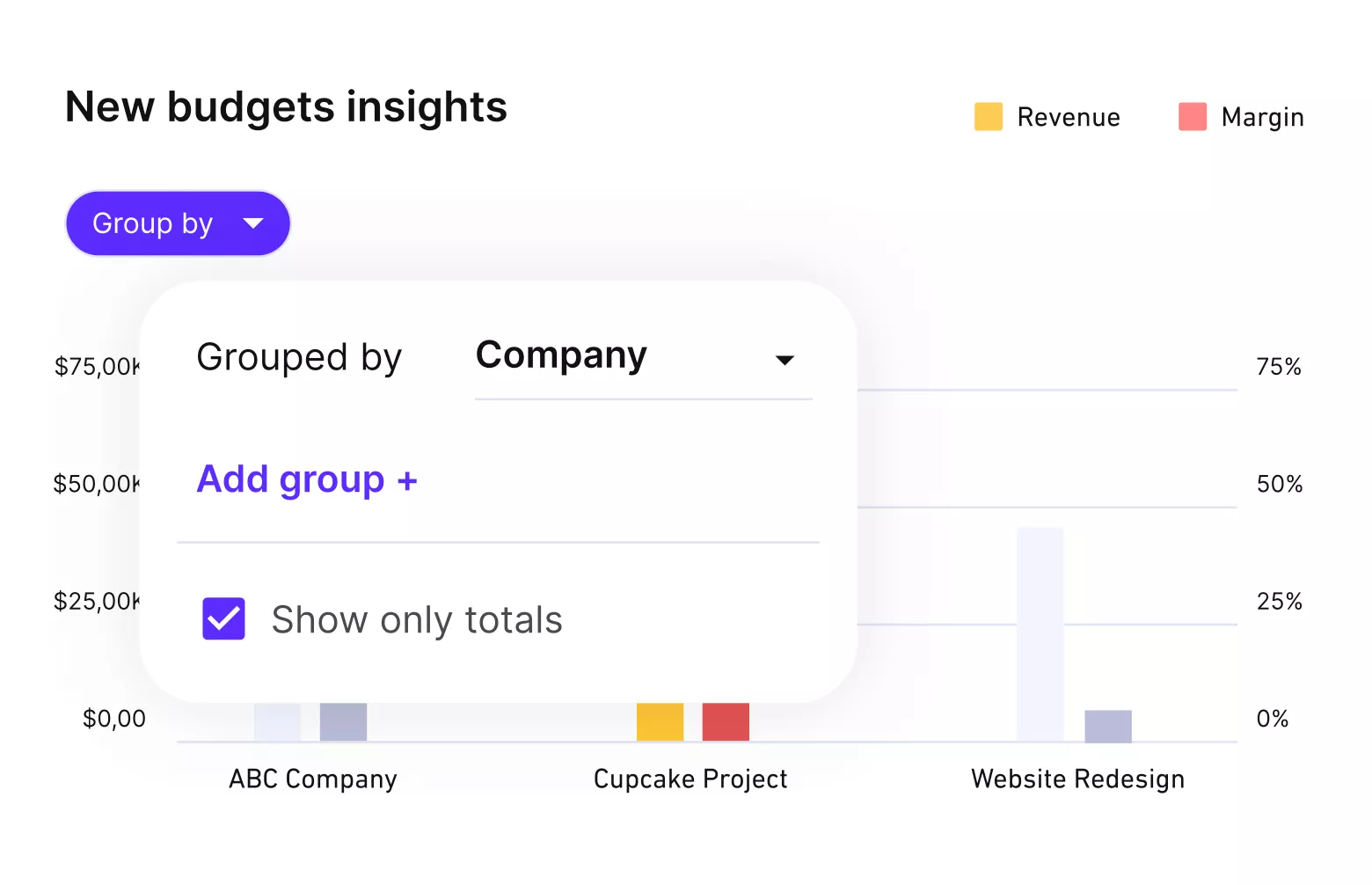
Productive provides real-time financial visibility for every project budget.
Teams gain instant insights into budget burn, project profitability, and overall financial health, ensuring work stays on track.
Beyond financials, Productive covers all core operational needs:
- Project management
- Resource planning
- Time tracking
- AI-powered Docs
- AI reporting
- Sales CRM
- Integrations with tools like Xero, QuickBooks,
- HubSpot, Gmail, Outlook, Slack, and more
Asana – A Good Tool for Team Collaboration
Asana is a project management platform designed to help teams organize work, collaborate more easily, and keep tasks moving forward. It is widely used to improve visibility into who is doing what and to keep stakeholders aligned as work progresses.
At its core, Asana supports collaboration and execution. Teams use it to prioritize work, break projects into tasks, share files, and comment in real time, which makes it easier to track progress and communicate changes without relying on email or meetings.
Key features include:
- Work prioritization with task management
- File sharing and real-time commenting
- Automation features to streamline repetitive tasks
- Integrations with other popular collaboration tools
Asana works well for teams that struggle to organize tasks and keep everyone aligned on day-to-day execution.
CloudTalk – A Good Call Management Platform for Customer Communication
CloudTalk is a cloud-based calling platform built for sales and customer support teams that rely heavily on phone communication. It helps teams handle inbound and outbound calls more efficiently while maintaining a clear record of customer interactions.
CloudTalk is best suited for managing high call volumes and improving communication quality. Features like smart call routing, call analytics, and automated dialing support teams that need structured, reliable call handling, especially across multiple market places or regions.
Key features include:
- Work prioritization with task management
- File sharing and real-time commenting
- Automation features to streamline repetitive tasks
- Integrations with other popular collaboration tools
If you want to compare more platforms, explore our full list of operations management software to find the option that best fits your team.
Final Thoughts
When workflows are clear, capacity is planned realistically, and performance is visible, teams spend less time reacting and more time doing meaningful work.
As service businesses grow, software becomes essential for managing operations, reducing manual effort, and making decisions based on real data rather than assumptions.
For professional services teams that want to manage operations end-to-end, Productive stands out as the most complete option. It brings project management, resourcing planning, and financial visibility into one platform, so you don’t have to piece together multiple tools.
If you want to see how this works in practice, you can book a demo with Productive and explore how it supports your operations day to day.
Run operations in one connected system
Productive helps you translate plans into executable work, assign people based on real capacity, and track financial performance as projects evolve. Everything stays connected, so changes don’t create blind spots.
