Operational Planning Step by Step Guide + Tools

Operational planning sets your team’s daily priorities and allocates resources. It guides decisions about taking on new projects, meeting client deadlines, and safely committing budget or team capacity to new work.
This guide walks through what operational planning is, how it connects to your strategic and tactical plans, and why it’s important. We’ll also share a practical step by step process to build your own operational plans, and showcase the tools that will help you plan bulletproof operations.
Key Takeaways
- Use planning to connect plans and delivery: link strategic goals and tactical plans to the real projects, tasks, and schedules your team works on each week.
- Tie plans to resource capacity: build your operational plan on actual team capacity and utilization, not wishful thinking about how many hours people have.
- Use forecasting to make informed decisions: link your operational plan to forecasting so you can see the impact on revenue, workload, and budget before you commit.
- Use software to run operational plans: manage projects, time, budgets, and forecasting in one system instead of scattered spreadsheets, so plans and mission execution stay in sync.
What Is Operational Planning?
Operational planning is the process of deciding how your team will carry out day-to-day work to meet the objectives set in your higher-level plans. In professional services, an operational plan turns targets from your tactical plan into concrete schedules, assignments, and activities for the coming weeks and months.
In practice, an operational plan answers questions like:
- Which projects are we working on this month?
- Who is staffed where?
- How many hours can each person realistically spend on each project?
- When do we need to hit the deadline?
- How much of the operational budget will we allocate to keep the work profitable and on time?
Good planning is part of everyday operations management, and it is updated as projects change, new work arrives, and people’s availability shifts. To see where this fits with your other planning layers, it helps to compare operational plans to strategic and tactical plans.
Strategic vs Tactical vs Operational Planning
There are several planning layers at play in a professional services business, and it is easy to mix them up in day-to-day conversations. To keep things clear, it helps to look at each type of plan separately, then see how they connect in practice.
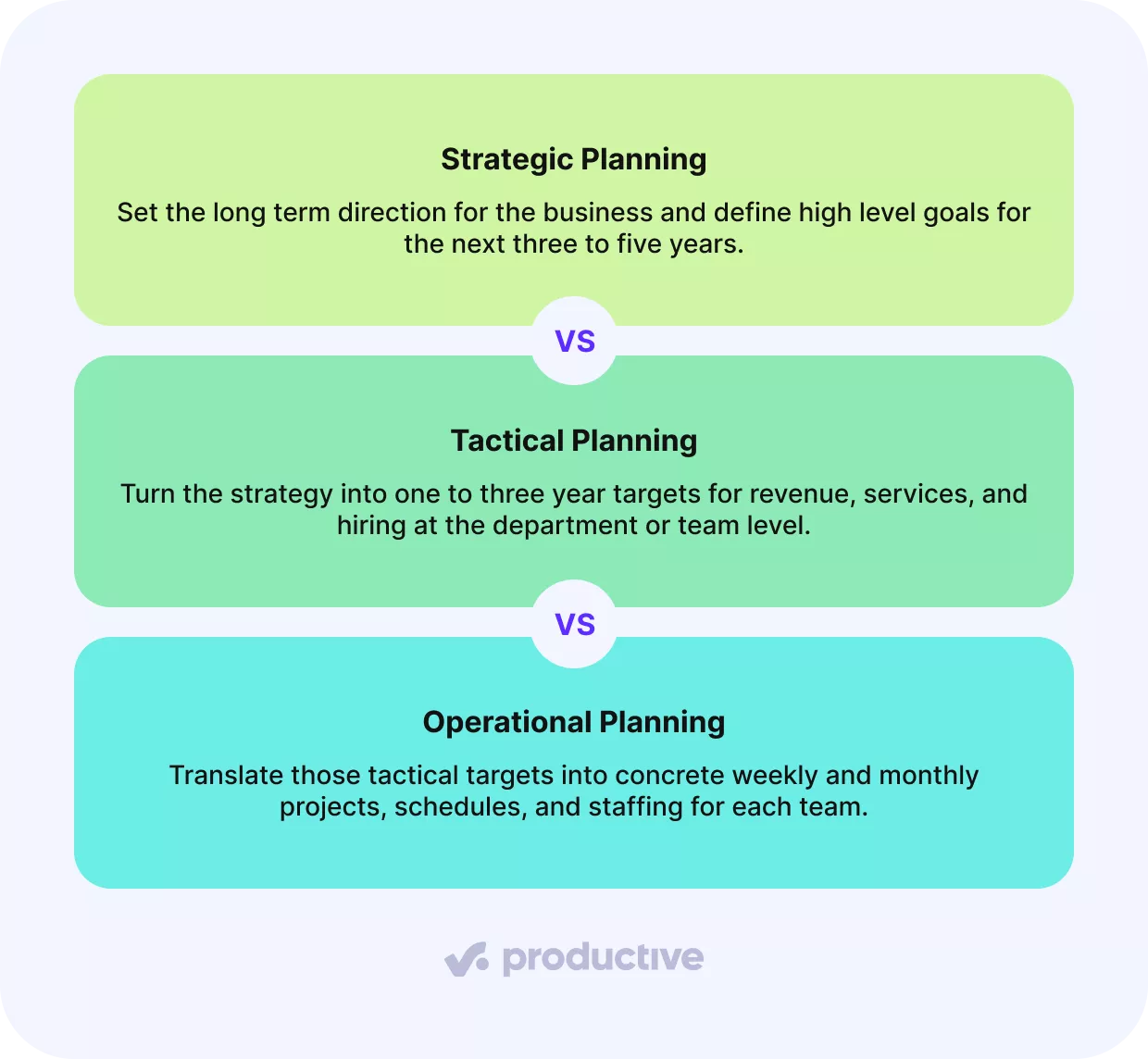
Strategic Planning
Strategic planning sets the long term direction for the organization, usually over a three to five year period. It is typically led by founders, partners, or the executive team, often with input from senior leaders in finance and operations.
For a digital agency, a strategic plan might set a five year goal to reach €10 million in annual revenue, keep profit margins above 10%, and have 50% of revenue coming from long term retainers with B2B tech clients.
Tactical Planning
Tactical planning breaks the strategy into mid term priorities and targets over roughly one to three years. These plans are usually owned by department heads and then agreed with the executive team.
For the same agency, a tactical plan for the next 18 months might set targets like growing retainer revenue from €4 million to €5.5 million, winning at least 10 new SaaS retainers worth a combined €30,000 per month, and hiring two senior account managers plus three performance marketers to support that growth.
Operational Planning
Operational planning then turns those mid term tactical targets into specific work for the next few weeks or months. These plans lay out the concrete projects, schedules, and resource assignments needed to hit the tactical objectives and are normally created by line managers and team leads in each team.
For that same digital agency, the plan for the next quarter might list which existing and new retainers are active and which designers and developers are assigned to each client.
Understanding how these layers work together is the first step. Next, it helps to look at why operational planning is so important for the health of a professional services business.
Why Is Operational Planning Important?
Operational planning is important because it supports team alignment, balances resource capacity, and enables risk-aware decision-making.
Here is how each of these helps in practice:
- Team alignment: A clear plan tells people which work comes first, who owns what, and how different projects fit together. Sales, marketing, and leadership can all look at the same picture instead of working from separate assumptions. As AP News reported in a summary of Gallup’s workplace survey, only 56% of U.S. workers strongly agreed they knew what was expected of them at work, which shows how fragile basic alignment can be.
- Balanced resource capacity: When you have a clear view of team resource capacity, you can compare it with the work you have scheduled ahead and rebalance workloads before anyone is overloaded.
- Risk-aware decision-making: Looking ahead at planned work, budgets, and capacity helps you forecast where things might go off track. That makes risks visible earlier, for example, bottlenecks in specific teams or unrealistic deadlines. Instead of reacting when something breaks, you can adjust scope, timing, or staffing and make more confident choices about which projects to accept, delay, or decline.
Productive forecasting shows your future financial performance based on your current resource scheduling.
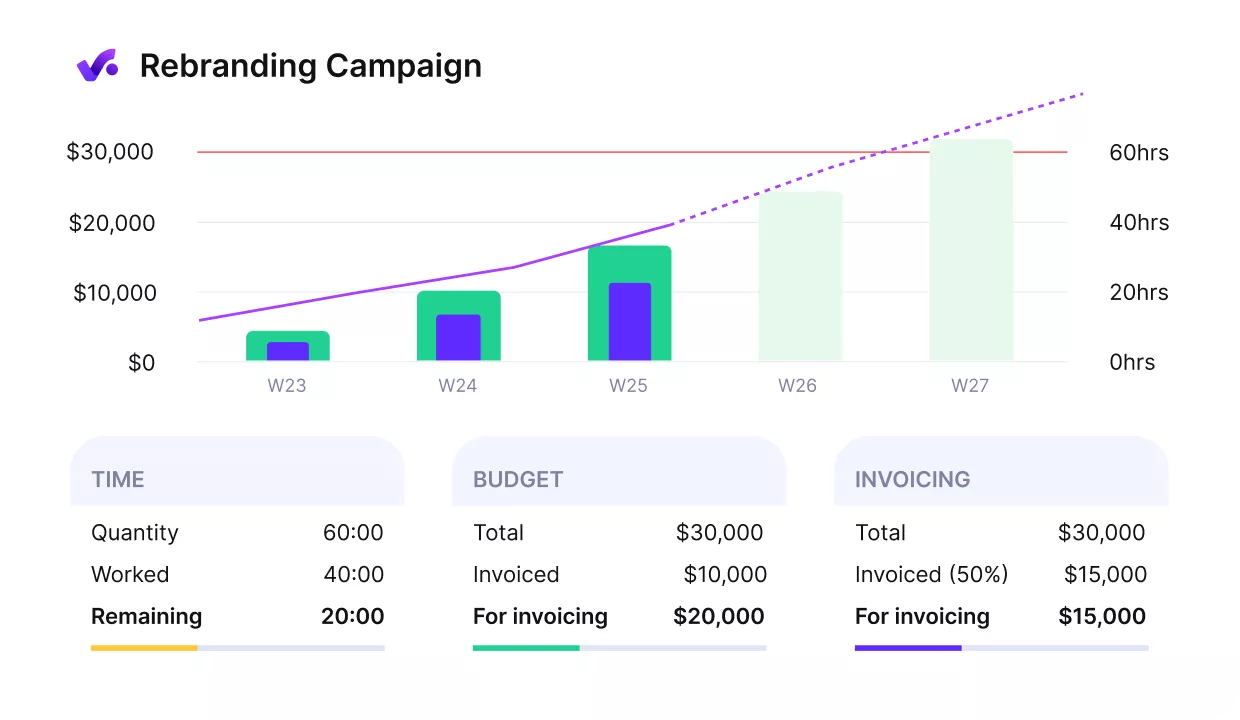
USE PRODUCTIVE TO FORECAST FUTURE WORKLOAD, AND PROFITABILITY.
You can use those forecasts to see when budgets or profit margins are at risk and adjust resource allocations before those issues hit your actuals.
Forecast workload in Productive
Once you are clear on why planning matters, the next step is to build an operational plan you can use. In the next section, you will walk through a simple five-step process.
What Are the Steps To Create an Operational Plan?
The steps to create an operational plan are to start with your strategy and tactical plan, sharpen the scope and priorities, identify key stakeholders and owners, build the operational plan itself, and finally measure and report on your KPIs.
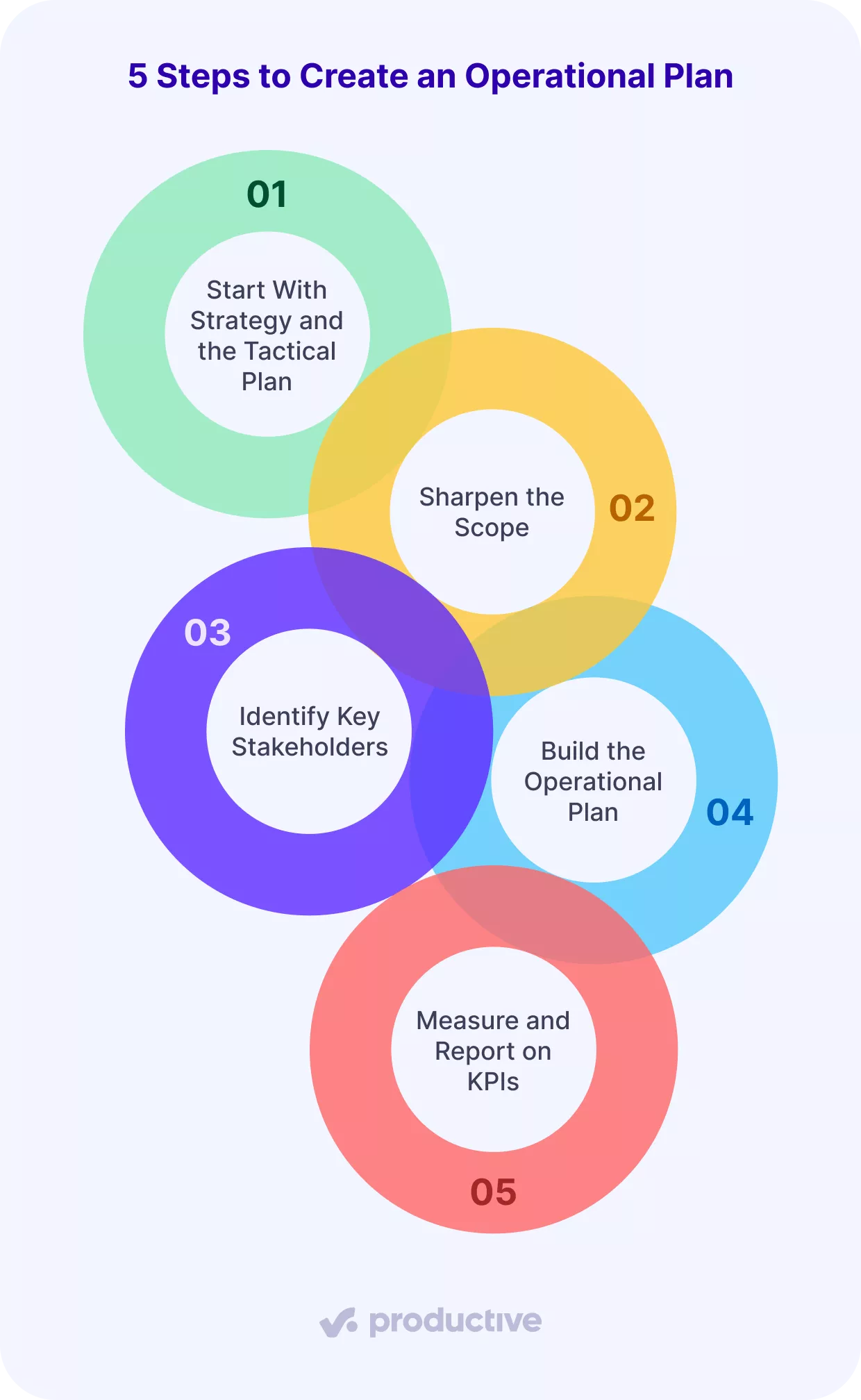
In the rest of this section, we will walk through each step so you can adapt this operational planning process to your own team.
Step 1: Start With the Strategy and the Tactical Plan
Planning should always start from the bigger plans you already have, not from a fresh list of ideas. As explained earlier, look at your existing strategic planning work and your tactical plan, then decide which parts of those you want to focus on in this planning period.
Pull out the essentials from your strategic plan, such as which markets you care about most, which services you want to grow, and which types of work are lower priority for now. Then check your tactical plan for mid-term targets, such as revenue from specific services, margin expectations, or how you want your mix of retainers and projects to shift.
End this step by writing a short list of simple priorities that flow from those plans.
Step 2: Sharpen the Scope
Sharpening the scope means deciding exactly which part of the business this plan covers. Instead of trying to plan everything at once, pick a clear slice, such as a delivery team, a department, or an office. For a digital agency, that means focusing this plan on the web development team that delivers B2B client projects.
You can run the same planning process for other teams later, but each plan should start with a well-defined scope so you always know whose work, capacity, and results you are actually planning.
Step 3: Identify Key Stakeholders
Now that you know what part of the business you are planning for, you can decide who is actually involved.
Start by listing three simple groups:
- Core team members who will deliver the work, for example, designers, developers, consultants, or account managers.
- People accountable for results, such as a department or project lead.
- Key partners or client contacts who need to stay informed because the plan directly affects them.
By the end of this step, you should be able to point to every part of the plan and say clearly, “This person owns this piece of work”.
Step 4: Build the Operational Plan
In this step, you turn your priorities, scope, and stakeholders into a concrete plan. You define SMART goals for the period, list the work you need to do, match it with people’s capacity, and shape a simple timeline and budget.
SMART here means setting goals that are specific, measurable, achievable, relevant, and time-bound, so your team members knows exactly what success looks like.
For example, an agency might set a goal like:
By the end of Q3, increase monthly retainer revenue from existing clients by 10%.
Once you know what success looks like, plan the work in more detail:
- List key activities and deliverables: For each client and internal initiative in scope, write down the concrete activities you need to complete and the outcomes you must deliver in this period.
- Plan resources: For each activity, note the roles, skills, and estimated hours required. This gives you a first pass at total demand for each role before you assign specific people.
- Allocate people based on capacity: Using that view of demand, decide who will work on which activities, and for how many hours.
- Outline a realistic timeline: Place the work on a calendar so you can see when each activity starts and ends, where milestones land, and where work overlaps.
- Draft the operational budget: Roll the planned hours and rates into a simple budget to see expected costs.
Productive supports your planning and helps you plan capacity months by showing people, projects, and tentative bookings on a single schedule.
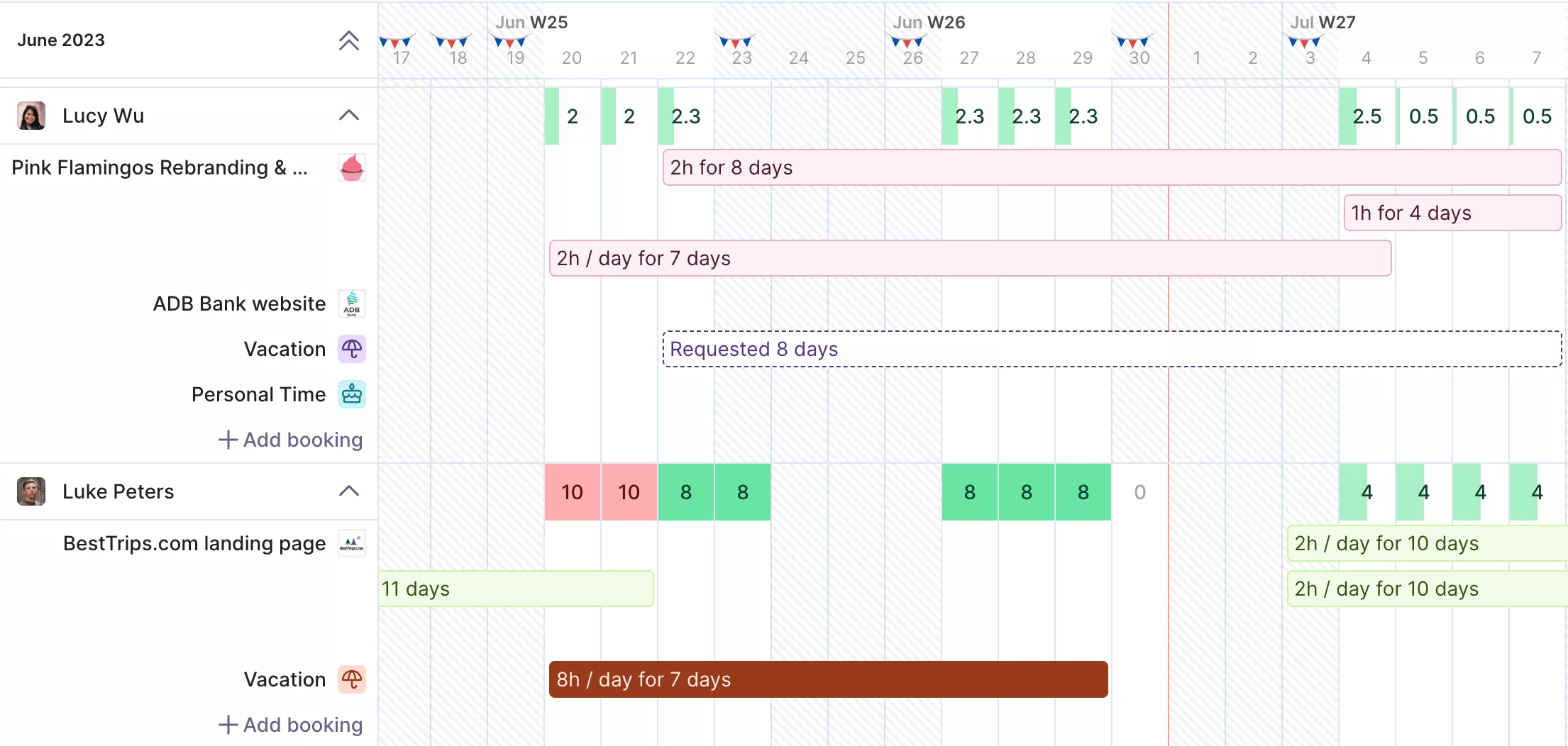
PLAN TEAM CAPACITY AND WORKLOAD WITH PRODUCTIVE.
Manage workloads to see who has room, who is already working overtime, and when new roles will be available.
Step 5: Measure and Report on KPIs
An plan works best when you measure its performance and improve it over time. This step is about choosing a small set of numbers you trust, then using them to guide day-to-day decisions.
Start by picking a short list of key performance indicators that show whether your plan is working in real projects. For most agencies and professional services teams, this usually includes:
- Billable utilization: How much of your team’s time is billed to clients versus total available hours.
- Forecasted billable utilization: How busy people will be in the coming weeks based on the work you have already scheduled.
- Revenue per client: How much revenue each client brings in during the period you are planning for.
- Project margin per client: The difference between revenue and delivery costs for each client or key project.
Keep this list short and focused. You do not need dozens of performance metrics to monitor progress, just a simple report that shows whether work, capacity, and margins are close to what you planned and helps you adjust when something drifts.
If you want more KPIs to track and their formulas, check out our list of professional services KPIs.
Which Tools Help You Run Planning?
The tools that help you run planning are all-in-one operations software and FP&A software. You can sketch an plan in spreadsheets and simple templates, but most growing professional services firms outgrow those manual processes quickly and eventually need dedicated tools instead.
Many teams struggle with resource allocation, capacity, and forecasting across disconnected tools and spreadsheets. Dedicated software centralizes this data, reduces manual work, and provides a clearer view of budgets, capacity, and profitability.
In the following parts of this section, we will look at each type in more detail and show a concrete example tool for both.
All-in-One Operations Software (Best Tool: Productive)
All-in-one operations software helps you run projects, time tracking, budgets, and resource planning in a single system. For planning, it gives teams one place to see what is planned, who is working on it, and how that affects capacity and budget.
Productive is an example of all-in-one operations software built for professional services firms. Planning in Productive sits inside the same workflows your teams already use to run projects, so plans and execution stay closely connected.
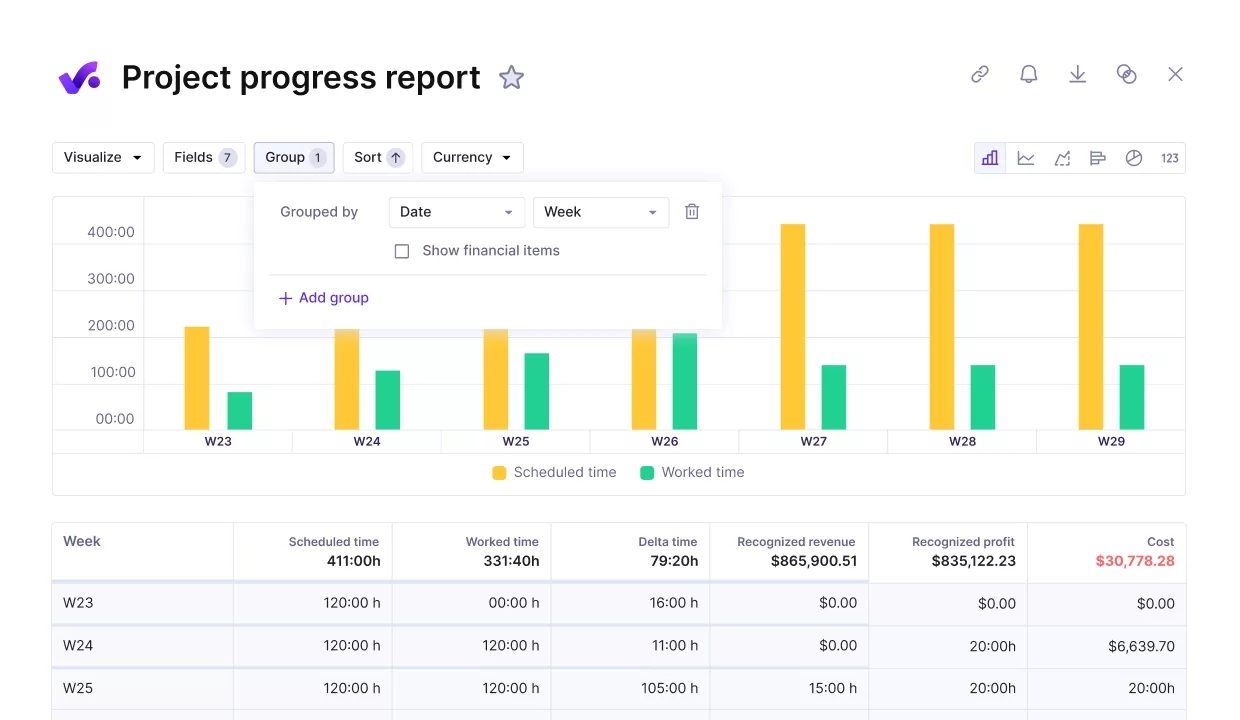
USE PRODUCTIVE TO MANAGE PROJECT PROGRESS IN ONE PLACE
When someone logs time, updates a task, or shifts a schedule, Productive automatically updates budget burn, forecasted margins, and capacity. Integrations with accounting and CRM systems keep key data in sync, so everyone shares the same, up-to-date picture of project status and profitability.

The main benefit we get from Productive is planning, clarity, and everyone working towards one system. It facilitates reporting hugely. It’s very easy to use. Also, I think one of the biggest things for me is the fact that it’s constantly improving.
We talk more about planning and project clarity on Saffron’s success story of using Productive.
In practice, a few core Productive features matter most for operational planning:
- Resource planner: a central timeline that shows who is working on what and when, including partial allocations and tentative bookings, so that you can staff projects and plan hiring based on real availability.
- Forecasting: forward-looking dashboards that bring together schedules, budgets, and time data to show expected revenue, utilization, and capacity in the coming weeks and months.
- Budgets: project and retainer budgets that update as hours and costs come in, giving you an up-to-date view of budget used, budget remaining, and profit at the project, client, and company levels.
- Time tracking: simple time entry options that make it easy for people to log their work accurately, so you can invoice correctly, refine future estimates, and understand the actual cost of delivery.
FP&A Software (Best Tool: Pigment)
Finance teams use FP&A (financial planning and analysis) software to build budgets, forecasts, and scenarios across the whole business. Instead of each team keeping its own version of the numbers, you bring financial and headcount data into one shared model so everyone is looking at the same plan.
Pigment is a modern FP&A and business planning platform for companies that have outgrown spreadsheet-only models. It lets you build connected models so finance and operations see the same live plan as inputs and scenarios change.
Core Pigment capabilities that support planning include:
- Driver-based models: connect revenue, cost, and headcount drivers to see how changes in one area affect the rest of the plan.
- Scenario planning: compare different paths for revenue growth, hiring, and cost control.
- Real-time dashboards: update automatically as you change inputs.
- Collaboration and workflow: let multiple teams work in the same model with clear ownership.
If you want to compare more options, you can check out our complete list of operational planning software.
Final Thoughts
Operational planning is the link between strategy on paper and the real work your people do each week. A good plan translates goals into clear projects, schedules, and budgets, stays close to real capacity, and gets refreshed as work, demand, and availability change.
Planning becomes less manual and more consistent when you run it in a tool that centralizes projects, time, budgets, and forecasts. To tighten the connection between planning and delivery, book a demo with Productive and see how it could work for your team.
FAQ
1. What Is Meant by Operational Planning?
Operational planning is the process of turning your strategy and tactical plans into concrete, short-term work. It sets out which projects and tasks will take place in the coming weeks or months, who will do them, when they will occur, and how they fit within budget and capacity.
2. How To Write a Good Operational Plan?
Start from your strategy and tactical goals, then define a clear scope (team, time period, and priorities). List the key activities, assign people based on real capacity, set simple timelines and budgets, and decide which KPIs you will track to see if the plan is working.
3. What Is an Example of an Operational Plan?
A simple example is a digital agency planning the next quarter for its web development team. The operational plan lists the client projects in scope, the developers assigned to each one, weekly hours per person, key milestones and deadlines, and the budget allocated to each project.
4. Who Performs Operational Planning?
Operational planning is usually owned by line managers and team leads who are close to day-to-day delivery. They often work with operations, finance, and account leads for input, while leadership sets the overall strategy and approves significant changes.
Run operational planning in one platform
Productive helps you translate goals into concrete projects, assign people based on real capacity, and update forecasts as plans change, keeping your team and your numbers in sync.
