Design Project Management – Practical Guide for Professional Services

Design project management becomes problematic when the scope keeps shifting, feedback loops never end, and budget overruns catch you by surprise. It’s messy, but hey, the good news is that you can prevent it.
Here, we’ll teach you how. This detailed guide covers what design project management is, why it matters, the phases you can follow, and the frameworks that help teams stay organized. You’ll also get practical tips for keeping scope and approvals under control, plus what to look for in software so your project data stays in sync.
Key Takeaways
- Design project management keeps delivery moving from brief to sign-off: use clear phases (brief, plan, track, approve, handoff) so work doesn’t stall in “waiting for feedback.”
- Scope stays controlled with two rules: define “done” and use change requests when work changes, so revisions don’t quietly rewrite the plan.
- Scrum, Kanban, and Lean fit different delivery styles: use Scrum for sprint-based work, Kanban for ongoing request queues, and Lean to reduce rework and messy handoffs.
- Good software supports resource management, approvals, and reporting in one place: when tasks, time, budgets, and resourcing stay connected, your data stays consistent during delivery.
What Is Design Project Management?
Design project management is the process of planning, running, and completing a design project—from the initial request through to final approval.
As a form of creative project management, this work is inherently more subjective; feedback can shift direction midway, so project managers often spend as much time navigating decisions as managing deadlines.
For example, consider a homepage redesign. The project manager collects the brief and assets, defines what’s in scope (like pages, breakpoints, and components), assigns tasks and owners, sets the timeline, and guides the team through multiple review rounds until there’s a clear sign-off.
This process shows why design project management can’t rely on perfectly linear project planning. Because expectations and feedback evolve throughout, it’s crucial to keep the work moving forward and adapt as changes arise.
Now that we’ve defined what it is, let’s talk about why it matters so much in professional services.
Why Is Project Design Important for Professional Services?
Project design is important in professional services because it protects margin, keeps capacity realistic, controls scope, and improves client communication.
We’ll look at each one more closely below.
- Protects margin. You protect margin by catching drift early, while you can still act. When you plan the work, track progress, and check in on hours as you go, you can spot an overrun before it becomes free work.
- Keeps capacity realistic. Design work slips when one person gets booked across too many projects at once. Design management forces a decision: what is the priority this week, who owns it, and what moves if something urgent shows up. This is how project managers avoid quiet overload and missed deadlines.
- Controls scope. Project scope stays under control when “what’s included” is documented and approvals have a finish line. A clear list of deliverables, a definition of what counts as done, and a rule for change requests keep new asks from sneaking in as “just one more tweak.”
- Improves client communication. Clients relax when they know what happens next and when they need to weigh in. A simple status rhythm, clear review windows, and one place to leave feedback (a client portal works well for this) reduce back-and-forth and prevent last-minute surprises.
Next, let’s map the phases that can deliver those benefits.
What Are the Phases of Design Project Management?
The phases of design project management are: taking and briefing, scoping and planning, Dproduction and tracking, review cycles and approvals, and delivery, handoff, and wrap-up.
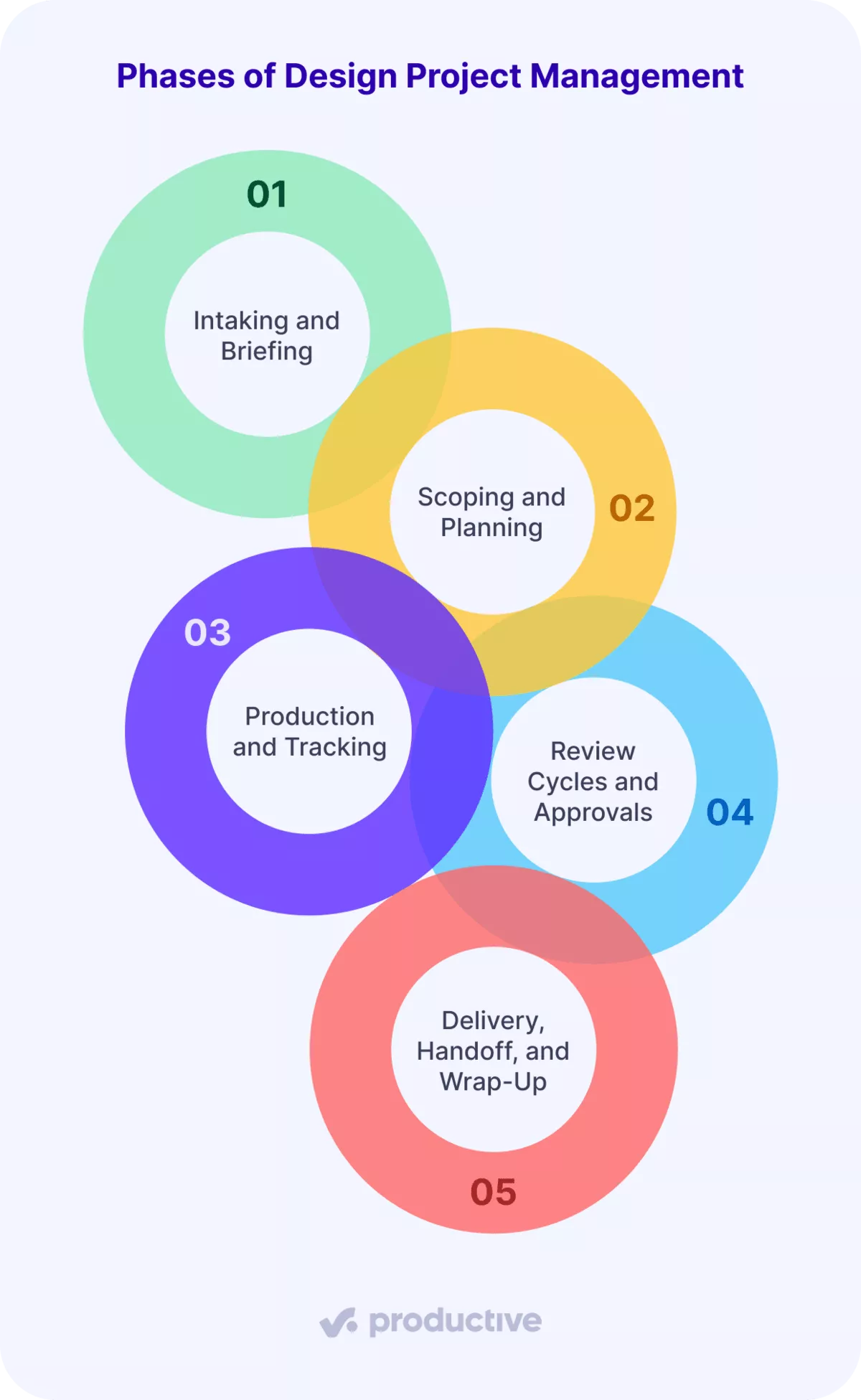
We’ll cover each phase in more detail next.
Phase 1: Intaking and Briefing
Intake prevents rework by turning a loose request into a clear brief and setting the project scope before anyone starts designing.
Use this simple intake checklist:
- Goal: What should this project achieve?
- Audience and context: Who is it for, and where will it be used?
- Project deliverables: What exactly are we producing (and in which formats)?
- References: Examples they like, examples they hate, and any brand rules.
- Deadline driver: Why this date, and what breaks if it slips?
- Single approver: Who gives the final yes, and who is only giving input?
- Constraints: Budget, platforms, accessibility, legal, or technical limits.
Once the brief is clear, you can scope without guessing.
Phase 2: Scoping and Planning
Scoping turns a brief into clear deliverables, milestones, and ownership, so the team knows what to do next and the client knows what to expect.
Here’s a straightforward way to scope and plan the work:
- List the deliverables, then break the work down into tasks. Create a lightweight work breakdown structure. Keep it practical: draft, review, revise, approve, deliver.
- Call out task dependencies early. Note what must happen first, like “copy first, design second,” or “wireframes before UI.” If you want a quick visual, a Gantt chart does the job nicely.
- Build a project timeline with a few real milestones. Then turn it into a project schedule with dates that match how approvals actually work.
- Check resource allocation before you commit. Confirm who owns each milestone, so no one person ends up on three “top priorities” at once.
If the project has lots of moving parts, a visual project plan can help. Some teams use Gantt charts for this. For complex dependency work, you might also see the Critical Path Method used to spot what can’t slip.
If you prefer estimates and probabilities, a PERT chart (Program Evaluation and Review Technique) can help. A quick SWOT analysis can also be useful when the scope depends on internal constraints, like missing assets or a tight review team.
Phase 3: Production and Tracking
Tracking during production is essential because it helps you catch problems early, before a small delay or budget overrun snowballs into something bigger.
Throughout this phase, project managers should focus on three things: what’s done, what’s blocked, and how much effort the work is actually taking.
Here is the scenario that hurts. You feel 60% done, but the budget is already 80% spent. Without clear visibility, you might keep moving forward and hope things balance out. With project profitability tracking, however, you can identify risks early and make adjustments before an overrun turns into free work.
This is where a project management tool like Productive is useful in a very direct way. As the team logs time, Productive’s Budgeting shows real-time budget burn, and it can break it down by department if needed. That means you get the warning at 80%, not 120%, when you can still talk scope with the client.
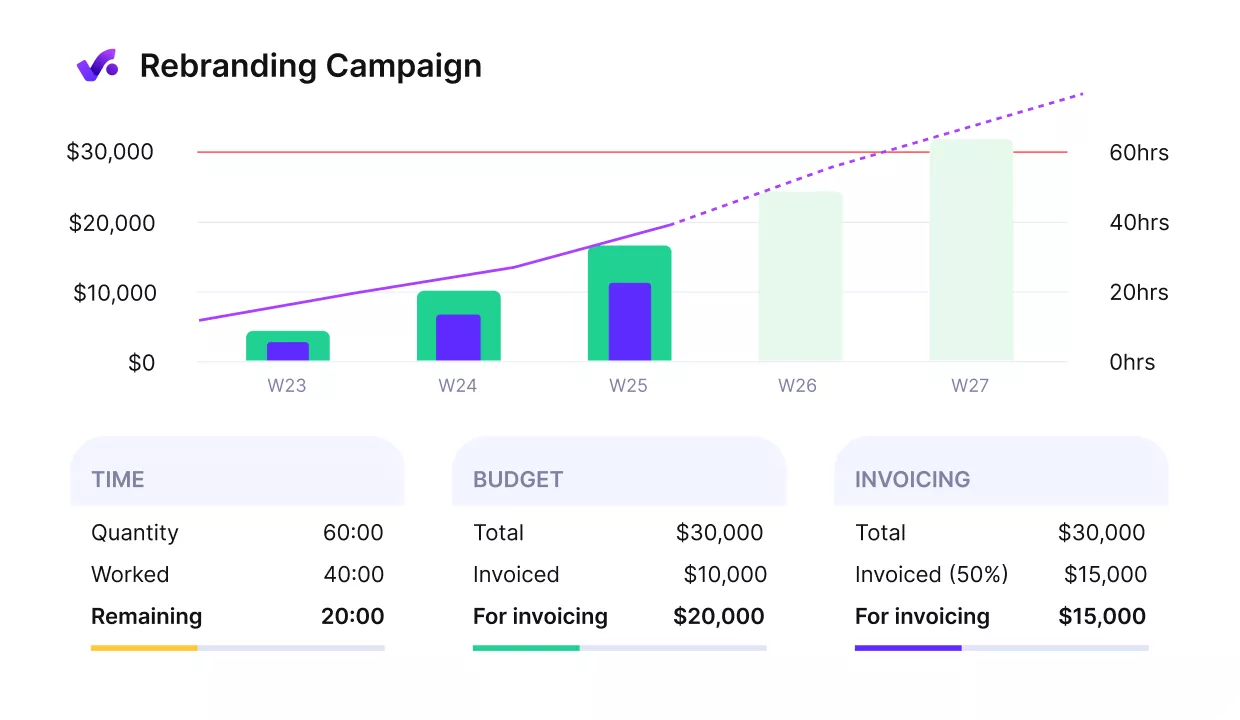
Track budget burn of your projects with Productive.
If you need strict control, budget overrun limitations can block further time tracking once a service limit is reached.
Track profitability in Productive
Phase 4: Review Cycles and Approvals
Approvals need simple rules, or feedback loops will stretch a two-day review into a two-week delay.
Start by making decisions easy:
- One place for feedback: Pick one channel and stick to it. Use a shared platform where comments and versions don’t get scattered.
- One feedback owner: One person collects input, removes duplicates, and sends a single set of changes to the team.
- One approver: Decide who gives the final yes. Everyone else provides input, not extra sign-offs.
- Clear review windows: Set a deadline for each round, and say what happens if feedback comes in late.
- Define a revision round: a single round of consolidated feedback. New ideas after sign-off become a new request.
Phase 5: Delivery, Handoff, and Wrap-Up
Delivery is more than sending a link and saying, “Here you go.” Aim to hand over everything the next person needs to use the work without guessing:
- Final files in the right formats
- Source files (where relevant)
- Naming conventions and version notes
- Export specs (sizes, color profiles, compression)
- Short-handoff notes for whoever implements the work
Then do a quick wrap-up while the project is still fresh. Treat it as light risk management for your next job, not a long meeting.
A simple risk register can be as basic as these bullets:
- What took longer than expected
- Where approvals slowed things down
- What you’ll change in the brief, scope, or review rules next time
Now that the process is clear, let’s talk about which frameworks fit best for design work.
Which Project Management Frameworks Are Best for Design Projects?
The project management frameworks that are best for design projects are Scrum, Kanban, and Lean.
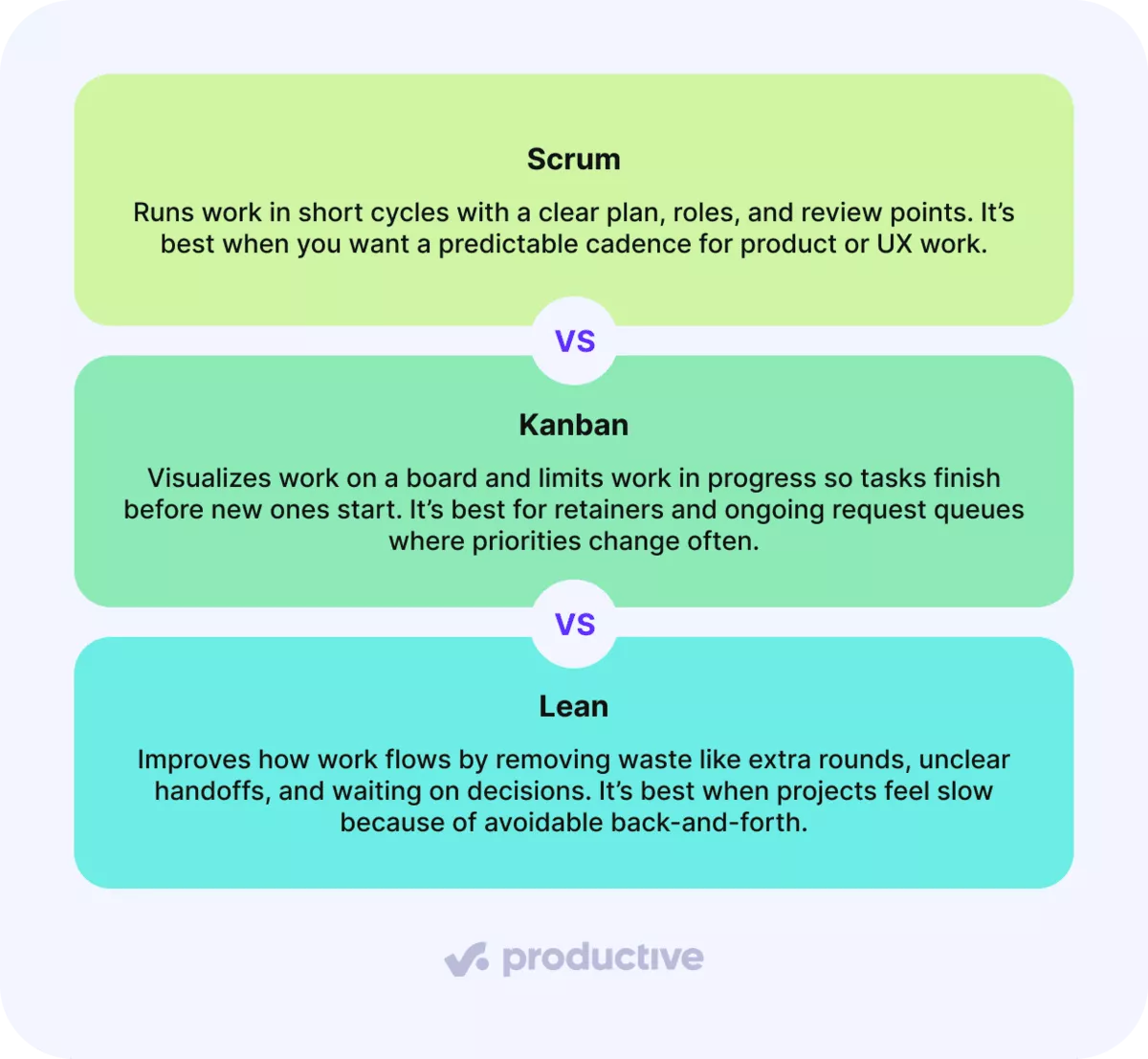
We’ll cover each framework briefly below.
Scrum
Scrum is a common Agile methodology that helps teams stay aligned by establishing a shared cadence for project work. It’s particularly effective for projects that benefit from short, repeatable cycles, like product or UX work, where steady progress is key.
Each sprint (typically 1 to 2 weeks) begins with the team selecting a focused set of priorities from the backlog. Throughout the sprint, the team designs, reviews, and iterates, then demos completed work and decides what to adjust for the next cycle.
Scrum also comes with clear roles, which help a lot in design work:
- Product Owner: sets priorities and makes trade-offs (what matters most right now)
- Scrum Master: keeps the process moving and removes blockers (so the team can focus)
- Team: delivers the work and flags risks early
Even in Scrum, a lightweight Gantt chart can help stakeholders understand the bigger timeline while the team works in sprints.
Something to watch out for: Scrum can feel heavy for tiny teams or fast-turn queues. If meetings start taking more time than the work itself, you’ve gone too far.
Kanban
Kanban is a simple workflow framework: you visualize work, limit work in progress, and pull tasks through to “done” instead of starting everything at once. Most teams run it on Kanban boards with a few clear stages (to do, in progress, review, done).
Kanban works best when design work comes in as a steady stream, such as retainers, ongoing marketing requests, or a shared “design queue.”
If your week keeps getting rearranged, you’re not imagining it. Microsoft’s 2025 Work Trend Index reports that 60% of meetings are ad hoc, which is a good sign that project plans often change on short notice.
That’s why Kanban works well for design teams. When something urgent shows up, you reorder the queue on your Kanban boards, keep the “in progress” limit intact, and finish the current work before you start new work.
Lean
Lean is an agile project management framework for improving how work flows, so you spend less time waiting, redoing, and hand-holding.
In lean project management, you look for “waste,” steps that don’t move the work forward. In design teams, that usually means unclear briefs, too many review rounds, messy handoffs, and waiting on decisions.
The fix is simple: remove friction instead of adding more process. Tighten the brief, define what “done” means, keep feedback in one place, and trim steps that create back-and-forth.
Next, let’s look at practical tips you can apply to your next project.
What Are Practical Tips for Running Design Projects Well?
The practical tips for running design projects well are to avoid a fragmented tool stack, define “done,” and use change requests.
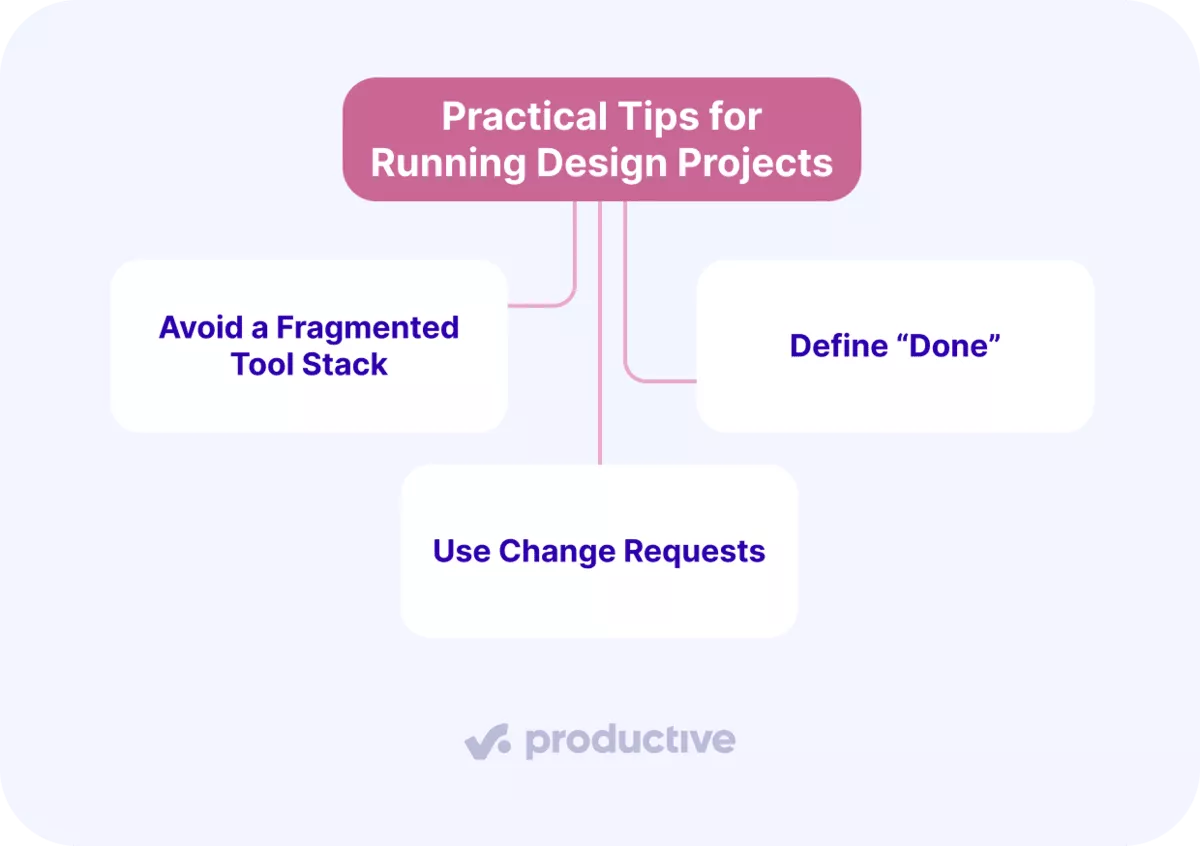
We’ll cover each one in more detail below.
Avoid a Fragmented Tool Stack
This setup is all too common in design teams: using one tool for task management, another for time tracking, a spreadsheet for budgets, and a separate accounting platform for invoicing.
This approach often leads to different numbers for the same project scattered across multiple places, so someone has to sort out the differences.
The real challenge is that when tracking becomes an extra step, it’s easily overlooked. Team members finish their work but forget to log hours or update the budget, resulting in missing data.
Instead of stitching together project management tools, Productive keeps projects, tasks, time, budgets, resourcing, and invoicing in one place.
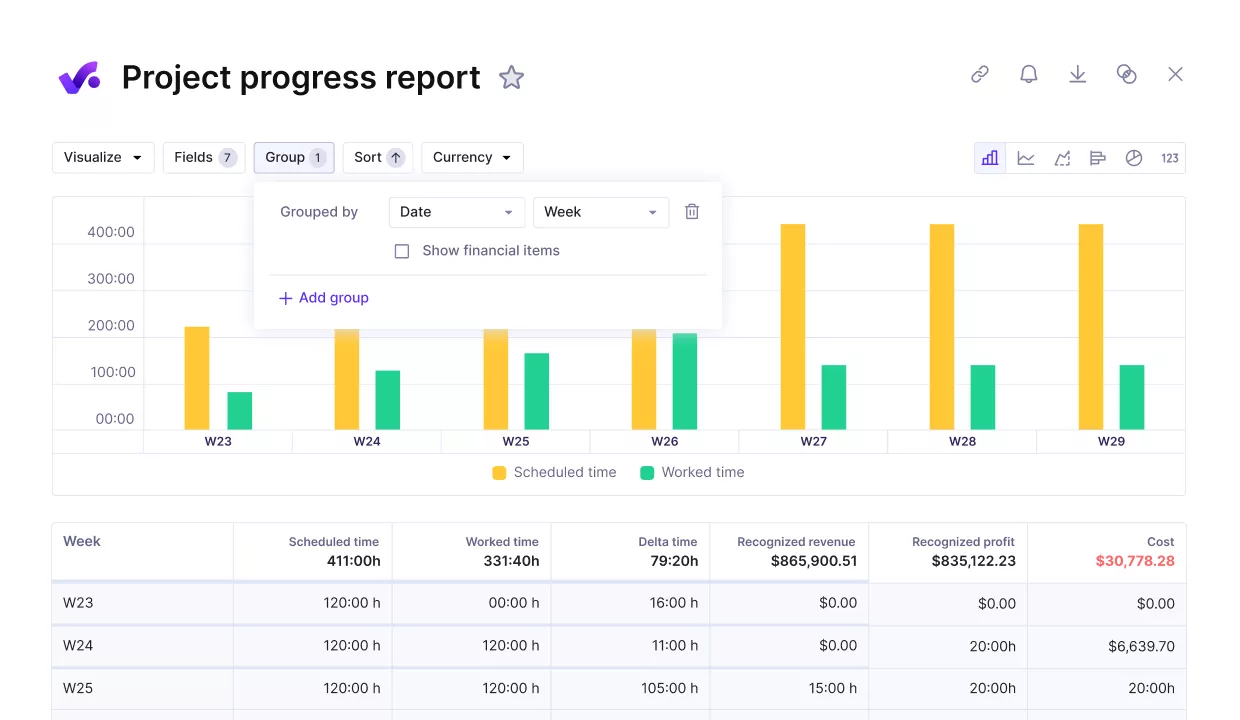
Track your projects end-to-end with Productive.
The result is simple: your data stays complete, and you can make pricing and staffing decisions based on what actually happened, not what people remember.

People no longer have to switch between multiple tools, and we don’t encounter issues where an update in one tool causes a problem in another. Everything is in one place now, which has made a huge difference. I can confidently say that the work required for financial reporting has been significantly reduced.

Read the whole customer story to see how wild keeps everything in one place with Productive.
Define “Done”
“Done” criteria prevents review ping-pong because everyone checks the same requirements before requesting changes.
In design, “Looks good” is not a finish line. If you don’t define what ready means, every reviewer brings their own definition, and you end up in endless rounds.
“Done” can mean different things depending on the type of design work and industry. Here are examples of what it can look like in practice:
- Logo package (graphic design): ready when the final logo files (SVG/PDF/PNG) are exported, color and monochrome versions are included, and the file naming matches the agreed convention.
- Landing page (user experience design): ready when desktop and mobile layouts are complete, key components are defined, and the handoff notes are clear enough for the UX/UI designer or developer to build from.
- UI flow (product design): ready when all key states are designed (empty, error, loading), and the interactions are explained with short notes or links.
- Mood board or floor plan (interior design or architectural design): ready when specs and references are attached, and there’s a one-line note that states what is approved. This is especially helpful for residential firms where client feedback can shift quickly.
Use Change Requests
A change request is a quick, written agreement to change the plan. It explains what’s new, how it affects the timeline and the budget, before the team keeps going.
Change requests protect scope and relationships by separating feedback from extra work.
Use a change request when:
- The direction changes after approval: “Let’s go with a different concept.”
- A new deliverable gets added: “Can we also get a banner set?”
- You’ve used up all the agreed rounds of revisions: Anything after round three isn’t included.
When that happens, pause and confirm three things in a single short message: what changed, how it affects the timeline, and how it affects the budget. That stops scope creep from sneaking in as “just one more thing.”
What Should You Look for in Design Project Management Software?
Look for design project management software that covers resource management and forecasting, approvals and version control support, and reporting that improves pricing decisions.
We’ll look at each one in more detail below.
Resource Management and Forecasting
Design teams rarely have a clean staffing picture. You have full-time people, contractors, and freelancers spread across multiple projects, and priorities change fast.
Without resource management, the default plan becomes Slack messages like “Are you free next week?” and a weekly standup that turns into a last-minute staffing meeting.
Good resource planning fixes this by making allocations explicit. You decide how much time each person can spend on each project, then adjust when reality changes. This also helps you spot the real bottleneck: that one designer everyone needs at the same time.
Productive makes this practical with a Resource Planner that shows who’s booked across projects and for how long.
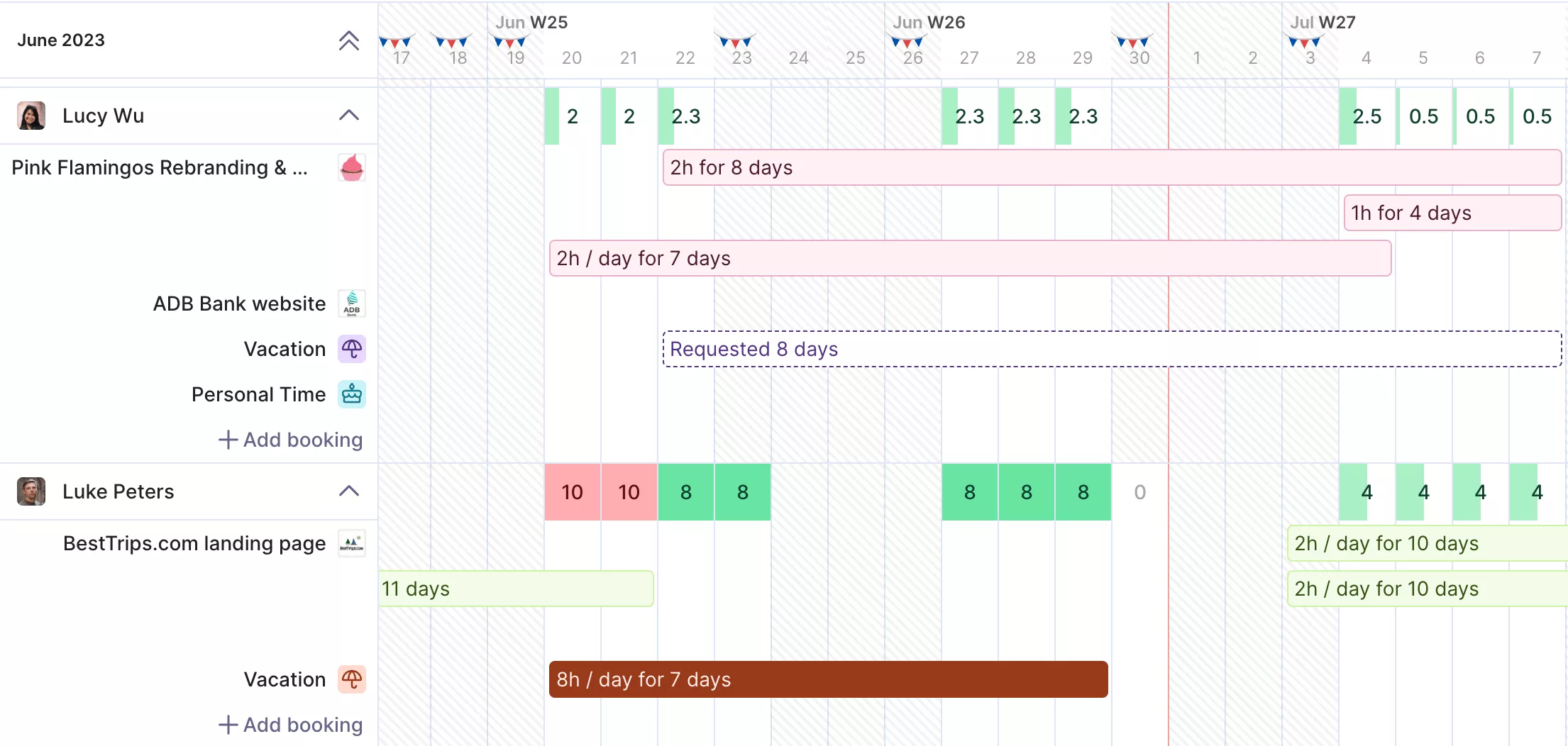
Plan your team’s resource capacity in Productive.
You can also set soft allocations for potential work and use placeholders to forecast capacity for new retainers or future hires.
Approvals and Version Control Support
Centralizing feedback and version control keeps projects running smoothly. When everyone knows where to find files and comments, there’s no wasted time tracking down versions or figuring out which feedback to follow.
To speed up approvals, make it simple for clients to review one thing at a time. Use a single, well-labeled space for files and feedback, and always share the right link. A shared review space provides clients with a single, clear place for their comments.
Keeping feedback in one place also prevents messy loops. When comments are scattered across email, Slack, and PDFs, people repeat themselves or give conflicting opinions.
With everything centralized, it’s easy for one person to collect all the feedback and send the team a clear, organized to-do list.
Reporting That Improves Pricing Decisions
Reporting helps you make better decisions by linking what actually happened on a project to your original plan and pricing.
The right software makes this much simpler by keeping everything connected in one place. That way, you don’t waste time exporting spreadsheets just to get a clear answer.
Here’s what good reporting helps you see:
- Planned vs actual: compare the scoped hours or budget to what was actually logged, while the details are still fresh.
- Where the effort went: break down the time by phase, like briefing, production, and revisions, so you can fix the real bottleneck.
- Profitability signals: project profitability tracking shows which work types tend to run over, so you can adjust pricing or tighten scope next time.
Margin tracking software pulls this together by automatically tying time to budgets, rather than requiring someone to reconcile numbers across tools.
If you are comparing tool options and need some help, check out our list of project management software for designers.
Final Thoughts
In professional services, consistent project completion depends on having all your data in one place. When information is centralized, you can respond and make decisions while the project is still underway.
If you want one system that supports your projects end-to-end, Productive is a strong option. It brings projects, time tracking, budgets, and resourcing together so you can see what’s happening now and adjust before small issues turn into expensive ones.
Want to see how it works for your team? Book a demo with Productive today.
FAQ
What Is the Role of a Design Project Manager?
The role of a design project manager is to keep projects moving by ensuring everyone is clear on scope, ownership, timelines, and approvals.
Design project managers turn feedback into clear next steps, keep everyone aligned on what’s included and what’s not, and ensure the work gets delivered rather than left “almost done.”
What Skills Are Needed for the Design Process?
The skills needed for the design process are clear briefing, strong prioritization, and organized feedback.
In creative teams, this means writing actionable briefs, choosing a single approver, and keeping reviews focused on the project’s goals. For user experience design, it’s also about turning feedback into clear, specific changes rather than vague suggestions.
Strong team management brings it all together: project managers set clear priorities, protect focused work time, and make trade-offs as new requests come in.
Keep your design work, budgets, and capacity in sync
Replace disconnected tools with one platform for projects, time, budgets, and resourcing, so your reporting and decisions are based on real data.
